Choosing the right time clock can save hours of payroll cleanup and help reduce buddy punching. The best systems balance accuracy, simple setup, and low ongoing costs.
Below, we focus on biometric employee time clocks that fit real small-business needs, from standalone devices to cloud-connected options.
Best 10 Biometric Employee Time Clocks Picks for 2026
4-in-1 Smart Attendance
NGTeco 4-in-1 Employee Time Clock
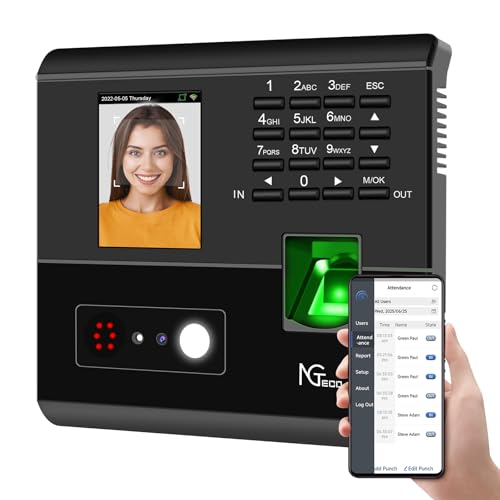
- Face, fingerprint, RFID, and PIN options
- Free app control with attendance exports
- No monthly fee with offline recording
Best For: Small teams needing flexible, low-cost attendance tracking
Standalone Fingerprint

- Fingerprint, RFID, and PIN punch options
- Standalone use with no software installation
- No monthly fees or paper punch cards
Best For: Teams wanting simple local time tracking without subscriptions
Cloud Biometric Access
ANVIZ FacePass 7 Pro Time Clock

- Forever free cloud software for small business
- Face, RFID, PIN, and door access support
- Large storage with offline punch capture
Best For: Small teams wanting cloud reports and access control
Offline App Control
App-Based Fingerprint Time Clock

- Pairs to a phone app in 5 seconds
- Works fully offline with local storage
- Auto-calculates overtime and deductions
Best For: Sites without reliable Wi-Fi that still want app control
Cloud-Ready Fingerprint Time Clock
uAttend NX2500 for Small Business

- Fingerprint, RFID, and PIN access
- Cloud syncing with reporting and backups
- Payroll export and lifetime replacements
Best For: Small businesses wanting a secure cloud-based time clock
Offline-Backup Payroll Time Clock
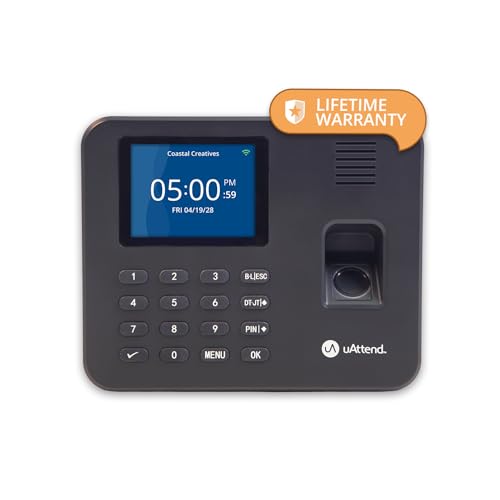
- Fingerprint and PIN clock-ins
- Offline storage plus cloud dashboard
- Mobile app and payroll-ready export
Best For: Businesses needing offline backup with cloud payroll tools
Standalone Privacy-Focused Choice
HapAttend H3 Fingerprint Time Clock for Small Business

- No WiFi, software, or monthly fees
- Automatic hours calculation with USB export
- Multi-language support and lifetime help
Best For: Small businesses that want local, offline attendance tracking
Flexible Authentication Pick
ANVIZ CX3 Fingerprint Time Clock

- Fingerprint, PIN, RFID, and key fob support
- No software, no internet, no monthly fee
- Stores up to 50,000 punches for 300 employees
Best For: Teams that need flexible punch options without subscriptions
Fast Setup Payroll Helper
Fingerprint Time Clock with PIN Code

- Under-1-second fingerprint clock-ins
- Offline use with zero monthly fees
- Auto-calculates hours, breaks, and overtime
Best For: Offices and warehouses needing quick, local attendance tracking
4-in-1 Smart Attendance – NGTeco 4-in-1 Employee Time Clock
For buyers comparing biometric employee time clocks, this NGTeco model is built to simplify attendance tracking without a monthly fee. It combines facial recognition, fingerprint, RFID, and PIN check-in, while also supporting app-based management, shift adjustments, and offline recording for uninterrupted punch tracking.
Best For: Small businesses that want a no-fee, multi-method time clock with flexible shift control.
Pros:
- 4-in-1 verification helps reduce buddy punching and attendance disputes.
- Free app control lets managers review attendance and export records.
- Supports flexible scheduling, night shifts, and offline recording.
- No monthly fee and paperless digital storage lower ongoing admin work.
Cons:
- App management requires the same local network.
- Best suited for indoor use and corded installation.
Overall, this is a practical fit if you want an affordable biometric employee time clock with multiple punch options and straightforward attendance tools.
Standalone Fingerprint – Acroprint BioTouch Time Clock
This Acroprint option is a straightforward choice in biometric employee time clocks when you want secure punch tracking without cloud software or recurring charges. It supports fingerprint, RFID proximity badges, and PIN entry, and it keeps setup simple by letting you manage the device directly.
Best For: Businesses that want a self-contained fingerprint time clock with no monthly fees.
Pros:
- Fingerprint, RFID, and PIN support gives employees flexible clock-in options.
- No monthly fees, paper cards, or ink required.
- Standalone operation means no software installation is needed.
- Reports can help track attendance, early/late punches, and overtime.
Cons:
- Data transfer relies on USB rather than cloud access.
- Less feature-rich than app- or cloud-managed systems.
If you want a reliable no-frills device for accurate employee attendance, this model keeps the workflow simple and budget-friendly.
Cloud Biometric Access – ANVIZ FacePass 7 Pro Time Clock
For businesses shopping biometric employee time clocks with cloud access, the ANVIZ FacePass 7 Pro stands out for its CrossChex Cloud software and fast facial recognition. It supports face, RFID, PIN, and door access functions, making it a strong fit for workplaces that want both attendance tracking and entry control.
Best For: Small businesses that want cloud-based time tracking with facial recognition and door access.
Pros:
- Forever free cloud software for small business use with 1 admin and 1 device.
- Fast facial recognition helps prevent buddy punching and supports mask use.
- Includes RFID, face, and PIN punching plus door access support.
- Large storage and offline capture help preserve punch data during outages.
Cons:
- Free cloud plan is limited to one admin and one device.
- Only supports 2.4GHz Wi-Fi directly.
This is a versatile pick if you want web-based reporting, multiple punch methods, and the option to connect attendance with door access.
Offline App Control – App-Based Fingerprint Time Clock
This biometric employee time clock is designed for places where Wi-Fi is unreliable or unavailable. It pairs directly with a phone app in about five seconds, runs fully offline, and automatically calculates overtime, lunch deductions, and shift rules for cleaner payroll processing.
Best For: Worksites, warehouses, and businesses that need offline time tracking with app access.
Pros:
- Uses instant wireless pairing and does not require Wi-Fi or cloud subscriptions.
- Auto-calculates overtime, breaks, and custom payroll rules.
- Supports fingerprint, IC card, and PIN punch options.
- Generates multiple payroll reports and keeps data stored locally.
Cons:
- Phone app syncing is needed to review records on the go.
- Not built for businesses that prefer cloud-first management.
If your priority is fast local setup and payroll-friendly calculations without a network dependency, this system is a strong fit.
Cloud-Ready Fingerprint Time Clock – uAttend NX2500 for Small Business
If you want biometric employee time clocks that combine secure punching with remote access, the uAttend NX2500 is built for small business teams that need more than basic time tracking. It supports fingerprint, RFID, and PIN entry, while cloud syncing keeps attendance data available for reporting, backups, and payroll export.
Best For: Small businesses that want a cloud-based biometric clock with payroll-friendly reporting and flexible punch options.
Pros:
- Fingerprint, RFID, and PIN entry help prevent buddy punching.
- Cloud-based sync supports real-time access, backups, and reporting.
- Exports time and attendance data for payroll systems.
- Includes easy setup and lifetime replacement support.
Cons:
- Requires an affordable monthly subscription.
- Best value depends on using the cloud and payroll features.
Overall, the NX2500 is a practical choice if you want a biometric time clock that does more than just record punches. Its cloud tools and reporting focus make it useful for owners who want attendance visibility without adding a complicated system.
No-Monthly-Fee Shift Tracker – NGTeco Fingerprint Time Clock
For buyers comparing biometric employee time clocks, the NGTeco model stands out for its fingerprint or PIN clock-in, app control, and no monthly fees. It is designed to simplify shift management with auto-calculated work hours, real-time punch detection, and flexible payroll export options.
Best For: Small businesses that want a simple biometric time clock with app control and no recurring fee.
Pros:
- Fingerprint sensor authenticates wet or dry prints in 0.5 seconds.
- Auto-calculates hours and supports overnight shift management.
- App editing and real-time sync help keep punches accurate.
- No monthly fees and includes USB or email export for payroll.
Cons:
- Real-time sync requires the same local network.
- Cloud-style features are more limited than subscription systems.
This is a straightforward choice if you want biometric attendance tracking without recurring costs. The mix of quick fingerprint recognition, flexible scheduling, and simple payroll exports makes it appealing for small teams that value ease of use.
Offline-Backup Payroll Time Clock – uAttend RE2000 for Employees
The uAttend RE2000 is a strong fit for businesses shopping for biometric employee time clocks with cloud access and offline protection. It uses fingerprint plus PIN clock-ins, stores punches offline, and gives managers cloud dashboard tools for viewing hours, breaks, overtime rules, and job codes.
Best For: Small businesses that want biometric time tracking with offline storage and payroll-ready cloud tools.
Pros:
- Fingerprint and PIN punches help reduce time theft and payroll errors.
- Offline storage handles up to 200,000 punches per day.
- Cloud dashboard shows hours, breaks, overtime rules, and job codes.
- Mobile app access supports reports, approvals, and punch location controls.
Cons:
- Requires a month-to-month subscription.
- Cloud and payroll automation add more value than basic time-only use.
For businesses that want dependable attendance capture with backup protection, the RE2000 offers a good balance of security and convenience. Its offline storage and payroll-ready workflow make it especially useful when accurate records matter every pay period.
Standalone Privacy-Focused Choice – HapAttend H3 Fingerprint Time Clock for Small Business
If you want biometric employee time clocks that keep things simple and local, this standalone HapAttend model is built for small businesses that do not want WiFi, software installs, or monthly fees. It records punches on the device and lets you transfer data by USB, which makes it a practical fit for teams that value privacy and low ongoing maintenance.
Best For: Small businesses that need a no-internet fingerprint time clock with local data storage.
Pros:
- Works offline with no WiFi required and no monthly fees
- Automatically calculates hours to reduce manual payroll work
- Supports English, Spanish, German, French, and Italian
- Simple setup with a quick tutorial and lifetime support
Cons:
- USB transfer may be less convenient than cloud-based systems
- Designed for standalone use, so it does not offer network connectivity
- Best suited to businesses that are comfortable managing data locally
Overall, this is a straightforward biometric employee time clock for owners who want accuracy, local control, and a low-cost setup without subscriptions. It is especially appealing if you prefer a plug-in-and-go system that keeps attendance tracking on-site.
Flexible Authentication Pick – ANVIZ CX3 Fingerprint Time Clock
The ANVIZ CX3 is a practical option among biometric employee time clocks if you want multiple punch methods and easy local data transfer. It works without software or internet, uses USB for logs, and supports fingerprint, PIN, RFID badges, and key fobs, which can help teams with different access needs.
Best For: Small businesses that want a no-subscription time clock with flexible punch options.
Pros:
- No monthly fee, no software requirement, and no internet connection needed
- Multiple punch options: fingerprint, PIN, RFID badges, and key fobs
- Supports up to 300 employees and stores up to 50,000 punch records
- Available in English, Spanish, French, and Portuguese
Cons:
- Does not connect to the internet
- Flexible scheduling is not supported
- Older records are overwritten once storage limits are reached
For businesses that want straightforward attendance tracking with several authentication choices, the CX3 is a strong fit. Its USB workflow and built-in hour calculation keep payroll prep simple, while the limited offline design may appeal to owners who prefer tighter control over records.
Fast Setup Payroll Helper – Fingerprint Time Clock with PIN Code
For buyers comparing biometric employee time clocks, this fingerprint and PIN system stands out for quick check-ins, simple setup, and built-in payroll math. It runs offline with no WiFi, protects records with password-controlled access, and exports reports by USB for Excel-based processing.
Best For: Offices or warehouses that want a fast, offline clock-in system with payroll-friendly reporting.
Pros:
- Under-1-second fingerprint check-ins for fast clocking
- Works offline with zero monthly fees and no WiFi needed
- Automatically calculates regular hours, breaks, and overtime
- USB export makes Excel payroll reporting easier
Cons:
- No WiFi or cloud features for remote access
- Requires initial setup of shift rules and enrollments
- Indoor, wall-mount design may not suit every workspace
This model is a solid pick if you want a no-frills attendance machine that speeds up punch-in and reduces payroll mistakes. It focuses on practical control and privacy rather than connected features, making it a good fit for teams that prefer a local workflow.
How We Picked These Biometric Employee Time Clocks
We prioritized models that make attendance tracking straightforward for small teams. That means dependable fingerprint or face recognition, easy admin controls, and practical support for PIN or RFID backup when needed. We also looked for low total cost of ownership, including no-monthly-fee options and cloud systems with clearly useful paid features.
Quick Comparison
There are two main paths here: standalone biometric clocks that store punches locally and cloud-based systems that sync data for remote management. Standalone units are usually best if you want simple installation and minimal recurring fees. Cloud-connected models are better if you need scheduling, reporting, and multi-location visibility.
Key Buying Factors for Biometric Employee Time Clocks
Authentication Methods
Fingerprint is the most common choice for small offices because it is fast and familiar. Face recognition can be more convenient in high-traffic areas, while PIN and RFID act as helpful backups when a user cannot scan biometrics.
Software and Reporting
Some Biometric Employee Time Clocks work without software, while others include app or cloud dashboards. If you run payroll weekly or manage shift changes, look for automatic hour calculation, exportable reports, and rule settings for overtime, breaks, or rounding.
Connectivity and Storage
Wi-Fi and app control make it easier to manage punches in real time, but offline storage matters if your internet is unreliable. For larger teams or multiple locations, check user capacity, punch history, and whether the system can handle remote administration.
Fees and Ownership Costs
“No monthly fee” can be a major advantage, but it is still worth checking for optional software upgrades, cloud subscriptions, or payroll add-ons. The lowest upfront price is not always the best value if it creates extra admin work later.
Who Should Buy Which Biometric Employee Time Clocks?
If you want the simplest, lowest-maintenance setup, choose a standalone fingerprint clock with automatic time calculation and local storage. If you need better oversight, scheduling, and reporting, a cloud-connected model is usually the smarter fit.
Businesses that value flexibility should look for Biometric Employee Time Clocks with fingerprint plus PIN or RFID backup. Teams with frequent shift changes, multiple users, or stricter attendance policies may benefit most from models that combine fast authentication with configurable rules and easy reporting.