Managing attendance across more than one site calls for a time clock that is accurate, easy to sync, and simple for managers to oversee remotely. The best systems cut down on payroll errors while keeping check-ins fast for employees.
Below, we focus on practical options for different business sizes and setups, from cloud-connected biometric clocks to lower-maintenance bundles for teams that prefer a straightforward punch-in process.
Best 10 Employee Time Clocks for Multiple Locations Picks for 2026
Cloud-Ready Multi-Location Tracking
NGTeco Cloud Time Clock for Small Business

- Remote app and web portal access
- Dual-band WiFi and 2000mAh backup battery
- Fingerprint check-in with customizable shifts
Best For: Small businesses wanting cloud access and flexible attendance control
Classic Unlimited Employee Tracking
Pyramid Time Systems 2500 Bundle

- Tracks arrivals, breaks, lunches, overtime, and departures
- Unlimited employee support with 100 time cards included
- Auto-aligning top-load time card feed
Best For: Small workplaces that want a traditional punch clock
Flexible 4-in-1 Cloud Punching

- Face, fingerprint, RFID, and PIN punch options
- Cloud reports with offline sync and up to 200 users
- Customizable shifts with multi-language support
Best For: Multi-site teams needing flexible check-in methods and cloud reporting
All-in-One Punch Clock Bundle
uPunch HN3500 Advanced Time Clock

- Includes clock, cards, racks, ribbons, and keys
- AutoAlign reduces punching errors
- Free cloud software for time and payroll processing
Best For: Small businesses wanting a complete traditional punch clock kit
Local-First Multidepartment Choice
App Control Fast-Connect Fingerprint & Face Clock

- Connects to the app in about 5 seconds for phone-based management.
- Supports face, fingerprint, IC card, and PIN clock-ins.
- Lets you edit missed punches and set custom overtime and break rules.
Best For: Small businesses needing local storage and flexible rules for department-based teams.
Cloud Sync Payroll Pick
uAttend JR1000 Biometric Cloud Time Clock

- Cloud-based access lets you view attendance from any device in real time.
- Includes fingerprint, RFID, and PIN punch options.
- Offers automatic cloud backups and payroll-focused reporting tools.
Best For: Growing teams that want cloud monitoring and payroll automation.
Remote Management Favorite
NGTeco 4-in-1 Cloud Touchscreen Time Clock
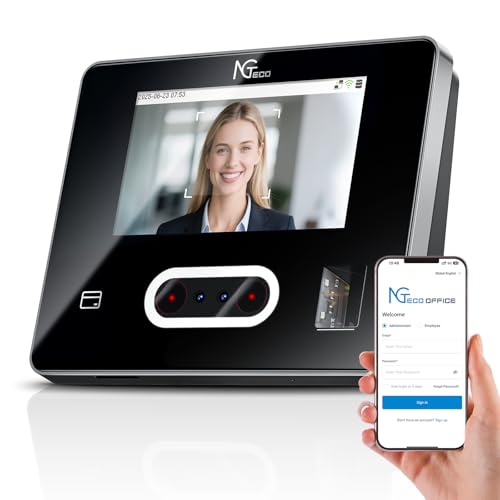
- Remote access lets you manage punches and schedules from web or mobile.
- Supports face, fingerprint, RFID, and PIN check-ins.
- Includes customizable shifts, break rules, and overtime settings.
Best For: Teams that want remote oversight and flexible attendance rules.
Cloud-Connected Attendance Hub
uAttend JR2000 Cloud Time Clock
- Fingerprint, RFID, and PIN check-ins
- Cloud access with real-time management
- Reporting plus payroll integration support
Best For: Small teams needing cloud attendance tracking and payroll help
Subscription-Free Multi-Mode Clock
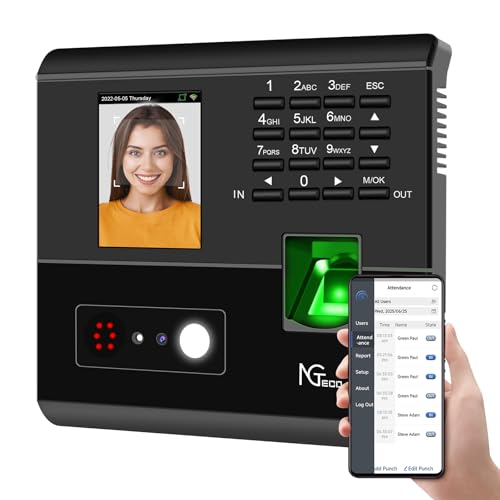
- Face, fingerprint, RFID, and PIN login options
- No monthly fee with digital record storage
- Night shift and flexible scheduling support
Best For: Teams wanting a no-subscription clock with simple shift management
Security-Focused Location Tracking
CB4000 Biometric Multi-Scan Clock

- Face, palm, fingerprint, PIN, and RFID support
- Cloud reporting with mobile app access
- GPS and geo-fencing for location tracking
Best For: Multi-site teams needing advanced verification and location-aware tracking
Cloud-Ready Multi-Location Tracking – NGTeco Cloud Time Clock for Small Business
If you need employee time clocks for multiple locations, this NGTeco cloud model is built around remote access and simple centralized oversight. Managers can review real-time clock-ins, generate reports from the app or web portal, and keep attendance moving without being tied to one office. The dual-band WiFi, fingerprint login, and backup battery make it a practical fit for busy teams that need dependable day-to-day punch tracking.
Best For: Small businesses that want cloud access, flexible shifts, and a no-monthly-fee setup for distributed teams.
Pros:
- Remote access through mobile app and web portal for on-the-go attendance management
- Dual-band 2.4GHz/5GHz WiFi helps maintain stable connectivity
- Fingerprint scanning supports quick, accurate punch-in and punch-out
- 2000mAh battery helps keep the clock running during outages
Cons:
- Full employee app features require a separate TimeEntrix subscription
- Designed for basic team management if you stick with the free tier
For teams that need a cloud-connected option for multiple sites, this model balances remote oversight, customizable scheduling, and secure storage without a monthly fee for core features.
Classic Unlimited Employee Tracking – Pyramid Time Systems 2500 Bundle
This Pyramid time clock is a straightforward option for employee time clocks for multiple locations when you want a simple, physical punch system instead of cloud software. It tracks arrivals, breaks, lunches, overtime, and departures, and the auto-aligning feed helps keep punches clean and consistent. With support for an unlimited number of employees, it works well for teams that need a durable, easy-to-use timecard setup.
Best For: Small workplaces that want a classic time card clock for unlimited employees.
Pros:
- Tracks arrival times, breaks, lunches, overtime, and departure times
- Auto-aligning top-loading feed makes punching in and out easy
- Handles an unlimited number of employees
- Bundle includes 100 time cards
Cons:
- Uses physical time cards rather than cloud-based access
- Best suited to compact small workplaces rather than advanced scheduling needs
If you want a dependable, low-tech punch clock that focuses on core attendance tracking, this Pyramid bundle is a practical and budget-friendly route.
Flexible 4-in-1 Cloud Punching – NGTeco TC1 Cloud Time Clock
For employee time clocks for multiple locations, this NGTeco TC1 is built to centralize punch data with cloud access, automatic report generation, and offline syncing. The 4-in-1 login options—face, fingerprint, RFID, and PIN—give different teams practical ways to check in, while the customizable shift settings help simplify multi-site scheduling. It also supports larger storage limits and multi-language software for more complex workplaces.
Best For: Multi-site teams that need flexible login methods, cloud reporting, and strong offline backup.
Pros:
- 4-in-1 punch options: face, fingerprint, RFID, and PIN
- Cloud access with automatic reports and real-time punch data
- Supports up to 200 users and 30,000 logs
- Offline punch capture syncs when connection returns
Cons:
- Full employee app features require a separate TimeEntrix subscription
- Requires 2.4GHz WiFi or LAN rather than 5GHz connectivity
This is a strong fit if you want a feature-rich cloud clock that can handle varied shifts and keep attendance data moving even when the network drops.
All-in-One Punch Clock Bundle – uPunch HN3500 Advanced Time Clock
If you’re shopping for employee time clocks for multiple locations and want a simple bundled system, the uPunch HN3500 keeps the setup focused on essential punch tracking. The package includes the clock, cards, racks, ribbons, and keys, while AutoAlign helps reduce timecard errors. It also comes with free uPunch cloud software for payroll and time processing, giving small teams a practical blend of physical punching and software support.
Best For: Small businesses that want a complete punch clock bundle with basic cloud software support.
Pros:
- Complete bundle includes cards, racks, ribbons, and keys
- AutoAlign helps produce accurate punches
- Free uPunch cloud software simplifies time and payroll processing
- Maintenance-free design helps reduce upkeep
Cons:
- Uses physical cards rather than a cloud-first punch workflow
- Best suited to basic time tracking rather than advanced scheduling
For buyers who want an all-in-one kit with minimal setup friction, this uPunch bundle offers a reliable, traditional approach backed by software tools.
Local-First Multidepartment Choice – App Control Fast-Connect Fingerprint & Face Clock
If you need employee time clocks for multiple locations or departments, this model is built around app-based control rather than a cloud-only workflow. You can connect in about 5 seconds, manage employees, edit missed punches, set overtime and break rules, and export payroll reports from your phone, which makes it easier to handle distributed teams without being tied to the device.
Best For: Small businesses that want local data storage, flexible attendance rules, and quick app-based editing for multi-department teams.
Pros:
- App control lets you add employees, fix records, and review time data from your phone.
- Supports face recognition, fingerprint, IC card, and PIN clock-ins.
- Custom break, lunch, overtime, and revision-zone settings help match different team rules.
- Stores attendance locally and includes 4 payroll reports plus offline historical reports after syncing.
Cons:
- Supports up to 50 employees, so it may be too small for larger operations.
- Requires app-based management rather than a cloud dashboard.
- Multi-location teams may still need a process for syncing and reviewing records.
This is a practical fit if you want a straightforward time clock with strong rule customization and quick phone management. Its local storage and multiple punch options make it a useful pick for teams that need flexibility without monthly fees.
Cloud Sync Payroll Pick – uAttend JR1000 Biometric Cloud Time Clock
For buyers comparing employee time clocks for multiple locations, this cloud-based uAttend model is a strong fit when you want real-time visibility from any device. It tracks punches with fingerprint, RFID, or PIN access, stores data in the cloud with automatic backup, and is designed to streamline payroll and reporting as your business grows.
Best For: Businesses that want cloud access, payroll automation, and easy remote monitoring across teams.
Pros:
- Cloud-based system gives real-time access to attendance data from any device.
- Supports biometric fingerprint, RFID, and PIN clock-ins.
- Automatic cloud backups help keep employee data available and secure.
- Reporting tools provide visibility into attendance trends, productivity, and labor costs.
Cons:
- Requires a low-cost subscription service rather than a free local-only setup.
- Connectivity is limited to WiFi or Ethernet.
- It may be more system than very small teams need if they only want basic punch tracking.
This model makes sense if your priority is remote access and payroll convenience more than hardware-only simplicity. It is especially appealing for managers who want attendance information available in real time across different workplaces.
Remote Management Favorite – NGTeco 4-in-1 Cloud Touchscreen Time Clock
If you are shopping for employee time clocks for multiple locations, this NGTeco unit stands out for remote control through web software and mobile apps. You can view clock-ins, adjust schedules, correct punches, and generate reports without being on-site, while the touchscreen and four punch methods make daily use simple for employees.
Best For: Businesses that need remote attendance management, flexible shifts, and a touchscreen clock with multiple check-in options.
Pros:
- Remote access through web software and iOS/Android apps supports off-site management.
- 4-in-1 punch options include face, fingerprint, RFID, and PIN.
- Customizable attendance rules cover fixed, rotating, or flexible shifts, plus breaks and overtime.
- Dual-band WiFi and AWS cloud storage help keep punches connected and protected.
Cons:
- Some advanced app features require a separate TimeEntrix subscription.
- Built-in management is free, but the fuller employee app experience is not included by default.
- It depends on WiFi, so it is less suitable where network access is unreliable.
Overall, this is a strong option if you want a modern cloud time clock that supports flexible scheduling and remote oversight. It offers useful core features out of the box, with extra app capabilities available if your team needs them.
Cloud-Connected Attendance Hub – uAttend JR2000 Cloud Time Clock
If you want employee time clocks for multiple locations with centralized visibility, the uAttend JR2000 is built around cloud-based attendance tracking and real-time access from any device. It combines biometric fingerprint, RFID, and PIN check-ins with reporting tools, automatic cloud backup, and optional payroll integration, making it a practical fit for owners who need accurate time data without a lot of manual cleanup.
Best For: Small businesses that want cloud-based attendance tracking, payroll automation, and remote access.
Pros:
- Biometric fingerprint, RFID, and PIN options help reduce buddy punching and missed punches.
- Cloud-based access lets managers view, track, and manage attendance in real time from any device.
- Comprehensive reporting can help surface attendance trends, productivity, and labor costs.
- Automatic cloud backups add a layer of data security and availability.
Cons:
- Requires a subscription for the cloud service, so there are ongoing costs.
- Best suited to small-business use rather than a larger, highly complex workforce.
Overall, the JR2000 is a solid choice if your priority is a connected time clock that keeps attendance data organized across locations and feeds into payroll workflows. It focuses more on practical cloud management than on bulky hardware or complicated setup.
Subscription-Free Multi-Mode Clock – NGTeco APP 4-in-1 Time Clock
For employee time clocks for multiple locations, the NGTeco APP Time Clock offers a flexible setup with facial recognition, fingerprint, RFID, and PIN verification. It is designed to reduce attendance disputes, support shift management, and let managers check real-time records through the free app on the same local network, which makes it a strong fit for businesses that want simple digital control without recurring fees.
Best For: Businesses that want a one-time-purchase time clock with multiple authentication modes and flexible shift tools.
Pros:
- 4-in-1 verification supports face, fingerprint, RFID card, and PIN check-in.
- No monthly fee and paperless record keeping keep ongoing costs low.
- Flexible shift management includes night shift support and easy rule adjustments.
- Offline recording helps prevent data loss during weak or intermittent network connections.
Cons:
- App management requires the same local network, so remote access is more limited than fully cloud-based systems.
- Supports up to 200 employees, which may not suit much larger operations.
This model stands out if you want a straightforward time clock that handles daily attendance needs without a subscription. Its mix of verification methods and shift tools makes it especially useful for busy teams with rotating schedules.
Security-Focused Location Tracking – CB4000 Biometric Multi-Scan Clock
If you need employee time clocks for multiple locations with stronger anti-theft controls, this biometric time clock combines face recognition, palm scanning, fingerprinting, PIN entry, and RFID cards. It supports cloud-based monitoring through WiFi or LAN, includes mobile app access, and adds GPS/geofencing, job transfers, and optional selfie capture, giving managers a more security-focused way to track punches and payroll data.
Best For: Businesses that want a subscription-based biometric clock with location-aware tracking and advanced verification.
Pros:
- Multiple login methods add flexibility while helping reduce buddy punching and time theft.
- Cloud access, mobile app support, and real-time online reporting simplify oversight.
- GPS coordinates, geo-fencing, and job transfer tools are useful for location-based tracking.
- Lifetime warranty and free replacements add long-term coverage.
Cons:
- Uses a monthly subscription after the 30-day free trial.
- Requires WiFi or LAN connectivity to send punches to the cloud.
As a workforce control system, this model leans heavily toward security and mobile oversight. It makes the most sense for teams that need more than a basic punch clock and value tracking features that support distributed workforces.
How We Picked the Best Employee Time Clocks for Multiple Locations
For Employee Time Clocks for Multiple Locations, we prioritized remote visibility, reliable identity verification, straightforward setup, and features that support payroll accuracy. We also looked for systems that can handle different work environments, since a solution that works well in one office may not fit a warehouse, retail floor, or field team.
Quick Comparison
In general, cloud-based models are best when managers need access from anywhere and want to oversee several locations in one place. Biometric systems are useful when you want tighter control over buddy punching and duplicate entries. Bundle-style clocks can be a strong fit if you want a more traditional punch clock with minimal ongoing complexity.
Key Buying Factors for Employee Time Clocks for Multiple Locations
Remote Management
Look for cloud access, app control, or web dashboards if you need to review punches, correct records, and export reports without visiting each site.
Employee Verification
Fingerprint, face, palm, RFID, and PIN options each serve different needs. Biometrics reduce time theft, while RFID and PIN can be faster for fast-moving teams or shared workstations.
Reporting and Payroll Support
Make sure the clock can generate usable time reports, overtime summaries, and break tracking. Multi-location operations benefit from clean exports that reduce manual cleanup before payroll runs.
Rules and Compliance
Custom overtime, lunch, and break rules can help standardize attendance policies across locations. If your sites operate under different schedules, choose a system that allows flexible rule settings.
Scalability and Access Control
Consider whether the system can support multiple locations, departments, or supervisors without creating confusion. Centralized management is especially valuable when you need consistent oversight across all sites.
Who Should Buy Which Employee Time Clocks for Multiple Locations?
If you want centralized oversight across several branches, choose a cloud-connected biometric clock with app or web access. If your priority is lower ongoing cost, a no-monthly-fee model may be the better fit. If you mainly need a dependable punch clock for a smaller operation with multiple work areas, a bundled traditional system can be the simplest path.
For most businesses comparing Employee Time Clocks for Multiple Locations, the best choice comes down to balancing control, convenience, and total cost of ownership. Start with the reporting and access features you truly need, then narrow the field based on the verification method and setup style that fits your team.