Choosing the right paper folder can save hours in mailrooms, admin offices, and small business workflows. The best models balance speed, capacity, fold consistency, and ease of setup.
Below, we’ve narrowed the field to options that fit a range of office needs—from compact desktop units to higher-volume automatic folders.
Best 10 Paper Folding Machines for Office Picks for 2026
Compact Desktop Folder
Martin Yale P7500 Office Paper Folder

- Up to 4,000 sheets per hour
- Multiple fold types for office mailings
- Simple operation with 50-sheet feed tray
Best For: Small offices and mailrooms needing an easy tabletop folder
Fast Batch Folder

- Up to 7,400 sheets per hour
- 200-sheet top-feed with AutoBatch
- LCD counter and neat output conveyor
Best For: High-volume offices needing organized, repeatable folding
Easy-Setup Office Folder
United Office Products F100 Folder

- Up to 156 sheets per minute
- 200-sheet hopper and LCD counter
- C, Z, Half, and Double Parallel folds
Best For: Offices, schools, and churches with regular folding tasks
Flexible Document Folder
Martin Yale 1501X Automatic Paper Folder

- Up to 7,500 sheets per hour
- Five fold types plus manual stapled-set feed
- 150-sheet capacity for office jobs
Best For: Teams that need fast folding and occasional stapled sets
High-Volume Office Folder
Dynafold 102N Paper Folding Machine
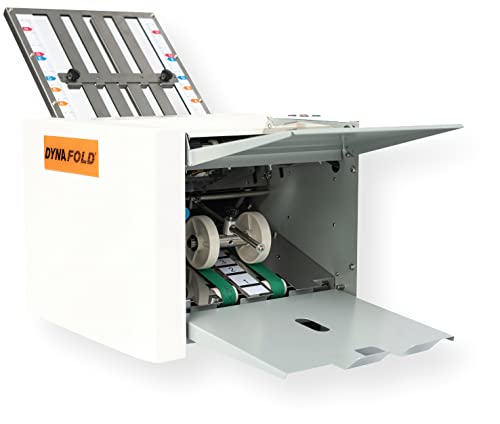
- Up to 8,000 sheets per hour
- Multiple preset fold styles
- Self-adjusting thickness control
Best For: High-volume letter-size office folding
Flexible Heavy-Duty Folder
BEILOCKERY Automatic Paper Folding Machine
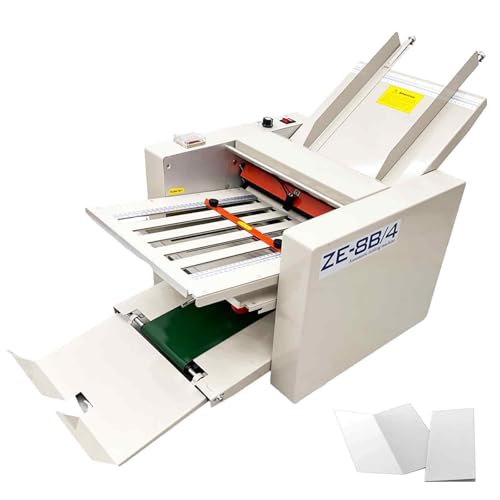
- Fits paper from 2 x 3 to 12 x 27 inches
- Speed adjustable up to 262 ft/min
- Preset quantity and digital controls
Best For: Varied folding jobs in larger offices or print settings
Best for Comfort
Martin Yale P6500 Paper Folding Machine

- Compact desktop design
- Up to 1,800 sheets per hour
- Tri fold and half fold support
Best For: Small offices with routine letter-size folding needs
Best with Extra Features
Automatic Paper Folding Machine

- Automatic sheet separation for smoother feeding
- Two folding trays for flexible fold styles
- Adjustable speed and fold controls
Best For: Busy offices needing automated folding
Desktop Letter Folder

- Automatically folds inserted sheets
- Supports letter and half folds
- Works with 1-3 sheets and stapled sets
Best For: Small offices with light folding needs
Medium-Duty Workhorse
Martin Yale 1217A Paper Folder
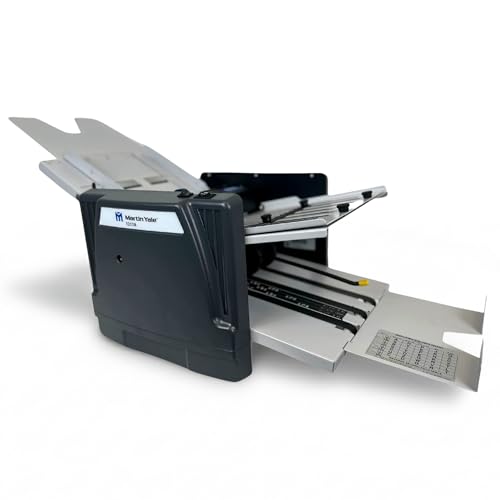
- Up to 10,300 sheets per hour
- Seven fold types with adjustable tables
- 250-sheet capacity for larger runs
Best For: High-volume office and mailroom folding
Compact Desktop Folder – Martin Yale P7500 Office Paper Folder
If you need paper folding machines for office use that can keep up with routine mailings, the Martin Yale P7500 is built for straightforward, high-volume desktop folding. It handles letter and legal-size paper with multiple fold options, making it a practical pick for small offices and mailrooms that want fast, simple operation.
Best For: Small offices, mailrooms, churches, and business teams that need an easy-to-use tabletop folder for recurring document runs.
Pros:
- Produces up to 4,000 folded sheets per hour.
- Supports letter, half, Z-fold, and double parallel folds.
- Loads up to 50 sheets in the feed tray.
- Simple operation makes it usable without training.
Cons:
- Designed for 8.5″ x 11″ and 8.5″ x 14″ 20lb bond paper.
- Lower throughput than some higher-capacity office folders.
Overall, the P7500 focuses on convenience and dependable everyday folding rather than advanced controls. If your office values easy setup and steady output in a compact format, it fits that job well.
Fast Batch Folder – Formax FD 300 Document Folder
Among paper folding machines for office workflows, the Formax FD 300 stands out for speed, capacity, and more controlled output. It accepts a wide paper range, folds up to 7,400 sheets per hour, and adds an LCD control panel with batch management for organized document runs.
Best For: Busy offices that need fast, neat folding with more control over batch processing and output stacking.
Pros:
- Processes up to 7,400 folded sheets per hour.
- Drop-in top-feed holds up to 200 sheets of 20# paper.
- Four fold types: C, Z, V, and Double Parallel.
- LCD panel includes a 3-digit counter and AutoBatch function.
Cons:
- Heavier and larger than basic desktop folders.
- Built for paper up to 8.5″ x 14″, so it is not the most flexible for oversized jobs.
For offices that want speed without sacrificing organized output, the FD 300 offers a strong balance of automation and control. Its conveyor and adjustable stacker wheels help keep folded documents in order as jobs move through.
Easy-Setup Office Folder – United Office Products F100 Folder
The United Office Products F100 is a solid choice if you want paper folding machines for office tasks that are fast, easy to load, and simple to track. It handles letter and legal sizes, offers common fold styles, and uses a clear LCD control panel to keep routine document jobs moving.
Best For: Offices, schools, and churches that want a dependable automatic folder with quick setup and manageable capacity.
Pros:
- Folds up to 156 sheets per minute.
- 200-sheet hopper supports easy loading.
- Handles C, Z, Half, and Double Parallel folds.
- LCD panel includes a resettable 3-digit counter.
Cons:
- Lower capacity than larger high-volume office folders.
- Fold options are limited to the standard formats listed.
As an office folder, the F100 keeps things practical: quick setup, neat stacking, and enough speed for recurring document runs. It is a strong fit for teams that want reliable folding without the complexity of a heavier production unit.
Flexible Document Folder – Martin Yale 1501X Automatic Paper Folder
If your office needs paper folding machines for office documents that include stapled sets, the Martin Yale 1501X adds useful flexibility. It automatically folds standard letter and legal-size sheets, supports five fold types, and also allows manual feed for stapled sets of up to three sheets.
Best For: Offices, mailrooms, schools, churches, and associations that need flexible folding for both loose sheets and small stapled sets.
Pros:
- Up to 7,500 sheets per hour for fast document handling.
- Supports Letter, Half, Z-fold, Double-Parallel, and Gate folds.
- Manual feed bypass handles stapled sets up to 3 sheets.
- 150-sheet capacity helps support larger jobs.
Cons:
- Manual feed is limited to small stapled sets.
- Catch trays are not fixed to the machine, so placement needs attention.
The 1501X is a good fit when you need more than basic folding and want to process mixed document types efficiently. Its combination of speed, fold variety, and stapled-set support makes it a practical office tool for recurring paperwork.
High-Volume Office Folder – Dynafold 102N Paper Folding Machine
If you need paper folding machines for office mailings, the Dynafold 102N is built for speed and repeatable batch work. It handles letter-size paper with push-button operation, self-adjusting thickness control, and several standard fold types, making it a practical fit for offices that process a steady stack of documents.
Best For: Offices that need fast, automated folding for recurring letter-size mail, statements, and handouts.
Pros:
- Folds up to 8,000 sheets per hour for high-volume workloads
- Supports single, double, letter, zig-zag, gate, and fold-out styles
- Self-adjusts for paper thickness to help streamline batch processing
- Output conveyor stacker and resettable counter support organized runs
Cons:
- Designed for letter-size paper only
- Best suited to offices with frequent folding volume, not occasional use
Overall, the Dynafold 102N stands out when speed and fold consistency matter more than compact size. It is a strong fit for teams that want a dedicated office machine for regular, repeatable folding tasks.
Flexible Heavy-Duty Folder – BEILOCKERY Automatic Paper Folding Machine
BEILOCKERY Automatic Paper Folding Machine, Electric Paper Folder with 4 Trays
Check Price On AmazonAmong paper folding machines for office use, this BEILOCKERY model is aimed at users who need broad size compatibility and adjustable output. It handles paper from small 2 x 3-inch sheets up to 12 x 27-inch formats, with adjustable speed and preset quantity control for organized folding runs.
Best For: Offices, print shops, schools, and churches that need to fold a wide range of paper sizes and weights.
Pros:
- Handles paper sizes from 2 x 3 inches to 12 x 27 inches
- Adjustable speed reaches up to 262 feet per minute
- Preset quantity control helps manage larger folding jobs
- Digital display, side guides, and rubber rollers support easier feeding
Cons:
- Large unit at 113 pounds
- Needs 110V power and more dedicated space than a desktop unit
This is the most versatile option in the group if your folding work goes beyond standard letters. Its wider size range and adjustable controls make it better suited to varied, high-output environments than basic office-only tasks.
Best for Comfort – Martin Yale P6500 Paper Folding Machine
If you want paper folding machines for office desks or smaller mailrooms, the Martin Yale P6500 keeps things simple. It is a compact desktop folder for letter-size paper that uses manual feed with automatic folding, making it a straightforward choice for everyday tri fold and half fold work.
Best For: Small offices, mailrooms, and schools that need an easy desktop folder for routine letter-size jobs.
Pros:
- Compact desktop footprint fits smaller work areas
- Handles up to 1,800 sheets per hour
- Automatically folds hand-fed stapled or unstapled documents
- Supports tri fold and half fold formats
Cons:
- Limited to letter-size paper folding
- Fewer fold options than larger automated machines
The P6500 is a practical pick when you want a small, easy-to-use folding machine without extra complexity. It is best for routine office tasks where space is tight and output needs are moderate.
Best with Extra Features – Automatic Paper Folding Machine
If you need paper folding machines for office work that can handle manuals, letters, and other routine jobs faster than hand folding, this WYDDDAR model is built for volume. Its automatic sheet separation, adjustable speed, and dual folding trays make it easier to process mixed paper sizes with less operator effort.
Best For: Offices, print shops, and service teams that need a compact automatic folder for repeated folding tasks.
Pros:
- Automatic paper separation helps feed sheets one by one for more consistent folding.
- Two folding trays can be used independently or together for different folding styles.
- Adjustable speed and tray scales give you more control over paper size and thickness.
- Built-in counter automatically tracks folded sheets.
Cons:
- At 69 pounds, it is not a lightweight desktop option.
- Best suited to office and commercial use rather than casual home use.
Overall, this is a practical choice when consistency and throughput matter more than portability. The fold range, auto-separation system, and dual trays make it a capable fit for busy document workflows.
Desktop Letter Folder – P6500 Office Paper Folder
For smaller office batches, this desktop option keeps paper folding machines for office use simple and fast. The P6500 is designed to automatically fold inserted sheets into letter or half folds, with support for 1-3 sheets at a time and stapled sets, making it a straightforward fit for recurring mail or document prep.
Best For: Small offices that want an easy desktop folder for letter-size paper and modest daily volume.
Pros:
- Automatically folds paper when inserted, reducing manual work.
- Handles 1-3 sheets and even stapled sets.
- Supports both letter and half folds.
- Compact 11-pound design is easy to place on a desk.
Cons:
- Limited to 8.5″ x 11″ paper and 18lb to 24lb bond stock.
- Lower capacity than larger commercial folders.
This model makes sense when you want a simple, low-friction way to automate everyday folding without stepping up to a heavy-duty machine. It is best viewed as a practical desktop helper for standard office paper.
Medium-Duty Workhorse – Martin Yale 1217A Paper Folder
When you need paper folding machines for office environments with higher throughput, the Martin Yale 1217A is built for medium-duty document work. It automatically feeds, folds, and collects documents, and its seven fold types plus 250-sheet capacity make it a strong fit for larger mailing and handout jobs.
Best For: Offices, schools, mailrooms, and churches that need fast automatic folding for larger document runs.
Pros:
- Processes up to 10,300 sheets per hour for high-volume jobs.
- Seven fold types and two adjustable fold tables add flexibility.
- 250-sheet capacity reduces how often you need to reload.
- Can handle stapled or unstapled documents through a manual bypass.
Cons:
- At 59 pounds and 42 inches long, it takes real space.
- Primarily supports letter-size paper, so it is less versatile than some larger-format folders.
For organizations that fold documents often, this machine offers a strong balance of speed, capacity, and fold options. It is a better fit for serious office production than for occasional use.
How We Picked These Paper Folding Machines for Office Use
We focused on practical features that matter in day-to-day office work: feed type, fold variety, sheet capacity, output handling, speed, and how well each machine suits recurring document batches. We also favored models that can handle common office paper sizes and provide straightforward controls for staff with minimal training.
Quick Comparison
If your workload is light and occasional, a manual-feed or compact desktop folder is usually enough. For recurring mailings, statements, invoices, or newsletters, automatic-feed models with higher sheet capacity and output stacking will reduce bottlenecks. High-volume offices should prioritize throughput, batch processing, and dependable jam resistance over extra fold styles.
Key Buying Factors for Paper Folding Machines for Office
Feed Style and Capacity
Automatic-feed machines are best for larger stacks and repetitive tasks, while manual-feed units are more flexible for smaller batches or stapled sets. Check both the input capacity and the type of paper the machine can process consistently.
Fold Types and Paper Size Support
Most offices only need letter, half, Z, or tri-fold options, but some workflows require multiple patterns. Make sure the machine supports your everyday paper sizes, especially if you handle legal-size documents or mixed-format mailings.
Speed and Output Handling
Published sheets-per-hour numbers are useful, but real-world performance also depends on output stacking and whether the folded pages stay organized. An output conveyor or stacker can make a big difference in busy environments.
Ease of Use and Maintenance
Simple controls, clear counters, and easy adjustment points help reduce setup time and operator error. Offices that share equipment should look for models that are easy to clean, load, and reset between jobs.
Who Should Buy Which Paper Folding Machines for Office?
Small offices and home offices should look for compact desktop folders with basic fold options and modest capacity. Mid-size teams that mail documents regularly will benefit from automatic-feed models with better speed and output control. High-volume mailrooms, schools, churches, and administrative departments should prioritize durable machines built for repeated batch folding and longer run times.
In short, the best Paper Folding Machines for Office use are the ones that match your paper volume, document type, and staffing needs—not just the highest advertised speed.