If your office still folds letters by hand, a good desktop folder can save hours and produce more consistent results. From mailrooms to small businesses, these machines make recurring folding jobs faster and neater.
Below, we’ve rounded up 10 standout options for different workloads, paper sizes, and budgets so you can choose the right fit with confidence.
Best 10 Desktop Paper Folding Machines Picks for 2026
High-Volume Desktop Folder

- Up to 7,400 sheets per hour
- Top-feed tray loads 200 sheets without fanning
- Supports C, Z, V, and Double Parallel folds
Best For: Offices needing fast, routine document folding
Booklet Folding and Binding Pick
A3 Booklet Maker with Silicone Rollers

- Folds and binds in one machine
- Produces about 200-300 booklets per hour
- Handles paper up to 11.69 x 16.54 inches
Best For: Schools and offices making booklet-style documents
Fast Office Folder
Formax FD 314 Desktop Office Folder

- Up to 7,700 sheets per hour
- Holds up to 250 sheets of 20 lb paper
- Quick-switch settings for four common folds
Best For: Medium-volume office folding with simple operation
Compact Mailroom Folder
Martin Yale P7500 Automatic Feed Folder

- Up to 4,000 sheets per hour
- Automatic feed tray holds 50 sheets
- Supports Letter, Half, Z Fold, and Double Parallel
Best For: Small offices needing simple everyday folding
High-Speed All-Purpose Folder
Digital Paper Folder 110V, 4-Tray Desktop Model
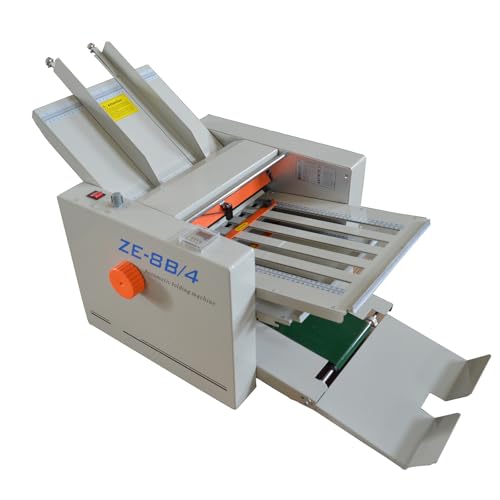
- Supports paper from 2" x 3" to 12" x 27".
- Auto-feed system processes up to 80 pages per minute.
- Variable speed, digital counter, and 4 fold settings add control.
Best For: Busy offices and print shops that need flexible, high-volume folding
Compact Rapid Folder
Martin Yale P7400 Desktop Automatic Feed

- Automatic feed tray holds up to 50 sheets.
- Folds letter, half, z-fold, and double parallel.
- Rated for up to 4,000 sheets per hour.
Best For: Standard office folding jobs with moderate volume
High-Capacity Office Folder
United Office Products F100 Automatic Paper Folder

- Folds up to 156 sheets per minute.
- 200-sheet hopper supports larger jobs.
- LCD panel and 3-digit counter keep setup simple.
Best For: Schools, offices, and churches folding standard-size batches
Compact Manual-Feed Letter Folder
Martin Yale P6500 Manual Feed Desktop Folder

- Folds letter-size paper into tri fold or half fold.
- Compact desktop design fits small work areas.
- Handles up to 1,800 sheets per hour.
Best For: Small offices and mailrooms needing routine letter folding.
Basic Office Letter Folder
P6500 Desktop Folder for 1-3 Sheet Sets

- Automatically folds inserted paper into letter or half folds.
- Accepts 1-3 sheets and stapled sets.
- Supports 8.5 x 11 paper up to 1,800 sheets per hour.
Best For: Basic office folding for small batches and stapled sets.
Standard Bond-Paper Desktop Folder
P6500 Folder for Letter-Size Bond Paper

- Supports letter or half-fold output for standard documents.
- Accepts 1-3 sheet stapled sets by hand feed.
- Works with 18lb to 24lb bond paper up to 1,800 per hour.
Best For: Standard office documents on common bond paper.
High-Volume Desktop Folder – Formax FD 300 Document Folder
If you need desktop paper folding machines that can keep up with steady office output, the Formax FD 300 is built around speed and simple setup. Its drop-in top-feed design skips paper fanning, while the LCD control panel and AutoBatch function make it practical for repeat folding jobs.
Best For: Offices that want a fast, compact folder for routine mailings and standard fold formats.
Pros:
- Handles up to 7,400 folded sheets per hour for high-output jobs.
- Drop-in top-feed system loads up to 200 sheets of 20# paper without fanning.
- LCD control panel includes a 3-digit resettable counter and AutoBatch.
- Pre-marked guides support C, Z, V, and Double Parallel folds.
Cons:
- Designed for paper up to 8.5" x 14", so it is not a large-format solution.
- Best suited to standard fold types rather than specialized finishing.
Overall, the FD 300 is a strong fit when you want speed, straightforward operation, and organized output from a desktop machine. It is especially appealing for offices that need dependable folding with minimal setup steps.
Booklet Folding and Binding Pick – A3 Booklet Maker with Silicone Rollers
Among desktop paper folding machines, this A3 booklet maker stands out for combining folding and binding in one unit. It is aimed at users who want a practical machine for booklet-style work, with a focus on stable operation, broad paper compatibility, and simple adjustment.
Best For: Schools and offices that need one machine for folding and binding booklet projects.
Pros:
- Two-in-one design can fold and bind together or separately.
- Handles about 200-300 booklets per hour depending on operator skill.
- Supports paper from 5.83" x 8.27" to 11.69" x 16.54".
- Uses silicone folding rollers and millimeter-level positioning for accuracy.
Cons:
- Folding capacity is limited to about 14 sheets of 80g paper at a time.
- Edge binding capacity is about 20 sheets of 80g paper, which may be limiting for heavier jobs.
This machine makes sense if your workflow includes booklet production more than basic office folding. The main advantage is versatility, especially when you need folding and binding in a single desktop setup.
Fast Office Folder – Formax FD 314 Desktop Office Folder
For buyers comparing desktop paper folding machines for everyday office use, the Formax FD 314 offers a balance of speed, capacity, and simple operation. It is built for quick setup and repeatable folding, with controls that make it easy to switch between common fold styles.
Best For: Offices that want a compact folder for frequent standard folds and medium-volume workloads.
Pros:
- Processes up to 7,700 sheets per hour.
- Hopper holds up to 250 sheets of 20 lb paper.
- Pre-marked settings cover C, Z, Half, and Double Parallel folds.
- Drop-in top-feed system reduces setup by eliminating paper fanning.
Cons:
- Designed around 11-inch and 14-inch lengths, so it is not aimed at oversized paper.
- No warranty is listed in the supplied details.
The FD 314 is a practical choice when you want a familiar office folder that keeps things moving without complicated training. It is well matched to mailrooms and offices that repeatedly fold the same document sizes and formats.
Compact Mailroom Folder – Martin Yale P7500 Automatic Feed Folder
The Martin Yale P7500 is a straightforward option in desktop paper folding machines for smaller offices that want automatic feeding and simple controls. It focuses on dependable folding for common letter-size jobs, with a compact footprint that suits limited workspace.
Best For: Small offices, churches, and mailrooms that need an easy automatic folder for common paper sizes.
Pros:
- Produces up to 4,000 folded sheets per hour.
- Automatic feed tray holds up to 50 sheets.
- Supports Letter, Half, Z Fold, and Double Parallel folds.
- Works with 8.5" x 11" and 8.5" x 14" 20lb bond paper.
Cons:
- Feed capacity is smaller than higher-volume office folders.
- Fold options are limited to the listed standard formats.
This model is best viewed as a practical everyday folder rather than a heavy-duty production machine. If your priority is easy use and space-saving convenience, it fits that brief well.
High-Speed All-Purpose Folder – Digital Paper Folder 110V, 4-Tray Desktop Model
If you need one of the more versatile desktop paper folding machines for mixed office jobs, this digital folder is built to handle a wide range of sheet sizes and fold styles. It supports manuals, letters, and documents with adjustable speed, auto-feed operation, and fold settings that help keep output consistent.
Best For: Offices, print shops, banks, and teams that need fast, repeatable folding for different document sizes.
Pros:
- Handles paper from 2″ x 3″ up to 12″ x 27″ and 40-125g thickness.
- Offers Z-fold, C-fold, and Letter-fold with 4 adjustable plates.
- Auto-feed and separation support continuous folding up to 80 pages per minute.
- Digital counter and variable speed control help with precise jobs.
Cons:
- May be more machine than needed for occasional small-volume folding.
- Best suited to users who have space for a dedicated desktop unit.
Overall, this model stands out for flexibility and control, especially if your folding tasks vary from day to day. The steel construction, soft rollers, and emergency stop switch also make it a practical pick for steady workplace use.
Compact Rapid Folder – Martin Yale P7400 Desktop Automatic Feed
The Martin Yale P7400 is a straightforward option among desktop paper folding machines when you want automatic feed and proven fold types without unnecessary complexity. It handles common letter and legal jobs, making it a practical fit for office mailings and everyday document prep.
Best For: Offices that need dependable folding for standard-size sheets and moderate batches.
Pros:
- Automatic feed tray holds up to 50 sheets.
- Folds up to 4,000 sheets per hour.
- Supports letter, half, z-fold, and double parallel folds.
- Handles paper from 3 1/2″ x 5″ to 8 1/2″ x 14″.
Cons:
- Feed tray capacity is lower than some higher-volume machines.
- Designed for a narrower paper-size range than more versatile folders.
This is a solid pick if your workflow centers on standard office sheets and you value speed with simple operation. The included stacking tray also helps keep folded output organized as it comes off the machine.
High-Capacity Office Folder – United Office Products F100 Automatic Paper Folder
For teams comparing desktop paper folding machines, the United Office Products F100 focuses on speed, capacity, and easy setup for everyday document runs. It supports letter and legal paper, offers multiple common fold styles, and includes a simple LCD panel for quick operation.
Best For: Schools, offices, and churches that need fast folding for large batches of standard documents.
Pros:
- Processes up to 156 sheets per minute.
- 200-sheet hopper capacity supports larger folding runs.
- Handles letter and legal paper with C, Z, Half, and Double Parallel folds.
- LCD control panel and resettable 3-digit counter simplify use.
Cons:
- Only supports letter and legal sizes, so it is less flexible for specialty paper.
- 6-month warranty may be short for some buyers.
Overall, the F100 is geared toward users who want quick setup and steady output rather than maximum paper-size versatility. Its outfeed conveyor and sequential stacking also make it easier to manage finished documents during busy runs.
Compact Manual-Feed Letter Folder – Martin Yale P6500 Manual Feed Desktop Folder
If you want desktop paper folding machines for everyday letter handling, the Martin Yale P6500 is built for simple office workflows. It manually feeds 8.5 x 11 paper and automatically folds it into tri fold or half fold formats, making it a practical fit for routine mail prep, school paperwork, and small-office document handling.
Best For: Small offices, mailrooms, and schools that need a compact folder for regular letter-size folding.
Pros:
- Handles letter-size paper in tri fold or half fold formats.
- Compact desktop design suits small work areas.
- Processes up to 1,800 sheets per hour for steady daily use.
- Can fold hand-fed stapled or unstapled documents.
Cons:
- Designed for manual feed rather than fully automatic loading.
- Focused on letter-size paper and basic fold types.
This is a straightforward choice if you want a compact, easy-to-use desktop folder for repetitive office tasks. It emphasizes dependable everyday folding over advanced features, which can be exactly what many small teams need.
Basic Office Letter Folder – P6500 Desktop Folder for 1-3 Sheet Sets
Among desktop paper folding machines, this P6500 model is aimed at simple letter and half-fold jobs with hand-fed operation. It automatically folds inserted paper, accepts 1-3 sheet sets including stapled sets, and supports common office paper sizes and weights for everyday document prep.
Best For: Offices that want a basic, easy-to-use folder for letter-size stacks and occasional stapled sets.
Pros:
- Automatically folds when paper is inserted by hand.
- Accepts 1-3 sheets and stapled sets.
- Supports 8.5 x 11 paper and 18lb to 24lb bond paper.
- Rated up to 1,800 sheets per hour.
Cons:
- Limited to letter or half-fold output.
- Best suited to small sets rather than large multi-page stacks.
This version keeps the feature set focused and practical, which is helpful if you want a no-fuss folding machine for standard office paperwork. Its ability to handle stapled sets and modest batch sizes makes it a flexible everyday option.
Standard Bond-Paper Desktop Folder – P6500 Folder for Letter-Size Bond Paper
If you’re comparing desktop paper folding machines for standard office use, this P6500 model is built around the same practical fold styles and paper handling as the other variant. It handles 1-3 sheet sets, accepts stapled documents, and works with 8.5 x 11 paper in common bond weights, keeping routine folding simple.
Best For: Teams that need a straightforward desktop folder for letter-size paper and everyday bond-stock documents.
Pros:
- Folds letter-size paper into letter or half-fold formats.
- Handles 1-3 sheet hand-fed sets, including stapled ones.
- Supports 18lb to 24lb bond paper and 68gsm to 90gsm stock.
- Rated for up to 1,800 sheets per hour.
Cons:
- Limited to basic letter and half-fold functions.
- Designed for modest batch sizes rather than heavy-duty folding.
This model is a sensible fit when you need dependable everyday folding without extra complexity. It stays focused on standard office paper and common fold types, which helps keep document prep efficient.
How We Picked the Best Desktop Paper Folding Machines
We focused on Desktop Paper Folding Machines that balance practical capacity, reliable feed performance, and useful fold options. Preference went to models with clear controls, solid sheet-per-hour output, and support for common office paper sizes like letter and legal.
We also considered whether a machine is better suited to light-duty desktop use or heavier recurring mailroom work. That matters because the right choice depends less on raw speed alone and more on how often you fold, how many sheets you handle at once, and how consistent the output needs to be.
Quick Comparison
For higher-volume workflows, automatic feed models with larger hoppers and multiple fold types are usually the best fit. If you only fold small sets occasionally, a manual-feed desktop unit is often simpler, cheaper, and easier to maintain. Booklet-style machines and specialty folders make sense when you need a specific output format rather than general-purpose folding.
Key Buying Factors for Desktop Paper Folding Machines
Capacity and Duty Cycle
Look at both hopper capacity and the machine’s rated speed. A higher sheet-per-hour figure is helpful, but only if it matches your actual workload. If you regularly batch-fold mailings, choose a model built for sustained use rather than occasional desktop tasks.
Fold Types and Paper Sizes
Most buyers need letter, half, z-fold, or double-parallel options. Make sure the machine handles the paper sizes you use most, especially if your office works with both letter and legal documents.
Ease of Setup and Controls
LCD panels, counters, and adjustable speed settings can make a big difference in day-to-day use. Simpler controls are ideal for shared office environments where different people may operate the machine.
Feed Method and Output Quality
Automatic feed models are better for volume, while manual feed machines can be more practical for smaller runs. If clean, consistent folds matter for client-facing mailers, prioritize smoother rollers and stable paper handling over extra features.
Who Should Buy Which Desktop Paper Folding Machines?
Choose a high-capacity automatic folder if your business sends frequent mailings or processes documents in batches. Pick a compact manual-feed model if you only need occasional folding for invoices, notices, or internal paperwork. If your workflow centers on brochures or booklets, a specialty folder may be the smarter choice than a general-purpose unit.
In short, the best Desktop Paper Folding Machines are the ones that match your volume, paper types, and fold style without adding unnecessary complexity.