The right screen can make conference-room presentations easier to see, more professional, and less dependent on wall color or room lighting. This roundup compares 10 options across fixed-frame, motorized, pull-down, and portable designs.
Use the buying guide below to match screen size, aspect ratio, gain, installation method, and control features to your meeting space and projector.
Best 10 Projector Screens for Conference Rooms Picks for 2026
Best Fixed-Frame Pick
Silver Ticket STR Series 120-Inch

- 120-inch 16:9 fixed-frame design
- 1.1-gain surface with 160° viewing angle
- Supports Full HD, 4K/8K, and Active 3D
Best For: Permanent conference rooms with compatible projectors
Best Motorized Option
Elite Screens Spectrum 2 100-Inch
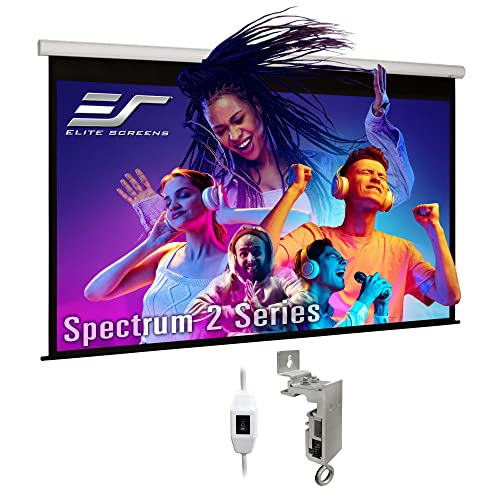
- Automatic 100-inch 16:9 screen
- Quiet motor with three-way wall switch
- 180° viewing angle and 12-inch extra drop
Best For: Standard-throw projector conference rooms
Best Portable Pick

- Lightweight retractable mobile screen
- Sets up on floors or tables
- Matte fabric with black masking border
Best For: Traveling presenters and small meeting spaces
Best Large Manual Screen
Elite Screens Manual B 135-Inch

- 135-inch 16:9 pull-down screen
- 1.1-gain material with 180° viewing angle
- Auto-lock height adjustment and dual mounting
Best For: Large rooms with standard long-throw projectors
Best for Easy Setup
Paris RHÔNE 100-Inch Tripod Screen

- 1.5-gain PVC surface with a 160° viewing angle
- Adjustable tripod and included ground nails
- Folds for transport and sets up in about two minutes
Best For: Portable presentations and multipurpose rooms
Best Large Motorized Pick
Elite Screens 180-Inch Electric Screen
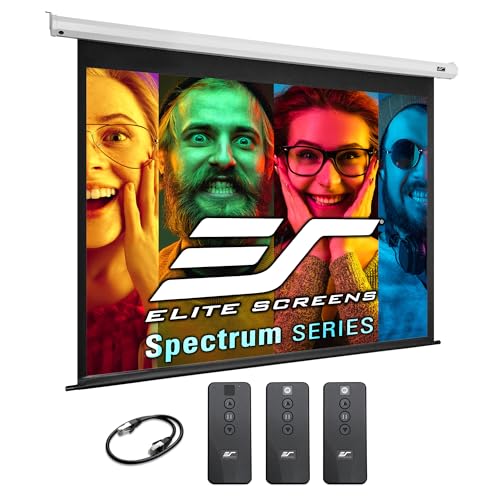
- 180-inch 4:3 screen for large indoor spaces
- Motorized operation with IR/RF control options
- Wall or ceiling mounting with RJ45 integration
Best For: Large conference rooms and presentation venues
Best Manual Wide-View Pick
WASJOYE 150-Inch Pull-Down Screen

- 150-inch 16:9 matte PVC screen
- Self-locking manual pull-down mechanism
- 178° viewing angle with wall or ceiling mounting
Best For: Large offices, training rooms, and classrooms
Large-Room Motorized Pick
DINAH 120-Inch Electric Projector Screen

- Large 120-inch screen for group viewing
- Remote-controlled motorized drop-down operation
- 4K 3D HD support with matte finish
Best For: Large offices, classrooms, and multipurpose conference rooms
Flexible Manual Mount Pick
Pyle 84-Inch Pull Down Projector Screen

- Auto-locking manual height adjustment
- Matte white surface with black border
- Wall, ceiling, or surface mounting
Best For: Smaller meeting rooms and offices needing simple setup
Professional Large-Format Pick
Elite Screens Spectrum 140-Inch Motorized Screen
- 140-inch 4:3 viewing area for large rooms
- Electric operation with remote and RJ45 control
- 1.1-gain MaxWhite 2 surface with 180-degree viewing
Best For: Large professional conference rooms using standard-throw projectors
Best Fixed-Frame Pick – Silver Ticket STR Series 120-Inch
For conference rooms that need a permanent presentation surface, this Silver Ticket fixed-frame screen offers a large 120-inch 16:9 image area and a clean wall-mounted installation. Its 1.1-gain white surface supports Full HD, 4K/8K, and Active 3D content while maintaining a 160-degree viewing angle.
Best For: Dedicated conference rooms using 16:9 long-, short-, or ultra-short-throw projectors, provided the projector is compatible with the frame.
Pros:
- Large 120-inch diagonal viewing area for group presentations
- 160-degree viewing angle with no stated resolution loss across the viewing area
- Heavy-duty aluminum frame with light-absorbing black velvet trim
- Tensioning rod system and adjustable mounting brackets support installation and alignment
Cons:
- Fixed wall-mount design has no legs or stand option
- Not acoustically transparent
- Some ultra-short-throw projectors may not be compatible with this frame
This is a strong choice when a conference room can accommodate a permanent, cinema-style installation. Project an image on the wall first to confirm the size and check compatibility carefully if using an ultra-short-throw projector.
Best Motorized Option – Elite Screens Spectrum 2 100-Inch
The Elite Screens Spectrum 2 is a practical choice for conference rooms that need the screen to retract when it is not in use. Its 100-inch 16:9 viewing area, 12-inch extra drop, quiet tubular motor, and included three-way wall switch support convenient presentations and flexible installation.
Best For: Indoor conference rooms using standard-throw projectors and requiring an automatic wall- or ceiling-mounted screen.
Pros:
- Motorized retractable design keeps the screen out of the way between meetings
- 1.1-gain MaxWhite FG surface provides a 180-degree viewing angle
- Supports 4K/8K Ultra HD, HDR, and Active 3D content
- Includes a 12-inch extra drop and floating wall/ceiling mount brackets
Cons:
- Not compatible with ultra-short-throw or short-throw projectors
- Optional remote control kit is sold separately
- Its 100-inch size is smaller than some fixed-frame alternatives
Choose this model when streamlined operation matters more than maximum image size. Confirm that the room uses a standard-throw projector, then use the included wall switch for straightforward up, stop, and down control.
Best Portable Pick – Pyle PRJTP46 40-Inch
For teams that present in multiple rooms, the Pyle PRJTP46 provides a lightweight, retractable screen that can be set up on a flat floor or table. Its 40-inch matte viewing surface and black masking border are suited to smaller office presentations, classrooms, and mobile meetings.
Best For: Portable conference presentations, classrooms, and small offices where quick setup and easy transport are priorities.
Pros:
- Lightweight mobile design for travel and room-to-room use
- Manual retractable system supports quick setup
- Stain-resistant, flame-retardant fabric with a matte viewing surface
- Can stand on a flat floor surface or table and work indoors or outdoors
Cons:
- 40-inch diagonal size is limited for larger conference rooms
- 90-degree viewing angle is narrower than the larger alternatives here
- Manual operation rather than motorized control
This screen makes the most sense for flexible meeting spaces rather than a boardroom needing a large shared image. Its compact format is convenient, but measure the viewing distance and room size before choosing it for group presentations.
Best Large Manual Screen – Elite Screens Manual B 135-Inch
When a conference room needs a particularly large image without motorized controls, the Elite Screens Manual B provides a 135-inch 16:9 pull-down screen. Its 1.1-gain MaxWhite 2 material, black masking, auto-lock height adjustment, and wall- or ceiling-mount design suit presentations, classrooms, and larger meeting spaces.
Best For: Large indoor conference rooms using standard long-throw projectors and needing a manually retractable screen.
Pros:
- 135-inch diagonal viewing area for large-group visibility
- 180-degree viewing angle with 1.1-gain front-projection material
- Auto-lock mechanism allows variable screen-height settings
- Supports 4K/8K Ultra HD, HDR, and Active 3D content
Cons:
- Designed for standard long-throw projectors only
- Manual pull-down operation
- Optional 6-inch and 12-inch L-brackets are sold separately
This model is a good fit when image size is the priority and the room can support its 124-inch-wide overall footprint. Verify the wall or ceiling mounting location and projector throw type before installation.
Best for Easy Setup – Paris RHÔNE 100-Inch Tripod Screen
For projector screens for conference rooms that may need to move between rooms or events, this 100-inch Paris RHÔNE model offers a flexible tripod setup. Its foldable design, wide viewing angle, and included carry bag make it practical for temporary presentations, training sessions, and multipurpose spaces.
Best For: Portable conference-room presentations, classrooms, home offices, and occasional outdoor use.
Pros:
- 100-inch 16:9 screen uses 1.5-gain PVC material for bright, color-accurate projection.
- Height-adjustable tripod ranges from 64 to 85 inches and includes ground nails for outdoor stability.
- Designed for one-person setup in about two minutes and includes a carry bag.
- Supports a 160-degree viewing angle and is compatible with 1080p HD projection.
Cons:
- Tripod mounting requires floor space and may be less suitable for permanent installations.
- Its 100-inch size provides less viewing area than the larger fixed screens in this roundup.
This is the most convenient choice when portability matters more than a built-in, motorized conference-room installation. The tripod format also makes it easy to reposition for different seating layouts.
Best Large Motorized Pick – Elite Screens 180-Inch Electric Screen
For projector screens for conference rooms where a large, permanent viewing surface is the priority, the Elite Screens Spectrum provides a 180-inch motorized display. Its wall or ceiling mounting, remote operation, and control-system integration suit large presentations, classrooms, and venue installations.
Best For: Large conference rooms, classrooms, houses of worship, and presentation venues using standard long-throw projectors.
Pros:
- Large 180-inch 4:3 viewing area measures 108 inches high by 144 inches wide.
- Motorized drop-down operation includes an IR remote, wall controller, and programmable vertical drop.
- MaxWhite 2 surface has 1.1 gain, a 180-degree viewing angle, and black backing to help prevent light penetration.
- Arrives assembled for wall or ceiling mounting and supports RJ45 integration with third-party control systems.
Cons:
- At 53.7 pounds and more than 155 inches wide overall, installation requires substantial wall or ceiling capacity.
- It is designed for standard long-throw projectors and is not compatible with short-throw or ultra-short-throw models.
- The 4:3 aspect ratio may be less suitable for widescreen content than a 16:9 screen.
This model is the strongest fit for a fixed installation that needs a very large image and convenient motorized control. Confirm projector type, mounting dimensions, and available installation support before buying.
Best Manual Wide-View Pick – WASJOYE 150-Inch Pull-Down Screen
For projector screens for conference rooms that need a large retractable surface without motorized hardware, the WASJOYE 150-inch manual screen is a practical option. Its self-locking pull-down mechanism, matte PVC material, and wall or ceiling mounting support office presentations, training, and teaching environments.
Best For: Permanently mounted offices, training rooms, classrooms, and medium-to-large presentation spaces.
Pros:
- 150-inch 16:9 screen supports 3D, 1080p, 4K, and Full HD projection.
- Four-layer matte white PVC construction is designed to resist wrinkling from temperature and humidity changes.
- Self-locking torsion spring lets users pull the screen down and stop it at the desired position.
- Offers a 178-degree viewing angle and can be mounted on a wall or ceiling.
Cons:
- Manual operation is less convenient than a motorized screen for frequent daily use.
- Installation requires two people according to the supplied notes.
- The recommended medium-to-long focal length projector may limit compatibility with short-throw setups.
This screen balances a large widescreen image with simpler manual hardware. It makes sense when a conference room can accommodate a permanent mount and users prefer to avoid motorized installation and controls.
Large-Room Motorized Pick – DINAH 120-Inch Electric Projector Screen
For conference rooms that need a large, flexible display, the DINAH 120-inch electric screen offers a motorized drop-down design and a 4:3 format suited to presentations, movies, and classroom content. Its ceiling- or wall-mount configuration helps keep the screen out of the way when it is not in use.
Best For: Large conference rooms, offices, classrooms, and multipurpose spaces where remote-controlled operation is useful.
Pros:
- Large 120-inch viewing area for group presentations.
- Remote-controlled motorized lowering and retraction.
- 4K 3D HD projection support with a matte finish and 160-degree viewing angle.
- Can be mounted to a wall or ceiling and stores neatly when retracted.
Cons:
- The 120-inch size requires substantial wall or ceiling space.
- The listed 4:3 format may not suit widescreen presentations as well as a 16:9 screen.
- Its 87-by-49-inch listed dimensions should be checked against the installation area.
The DINAH is a practical choice when presentation visibility and motorized convenience matter most. Confirm the available mounting space and aspect-ratio needs before selecting it for a conference room.
Flexible Manual Mount Pick – Pyle 84-Inch Pull Down Projector Screen
The Pyle 84-inch manual screen is a straightforward option among projector screens for conference rooms, especially where an electrical connection is not needed. Its auto-locking pull-down mechanism lets users set the screen at different heights and retract it after meetings.
Best For: Smaller conference rooms, offices, classrooms, and spaces that favor simple manual operation and flexible positioning.
Pros:
- Auto-locking height adjustment allows the screen to stop at the desired position.
- Matte white viewing surface is designed for bright color and contrast.
- Supports wall, ceiling, or surface mounting.
- Retracts neatly for less visual clutter after use.
Cons:
- Manual operation is less convenient than a motorized screen for frequent presentations.
- The 84-inch size provides less viewing area than larger conference-room models.
- The listed 67.3-by-50.3-inch dimensions should be compared with the intended mounting location.
The Pyle makes sense for teams seeking an uncomplicated, retractable screen with adjustable height. It is a good fit when room size and budget favor manual control over motorized convenience.
Professional Large-Format Pick – Elite Screens Spectrum 140-Inch Motorized Screen
For large presentation spaces, the Elite Screens Spectrum 140-inch model provides a substantial 4:3 image area and electric drop-down operation. It is designed for conference rooms, classrooms, and offices, with control options that can integrate into a more structured presentation system.
Best For: Large conference rooms, classrooms, and professional presentation environments using standard-throw projectors.
Pros:
- 140-inch diagonal screen with an 84-by-112-inch viewing area.
- MaxWhite 2 front-projection material has 1.1 gain and a 180-degree viewing angle.
- Includes an IR remote, wall switch, RJ45 input, and programmable vertical drop.
- Arrives assembled for wall or ceiling installation and carries GREENGUARD certifications.
Cons:
- The large overall housing requires considerable installation space.
- It is not compatible with ultra-short-throw or short-throw projectors.
- The 4:3 aspect ratio may be less suitable for widescreen video content.
The Elite Screens Spectrum is the strongest fit here for a high-use, large-format conference room that needs motorized control and system-integration options. Verify projector compatibility and mounting dimensions before installation.
How We Picked the Best Projector Screens for Conference Rooms
We selected screens that cover the main needs of business meeting spaces, classrooms, training rooms, and larger presentation venues. The lineup includes fixed-frame models for a permanent installation, motorized screens for convenient operation, manual pull-down designs for value, and portable screens for rooms that serve multiple purposes.
We also considered image format, advertised viewing surface characteristics, installation flexibility, screen size, and practical controls. Because projector brightness, viewing distance, and ambient light vary widely, no single screen is ideal for every conference room.
Quick Comparison
| Screen type | Best for | Main advantage | Potential drawback |
|---|---|---|---|
| Fixed frame | Dedicated presentation rooms | Flat, consistently tensioned surface | Requires permanent wall space |
| Motorized | Professional rooms and classrooms | Fast, convenient deployment | Needs power and careful installation |
| Manual pull-down | Budget-conscious installations | Simple and affordable | Manual operation and possible surface waves |
| Portable | Shared rooms and off-site meetings | Easy to move and store | Less permanent and potentially less stable |
Key Buying Factors for Projector Screens for Conference Rooms
Screen Size and Viewing Distance
Choose a size that allows people at the back of the room to read charts and text without forcing front-row viewers to look uncomfortably high or wide. Measure the available wall or ceiling space, including clearance for a housing, frame, or drop-down mechanism.
Aspect Ratio
A 16:9 screen suits widescreen laptops, video calls, and modern presentation content. A 4:3 model can be useful in classrooms or with older presentation equipment. Match the screen to the projector’s native format to avoid unnecessary blank areas or image cropping.
Ambient Light and Gain
Room lighting affects contrast more than many buyers expect. A matte white surface is a versatile choice for controlled lighting and broad seating positions. Higher gain may provide a brighter image from certain angles, but it can narrow viewing angles and make hotspotting more noticeable. For bright rooms, also consider blackout shades, controlled lighting, or a brighter projector.
Installation and Controls
Confirm whether the screen supports wall, ceiling, or stand mounting and verify the included hardware. Motorized models may offer remote control, wired switching, or trigger compatibility; manual screens avoid electronics but require physical access. Check the housing width, drop length, power location, and stud or ceiling support before buying.
Surface Quality and Maintenance
Look for a smooth, cleanable viewing surface and protect it from creasing, dust, and unnecessary handling. Portable screens should be easy to fold, roll, or transport without creating permanent wrinkles.
Who Should Buy Which Projector Screens for Conference Rooms?
Choose a Fixed-Frame Screen for a Dedicated Boardroom
A fixed-frame option is a strong fit when the room is used primarily for presentations and you want a clean, permanently aligned image surface.
Choose a Motorized Screen for Polished, Frequent Presentations
Motorized models are well suited to offices, classrooms, and venues where the screen should disappear when not in use or deploy with minimal effort.
Choose a Manual Pull-Down Screen for Value
Manual screens work well when budgets are limited, power is unavailable near the mounting point, or the screen will be used occasionally.
Choose a Portable Screen for Shared Spaces
A stand-mounted portable model makes sense for mobile presenters, multipurpose rooms, training sessions, and meetings held away from a permanent conference room.