A monitor stand with storage can do more than raise your screen. The right design creates space for a keyboard, office supplies, notebooks, or a second display while helping your desk feel less crowded.
We selected 10 monitor risers with drawers, shelves, pen holders, and dual-monitor layouts to suit home offices, gaming setups, and compact workstations. Use the guide below to compare features and choose the best fit for your desk.
Best 10 Monitor Stands with Storage Picks for 2026
Best Dual-Monitor Storage Riser
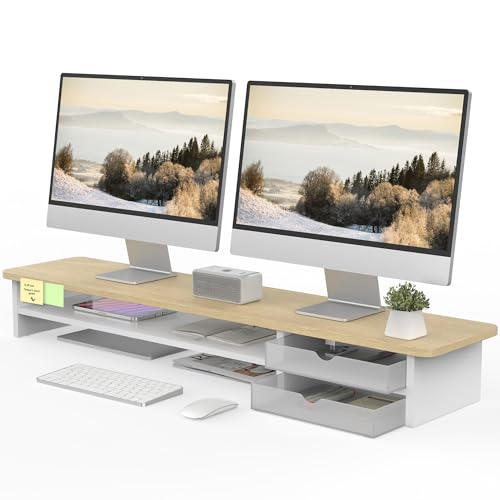
- 42.5-inch platform for two monitors
- 99-pound maximum capacity
- Two interchangeable frosted drawers
Best For: Wide dual-monitor desks needing concealed storage
Best Feature-Packed Metal Stand
Simple Trending USB Monitor Riser

- 7-inch ergonomic height
- Two drawers plus a storage tier
- Built-in USB 2.0 charging port
Best For: Desks needing storage and convenient accessory charging
Best Adjustable-Height Compact Riser
WALI Monitor Stand with Storage

- Three height settings up to 6.1 inches
- Removable drawer and two pen holders
- 44-pound support capacity
Best For: Compact workspaces needing flexible screen positioning
Best Compact Metal Organizer
Simple Trending Drawer Monitor Stand

- Compact 20-inch-wide design
- Drawer plus two pen holders
- Mesh platform and suction-cup base
Best For: Small desks needing a stable riser with basic storage
Rustic Dual-Screen Organizer

- Holds two monitors with a 68 kg stated capacity
- Open space underneath stores office supplies
- Steel legs and rustic-brown wood finish
Best For: Large dual-monitor workstations needing open storage
Compact Drawer Organizer

- Includes a drawer and two pen holders
- Two storage tiers organize notes and supplies
- Supports up to 44 pounds with adjustable feet
Best For: Compact desks, dorm rooms, and organized work areas
Expandable Dual-Monitor Storage
Simple Houseware Dual Monitor Riser

- Expands from 33.3 to 45 inches wide
- Organizer tray offers up to nine compartments
- Includes drawer, caddies, and phone/tablet holders
Best For: Dual-monitor desks needing customizable storage
Best Overall Wooden Riser

- Supports up to 80 pounds
- Two tiers store keyboards and accessories
- Works as a laptop, printer, or TV riser
Best For: Home offices wanting a sturdy, versatile wooden stand
Best Desk Organizer

- Includes a drawer and two pen holders
- Supports up to 44 pounds
- Uses non-slip, height-adjustable pads
Best For: Compact workspaces needing organized accessory storage
Best for Dual Monitors
OPNICE Dual Monitor Stand Riser

- Designed for two monitors
- Expands to 39 inches wide
- Includes a drawer and two pen holders
Best For: Dual-monitor desks needing extra organization and shelf space
Best Dual-Monitor Storage Riser – Fenge Oak Monitor Stand
For shoppers comparing monitor stands with storage, this Fenge riser offers a wide oak platform designed to hold two monitors while adding two tiers and a pair of frosted acrylic drawers. Its 5.5-inch height can help place screens in a more comfortable viewing position.
Best For: Dual-monitor setups that need broad surface space and concealed desktop storage.
Pros:
- 42.5-inch width accommodates two monitors, an ultrawide screen, laptop, or TV.
- Supports up to 99 pounds with a 15mm engineered-wood panel.
- Two interchangeable frosted drawers help organize smaller supplies.
- Water-resistant surface, rounded corners, and non-slip pads add practical desk-friendly details.
Cons:
- The wide footprint may not suit smaller desks.
- Assembly is required, although the included instructions and tools are designed for a 5–8 minute setup.
- The supplied notes indicate that cable management is currently included only on the upgraded black version.
This is a strong choice when width, high weight capacity, and drawer storage matter more than a compact footprint. The oak finish and two-tier layout also make it useful for creating a more organized home-office workstation.
Best Feature-Packed Metal Stand – Simple Trending USB Monitor Riser
This Simple Trending model combines monitor stands with storage and useful workstation extras. The 7-inch riser has two tiers, two drawers, mesh ventilation, a USB 2.0 charging port, and a 32-inch-wide platform suitable for many dual-monitor or mixed-device setups.
Best For: Home offices and gaming desks that need device storage, drawer space, and convenient USB access.
Pros:
- Two-tier design provides room for keyboards, Xbox consoles, cable boxes, or printers.
- Two drawers store pens, notes, and other small supplies.
- Built-in USB 2.0 charging port keeps compatible accessories easy to reach.
- Mesh construction promotes airflow, while suction cups and cable ties support stability and organization.
Cons:
- At 32 inches wide, it may be less suitable for especially compact desks.
- The USB connection is specified as USB 2.0, so it is intended for basic charging rather than high-speed data transfer.
Choose this stand if integrated features are a priority. Its 100-pound capacity and versatile lower tier make it practical for heavier or mixed equipment, while the drawers reduce everyday desktop clutter.
Best Adjustable-Height Compact Riser – WALI Monitor Stand with Storage
Among monitor stands with storage, the WALI riser is a straightforward option for smaller workspaces. Its 14.6-by-9.3-inch shelf supports a monitor, laptop, or printer, while three height settings and a removable drawer let you tailor the setup to your desk.
Best For: Compact desks and users who want adjustable screen height with simple accessory storage.
Pros:
- Three height options raise equipment by 4.6, 5.4, or 6.1 inches.
- Removable drawer keeps smaller office items out of sight.
- Two hanging pen holders provide accessible storage for writing tools.
- Tool-free assembly enables quick setup, and rubber pads help prevent slipping.
Cons:
- The 44-pound capacity is lower than some larger stands in this roundup.
- The 14.6-by-9.3-inch shelf is designed for one primary device rather than a wide dual-monitor arrangement.
This WALI stand makes sense when adjustability and a modest footprint are more important than maximum width. Its drawer and pen holders add useful organization without requiring a complicated assembly process.
Best Compact Metal Organizer – Simple Trending Drawer Monitor Stand
This compact Simple Trending stand is a practical pick for shoppers seeking monitor stands with storage on a smaller desk. Its 5.8-inch riser includes a lower tier, a drawer, and two pen holders, while the mesh platform supports airflow around a monitor or laptop.
Best For: Small home-office, dorm, or gaming desks that need basic storage and a stable metal riser.
Pros:
- 20-inch-wide footprint fits most monitors, laptops, and iMacs.
- Drawer and two pen holders organize supplies within easy reach.
- Lower tier accommodates items such as gaming keyboards, Xbox consoles, or cable boxes.
- Mesh platform improves airflow, while four suction cups help limit sliding.
Cons:
- Its 33-pound capacity is more limited than the larger stands listed here.
- The single-tier designation and compact width may not suit larger dual-monitor setups.
For a smaller workstation, this model balances a modest footprint with useful organization. It is best suited to lighter equipment and everyday desk accessories rather than a large, heavy multi-monitor arrangement.
Rustic Dual-Screen Organizer – WESTREE Dual Monitor Stand
If you need monitor stands with storage for a two-screen setup, the WESTREE riser combines a wide desktop surface with open space underneath. Its steel legs and rustic-brown wood finish suit monitors, laptops, printers, or other equipment while helping raise screens to a more comfortable viewing height.
Best For: Dual-monitor users who want sturdy, open storage beneath their screens.
Pros:
- Designed to hold two monitors and supports a stated load capacity of up to 68 kg.
- Open lower storage helps organize office supplies and keep the desktop clearer.
- Steel legs, optional anti-slip pads, and pre-drilled parts support stable, straightforward assembly.
Cons:
- The 35.8-inch width may be less suitable for compact desks.
- Its single-level, open design does not provide drawers or enclosed compartments.
Choose this model when capacity and open storage matter more than a compact footprint or detailed compartmentalization. It is a practical, rustic-looking riser for larger workstations.
Compact Drawer Organizer – gianotter Monitor Stand
The gianotter monitor stand is a compact choice among monitor stands with storage, pairing a raised screen platform with two storage tiers, a drawer, and two pen holders. Its wood-and-metal construction fits offices, dormitories, and home workspaces where small supplies need to stay close at hand.
Best For: Students and office users who want a compact riser with drawer and desktop organization.
Pros:
- Two storage tiers, two pen holders, and a drawer keep everyday supplies organized.
- Raises a monitor to help reduce hunching and improve viewing comfort.
- Supports up to 44 pounds and includes adjustable-height feet for stability.
- Sets up in approximately three minutes and can also serve as a laptop or printer riser.
Cons:
- The 17.7-inch width is intended for a smaller setup than wide dual-monitor risers.
- The stated 44-pound capacity is lower than that of some heavy-duty stands.
This is a sensible pick when built-in organization is the priority. The drawer and pen holders provide more structured storage than an open shelf while keeping the overall footprint relatively modest.
Expandable Dual-Monitor Storage – Simple Houseware Dual Monitor Riser
For shoppers comparing monitor stands with storage, the Simple Houseware riser stands out for its expandable width and configurable organization. It is designed for two monitors and combines a drawer, removable tray dividers, side caddies, and built-in phone and tablet holders.
Best For: Dual-monitor users who need flexible storage and a riser that can extend to 45 inches wide.
Pros:
- Designed for two monitors and extends from 33.3 to 45 inches wide.
- Six removable dividers create up to nine organizer compartments.
- Includes a sliding drawer, two side caddies, and phone/tablet storage.
- Raises screens 5 inches to support a more ergonomic viewing position.
Cons:
- At its full extension, the 45-inch width requires substantial desk space.
- The engineered-wood construction may not suit shoppers specifically seeking solid wood or metal-only construction.
This model is particularly useful when your storage needs change from day to day. Its adjustable width and removable dividers offer more flexibility than a fixed, open monitor shelf, provided your desk can accommodate the extended configuration.
Best Overall Wooden Riser – TEAMIX 20-Inch Monitor Stand
The TEAMIX is a practical choice among monitor stands with storage if you want a roomy, wood-built riser for a single monitor, laptop, printer, or small TV. Its two-tier layout creates space for a keyboard and other desk essentials while raising your screen toward a more comfortable viewing height.
Best For: Home offices and study areas needing a sturdy, versatile wooden riser with broad storage space.
Pros:
- Supports up to 80 pounds.
- Two-tier design provides storage for keyboards, mice, and office items.
- Can also serve as a laptop, printer, TV, or small coffee-bar stand.
- Assembly components and tools are organized for easier setup.
Cons:
- Assembly is required.
- The fixed 20-inch width may not suit every desk or dual-monitor setup.
Choose the TEAMIX when load capacity and flexible use matter more than built-in drawers or a metal frame. Its black engineered-wood construction gives you a substantial, multipurpose storage riser for a range of rooms.
Best Desk Organizer – OPNICE 2-Tier Monitor Stand
The OPNICE combines a monitor riser with dedicated organization, making it one of the more convenient monitor stands with storage for compact workspaces. A drawer and two hanging pen holders keep small supplies accessible while the two-tier design leaves room beneath the screen.
Best For: Office, dorm, and home users who want built-in storage for pens and smaller desk accessories.
Pros:
- Includes a drawer and two hanging pen holders.
- Sturdy carbon-steel construction supports up to 44 pounds.
- Non-slip pads help protect the desk and provide stability.
- Modern black design fits a variety of office setups.
Cons:
- Its 44-pound capacity is lower than some heavier-duty risers.
- The drawer and pen holders are better suited to small supplies than bulky equipment.
This OPNICE model is a strong fit when everyday organization is the priority. Select it for its dedicated drawer and pen storage, especially if you want a clean, minimalist workstation rather than a high-capacity shelf.
Best for Dual Monitors – OPNICE Dual Monitor Stand Riser
The OPNICE Dual Monitor Stand Riser is designed for users who need more screen coverage and organized storage. Among monitor stands with storage, it stands out for its dual-monitor focus, drawer, two pen holders, and extendable design that can widen to 39 inches.
Best For: Dual-monitor workstations that need a raised display area plus storage for keyboards, files, and desk supplies.
Pros:
- Designed to raise two monitors and extend up to 39 inches wide.
- Includes a drawer and two hanging pen holders.
- Creates space underneath for keyboards, mice, files, printers, or gaming items.
- No installation is required.
Cons:
- The extendable, dual-monitor design may take up considerable desk space.
- The supplied notes do not specify a load-capacity rating.
Pick this OPNICE riser if your main challenge is organizing a two-monitor setup without sacrificing access to daily essentials. Its no-installation design and expandable width make it especially practical for larger work surfaces.
How We Picked the Best Monitor Stands with Storage
We focused on practical desk organization rather than appearance alone. The selected Monitor Stands with Storage were compared for usable surface area, storage layout, monitor capacity, construction materials, footprint, and everyday convenience. We also considered whether each design accommodates a keyboard, laptop, printer, office accessories, or two monitors.
Because desk setups vary widely, this list includes compact single-monitor risers, wider dual-monitor stands, drawer-based organizers, and open two-tier shelves. Always confirm the product’s dimensions and stated weight capacity before placing equipment on top.
Quick Comparison
- Best for a polished single-monitor setup: Choose a wood-look riser with a drawer or frosted storage compartment.
- Best for two monitors: Look for a wide dual-monitor platform with reinforced metal supports.
- Best for accessories: Drawer-and-pen-holder designs keep small supplies contained and within reach.
- Best for keyboard storage: A two-tier riser provides open space beneath the upper shelf.
- Best for flexibility: Open shelves are easier to adapt for laptops, printers, speakers, and notebooks.
Key Buying Factors for Monitor Stands with Storage
Size and Desk Footprint
Measure the available width, depth, and height before ordering. A stand should leave room for cables and allow the monitor base to sit fully on the platform. Wider dual-monitor models need enough desk depth to prevent the setup from feeling cramped.
Storage Type and Accessibility
Drawers are useful for keeping pens, charging cables, and small accessories out of sight. Open shelves provide faster access and more flexible storage for keyboards, notebooks, or a laptop. Pen holders are convenient, but they can reduce usable shelf width.
Monitor Capacity and Stability
Check the stated load limit and whether the platform is intended for one or two displays. Metal frames generally offer strong support, while wood and engineered-wood tops can provide a warmer appearance. Non-slip feet and a rigid frame help reduce movement during typing.
Ergonomics and Cable Management
Raising a monitor can improve viewing height, but the ideal position depends on your chair, screen size, and posture. Look for enough clearance to route cables without sharp bends. A stand should not force the monitor too high or block access to ports.
Who Should Buy Which Monitor Stands with Storage?
Choose a drawer organizer if your main problem is desk clutter and you want small supplies hidden. Choose a two-tier shelf if you need open space for a keyboard, laptop, or frequently used documents. Choose a dual-monitor riser if you use two displays or want a broad platform for a monitor and accessories. Choose a compact single-monitor stand for a smaller desk or a simple home-office setup.
Before buying, compare the stand’s external dimensions with your desk, measure the monitor bases, and verify the weight rating. The best option is the one that raises the screen appropriately while adding storage you will actually use.