Managing a TV, streaming player, sound system, and other smart-home devices should not require a pile of remotes. The best smart remote controls with touchscreen combine intuitive on-screen commands with broad device compatibility and activity-based shortcuts.
We selected 10 touchscreen universal remotes ranging from straightforward all-in-one controllers to advanced hub-based systems. Use this guide to compare connectivity, setup, customization, charging, and everyday usability before choosing one.
Best 10 Smart Remote Controls with Touchscreen Picks for 2026
Classic Touchscreen Control
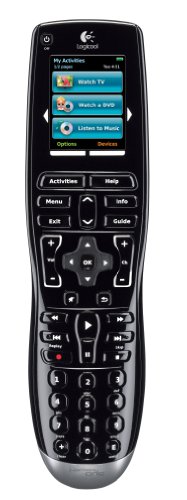
- Color LCD touchscreen with activity buttons
- Backlit, contoured physical controls
- Learns IR codes from existing remotes
Best For: TV users wanting touchscreen and tactile button control
App-Connected Touch Control

- Controls up to 12 devices
- App, IR, and Bluetooth connectivity
- Custom activities and backlit keys
Best For: Multi-device setups needing customizable control
Whole-Home Smart Hub Remote

- IR, Bluetooth, RF, and Wi-Fi support
- Included hub with 360-degree coverage
- Macros, voice control, and Matter support
Best For: Automated smart-home and home-theater systems
Rechargeable Display Remote

- Digital display with touch control
- Rechargeable lithium-ion battery
- Bluetooth and infrared connectivity
Best For: Users seeking a rechargeable multi-device remote
Best Hub-Based Pick
SofaBaton X1S Universal Remote

- Large database covering 6,000+ brands and 500,000+ devices
- Custom touchscreen buttons and one-click activities
- Hub with two IR blasters for cabinet-friendly control
Best For: Complex home theater setups needing customizable hub control
Best Standalone Value
SofaBaton U3 Smart Universal Remote

- Supports IR, Bluetooth, and RF devices
- Programmable macros and air-mouse control
- App setup with a 6,000+ brand database
Best For: Mixed-device entertainment systems that do not need a hub
Best Touchscreen Upgrade

- Quick-access touchscreen for channels, keypads, and macros
- Hub and two IR blasters extend control throughout the home
- Supports Home Assistant, MQTT, Alexa, and Google Assistant
Best For: Advanced home theater and smart-home automation setups
Best Standalone Touchscreen Remote

- 2.4-inch HD touchscreen with macros and number pad access
- Supports IR, Bluetooth, RF, and 2.4G Wi-Fi
- Standalone remote includes rechargeable battery and app customization
Best For: Buyers who do not need a hub or charging dock
Best Hub-Based Touchscreen Remote
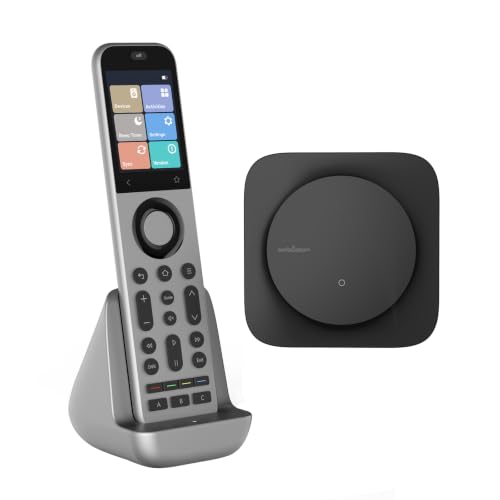
- Includes hub, charging dock, and touchscreen remote
- RF hub extends IR control through walls and cabinets
- Works with Alexa, Google Assistant, and Home Assistant
Best For: Complex home theaters and hidden-device installations
Best Smart-Home Integration

- MQTT and Home Assistant support for custom automation
- 2.4-inch touchscreen with macros and customizable layouts
- Hub offers 360-degree IR transmission up to 40 feet
Best For: Connected homes with advanced AV and lighting automations
Classic Touchscreen Control – Harmony One
The Logitech Harmony One is a practical choice for shoppers seeking smart remote controls with touchscreen functionality in a familiar universal-remote design. Its color display provides dedicated activity controls, while the backlit physical buttons help with viewing in dim rooms.
Best For: TV users who want a color touchscreen alongside tactile, backlit controls.
Pros:
- Color LCD touchscreen with dedicated on-screen activity buttons.
- Contoured backlit buttons support use in low light.
- Can learn IR codes from existing remote controls.
- Offers Internet-based setup and live customer support.
Cons:
- Listed compatibility is limited to television devices.
- Supports one device according to the supplied specifications.
- Connectivity includes Bluetooth, infrared, and radio frequency, but the notes do not specify touchscreen app control.
The Harmony One suits buyers who prefer a dedicated remote with a straightforward touchscreen interface rather than a phone-first setup. Its physical buttons and learning function add useful flexibility for a TV-focused system.
App-Connected Touch Control – Smart Control Pro Touch
The One for All Smart Control Pro Touch combines app control, infrared, and Bluetooth for shoppers comparing smart remote controls with touchscreen features. It supports up to 12 devices and adds custom activities, screens, and backlit keys for a more personalized setup.
Best For: Multi-device entertainment systems that need customizable touchscreen and app-based control.
Pros:
- Supports up to 12 devices.
- Combines app control, infrared, and Bluetooth.
- Offers custom activities and screens.
- Backlit keys improve visibility in darker rooms.
Cons:
- Requires four AAA batteries.
- The supplied specifications list a maximum range of 20 feet.
- Detailed touchscreen dimensions and app features are not provided.
This model is a strong fit when a single remote needs to coordinate several entertainment devices. Its activity customization and app connection offer more flexibility than a basic universal remote, while the 20-foot stated range may suit typical living-room use.
Whole-Home Smart Hub Remote – SofaBaton X2
The SofaBaton X2 is aimed at shoppers who want smart remote controls with touchscreen access, hub-based coverage, and advanced home-theater automation. Its system supports IR, Bluetooth, RF, and Wi-Fi, while the app can customize layouts, macros, and one-touch activities.
Best For: Smart-home and home-theater users who want hub control, voice commands, and automated activities.
Pros:
- Supports IR, Bluetooth, RF, and Wi-Fi protocols.
- Included hub provides 360-degree coverage with long-range transmission.
- App supports custom layouts, macros, key reassignment, and cloud backup.
- Works with Alexa, Google Assistant, Home Assistant, and Matter-certified devices according to the supplied notes.
Cons:
- The listed maximum supported-device specification is one, despite the broad protocol support.
- Optional IR repeaters are sold separately.
- Its advanced features may require app and smart-home configuration.
The X2 is the most automation-focused option in this group. Choose it if one-touch activities, voice control, and whole-home signal coverage matter more than keeping the setup strictly simple.
Rechargeable Display Remote – BECSY UC200
The BECSY UC200 is a compact option for shoppers looking for smart remote controls with a digital display and touch control. It uses Bluetooth and infrared, includes a rechargeable lithium-ion battery, and is specified for televisions, stereos, set-top boxes, and home-theater equipment.
Best For: Users wanting a rechargeable universal remote with display and touch-control functions.
Pros:
- Includes a digital display and touch control.
- Rechargeable lithium-ion battery is included.
- Compatible with home theater, set-top box, stereo, and television devices.
- Uses both Bluetooth and infrared connectivity.
Cons:
- The supplied notes do not detail the display size or touchscreen interface.
- Listed maximum range is 10 meters.
- Product specifications contain inconsistent quantity information, including 100 items listed.
The UC200 is worth considering if rechargeable power and a simple digital display are priorities. Its broad listed device compatibility is useful, but shoppers should verify the exact supported-device list and interface before buying.
Best Hub-Based Pick – SofaBaton X1S Universal Remote
The SofaBaton X1S is a practical choice if you want smart remote controls with touchscreen customization, hub-based control, and one-touch entertainment activities. Its LCD screen supports virtual buttons and command sequences, while the included hub helps control devices without aiming directly at them.
Best For: Home theater users who want broad device compatibility, custom activities, and reliable whole-room control.
Pros:
- Supports more than 6,000 brands and 500,000 device models through its continually updated database.
- Custom activities can combine commands such as powering on devices, changing inputs, and adjusting receivers.
- Hub includes two IR blasters and supports control from anywhere in the room, including with devices stored in cabinets.
- LCD customization, backlighting, raise-to-wake, voice control, and a Find My Remote feature add convenience.
Cons:
- The hub-based setup may be more involved than using a basic standalone remote.
- Voice control requires Alexa or Google Assistant integration.
The X1S stands out for combining a customizable LCD interface with a capable hub and a large compatibility database. It is especially appealing when your entertainment setup includes several devices or hidden components.
Best Standalone Value – SofaBaton U3 Smart Universal Remote
The SofaBaton U3 is a flexible all-in-one option for shoppers comparing smart remote controls with touchscreen-style customization and app support. It combines IR, Bluetooth, and RF control with programmable macros, Bluetooth device switching, and an air-mouse mode.
Best For: Users who want one programmable remote for TVs, soundbars, streaming devices, and other entertainment equipment without adding a hub.
Pros:
- Controls IR, Bluetooth, and RF devices, with support for up to three Bluetooth devices simultaneously.
- Macros can perform several actions with one button press, such as turning on the TV and soundbar.
- Air Mouse mode provides motion-based cursor control for compatible on-screen interfaces.
- Cloud database covers more than 6,000 brands and 500,000 devices, with app-based setup and customization.
Cons:
- Google Assistant voice control is limited to Bluetooth-connected devices and has stated compatibility exclusions.
- The optional R1 Repeater is required for extending control to devices in cabinets or other rooms.
- It uses physical buttons rather than the X2’s dedicated touchscreen.
The U3 offers broad connectivity and useful macro features in a standalone remote. It is a sensible fit for conventional entertainment systems where direct room-range control is sufficient and a separate hub is unnecessary.
Best Touchscreen Upgrade – SofaBaton X2 Universal Remote
The SofaBaton X2 is designed for shoppers seeking smart remote controls with touchscreen access and whole-home capabilities. Its quick-access screen supports favorite channels, numeric controls, and macros, while the hub and IR blasters extend control across rooms and through cabinets.
Best For: Smart-home and home theater users who want touchscreen shortcuts, charging-dock convenience, and integration with Home Assistant.
Pros:
- Touchscreen provides quick access to numeric keys, favorite channels, and custom macros.
- Supports IR, Bluetooth, Wi-Fi, and RF devices across a database of more than 6,000 brands and 500,000 devices.
- Includes a hub and two IR blasters for expanded coverage through walls and closed cabinets.
- Works with Home Assistant, MQTT, Alexa, Google Assistant, and selected Wi-Fi devices such as Roku and Sonos.
Cons:
- Its extensive smart-home and multi-device features may be more than needed for a simple TV setup.
- Advanced integrations may require additional configuration.
The X2 is the strongest match here for buyers prioritizing a dedicated touchscreen. The charging dock, quick-access controls, hub coverage, and smart-home integrations make it a compelling upgrade for elaborate entertainment and automation systems.
Best Standalone Touchscreen Remote – SofaBaton X2
If you want smart remote controls with touchscreen functionality without adding a hub or charging dock, the standalone SofaBaton X2 is a practical option. Its 2.4-inch HD display, broad device database, and support for IR, Bluetooth, RF, and 2.4G Wi-Fi make it suitable for varied entertainment setups.
Best For: Users who want a customizable touchscreen remote without a separate hub or dock.
Pros:
- Supports more than 500,000 devices from over 6,000 brands.
- 2.4-inch HD touchscreen provides quick access to number pads and macros.
- One-touch Activities can combine multiple commands, such as powering on a TV and adjusting a soundbar.
- Rechargeable design and app-based button, layout, and macro customization.
Cons:
- This package does not include the hub or charging dock.
- Advanced Home Assistant control requires MQTT setup.
The standalone X2 is a strong fit for simplifying a multi-device setup while keeping the hardware footprint small. Choose it if you already have a charging solution and do not need hub-based whole-home IR coverage.
Best Hub-Based Touchscreen Remote – SofaBaton X2 with Dock
Among smart remote controls with touchscreen interfaces, this SofaBaton X2 bundle stands out for adding a hub, charging dock, and whole-home IR coverage. It is designed for systems that include hidden equipment, multiple rooms, or hands-free voice control through Alexa and Google Assistant.
Best For: Home theaters needing hub-based control, charging convenience, and coverage for devices behind cabinets or walls.
Pros:
- Controls IR, Bluetooth, Wi-Fi, and RF devices from more than 500,000 supported models.
- Included hub uses RF communication and IR emitters to control equipment without direct line of sight.
- 2.4-inch HD touchscreen works alongside dedicated shortcut buttons.
- Charging dock, one-touch Activities, Home Assistant integration, and Alexa/Google Assistant support add convenience.
Cons:
- The hub-based bundle takes up more space than a standalone remote.
- Optional R1 repeaters are needed for expanded coverage beyond the included setup.
- App customization and advanced integrations may require additional setup time.
This is the more complete X2 package for a built-in entertainment center or larger smart-home system. The hub and dock justify choosing it over the remote-only version when reliable coverage and always-ready charging matter.
Best Smart-Home Integration – SofaBaton X2 Hub Bundle
This SofaBaton X2 bundle is one of the more automation-focused smart remote controls with touchscreen functionality. Along with its 2.4-inch display and multi-protocol support, it offers Home Assistant and MQTT integration for coordinating entertainment equipment, lights, curtains, and other connected devices.
Best For: Smart-home enthusiasts who want programmable Activities and direct Home Assistant control.
Pros:
- Cloud library supports over 500,000 devices across more than 6,000 brands.
- Touchscreen provides access to custom layouts, digital keypads, and macros.
- Hub provides 360-degree IR transmission with seven high-power emitters and a stated range of up to 40 feet.
- MQTT and Home Assistant support enable direct automation of AV gear, lighting, and curtains.
Cons:
- Advanced MQTT and Home Assistant features are better suited to technically confident users.
- The included hub and dock make this a larger setup than a remote-only package.
- Obstructed or farther equipment may require the optional IR extension cable.
Choose this version when automation is a priority rather than simply replacing several remotes. Its combination of touchscreen control, hub coverage, and programmable integrations makes it especially useful in a connected living space.
How We Picked the Best Smart Remote Controls with Touchscreen
We focused on the features that matter most in a real living-room setup: touchscreen responsiveness, device compatibility, connection methods, activity customization, hub support, charging convenience, and app quality. We also considered whether each remote is better suited to simple infrared control or more complex systems involving Bluetooth, Wi-Fi, radio frequency, streaming devices, and AV receivers.
Because product names and bundles can vary, check the exact listing for included hubs, repeaters, docks, and supported devices before buying. A remote sold alone may not provide the same range or automation as a complete hub package.
Quick Comparison
| Feature | What to look for | Best suited to |
|---|---|---|
| Touchscreen | Clear menus, responsive controls, and useful customization | Frequent device switching and activity shortcuts |
| Hub or repeater | Centralized control, extended range, and hidden-component support | Complex home theater cabinets |
| Bluetooth and Wi-Fi | Direct control of modern streaming and smart devices | Connected entertainment systems |
| Infrared control | Broad compatibility and reliable line-of-sight operation | TVs, receivers, cable boxes, and older equipment |
| Charging dock | Convenient recharging and a consistent storage location | Daily use and shared households |
Key Buying Factors for Smart Remote Controls with Touchscreen
Compatibility and Connectivity
Confirm that the remote supports every device you want to control, especially game consoles, soundbars, streaming boxes, projectors, and less-common brands. IR is important for traditional components, while Bluetooth and Wi-Fi can improve control of newer devices. A hub or repeater is useful when equipment is inside a cabinet or positioned outside the remote’s line of sight.
Activities and Customization
Look for programmable activities such as Watch TV, Watch a Movie, or Listen to Music. These can turn on the right components, select inputs, and present only the controls you need. App-based setup is often easier for complex configurations, but verify that the app supports your phone and preferred customization options.
Screen, Controls, and Battery Life
A touchscreen should simplify operation rather than replace every tactile button. Physical volume, navigation, and playback controls can be faster in the dark, while a configurable display helps reduce clutter. Consider battery life, charging frequency, dock quality, and whether the remote remains usable while charging.
Who Should Buy Which Smart Remote Controls with Touchscreen?
Choose a simpler all-in-one model if you mainly need one controller for a TV, streaming device, and sound system without extensive automation. Choose a hub-based touchscreen remote if your components are concealed, spread across the room, or controlled through multiple connection types. A model with strong app customization is best for households with different viewing routines, while a dock-equipped option suits frequent daily use.
Before ordering, make a complete device list and decide whether you need a hub, repeater, Bluetooth, Wi-Fi, or only IR. That short checklist will help you avoid paying for features you will not use—and prevent compatibility surprises after setup.