A laptop cooling pad with adjustable fan speed can help manage heat during gaming, video editing, and other demanding workloads while also improving desk comfort. The best models combine useful airflow control with stable support, sensible height adjustment, and compatibility with your laptop’s size.
We’ve compared these 10 options by fan configuration, speed controls, adjustability, connectivity, noise-conscious design, and overall practicality so you can choose a cooler that fits your setup rather than simply picking the model with the most fans.
Best 10 Laptop Cooling Pad with Adjustable Fan Speed Picks for 2026
Portable Dual-Fan Control
LIENS Adjustable Laptop Cooling Pad
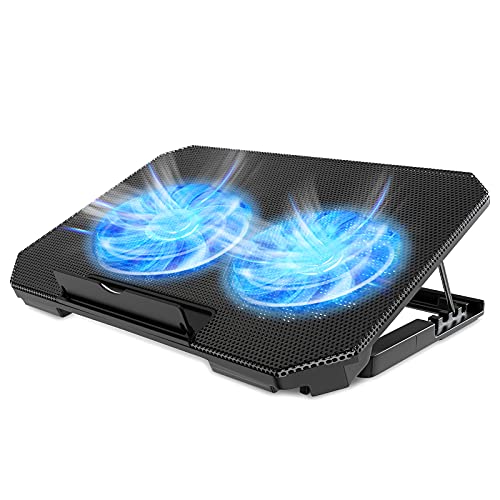
- Two fans adjustable from 800-2000 RPM
- Four height settings and detachable stopper
- Dual USB ports in a lightweight design
Best For: Portable cooling for 12-15.6-inch laptops
Five-Fan Coverage

- Five fans with selectable 1, 4, or 5-fan modes
- Six height settings for ergonomic use
- Dual USB hubs and 12-17-inch compatibility
Best For: Broad cooling coverage for home or desk use
High-Airflow Stand

- Three speeds rated at 40, 52, and 85 CFM
- Height adjusts up to 11.8 inches
- Foldable aluminum stand supports up to 22 pounds
Best For: Ergonomic desk setups with adjustable airflow
Best Family-Friendly Pick
Quiet 3-Fan Adjustable Laptop Cooling Pad

- Three quiet fans with wheel-controlled speed adjustment
- Five height levels plus a built-in phone holder
- Supports laptops under 17 inches and adds two USB ports
Best For: Shared home, school, work, and casual gaming setups
Best Aluminum Stand
ENHANCE 6-Fan Cooling Pad with Speed Control

- Six fans provide up to 85 CFM of airflow
- Seven height positions and a perforated aluminum top
- Fits laptops up to 17.3 inches with USB data pass-through
Best For: Larger laptops used at home, school, or an office desk
Best for Gaming Features
10-Fan RGB Laptop Cooling Stand

- Ten fans with five adjustable speed settings
- Seven height levels and customizable RGB modes
- Fits 12- to 18.1-inch laptops with USB Type-C connectivity
Best For: Gaming and video-editing setups needing broad cooling coverage
Most Adjustable Cooling
LIANGSTAR 8-Fan Laptop Cooling Pad

- Eight ultra-quiet fans with infinitely adjustable speed control
- Seven height settings and built-in phone holder
- Two USB ports and support for 12- to 17.3-inch laptops
Best For: Users prioritizing precise airflow and ergonomic adjustment
Quiet Everyday Cooling
ICE COOREL 8-Fan Laptop Cooler

- Eight ultra-quiet fans with adjustable 2400–2600 RPM speeds
- Metal mesh surface helps support heat dissipation
- Six height positions and two USB 2.0 ports
Best For: Quiet home or office laptop cooling
Best for Gaming Controls
ICE COOREL RGB 8-Fan Cooling Pad

- LCD shows current fan speed with touch controls
- Eight quiet fans and six adjustable height positions
- Ten RGB lighting modes plus a phone stand
Best For: Gamers wanting cooling controls and RGB customization
Targeted RGB Cooling – DEPGI Movable-Fan Laptop Cooler
If you want a laptop cooling pad with adjustable fan speed, the DEPGI combines three manual speed levels with an automatic temperature-sensing mode. Its movable 5.5-inch fan can be aligned with your laptop’s vents, while the adjustable stand supports 14- to 17.3-inch laptops.
Best For: Gaming, creative work, and users who want targeted airflow with RGB lighting.
Pros:
- Movable 5.5-inch fan directs airflow toward hot spots.
- Offers auto temperature adjustment plus three manual speed levels.
- Includes multiple height settings and 10 RGB lighting modes.
- Rated at no more than 40dB for quieter use.
Cons:
- Its 14- to 17.3-inch compatibility is narrower than some smaller laptop stands.
- Uses one fan rather than a multi-fan layout.
The DEPGI stands out when vent alignment and adjustable control matter more than having several fans. It is a versatile choice for larger laptops and desk setups that benefit from lighting and ergonomic height adjustment.
Portable Dual-Fan Control – LIENS Adjustable Laptop Cooling Pad
The LIENS is a practical laptop cooling pad with adjustable fan speed, using two large fans with freely adjustable speeds from 800 to 2000 RPM. Four height settings, a detachable stopper, and dual USB ports make it suitable for everyday work, gaming, and travel with 12- to 15.6-inch laptops.
Best For: Portable setups that need adjustable airflow, ergonomic positioning, and an extra USB connection.
Pros:
- Two 5.1-inch fans provide adjustable 800-2000 RPM operation.
- Four height settings support a more comfortable viewing angle.
- Built-in dual USB ports add connectivity for peripherals.
- Lightweight, flat design is convenient for backpacks or briefcases.
Cons:
- Fits laptops up to 15.6 inches, so it is not intended for larger models.
- Blue LED lighting may not suit every desk setup.
With two adjustable-speed fans and a travel-friendly form factor, the LIENS is a balanced option for smaller laptops. Its USB pass-through and height adjustment add useful everyday convenience without a bulky design.
Five-Fan Coverage – Kootek Laptop Cooling Pad
The Kootek offers a multi-fan approach for shoppers seeking a laptop cooling pad with adjustable fan speed. Two switches let you select one fan, four fans, or all five fans, while six height settings and dual USB ports add flexibility for work, gaming, and entertainment.
Best For: Users who want selectable multi-fan coverage for 12- to 17-inch laptops.
Pros:
- Five fans provide broad cooling coverage.
- Switches allow one-, four-, or five-fan operation.
- Six adjustable height settings support ergonomic positioning.
- Includes two USB hubs for additional devices.
Cons:
- At 1.16 kg, it is heavier than the LIENS model.
- Fan selection is controlled in preset groups rather than by continuously variable speed.
- Blue LEDs may be less suitable for understated workspaces.
The Kootek is a strong fit when coverage and selectable cooling modes are priorities. Its five-fan layout and broad 12- to 17-inch compatibility make it useful for larger laptops, though its heavier build is less travel-oriented.
High-Airflow Stand – SHUWEI 3-Speed Laptop Cooler
The SHUWEI is a laptop cooling pad with adjustable fan speed built around one enlarged fan and three airflow settings. It also functions as a highly adjustable aluminum stand, with height adjustment up to 11.8 inches and a 0- to 120-degree angle range for laptops up to 15 inches.
Best For: Users who want a cooling stand with strong airflow options and extensive screen-height adjustment.
Pros:
- Three speeds provide stated airflow levels of 40, 52, and 85 CFM.
- Height adjusts up to 11.8 inches, with a 0-120-degree angle range.
- Anodized aluminum construction supports up to 22 pounds.
- Foldable design works with laptops and tablets up to 15 inches.
Cons:
- Its elevated design may require an external keyboard and mouse for comfortable typing.
- One fan may offer less coverage than multi-fan cooling pads.
- Compatibility is limited to devices up to 15 inches.
The SHUWEI is more than a basic cooling pad: it is an adjustable aluminum riser with three clearly defined airflow levels. Choose it if posture, display height, and foldability are as important as fan-speed control.
Best Family-Friendly Pick – Quiet 3-Fan Adjustable Laptop Cooling Pad
If you need a laptop cooling pad with adjustable fan speed for several devices at home, this model combines three quiet fans with a simple wheel control. Its five height settings, phone holder, and support for laptops under 17 inches make it practical for work, school, and casual gaming.
Best For: Families and households sharing a cooling stand across work, school, and gaming laptops.
Pros:
- Three ultra-silent fans with noise listed at about 40dB.
- Wheel-style fan-speed control and five adjustable height levels.
- Includes a phone holder and two extra USB ports.
- ABS and stainless steel mesh construction with anti-slip front pads.
Cons:
- The supplied notes do not specify exact airflow or fan-speed levels.
- Type-C devices may require a separate Type-C-to-USB adapter.
This is a versatile, low-fuss choice when quiet operation and shared household convenience matter more than advanced gaming features.
Best Aluminum Stand – ENHANCE 6-Fan Cooling Pad with Speed Control
For a laptop cooling pad with adjustable fan speed and a broad metal surface, the ENHANCE model pairs six fans with an aluminum top plate. It supports laptops up to 17.3 inches, offers seven height positions, and provides stated airflow of up to 85 CFM.
Best For: Home-office, school, and workstation users with larger laptops who want an aluminum riser.
Pros:
- Six-fan design delivers airflow rated up to 85 CFM at up to 2500 RPM.
- Seven height settings help adjust viewing angle and typing position.
- Perforated aluminum top plate helps disperse heat.
- Includes USB data pass-through and a three-year warranty.
Cons:
- The USB pass-through is not intended for charging.
- Its stated maximum laptop size is 17.3 inches, smaller than some extra-large models.
Choose this model if a sturdy aluminum surface, measured airflow specification, and extensive height adjustment are priorities for a desk-based setup.
Best for Gaming Features – 10-Fan RGB Laptop Cooling Stand
This laptop cooling pad with adjustable fan speed is designed for users who want extensive coverage and gaming-oriented extras. Ten fans, five speed settings, seven height levels, and RGB lighting support laptops from 12 to 18.1 inches.
Best For: Gamers and creators using larger laptops who want adjustable cooling and customizable RGB lighting.
Pros:
- Ten fans combine four large and six small fans with five speed settings.
- Seven RGB colors and five dynamic lighting modes add customization.
- Seven adjustable heights support a more ergonomic setup.
- USB Type-C connectivity and dual expansion ports support peripherals.
Cons:
- The one-year warranty is shorter than some competing options.
- RGB lighting may be unnecessary for users seeking a basic cooling stand.
- The supplied notes do not provide a specific airflow or noise rating.
Its large size range and extensive controls make it the most feature-focused option here, particularly for gaming or video-editing setups where lighting and multiple speed levels are useful.
Most Adjustable Cooling – LIANGSTAR 8-Fan Laptop Cooling Pad
For shoppers seeking a laptop cooling pad with adjustable fan speed, the LIANGSTAR stands out with eight ultra-quiet fans and an infinitely adjustable speed control. Its large metal mesh surface, seven height positions, and broad 12- to 17.3-inch compatibility make it a flexible choice for gaming, work, or extended laptop sessions.
Best For: Users who want highly adjustable airflow, multiple viewing angles, and a built-in phone holder.
Pros:
- Eight ultra-quiet fans with gear-button speed adjustment and blue speed-indicator lighting.
- Seven height settings, an ergonomic design, and a non-slip baffle for added stability.
- Two USB ports, a large metal mesh surface, and a convenient phone holder.
- Supports most laptops from 12 to 17.3 inches.
Cons:
- At 1 kg, it may be less convenient to carry than a lighter cooling pad.
- The blue LED lighting may not suit users seeking a subdued appearance.
Choose this model if precise fan adjustment and ergonomic flexibility matter more than minimizing size or weight. The combination of eight fans, seven height settings, and extra USB connectivity gives it a feature-rich design for larger laptops.
Quiet Everyday Cooling – ICE COOREL 8-Fan Laptop Cooler
The ICE COOREL is a practical laptop cooling pad with adjustable fan speed for home or office use. Its eight fans operate at adjustable speeds from 2400 to 2600 RPM, while the metal mesh surface helps draw heat away and the stand offers multiple height positions.
Best For: Laptop users wanting quiet, adjustable cooling with USB connectivity and a straightforward stand design.
Pros:
- Eight ultra-quiet fans with adjustable 2400–2600 RPM speeds.
- Metal mesh construction supports heat dissipation and provides a firm laptop surface.
- Two USB 2.0 ports allow data transmission or connection to other devices.
- Six adjustable height positions and two baffles help improve comfort and stability.
Cons:
- The supplied description gives a 13- to 15.6-inch focus while also stating compatibility up to 17 inches, so larger-laptop fit should be checked.
- It does not list a built-in display or RGB lighting controls.
This is a sensible option for buyers who value quiet operation and basic adjustability over gaming-focused extras. Its fan-speed range, metal mesh surface, and dual USB ports cover the essentials for everyday laptop cooling.
Best for Gaming Controls – ICE COOREL RGB 8-Fan Cooling Pad
For gaming setups that need a laptop cooling pad with adjustable fan speed, this ICE COOREL model adds an LCD readout and touch controls for monitoring and changing fan speed. Eight quiet fans, six height settings, RGB lighting modes, and a phone stand make it designed for both cooling and desk presentation.
Best For: Gamers who want visible fan-speed feedback, adjustable cooling modes, and customizable RGB lighting.
Pros:
- Eight fans provide selectable cooling modes and are designed for quiet operation.
- LCD display shows the current fan speed for quick monitoring.
- Touch controls manage fan speed and RGB lighting, with ten RGB light modes.
- Six height adjustments and a phone stand add convenience to gaming setups.
Cons:
- The 1.12 kg weight and larger 16-by-12-inch dimensions may reduce portability.
- Its gaming-oriented RGB design may be excessive for users wanting a discreet work accessory.
- The product is specified for 15- to 17.3-inch laptops, limiting suitability for smaller devices.
This model makes the most sense when controls and visual feedback are important. The LCD fan-speed display and touch interface are useful differentiators, while the six-position stand and quiet eight-fan layout support longer gaming sessions.
How We Picked the Best Laptop Cooling Pad with Adjustable Fan Speed
We focused on features that affect everyday cooling performance and usability: adjustable fan speeds, fan placement, supported laptop sizes, height positions, USB connectivity, stability, and additional conveniences such as temperature sensors, phone holders, or RGB lighting. Fan count is only one factor; a well-positioned, controllable fan can be more useful than a larger number of fixed fans.
We also considered whether each stand suits compact notebooks, mainstream 15.6-inch laptops, or larger gaming systems. Because noise and desk ergonomics matter as much as raw airflow, models with multiple speed settings and adjustable viewing angles received particular attention.
Quick Comparison
| Best For | Look For | Notable Features |
|---|---|---|
| Everyday laptops | Quiet adjustable airflow | Compact design, simple controls, USB pass-through |
| Gaming laptops | High airflow and broad coverage | Multiple fans, larger platform, sturdy stops |
| Ergonomic desk setups | Several height positions | Adjustable riser, stable base, comfortable viewing angle |
| Portable use | Low weight and straightforward controls | Fewer moving parts, moderate fan count, easy storage |
Key Buying Factors for a Laptop Cooling Pad with Adjustable Fan Speed
Fan Control and Airflow
Adjustable speed lets you match cooling to the workload. Lower settings are preferable for browsing or office work, while higher settings can help move more air during gaming or rendering. Look for controls that are easy to reach and provide genuinely useful steps rather than a barely noticeable adjustment.
Size, Fan Placement, and Compatibility
Check the cooler’s stated laptop range and platform dimensions, especially for 16- to 18-inch gaming laptops. The fans should sit beneath your laptop’s intake vents; a high fan count does not guarantee better results if airflow misses those openings.
Height Adjustment and Stability
Multiple height settings can improve wrist and neck posture, but the stand must remain stable at its highest position. A front retaining lip, non-slip pads, and a rigid frame are important for preventing movement during typing or gaming.
Ports, Power, and Extras
Most cooling pads draw power through USB. USB pass-through ports are useful when the pad would otherwise occupy a needed laptop port. Temperature sensors, RGB lighting, phone holders, and USB-C connections can add convenience, but they should not outweigh cooling performance and build quality.
Who Should Buy Which Laptop Cooling Pad with Adjustable Fan Speed?
Choose a compact, lower-fan model if you use a thin laptop for school, office work, or light creative tasks and mainly want a more comfortable angle. A mid-size cooler with two or three adjustable fans is a practical choice for mainstream 12- to 15.6-inch laptops. For gaming notebooks or sustained demanding workloads, prioritize a wide platform, strong airflow, multiple speed settings, and secure support over decorative lighting.
If you frequently switch between quiet work and intensive sessions, select a Laptop Cooling Pad with Adjustable Fan Speed rather than a fixed-speed design. Users who value posture should prioritize height range, while frequent travelers should avoid oversized multi-fan stands unless the extra cooling justifies the added bulk.