Managing two or more computers from one keyboard, mouse, and display setup can simplify your desk and reduce cable clutter. The best KVM switches make switching between systems quick while preserving the resolution, refresh rate, and USB connectivity your workflow requires.
This roundup compares 10 options covering single- and dual-monitor configurations, two- and four-computer setups, HDMI and DisplayPort connections, and video support up to 8K.
Best 10 Kvm Switches Picks for 2026
Best Dual-Monitor 8K KVM
8K HDMI KVM Switch for 2 Computers

- Dual-monitor copy and extended modes
- Up to 8K@60Hz and 4K@120Hz
- Four USB 3.0 ports with 12V power
Best For: Two-computer HDMI workstations with dual monitors
Best 4-Computer HDMI KVM

- Switches four computers through one monitor
- Supports 8K@60Hz and 4K high refresh rates
- Four USB 3.0 ports and wired controller
Best For: Four-PC single-monitor offices, labs, or gaming rooms
Best Value 4-Port HDMI KVM

- Controls four computers with one monitor
- Supports 4K@60Hz and EDID adaptive switching
- Four USB 3.0 ports with wired remote
Best For: Four-PC home offices, IT benches, and single-monitor workstations
Best Dual-Monitor HDMI Pick
UGREEN 4K HDMI KVM for 2 Computers

- Supports two HDMI monitors with extend or mirror modes
- 4K@60Hz output and four USB 3.0 ports
- Button and wired-controller switching; no hotkeys
Best For: Two-computer, two-monitor HDMI workstations
Best Single-Monitor Value
Hearvo 4K HDMI KVM for 2 Computers

- Shares one monitor and USB peripherals between two computers
- 4K@60Hz HDMI with adaptive EDID
- Four USB 3.0 ports and a wired remote
Best For: Single-monitor home and office desks
Best High-Resolution Triple-Monitor Pick

- Switches two computers across three monitors
- Supports 8K@60Hz and 4K@240Hz
- Includes four USB 3.0 ports and desktop controller
Best For: Triple-monitor, high-refresh professional workstations
Best 4-Port Value

- Controls four computers from one HDMI monitor
- Supports 4K at 60Hz
- Includes USB 3.0, USB-C, and wired switching
Best For: Four-computer workstations needing shared USB peripherals
Best USB Expansion
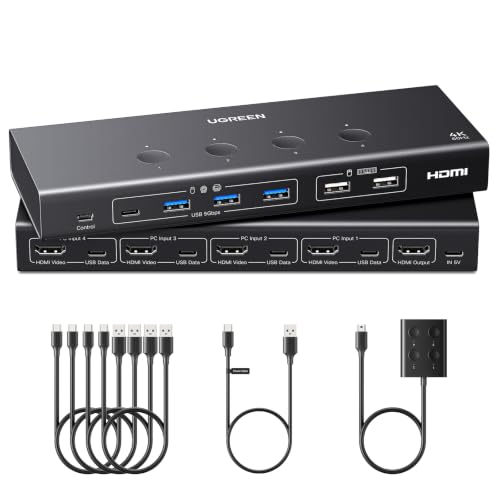
- Shares one monitor across four computers
- Provides six USB ports
- Adds EDID emulation and 4K60 support
Best For: Multi-device workstations with numerous USB accessories
Best Compact Option

- Switches two computers through one monitor
- Supports 4K at 60Hz
- Compact, USB-powered design with wired control
Best For: Two-PC desks prioritizing simple switching and minimal hardware
Best Dual-Monitor 8K KVM – 8K HDMI KVM Switch for 2 Computers
For users comparing kvm switches for a two-computer, two-monitor workspace, this HDMI model combines dual-display control with four shared USB 3.0 ports. It supports copy or extended display modes and resolutions up to 8K at 60Hz or 4K at 120Hz, provided each computer has two HDMI outputs and supports multiple displays.
Best For: Dual-monitor office, creative, or workstation setups using two HDMI-equipped computers.
Pros:
- Supports extended or mirrored output across two monitors.
- Handles up to 8K@60Hz and 4K@120Hz, with backward compatibility.
- Shares four USB 3.0 peripherals and includes a wired desktop controller.
- External 12V power helps support higher-power USB devices.
Cons:
- Requires two HDMI ports on each computer for extended dual-monitor use.
- Does not support keyboard hotkey switching.
- High-power USB devices require the included power adapter.
This is a feature-rich choice when dual-screen productivity matters, but buyers should verify graphics outputs and display-mode support before ordering.
Best 4-Computer HDMI KVM – UGREEN 8K HDMI KVM Switch
Among kvm switches for managing several computers from one desk, this UGREEN model supports four HDMI-connected hosts sharing one monitor and four USB 3.0 peripherals. Its 8K@60Hz capability, aluminum housing, and wired controller make it suitable for productivity, testing, and gaming spaces.
Best For: Users who need to switch one display, keyboard, mouse, and USB accessories among four computers.
Pros:
- Controls four computers through one monitor setup.
- Supports up to 8K@60Hz, plus high-refresh 4K and 1080p modes.
- Provides three USB-A and one USB-C USB 3.0 ports.
- Offers front-button and wired-controller switching.
Cons:
- Each computer needs both an HDMI cable and USB-A-to-C data cable.
- Does not support hotkey switching or EDID emulation.
- Requires external power for stable operation, especially with high-power devices.
This is a practical four-host solution for a single-display workflow, though its cable requirements and lack of hotkey switching should be considered during setup planning.
Best DisplayPort Dual-Monitor KVM – 4K DisplayPort KVM Switch
This DisplayPort option is one of the more capable kvm switches for two computers that each need a dual-monitor connection. It supports 4K at 144Hz, extended or mirrored displays, four USB 3.0 peripherals, and switching through either the chassis button or included desktop controller.
Best For: Dual-monitor DisplayPort workstations where smooth 4K high-refresh output is important.
Pros:
- Supports dual displays in extended or copy mode.
- Delivers up to 4K@144Hz with up to 48Gbps video bandwidth.
- Shares four USB 3.0 devices between two computers.
- Includes a 12V adapter, two USB-A cables, and a wired controller.
Cons:
- Requires two DisplayPort cables per computer; DP cables are not included.
- Each computer must support multiple monitors.
- Does not support keyboard hotkey switching.
Choose this model when your computers and monitors use DisplayPort and high refresh rates are a priority. Confirm graphics support and budget for the additional DisplayPort cables.
Best Value 4-Port HDMI KVM – 4K HDMI KVM Switch
For straightforward kvm switches that consolidate several PCs into one monitor station, this four-port HDMI model supports 4K at 60Hz and shares a keyboard, mouse, webcam, printer, or storage devices. EDID adaptive support helps the switch match an appropriate display resolution when changing sources.
Best For: Home offices, IT workstations, test benches, and other four-PC single-monitor setups.
Pros:
- Switches among four computers using one monitor.
- Supports 4K@60Hz through HDMI 2.0 with up to 18Gbps bandwidth.
- Includes three USB-A and one USB-C USB 3.0 ports.
- Provides numbered front buttons, LEDs, and a wired remote.
Cons:
- Does not support hotkey switching.
- Each computer requires an HDMI cable and USB cable.
- Its design is limited to one-monitor output.
This is a sensible option for users prioritizing four-host control and simple physical switching over dual-monitor support or keyboard shortcuts. Its included accessories can also simplify initial installation.
Best Dual-Monitor HDMI Pick – UGREEN 4K HDMI KVM for 2 Computers
For shoppers comparing kvm switches for a two-monitor workspace, this UGREEN model combines dual HDMI display support with shared keyboard, mouse, and USB accessories. It supports extend or mirror mode and switches by onboard button or wired desktop controller, with no software installation required.
Best For: Home offices and professional setups using two HDMI monitors with two computers.
Pros:
- Supports two monitors, two computers, and extend or mirror display modes.
- Offers 4K resolution at 60Hz with HDMI 2.0, HDR, HDR10+, and HDCP support.
- Includes four USB 3.0 ports, including USB-A and USB-C, for shared peripherals.
- Includes HDMI and USB cables, power adapters, and a desktop controller.
Cons:
- Requires two HDMI cables and one USB-A cable per computer.
- Does not support EDID emulation or keyboard-shortcut switching.
- Both monitors display the selected computer rather than separate computers simultaneously.
This is a practical dual-monitor HDMI KVM for users who prioritize 4K output and broad USB connectivity. Confirm that both computers support dual displays and that your output HDMI cables meet the stated length guidance before buying.
Best Single-Monitor Value – Hearvo 4K HDMI KVM for 2 Computers
This Hearvo model is a straightforward choice among kvm switches for sharing one monitor, keyboard, mouse, and USB accessories between two computers. It combines HDMI and USB switching, supports 4K at 60Hz, and offers both a chassis button and wired remote.
Best For: Desks where two computers need to share one HDMI monitor and several USB peripherals.
Pros:
- Controls two computers through one shared monitor, keyboard, and mouse.
- Supports 4K@60Hz, 4K@30Hz, 2K, 1080p, 3D, and HDCP 2.2.
- Provides three USB-A and one USB-C USB 3.0 port for peripherals.
- Includes a wired remote for convenient switching away from the main unit.
Cons:
- Designed for one monitor rather than a dual- or triple-monitor setup.
- The supplied notes do not specify support for keyboard hotkey switching.
- Although described as plug and play without a power supply, connected setups may still depend on the computers and peripherals used.
For a compact single-display setup, the Hearvo focuses on useful essentials: 4K HDMI, four USB 3.0 ports, adaptive EDID, and flexible physical switching. It is best suited to users who do not need multi-monitor output.
Best High-Resolution Triple-Monitor Pick – UGREEN 8K DP/HDMI KVM
For demanding kvm switches setups, this UGREEN unit supports three monitors across two computers using two DisplayPort 1.4 connections and one HDMI 2.1 connection. It is built for high-refresh workflows, with support up to 8K@60Hz or 4K@240Hz, plus shared USB peripherals and button or desktop-controller switching.
Best For: Content creators, IT professionals, and home-office users with two computers that support triple-monitor output.
Pros:
- Supports three monitors with mirror or extended display modes.
- Offers up to 8K@60Hz and 4K@240Hz, with VRR, FreeSync, and G-Sync support.
- Combines two DisplayPort outputs, one HDMI output, and four USB 3.0 ports.
- Includes required DP, HDMI, and USB cables plus a desktop controller.
Cons:
- Both computers must support triple-monitor output for all three displays to work.
- Each computer requires two DP cables, one HDMI cable, and one USB cable.
- Requires the included power adapter and does not support EDID emulation or hotkey switching.
This is the most capable option here for a three-screen, high-refresh workspace, but it also has the strictest connection requirements. Verify that each computer has two DisplayPort ports, one HDMI port, and sufficient multi-display capability before purchasing.
Best 4-Port Value – 4-Computer 4K HDMI KVM
If you need a practical way to manage four computers, this 4-port KVM switch lets one HDMI monitor, keyboard, and mouse serve all four systems. It supports 4K at 60Hz and offers front-button or wired-controller switching, making it a flexible choice for a busy workstation.
Best For: Users who need to share one monitor and USB peripherals across four HDMI-equipped computers.
Pros:
- Supports up to 3840×2160 at 60Hz and is compatible with lower resolutions.
- Provides three USB 3.0 ports plus one USB-C port for shared peripherals.
- Includes front-panel buttons, a wired remote keypad, LED indicators, and several connection cables.
Cons:
- Does not support hotkey switching.
- Requires computers with HDMI output and USB ports.
This KVM switch is a strong fit when four-system capacity and fast USB connectivity matter more than hotkey control. Its included cables and two physical switching methods also make setup relatively straightforward.
Best USB Expansion – UGREEN 4-Computer 4K KVM
Among kvm switches for a multi-computer desk, this UGREEN model stands out for its six USB ports and broad video support. It can share one monitor and USB devices across four computers while supporting 4K at 60Hz, HDR, 3D, and HDMI 2.0.
Best For: Offices and workstations that need to share several USB devices between four computers.
Pros:
- Supports one monitor plus four computers at resolutions up to 4K at 60Hz.
- Offers four USB 3.0 ports and two USB 2.0 ports for peripherals and storage devices.
- Includes EDID emulation and switching through either the main button or wired desktop controller.
Cons:
- HDMI cables and the power adapter are not included.
- Each computer needs both an HDMI cable and a USB-A-to-C data cable.
- It is not intended for use with docking stations and requires power for stable operation.
This is the more expandable option for users with webcams, storage drives, printers, or other USB accessories. Plan for the required cables and power connection before buying, especially in a laptop-based setup.
Best Compact Option – 2-Computer 4K HDMI KVM
This compact KVM switch is designed for a simpler two-computer setup. It lets two HDMI-equipped PCs share one monitor, keyboard, and mouse, with 4K at 60Hz support and both onboard and wired-controller switching.
Best For: Users switching between two HDMI computers while keeping a small, tidy desk setup.
Pros:
- Supports up to 4K at 60Hz and lower resolutions.
- Provides two USB 2.0 ports for a keyboard, mouse, or other compatible devices.
- Compact design needs no external power supply and includes a wired desktop controller.
Cons:
- HDMI cables are not included.
- Does not support hotkey switching.
- The manufacturer does not recommend it for Mac devices, and adapters may cause instability.
Choose this model when you only need two computer inputs and want a low-power, space-conscious solution. Confirm that both computers and the monitor have HDMI ports, and use a high-quality HDMI 2.0 cable within the stated length guidance.
How We Picked These Kvm Switches
We focused on the specifications that most affect everyday use: supported computers and monitors, HDMI or DisplayPort compatibility, maximum resolution and refresh rate, USB port count, switching methods, and dual-monitor support. The selection includes compact two-port models for home offices, four-computer switches for shared workstations, and higher-bandwidth options for demanding video or gaming setups.
Because advertised performance depends on the computer, monitor, cable, and graphics hardware, treat maximum figures such as 8K at 60Hz or 4K at 144Hz as compatibility targets rather than guarantees for every setup.
Quick Comparison
| Setup need | Best specification to prioritize | Typical choice |
|---|---|---|
| Two computers, one monitor | HDMI 4K at 60Hz and USB 3.0 | 2-port HDMI KVM |
| Two computers, two monitors | Dual-display support and matching video inputs | Dual-monitor HDMI or DisplayPort KVM |
| Three or four computers | Four input ports and reliable wired or button switching | 4-port KVM |
| High-refresh gaming or creative work | 4K at 120Hz or 144Hz, with sufficient bandwidth | DisplayPort or high-spec HDMI model |
| 8K displays | 8K at 60Hz support across the entire signal path | 8K HDMI KVM |
Key Buying Factors for Kvm Switches
Video Inputs and Display Count
Match the switch to both your computers and monitors. A single-monitor KVM cannot provide an extended dual-monitor desktop, while dual-monitor models generally require two video connections from each computer. Confirm whether the ports are HDMI, DisplayPort, or a combination before buying.
Resolution and Refresh Rate
For office work, 4K at 60Hz is usually sufficient. Gaming, animation, and fast-moving content benefit from 4K at 120Hz or 144Hz. If you need 8K, verify that your computers, cables, monitors, and KVM all support the desired refresh rate and features such as HDR or adaptive sync.
USB Sharing and Switching
USB 3.0 ports are preferable for external drives and other high-speed peripherals; basic keyboard-and-mouse switching may only need USB 2.0. Check the total port count and whether switching uses a physical button, wired remote, hotkey, or a combination. Hotkeys are convenient, but button controls can be more dependable when software or keyboard shortcuts are unavailable.
Power, Cables, and Compatibility
Some Kvm Switches draw power from USB, while higher-bandwidth models may use an included adapter. Check what cables are supplied and budget for additional certified cables if your setup needs long runs or high refresh rates. Also confirm operating-system support, audio handling, and whether your computers can remain awake when switched away.
Who Should Buy Which Kvm Switches?
For a Simple Home-Office Setup
Choose a two-computer, single-monitor HDMI model with USB 3.0 if you mainly share a keyboard, mouse, webcam, or storage device.
For a Dual-Monitor Workstation
Select a dual-display KVM and verify that it supports extended mode rather than merely mirroring the same image. DisplayPort models can be particularly attractive for high-refresh monitors.
For Several Computers
A four-port KVM is the practical choice for developers, administrators, testing labs, or households with multiple PCs. Prioritize clear physical controls and enough USB ports for your shared accessories.
For Gaming and High-Resolution Work
Choose the highest-bandwidth model that matches your graphics cards and monitors, then verify every connection in the signal chain. Paying for an 8K switch is unnecessary if your displays and computers top out at 4K.