Managing a computer or server remotely is easier when you can see the full console, access BIOS, and recover from startup problems without being on-site. The best KVM over IP switches provide that control through a browser, dedicated software, or a secure remote-access network.
This roundup compares 10 options for home labs, small offices, IT teams, and data centers, with attention to video quality, remote power features, user capacity, networking, and installation requirements.
Best 10 Kvm Over Ip Switches Picks for 2026
Best Overall

- BIOS-level remote control without host software
- 4K 30Hz video with H.264 hardware encoding
- File transfer and remote audio included
Best For: Remote management of one PC or server
Best Open-Source Pick

- 1080p and 1200p video at 60Hz
- Ethernet, Wi-Fi, and optional cellular access
- Turnkey kit with cables, power supply, and PCI brackets
Best For: Open-source remote server administration
Best for Flexible Access

- Local browser, cloud, and Wake-on-LAN access
- 1080p 60fps streaming with 30–60ms latency
- Open-source software and expandable hardware
Best For: Flexible remote access and system recovery
Best PoE Option

- PoE and USB-C dual-power support
- 4K streaming at 30fps with remote BIOS reinstall
- 32GB eMMC and accessory expansion interface
Best For: Single-server setups with compatible PoE networking
Premium 4K Remote Access
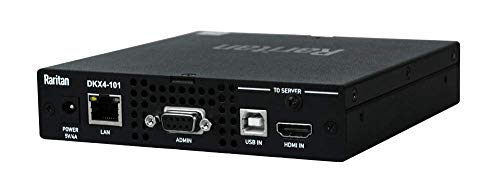
- 4K KVM-over-IP support
- Remote Ethernet control
- Compact rack-mount design
Best For: Single-system professional remote access
Feature-Rich Remote Access
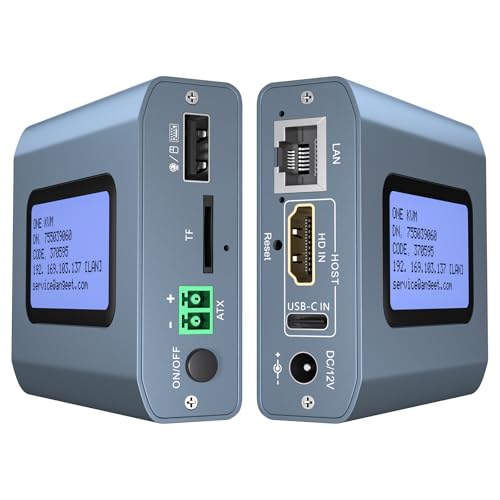
- 4K at 60Hz
- Web, app, and ZeroTier access
- Remote desktop power control
Best For: Multi-location PC and server management
Eight-Port Rack Control

- Eight-port remote access
- Rack-mount installation
- Supports legacy and modern connectors
Best For: Mixed-device server rooms and IT racks
Best Flexible Remote Option

- Remote access for two computers
- 4K60 video with synchronized audio
- ZeroTier and remote power control
Best For: Small remote-work and desktop-management setups
Best for Large Server Deployments
Tripp Lite 16-Port NetDirector IP KVM

- Controls 16 systems directly
- Daisy-chains up to 264 devices
- Supports up to 64 secure users
Best For: Rack-based IT departments and server rooms
Best Compact Rack Solution

- Eight-port 1U rack-mount design
- One local and one remote user
- IPv4/IPv6 and directory authentication
Best For: Small and midsize server racks
Best Overall – GL.iNet Comet GL-RM1
The GL.iNet Comet GL-RM1 is a versatile choice among kvm over ip switches for remote PC and server management. It provides BIOS-level control, 4K video at 30Hz, file transfer, and remote audio without requiring software on the controlled computer.
Best For: IT professionals, remote workers, and smart-home users who need dependable internet-based access to one computer or server.
Pros:
- Supports remote rebooting, OS installation, power-on control, and BIOS access.
- Delivers 3840×2160 video at 30Hz with low-latency hardware H.264 encoding.
- Offers one-click app setup, file transfer, and compatibility with laptops, desktops, and servers.
Cons:
- Controls one computer or server at a time.
- PD adapters cannot be used.
- Video output is limited to 30Hz at 4K.
With broad device compatibility and hostless operation, the GL-RM1 is a strong all-around remote KVM option. Its single-port design suits individual systems rather than multi-server racks.
Best Open-Source Pick – PiKVM V4 Plus
The PiKVM V4 Plus is a production-oriented Raspberry Pi-based option for kvm over ip switches. It combines 1080p video at 60Hz, multiple network connection methods, extra HDMI outputs, and a turnkey kit designed for remote server or PC management.
Best For: Server administrators and technically inclined users who want an open-source, Raspberry Pi-based remote KVM platform.
Pros:
- Supports 1920×1080 and 1920×1200 at 60Hz for smooth remote viewing.
- Provides Ethernet, Wi-Fi, and optional cellular connectivity.
- Includes power supply, USB and Ethernet cables, PCI brackets, and internal USB 3.0 storage expansion.
Cons:
- Video resolution is lower than the 4K options in this roundup.
- Its Raspberry Pi-based feature set may be more involved than a basic plug-and-play device.
- Cellular connectivity requires the appropriate optional setup.
The PiKVM V4 Plus stands out for connectivity flexibility and production-grade positioning. It is especially appealing when open-source control and multiple access paths matter more than maximum video resolution.
Best for Flexible Access – JetKVM IP KVM
The JetKVM IP KVM offers a flexible approach to kvm over ip switches, with browser-based local access, optional cloud access, and Wake-on-LAN support. Its 1080p 60fps stream and 30–60ms latency are aimed at responsive remote keyboard and mouse control.
Best For: Users who want browser, cloud, and Wake-on-LAN access plus an open-source platform that can be expanded with optional hardware.
Pros:
- Provides local browser access, optional cloud access, and Wake-on-LAN.
- Uses H.264 encoding for 1080p at 60fps with stated 30–60ms latency.
- Supports flexible power methods and expansion options such as ATX, DC, and RS-232 control.
- Can help with crash recovery, safe-mode access, and remote OS reinstallation.
Cons:
- Cloud access is optional and depends on network connectivity and setup.
- Video resolution is limited to 1080p.
- Advanced expansion features may require additional hardware or configuration.
JetKVM is a practical choice for remote recovery and customizable deployments. Its combination of low latency, open-source software, and expansion support makes it more adaptable than a basic remote-display adapter.
Best PoE Option – GL.iNet Comet PoE GL-RM1PE
The GL.iNet Comet PoE GL-RM1PE is a compact kvm over ip switches option for remotely managing a single computer or server. Its PoE and USB-C dual-power design, 4K streaming at 30fps, Tailscale support, and remote BIOS reinstall capability suit installations where cabling and power flexibility are important.
Best For: Networked computer or server setups that can benefit from Power over Ethernet and compact remote BIOS management.
Pros:
- Supports PoE and USB-C power options.
- Provides 4K streaming at 30fps and remote BIOS reinstall.
- Includes 32GB built-in eMMC storage and a USB interface for ATX and Fingerbot accessories.
Cons:
- Supports only one computer or server.
- 4K streaming is limited to 30fps.
- Its PoE capability requires compatible network infrastructure.
The GL-RM1PE is a focused choice for installations where a single remote system needs dependable network-based access and simplified power delivery. Choose it over the standard model when PoE is useful in your deployment.
Premium 4K Remote Access – Raritan Dominion KX IV-101
Raritan Dominion KX IV-101 Ultra High Performance 1-Port 4K KVM-Over-IP Switch
Check Price On AmazonThe Raritan Dominion KX IV-101 is a compact, rack-mount KVM over IP switch for remote control of one compatible computer or server. It supports Ethernet connectivity, USB devices, remote operation, and 4K performance in a 1-port design.
Best For: IT professionals who need a high-quality, single-device remote KVM over IP setup in a rack-mounted environment.
Pros:
- Supports 4K KVM-over-IP operation
- Remote control through Ethernet connectivity
- Compact rack-mount form factor
- Includes a 2-year warranty
Cons:
- Limited to one connected computer or server
- Designed primarily for rack-mount installation
- Supplied details do not specify a broader multi-user feature set
Choose this model when build quality, compact installation, and single-system 4K remote access matter more than port count. Its 1-port layout is straightforward and focused.
Feature-Rich Remote Access – 4K Internet IP KVM
This internet-enabled KVM over IP switch is built for remote control of PCs, servers, and other compatible devices without extra software or drivers. It combines 4K video at 60Hz with web and app access, remote power control for desktop computers, and built-in ZeroTier support.
Best For: Remote workers and IT managers who need flexible access to computers across networks, including BIOS-level tasks and remote installation support.
Pros:
- Supports 3840×2160 at 60Hz with latency below 60 milliseconds
- Works with Windows, macOS, Linux, and Android systems
- Offers web, app, and built-in ZeroTier access options
- Supports remote desktop power control and includes HDMI and Ethernet cables
Cons:
- Remote power control is limited to desktop computers
- ZeroTier requires an online upgrade
- Remote app access requires initial web-browser login and app download
Among these kvm over ip switches, this is the most feature-packed option for distributed access. Its broad platform support and remote power functions are useful, but setup requirements should be considered.
Eight-Port Rack Control – ATEN KN1108VA KVM Over IP
The ATEN KN1108VA is an 8-port rack-mount KVM over IP switch designed to provide remote access to multiple computers. Its compatibility with Windows, Mac, Sun, and Linux systems, plus USB, PS/2, Sun Legacy, and RS-232 connections, makes it suited to mixed-device environments.
Best For: Businesses and server rooms that need remote management for up to eight compatible systems from a rack-mounted unit.
Pros:
- Provides eight connected positions
- Supports remote control over a rack-mount design
- Compatible with Windows, Mac, Sun, and Linux devices
- Accommodates USB, PS/2, Sun Legacy, and RS-232 connectors
Cons:
- Larger and heavier than compact single-port alternatives
- Supplied details do not list 4K video support
- Its broad legacy connector compatibility may be unnecessary for simpler setups
This ATEN model is the practical choice when port capacity and mixed legacy connectivity are priorities. It takes more rack space, but eight-port access can reduce the need for multiple KVM units.
Best Flexible Remote Option – ONE-KVM 2-Computer 4K IP KVM
For shoppers comparing kvm over ip switches for remote work or hands-on computer management, this two-port ONE-KVM model offers browser- and app-based access, 4K video support, and local switching. Its LCD displays the acquired IP address, simplifying initial network access.
Best For: Remote access to two desktop computers, especially when remote power control and cross-network access are useful.
Pros:
- Controls two computers remotely through a web interface or ONE KVM app.
- Supports 3840×2160 at 60Hz, synchronized audio, and hardware H.264 encoding.
- Includes ZeroTier for cross-network access without manual port forwarding or VPN configuration.
- Supports remote power on/off for compatible desktop PCs and includes an LCD IP display.
Cons:
- The unit requires a separate 12V power adapter and is not PoE.
- Web access is listed for LAN use, while WAN access relies on the app.
- Remote power control requires connecting the included cable to a desktop motherboard header.
This is a feature-rich choice for a small setup where 4K output, mobile access, and remote power management matter more than a high port count.
Best for Large Server Deployments – Tripp Lite 16-Port NetDirector IP KVM
Among kvm over ip switches, the Tripp Lite NetDirector is aimed at rack-based environments that need centralized access to many systems. It directly controls up to 16 computers or servers and can be daisy-chained to reach as many as 264 devices.
Best For: IT departments and server rooms needing high device capacity, rack mounting, and multiple secure user accounts.
Pros:
- Controls up to 16 computers or servers directly.
- Daisy-chaining expands the system to as many as 264 devices.
- Supports remote access through LAN, WAN, or the Internet.
- Allows up to 64 secure user accounts and works with USB and PS/2 connections.
Cons:
- Its 1U rack-mount design is less suited to home or compact desktop setups.
- The supplied notes do not specify video resolution or audio features.
- It is a larger-capacity solution than needed for only one or two computers.
Choose this model when scalability and user management are priorities. Its broad connectivity and expansion capability make it better suited to structured server environments than casual remote access.
Best Compact Rack Solution – Tripp Lite 8-Port Cat5 IP KVM
This Tripp Lite NetCommander is one of the more compact kvm over ip switches for rack environments, using Cat5 cabling to reduce cable clutter. It supports eight ports, one local and one remote user at the same time, and remote browser-based server control over a secure IP connection.
Best For: Small and midsize server racks that need eight-port access, dual-user operation, and IPv4/IPv6 support.
Pros:
- Controls eight connected systems through a 1U rack-mount design.
- Supports simultaneous use by one local and one remote user.
- Cat5 connectivity helps reduce cable clutter at the rack.
- Offers IPv4 and IPv6 support, RADIUS and LDAP/S authentication, and optional PDU control.
Cons:
- Expansion requires cascading another KVM switch rather than adding ports directly.
- The remote browser application is Java-based.
- It is designed for rack and server use rather than general desktop setups.
This model balances manageable capacity with rack-friendly cabling. It is a practical middle ground for teams that need remote access and authentication features without moving to a 16-port unit.
How We Picked These Kvm Over Ip Switches
We selected products that provide remote keyboard, video, and mouse access over a network, then compared them across the features that matter after installation. Those include BIOS-level control, supported resolution and refresh rate, local access, remote-user capacity, security options, operating-system independence, and compatibility with rack-mounted or standalone systems.
We also considered practical differences between compact single-computer devices and enterprise Kvm Over Ip Switches built for multiple servers. Features such as Tailscale or ZeroTier support, PoE, remote power control, virtual media, webcam support, and daisy chaining can significantly affect which model fits a particular environment.
Quick Comparison
- For a single computer or home lab: Compact units such as the GL.iNet Comet, PiKVM V4 Plus, JetKVM, and ONE-KVM are easier to deploy.
- For secure overlay networking: Models with Tailscale or ZeroTier support can simplify remote access without requiring extensive port forwarding.
- For enterprise racks: Raritan, ATEN, and Tripp Lite models offer stronger multi-user, rack-mount, and multi-server capabilities.
- For high-resolution consoles: Look for explicit 4K support, while checking whether 4K is limited to 30Hz and whether compression affects responsiveness.
Key Buying Factors for Kvm Over Ip Switches
Port Count and Expansion
Choose a device with enough ports for current systems plus reasonable growth. A one-port remote KVM is efficient for a workstation or single server, while an eight- or 16-port switch is better for a rack. Daisy chaining may expand capacity, but verify supported models and cabling.
Video Quality and Latency
4K support is useful for detailed interfaces, but resolution alone does not determine the experience. Check refresh rate, encoding behavior, bandwidth requirements, and whether the device remains responsive during BIOS screens or recovery tasks.
Remote Management Features
BIOS access, virtual media, remote power control, Wake-on-LAN, and OS installation support make a KVM much more useful than basic remote desktop software. Webcam passthrough and virtual storage can also help with hands-on troubleshooting.
Security and Networking
Prioritize encrypted connections, strong authentication, user permissions, IPv4 and IPv6 support, and a clear firmware-update policy. Tailscale, ZeroTier, or a properly configured VPN can be preferable to exposing the management interface directly to the public internet.
Installation and Compatibility
Confirm the required HDMI, DisplayPort, USB, VGA, or Cat5 connections before buying. Rack units may require dedicated space and structured cabling, while compact devices may need separate power or a PoE-compatible network switch.
Who Should Buy Which Kvm Over Ip Switches?
Home-lab users and individual PC owners should favor compact, easy-to-configure models with secure remote networking. Small businesses may want a multi-port unit with local console access, user accounts, and reliable remote recovery features. IT departments and data centers should prioritize enterprise-grade Kvm Over Ip Switches with centralized administration, multiple simultaneous users, rack mounting, expansion, and stronger audit or access-control features.
Before choosing, identify the systems you need to control, the video connections they use, how many people need access, and whether the device will be reachable only through a private network. Those answers usually narrow the selection more effectively than choosing by resolution alone.