A KVM over IP switch can let you control a remote computer, server, or homelab from another room—or across the internet—using one keyboard, display, and mouse setup. The best options combine reliable video, USB control, secure remote access, and recovery features such as BIOS access and power management.
Our 2026 roundup covers compact remote KVMs, open-source systems, PoE models, and HDMI-over-Ethernet extenders. Use the buying guide below to match the right design to your home office, workstation, or homelab.
Best 10 Kvm Over Ip Switches for Home Offices Picks for 2026
Best All-Around Remote Access

- BIOS-level remote control without host software
- 4K video at 30Hz with H.264 encoding
- Remote audio and file transfer included
Best For: Home offices needing remote recovery and device management
Best Feature-Rich Option

- Open-source Raspberry Pi CM4-based KVM
- 1080p and 1200p video at 60Hz
- Ethernet, Wi-Fi, and cellular connectivity
Best For: Enthusiasts managing PCs and servers remotely
Best PoE Setup

- PoE and USB Type-C dual power
- 4K streaming at 30FPS
- 32GB eMMC and remote BIOS reinstall
Best For: Single-device setups with PoE networking
Best Open-Source Value

- 1080p at 60FPS with 30–60ms latency
- Local, cloud, and Wake on LAN access
- Open-source Linux with expansion options
Best For: Tinkerers needing responsive remote recovery control
Best Rack-Ready Pick
GL.iNet Comet X Quad-Port Remote KVM

- Four-host HDMI and USB-C switching
- PoE with 5V USB-C backup power
- 4K@30Hz local loop-out and touchscreen
Best For: Home labs and rack-based IT setups
Best Long-Distance Extender
AV Access 4K HDMI USB KVM Extender

- Up to 390 feet over Cat5e or better
- 4K@30Hz video with USB control
- Supports up to 16 paired extender sets
Best For: Remote desks with long Ethernet cable runs
Best Internet-Accessible Option
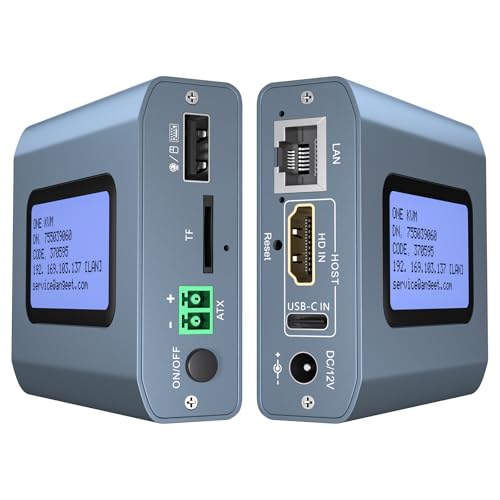
- 4K@60Hz remote KVM control
- ZeroTier for cross-network access
- Remote power control for desktop PCs
Best For: Unattended PCs and servers managed remotely
Best 4K HDMI KVM Extender
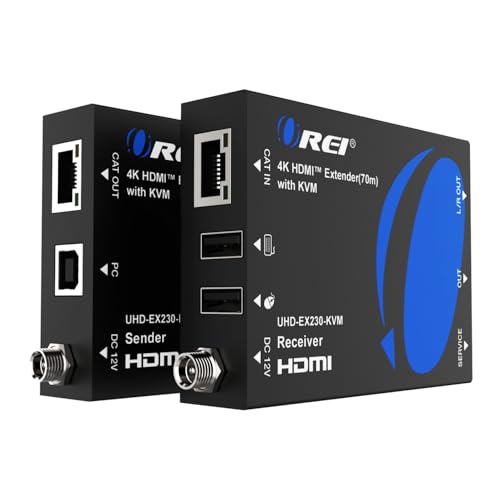
- 4K at 60Hz up to 230 feet
- USB keyboard and mouse extension
- HDR, Dolby Vision, and HDMI loop-out support
Best For: Long-distance 4K home-office display extension
Best Open-Source KVM Over IP

- Browser-based BIOS and UEFI control
- PoE with full-size HDMI connectivity
- Open-source firmware with no subscription
Best For: Homelab and headless-server administration
Best Network KVM Extender
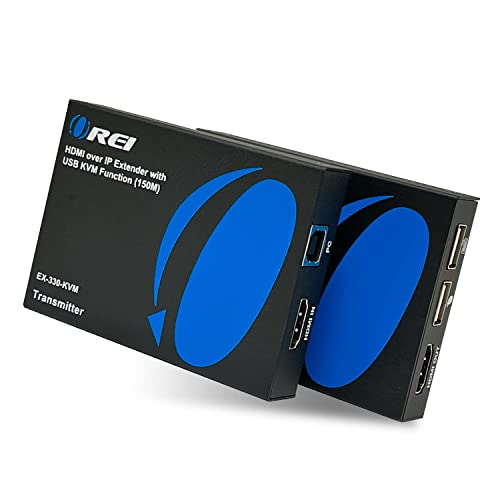
- Remote keyboard and mouse over LAN
- Up to 2K at 60Hz over Cat6/7
- Supports multiple receiver locations
Best For: Room-to-room PC control over a home network
Best All-Around Remote Access – GL.iNet Comet GL-RM1
For home offices seeking kvm over ip switches for home offices, the GL.iNet Comet GL-RM1 is a compact hardware KVM for controlling one computer or server remotely. It supports BIOS-level access, 4K video at 30Hz, file transfer, and remote audio without requiring software on the host computer.
Best For: Remote workers, IT users, and smart-home setups that need dependable BIOS and operating-system access.
Pros:
- Provides remote rebooting, power-on control, BIOS access, and OS installation.
- Supports 3840×2160 video at 30Hz with hardware H.264 encoding.
- Works with laptops, desktops, servers, and other compatible computers without host software.
- Includes remote audio and file transfer features.
Cons:
- Controls one connected device rather than multiple computers.
- Power Delivery adapters cannot be used.
- Video output is limited to 30Hz at 4K.
The GL-RM1 is a strong fit when remote recovery and BIOS control matter more than multi-device switching. Its small footprint and one-click app setup make it practical for a home office or small server area.
Best Feature-Rich Option – PiKVM V4 Plus
The PiKVM V4 Plus is a production-oriented choice for shoppers comparing kvm over ip switches for home offices. This Raspberry Pi CM4-based, open-source KVM provides remote access to PCs and servers, with Ethernet, Wi-Fi, and optional cellular connectivity.
Best For: Enthusiasts and home-office administrators who want open-source remote management with multiple connectivity options.
Pros:
- Supports 1920×1080 and 1920×1200 video at 60Hz.
- Offers Ethernet, Wi-Fi, and cellular connectivity channels.
- Includes a power supply, USB and Ethernet cables, and PCI brackets.
- Provides extra storage through an internal USB 3.0 slot.
Cons:
- Video resolution is lower than the 4K options in this roundup.
- Its Raspberry Pi-based feature set may be more than a basic home-office setup needs.
- Optional external antenna and cellular connectivity may require additional equipment or service.
With its open-source foundation, 60Hz support, and broad connectivity, the PiKVM V4 Plus suits users who value flexibility and expandability. It is particularly compelling for managing servers or several remote-access scenarios rather than simply sharing a monitor.
Best PoE Setup – GL.iNet Comet PoE GL-RM1PE
The GL.iNet Comet PoE GL-RM1PE is a practical candidate among kvm over ip switches for home offices where simplified power and network cabling are priorities. It supports remote BIOS reinstallation, 4K streaming at 30 frames per second, and both PoE and USB Type-C power.
Best For: Home offices and compact equipment spaces with Ethernet cabling and PoE infrastructure.
Pros:
- Supports PoE and USB Type-C dual power options.
- Provides 4K video streaming at 30FPS.
- Includes 32GB built-in eMMC storage.
- Supports remote BIOS reinstall and USB control for ATX or Fingerbot accessories.
Cons:
- Supports a maximum of one connected device.
- PoE functionality requires compatible network equipment.
- Its 30FPS 4K output may not suit users seeking higher refresh rates.
The GL-RM1PE stands out for installations where one cable can simplify both connectivity and power. Its PoE support and accessory-oriented USB interface make it a useful choice for a tidy, remotely managed home-office workstation or small server setup.
Best Open-Source Value – JetKVM Over IP
The JetKVM is a flexible option for anyone comparing kvm over ip switches for home offices and wanting browser-based control with low-latency video. It connects over HDMI and USB-C, supports local or optional cloud access, and can wake a computer remotely with Wake on LAN.
Best For: Tinkerers and remote workers who want open-source software, responsive 1080p control, and recovery features.
Pros:
- Delivers 1920×1080 video at 60FPS with stated 30–60ms latency.
- Offers local browser access, optional cloud access, and Wake on LAN.
- Supports remote restart, Safe Mode access, OS reinstallation, and other recovery tasks.
- Provides flexible power methods and an expansion port for hardware extensions.
Cons:
- Video resolution is limited to 1080p rather than 4K.
- Cloud access is optional and depends on the JetKVM Cloud service.
- Advanced expansion capabilities may require additional hardware or configuration.
JetKVM is a compelling choice for users who value customization and recovery access over maximum resolution. Its open-source Linux foundation, browser interface, and flexible power options make it adaptable for a home lab or remote-workstation setup.
Best Rack-Ready Pick – GL.iNet Comet X Quad-Port Remote KVM
For home offices that also serve as compact labs, the GL.iNet Comet X is one of the more capable kvm over ip switches for home offices. It connects up to four systems, supports browser-based remote access over HTTPS, and can be powered through PoE or USB-C.
Best For: Home lab users and IT professionals managing multiple computers in a rack or server-room setup.
Pros:
- Four HDMI inputs and four dedicated USB-C device ports support up to four host systems.
- PoE simplifies installation, while 5V USB-C provides backup power.
- 4K@30Hz HDMI loop-out enables local monitor, keyboard, and mouse access.
- Touchscreen controls, included rack brackets, and 64GB eMMC add useful convenience.
Cons:
- 4K loop-out is limited to 30Hz.
- The 25–40°C rated temperature range may not suit harsher environments.
- Its four-port feature set may be more than needed for a single-computer office.
The Comet X stands out when local control, rack mounting, and multi-system management matter as much as remote access. Its self-hosted, browser-based design is particularly appealing for a home office that is growing into a serious lab.
Best Long-Distance Extender – AV Access 4K HDMI USB KVM Extender
The AV Access 4K HDMI USB KVM Extender is a practical choice among kvm over ip switches for home offices when the computer and workstation need to be separated by a long cable run. It sends video, audio, and USB over standard Cat5e or better Ethernet cabling.
Best For: Home offices with a distant PC, server, or gaming system and an existing Ethernet infrastructure.
Pros:
- Extends 4K@30Hz HDMI, audio, and USB up to 390 feet over one Ethernet cable.
- Remote USB control supports a keyboard, mouse, controller, flash drive, or printer.
- Works with Windows, macOS, and Linux without additional drivers.
- Up to 16 extender sets can operate on the same network using DIP-switch pairing.
Cons:
- This is an extender system rather than a multi-host switching hub.
- 4K operation is limited to 30Hz.
- It requires separate transmitter and receiver units plus a 12V DC power setup.
Choose this model when distance and cable simplicity are the priorities. It makes sense for a home office that keeps a noisy or inaccessible computer elsewhere while placing the display and peripherals at the desk.
Best Internet-Accessible Option – Remote KVM with ZeroTier
This remote KVM is aimed at home offices that need internet-based access to a PC or server. Among kvm over ip switches for home offices, it adds 4K@60Hz support, remote power control for compatible desktop PCs, and built-in ZeroTier for cross-network access.
Best For: Remote workers and administrators who need to access, reboot, or manage a desktop or server from another network.
Pros:
- Remote access works through a web interface or app without host-side drivers.
- Supports 3840×2160 at 60Hz with stated latency below 60 milliseconds.
- Built-in ZeroTier can simplify peer-to-peer access without port forwarding or VPN configuration.
- Optional ATX connection enables remote power on/off for compatible desktop computers.
Cons:
- Remote power control is not supported for laptops.
- ZeroTier requires an online upgrade according to the supplied notes.
- Remote access depends on Ethernet connectivity and the chosen web or app platform.
This model is the strongest fit when access from outside the home network is central to the setup. Its 4K60 support and desktop power control make it useful for unattended systems, provided the ATX wiring and network configuration are acceptable.
Best 4K HDMI KVM Extender – 4K Over Ethernet
For shoppers comparing kvm over ip switches for home offices, the OREI EX-230PRO-KVM is a strong fit when the goal is extending a high-resolution HDMI workstation over Ethernet rather than managing multiple computers. It sends 4K video up to 230 feet over Cat6 or Cat7 cabling and adds remote keyboard-and-mouse control.
Best For: Home offices that need long-distance 4K display extension with remote USB KVM control.
Pros:
- Supports 4K at 60Hz over Cat6/7 cable for up to 230 feet.
- Includes USB KVM extension, HDMI loop-out, and EDID pass-through.
- Supports HDR formats, Dolby Vision, and several multichannel audio formats.
- Includes a one-year warranty and plug-and-play installation.
Cons:
- It is an HDMI-over-Ethernet extender, not a traditional multi-computer IP KVM switch.
- The system uses a dedicated sender and receiver rather than a single compact unit.
This OREI model makes the most sense when video quality and cable distance matter more than browser-based remote administration. Its local HDMI loop-out and 4K60 support are especially useful for a home office with a nearby monitor and a remotely located display.
Best Open-Source KVM Over IP – Remote BIOS Access
Among kvm over ip switches for home offices, the ArkKVM stands out for true out-of-band management. It provides browser-based BIOS and UEFI access, keyboard, video, and mouse control, and remote recovery even when the operating system is frozen or unavailable.
Best For: Homelabs, Proxmox systems, and headless servers that need remote BIOS access and recovery.
Pros:
- Provides remote BIOS/UEFI access and control through a web browser.
- Supports 1080p at 60Hz with stated latency under 100ms.
- Built-in PoE can provide power and network connectivity through one Ethernet cable.
- Open-source Rust firmware, 32GB eMMC storage, virtual media, and no subscription fee.
Cons:
- Its advanced server-management features may be unnecessary for a basic desktop home office.
- Remote power control requires the optional ATX expansion board.
The ArkKVM is the most capable choice here for managing a machine that may need attention before the operating system loads. PoE, open-source firmware, and optional relay access make it particularly appealing to technically inclined home-office and homelab users.
Best Network KVM Extender – Home Network PC Control
The OREI EX-330-KVM is a practical option for comparing kvm over ip switches for home offices when you want to control a computer from another room using existing network cabling. It sends HDMI video over a home network and extends keyboard and mouse control to the receiver.
Best For: Home users who want remote PC control over a LAN and may need receivers in multiple locations.
Pros:
- Supports remote keyboard and mouse control through USB KVM extension.
- Works over a home network and supports one-to-many receiver setups.
- Can transmit up to 330 feet over Cat6/Cat7 cable and supports up to 2K at 60Hz.
- Offers plug-and-play setup without software installation and includes IR control.
Cons:
- It is limited to HDMI 1.3/1.4 compatibility and does not target 4K video.
- It requires separate sender and receiver units, power adapters, and network cabling.
This OREI extender is a sensible middle ground for a home office that needs room-to-room PC access without installing management software. Its one-to-many capability is useful if the same source needs to reach more than one display location.
How We Picked the Best Kvm Over Ip Switches for Home Offices
We focused on the features that matter most when managing a computer remotely: dependable video transmission, keyboard and mouse control, BIOS-level access, network compatibility, installation complexity, and recovery options. We also considered whether each model suits a typical home office, a multi-machine setup, or a more advanced homelab.
The selection includes true internet-capable remote KVMs, open-source platforms, multi-port systems, and LAN-based HDMI extenders. Because these categories work differently, check the product specifications carefully before buying.
Quick Comparison
| Type | Best for | What to check |
|---|---|---|
| Single-port remote KVM | One desktop, NAS, or server | Resolution, remote-access method, and USB support |
| Multi-port remote KVM | Home labs and multiple systems | Port count, switching workflow, and bandwidth |
| Open-source KVM | DIY users and advanced control | Setup effort, firmware, and hardware compatibility |
| HDMI-over-Ethernet extender | Local office-to-room extension | Distance limits, cabling, and network design |
Key Buying Factors for Kvm Over Ip Switches for Home Offices
Remote Access and Security
Decide whether you need access only on your local network or from outside the home. Tailscale, ZeroTier, VPN support, and secure web interfaces can simplify remote connections, but you should still use strong credentials, current firmware, and network isolation where possible.
Video Resolution and Refresh Rate
4K support is useful for detailed desktops, but many remote KVMs deliver 4K at 30Hz rather than 60Hz. For administration, coding, and BIOS screens, that may be sufficient. For fast motion or a normal daily monitor replacement, verify refresh rate, latency, and compression performance.
Power, BIOS, and USB Control
Look for true pre-boot access if you need to enter BIOS, reinstall an operating system, troubleshoot a failed boot, or manage a headless machine. Remote power control, Wake-on-LAN, virtual media, and reliable keyboard and mouse emulation can make the difference between convenient recovery and an on-site visit.
Installation and Cabling
Some units connect directly to a network and the target computer, while HDMI-over-Cat extenders generally work best as point-to-point links. Confirm HDMI and USB connector requirements, Ethernet distance ratings, PoE needs, and whether the device can share your existing network without performance issues.
Who Should Buy Which Kvm Over Ip Switches for Home Offices?
Choose a compact single-port remote KVM for one desktop, NAS, or headless server. Choose a multi-port model if you regularly manage several computers or a growing homelab. Choose an open-source option if customization and community-supported software matter more than plug-and-play simplicity.
Choose an HDMI-over-Ethernet extender when the goal is reliable local-room extension over existing Cat cabling rather than internet access. For frequent remote administration, prioritize secure networking, BIOS-level control, power recovery, and documented compatibility over headline resolution alone.