Remote access is most useful when it works below the operating system. The best KVM over IP switches for Windows let you view a machine’s display, control its keyboard and mouse, enter BIOS, troubleshoot boot failures, and reinstall software without being physically present.
This roundup compares ten options across video quality, remote-management features, connectivity, power control, and deployment style so you can choose the right fit for a workstation, home lab, server room, or distributed Windows environment.
Best 10 Kvm Over Ip Switches for Windows Picks for 2026
Best Overall
GL.iNet Comet GL-RM1 Remote KVM

- BIOS-level remote control without host software
- 4K video at 30Hz with remote audio
- File transfer and Tailscale support
Best For: Remote PC, server, and recovery management
Best Open-Source Choice

- Open-source Raspberry Pi-based KVM
- 1080p and 1200p video at 60Hz
- Ethernet, Wi-Fi, and optional cellular access
Best For: Production-grade server and PC administration
Best PoE Model

- PoE and USB Type-C dual power
- 4K streaming at 30FPS
- Remote BIOS reinstall and 32GB eMMC
Best For: Single servers or PCs on PoE-enabled networks
Best for Flexible Access

- Local, cloud, and Wake on LAN access
- 1080p at 60FPS with 30–60ms latency
- Open-source and customizable expansion
Best For: Remote support, recovery, and developer use
Open-Source Homelab Pick

- 1080p/60Hz browser-based BIOS access
- PoE with full-size HDMI
- Open-source, subscription-free design
Best For: Homelabs, Proxmox hosts, and headless Windows servers
Professional 4K Choice
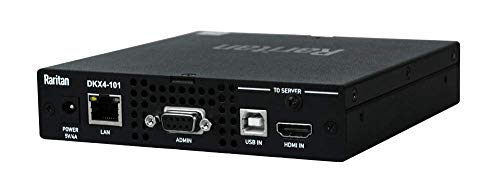
- Single-port 4K KVM-over-IP
- Rack-mount construction
- Ethernet and USB connectivity
Best For: Professional rack and server-room installations
Feature-Rich Remote Access
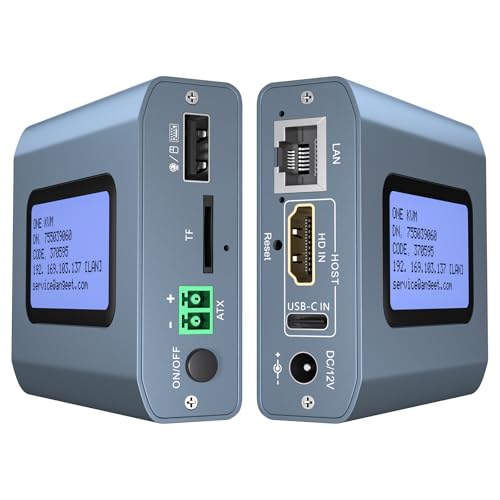
- 4K/60Hz with under 60ms latency
- ZeroTier cross-network access
- Remote power control for desktops
Best For: Remote Windows PCs and servers across multiple networks
Best for Failover

- 5G, Ethernet, and Wi-Fi 6 failover
- 4K browser-based remote access
- 64GB image and recovery storage
Best For: Resilient remote management for servers, edge PCs, and home labs
Best Two-PC Value

- Remote control for two computers
- 4K at 60Hz with low delay
- ZeroTier and remote power control
Best For: Managing two desktop PCs over LAN or WAN
Best for Rack Switching

- One console for eight computers
- IP, RS232, hotkey, and IR control
- EDID emulators and included cables
Best For: Multi-computer offices, server rooms, and control desks
Best Overall – GL.iNet Comet GL-RM1 Remote KVM
The GL.iNet Comet GL-RM1 is a practical choice among kvm over ip switches for windows when you need remote desktop, BIOS, and recovery access without installing software on the controlled computer. It supports 4K at 30Hz, remote audio, file transfers, and internet access through a hardware-based design.
Best For: IT professionals, remote workers, and users managing PCs or servers from outside the local site.
Pros:
- Provides BIOS-level control for rebooting, OS installation, and recovery.
- Supports 3840×2160 at 30Hz with low-latency video and remote audio.
- Works with laptops, desktops, servers, and other compatible computers without host software.
- Includes file transfer and Tailscale support for convenient remote access.
Cons:
- It has a single-device design rather than multi-port switching.
- PD adapters cannot be used.
- 4K video is limited to 30Hz.
Choose the GL-RM1 when BIOS access and straightforward remote administration matter more than connecting multiple systems at once. Its compact hardware and 1Gbps Ethernet interface make it well suited to remote support and server maintenance.
Best Open-Source Choice – PiKVM V4 Plus
The PiKVM V4 Plus is a production-oriented option for shoppers comparing kvm over ip switches for windows and other computer platforms. Built around Raspberry Pi CM4 hardware, it offers remote server and PC management, 1080p video at 60Hz, multiple connectivity options, and a turnkey kit with cables and power accessories.
Best For: Server administrators and technical users who want an open-source, feature-rich remote KVM platform.
Pros:
- Supports 1920×1080 and 1920×1200 video at 60Hz for smooth remote management.
- Offers Ethernet, Wi-Fi, and optional cellular connectivity channels.
- Includes a power supply, USB and Ethernet cables, and PCI brackets.
- Provides extra USB 3.0 storage and two additional HDMI outputs.
Cons:
- Its larger metal enclosure may require more installation space than compact alternatives.
- Cellular connectivity requires the appropriate additional setup.
- The Raspberry Pi-based platform may be more involved for users seeking a minimal plug-and-play device.
The PiKVM V4 Plus stands out when connectivity flexibility and open-source functionality are priorities. Its 60Hz Full HD support and included accessories make it a strong fit for ongoing server administration.
Best PoE Model – GL.iNet Comet PoE Remote KVM
The GL.iNet Comet PoE GL-RM1PE is a compact pick for kvm over ip switches for windows installations that already use Ethernet infrastructure. It combines PoE and USB Type-C power, supports 4K streaming at 30 frames per second, and provides remote BIOS reinstall capability for one computer or server.
Best For: Networked workstations and servers where PoE simplifies remote KVM installation.
Pros:
- Supports both PoE and USB Type-C power options.
- Provides 4K streaming at 30FPS and remote BIOS reinstall functionality.
- Includes 32GB built-in eMMC storage.
- Offers a USB interface for ATX and Fingerbot applications.
Cons:
- Supports a maximum of one device.
- 4K streaming is limited to 30 frames per second.
- Its listed connectivity is centered on Ethernet and HDMI, so local setup requirements should be checked carefully.
The GL-RM1PE is especially appealing when you want to power a remote KVM through the network instead of adding a separate power adapter. It is best suited to a single managed computer or server rather than a multi-system rack.
Best for Flexible Access – JetKVM IP KVM
JetKVM is a versatile option among kvm over ip switches for windows, using HDMI and USB-C connections to provide browser-based control from a local network or through its optional cloud dashboard. It adds Wake on LAN, 1080p at 60FPS streaming, adjustable video quality, and recovery features for systems that crash or fail to boot.
Best For: Developers, IT users, and remote-support scenarios requiring local, cloud, and Wake on LAN access.
Pros:
- Offers local browser access, optional cloud access, and Wake on LAN.
- Delivers 1080p at 60FPS with claimed 30–60ms latency and H.264 encoding.
- Supports remote restart, Safe Mode access, OS reinstall, and other recovery tasks.
- Open-source Linux software and an expansion port support customization.
Cons:
- Cloud access is optional and requires using the JetKVM Cloud service.
- The device requires HDMI and USB-C connections to the controlled computer.
- Power options and expansion features may require additional compatible hardware or cabling.
JetKVM is a strong fit when responsive browser control and system recovery are more important than 4K output. Its open-source foundation and expansion port also give technically inclined users room to customize the setup.
Open-Source Homelab Pick – ArkKVM Remote BIOS KVM
For Windows users looking at kvm over ip switches for windows, the ArkKVM is a flexible choice for headless PCs, Proxmox hosts, and servers. It provides browser-based BIOS/UEFI access, 1080p at 60Hz HDMI capture, keyboard and mouse control, and OS-independent operation without requiring software on the managed computer.
Best For: Homelabs, headless Windows systems, Proxmox hosts, and users who want open-source remote recovery without a subscription.
Pros:
- Remote BIOS/UEFI access can help recover frozen or unbootable systems.
- PoE and full-size HDMI simplify rack or network installation.
- Open-source Rust firmware, virtual media, Wake-on-LAN, and optional remote power control add flexibility.
Cons:
- Optional ATX power control requires an expansion board.
- The unit is limited to 1080p at 60Hz rather than 4K capture.
- Remote access features may require setup of the included relay or an existing Tailscale network.
The ArkKVM stands out for transparent firmware, PoE convenience, and broad platform compatibility. It is particularly compelling when reliable out-of-band access matters more than maximum video resolution.
Professional 4K Choice – Raritan Dominion KX IV-101
Raritan Dominion KX IV-101 Ultra High Performance 1-Port 4K KVM-Over-IP Switch
Check Price On AmazonThe Raritan Dominion KX IV-101 is a rack-mount, single-port KVM-over-IP switch for buyers who prioritize a professional 4K solution for Ethernet-connected computers and USB devices. Its supplied specifications identify remote control, Ethernet connectivity, USB support, and a two-year warranty.
Best For: Rack-mounted IT environments that need a dedicated one-port 4K KVM-over-IP device with remote access and a stated two-year warranty.
Pros:
- Supports 4K KVM-over-IP operation according to the product title.
- Rack-mount form factor suits structured server-room installations.
- Includes Ethernet and USB connectivity with a two-year warranty.
Cons:
- Provides one KVM-over-IP port.
- The supplied notes provide limited detail about Windows-specific setup or remote BIOS features.
- Its 3.1-pound listed weight may be more than compact homelab users need.
This Raritan model is the most enterprise-oriented option in the group. Consider it when a rack-ready, 4K-capable single-port unit is a better fit than a smaller DIY-style device.
Feature-Rich Remote Access – ONE KVM 4K IP Switch
For kvm over ip switches for windows that combine high resolution with internet-oriented access, this IP KVM supports Windows, macOS, Linux, and Android systems. It offers 4K at 60Hz, web and app control, remote desktop power switching, ZeroTier connectivity, and BIOS-level OS installation support without drivers on the managed computer.
Best For: Remote Windows PC and server management across networks, especially when 4K video, app access, and integrated remote power control are useful.
Pros:
- Supports 3840×2160 at 60Hz with stated latency below 60 milliseconds.
- ZeroTier can provide cross-network access without port forwarding or separate VPN configuration.
- Includes remote power control for compatible desktop motherboards and BIOS-based OS installation.
Cons:
- Remote power control is for desktop computers and does not support laptops.
- The ONE KVM app requires web-browser login first, and online upgrading is required for ZeroTier.
- Remote access uses a cloud platform or custom cloud server, adding setup considerations.
This model offers the broadest combination of 4K video, mobile access, networking, and power management here. It is a strong match for distributed Windows systems, provided its app and network setup fit your security and workflow requirements.
Best for Failover – Comet 5G Remote KVM
For users comparing kvm over ip switches for windows, the GL.iNet Comet 5G stands out when connectivity and BIOS-level access matter. It supports browser-based control on Windows, macOS, and Linux, with Ethernet, Wi-Fi 6, and 5G/4G failover for remote access during network problems.
Best For: Home labs, MSPs, and enterprise teams that need resilient remote access to a server or edge PC.
Pros:
- 5G RedCap, Gigabit Ethernet, and Wi-Fi 6 provide multi-WAN failover.
- Supports low-latency 4K remote access with H.264 hardware encoding.
- 64GB eMMC storage can hold OS images, ISOs, and recovery tools.
- Built-in touchscreen, Wi-Fi hotspot, Tailscale, and ZeroTier add flexibility.
Cons:
- It is designed for single-device remote management rather than switching among multiple computers.
- Its 5G and storage features may be more than needed for basic LAN-only KVM use.
The Comet 5G is a strong choice when uninterrupted access is more important than a traditional multi-port KVM layout. Its combination of cellular failover, local control, and recovery storage makes it particularly useful for infrastructure that cannot be left unattended.
Best Two-PC Value – ONE-KVM 4K IP KVM
This two-port unit is a practical option among kvm over ip switches for windows when you need to control two computers remotely. It supports web or app access, local switching, 4K video, remote power control for desktop PCs, and ZeroTier connectivity without requiring software or drivers on the target computers.
Best For: Remote workers and IT users managing two desktop PCs across a LAN or WAN.
Pros:
- Controls two computers through web, app, or physical switching.
- Supports 3840×2160 at 60Hz with less than 60ms delay and synchronized audio.
- LCD display shows the acquired IP address for easier setup.
- ZeroTier enables cross-network access without manual port forwarding.
Cons:
- The web interface is available on LAN, while WAN access uses the app.
- Remote power control requires motherboard F_PANEL wiring and applies to desktop PCs.
- The device requires a 12V power adapter and is not PoE.
For a two-computer setup, this model offers a broad feature set without needing client software on the controlled machines. Its main limitations are the LAN-only web access and the installation work required for remote desktop power control.
Best for Rack Switching – TESmart 8-Port HDMI KVM
The TESmart HKS801-EB23-USBK suits buyers seeking kvm over ip switches for windows with local control of a larger group of computers. It connects up to eight HDMI systems to one keyboard, mouse, and monitor, while offering IP commands, RS232, hotkeys, IR control, auto-scan, and rack-oriented enterprise features.
Best For: Offices, server rooms, and control desks that need one console for up to eight HDMI computers.
Pros:
- Controls up to eight HDMI computers from one USB console.
- Provides seven switching methods, including IP commands, RS232, hotkeys, and auto-scan.
- EDID emulators help maintain display settings when changing inputs.
- Includes eight 5-foot KVM cables and supports USB 2.0 peripherals.
Cons:
- 4K output is limited to 30Hz.
- It is primarily a local HDMI KVM; the notes do not specify full browser-based remote KVM access.
- AAA batteries for the IR remote are not included.
This TESmart is the most suitable choice here for high-port-count console management rather than cellular or internet-first access. Its EDID handling, cable bundle, and varied switching methods can simplify a busy multi-PC workstation, provided 4K at 60Hz is not required.
How We Picked the Best Kvm Over Ip Switches for Windows
We focused on products that provide genuine remote keyboard, video, and mouse access rather than ordinary USB or HDMI sharing. The selection spans compact single-computer units, open-source platforms, PoE models, cellular and Wi-Fi devices, dual-computer switches, and enterprise hardware.
Our comparison priorities were Windows compatibility, pre-boot and BIOS control, remote access methods, video resolution and refresh rate, network flexibility, installation requirements, and features such as virtual media, power management, touchscreen control, and secure overlay networking. Because capabilities vary by firmware and setup, verify the manufacturer’s current specifications before buying.
Quick Comparison
| Best For | Look For | Standout Features |
|---|---|---|
| Home labs and homelabs | Open-source firmware, HDMI capture, reliable browser access | BIOS control, virtual media, community support |
| Simple remote Windows access | Easy setup and secure remote networking | Integrated Tailscale or similar connectivity |
| Remote or temporary deployments | Wi-Fi, 5G, or PoE | Flexible installation without a dedicated local network drop |
| Data centers and business IT | Enterprise management and support | High-performance video, centralized administration, rack deployment |
| Multiple computers | More than one host input and switching controls | Shared peripherals, hotkeys, EDID handling, or LAN management |
Key Buying Factors for Kvm Over Ip Switches for Windows
Windows and Pre-Boot Compatibility
Windows support is usually straightforward, but remote BIOS access depends on physical HDMI or DisplayPort capture and USB HID emulation. Confirm that the device can pass keyboard and mouse input before Windows loads. This matters for BitLocker prompts, firmware updates, Safe Mode, and machines that fail to boot.
Resolution, Refresh Rate, and Latency
4K support is useful for detailed desktops, but many remote KVM products limit 4K to 30Hz. That is generally adequate for administration and installation, while 60Hz is preferable for frequent interactive work. Check capture resolution, output resolution, compression behavior, and network latency rather than relying on the headline resolution alone.
Network Access and Security
Decide whether you need local LAN access, secure remote access through an overlay network, cloud features, or direct inbound connectivity. Tailscale, ZeroTier, VPN access, HTTPS, user accounts, and multifactor authentication can simplify secure deployment. Avoid exposing a management interface directly to the public internet unless it is properly hardened.
Power and Physical Installation
A KVM cannot fix a powered-off computer unless the setup includes remote power control, Wake-on-LAN, a smart outlet, or compatible motherboard headers. PoE can reduce cabling, while rackmount hardware is better suited to server rooms. Also check USB power requirements, HDMI compatibility, included cables, and operating temperature.
Who Should Buy Which Kvm Over Ip Switches for Windows?
Choose a compact GL.iNet Comet, JetKVM, or similar single-host unit if you want convenient remote Windows administration for a desktop, workstation, or small server. Open-source PiKVM-style hardware is a strong choice for tinkerers who value customization, local control, and community documentation.
Pick a PoE model when the network cable is easier to run than a separate power adapter. A cellular or Wi-Fi-equipped remote KVM is better for sites without dependable wired access, but confirm data costs, signal quality, and remote-management security first.
For two computers, a dual-host product can reduce desk clutter and share peripherals. For larger installations or business-critical infrastructure, an enterprise Raritan-class device is worth considering for support, administration, and reliability. Finally, choose a conventional multi-port LAN KVM when several nearby systems must share one console and you do not need the full flexibility of an independent remote KVM appliance.