The best Blu-ray drives make it easier to watch, back up, and burn high-capacity discs without relying on a built-in optical drive. This roundup covers portable USB models, internal SATA writers, 4K UHD-capable options, and versatile drives with extra ports.
Whether you need reliable media playback, BDXL or M-DISC support, or a compact drive for a laptop, compare connectivity, format compatibility, software requirements, and build quality before choosing.
Best 10 Blu Ray Drives Picks for 2026
Best 4K-Ready Blu-ray Writer
Verbatim Ultra HD External Writer

- Supports Ultra HD 4K playback with separate software
- Writes BD-R/BD-R DL at up to 6x
- Includes BDXL, M-DISC, USB-C, and Windows software
Best For: External 4K-capable disc writing and archival storage
Best Hub-Style Budget Drive

- Reads and writes Blu-ray, DVD, and CD media
- Adds two USB ports and SD/TF card slots
- Connects through USB 3.0 or Type-C
Best For: Portable disc access and extra laptop connectivity
Best Internal Laptop Upgrade
BU40N 9.5mm SATA Blu-ray Writer
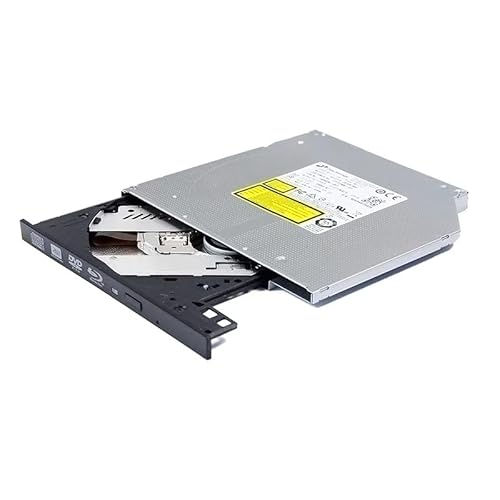
- Fits compatible 9.5mm SATA tray-loading systems
- Supports BDXL and M-DISC archival media
- Writes BD-R and BD-R DL at up to 6x
Best For: Replacing an optical drive in a compatible laptop
Best All-in-One External Drive

- Combines Blu-ray burning with USB and card-reader ports
- Supports BD, DVD, CD, M-DISC, and 3D playback
- Includes carrying case and four disc sleeves
Best For: Portable disc, card, and peripheral connectivity
Ultra HD Upgrade

- Internal 9.5mm SATA design
- Supports 4K UHD and BDXL media
- Reads and writes Blu-ray, DVD, and CD
Best For: Compatible Windows laptops needing an internal UHD Blu-ray drive
Flexible External Choice
USB 3.0 and Type-C Blu-ray Burner

- Connects through USB-A or Type-C
- Reads and writes 50GB Blu-ray discs
- Supports Windows, macOS, and Linux
Best For: Portable Blu-ray use across computers with different USB ports
Stable Portable Storage

- Supports BD-XL discs up to 100GB
- Includes USB 3.0 and Type-C connections
- Extra USB cable helps stabilize power
Best For: Portable Blu-ray, DVD, and CD burning on laptops and PCs
Best High-Capacity Hub
7-in-1 External Blu-ray Burner

- Reads and writes 100GB Blu-ray discs
- Built-in SD, TF, USB, and Type-C ports
- Up to 6x BD, 8x DVD, and 24x CD speeds
Best For: High-capacity backups and versatile file transfers
Best Simple Portable Option
External Blu-ray Player and CD/DVD Burner

- Reads Blu-ray discs up to 6x
- Burns CDs and DVDs, but not Blu-rays
- Includes USB-A and Type-C connectors
Best For: Portable playback and everyday CD/DVD burning
Best Quiet 7-in-1 Choice
External Blu-ray Drive with Card Readers

- Reads and writes 100GB Blu-ray discs
- Adds SD, TF, and USB connectivity
- Works with Windows, macOS, and Linux
Best For: Quiet cross-platform disc burning and file transfers
Best 4K-Ready Blu-ray Writer – Verbatim Ultra HD External Writer
For shoppers comparing blu ray drives, the Verbatim Ultra HD 4K Blu-ray Writer is a well-equipped external option with USB-C connectivity, broad disc support, and included Windows software. It can write Blu-ray, DVD, and CD media, while BDXL and M-DISC support make it useful for high-capacity backups and archival storage.
Best For: Laptop and desktop users who want an external drive for 4K-capable playback, disc writing, and long-term data archiving.
Pros:
- Supports Ultra HD 4K Blu-ray playback with compatible hardware and separately obtained playback software.
- Writes BD-R and BD-R DL media at up to 6x and supports BDXL discs up to 100GB.
- USB-powered slim design includes USB cables, adapter, Nero Burn & Archive software, and a 25GB Blu-ray disc.
Cons:
- 4K playback requires compatible hardware and separate playback software.
- Maximum listed Blu-ray read speed is 4x.
This is one of the more complete blu ray drives for users who want an external writer rather than a basic reader. Its included accessories and two-year limited warranty add value, especially for Windows-based archiving tasks.
Best Hub-Style Budget Drive – BUNUD 5-in-1 Blu-ray Drive
This BUNUD model stands out among blu ray drives by combining Blu-ray, DVD, and CD functionality with two USB ports and SD/TF card slots. Its plug-and-play USB 3.0 and Type-C connections suit Windows computers and Macs that need both optical media access and extra connectivity.
Best For: Laptop and Mac users who want a portable Blu-ray reader/writer with integrated USB expansion and memory-card access.
Pros:
- Reads and writes Blu-ray, DVD, and CD media for playback, backups, and file transfers.
- Includes two USB ports plus SD/TF slots for added connectivity.
- Supports USB 3.0 and Type-C connections without requiring a separate driver.
Cons:
- Does not play 4K Ultra HD discs.
- Not compatible with iPads, tablets, projectors, TVs, Chrome OS, cars, or smartphones.
- Playback and burning capabilities may still depend on the computer’s software.
Choose this drive if versatility and portability matter more than 4K support. Its built-in ports are particularly useful on laptops with limited connectivity, while the one-year warranty provides basic coverage.
Best Internal Laptop Upgrade – BU40N 9.5mm SATA Blu-ray Writer
Unlike portable blu ray drives, this BU40N is an internal 9.5mm SATA tray-loading replacement for compatible laptops. It supports Blu-ray, DVD, and CD media, along with BDXL and M-DISC, but buyers should verify the laptop’s drive height, bezel, button, and SATA interface before ordering.
Best For: Users upgrading or replacing a compatible 9.5mm SATA optical drive in a laptop or PC.
Pros:
- Supports BDXL media up to 100GB and quad-layer BDXL-R discs up to 128GB.
- Offers 6x BD-R and BD-R DL writing plus M-DISC support.
- Tray-loading internal design fits compatible 9.5mm SATA systems.
Cons:
- Requires a compatible 9.5mm SATA tray-loading bay and installation.
- Playback and 4K UHD writing software are not included.
- Ships as the internal drive only, without cables, tools, or an instruction manual.
This is a practical choice for restoring Blu-ray capability to a compatible laptop, but it is not a plug-in external solution. Compatibility checks and separate software purchases are essential, and the six-month warranty is shorter than some external alternatives.
Best All-in-One External Drive – 8-in-1 Blu-ray Hub
Among multifunctional blu ray drives, this 8-in-1 external model combines disc reading and writing with USB expansion and SD/TF card access. It supports BD, DVD, CD, and M-DISC media, includes USB-A and USB-C connectivity, and comes with a carrying case and disc sleeves for portable use.
Best For: Travelers and laptop users who need one compact accessory for optical discs, memory cards, and several USB peripherals.
Pros:
- Reads and burns BD, DVD, and CD media, with support for M-DISC and 3D Blu-ray playback.
- Offers two USB-C ports, USB 3.0, USB 2.0, and an SD/TF card slot.
- Includes a carrying case, four disc sleeves, and a built-in cable-storage design.
Cons:
- Does not support 4K playback and burns Blu-ray media up to 50GB.
- Third-party software is required for Blu-ray playback.
- SD and TF cards cannot be read simultaneously.
This drive is a strong fit when hub and card-reader features are as important as disc support. Its slim form and included storage accessories improve portability, while the one-year warranty offers basic protection.
Ultra HD Upgrade – BU40N Slim 4K Blu-ray Drive
For shoppers seeking blu ray drives for an internal laptop upgrade, the BU40N is a slim 9.5mm SATA model with 4K UHD Blu-ray playback, regular Blu-ray, DVD, and CD reading and writing, plus support for BDXL discs up to 100GB. It is designed for compatible laptops using a tray-loading SATA optical drive.
Best For: Laptop owners who need an internal slimline drive and want UHD Blu-ray playback on Windows.
Pros:
- Supports 4K UHD Blu-ray playback with recommended CyberLink PowerDVD software.
- Reads and burns Blu-ray, DVD, and CD media.
- Supports BDXL 100GB and 3D Blu-ray discs.
- Includes a stated three-year after-service warranty.
Cons:
- Requires a compatible 9.5mm SATA tray-loading bay.
- UHD Blu-ray playback is limited to Windows because suitable Mac UHD software is not available according to the listing.
- Playback software is not indicated as included.
This is the most specialized option in the group, particularly for a compatible Windows laptop that needs 4K UHD support. Check the laptop’s drive-bay specifications before ordering, and plan for compatible playback software.
Flexible External Choice – USB 3.0 and Type-C Blu-ray Burner
This external option is one of the more versatile blu ray drives for laptops and desktops, with both USB-A and Type-C connectivity built into the cable. It reads and writes Blu-ray discs at up to 6x, supports 50GB discs, and works with Windows, macOS, and Linux systems, although playback and burning software must be supplied separately.
Best For: Users who want a portable external Blu-ray burner that can connect to USB-A or USB-C computers.
Pros:
- Built-in USB 3.0 and Type-C cable supports common computer ports without an adapter.
- Reads and writes 50GB Blu-ray discs, along with DVD and CD media.
- Supports near-1080p 3D Blu-ray playback.
- Compatible with Windows, macOS, and Linux computers.
Cons:
- Does not support 4K Ultra HD Blu-ray discs.
- Playback and burning software is not included.
- Not compatible with Chromebooks, smartphones, tablets, TVs, or car players.
Choose this drive when broad computer compatibility and convenient USB connectivity matter more than 4K UHD support. Its slim external form also makes it practical for travel or for computers without an internal optical bay.
Stable Portable Storage – Dainty External Blu-ray Drive
The Dainty external drive is a practical pick among blu ray drives for users who need broad disc support and portable USB connectivity. It can read and write Blu-ray, DVD, and CD media, supports BD-XL discs up to 100GB, and includes an additional USB power cable to help maintain stable operation during reading or burning.
Best For: Laptop and PC users who prioritize portable storage, dual USB connectivity, and extra power stability.
Pros:
- Supports Blu-ray, DVD, and CD reading and writing, including BD-XL 100GB media.
- Includes USB 3.0 and Type-C connection options.
- Additional USB power cable is designed to reduce interruptions from insufficient power.
- Works with Windows 7–11, macOS, and Linux.
Cons:
- Requires separate playback or burning software.
- Not compatible with TVs, tablets, PS4, iPads, Chromebooks, projectors, or vehicles.
- Warranty is listed as one year.
This model makes sense for users who regularly move between computers and want support for high-capacity BD-XL media. The extra power connection is useful for demanding disc tasks, but buyers should confirm that their computer has the required USB ports and obtain compatible software separately.
Best High-Capacity Hub – 7-in-1 External Blu-ray Burner
For shoppers comparing blu ray drives, the Wbacon external model stands out as a high-capacity burner with built-in connectivity. It reads and writes 100GB Blu-ray discs, supports up to 6x Blu-ray, 8x DVD, and 24x CD speeds, and includes SD, TF, USB, and Type-C connections.
Best For: Users who want one portable drive for disc burning, memory-card transfers, and USB connectivity.
Pros:
- Supports reading and writing 100GB Blu-ray discs.
- Combines Blu-ray, DVD, and CD support with SD and TF card slots.
- Includes USB 3.0 and Type-C connectivity with integrated cable storage.
- Compatible with supported Windows, Linux, and older macOS systems.
Cons:
- Blu-ray playback requires separate software, such as PowerDVD or Macgo Blu-ray Player.
- Not compatible with TVs, tablets, smartphones, projectors, or cars.
- Region code can be changed only five times.
This is a flexible choice if you need more than basic disc playback. Its 100GB writing support and integrated ports add useful backup and transfer options, though buyers should confirm software and operating-system compatibility first.
Best Simple Portable Option – External Blu-ray Player and CD/DVD Burner
Among blu ray drives for straightforward playback and everyday disc tasks, this portable model keeps the setup simple with USB 3.0 and Type-C connections. It reads Blu-ray discs at up to 6x and handles CD and DVD playback and burning, but Blu-ray discs are read-only.
Best For: Laptop and desktop users who need portable Blu-ray playback plus CD/DVD burning.
Pros:
- Supports Blu-ray reading up to 6x, DVD reading up to 8x, and CD reading up to 24x.
- Can play and burn CDs and DVDs.
- Offers both USB-A and Type-C connectors with plug-and-play CD/DVD operation.
- Lightweight design with a built-in data cable for travel.
Cons:
- Cannot burn Blu-ray discs.
- Blu-ray playback requires third-party software.
- Not compatible with Chromebooks, TVs, tablets, iPads, trucks, or cars.
This drive is a practical fit for users who mainly need Blu-ray reading and CD/DVD burning without high-capacity Blu-ray writing. Its dual connector design improves compatibility with newer and older computers, provided the host system is supported.
Best Quiet 7-in-1 Choice – External Blu-ray Drive with Card Readers
This 7-in-1 option gives blu ray drives buyers a combination of disc burning, card reading, and extra USB connectivity. It supports 100GB Blu-ray discs, reads Blu-rays at up to 6x, and works with Windows, macOS, and Linux, while its slim profile and noise-reduction design suit portable use.
Best For: Cross-platform users who need Blu-ray burning and convenient SD/TF card file transfers.
Pros:
- Reads and writes 100GB Blu-ray discs at up to 6x.
- Includes SD and TF card slots plus additional USB ports.
- Supports Windows, macOS, and Linux systems.
- Offers a slim, lightweight design with low-noise operation.
Cons:
- Blu-ray playback software is not included.
- Does not support 4K, TVs, tablets, phones, or projectors.
- A supplemental 5V power cable may be needed for stable performance with large-capacity discs.
This model is more versatile than a basic external burner because it also works as a card and USB transfer hub. It is a strong match for mixed-device households and media workflows, as long as the listed compatibility limits and software requirement are acceptable.
How We Picked the Best Blu Ray Drives
We focused on the features that matter most in real-world use: supported disc formats, 4K UHD and 3D playback claims, read and write capability, connection type, portability, and compatibility with current computers. The selection includes external USB drives for laptops and desktops, internal SATA models for compatible PCs, and multifunction options with card readers or USB hubs.
We also considered support for BDXL discs, which can hold more data than standard Blu-ray media, and M-DISC compatibility for users building long-term archives. Because performance can depend on the computer, operating system, software, and disc media, buyers should verify requirements before ordering.
Quick Comparison
| Drive type | Best for | What to check |
|---|---|---|
| External USB Blu-ray drive | Laptops, flexible setups, and portability | USB-A or USB-C support, cable requirements, and software |
| Internal SATA Blu-ray writer | Desktop PC upgrades and frequent disc burning | Drive-bay size, SATA power/data connections, and case clearance |
| 4K UHD-capable drive | High-resolution movie playback | UHD software, computer hardware, display support, and protected-disc compatibility |
| Hub or card-reader model | Users who need extra connectivity | Port speeds, card formats, and simultaneous-use limitations |
Key Buying Factors for Blu-Ray Drives
Format and Capacity Support
Confirm that the drive supports the discs you plan to use, including BD-R, BD-RE, dual-layer media, BDXL, DVDs, and CDs. M-DISC support is useful for archival projects, but compatible discs and suitable burning software are still required.
Connection and Installation
External drives are generally the simplest choice because they connect over USB and can move between computers. USB-C is convenient for newer laptops, while USB 3.0 or USB 3.2 can provide the bandwidth needed for Blu-ray data transfers. Some drives include adapters or dual-compatible cables; others may require a separate adapter. Internal SATA models can offer a tidy permanent installation, but they require an available 5.25-inch bay or a compatible slim-drive mounting solution, along with SATA connections.
Playback Software and Operating-System Support
Plug-and-play usually refers to hardware detection, not guaranteed movie playback. Commercial Blu-ray and 4K UHD discs may require compatible playback software, codecs, or licensing. Check Windows support, included software, and whether your preferred operating system can handle protected Blu-ray content before buying.
Portability and Power
A slim external model suits travel and occasional use, while a larger, powered enclosure may be better for frequent burning. Check whether the drive draws enough power from one USB port or needs an additional power connection, especially with older computers or USB hubs.
Who Should Buy Which Blu Ray Drives?
- Choose a portable external drive if you use a laptop, switch between computers, or want the simplest installation.
- Choose an internal SATA writer for a desktop PC that will regularly burn discs and has the required bay and connections.
- Choose a 4K UHD-focused model if high-resolution movie playback is the priority, but verify software and system requirements first.
- Choose a hub or card-reader drive if your laptop has limited ports and you want one accessory for optical media and removable storage.
- Choose BDXL or M-DISC support for large backups, photo libraries, video projects, or archival storage.
For most buyers, an external USB-C or USB 3.0 Blu-ray writer offers the best balance of convenience and flexibility. Match the drive’s disc formats and software support to your intended use rather than choosing solely by advertised speed.