A laptop locking cable is a simple way to deter opportunistic theft in offices, classrooms, libraries, conference rooms, and other shared spaces. The right choice depends on more than cable length: lock type, slot compatibility, anchoring options, and daily convenience all matter.
We’ve gathered 10 laptop locking cables spanning combination and keyed designs, standard K-Slot models, universal locks, and options for newer Nano or Wedge-shaped security slots.
Best 10 Laptop Locking Cables Picks for 2026
Best Overall Combination Lock
Kensington T-Bar Standard Cable Lock

- Resettable four-digit combination with 10,000 possible codes
- Six-foot cut-resistant carbon steel cable
- Fits standard Kensington security slots
Best For: Standard-slot laptops and shared equipment
Best Adhesive-Mount Kit
AboveTEK Laptop and Tablet Security Cable

- Includes two adhesive anchor plate sets
- Six-foot galvanized steel cable
- Designed for laptops, tablets, and smartphones
Best For: Multiple mobile devices and display setups
Best Keyed Security Option
Kensington T-Bar Standard Keyed Lock

- Six-foot carbon steel cable
- Pivoting 10 mm lock head for thin devices
- Tubular keyed lock with hidden-pin design
Best For: Standard-slot laptops where keyed access is preferred
Best Budget Combination Cable

- Four-dial lock with up to 10,000 combinations
- Six-foot cable for fixed-object anchoring
- Design helps prevent accidental resets
Best For: Everyday standard-slot laptop security
Best No-Key Flexibility

- Supports built-in slots or an adhesive lock plate
- Resettable four-digit combination
- 6.23-foot, 5mm braided cable
Best For: Mixed devices and key-free access
Best Portable Keyed Option
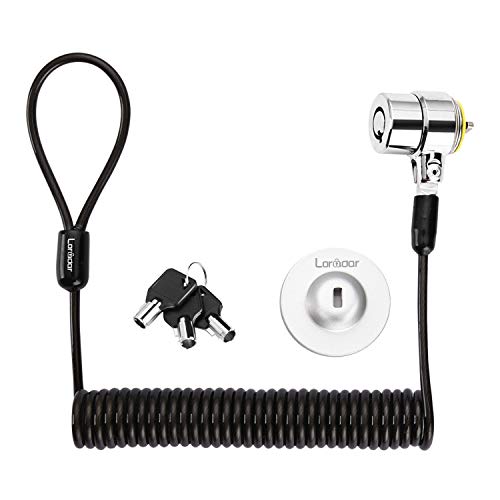
- Includes three keys and a traceable key number
- Self-rolling cable extends to about 6 feet
- Supports direct slot use or an adhesive plate
Best For: Portable keyed security in shared spaces
Best Universal Slot Coverage
Kensington 3-in-1 Combination Lock

- Fits standard, nano, and wedge-shaped slots
- Resettable four-number combination
- Six-foot carbon-steel cable
Best For: Mixed laptop brands and slot types
Simple Keyed Security

- Key-operated lock includes two keys.
- 4.6-foot steel cable with protective PVC jacket.
- Designed for compatible K-slot electronics.
Best For: Shared spaces and users who prefer a traditional keyed lock
Dell-Specific Combination Protection
Kensington N17 Dell Laptop Lock

- Made for compatible Dell and Alienware wedge slots.
- Resettable four-wheel combination with 10,000 codes.
- Six-foot carbon steel cable and push-button engagement.
Best For: Dell and Alienware laptop owners wanting keyless security
Universal Slot Flexibility
AboveTEK 3-in-1 Universal Lock

- Compatible with K-Slot, Nano, and Wedge slots.
- Resettable four-digit combination with 10,000 codes.
- 360-degree rotating head supports flexible positioning.
Best For: Mixed-device environments and users wanting broad compatibility
Best Overall Combination Lock – Kensington T-Bar Standard Cable Lock
For standard Kensington security slots, this Kensington cable lock is a practical choice for protecting laptops and other equipment. Its resettable four-digit combination, push-button attachment, and six-foot carbon steel cable make it convenient for offices, homes, and shared spaces. Check your device first, since it is not designed for Dell or Alienware systems using different lock slots.
Best For: Users who want a resettable combination lock for laptops and other devices with a standard Kensington slot.
Pros:
- Offers 10,000 possible four-digit combinations.
- Push-button design supports one-handed engagement.
- Six-foot cut-resistant carbon steel cable anchors to fixed structures.
- Works with compatible laptops, desktops, monitors, TVs, docking stations, and projectors.
Cons:
- Does not fit Dell and Alienware devices that use Noble or other nonstandard slots.
- Requires a compatible Kensington standard security slot.
This is a versatile laptop locking cable for standard-slot devices, especially when combination access is preferable to carrying a key. Confirm the lock-slot type before ordering.
Best Adhesive-Mount Kit – AboveTEK Laptop and Tablet Security Cable
The AboveTEK locking kit is a flexible option for laptops, tablets, smartphones, and other devices without a built-in security slot. It includes two adhesive anchor plates and keyed locks, allowing the same approach to extend across multiple mobile devices. The six-foot galvanized steel cable is suited to public, retail, and workplace settings where portable equipment needs an attachment point.
Best For: People securing multiple flat-surface devices, including tablets and phones, with adhesive anchor plates.
Pros:
- Includes two adhesive sticker and anchor plate sets.
- Industrial-grade 3M adhesive is designed for most flat surfaces.
- Six-foot cut-resistant galvanized steel cable supports device mobility.
- Broadly intended for tablets, smartphones, laptops, and notebooks.
Cons:
- Adhesive mounting depends on a suitable flat surface and proper installation.
- Keyed operation may be less convenient than a combination lock.
This is one of the more adaptable laptop locking cables in the group because its adhesive anchors can add security to devices lacking a standard slot. It is particularly useful for displays, counters, libraries, cafés, and other shared environments.
Best Keyed Security Option – Kensington T-Bar Standard Keyed Lock
This keyed Kensington cable lock provides a straightforward security solution for devices equipped with a standard Kensington slot. Its six-foot carbon steel cable, pivoting 10 mm lock head, and tubular lock design are intended for laptop and equipment security. As with other laptop locking cables, compatibility is slot-specific, so it will not fit Dell wedge slots or devices requiring a Kensington Nano lock.
Best For: Users who prefer a keyed lock and need to secure standard Kensington-slot laptops or peripherals.
Pros:
- Six-foot carbon steel cable offers reach around desks and fixed structures.
- Pivoting 10 mm lock head suits thin laptops and devices.
- Patented hidden-pin tubular lock design supports anti-pick security.
- Hinged design helps reduce awkward locking angles.
Cons:
- Does not fit Dell devices using the newer wedge lock slot.
- Some HP devices use a Nano Saver slot instead.
- Keys must be retained for access.
Choose this model when a keyed locking method and a standard Kensington slot match your setup. Its pivoting head and long cable add practical usability, but checking the device specifications is essential.
Best Budget Combination Cable – Sendt Notebook Laptop Lock
The Sendt notebook lock is a simple combination-based option for laptops with a Kensington security slot. Its six-foot cable and four-dial user-settable combination provide flexible placement without requiring a key. It is aimed at settings such as schools, colleges, libraries, and offices, but it does not fit Dell, Kensington Nano, or Noble wedge slots.
Best For: Budget-conscious users securing standard Kensington-slot laptops in schools, libraries, and offices.
Pros:
- Provides up to 10,000 user-settable combinations.
- Six-foot cable supports anchoring to fixed objects.
- Design helps prevent accidental combination resetting.
- Compact zinc alloy lock construction.
Cons:
- Compatibility excludes Dell, Kensington Nano, and Noble wedge slots.
- Only works with devices that have a Kensington security slot.
This Sendt model covers the essentials for standard-slot laptops while avoiding the need for keys. It makes sense for everyday institutional use, provided your notebook has the correct Kensington slot.
Best No-Key Flexibility – Versatile Laptop Cable Lock
This option is a practical choice among laptop locking cables when you want combination access and compatibility with devices that may not have a built-in security slot. It includes an adhesive lock plate for supported flat surfaces, while laptops with compatible slots can connect directly.
Best For: Users securing laptops, tablets, or other devices with either a built-in security slot or a suitable flat surface for the included adhesive plate.
Pros:
- Works with compatible built-in security slots or the included adhesive anchor plate.
- Resettable four-digit combination provides over 10,000 possible codes without requiring keys.
- 6.23-foot, 5mm braided cable allows additional reach and device movement.
- Stainless-steel, double-lever lock head has a 360-degree rotating push-button design.
Cons:
- The adhesive plate requires a suitable hard surface and proper installation.
- Combination locks may be less convenient if you prefer keyed access.
Its combination format and dual mounting approach make it a flexible pick for mixed-device setups. Confirm the surface and slot compatibility before relying on the anchor plate.
Best Portable Keyed Option – Retractable Laptop Lock Kit
This keyed choice stands out among laptop locking cables for its retractable design and broad use across compatible laptops, monitors, tablets, and other electronics. It connects directly to compatible 3-by-7mm security slots or uses the included adhesive anchor plate where needed.
Best For: Portable keyed security for compatible laptops and electronics in offices, libraries, cafés, hotels, and other shared spaces.
Pros:
- Includes three keys and a traceable number for key replacement concerns.
- Self-rolling cable stretches to approximately 6 feet and retracts to about 4 inches.
- Can connect directly to compatible 3-by-7mm security slots or use an adhesive anchor plate.
- Compact design and TPU-coated twisted steel cable are suited to portable use.
Cons:
- Compatibility varies, and several listed laptop models require the anchor plate.
- Newer Apple MacBook models are not supported according to the supplied notes.
- The adhesive plate needs careful surface preparation and pressure during installation.
The retractable cable is convenient for carrying and storage, while the keyed mechanism suits users who prefer physical keys. Check the device slot type and model-specific compatibility first.
Best Universal Slot Coverage – Kensington 3-in-1 Combination Lock
This Kensington model is a strong choice among laptop locking cables when device slot compatibility is your main concern. Its interchangeable tips fit standard, nano, or wedge-shaped laptop security slots, and the resettable combination avoids the need to carry keys.
Best For: Users securing laptops from different brands or generations who want one combination lock with broad slot support.
Pros:
- Interchangeable tips support standard, nano, and wedge-shaped security slots.
- Resettable four-number dial provides 10,000 possible combinations.
- Six-foot carbon-steel cable has a plastic sheath for cut and theft resistance.
- Unused lock tips remain attached to the lock through a tether.
Cons:
- Designed for devices with compatible security slots; no adhesive anchor plate is listed.
- Combination retrieval depends on Kensington’s registration program if the code is forgotten.
- At 8.3 ounces, it is heavier than some compact keyed options listed here.
Its three-tip design is particularly useful for households or workplaces with varied laptop slot formats. It is best suited to devices with a compatible built-in slot rather than anchor-plate installation.
Simple Keyed Security – Manhattan Laptop Lock
The Manhattan Laptop Lock is a straightforward option for shoppers seeking laptop locking cables with a traditional key-operated design. Its 4.6-foot steel cable attaches to compatible K-slot devices and wraps around a desk, table leg, or other fixed object.
Best For: Home offices, classrooms, shared workspaces, and travel situations involving laptops or other electronics with a built-in K-slot.
Pros:
- Key lock includes two keys for convenient access.
- 4.6-foot steel cable provides useful reach to a stationary anchor.
- PVC jacket helps protect devices, furniture, and nearby surfaces from scratches.
- Works with various compatible electronics, including notebooks, displays, projectors, cameras, and mobile devices.
Cons:
- Only compatible with devices that have a K-slot.
- Keyed design requires keeping track of the included keys.
- Its 4.6-foot length may offer less reach than some longer cables.
This is a practical, low-profile choice when a keyed connection and broad K-slot compatibility matter more than combination-lock convenience.
Dell-Specific Combination Protection – Kensington N17 Dell Laptop Lock
Kensington N17 Dell Laptop Computer Lock, Combination Security Locking Cable (K68008WW) Black
Check Price On AmazonThe Kensington N17 is one of the more specialized laptop locking cables in this roundup, pairing a resettable combination lock with a wedge-shaped slot connection. It is designed specifically for Dell and Alienware laptops, so checking the device’s lock-slot type before buying is essential.
Best For: Dell and Alienware laptop users in offices, homes, and educational institutions who want keyless access.
Pros:
- Fits Dell and Alienware laptops with compatible wedge lock slots.
- Resettable four-wheel combination offers 10,000 possible codes.
- Push-button design supports one-handed engagement.
- Six-foot carbon steel cable anchors to desks, tables, or other fixed structures.
Cons:
- Compatibility is limited to Dell and Alienware devices with the appropriate wedge slot.
- Combination locks require remembering the selected code.
- The product details identify a specific device family rather than universal slot compatibility.
For compatible Dell systems, the N17 combines a longer cable with convenient keyless operation and a five-year manufacturer warranty.
Universal Slot Flexibility – AboveTEK 3-in-1 Universal Lock
The AboveTEK 3-in-1 Universal Laptop Cable Lock is aimed at shoppers who need laptop locking cables that can work across multiple security-slot formats. Its design supports K-Slot, Nano, and Wedge slots, while the resettable four-digit combination avoids the need for keys.
Best For: Offices, campuses, and travelers securing laptops from different brands or with varying compatible slot types.
Pros:
- Supports K-Slot, Nano, and Wedge security slots.
- Resettable four-digit combination provides 10,000 possible codes.
- 360-degree rotating head helps with positioning and access.
- Galvanized steel cable, zinc alloy lock head, and vinyl coating are designed for regular use.
Cons:
- Users must verify their laptop’s slot type before purchase.
- Combination operation requires remembering the programmed code.
- The supplied notes do not specify the cable length.
Its three-slot compatibility makes this a flexible pick for mixed-device environments, especially when a resettable combination and rotating head are useful.
How We Picked These Laptop Locking Cables
We focused on practical security features rather than appearance alone. The lineup includes resettable combination locks for key-free access, keyed locks for straightforward operation, universal models for mixed-device environments, and compact options for travel. We also considered cable length, stated compatibility, included keys or adhesive anchors, portability, and whether a lock is better suited to a fixed desk or flexible shared workspace.
No cable lock makes a laptop impossible to steal. These products are primarily deterrents: they secure a compatible device to a sturdy, immovable object and make opportunistic removal more difficult.
Quick Comparison
| Lock type | Best for | Main advantage | Potential trade-off |
|---|---|---|---|
| Combination | Shared offices and classrooms | No key to carry | Code management matters |
| Keyed | Personal desks and fixed setups | Simple, familiar operation | Keys can be misplaced |
| Universal | Mixed laptop fleets | Supports multiple slot styles | May be bulkier |
| Adhesive-anchor kit | Devices without a built-in slot | Adds an attachment point | Surface preparation is important |
Key Buying Factors for Laptop Locking Cables
Check the Security Slot First
Standard K-Slot compatibility is common, but newer laptops may use Nano or Wedge slots—or have no built-in slot at all. Confirm the manufacturer’s slot type before buying. A universal lock can be useful when several device designs must be protected.
Choose Combination or Keyed Access
Combination locks are convenient for hot desks, classrooms, and teams because multiple users do not need shared keys. Keyed models can be faster for one owner or a small group, especially when the key remains attached to a keyring. Consider whether you need a resettable code or spare keys.
Match the Cable to Your Workspace
A longer cable can reach a desk leg or other anchor more easily, while a shorter cable is usually easier to pack and manage. Look for a sturdy steel cable, a locking head that fits without excessive play, and a loop that can wrap around a genuinely immovable object.
Consider Installation and Portability
If the laptop lacks a security slot, an adhesive anchor may expand your options, but follow the installation instructions and allow the adhesive to bond properly. For frequent travel, prioritize lower weight, a manageable cable length, and a lock that is easy to attach without tools.
Who Should Buy Which Laptop Locking Cables?
- Shared offices, libraries, and classrooms: Choose a resettable combination lock so users do not have to distribute or replace keys.
- Single-user desks: A keyed K-Slot lock is a straightforward choice when your laptop has a standard slot and the key can stay secure.
- Organizations with mixed devices: A universal model supporting K-Slot, Nano, and Wedge-style slots can reduce the need to stock several lock types.
- Tablets or laptops without built-in slots: Consider a kit with an adhesive anchor, and verify that the device surface is suitable before installation.
- Frequent travelers: Pick a compact, lighter cable with enough reach for hotel desks, coworking stations, or conference furniture.