Wi-Fi is convenient, but a wired connection can deliver more consistent speed and lower latency for streaming, gaming, video calls, and large file transfers. USB 3.0 Ethernet adapters make it easy to add reliable network access to laptops, tablets, and other devices without a built-in Ethernet port.
Our roundup covers compact gigabit adapters, USB-C options, multiport hubs, and a faster 2.5Gbps model. Use the guide below to match the right adapter to your device, network, and everyday workload.
Best 10 USB 3.0 Ethernet Adapters Picks for 2026
Reliable Gigabit Basics
Amazon Basics USB 3.0 Ethernet Adapter

- Gigabit speeds up to 1,000 Mbps
- Supports Wake-on-LAN and energy-saving features
- For Windows, macOS, ChromeOS, and Linux computers
Best For: Computer and laptop users seeking a simple wired connection
Most Versatile USB-A Pick
UGREEN USB 3.0 Gigabit Ethernet Adapter

- Gigabit speeds up to 1,000 Mbps
- Plug-and-play support for computers and Nintendo Switch
- Compact design with a 24-month warranty
Best For: Travelers and gamers needing broad USB-A compatibility
Premium USB-C Option
Anker PowerExpand Gigabit Ethernet Adapter

- Wired speeds up to 1 Gbps
- Compact aluminum body and braided cable
- Includes an 18-month limited warranty
Best For: USB-C users who prioritize portability and finish
Best for Switch Gaming
TP-Link UE306 USB 3.0 Ethernet Adapter

- Gigabit connectivity for computers and Nintendo Switch
- Plug-and-play support on Switch, Windows, and Linux
- Foldable design with a two-year warranty
Best For: Nintendo Switch gaming and portable wired networking
Best Versatile Pick
BENFEI USB A/C Gigabit Ethernet Adapter

- USB-A and USB-C connectivity
- Up to 1000Mbps wired performance
- Broad OS support with 18-month warranty
Best For: Users needing one adapter for both USB-A and USB-C devices
Best for 2.5Gb Networks
UGREEN USB 2.5Gb Ethernet Adapter

- Up to 2.5Gbps network speeds
- Low-power RTL8156BG chipset
- Aluminum housing with status lights
Best For: Users with compatible 2.5Gb routers, switches, and network service
Best Budget Gigabit Pick
uni USB 3.0 Gigabit Ethernet Adapter

- 10/100/1000Mbps Ethernet support
- Braided cable and aluminum housing
- Broad computer OS compatibility
Best For: Users wanting a durable everyday gigabit adapter for USB-A computers
Best Multiport Pick
UGREEN 5-in-1 USB Ethernet Hub
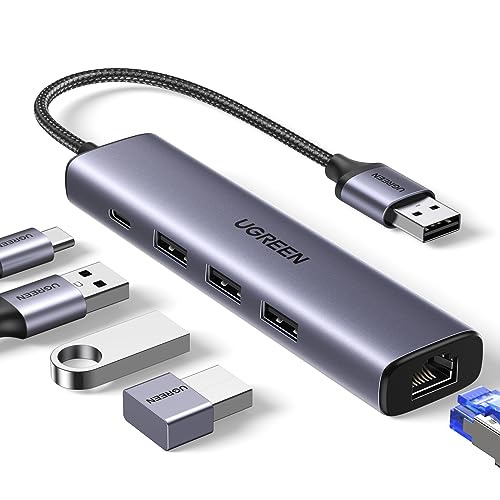
- Gigabit Ethernet up to 1000Mbps
- Three USB 3.0 ports up to 5Gbps
- USB-C power input for peripherals
Best For: Adding wired networking and USB expansion to a laptop
Best Simple Adapter
Cable Matters USB 3.0 Gigabit Adapter

- 10/100/1000Mbps Ethernet support
- Lightweight design under one ounce
- Native Chrome, Mac, and Windows support
Best For: Portable wired networking without extra hub functionality
Best Budget Hub
ABLEWE 4-in-1 USB Ethernet Adapter

- Gigabit RJ45 with three USB 3.0 ports
- Up to 5Gbps USB data transfers
- Compact aluminum design with two-year warranty
Best For: Connecting Ethernet and multiple peripherals at once
Reliable Gigabit Basics – Amazon Basics USB 3.0 Ethernet Adapter
If you need one of the straightforward usb 3.0 ethernet adapters for a computer or laptop, this Amazon Basics model connects to a router, modem, or network switch and supports Gigabit Ethernet speeds up to 1,000 Mbps.
Best For: Windows and macOS computer users who want a basic wired network connection.
Pros:
- Supports 10/100/1000 Mbps Ethernet connections.
- Includes Wake-on-LAN and Energy Efficient Ethernet support.
- Supports Windows 8.1 or higher and macOS, with broader compatibility listed for ChromeOS and Linux.
Cons:
- Does not support Smart TVs or gaming consoles such as Nintendo Switch.
- Designed for computers and laptops rather than a broader range of USB devices.
This is a practical pick when computer compatibility matters more than console support. Its Gigabit capability and power-saving features make it a sensible everyday wired-network adapter.
Most Versatile USB-A Pick – UGREEN USB 3.0 Gigabit Ethernet Adapter
Among compact usb 3.0 ethernet adapters, the UGREEN model stands out for broad device support. It provides up to 1,000 Mbps and is designed for computers, laptops, TV boxes, and Nintendo Switch systems with a USB-A port.
Best For: Users who want one portable adapter for laptops, desktops, and Nintendo Switch.
Pros:
- Offers Gigabit network speeds for streaming, gaming, uploads, and downloads.
- Plug-and-play support is listed for Windows, macOS, ChromeOS, and Nintendo Switch.
- Compact design and a 24-month UGREEN warranty support travel use.
Cons:
- Requires a USB-A port.
- Its stated plug-and-play support does not cover every operating system listed in the broader compatibility details.
Choose this adapter if flexibility is a priority, especially when Nintendo Switch compatibility is important. It combines Gigabit performance with a small form factor suited to bags and briefcases.
Premium USB-C Option – Anker PowerExpand Gigabit Ethernet Adapter
For devices with USB-C ports, this Anker adapter provides a stable wired connection at up to 1 Gbps. Its compact aluminum housing and braided-nylon cable make it a polished alternative among usb 3.0 ethernet adapters.
Best For: USB-C tablets and other compatible devices where portability and build quality are priorities.
Pros:
- Delivers wired internet speeds up to 1 Gbps.
- Lightweight design weighs about as much as a AA battery.
- Uses an aluminum exterior and braided-nylon cable, with an 18-month warranty.
Cons:
- Uses USB-C rather than USB-A.
- The supplied notes specify tablet compatibility but do not list operating-system support.
This is a strong fit for a modern USB-C setup that values a small footprint and premium materials. Confirm your device has a compatible USB-C port before choosing it.
Best for Switch Gaming – TP-Link UE306 USB 3.0 Ethernet Adapter
The TP-Link UE306 is a portable choice among usb 3.0 ethernet adapters, adding a wired Gigabit connection to laptops, tablets, and Nintendo Switch systems. It supports 10/100/1000 Mbps networking and requires no external power.
Best For: Nintendo Switch players and laptop users who want a foldable, plug-and-play wired connection.
Pros:
- Supports Gigabit Ethernet and backward compatibility with USB 2.0 and 1.1.
- No driver is required for Nintendo Switch, Windows 11/10/8.1/8, and Linux.
- Foldable, lightweight design measures 2.8 by 1 by 0.6 inches and includes a two-year warranty.
Cons:
- Uses a USB-A connector.
- The supplied details do not specify driver-free support for macOS.
With dedicated Switch support, compact construction, and a foldable connector, the UE306 is particularly well suited to gaming setups and travel. It is also a practical way to add wired networking to compatible laptops and tablets.
Best Versatile Pick – BENFEI USB A/C Gigabit Ethernet Adapter
For shoppers comparing usb 3.0 ethernet adapters, the BENFEI stands out for its flexible USB-A and USB-C connectivity, compact form, and gigabit wired performance. It supports up to 1000Mbps over a USB 3.0-class connection and works with a broad range of Windows, macOS, ChromeOS, Linux, and Android devices.
Best For: Users who want one portable adapter that can connect both USB-A and USB-C devices to wired Ethernet.
Pros:
- USB-A/C design adds RJ45 Ethernet to a wide range of computers and tablets.
- Supports 10/100/1000Mbps performance, Wake-on-LAN, and energy-efficient Ethernet.
- Compact aluminum-shell design, status LEDs, and no external power requirement.
- Includes an 18-month warranty and broad operating-system compatibility.
Cons:
- Not compatible with Nintendo Switch or Windows RT.
- Reaching 1Gbps requires a CAT6 or newer Ethernet cable and compatible network equipment.
The BENFEI is a practical all-around choice when compatibility matters as much as speed. Its dual-connector design makes it especially convenient for households or users switching between older USB-A laptops and newer USB-C devices.
Best for 2.5Gb Networks – UGREEN USB 2.5Gb Ethernet Adapter
Among usb 3.0 ethernet adapters, the UGREEN model is the speed-focused option, adding a 2.5Gbps RJ45 connection to compatible USB-A computers. It is designed for faster downloads, NAS access, streaming, and gaming when the rest of the network supports 2.5Gb Ethernet.
Best For: Users upgrading from gigabit Ethernet who have a 2.5Gb-capable router, switch, and network service.
Pros:
- Supports network speeds up to 2.5Gbps for compatible setups.
- RTL8156BG chip is designed for stable, lower-power operation at full speed.
- Durable aluminum housing, reinforced ports, and indicator lights.
- Compatible with Windows, macOS, ChromeOS, and Linux systems.
Cons:
- Uses USB 3.0 Type-A rather than USB-C.
- 2.5Gbps performance requires compatible network hardware and service.
- Not compatible with all Nintendo Switch, TV, Synology NAS, or Wii devices.
The UGREEN offers the most headroom in this group, but its advantage depends on having a complete 2.5Gb network. For ordinary gigabit connections, a less expensive 1Gbps adapter may be sufficient.
Best Budget Gigabit Pick – uni USB 3.0 Gigabit Ethernet Adapter
The uni is a straightforward choice for shoppers seeking usb 3.0 ethernet adapters with gigabit capability and a simple setup. It supports 10/100/1000Mbps Ethernet, uses a braided cable and aluminum housing, and is compatible with many Windows, macOS, ChromeOS, and Linux computers.
Best For: Laptop and desktop users who want a durable, driver-free gigabit adapter for video calls, streaming, downloads, or gaming.
Pros:
- Supports up to 1Gbps through USB 3.0 and works with USB 2.0 and 1.1.
- RTL8153 chip, snug USB connector, braided cable, and aluminum case support stable daily use.
- Status LED, Wake-on-LAN, crossover detection, and IPv4/IPv6 support.
- Includes an 18-month warranty and customer service support.
Cons:
- Windows 11 requires a driver according to the supplied notes.
- USB 2.0 connections are limited to 10/100Mbps.
- Not recommended for TVs or compatible with Nintendo Switch.
The uni delivers the essential features most people need from a gigabit adapter without adding 2.5Gb hardware. It is a sensible pick for stable wired networking, provided your device has USB-A and you do not need TV or Nintendo Switch compatibility.
Best Multiport Pick – UGREEN 5-in-1 USB Ethernet Hub
If you need more than wired networking, this UGREEN model is one of the more versatile usb 3.0 ethernet adapters. It combines a gigabit Ethernet port with three USB 3.0 ports, while its USB-C power input can help support higher-power peripherals.
Best For: Laptop users who want wired gigabit networking and additional USB connectivity from one compact hub.
Pros:
- Gigabit Ethernet supports speeds up to 1000Mbps.
- Three USB 3.0 ports offer data transfers up to 5Gbps.
- Plug-and-play support for Windows 11/10/8.1, macOS, and Chrome OS.
- USB-C power input can support high-power peripherals such as hard drives.
Cons:
- The USB-C port powers peripherals, not the host laptop.
- Windows XP/7/8, Vista, and Linux require driver installation.
This is a strong choice when a basic Ethernet adapter would not provide enough expansion. Its combination of gigabit networking and three USB ports makes it particularly useful for a streamlined laptop workspace.
Best Simple Adapter – Cable Matters USB 3.0 Gigabit Adapter
The Cable Matters adapter is a straightforward option among usb 3.0 ethernet adapters, adding a standard RJ45 port to computers with USB 3.0. It supports gigabit networking, backwards compatibility with 10/100Mbps networks, and native driver support across common operating systems.
Best For: Users who want a lightweight, dedicated wired network adapter without extra hub ports.
Pros:
- Supports 10/100/1000Mbps Ethernet connections.
- USB 3.0 supports data transfer rates up to 5Gbps.
- Native driver support is available for Chrome, Mac, and Windows OS.
- Supports features including Wake-on-LAN, PXE, and MAC address pass-through with compatible software.
Cons:
- It adds Ethernet connectivity but does not include USB expansion ports.
- It does not support Windows RT.
- An Ethernet cable is sold separately.
For a focused, portable solution, this model keeps things simple. Its sub-one-ounce weight and broad Chrome, Mac, and Windows compatibility make it practical for travel, Wi-Fi dead zones, or replacing an unreliable network port.
Best Budget Hub – ABLEWE 4-in-1 USB Ethernet Adapter
This ABLEWE model combines a gigabit RJ45 connection with three USB 3.0 ports, making it a useful pick among usb 3.0 ethernet adapters when you also need peripheral expansion. All hub ports can work simultaneously, and the aluminum housing keeps the design compact and portable.
Best For: Users who need wired Ethernet plus several USB ports for storage devices, input accessories, or printers.
Pros:
- Gigabit Ethernet supports 10/100/1000Mbps network speeds.
- Three USB 3.0 ports provide data transfers up to 5Gbps.
- Ports can operate simultaneously for connecting multiple peripherals.
- Compatible with Windows, macOS, Linux, Chrome OS, and supported Surface devices.
Cons:
- It requires a USB 3.0 host port for the listed high-speed performance.
- Compatibility varies by operating-system version, so older systems should be checked carefully.
The ABLEWE is a practical all-in-one choice for expanding a laptop or desktop with both Ethernet and USB connectivity. Its simultaneous port operation and two-year warranty add useful convenience for everyday setups.
How We Picked These USB 3.0 Ethernet Adapters
We focused on adapters that provide a practical alternative to wireless networking, prioritizing wired speed, connection stability, compatibility, portability, and ease of setup. The selection includes USB-A and USB-C designs, standard gigabit models, a 2.5Gbps option, and hub-style adapters for users who need additional ports.
We also considered whether each model supports common operating systems and devices, including Windows PCs, Macs, Surface hardware, and gaming consoles where stated. Before buying, confirm that the listed connector matches your device and that your operating system is supported.
Quick Comparison
| Type | Best For | Typical Advantage |
|---|---|---|
| USB 3.0 to Gigabit Ethernet | Most laptops and desktops | Reliable 1Gbps wired networking |
| USB-C to Gigabit Ethernet | Modern laptops and tablets | Direct connection to USB-C ports |
| 2.5Gbps Ethernet | Fast networks and file transfers | More headroom than standard gigabit |
| Ethernet hub | Devices with limited ports | Networking plus extra USB connectivity |
Key Buying Factors for USB 3.0 Ethernet Adapters
Connector and Compatibility
Check whether you need USB-A, USB-C, or a hub with both. Some USB-C adapters may require a compatible port with the necessary data support. Verify operating-system compatibility as well, particularly if you use macOS, ChromeOS, Linux, a gaming console, or a specialized device.
Network Speed
Most models in this roundup support up to 1Gbps, which is sufficient for many home broadband plans and office networks. A 2.5Gbps adapter makes more sense when your computer, router or switch, cabling, and internet service can support speeds above gigabit.
Drivers and Setup
Plug-and-play support keeps installation simple, but some operating systems may still require a driver. If you regularly move between computers, prioritize a model with broad compatibility and clearly documented support.
Design and Extras
A compact adapter is easier to carry, while an aluminum housing may improve durability. Hub models add useful USB ports but are larger and can draw more power. Consider cable length, heat management, and whether the adapter blocks neighboring ports.
Who Should Buy Which USB 3.0 Ethernet Adapters?
Choose a compact USB-A gigabit adapter for an older laptop, desktop, or docking setup with a standard USB 3.0 port. Pick a USB-C model for a newer ultrabook or tablet, especially when you want a simple wired connection without a separate dock.
A 2.5Gbps adapter is the better choice for fast local-network transfers, compatible NAS systems, or upgraded internet service. If your device has too few ports, a USB hub with Ethernet can combine networking and peripheral connectivity in one accessory. For Nintendo Switch or other specialized devices, use a model that explicitly lists support for that hardware rather than assuming every adapter will work.