High-speed optical disc drives remain useful for backing up files, burning DVDs and CDs, archiving photos, and playing physical media. The right choice depends on more than maximum speed: connection type, disc format support, compatibility, and portability all affect everyday performance.
This roundup compares 10 internal and external models, from fast Blu-ray burners and 4K-oriented drives to compact USB DVD writers. Use the guide below to narrow the list by system, media format, and intended workload.
Best 10 High Speed Optical Disc Drives Picks for 2026
Best High-Speed Blu-ray Pick

- 16x Blu-ray writing with BDXL support
- USB 3.0 works with Mac and Windows
- M-DISC and optional file encryption support
Best For: Fast external Blu-ray backups and large optical archives
Best Fast DVD Rewriter

- 24x CD and 8x DVD writing
- Supports DVD-RAM and dual-layer DVD
- Portable USB design with M-DISC support
Best For: Routine CD and DVD burning on Mac or Windows
Best Internal Archival Drive
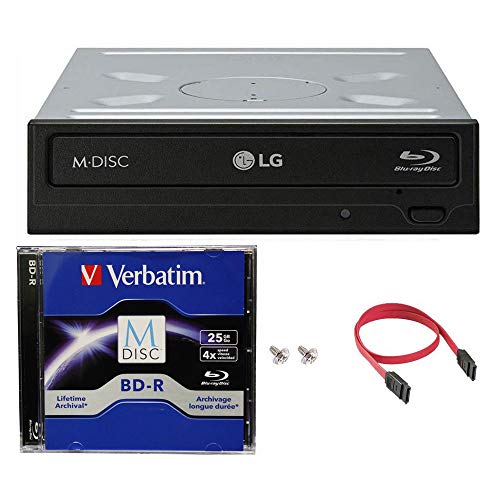
- 14x BD-R and 16x DVD writing
- Includes 25GB M-DISC BD and cables
- SATA installation for desktop computers
Best For: Durable internal Blu-ray backups and archives
Best Slim Laptop Blu-ray Drive

- Slim 9.5mm internal form factor
- Supports Blu-ray, DVD, and CD media
- 6x writing through a SATA interface
Best For: Laptop and compact-PC optical-drive upgrades
Best Internal DVD Burner
LG GH24NSC0 Internal Optical Drive

- Writes DVD±R at up to 24X
- Supports DVD-RAM, dual-layer, and M-DISC
- 5.25-inch internal SATA design
Best For: Desktop PC CD/DVD reading and burning
Best Blu-ray-Capable Choice
JOTEC Slim 4K UHD Blu-ray Drive

- Supports 4K UHD and 3D Blu-ray
- Reads CD, DVD, and Blu-ray formats
- Handles discs up to 128GB
Best For: Compatible laptops and PCs needing Blu-ray and large-capacity media support
Best Internal Speed

- Up to 24x media speed
- Internal half-height 5.25-inch design
- SATA connectivity for compatible desktops
Best For: Desktop users needing a fast internal DVD/CD writer
Best Portable Dual-Interface
Amicool USB 3.0/USB-C DVD Drive

- USB 3.0 and USB-C interfaces
- Up to 8x DVD and 24x CD speeds
- Slim plug-and-play design
Best For: Portable CD/DVD use across compatible laptops and desktops
Best Multifunctional Hub
8-in-1 USB 3.0 External DVD Drive

- DVD/CD burner with up to 8x DVD speed
- Built-in USB, USB-C, SD, and TF ports
- Plug-and-play support for major desktop OS platforms
Best For: Users wanting optical media and extra port expansion in one device
Best High-Speed Blu-ray Pick – ASUS BW-16D1X-U
The ASUS BW-16D1X-U is a strong choice among high speed optical disc drives when fast Blu-ray writing is the priority. Its USB 3.0 connection supports Mac and Windows computers, while 16x Blu-ray writing and BDXL support suit large backups and media projects.
Best For: Users who need a fast external Blu-ray writer for large backups, personal media, gaming, or business files.
Pros:
- 16x Blu-ray writing with BDXL support for capacities up to 128GB.
- USB 3.0 connectivity and compatibility with Mac OS X 10.6 or later and Windows systems.
- Supports M-DISC and includes CyberLink Power2Go 8 with optional encryption.
- Portable diamond-shaped enclosure with included power adapter and USB cable.
Cons:
- Requires an external power adapter.
- At 2.6 pounds, it is less lightweight than a slim portable drive.
With its combination of 16x Blu-ray performance, BDXL support, and broad computer compatibility, this ASUS model is especially practical for users who regularly write large optical archives.
Best Fast DVD Rewriter – LG GE24NU40
LG Electronics GE24NU Super Multi DVDRW (R DL) / DVD-RAM Drive - External, Black (GE24NU40)
Check Price On AmazonThe LG GE24NU40 is a practical external DVD option for shoppers seeking high speed optical disc drives without moving to Blu-ray media. It writes DVD media at up to 8x and CD-RW media at up to 24x, with broad format support and a USB connection.
Best For: Everyday DVD and CD burning, playback, and disc archiving on compatible Windows or Mac computers.
Pros:
- Up to 24x CD-RW and 8x DVD write speeds.
- Supports CD, DVD, dual-layer DVD, and DVD-RAM formats.
- Includes buffer underrun protection and emergency eject support.
- Portable external design with M-DISC support.
Cons:
- Uses USB 2.0 rather than USB 3.0.
- DVD writing is slower than the listed CD writing speed.
This LG drive makes sense when dependable DVD functionality and format versatility matter more than Blu-ray capability or the latest USB interface.
Best Internal Archival Drive – LG WH14NS40 Blu-ray Burner
The LG WH14NS40 is an internal Blu-ray burner for desktop computers with a 3.5-inch bay and SATA interface. Among high speed optical disc drives, it stands out for archival use, combining 14x BD-R writing with included M-DISC media and support for DVD and CD formats.
Best For: Desktop users who want an internal Blu-ray burner for durable backups and multi-format disc creation.
Pros:
- 14x BD-R, 16x DVD-R/+R, and 48x CD-R burn speeds.
- Includes a 25GB M-DISC BD, SATA cable, power cable, and mounting screws.
- M-DISC technology is designed for long-term, non-volatile data storage.
- Supports dual-layer DVD burning and includes buffer underrun prevention.
Cons:
- Internal installation requires a compatible 3.5-inch bay and SATA connection.
- Listed operating-system support is limited to older Windows versions.
For a compatible desktop, this bundle offers a convenient way to start Blu-ray archiving immediately, particularly when M-DISC durability is more important than external portability.
Best Slim Laptop Blu-ray Drive – LG BU40N Slim Blu-ray Drive
LG Electronics 183663 LG Ultra Slim Bd DVDRW 6X SATA 9.5mm Tray Retail Optical Drive BU40N
Check Price On AmazonThe LG BU40N is a slim internal optical drive designed for laptops and compatible PCs with a SATA connection. Its 9.5mm form factor makes it a space-conscious choice among high speed optical disc drives, with Blu-ray support and 6x writing.
Best For: Laptop or compact-PC upgrades where a slim internal Blu-ray and DVD drive is required.
Pros:
- Slim 9.5mm design suited to compatible laptops and compact systems.
- Supports Blu-ray, DVD, and CD media.
- SATA interface for internal installation.
- Compatible with listed Windows versions from XP through Windows 10.
Cons:
- 6x writing is slower than the other Blu-ray models in this roundup.
- Requires an appropriate internal SATA bay and installation.
- The supplied notes list limited operating-system support for newer platforms.
The BU40N is best viewed as a compact replacement or upgrade drive rather than a high-throughput desktop burner. Its slim construction is the main advantage for space-constrained systems.
Best Plug-and-Play Pick – ROOFULL External CD/DVD Drive
For straightforward access to CDs and DVDs, the ROOFULL ECD829-Y is a practical choice among high speed optical disc drives. Its USB 3.0 connection supports up to 5 Gbps, with maximum rated speeds of 8X for DVDs and 24X for CDs. Built-in USB-A and USB-C connectors also make it convenient for modern laptops and desktops.
Best For: Users who want a portable external drive for playing, burning, ripping, or backing up CD and DVD media.
Pros:
- Plug-and-play operation with no driver installation required.
- Includes both USB-A and USB-C connectors in the built-in cable.
- Supports DVD speeds up to 8X and CD speeds up to 24X.
- Compact design includes a protective carrying case and a two-year service period.
Cons:
- Does not support Blu-ray or 4K discs.
- Not compatible with Chromebooks, mobile devices, TVs, cars, or gaming consoles.
- Software for reading, burning, or ripping is not included.
This is the most convenient option for everyday CD/DVD tasks, especially when portability and broad computer compatibility matter more than Blu-ray support.
Best Internal DVD Burner – LG GH24NSC0 Internal Optical Drive
The LG GH24NSC0 is a conventional 5.25-inch internal SATA drive for desktop PCs. It offers high speed optical disc drives performance with rated write speeds up to 24X for DVD±R and 48X for CD media, plus support for DVD-RAM, dual-layer discs, and M-DISC.
Best For: Desktop PC builders and upgraders who need a dependable internal CD/DVD reader and burner.
Pros:
- DVD±R write speed reaches 24X, while CD write speed reaches 48X.
- Supports CD, DVD±R/RW, DVD-RAM, dual-layer media, and M-DISC.
- SATA interface and half-height form factor suit compatible desktop cases.
- Can be mounted horizontally or vertically and includes buffer-under-run prevention.
Cons:
- Internal 5.25-inch design is not suitable for laptops or portable use.
- Uses SATA rather than USB connectivity.
- Listed operating-system compatibility centers on older Windows versions.
Choose this LG model when your computer has an available 5.25-inch bay and SATA connection. It is a focused, high-speed DVD solution rather than a flexible external drive.
Best Blu-ray-Capable Choice – JOTEC Slim 4K UHD Blu-ray Drive
The JOTEC BU40N/BU50N is the most capable option here for users who need more than standard DVDs. This slim SATA optical drive supports CD, DVD, Blu-ray, 3D Blu-ray, and 4K UHD Blu-ray media, with rated read speeds of 6X for BD-ROM, 8X for DVD, and 24X for CD.
Best For: Laptop or PC users seeking a slim internal drive for Blu-ray playback, disc burning, and large-capacity media up to 128GB.
Pros:
- Supports CD, DVD, BD-ROM, BD-R, BD-RE, 3D Blu-ray, and 4K UHD Blu-ray discs.
- Handles disc capacities up to 100GB and 128GB.
- Includes a USB 3.0 Micro SATA cable and USB-C adapter.
- Offers rated read speeds of 6X BD-ROM, 8X DVD, and 24X CD.
Cons:
- Requires a compatible 9.5mm SATA tray-loading bay or suitable connection.
- Playback and burning software must be purchased separately.
- Its listed warranty is 180 days.
This JOTEC drive is the strongest fit for Blu-ray and high-capacity disc workflows. Confirm your device’s 9.5mm SATA compatibility before buying, and budget for separate software.
Best Internal Speed – Lite-On 24X SATA DVD-RW Drive
For desktop users seeking high speed optical disc drives, the Lite-On IHAS124-14 is a straightforward internal SATA DVD writer with up to 24x media speed. Its half-height 5.25-inch form factor is intended for compatible PCs rather than laptops or tablets.
Best For: Desktop PC owners who want a traditional internal DVD/CD writer with SATA connectivity.
Pros:
- Supports up to 24x media speed.
- Uses SATA connectivity and a standard half-height 5.25-inch form factor.
- Compact 399 g internal design in black.
Cons:
- Requires an available compatible desktop drive bay.
- Not a portable external drive.
- Supplied details identify it as a DVD/CD drive, not a Blu-ray drive.
This is a practical choice when maximum convenience is less important than installing a fast, conventional optical drive inside a desktop PC. Confirm your case has a suitable bay and SATA connection before buying.
Best Portable Dual-Interface – Amicool USB 3.0/USB-C DVD Drive
The Amicool external drive combines USB 3.0 and USB-C connections with CD/DVD reading, writing, and burning. With up to 8x DVD and 24x CD speeds, it is a flexible high speed optical disc drive for compatible laptops and desktops.
Best For: Laptop and desktop users who need a lightweight external drive with both USB-A and USB-C connectivity.
Pros:
- Offers dual USB 3.0 and USB-C interfaces with transfer rates up to 5Gbps.
- Supports up to 8x DVD speed and 24x CD read/write speed.
- Plug-and-play design includes a built-in cable and portable slim body.
- Works with Windows, Linux, and supported macOS computers.
Cons:
- Does not support Blu-ray or DVD-RAM discs.
- Direct connection is recommended; hubs and extension cables may cause power issues.
- Not designed for TVs, tablets, game consoles, car stereos, or standalone Blu-ray players.
Choose this model when portability and connection flexibility matter. Its speed is suitable for routine CD/DVD playback and burning, but users with high-power USB setups should follow the direct-port guidance.
Best Multifunctional Hub – 8-in-1 USB 3.0 External DVD Drive
This 8-in-1 external drive pairs CD/DVD reading and burning with extra connectivity, including a USB 3.0 hub, three USB 2.0 ports, SD/TF card access, and USB-C. It reaches up to 8x DVD and 24x CD speeds, making it a versatile high speed optical disc drive for supported computers.
Best For: Laptop and desktop users who want optical media support plus card-reader and USB expansion.
Pros:
- Combines an external CD/DVD burner with USB, USB-C, SD, and TF connectivity.
- Supports up to 8x DVD read/write and 24x CD read/write speeds.
- Compatible with Windows, Linux, and Mac OS 10.6 or later systems listed by the manufacturer.
- Includes plug-and-play operation, error correction, and a one-year after-sales warranty.
Cons:
- SD and TF cards cannot be used simultaneously.
- Windows 10/11 systems may require the extra power cable if the drive is not recognized.
- Does not support Blu-ray, TVs, tablets, smartphones, cars, or projectors.
This is the most feature-rich option of the three, especially for users who need to move photos or videos from memory cards while using discs. Its added ports are useful, but the larger feature set makes it less focused than a basic portable DVD drive.
How We Picked the Best High Speed Optical Disc Drives
We focused on the specifications that matter most in real-world use: rated read and write speeds, Blu-ray and DVD support, interface type, installation requirements, operating-system compatibility, and portability. The selection includes internal SATA drives for desktop upgrades, external USB models for laptops, and slim optical drives for space-constrained systems.
We also considered whether a drive is suited to occasional disc playback, frequent burning, large Blu-ray archives, or long-term media preservation. Bundled accessories can add value, but blank media and cables should not outweigh compatibility or sustained performance.
Quick Comparison
| Best For | Drive Type | What to Look For |
|---|---|---|
| Fast Blu-ray burning | External or full-size internal Blu-ray burner | 16x Blu-ray writing, USB 3.0 or SATA, BDXL support |
| DVD and CD backups | Internal or portable DVD writer | 24x DVD writing, broad media support, dependable connectivity |
| Laptop use | External slim USB drive | USB-C compatibility, compact enclosure, bus-powered operation |
| Desktop replacement | Internal SATA optical drive | Correct bay size, SATA data and power connections |
| Long-term archiving | Blu-ray or M-DISC-compatible burner | Supported archival media, verification software, stable writing |
Key Buying Factors for High-Speed Optical Disc Drives
Speed and Media Format
Check the rated speed for the exact format you use. A drive advertised with fast DVD writing may not offer equally fast Blu-ray performance. Blu-ray burners are the better choice for larger backups, while DVD/CD drives are typically cheaper and sufficient for music, documents, and standard video discs.
Internal Versus External Design
Internal SATA models are a practical fit for desktop towers with an available bay and usually require separate data and power connections. External USB drives are easier to move between computers and are the better option for most modern laptops. Confirm whether the drive is bus-powered and whether your computer needs USB-A, USB-C, or an adapter.
Compatibility and Software
Verify operating-system support, physical drive dimensions, and available ports before buying. Reading or burning Blu-ray, DVD, and CD media may also require compatible playback or authoring software. For 4K UHD Blu-ray, check the complete hardware and software requirements rather than assuming every Blu-ray burner supports UHD playback.
Archiving and Build Quality
For important backups, choose a drive that supports the media type you plan to use and enable verification after burning. A sturdy tray or enclosure, adequate ventilation, and a reliable cable can matter more than a small difference in peak speed.
Who Should Buy Which High Speed Optical Disc Drives?
Choose a fast external Blu-ray model if you regularly create large optical backups or need a flexible drive for multiple computers. A full-size internal Blu-ray burner makes more sense for a desktop archive workstation. For everyday CDs and DVDs, an internal 24x DVD writer offers strong value, while a slim external DVD drive is ideal for a laptop without a built-in optical bay.
Buy a slim SATA optical drive when replacing a notebook drive or fitting a compact system, but confirm the 9.5mm form factor and connector arrangement first. If portability is the priority, select an external USB model with both USB-A and USB-C support or budget for the appropriate adapter.