A reliable docking station with Ethernet port can turn a laptop into a more capable desktop workstation, adding wired networking, external displays, storage access, and charging through one USB-C connection.
We selected 10 versatile hubs and docks ranging from compact travel adapters to dual-monitor models. Use the buying guide below to match ports, display support, power delivery, and compatibility to your setup.
Best 10 Docking Station with Ethernet Port Picks for 2026
Best Compact Pick

- Eight-port expansion with HDMI, Ethernet, USB, and card readers
- 100W PD charging and 4K@30Hz HDMI
- Compact aluminum design with 100Mbps wired networking
Best For: Portable everyday connectivity for compatible USB-C laptops and tablets
Best Windows Dual-Monitor Dock
WAVLINK 10-in-1 Docking Station
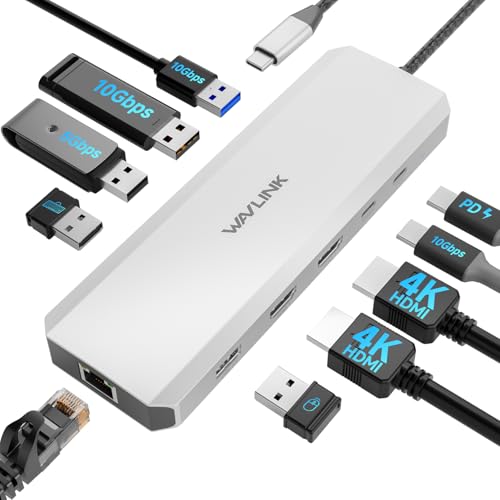
- Gigabit Ethernet and three 10Gbps USB ports
- Dual HDMI output for compatible Windows systems
- 100W PD input with up to 85W laptop charging
Best For: Windows dual-monitor workstations using compatible Dell, HP, or Lenovo laptops
Best Simple Hub

- Adds Ethernet, HDMI, USB-C data, and two USB data ports
- Supports 4K@30Hz external display output
- Provides up to 65W pass-through charging
Best For: Home-office setups needing basic wired networking and one external display
Best High-Resolution Dock

- Dual 4K@60Hz or single 8K@30Hz HDMI support
- 1Gbps Ethernet with SD and MicroSD readers
- 100W PD input with up to 85W pass-through charging
Best For: Windows multi-monitor workstations requiring high-resolution displays and Gigabit Ethernet
Acer Connectivity Hub

- Gigabit Ethernet and 4K@60Hz HDMI
- Two USB-A and one USB-C data port
- Up to 85W laptop charging output
Best For: Portable single-display laptop workstations
UGREEN Revodok

- Gigabit Ethernet up to 1000Mbps
- Three USB-A 3.0 data ports
- 4K@30Hz HDMI and up to 85W charging
Best For: Everyday laptop connectivity and USB-A accessories
Best for Multi-Monitor Workspaces
MOKiN 14-in-1 Triple-Display Dock

- Four display outputs with HDMI and DisplayPort flexibility
- 1000Mbps Ethernet and multiple 5Gbps USB ports
- Up to 100W PD, card readers, and screen-off button
Best For: Windows users building a feature-rich multi-monitor workstation
Best for Travel and Everyday Productivity
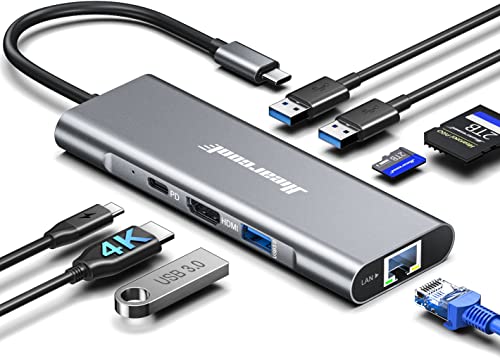
- 1Gbps Ethernet in a compact aluminum hub
- 4K HDMI output at 60Hz with compatible systems
- Three USB-A 3.0 ports plus SD and TF readers
Best For: Travelers and remote workers needing essential wired connectivity
Best for High-Speed Expansion
LIONWEI 13-in-1 Dual-HDMI Dock

- Dual HDMI plus DisplayPort for flexible display setups
- 10Gbps USB-C data transfer and Gigabit Ethernet
- 87W laptop charging after the dock's power draw
Best For: Windows workstations needing fast expansion and multiple displays
Best Compact Pick – Luonanava 8-in-1 USB-C Hub
If you need a compact docking station with ethernet port, this Luonanava USB-C hub combines wired networking with display output, charging, storage-card access, and several USB connections. Its RJ45 port supports speeds up to 100Mbps, while the HDMI output supports 4K at 30Hz.
Best For: MacBook, Windows laptop, tablet, or other compatible USB-C devices that need a lightweight everyday port expansion solution.
Pros:
- Eight useful connections, including HDMI, Ethernet, USB ports, card readers, and USB-C PD.
- Supports up to 100W PD charging for compatible devices.
- Aluminum housing, plug-and-play setup, and broad operating-system compatibility.
Cons:
- Ethernet is limited to 100Mbps rather than Gigabit speeds.
- HDMI output is limited to 4K at 30Hz.
- The USB-C PD port supports charging only, not data transfer.
This is a practical, travel-friendly choice when you want many essential ports in a small adapter. Confirm that your USB-C device supports DisplayPort Alt Mode before relying on the HDMI output.
Best Windows Dual-Monitor Dock – WAVLINK 10-in-1 Docking Station
The WAVLINK is a full-size docking station with ethernet port designed for a busy Windows workstation. It adds Gigabit Ethernet, dual HDMI, three 10Gbps USB ports, additional USB connections, and up to 100W power delivery input, although laptop charging is rated at 85W.
Best For: Windows users with compatible Dell, HP, or Lenovo laptops who want dual-display support and high-speed peripheral connectivity.
Pros:
- Includes Gigabit Ethernet and three 10Gbps USB-A or USB-C ports.
- Dual HDMI supports up to 4K at 60Hz plus 4K at 30Hz for Windows systems.
- Offers 100W PD input with up to 85W available for laptop charging.
- Two-year warranty and technical support are included.
Cons:
- Not compatible with Mac OS computers.
- Power adapter is not included.
- Full display performance requires suitable DP1.4 with DSC support, and charging is not intended for laptops needing over 85W.
For a Windows desk setup, this dock prioritizes fast USB connectivity and multiple monitors over universal compatibility. Check your laptop’s video, charging, and DP1.4/DSC support before purchasing.
Best Simple Hub – Anker 6-in-1 Ethernet Hub
Anker’s 6-in-1 hub is a straightforward docking station with ethernet port for laptops and tablets. It provides an Ethernet connection alongside HDMI, USB-C data, two USB data ports, and a USB-C PD input that supports up to 65W pass-through charging.
Best For: Home-office users who want a compact, established-brand hub for wired networking, one external display, and basic USB expansion.
Pros:
- Combines Ethernet, HDMI, USB-C data, and two USB data ports in a compact hub.
- Supports up to 4K at 30Hz through HDMI.
- Accepts a 65W wall charger for pass-through laptop charging.
- Includes an 18-month warranty and customer service.
Cons:
- The supplied notes do not specify the Ethernet speed.
- HDMI output is limited to 4K at 30Hz.
- A compatible wall charger is required for pass-through charging.
This Anker model is a sensible middle ground for users who need essential ports without a larger desktop dock. It is especially suitable when one external display and wired networking are enough.
Best High-Resolution Dock – UGREEN 10-in-1 Dual HDMI Dock
The UGREEN 10-in-1 is a versatile docking station with ethernet port for users who want dual-display support, fast USB connections, card readers, and wired networking. Its RJ45 port supports up to 1000Mbps, while the HDMI outputs can drive two 4K displays at 60Hz or one 8K display at 30Hz.
Best For: Compatible Windows laptops and USB-C workstations that need high-resolution multi-monitor output, Gigabit Ethernet, and memory-card access.
Pros:
- Supports dual 4K at 60Hz or a single 8K at 30Hz through HDMI.
- Includes 1Gbps Ethernet, SD/TF card readers, and 5Gbps USB-C and USB-A ports.
- 100W PD input provides up to 85W pass-through charging.
- Compact aluminum design and a 24-month warranty.
Cons:
- On macOS, both external monitors display the same content because of platform limitations.
- The PD port supports charging only, not data or video.
- USB ports do not provide charging or video output.
This dock offers one of the strongest feature sets in the group for a compatible Windows laptop, particularly if you need fast wired networking and two high-refresh 4K displays. Mac users should plan for mirrored external screens.
Acer Connectivity Hub – 6-in-1 USB-C Ethernet Hub
For shoppers seeking a compact docking station with ethernet port, the Acer 6-in-1 USB-C hub combines Gigabit wired networking, 4K display output, charging, and peripheral connectivity in a portable aluminum design. Its HDMI port supports up to 4K at 60Hz when the host device meets the required DP 1.4 and HDMI 2.0 specifications.
Best For: Laptop users who want a portable hub for wired networking, one external display, USB accessories, and pass-through charging.
Pros:
- Gigabit RJ45 Ethernet supports 10/100/1000Mbps connectivity.
- HDMI supports 4K at 60Hz with a compatible laptop or tablet.
- Includes two USB-A data ports, one USB-C data port, and up to 85W laptop charging output.
Cons:
- Provides one HDMI output rather than a dual-monitor setup.
- The USB-C PD port is for charging only, while the data ports do not support charging.
- A compatible 100W-or-higher charger and cable are required for maximum charging performance.
This Acer hub is a practical choice when reliable Ethernet and a high-refresh-rate single display matter more than extensive expansion. It is especially suitable for streamlined desks and mobile workstations.
Giq Multi-Display Dock – 10-in-1 Dual-HDMI USB-C Dock
This 10-in-1 docking station with ethernet port is designed for users who need more expansion than a basic hub. It combines dual HDMI outputs, Gigabit Ethernet, four USB data ports, card readers, and 100W PD pass-through in one USB-C dock, provided the host device supports video over USB-C.
Best For: Multitaskers, photographers, designers, and office users who need dual-display connectivity, wired networking, and card-reader access.
Pros:
- Dual HDMI outputs support up to 4K at 60Hz on compatible systems.
- Gigabit Ethernet provides a stable wired connection for work and streaming.
- Includes two USB-A 3.0 ports, two USB-C data ports, SD/TF readers, and 100W PD pass-through.
Cons:
- Requires a USB-C port with DisplayPort Alternate Mode for video output.
- macOS limitations may cause connected extended monitors to show the same content.
- SD and TF cards cannot be read simultaneously.
Among these options, this Giq dock offers the broadest selection of ports and the strongest fit for a multi-monitor desk. Check your laptop’s video-output support before buying, particularly if you plan to use dual displays.
UGREEN Revodok – 6-in-1 USB-C Ethernet Adapter
The UGREEN Revodok is a straightforward docking station with ethernet port for adding wired networking and everyday connectivity to a USB-C laptop, tablet, or compatible phone. It offers Gigabit Ethernet, 4K HDMI at 30Hz, three USB-A ports, and up to 85W pass-through charging in a lightweight hub.
Best For: Users who want dependable Gigabit Ethernet and several USB-A ports for accessories without moving to a larger multi-display dock.
Pros:
- Gigabit RJ45 Ethernet supports up to 1000Mbps.
- Three USB-A 3.0 ports support data transfers up to 5Gbps.
- Supports 4K HDMI at 30Hz and up to 85W USB-C pass-through charging.
Cons:
- HDMI is limited to 30Hz at 4K and does not support HDR or 3D.
- The USB-C port is charging-only and does not carry data or video.
- Maximum charging output reserves 15W for hub operation.
This UGREEN model is a sensible value-oriented choice for routine office work, wired internet, and USB-A peripherals. Choose a different option if you need 4K at 60Hz, dual displays, or USB-C data expansion.
Best for Multi-Monitor Workspaces – MOKiN 14-in-1 Triple-Display Dock
If you need a docking station with ethernet port for a demanding desk setup, the MOKiN 14-in-1 model combines multi-monitor connectivity, wired networking, charging, and card readers in one hub. Its four display outputs and broad port selection make it suited to Windows users building a flexible workstation.
Best For: Windows laptop users who need triple-display support, Gigabit Ethernet, and many expansion ports.
Pros:
- Offers two HDMI ports, two DisplayPort ports, an RJ45 Ethernet port, USB ports, SD/microSD readers, and USB-C charging.
- Supports display combinations such as two HDMI plus DisplayPort or two DisplayPort plus HDMI.
- Provides 1000Mbps Ethernet, 5Gbps USB connectivity, and up to 100W USB-C PD input.
- Includes a screen-off lock button and a two-year warranty.
Cons:
- The listed minimum operating system requirement is Windows 10, so compatibility should be checked before purchase.
- Actual display support can depend on the laptop, operating system, and available USB-C capabilities.
This is the most expansion-focused option of the three. Choose it when multiple display choices, wired networking, card access, and a large number of ports matter more than a compact travel form.
Best for Travel and Everyday Productivity – Hiearcool 8-in-1 USB-C Hub
The Hiearcool 8-in-1 is a practical docking station with ethernet port for laptops that need reliable wired internet without a bulky desktop dock. It adds 4K HDMI, USB-A expansion, card readers, and pass-through charging in a lightweight aluminum enclosure.
Best For: Remote workers, students, creators, and travelers who want a compact hub with Gigabit Ethernet and essential ports.
Pros:
- Includes 1Gbps Ethernet for more stable video calls, meetings, downloads, and office networking.
- Supports 4K output at 60Hz through HDMI when the connected system supports it.
- Provides three USB-A 3.0 ports, SD and TF card readers, and up to 100W pass-through charging.
- The aluminum hub weighs 2.97 ounces and supports a broad range of USB-C devices.
Cons:
- It has one HDMI display output rather than the multi-display output selection offered by larger docks.
- The product details list a total of eight ports, so it may be limiting for highly expanded desk setups.
For everyday connectivity, this hub keeps the essentials together in a portable package. It is a strong fit when Ethernet, one external 4K display, USB accessories, and media-card access are the main priorities.
Best for High-Speed Expansion – LIONWEI 13-in-1 Dual-HDMI Dock
The LIONWEI 13-in-1 is a docking station with ethernet port designed for users who want dual HDMI, DisplayPort, fast USB connections, and wired networking from a single USB-C connection. It also adds audio and microphone support for a more complete desktop setup.
Best For: Windows laptop users who want triple-display capability, 10Gbps data transfer, Gigabit Ethernet, and built-in audio connectivity.
Pros:
- Combines two 4K HDMI outputs, DisplayPort, Gigabit Ethernet, multiple USB-C and USB-A ports, and a 3.5mm audio/mic jack.
- Supports up to 10Gbps data transfer through USB-C 3.1 and includes three USB 3.0 ports.
- Offers up to 100W PD input, with 87W available for the laptop after the dock uses 13W.
- Supports triple displays on Windows and provides an 18-month technical-support warranty.
Cons:
- On macOS, the notes specify that only one monitor can be extended at 4K@60Hz.
- The dock itself consumes 13W, reducing the maximum laptop charging output to 87W.
- Triple-display and 4K performance depend on the computer’s USB-C and graphics support.
This dock is a compelling middle ground for a permanent workstation. It offers faster USB transfer than the Hiearcool hub and a focused display layout, but Mac users should pay close attention to the stated monitor-extension limitation.
How We Picked the Best Docking Station with Ethernet Port
We focused on the features that matter most in everyday laptop docking: Ethernet speed, display capability, port variety, power delivery, size, and broad compatibility. The selection includes compact USB-C hubs for travel as well as larger multiport docks designed for dual-monitor workstations.
We also considered practical specifications such as 4K support, USB data speeds, SD and microSD card access, HDMI quantity, and whether the dock is a good fit for Windows laptops, MacBooks, Chromebooks, or business systems. Always verify your computer’s USB-C capabilities before buying, since not every USB-C port supports video output or charging.
Quick Comparison
| Feature | What to look for | Best suited to |
|---|---|---|
| Ethernet | Gigabit Ethernet or better | Stable video calls, file transfers, and wired internet |
| Display output | One or two HDMI ports with the required resolution and refresh rate | Home offices, multitasking, and presentations |
| Charging | USB-C Power Delivery, ideally up to 100W input | Using one cable for power and peripherals |
| Port selection | USB-A, USB-C, card readers, audio, and HDMI as needed | Replacing several separate adapters |
Key Buying Factors for a Docking Station with Ethernet Port
Ethernet Speed and Reliability
Gigabit Ethernet is the practical baseline for fast wired internet and network transfers. It is especially useful when Wi-Fi is congested or unreliable. Check whether the advertised speed requires a specific driver, operating system, or USB-C connection standard.
Display Support
Confirm the maximum resolution and refresh rate for each monitor. A dual-HDMI dock may support two screens on Windows but offer different limitations on macOS, particularly when the laptop does not natively support multiple external displays. HDMI outputs typically share bandwidth with other high-speed ports.
Power Delivery and Compatibility
Power Delivery lets a compatible charger pass power through the dock to the laptop. A “100W” rating commonly describes input capacity, with some power reserved for the dock and connected devices. Check your laptop’s required wattage and whether the dock supports your operating system without extra software.
Port Layout and Portability
Choose a compact hub for occasional travel, or a larger dock with spaced ports for a permanent desk. Front-facing USB ports, card readers, and a short or detachable host cable can make daily use more convenient.
Who Should Buy Which Docking Station with Ethernet Port?
Frequent travelers: Choose a lightweight 6-in-1 or 8-in-1 hub with Gigabit Ethernet, HDMI, USB ports, and pass-through charging.
Home-office professionals: A 10-in-1 or 13-in-1 model with dual HDMI, multiple USB ports, and high-wattage Power Delivery is better for a permanent workstation.
Content creators: Prioritize SD and microSD card readers, fast USB data connections, 4K display support, and reliable Ethernet for large file transfers.
MacBook owners: Confirm native external-display support before choosing a dual-monitor dock. A single-display hub may be the simpler and more dependable option for many Mac setups.