A quality monitor arm can free up valuable desk space, improve screen positioning, and make a business workstation more comfortable throughout the day. The right choice depends on your monitor size, weight, desk construction, and whether you need a single- or dual-screen setup.
We’ve gathered 10 monitor arms covering everyday office displays, ultrawide monitors, dual-screen arrangements, and heavier professional setups. Use the guide below to narrow your options by stability, adjustability, installation, and long-term value.
Best 10 Monitor Arms for Business Desks Picks for 2026
Best Dual-Desk Monitor Mount
VIVO STAND-V002 Dual Monitor Arm

- Holds two screens up to 30 inches and 22 pounds each
- Supports tilt, swivel, rotation, and height adjustment
- Includes C-clamp and grommet mounting options
Best For: Dual-monitor business workstations
Best Single Monitor Flexibility
WALI GSMP001N Adjustable Monitor Arm

- Supports displays up to 34 inches
- Extends 19.3 inches and lifts 17.3 inches
- Includes C-clamp and grommet mounting
Best For: Single-monitor users needing a wide adjustment range
Best for Ultrawide Displays
VIVO STAND-V001 Single Monitor Arm

- Supports ultrawide monitors up to 38 inches
- Holds displays weighing up to 22 pounds
- Includes clamp and grommet mounting options
Best For: Single-monitor desks with large ultrawide displays
Best Fast-Install Dual Mount

- Fits two monitors up to 32 inches
- Features tool-free VESA mounting
- Includes independent adjustments and cable clips
Best For: Dual-monitor offices needing quick installation
Best Flexible Pick
HUANUO FlowLift Single Monitor Arm

- Supports 13-32-inch monitors up to 19.8 pounds
- Wide tilt, swivel, and rotation adjustment
- C-clamp and grommet mounting included
Best For: Flexible office workstations with standard-size monitors
Best Heavy-Duty Pick
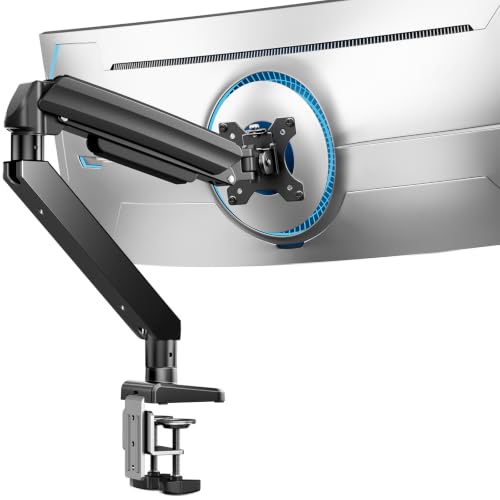
- Handles monitors up to 49 inches and 37.4 pounds
- Dual C-clamp design helps distribute the load
- Supports tilt, swivel, rotation, and height adjustment
Best For: Large ultrawide or curved monitors in demanding office setups
Best Simple Office Pick
Amazon Basics Single Monitor Arm

- Fits 13-30-inch monitors up to 22 pounds
- Includes cable management and VESA hardware
- Rotates 360 degrees for portrait or landscape use
Best For: Standard office desks needing a practical single-monitor mount
Best Dual-Arm Workstation
HUANUO FlowLift Dual Monitor Stand

- Supports two 13–32-inch monitors
- C-clamp and grommet mounting options
- Full-motion adjustment with cable management
Best For: Dual-monitor office workstations on compatible wooden desks
Best for Ultrawide Screens

- Supports displays up to 34 inches
- Tool-free VESA mounting
- Up to 17.5 inches of height adjustment
Best For: Single-monitor business desks with larger or ultrawide displays
Best for Stable Adjustments
HUANUO FlowLift Pro Monitor Arm

- MechaSpring design for steady positioning
- Visible tension-adjustment indicator
- Tool-free quick-release VESA plate
Best For: Single-monitor professionals who value stability and precise adjustment
Best Dual-Desk Monitor Mount – VIVO STAND-V002 Dual Monitor Arm
For business desks that need two screens, the VIVO STAND-V002 is a heavy-duty option with broad compatibility and flexible positioning. It supports two 13–30-inch monitors weighing up to 22 pounds each, with C-clamp or grommet installation.
Best For: Dual-monitor business workstations that need strong support and flexible screen orientation.
Pros:
- Supports two monitors up to 30 inches and 22 pounds each.
- Offers tilt, swivel, rotation, and height adjustment, with portrait or landscape positioning.
- Includes cable-management clips, detachable VESA plates, and a three-year warranty.
Cons:
- Its 30-inch screen limit may not suit larger ultrawide displays.
- Dual-monitor installation requires more desk space and assembly than a single-arm mount.
With sturdy steel construction and two mounting methods, this VIVO mount is a practical choice for teams using matched displays or a two-screen productivity setup.
Best Single Monitor Flexibility – WALI GSMP001N Adjustable Monitor Arm
The WALI GSMP001N is a versatile choice among monitor arms for business desks, supporting flat or curved displays up to 34 inches. Its wide adjustment range and cable guides help create a cleaner, more ergonomic workstation.
Best For: Single-monitor users who want extensive positioning range and long-term adjustability.
Pros:
- Supports flat screens up to 34 inches and up to 26.4 pounds, with a lower limit for curved screens.
- Provides 19.3 inches of extension, 17.3 inches of lift, tilt, swivel, and 360-degree rotation.
- Offers C-clamp or grommet installation and a 10-year warranty.
Cons:
- Compatibility and capacity vary between flat and curved monitors.
- The product notes recommend installation on a wooden desk without an underside crossbeam.
Its broad movement range and tested adjustment mechanism make the WALI a strong fit for business users who frequently change viewing positions or switch between tasks.
Best for Ultrawide Displays – VIVO STAND-V001 Single Monitor Arm
For business desks centered on one large display, the VIVO STAND-V001 supports monitors up to 38 inches, including ultrawide models, while keeping adjustment straightforward. It uses a hand-tightened clamp and also includes a grommet option.
Best For: Single-monitor workstations using a large or ultrawide display.
Pros:
- Supports monitors up to 38 inches and 22 pounds.
- Provides tilt, swivel, rotation, and up to 16 inches of height adjustment.
- Includes cable clips, a detachable VESA plate, and both clamp and grommet mounting.
Cons:
- It supports only one monitor.
- The 22-pound capacity requires checking the weight of heavier ultrawide displays.
This is a sensible option when a business desk needs one expansive screen rather than multiple displays, particularly where portrait or landscape rotation is useful.
Best Fast-Install Dual Mount – ErGear EGDMA70B-DS-UK
The ErGear EGDMA70B-DS-UK combines dual-screen support with tool-free VESA mounting, making it a convenient choice for business desks where installation speed and tidy cable routing matter. It fits two 13–32-inch monitors within its specified weight range.
Best For: Dual-monitor workstations that prioritize quick setup and independent positioning.
Pros:
- Supports two 13–32-inch flat or curved monitors weighing 4.84–19.8 pounds each.
- Uses tool-free VESA mounting with C-clamp or optional grommet installation.
- Provides independent height, extension, tilt, swivel, and rotation adjustments, plus cable clips.
Cons:
- The minimum supported weight of 4.84 pounds may exclude some lighter displays.
- Its maximum screen size is 32 inches, so it is not designed for larger ultrawides.
- The notes recommend a wooden desk without an underside crossbeam.
With a five-year warranty and a movement system tested through more than 20,000 cycles, this ErGear mount offers a capable, organized setup for two standard office monitors.
Best Flexible Pick – HUANUO FlowLift Single Monitor Arm
For business desks that need a flexible, ergonomic setup, the HUANUO FlowLift supports 13- to 32-inch monitors weighing 4.4 to 19.8 pounds. Its clamp and grommet mounting options, broad adjustment range, and one-hand height adjustment make it a practical choice for varied workstations.
Best For: Offices seeking an adaptable single-monitor arm with extensive positioning options.
Pros:
- Supports 13- to 32-inch displays and 4.4- to 19.8-pound monitors.
- Offers -50° to +85° tilt, ±90° swivel, and 360° rotation.
- Includes both C-clamp and grommet mounting options.
- Uses a one-piece design with included hardware and a stated three-minute setup.
Cons:
- Requires a compatible wood tabletop and adequate clearance beneath the desk.
- Its stated maximum supported screen size varies between the product title and details.
The FlowLift is a well-rounded option when adjustability and installation flexibility matter more than supporting very large ultrawide displays. Its five-year manufacturer warranty also suits everyday office use.
Best Heavy-Duty Pick – ErGear Ultrawide Monitor Arm
For business desks using large or curved displays, the ErGear heavy-duty monitor arm supports screens from 13 to 49 inches and up to 37.4 pounds. Its dual C-clamp, steel construction, and grommet option are designed to keep demanding setups steady.
Best For: Offices with ultrawide, curved, or heavier monitors that need strong desk support.
Pros:
- Supports monitors from 13 to 49 inches with a 37.4-pound capacity.
- Provides dual C-clamp support plus a grommet mounting option.
- Offers +30°/-40° tilt, ±90° swivel, and 360° rotation.
- Extends up to 21.2 inches and raises the display up to 22.2 inches.
Cons:
- The mounting range is limited by desk thickness: 0.39-3.15 inches for the clamp and 0.39-2 inches for the grommet.
- Its heavy-duty design may be more capability than needed for smaller office monitors.
The ErGear stands out for business users who need stability with a large display. It also offers a pre-assembled design and a stated 10-year warranty for long-term workplace use.
Best Simple Office Pick – Amazon Basics Single Monitor Arm
The Amazon Basics single monitor arm is a straightforward option for business desks with 13- to 30-inch displays weighing up to 22 pounds. It combines a steel desk mount with height adjustment, portrait-or-landscape rotation, cable management, and included installation hardware.
Best For: Standard office monitors and buyers who want a simple, practical desk-mounted setup.
Pros:
- Fits 13- to 30-inch monitors weighing up to 22 pounds.
- Rotates 360 degrees for landscape or portrait orientation.
- Includes cable management and a detachable VESA plate for 75 x 75mm and 100 x 100mm patterns.
- Fits desks 0.8 to 3.9 inches thick and includes tools and hardware.
Cons:
- Has a one-year Amazon Basics limited warranty.
- Its listed movement type is tilt, so the adjustment system is less extensively specified than some competing arms.
- Its tilt range is listed inconsistently in the supplied details.
This model is a sensible choice for a conventional business workstation where broad compatibility, cable control, and uncomplicated installation are priorities. It is less suited to ultrawide or unusually heavy monitors.
Best Dual-Arm Workstation – HUANUO FlowLift Dual Monitor Stand
For business desks that need two displays, the HUANUO FlowLift is a practical choice among monitor arms for business desks. It supports two 13–32-inch monitors, provides broad positioning control, and frees desktop space for keyboards, notebooks, or a docking station. Check monitor weight, VESA pattern, and desk construction before buying.
Best For: Dual-monitor office workstations using compatible wooden desks.
Pros:
- Supports two 13–32-inch monitors weighing 4.4–19.8 pounds per arm.
- Offers C-clamp or grommet mounting for compatible desks 0.59–3.54 inches thick.
- Provides tilt, swivel, rotation, height adjustment, and integrated cable management.
Cons:
- Only wooden desks are recommended; plastic and glass desks are not suitable.
- Desk bottoms must be free of cross beams or panels that could interfere with installation.
- Each monitor must have a compatible 75x75mm or 100x100mm VESA pattern.
This is a strong fit when two-screen productivity and desk organization matter most. Its compatibility requirements are specific, so measure the desk and verify both monitors before ordering.
Best for Ultrawide Screens – ErGear Single Monitor Arm
The ErGear Single Monitor Arm is a flexible option for business desks with one standard or ultrawide display. As monitor arms for business desks go, it stands out for supporting screens up to 34 inches, offering tool-free VESA mounting, and providing substantial height and reach adjustment. Confirm your monitor’s weight, size, VESA pattern, and desk thickness first.
Best For: Single-monitor workstations using larger flat or curved displays.
Pros:
- Supports 13–34-inch monitors weighing 4.84–19.8 pounds.
- Offers up to 17.5 inches of height adjustment and 18.1 inches of reach.
- Includes tool-free VESA mounting, cable clips, and C-clamp or grommet installation.
Cons:
- It is designed for one monitor rather than a multi-display setup.
- C-clamp and grommet mounts have different desk-thickness limits.
- Compatibility requires a 75x75mm or 100x100mm VESA pattern.
Choose this arm when a single large screen needs generous positioning range and a relatively quick setup. Its wider size range makes it especially useful for offices using ultrawide or curved monitors.
Best for Stable Adjustments – HUANUO FlowLift Pro Monitor Arm
The HUANUO FlowLift Pro is designed for users who want one monitor to stay firmly positioned while remaining easy to adjust. Among monitor arms for business desks, its MechaSpring mechanism, visible tension indicator, and tool-free VESA plate make it appealing for coding, design, data analysis, and meeting-heavy work. Verify the monitor and wooden-desk requirements before installation.
Best For: Single-monitor professionals who prioritize steady positioning and precise adjustment.
Pros:
- Supports compatible 13–32-inch monitors weighing 4.4–15.4 pounds.
- Uses a MechaSpring arm with a visible PrecisionView tension indicator.
- Includes tool-free quick-release VESA mounting and C-clamp or grommet options.
Cons:
- It supports one monitor and has a lower maximum load than some heavy-duty arms.
- It is recommended for wooden desks 0.59–3.54 inches thick.
- Monitor compatibility requires a 75x75mm or 100x100mm VESA pattern.
This model makes the most sense for a set-and-adjust office setup where screen stability matters. The visible tension feedback and quick-release mounting can simplify calibration and installation, provided the desk and monitor meet the stated limits.
How We Picked the Best Monitor Arms for Business Desks
We focused on monitor arms suited to productive office work rather than appearance alone. The selection covers single and dual-monitor configurations, common VESA patterns, a range of screen sizes and weight limits, and both clamp and grommet installation. We also considered adjustability, desk stability, cable management, installation convenience, and whether an arm is appropriate for standard monitors or heavier ultrawide displays.
Before buying, verify the exact monitor weight without its original stand and confirm that your desk can support the mounting hardware. A high capacity rating does not compensate for a weak, hollow, glass, or unusually thin desktop.
Quick Comparison
| Best for | Recommended type | What to prioritize |
|---|---|---|
| One standard office monitor | Single monitor arm | Easy adjustment, cable routing, and stable clamp |
| Two productivity screens | Dual monitor arm | Independent positioning and sufficient per-arm capacity |
| Large ultrawide display | Heavy-duty single arm | High weight rating, reinforced base, and low sag |
| Shared or flexible workstations | Full-motion arm | Reliable tilt, swivel, height, and rotation controls |
Key Buying Factors for Monitor Arms for Business Desks
Monitor Size, Weight, and VESA Compatibility
Check both the screen diagonal and its weight. Large ultrawide monitors often require substantially more support than their size suggests. Confirm that the arm supports your monitor’s VESA mounting pattern, commonly 75 × 75 mm or 100 × 100 mm, and leave capacity headroom if possible.
Desk Mounting and Stability
A C-clamp is convenient for most desks with an accessible rear edge. A grommet mount can provide a cleaner, more centered installation when your desk has a suitable cable hole. For business use, look for a broad base, firm padding, and a clamp that distributes pressure rather than concentrating it at one point.
Adjustment Range and Movement
Full-motion arms typically allow height adjustment, tilt, swivel, and screen rotation. Smooth movement is useful for sit-stand workstations or shared desks, while a simpler arm may be preferable when the monitor will remain in one position. Dual arms should offer enough independent adjustment to align screens evenly.
Installation and Cable Management
Tool-free VESA attachment can speed installation, but the arm still needs to be tightened correctly and balanced for the display. Integrated cable channels help keep a business desk organized and reduce strain on power and display cables.
Who Should Buy Which Monitor Arms for Business Desks?
Choose a single standard-duty arm if you use one typical office monitor and want more desk space with minimal complexity. A dual arm is the better fit for spreadsheets, research, coding, and workflows that rely on two screens. If you use a 34-inch-or-larger ultrawide or a particularly heavy display, select a heavy-duty model with generous capacity rather than relying on the minimum rating.
For hot desks, collaborative workspaces, and users who frequently change posture, prioritize smooth full-motion adjustment. For a fixed workstation, stability and simple height positioning may matter more than maximum movement. Whichever option you choose, recheck the VESA pattern, monitor weight, desk thickness, and clearance behind the desk before ordering.