Upgrading a standing desk with the right monitor mount can improve posture, free up workspace, and make height changes far easier throughout the day.
In this roundup, we focus on sturdy, adjustable options that work well for single and dual-screen setups, from compact mounts to heavy-duty arms for larger displays.
Best 10 Monitor Mounts for Standing Desks Picks for 2026
Dual-Arm Desk Upgrade

- Holds 2 monitors up to 30" and 22 lbs each
- Tilt, swivel, rotate, and height-adjust for ergonomic positioning
- C-clamp or grommet mounting with cable clips
Best For: Dual-screen standing desks that need flexible positioning
Simple Single-Screen Setup

- Supports 13" to 32" monitors up to 17.6 lbs
- Tilt, swivel, and rotate for ergonomic viewing
- C-clamp or grommet mount with cable clips
Best For: One-monitor setups that need a compact adjustable arm
Stable Freestanding Option
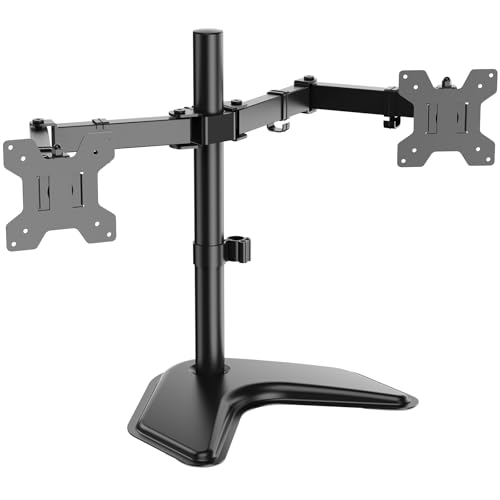
- Freestanding V-base avoids desk clamps
- Supports 2 monitors up to 27" and 22 lbs each
- Full-motion adjustment with a height-adjustable pole
Best For: Dual monitors when you prefer a base instead of a clamp
Premium Precision Pick
HUANUO FlowLift Pro Monitor Arm

- MechaSpring arm aims for longer-lasting support
- Tool-free VESA plate and visible tension adjustment
- Fits 13" to 32" monitors on compatible wood desks
Best For: Precision-focused single-monitor setups with frequent adjustments
Extra Tall Single-Monitor Pick
VIVO Extra Tall Single Monitor Desk Mount

- 39-inch pole supports sit-to-stand positioning
- Fits 13-32 inch monitors and ultrawides up to 38 inches
- Clamp or grommet mounting with cable clips
Best For: People who want a tall, flexible single-monitor mount for a standing desk
Stable Everyday Arm
HUANUO FlowLift Single Monitor Mount

- Supports 13-32 inch monitors with VESA 75x75 and 100x100
- Tilts, swivels, and rotates for ergonomic positioning
- One-piece design with clamp and grommet options
Best For: Anyone wanting a simple, stable single-monitor arm for a standing desk
Freestanding Dual-Monitor Option
VIVO STAND-V002F Dual Monitor Stand

- Freestanding base skips clamp or grommet mounting
- Holds two 13-27 inch monitors up to 22 lbs each
- Full articulation with cable clips included
Best For: Dual-monitor users who want a freestanding desk setup
Dual-Arm Stability for Bigger Setups
HUANUO FlowLift Dual Monitor Stand

- Supports two 13-32 inch VESA monitors
- C-clamp and grommet mounting options
- Full motion with height, tilt, swivel, rotation
Best For: Standing desk users who want a secure dual-monitor arm with lots of adjustability
Heavy-Duty Value Pick

- Supports two 13-32 inch monitors
- Up to 17.6 lbs per arm
- Clamp and grommet install options
Best For: Buyers who want a sturdy, adjustable dual-arm mount for everyday use
Fast-Install Single Arm

- Supports 13-34 inch flat or curved monitors
- Tool-free VESA mounting
- Wide height, reach, and motion adjustment
Best For: Single-monitor users who want a quick-install arm with broad compatibility
Dual-Arm Desk Upgrade – VIVO Dual Monitor Mount
If you’re shopping for monitor mounts for standing desks, this VIVO dual arm is a practical pick for turning one workstation into a two-screen setup. It supports 13″ to 30″ monitors up to 22 lbs each, and the adjustable arms give you tilt, swivel, rotation, and height positioning for a more ergonomic layout.
Best For: Users who want a sturdy dual-monitor mount with broad adjustability and desk-clamp or grommet mounting options.
Pros:
- Supports two monitors from 13″ to 30″ and up to 22 lbs each.
- Offers +90°/-90° tilt, 180° swivel, 360° rotation, and height adjustment.
- Includes cable management clips along the arms and center pole.
- Works with both C-clamp and optional grommet mounting.
Cons:
- Desk thickness is limited to 3.25″ for C-clamp use.
- Requires VESA 75x75mm or 100x100mm mounting holes.
This is a solid choice if you need a no-nonsense dual arm that can handle everyday office use and keep cables under control. The steel construction and 3-year warranty add reassurance for a long-term standing desk setup.
Simple Single-Screen Setup – Ergear Single Monitor Mount
For monitor mounts for standing desks where you only need one screen, this Ergear arm keeps the setup compact while still adding ergonomic flexibility. It supports 13″ to 32″ monitors up to 17.6 lbs and uses a steel pole design with tilt, swivel, and rotation to help place the display at a better viewing height.
Best For: Single-monitor standing desk users who want a straightforward, space-saving arm with easy installation.
Pros:
- Fits monitors from 13″ to 32″ and up to 17.6 lbs.
- Supports 360° rotation, ±45° tilt, and ±90° swivel.
- Includes cable clips for cleaner desk organization.
- Offers C-clamp or grommet installation for flexible setup.
Cons:
- Table compatibility is specific: wood desk recommended, 0.39″ to 3.54″ thick.
- Requires VESA 75x75mm or 100x100mm mounting holes.
This mount makes sense if your goal is to free up desk space without overcomplicating the build. It delivers the core adjustments most people need for a standing desk, while staying simple to install and manage.
Stable Freestanding Option – WALI Dual Monitor Stand
If you’re comparing monitor mounts for standing desks and don’t want to clamp into the tabletop, this WALI dual stand is a freestanding alternative. The V-base supports two monitors up to 27″ and 22 lbs per arm, with full-motion adjustability and a height-adjustable pole for a comfortable dual-screen arrangement.
Best For: Users who want a free-standing dual monitor solution without using a desk clamp.
Pros:
- Freestanding V-base design avoids clamp or grommet installation.
- Supports two monitors up to 27″ and 22 lbs per arm.
- Offers ±90° tilt and swivel plus 360° rotation.
- Height-adjustable 16″ pole helps fine-tune screen position.
Cons:
- Max screen size is smaller than clamp-style dual monitor arms in this group.
- Requires VESA 75x75mm or 100x100mm mounting patterns.
This is the easiest fit if your desk surface or standing desk design makes clamp mounting awkward. The tradeoff is a little less screen-size headroom, but the free-standing base makes setup more flexible.
Premium Precision Pick – HUANUO FlowLift Pro Monitor Arm
For buyers focused on monitor mounts for standing desks, this HUANUO FlowLift Pro emphasizes smooth adjustment, safety, and setup precision. It fits 13″ to 32″ monitors, uses a MechaSpring arm for long-term support, and adds tool-free VESA mounting plus a visible tension indicator to make dialing in the arm easier.
Best For: Users who want a premium single-monitor arm with precise adjustment and a safety-focused build.
Pros:
- Supports 13″ to 32″ monitors with VESA 75x75mm or 100x100mm.
- MechaSpring design is built for longer life than gas-based alternatives.
- Tool-free snap-in VESA plate speeds up installation.
- Tension window and load testing help make setup more precise.
Cons:
- Best suited for wood desks 0.59″ to 3.54″ thick.
- Weight range is narrower than some other 13″ to 32″ mounts.
- Irregular desk edges may require extra caution.
This arm stands out if you want a more refined monitor mount with less guesswork during setup. The combination of smooth movement, visible tension adjustment, and certified testing makes it appealing for workspaces where consistency matters.
Extra Tall Single-Monitor Pick – VIVO Extra Tall Single Monitor Desk Mount
If you need monitor mounts for standing desks, this VIVO extra-tall single arm is built around flexibility. The 39-inch center pole makes it easier to position your screen for both sitting and standing, while the arm’s tilt, swivel, rotation, and height adjustments help you dial in a comfortable viewing angle.
Best For: Users who want a tall, adjustable single-monitor solution for switching between sitting and standing.
Pros:
- 39-inch pole gives you more vertical range than standard desk arms.
- Fits 13- to 32-inch monitors and supports ultrawides up to 38 inches.
- Includes cable management clips along the arm and pole.
- Offers clamp or grommet mounting for different desk setups.
Cons:
- Single-monitor design only.
- Requires a desk that can support clamp or grommet installation.
Overall, this is a practical pick if height range matters more than dual-screen capacity. The extra-tall pole and broad articulation make it especially useful for standing desks where screen position changes throughout the day.
Stable Everyday Arm – HUANUO FlowLift Single Monitor Mount
For shoppers comparing monitor mounts for standing desks, this HUANUO arm stands out for simple setup and stable everyday use. It supports common 13- to 32-inch monitors, and the arm can lift the screen up to 39.6 cm from the desktop with easy tilt, swivel, and rotation adjustment.
Best For: Buyers who want a straightforward single-monitor arm with fast installation and solid adjustability.
Pros:
- Fits 13- to 32-inch monitors with 75x75mm and 100x100mm VESA patterns.
- Offers a wide motion range with tilt, swivel, and 360-degree rotation.
- One-piece design is meant to simplify installation.
- Includes both C-clamp and grommet mounting options.
Cons:
- Does not support very large screens beyond the listed size range.
- Best results depend on a compatible tabletop layout.
This is a good all-around choice if you want a monitor arm that is easy to install and easy to live with. The wide adjustment range and sturdy build focus on practical comfort rather than extra complexity.
Freestanding Dual-Monitor Option – VIVO STAND-V002F Dual Monitor Stand
If you want monitor mounts for standing desks without clamping to the edge, this VIVO freestanding dual stand is a useful alternative. It holds two 13- to 27-inch monitors and gives you full articulation plus height adjustment, all on a heavy base designed to stay planted on the desk.
Best For: Users who want a dual-monitor setup with a freestanding base instead of a clamp mount.
Pros:
- Supports two monitors up to 27 inches and 22 lbs each.
- Freestanding base avoids clamp or grommet installation.
- Offers tilt, swivel, rotation, and height adjustment.
- Includes detachable cable clips for tidier wiring.
Cons:
- Requires enough desk space for the large base.
- Best stability depends on keeping monitors near the center of gravity.
- Not ideal if you need a wall- or clamp-mounted solution.
This stand makes the most sense when desk compatibility is a concern or when you want a cleaner no-clamp setup. Just be mindful of base footprint and placement, since VIVO notes stability is best when the monitors are not pulled too far forward or back.
Dual-Arm Stability for Bigger Setups – HUANUO FlowLift Dual Monitor Stand
If you want monitor mounts for standing desks that can keep two screens steady while still giving you easy adjustment, this HUANUO dual arm is built for that job. It supports 13-32 inch VESA monitors, includes both C-clamp and grommet mounting options, and offers full-motion positioning to help you place each display at a comfortable eye line.
Best For: Dual-monitor standing desk setups that need secure mounting and flexible positioning.
Pros:
- Supports two 13-32 inch monitors with 75×75 mm or 100×100 mm VESA patterns
- Dual C-clamp design plus grommet option for stable desk attachment
- Full-motion adjustment with tilt, swivel, rotation, and height up to 15.75 inches
- Built-in cable management helps keep the desk clear and organized
Cons:
- Requires a wooden desk with no cross beams or panels underneath
- Each monitor must stay within the 4.4 to 19.8 lb weight range
- Not suitable for desks outside the stated thickness limits
This is a practical pick if stability matters more than a minimalist footprint. The wide compatibility and secure mounting hardware make it a solid fit for productivity, gaming, or multitasking on a standing desk.
Heavy-Duty Value Pick – ErGear Dual Monitor Stand
For monitor mounts for standing desks, this ErGear dual arm is focused on straightforward compatibility and broad adjustability. It supports two 13-32 inch monitors, offers swivel, tilt, and rotation, and includes both clamp and grommet installation options to help you build a clean two-screen setup.
Best For: Users who want a heavy-duty dual monitor mount with simple installation options.
Pros:
- Fits two 13-32 inch monitors with 75×75 mm or 100×100 mm VESA patterns
- Supports up to 17.6 lbs per monitor arm
- Wide arm span and 16-inch high bar provide generous positioning range
- Integrated cable clips help keep the desk tidier
Cons:
- Only recommended for wooden tables
- Desk underside should be free of beams or panels that interfere with installation
- Clamp and grommet thickness ranges are specific, so desk fit needs checking first
This model is a strong everyday choice if you want dependable dual-screen support without overcomplicating setup. It gives you the key ergonomic adjustments needed for a standing desk while keeping the workspace organized.
Fast-Install Single Arm – ErGear Single Monitor Arm
If you only need one screen on your standing desk, this ErGear single arm is a flexible option among monitor mounts for standing desks. It supports 13-34 inch flat or curved monitors, includes tool-free VESA mounting, and gives you a wide range of height, tilt, swivel, and rotation adjustments for a comfortable setup.
Best For: Single-monitor standing desk setups that prioritize quick installation and easy repositioning.
Pros:
- Supports most 13-34 inch flat or curved monitors up to 19.8 lbs
- Tool-free VESA mounting makes setup simpler
- Full-motion adjustability with up to 17.5 inches of height and 18.1 inches of reach
- Built-in cable clips help reduce clutter
Cons:
- Only works with 75×75 mm or 100×100 mm VESA patterns
- C-clamp and grommet mounts have specific desk thickness limits
- Single-arm design is not for dual-monitor setups
Among single-screen options, this one stands out for fast setup and strong adjustment range. It is a practical fit if you want to free desk space and keep one monitor aligned to eye level on a standing desk.
How We Picked the Best Monitor Mounts for Standing Desks
We focused on Monitor Mounts for Standing Desks that balance adjustability, stability, and desk compatibility. Priority went to models with solid load ratings, practical height and tilt range, easy VESA support, and mounting styles that fit different desk setups, including clamp, grommet, pole, and free-standing designs.
We also looked for options that make daily sit-to-stand transitions smoother, especially for users who need consistent screen positioning and minimal wobble.
Quick Comparison
Single-monitor arms are best for simpler setups, lighter desks, and users who want maximum adjustability with less bulk. Dual-monitor mounts make more sense for productivity work, gaming, trading, or multitasking when you need two screens aligned at the same height. Free-standing models are useful when clamping is not possible, while extra-tall and heavy-duty mounts are better for ultrawides or taller standing desk ranges.
Key Buying Factors for Monitor Mounts for Standing Desks
Weight and Screen Size Support
Always match the mount’s stated capacity to both your monitor size and actual weight. Larger screens are not always heavier, and some ultrawides need more support than their diagonal size suggests.
Range of Motion
Look for tilt, swivel, rotation, and height adjustment if you want to switch between sitting and standing without losing your preferred viewing angle. More motion is especially helpful on standing desks, where screen height often changes relative to your chair position.
Mounting Style
Clamp mounts are the most common and usually save the most space. Grommet mounts are a good fit when you want a cleaner permanent setup. Free-standing bases work well for glass tops or desks that cannot be clamped, though they may take up more surface area.
Desk and Monitor Fit
Check desk thickness, VESA pattern compatibility, arm reach, and whether your monitor needs a straight or tall pole design. If you use dual screens, verify that the arms can align them side by side without blocking each other or the edge of the desk.
Who Should Buy Which Monitor Mounts for Standing Desks?
If you want a simple, flexible setup for one display, choose a single-arm mount with strong height adjustment and smooth motion. If you work across spreadsheets, code, or multiple apps, a dual arm setup is often the better productivity choice. Users with large ultrawides or taller standing desk positions should look for extra-tall or heavy-duty models, while anyone avoiding desk clamps should consider a free-standing option.
For most buyers, the best Monitor Mounts for Standing Desks are the ones that fit the desk, support the monitor safely, and make posture changes effortless throughout the day.