A good laptop and monitor arm combo can turn a cramped desk into a more ergonomic, flexible workspace. The right setup lifts your screens, frees up surface space, and makes it easier to switch between tasks.
Below, we focus on the most practical options for home offices, hybrid work, and multi-screen productivity in 2026.
Best 10 Laptop and Monitor Arm Combo Picks for 2026
Clamp-Mounted Dual-Screen Pick
VIVO 13 to 32 inch Monitor and Laptop Desk Mount

- Supports 13" to 32" monitors up to 10 kg
- Vented tray fits laptops up to 17"
- Clamp or optional grommet mounting
Best For: People who want a desk-clamped, highly adjustable dual-screen arm
Heavy-Duty Wide-Range Option
PUTORSEN Laptop Arm Mount for Large Monitors

- Fits 17" to 35" monitors and 12" to 18" laptops
- Each arm supports up to 19.8 lbs
- Clamp or grommet desk installation
Best For: Users needing a wider monitor range and a sturdy dual-device mount
Freestanding Glass-Base Choice
VIVO Free Standing Monitor and Laptop Combo Stand

- Freestanding design with tempered glass base
- Fits monitors up to 32" and laptops up to 17"
- Full articulation with cable clips
Best For: People who need a no-clamp dual-screen stand
High-Adjustment Desk Mount
HUANUO Adjustable Monitor Arm with Laptop Tray

- Fits 13" to 32" monitors up to 22 lbs
- 14" x 12" ventilated laptop tray
- Clamp and grommet mounting included
Best For: Users who want maximum adjustability in a single desk-mounted combo
Triple-Screen Workstation
VIVO Laptop and Dual Monitor Pneumatic Arm Mount

- Supports 2 monitors plus 1 laptop
- Pneumatic arms with broad adjustment
- Ventilated laptop tray and cable covers
Best For: Users building a full triple-screen desk setup
Ergonomic Single-Arm Pick
WALI 2-in-1 Gas Spring Monitor and Laptop Mount

- Supports one monitor and one laptop
- Gas spring arm with broad motion range
- Clamp or grommet installation options
Best For: Users wanting a compact ergonomic 2-in-1 setup
Gaming-Ready Desk Setup
Afaloona RGB Monitor & Laptop Stand with USB Hub

- RGB lighting with built-in USB-C and USB-A ports
- Converts from laptop tray to dual-monitor mount
- Full motion adjustment with cable management
Best For: Gamers and creators who want ports, lighting, and flexibility
Ergonomic 2-in-1 Desk Mount
suptek Monitor and Laptop Mount with Tray

- Fits 13-27 inch monitors with standard VESA patterns.
- Detachable tray supports laptops up to 15.6 inches.
- Includes clamp and grommet mounting options.
Best For: Budget-friendly dual setup with a removable laptop tray.
Full-Motion Dual Arm Mount
monTEK Laptop & Monitor Desk Mount

- Supports 17-32 inch monitors and 12-18 inch laptops.
- Offers tilt, swivel, rotation, and height adjustment.
- Can convert from monitor-plus-laptop to dual monitors.
Best For: Power users who want maximum adjustability and future flexibility.
Triple-Use Productivity Stand
MOUNTUP Dual Monitor and Laptop Mount
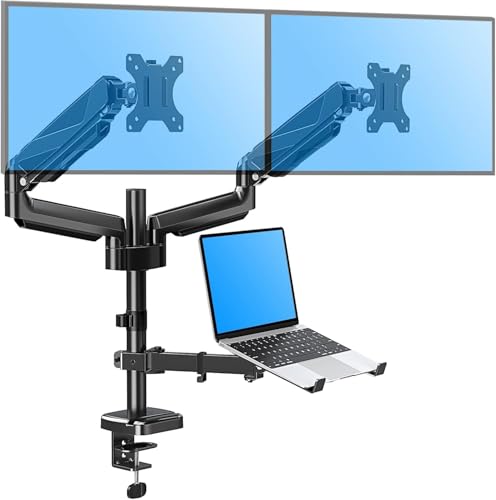
- Holds two 13-27 inch monitors plus a 10-17 inch laptop.
- Offers tilt, swivel, and 360° rotation for all screens.
- Includes clamp and grommet installation options.
Best For: Large multitasking desks that need three-screen support.
Clamp-Mounted Dual-Screen Pick – VIVO 13 to 32 inch Monitor and Laptop Desk Mount
If you want a straightforward laptop and monitor arm combo for a clean desktop setup, this VIVO mount covers the basics well. It supports most 13″ to 32″ monitors, includes a vented tray for laptops up to 17″, and gives you full articulation for dialing in a comfortable viewing angle.
Best For: Users who want a clamp-on dual-screen mount with strong adjustability and an optional grommet install.
Pros:
- Fits most 13″ to 32″ monitors up to 10 kg with 75x75mm or 100x100mm VESA.
- Vented laptop tray supports laptops up to 17″.
- Full articulation includes tilt, swivel, rotation, and height adjustment.
- Detachable cable clips help keep cords organized.
Cons:
- Desk clamp is limited to desks up to 10.2 cm thick.
- Best suited to laptops that fit the tray size and vented design.
This is a practical choice if you want a flexible desktop arm with a proven VIVO layout and a 3-year warranty. It is especially appealing when you need a stable desk-mounted setup without overcomplicating installation.
Heavy-Duty Wide-Range Option – PUTORSEN Laptop Arm Mount for Large Monitors
This PUTORSEN laptop and monitor arm combo is built for users who need broad display compatibility and a sturdy desk mount. The monitor arm supports 17″ to 35″ screens, while the adjustable ventilated tray is sized for laptops from 12″ to 18″, making it a solid fit for a bigger workspace.
Best For: Buyers who want a wide-monitor arm with a laptop tray and flexible clamp or grommet installation.
Pros:
- Supports monitors from 17″ to 35″ and laptops from 12″ to 18″.
- Each arm holds up to 9 kg (19.8 lbs).
- Vented tray and laptop straps help with airflow and stability.
- Includes cable management and removable VESA plate for easier setup.
Cons:
- Desk thickness limits apply for both clamp and grommet mounting.
- Mounting instructions matter, since the setup is meant to stay rock-solid once installed.
If you need a laptop and monitor arm combo for a larger display range, this one stands out for capacity and adjustability. It is a strong pick for users who want a tidy, reliable mount that can handle more substantial screens.
Freestanding Glass-Base Choice – VIVO Free Standing Monitor and Laptop Combo Stand
For anyone who wants a laptop and monitor arm combo without clamping to the desk, this VIVO freestanding model is a practical alternative. It supports monitors up to 32″ and uses a tempered glass base for stability, while the vented laptop tray handles laptops up to 17″.
Best For: Users who want a freestanding dual-screen setup with a stable glass base and simple assembly.
Pros:
- Freestanding tempered glass base avoids desk clamp installation.
- Supports 13″ to 32″ monitors up to 15.4 lbs.
- Laptop tray fits up to 17″ and 9.9 lbs.
- Includes full articulation and cable clips for cleaner routing.
Cons:
- Best practices warn against pulling the monitor too far forward or backward unless bolted down.
- Heavier base takes up more desk space than a clamp mount.
This stand makes sense when desk compatibility is the priority and a clamp is not ideal. The glass base adds stability, but placement matters, so it is best used with a balanced setup and modest reach adjustments.
High-Adjustment Desk Mount – HUANUO Adjustable Monitor Arm with Laptop Tray
The HUANUO laptop and monitor arm combo is a strong all-around desk mount for users who want easy adjustability and a ventilated tray. It supports 13″ to 32″ monitors and includes a 14″ x 12″ laptop tray, so it works well for compact dual-screen setups that still need flexibility.
Best For: Buyers who want a highly adjustable single-arm setup with a roomy ventilated laptop tray.
Pros:
- Supports 13″ to 32″ VESA monitors up to 22 lbs.
- 14″ x 12″ ventilated laptop tray helps reduce overheating.
- Offers tilt, swivel, rotation, and up to 17″ of height adjustment.
- Includes both C-clamp and grommet mounting options.
Cons:
- C-clamp and grommet mounting are limited to wooden desks.
- Adjustment screws need to be tightened properly during setup.
As a laptop and monitor arm combo, this model stands out for practical motion range and a tray that is designed with airflow in mind. If you want a single desk mount that is easy to position and backed by a 5-year warranty, it is an easy one to consider.
Triple-Screen Workstation – VIVO Laptop and Dual Monitor Pneumatic Arm Mount
If you want a laptop and monitor arm combo that turns a desk into a true command center, this VIVO mount is built for a three-screen layout. It supports two 17″ to 32″ monitors plus a 10″ to 15.6″ laptop tray, with pneumatic arms that make height changes smooth and easy.
Best For: Users who want a sturdy triple-screen setup with flexible positioning and clean cable routing.
Pros:
- Holds 2 monitors and 1 laptop for a full multi-display workspace.
- Pneumatic spring arms offer smooth height adjustment and broad articulation.
- Laptop tray includes rubber tabs and ventilation to help secure and cool the device.
- C-clamp and grommet mounting options add installation flexibility.
Cons:
- Best suited to desks that can accommodate a triple-screen layout.
- Laptop support is limited to 10″ to 15.6″ notebooks.
This is the most workspace-heavy option in the group, but it delivers the most screen real estate if your workflow depends on monitoring, reference tabs, and laptop access at the same time. It is a practical fit for users who care more about capability and organization than minimal desk footprint.
Ergonomic Single-Arm Pick – WALI 2-in-1 Gas Spring Monitor and Laptop Mount
This laptop and monitor arm combo is aimed at users who want one flexible arm for a monitor and a laptop tray without taking over the whole desk. The WALI design supports a 17″ to 32″ monitor and a laptop up to 17″, while the gas spring arm helps you set a comfortable viewing height.
Best For: People who want a compact 2-in-1 desk mount with strong adjustability and ergonomic positioning.
Pros:
- Fits both a monitor and a laptop on a single adjustable arm.
- Gas spring mechanism supports smooth height changes and ergonomic positioning.
- Laptop tray uses ventilation holes to improve airflow.
- Clamp and grommet mounting options help it fit different desks.
Cons:
- It is a single-arm setup, so it is less expansive than dual-arm or triple-screen options.
- Maximum extension length is 19.3″, which may limit placement on deeper desks.
For shoppers who value adjustability more than sheer screen count, this WALI mount is a balanced choice. It should appeal to home-office users and multitaskers who want their laptop and primary display raised, aligned, and easier on the neck and shoulders.
Gaming-Ready Desk Setup – Afaloona RGB Monitor & Laptop Stand with USB Hub
If you want a laptop and monitor arm combo with extra desk-side convenience, this Afaloona stand adds RGB lighting and a built-in USB hub to the usual ergonomic benefits. It supports one 13″ to 32″ monitor and one 11″ to 17″ laptop, and the removable tray can convert the setup into a dual-monitor mount.
Best For: Gamers, streamers, and creators who want an adjustable mount with USB ports and lighting.
Pros:
- Built-in USB-C and USB-A ports add easy charging and data transfer access.
- Removable laptop tray converts the mount into a dual monitor setup.
- Supports full motion adjustment with tilt, swivel, rotation, and height changes.
- Ventilated tray and cable management clips help keep the desk tidy.
Cons:
- RGB lighting is a style feature, so it may not suit every workspace.
- Per-arm load capacity is capped at 18 lbs.
This is the most feature-rich pick for users who want more than a basic mount. The combination of lighting, USB access, and flexible tray conversion makes it a good fit for setups that need both function and a more polished look.
Ergonomic 2-in-1 Desk Mount – suptek Monitor and Laptop Mount with Tray
If you’re shopping for a laptop and monitor arm combo, this suptek setup is built for a simple dual-workstation arrangement: one monitor plus a laptop tray, or a dual-monitor desk mount if you remove the tray. It focuses on ergonomics, desk organization, and flexible positioning, with enough adjustment to help you fine-tune your viewing height and angle.
Best For: Users who want a basic, adjustable laptop and monitor arm combo with a detachable tray and two mounting options.
Pros:
- Supports 13-27 inch monitors with 75x75mm or 100x100mm VESA patterns.
- Detachable laptop tray fits notebooks up to 15.6 inches and includes venting holes.
- Fully adjustable arms with 360° rotation, 180° swivel, and 90° tilt.
- Includes both C-clamp and grommet mounting hardware.
Cons:
- Laptop tray is limited to smaller notebooks rather than larger mobile workstations.
- Weight limits may rule out heavier monitor or laptop setups.
Overall, this is a practical laptop and monitor arm combo for improving posture and clearing desk space without adding unnecessary complexity. The detachable tray also makes it more flexible if your setup changes later.
Full-Motion Dual Arm Mount – monTEK Laptop & Monitor Desk Mount
This laptop and monitor arm combo is designed for people who want a flexible side-by-side setup with plenty of movement. The monTEK dual arm mount supports a monitor and laptop together, or can switch to a dual-monitor layout when you remove the tray, making it a strong fit for changing workflows.
Best For: Users who want the most adjustable 2-in-1 laptop and monitor arm combo for multitasking or swapping to dual monitors later.
Pros:
- Fits 17-32 inch monitors and 12-18 inch laptops with up to 19.8 lbs per arm.
- Full-motion movement includes tilt, swivel, rotation, and up to 16.3 inches of height adjustment.
- Ventilated laptop tray with a reversible bottom lip helps support thicker laptops.
- Clamp and grommet installation options plus quick-release VESA plate for easier setup.
Cons:
- Laptop tray is sized for 12-18 inch laptops, so it is not ideal for very small or very large models.
- More adjustment and dual-arm hardware may be more than needed for a simple workstation.
For a laptop and monitor arm combo that prioritizes flexibility, this one stands out with broad compatibility and strong motion range. It is especially appealing if you want a cleaner desk now and the option to repurpose it as a dual-monitor mount later.
Triple-Use Productivity Stand – MOUNTUP Dual Monitor and Laptop Mount
If you need a laptop and monitor arm combo built for multitasking, this MOUNTUP model is designed for two monitors plus a laptop tray in one organized setup. It aims to improve ergonomics, reduce cable clutter, and free up desktop space while keeping all three screens easy to position.
Best For: Users who want a 3-in-1 laptop and monitor arm combo for a larger productivity workstation.
Pros:
- Supports two 13-27 inch monitors and a 10-17 inch laptop tray.
- Full-motion adjustment with tilt, swivel, and 360° rotation.
- Offers up to 20.7 inches of arm extension and 18.5 inches of height rise.
- Includes clamp and grommet mounting with labeled parts for easier assembly.
Cons:
- Desk and laptop size limits may not suit oversized setups.
- Glass-table use requires a reinforcement plate, which is not included.
This is a solid choice if your laptop and monitor arm combo needs to handle multiple screens without taking over the desk. The extra range and three-device layout make it especially useful for demanding workstations.
How We Picked the Best Laptop and Monitor Arm Combo Options
We prioritized stability, adjustability, weight capacity, VESA compatibility, and tray design. We also looked at whether each Laptop and Monitor Arm Combo supports a useful range of screen sizes, provides smooth height and tilt changes, and includes mounting options that fit different desks.
We favored models that balance ergonomics with everyday convenience, including ventilation for laptops, cable management, and sturdy bases or clamps/grommets where applicable.
Quick Comparison
If you want a simple single-screen setup, a single-arm model is usually the easiest fit. For heavier workflows, dual-monitor solutions add more screen space, while combo stands with a built-in laptop tray are ideal if your notebook stays part of the main workstation. Free-standing bases can be better for desks where clamps or grommets are not an option.
Key Buying Factors for a Laptop and Monitor Arm Combo
Monitor and Laptop Size Support
Check both the screen range and the laptop tray dimensions. A tray that is too small can block airflow or leave the laptop unstable, while an undersized arm may struggle with a larger monitor.
Weight Capacity and Balance
Make sure the arm can handle your display weight plus the laptop tray load. Higher capacity is especially important if you use a thick gaming laptop or a larger monitor.
Mounting Style
Clamp mounts save desk space, grommet mounts offer a cleaner look, and freestanding bases work well on glass desks or surfaces you do not want to puncture. Choose based on your desk material and layout.
Ergonomics and Movement
Look for height adjustment, tilt, swivel, and rotation so you can keep the monitor at eye level and reduce neck strain. Gas spring and pneumatic designs usually feel smoother for frequent repositioning.
Extras That Matter
Ventilated trays, cable routing, USB hubs, and RGB lighting are nice-to-have features, but they should not come at the expense of stability or ease of adjustment.
Who Should Buy Which Laptop and Monitor Arm Combo?
Choose a single-monitor Laptop and Monitor Arm Combo if you want a compact, affordable upgrade to one primary screen and one laptop. Pick a dual-monitor model if you manage spreadsheets, creative work, coding, or research and want maximum multitasking space.
If you need portability or have limited desk mounting options, a freestanding stand is the safest bet. If your laptop is always docked, prioritize tray comfort and airflow; if you move it often, focus on easy access, smooth articulation, and fast setup.