Choosing the right dock can turn a Dell laptop into a full desktop setup in seconds. The best options balance charging speed, display support, port selection, and compatibility with your workflow.
In this roundup, we focus on docking stations for Dell laptops that make everyday use easier at home, in the office, or on the road.
Best 10 Docking Stations for Dell Laptops Picks for 2026
Elite Modern Dock
Dell Pro Laptop Docking Station WD25

- Up to 100W charging for compatible PCs
- Supports up to four high-res displays
- Includes Ethernet, USB-A, and USB-C ports
Best For: Modern office users who want a feature-rich Dell dock
Universal USB Dock

- USB-C and USB-A connection options
- Supports displays and common peripherals
- Compact and lightweight design
Best For: Shared desks and users who need a simple universal Dell dock
Renewed Power Bundle Dock
Dell Docking Station WD19S 180W Bundle

- 180W bundle with USB-C docking
- Dual DisplayPort, HDMI, USB, and Ethernet
- Compatible with select Dell notebook families
Best For: Users who want a renewed Dell dock for dual-monitor work
High-Output Pro Dock
- Up to four-display support with HDMI 2.1 and DP 1.4
- Up to 100W charging for Dell systems
- Six USB ports plus 2.5GbE Ethernet
Best For: Power users needing a compact high-connectivity Dell dock
Reliable Everyday Dock

- 130W power delivery for compatible Dell laptops
- Dual DisplayPort plus HDMI for monitor setups
- 6 USB ports for desk peripherals
Best For: Dell users who want a simple USB-C dock for dual monitors and daily work
Premium Multi-Display Dock
Dell Pro Thunderbolt 4 Smart Dock SD25TB4

- Up to 4 4K displays for advanced setups
- 130W charging for Dell laptops
- Wi-Fi management and business security features
Best For: Power users and business setups that need Thunderbolt 4 and multiple 4K monitors
Value Workhorse Dock
Dell WD19S 180W USB-C Dock with Ethernet

- 180W charging with USB-C connection
- Dual DisplayPort 1.4 plus HDMI 2.0
- Gigabit Ethernet and VESA-mountable design
Best For: Dell users who want a dependable wired dock for charging, displays, and Ethernet
Elite Connectivity Pick
Dell WD19TBS Thunderbolt Dock, 180W

- Triple 4K@60Hz or single 5K support
- Thunderbolt 3, HDMI, dual DP, USB-C, USB-A
- Includes adapter plus HDMI and DP cables
Best For: Dell users needing high-end multi-monitor docking
Balanced Everyday Dock
Dell WD19 130W Docking Station

- HDMI 2.0b plus dual DisplayPort 1.4
- 90W power delivery with 130W adapter
- USB-C, USB-A, audio, and Gigabit Ethernet
Best For: Daily office use with standard Dell USB-C laptops
High-Power Work Dock
Dell WD19 180W Docking Station
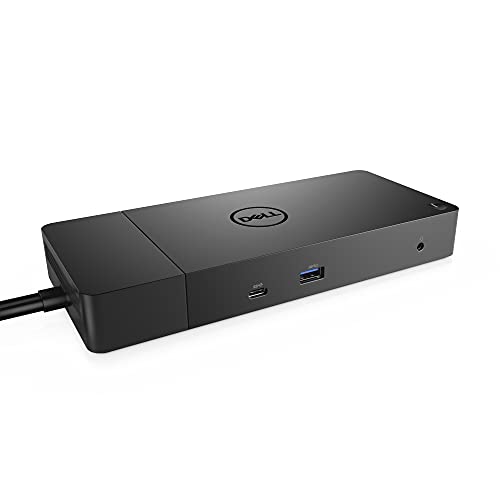
- 130W power delivery with 180W adapter
- HDMI, dual DisplayPort, USB-C, USB-A
- Includes SuperSpeed USB-C cable
Best For: Users wanting a stronger WD19 dock for demanding desks
Elite Modern Dock – Dell Pro Laptop Docking Station WD25
If you’re comparing docking stations for dell laptops for a modern office setup, the Dell Pro Dock WD25 is built to cover the basics and then some. It supports up to 100W charging for compatible Dell AI PCs and other USB-C systems, adds Ethernet and multiple USB ports, and can drive up to four high-resolution displays for a more flexible desk setup.
Best For: Users who want a modern Dell dock with strong display support, broad compatibility, and cleaner workspace cable routing.
Pros:
- Provides up to 100W power delivery to compatible Dell and non-Dell PCs.
- Native support for up to four high-res displays.
- Includes Ethernet plus USB-A and USB-C ports for accessories.
- Ambidextrous USB-C cable routing helps simplify desktop placement.
Cons:
- Best features depend on USB-C compatibility and supported system configurations.
- More capability than a simple single-monitor dock if you only need basic expansion.
Overall, the WD25 is a strong pick if you want a current-generation Dell dock with broad productivity features, flexible port access, and a compact design aimed at day-to-day office use.
Universal USB Dock – Dell Universal Dock D6000S
For shoppers looking at docking stations for dell laptops and mixed-device workspaces, the Dell Universal Dock D6000S keeps things simple and flexible. It connects through USB-C or USB-A, lets you attach displays and peripherals, and is designed for home or office use when you want an easy way to expand a laptop setup.
Best For: People who need a straightforward universal dock for Dell laptops or USB-C/USB-A laptops in a shared workspace.
Pros:
- Works with laptops that have USB-C or USB-A.
- Supports connecting displays, keyboard, mouse, and audio devices.
- Compact design with LED indicator and low 13.4-ounce weight.
- Includes USB ports and HDMI output for basic desk expansion.
Cons:
- Limited to 65W power, which may be less than some users want.
- Compatible devices are listed as Dell, so broader support should be checked carefully.
The D6000S makes sense if you want a practical universal dock rather than a high-end desktop hub. It focuses on convenience and everyday connectivity, which is often exactly what a basic office or home setup needs.
Renewed Power Bundle Dock – Dell Docking Station WD19S 180W Bundle
If you want docking stations for dell laptops with plenty of legacy-style video and peripheral options, this renewed WD19S bundle is a capable office dock. It includes a 180W power supply, USB-C docking, HDMI, dual DisplayPort outputs, and Gigabit Ethernet, making it useful for dual-monitor workstations and mixed accessory setups.
Best For: Dell notebook users who want a renewed dock bundle with strong wired connectivity and dual-monitor support.
Pros:
- Includes a 180W power adapter and USB-C docking interface.
- Offers dual DisplayPort, HDMI, USB-A, USB-C, and Ethernet ports.
- Compatible with select Inspiron, Venue, Precision, XPS, and Latitude systems.
- Bundle includes an HDMI cable and USB-C cable for setup convenience.
Cons:
- As a renewed product, condition and included accessories can matter more than with new units.
- Compatibility is limited to select Dell device families and should be confirmed first.
The WD19S bundle is a strong pick if you value broad wired port selection and want a dock that is already packaged for a workstation-style setup. It is especially appealing when a dual-display desk is the priority.
High-Output Pro Dock – Dell Pro Dock WD25
Among docking stations for dell laptops, the WD25 stands out if you need modern video output, high-speed networking, and a compact dock that still supports a serious multi-monitor workspace. It offers up to four-display support, 2.5GbE Ethernet, and a mix of USB-A and USB-C ports, plus up to 100W charging for Dell systems.
Best For: Power users who want a compact Dell dock with strong display flexibility, fast Ethernet, and lots of USB ports.
Pros:
- Supports up to four WQHD displays through HDMI 2.1, dual DP 1.4, and USB-C.
- Delivers up to 100W charging to Dell systems and 96W to other devices.
- Includes 6 USB 3.2 Gen 2 ports and 2.5GbE Ethernet.
- Features a compact design with ambidextrous cable routing and recycled materials.
Cons:
- Full display support depends on your laptop and monitor configuration.
- It may be more dock than you need if you’re only adding one screen and a few peripherals.
This WD25 version is a strong fit for desk setups that need more than a basic laptop hub. With fast networking, multiple modern ports, and high-resolution display support, it is built for users who want their dock to do a lot.
Reliable Everyday Dock – Dell WD19S 180W USB-C Dock
Dell WD19S 180W Docking Station (130W Power Delivery) USB-C, HDMI, Dual DisplayPort, Black
Check Price On AmazonIf you want docking stations for dell laptops that keep a desk setup simple, the Dell WD19S 180W is a solid everyday option. It uses a single USB-C connection to power peripherals and support dual external displays, making it a practical fit for office work, home work, and routine multitasking.
Best For: Dell laptop users who want a straightforward USB-C dock for dual monitors and essential desk connectivity.
Pros:
- 180W dock with 130W power delivery for compatible Dell laptops
- Dual DisplayPort plus HDMI support for flexible monitor setups
- Includes 6 USB ports for peripherals and accessories
- Compact black design that fits easily on a desk
Cons:
- Built primarily around USB-C, so compatibility depends on your laptop’s port support
- Not the most feature-rich option if you need advanced multi-display or networking extras
The WD19S is best viewed as a dependable plug-and-work dock for standard productivity needs. It covers the basics well without adding unnecessary complexity, which is often exactly what Dell laptop users want.
Premium Multi-Display Dock – Dell Pro Thunderbolt 4 Smart Dock SD25TB4
For docking stations for dell laptops that need more than a basic monitor hookup, the Dell Pro Thunderbolt 4 Smart Dock SD25TB4 is built for high-end productivity setups. It supports up to four 4K displays and adds Thunderbolt 4, HDMI 2.1, and dual DisplayPort 1.4 connections for demanding workstations.
Best For: Power users who need advanced multi-monitor support, Thunderbolt 4 speed, and business-focused management features.
Pros:
- Supports up to 4 4K monitors for complex workflows
- Up to 130W charging for Dell laptops, 96W for others
- Includes dual Thunderbolt 4 ports, HDMI 2.1, and DP 1.4
- Offers Wi-Fi management and business security features like WPA3 and PXE boot
Cons:
- More dock than most casual users need
- Best value is tied to laptops and setups that can take advantage of its advanced features
This dock is the strongest fit when your desk needs multiple high-resolution displays and enterprise-style control. It is compact for the capabilities it offers, but it clearly targets serious productivity rather than basic expansion.
Value Workhorse Dock – Dell WD19S 180W USB-C Dock with Ethernet
If you are comparing docking stations for dell laptops and want a practical, wired office hub, the WD19S 180W version with Ethernet is a strong pick. It delivers full-speed charging for compatible Dell laptops and adds a mix of USB, dual DisplayPort, HDMI, and Gigabit Ethernet connections for a tidy workstation.
Best For: Dell laptop owners who want dependable charging, wired networking, and a balanced port selection for office use.
Pros:
- 180W power delivery for compatible Dell laptops
- Dual DisplayPort 1.4 plus HDMI 2.0 supports multi-monitor use
- Includes Gigabit Ethernet for stable wired networking
- VESA-mountable, compact, and built for desk-friendly placement
Cons:
- Compatibility is centered on Dell laptops and USB-C devices
- Less suited to users who want Thunderbolt-class features or very advanced display expansion
This model makes sense if you want a no-fuss dock that covers charging, displays, and Ethernet in one unit. It is a straightforward workhorse rather than a specialty dock, which helps keep the setup easy to manage.
Elite Connectivity Pick – Dell WD19TBS Thunderbolt Dock, 180W
If you want docking stations for dell laptops that can also handle demanding multi-display setups, the Dell WD19TBS is built for that job. It combines Thunderbolt 3 connectivity with a broad port selection, so you can run several peripherals and multiple monitors through one cable while keeping your desk simple.
Best For: Dell Latitude, Precision, and XPS users who need strong multi-monitor support and Thunderbolt performance.
Pros:
- Supports triple 4K at 60Hz or a single 5K display over Thunderbolt 3.
- Includes HDMI, dual DisplayPort, USB-C, multiple USB-A ports, and Gigabit Ethernet.
- Comes with the 180W power adapter plus HDMI and DisplayPort cables for faster setup.
- Delivers up to 130W power delivery and 40Gbps data transfer.
Cons:
- Compatibility depends on having USB-C DisplayPort Alt Mode or Thunderbolt 3 support.
- Renewed product condition may matter to buyers who prefer brand-new hardware.
Overall, this is the most capable option in the group if display flexibility and Thunderbolt bandwidth matter more than keeping costs minimal. It is especially appealing for workstation-style Dell laptops that need a true single-cable desk setup.
Balanced Everyday Dock – Dell WD19 130W Docking Station
Dell WD19 130W Docking Station (with 90W Power Delivery) USB-C, HDMI, Dual DisplayPort, black
Check Price On AmazonFor docking stations for dell laptops, the WD19 130W is a practical middle-ground choice that covers the everyday office essentials. It offers HDMI, dual DisplayPort, USB-C, USB-A, audio, and Gigabit Ethernet in a compact dock designed for straightforward USB-C use.
Best For: Dell notebook owners who want a reliable daily dock with a solid mix of display and USB ports.
Pros:
- Includes HDMI 2.0b, dual DisplayPort 1.4, USB-C multifunction display output, and Gigabit Ethernet.
- Provides 90W power delivery from a 130W power adapter.
- Has useful extras like audio in/out and USB-A ports with PowerShare.
- Compact size makes it easier to place on a crowded desk.
Cons:
- Lower power delivery than the 180W WD19 version.
- Uses USB-C docking, so it is not for laptops without compatible USB-C support.
This dock makes sense when you want dependable connectivity without paying for the highest-power model. It is a strong everyday pick for users who need dual-monitor support and standard office peripherals.
High-Power Work Dock – Dell WD19 180W Docking Station
Dell WD19 180W Docking Station (130W Power Delivery) USB-C, HDMI, Dual DisplayPort, Black
Check Price On AmazonIf your setup needs a more powerful dock, this Dell WD19 180W is a solid option among docking stations for dell laptops. It keeps the same general port layout as the WD19 family, but adds a 180W power adapter and 130W power delivery, making it better suited for heavier workloads and busier desk setups.
Best For: Dell users who want the WD19 layout with stronger power delivery and a bundled USB-C cable.
Pros:
- Offers HDMI, dual DisplayPort 1.4, USB-C multifunction display output, USB-A, audio, and Gigabit Ethernet.
- Includes a 180W power adapter and 130W power delivery.
- Comes with a SuperSpeed USB-C cable in the box.
- Same compact dock footprint as the WD19 130W model.
Cons:
- Still requires a compatible USB-C docking interface.
- Ports are versatile, but the design is still centered on a single dock cable and standard office expansion.
Choose this version if you like the WD19 feature set but want more charging headroom. It is a practical step up for Dell laptop owners who need a sturdy, all-purpose desktop dock without moving to Thunderbolt.
How We Picked the Best Docking Stations for Dell Laptops
We prioritized Docking Stations for Dell Laptops that offer reliable power delivery, strong monitor support, and the ports most buyers actually need. We also looked for models with broad USB-C compatibility, clearer upgrade paths for dual- or triple-monitor users, and practical extras like Ethernet and USB-A for legacy peripherals.
Quick Comparison
For simple single- or dual-monitor desks, the WD19S and WD19 models are the most straightforward choices. If you need more flexibility or more displays, the WD25 and Thunderbolt options step up output and bandwidth. The D6000S is a useful pick when you want multi-display support with a more universal docking approach.
Key Buying Factors for Docking Stations for Dell Laptops
Power Delivery
Check your laptop’s charging requirement first. Many Dell business laptops work well with 90W to 130W delivery, but higher-performance systems may benefit from docks that provide more headroom. A dock that underpowers your laptop can lead to slow charging or reduced performance under load.
Display Support
Match the dock to your monitor setup. If you use one external screen, most options are fine. For two or more monitors, pay attention to DisplayPort, HDMI, and Thunderbolt bandwidth, as well as the maximum resolution and refresh rate supported on each output.
Port Selection
Consider the devices you plug in daily. USB-A is still important for mice, keyboards, and drives, while USB-C is useful for newer accessories. Ethernet remains valuable for stable video calls, downloads, and office networks.
Compatibility and Dock Type
Some Docking Stations for Dell Laptops are designed for broader USB-C compatibility, while others are optimized for Dell systems and may deliver better power or display behavior. Thunderbolt docks generally offer the most flexibility, but standard USB-C docks are often easier to justify on price.
Who Should Buy Which Docking Stations for Dell Laptops?
Choose a WD19 or WD19S if you want a dependable everyday dock for charging plus two monitors. Pick the WD25 if you want newer connectivity, more ports, or support for more displays. Go with the WD19TBS or SD25TB4 if you need the best bandwidth for advanced multi-monitor or high-performance work. The D6000S is best for users who value universal docking and flexible display expansion over Dell-specific optimization.
In short, the best dock depends on how many displays you use, how much power your Dell laptop needs, and whether you want a simple office hub or a more future-ready workstation setup.