Smart whiteboards for remote meetings can turn a basic conference room into a more collaborative workspace. The best models make it easier to present, annotate, brainstorm, and keep everyone engaged—whether they’re in the room or joining from afar.
Below, we’ve focused on 10 standout options for hybrid teams, classrooms, and office setups that need a reliable all-in-one display for communication and collaboration.
Best 10 Smart Whiteboards for Remote Meetings Picks for 2026
Enterprise Hybrid Meeting Hub
NearHub S Pro 4K UHD Smart Board for Business
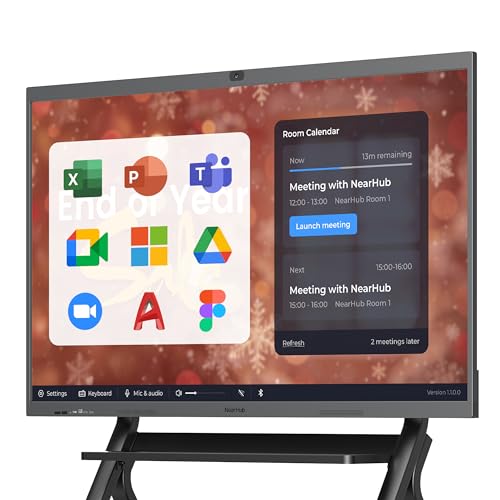
- Windows 11 OPS with Intel Core i5, 16GB RAM, 128GB storage
- 4K camera, 8-mic array, and dual speakers for hybrid meetings
- 4K touch display with 20-point input and cloud saving
Best For: business teams needing full Windows app support and conferencing integration
Secure Google-Ready Board
55" EDLA Smart Whiteboard with Android 14
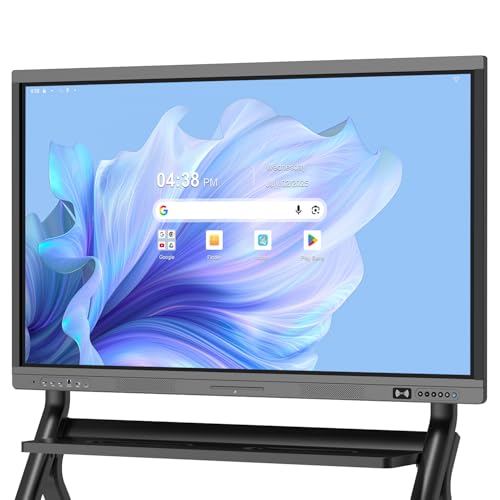
- Google EDLA-certified with Play Store, Drive, and OTA updates
- Android 14, 8GB RAM, and 128GB storage
- Anti-glare 4K display with wireless sharing and HDMI
Best For: Google-centered offices and classrooms needing secure, easy management
Large-Room Collaboration Screen
75" Remote Collaboration Smart Board

- 75-inch 4K UHD display for larger meeting spaces
- Dual Android 11 and Windows system support
- Wireless projection, multi-screen interaction, QR save
Best For: large classrooms and business rooms needing a big collaborative canvas
Open App Collaboration Board
Vibe S1 55" Smart Board with 250+ Apps

- 55-inch 4K UHD board with cloud-based whiteboarding
- 250+ apps via VibeOS and the Vibe App Store
- Wi-Fi 6, Bluetooth 5.2, and fleet management security
Best For: small teams wanting an open app ecosystem and cloud collaboration
Executive Collaboration Hub
65'' 4K Smart Board for Remote Meetings

- Android 14 with 8GB RAM and 128GB storage
- 4K UHD touchscreen with 20-point infrared touch
- Built-in conferencing hub and front-panel ports
Best For: Hybrid offices and larger meeting rooms
Security-First Team Board
55'' Android 14 Interactive Whiteboard

- Screencasts from Mac, Windows, iOS, and Android
- Android 14 with 8GB RAM and octa-core CPU
- Enterprise security plus Fleet management tools
Best For: Managed offices and classrooms
Video Meeting Workhorse
55'' 4K Smart Whiteboard with Camera

- 13MP camera, 8-array mics, and 2x20W speakers
- 4K UHD touch display with 20-point IR touch
- Wireless screen projection for up to 4 users
Best For: Video-first remote meetings and demos
AI-Powered Collaboration Hub
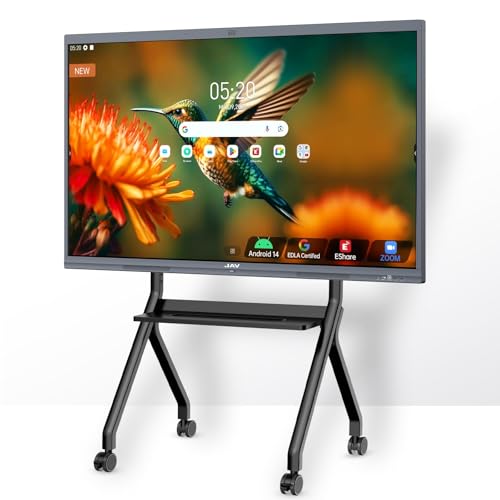
- 48MP AI camera and 8-array mic
- Google EDLA-certified Android 14 platform
- 20-point touch with wireless sharing
Best For: Hybrid meetings and collaborative presentations
Secure App-Friendly Meeting Board

- Cross-platform wireless sharing
- EDLA security with password protection
- Built-in camera for remote meetings
Best For: Secure collaboration and app-based workflows
Large-Screen Meeting Canvas

- 65-inch 4K UHD interactive display
- Supports major video meeting platforms
- 6ms response with QR file sharing
Best For: Larger rooms and collaborative group sessions
Enterprise Hybrid Meeting Hub – NearHub S Pro 4K UHD Smart Board for Business
If you need smart whiteboards for remote meetings that behave more like a full meeting computer than a basic display, the NearHub S Pro is built for that workflow. Its Windows 11 OPS platform lets teams run desktop software directly, while the 4K camera, 8-mic array, and front speakers support integrated video conferencing in one unit.
Best For: Teams that want a Windows-based collaboration board with native app support for hybrid meetings.
Pros:
- Native Windows 11 with built-in Intel Core i5 OPS, 16GB RAM, and 128GB storage
- AI-powered 4K wide-angle camera plus eight omnidirectional microphones
- 4K UHD touchscreen with 20-point touch and 6ms low latency
- Wireless and wired sharing options with cloud saving for whiteboard content
Cons:
- 55-inch size may be small for larger conference rooms
- Mobile stand is optional and not included
This is a strong fit if your organization wants broad software compatibility and centralized IT control through Microsoft Intune. It favors business environments that need reliable conferencing, annotation, and managed deployment more than a lightweight consumer whiteboard.
Secure Google-Ready Board – 55" EDLA Smart Whiteboard with Android 14
For smart whiteboards for remote meetings in offices, classrooms, or shared spaces, this EDLA-certified model focuses on Google ecosystem access and security. Android 14, Play Store support, OTA updates, and NFC-based multi-user management make it practical for teams that want a modern board with straightforward app access and easier device control.
Best For: Organizations that rely on Google services and want a secure Android-based collaboration board.
Pros:
- Google EDLA certification with access to Google Play Store and Google Drive
- Android 14 with 8GB RAM and 128GB storage for app and file handling
- Wireless sharing plus HDMI support for Mac, Windows, iOS, and Android
- Anti-glare 4K touchscreen with 20-point multi-touch and ±1mm touch accuracy
Cons:
- Wall mount is included, but a standing bracket is sold separately
- Android platform may be less ideal if you need full Windows desktop apps
This board is especially appealing if your workflow is centered around Google Drive, QR sharing, and secure multi-user access. It offers a balanced mix of performance, display quality, and enterprise-oriented protections.
Large-Room Collaboration Screen – 75" Remote Collaboration Smart Board
If your priority is a larger canvas for smart whiteboards for remote meetings, this 75-inch model gives presentations and annotations more room to breathe. It supports real-time conferencing, wireless projection, and dual Android 11 plus Windows functionality, making it suitable for teams that want a versatile board for bigger spaces.
Best For: Classrooms and business rooms that need a large 75-inch interactive display for collaboration.
Pros:
- 75-inch 4K UHD display for better visibility in larger rooms
- Dual-system design with Android 11 and Windows
- Supports Zoom, Google Meet, Microsoft, and other conferencing apps
- Wireless projection, multi-screen interaction, and QR code file saving
Cons:
- Board only, so additional mounting or support hardware may be needed
- Windows does not include an activation feature according to the notes
This is the most room-filling option in the group, and it leans heavily into presentation scale and multi-user interaction. It makes the most sense where screen size matters as much as collaboration features.
Open App Collaboration Board – Vibe S1 55" Smart Board with 250+ Apps
Among smart whiteboards for remote meetings, the Vibe S1 is aimed at teams that want a flexible app ecosystem without losing the core whiteboarding experience. Its 4K touchscreen, cloud-based canvas, and support for 250+ apps make it practical for meetings where content, video calls, and notes all need to live in one place.
Best For: Small teams, offices, and classrooms that want an open app ecosystem with easy whiteboarding.
Pros:
- 55-inch 4K UHD display with 10-point infrared touch and sub-8ms response time
- 250+ apps through VibeOS and the Vibe App Store
- Cloud-based whiteboard that can annotate PDFs and third-party apps
- Wi-Fi 6, Bluetooth 5.2, and enterprise-level security with fleet management
Cons:
- 10-point touch is lower than some competing boards with 20-point support
- Best suited to smaller rooms rather than very large conference spaces
This model stands out for software flexibility and a polished collaboration workflow. It is a practical choice if you want a board that supports both remote meetings and everyday app-based work without being locked into a single ecosystem.
Executive Collaboration Hub – 65'' 4K Smart Board for Remote Meetings
If you want smart whiteboards for remote meetings that can also serve as a presentation and collaboration center, this 65-inch model is built for that job. It combines Android 14, 4K UHD touch, and conferencing-friendly hardware so teams can annotate, share, and meet on one screen without juggling extra devices.
Best For: Hybrid offices, training rooms, and teams that want an all-in-one meeting board with strong connectivity.
Pros:
- Android 14 with 8GB RAM and 128GB storage for smooth daily use
- True 4K UHD touchscreen with over 400 nits brightness and eye-care support
- Built-in video conferencing hub for calls, annotation, and real-time document edits
- 20-point infrared touch with fast 6ms response and ±1mm precision
Cons:
- Large 65-inch size may be more than smaller rooms need
- Feature-rich setup may be more board than casual home users require
This is the most full-featured option in the group, especially if your remote meetings need video, whiteboarding, and broad port compatibility in one display. Its value comes from reducing add-ons while keeping collaboration tools close at hand.
Security-First Team Board – 55'' Android 14 Interactive Whiteboard
For smart whiteboards for remote meetings where IT control and clean screen sharing matter, this 55-inch board is a practical middle-ground choice. It supports screencasting from Mac, Windows, iOS, and Android devices, while Android 14 and enterprise-focused management features make it easier to fit into office workflows.
Best For: Offices, classrooms, and managed teams that want a secure wall-mounted board with flexible sharing.
Pros:
- Android 14 platform with Cortex-A55 octa-core CPU and 8GB RAM
- Supports screencasting from Mac, Windows, iOS, and Android devices
- Enterprise security and Fleet management tools for IT admins
- Wall mount included for straightforward installation
Cons:
- Smaller 55-inch screen than the 65-inch alternatives
- Notes emphasize business and classroom use more than advanced conferencing hardware
This model stands out if you want a dependable collaboration board with broad device compatibility and admin-friendly controls. It is less about extra conferencing hardware and more about secure, smooth use in shared environments.
Video Meeting Workhorse – 55'' 4K Smart Whiteboard with Camera
If your priority is smart whiteboards for remote meetings with built-in video tools, this 55-inch YCKJNB board is especially appealing. It combines a 13MP camera, 8-array microphones, speakers, and 4K UHD touch so teams can present, annotate, and meet from the same display.
Best For: Video-heavy meeting spaces, remote demos, and small teams that want conferencing hardware built in.
Pros:
- Built-in 13MP camera, 8-array microphones, and dual 20W speakers
- 4K UHD display with 20-point infrared multi-touch
- Supports up to 4 users for wireless screen projection
- Reverse touch control helps with remote demonstrations and collaboration
Cons:
- 55-inch size may feel compact for larger conference rooms
- Only one HDMI and one USB port listed in the notes
- Android 13, not the newer Android 14 found on some rivals
This is the most conferencing-focused choice here, making it a strong fit when remote calls and demonstrations matter as much as whiteboarding. The included camera and audio hardware reduce the need for extra meeting gear.
AI-Powered Collaboration Hub – JAV 55" Smart Board Pro
If you’re comparing smart whiteboards for remote meetings, this JAV 55-inch board is built to handle live collaboration, screen sharing, and video calls in one place. The 4K UHD display, built-in camera, and 8-array microphone make it a strong fit for hybrid teams that need both interactive whiteboarding and conferencing tools.
Best For: Hybrid meetings, team workshops, and remote presentations that need integrated audio/video.
Pros:
- Google EDLA-certified with Android 14 and access to Google Workspace apps
- Built-in 48MP AI camera and 8-array mic with noise suppression for meetings
- 20-point touch, palm erase, annotation tools, and wireless screen sharing
- Includes 100W soundbar plus split-screen, QR export, and meeting tools
Cons:
- 55-inch size may be limiting for larger conference rooms
- Wall-mount format may not suit teams wanting a movable setup
- Feature-rich system may be more than basic whiteboard users need
This model stands out if your priority is a more complete remote-meeting workstation rather than a simple display. It combines the core collaboration features teams rely on with strong audio, video, and app support.
Secure App-Friendly Meeting Board – JAV 55" EDLA Smart Board
For teams shopping smart whiteboards for remote meetings, this JAV board focuses on secure sharing, broad device compatibility, and a simple all-in-one collaboration setup. Its 4K touchscreen, built-in camera, and Android 14 platform make it practical for meetings, presentations, and hybrid work.
Best For: Small teams, classrooms, and remote collaborators who want secure sharing and open app support.
Pros:
- Works with Mac, Windows, iOS, and Android for easy cross-device sharing
- Google EDLA certification with screen lock and USB password protection
- Built-in camera supports video conferencing and remote collaboration
- 8GB RAM and 128GB storage for multitasking and app use
Cons:
- Product notes do not list speaker or microphone specifications
- 55-inch screen may be smaller than ideal for larger meeting rooms
- Wall-mount style may not fit every office layout
This is a good pick if security and cross-platform compatibility matter as much as the display itself. It gives remote teams the tools to share, annotate, and meet without needing a separate meeting display ecosystem.
Large-Screen Meeting Canvas – COOLHOOD 65" Smart Board
If you want smart whiteboards for remote meetings with a bigger viewing area, this COOLHOOD 65-inch board is designed for collaboration and presentation work. It pairs 4K UHD visuals with multi-device wireless sharing, built-in conferencing support, and fast writing response for interactive sessions.
Best For: Larger meeting spaces, classrooms, and teams that want a spacious collaborative display.
Pros:
- 65-inch 4K UHD screen gives teams more room to present and annotate
- Supports Zoom, Google Meet, Microsoft Teams, and Webex
- 6ms response time and ±1mm precision for smooth writing
- Open app ecosystem plus cloud storage and QR code file sharing
Cons:
- Listing notes that the stand is sold separately
- Only one HDMI port is listed in the specifications
- Wall-mount setup may require a dedicated installation space
This model makes the most sense when screen real estate matters and you want a board that can double as a collaboration centerpiece. It offers the basics remote teams need, with a larger format that helps content stay visible in group settings.
How We Picked the Best Smart Whiteboards for Remote Meetings
We prioritized models that support hybrid collaboration well: sharp 4K displays, responsive touch input, built-in camera or conferencing support, modern operating systems, and enough app compatibility for everyday business use. We also looked at screen size options, installation flexibility, and whether the board feels practical for meetings rather than just presentation playback.
Quick Comparison: What Matters Most
For smaller rooms, a 55-inch board is often the most practical choice. Mid-size teams may prefer 65-inch models for better visibility, while 75-inch displays work best in larger conference spaces. If your meetings rely heavily on video calls, prioritize camera quality, mic integration, and software ecosystem over extra screen size alone.
Key Buying Factors for Smart Whiteboards for Remote Meetings
Display Size and Room Fit
Match the board to the room, viewing distance, and number of participants. A display that is too small forces people to crowd in, while one that is too large can overwhelm compact rooms.
Touch Response and Annotation
For brainstorming and live markup, smooth multi-touch performance matters. Look for boards with low-latency writing, accurate palm rejection, and enough simultaneous touch points for group collaboration.
Video Meeting Hardware
Remote meetings benefit from integrated cameras, speakers, and microphones that reduce setup time. An all-in-one unit can simplify daily use, especially in shared rooms where people need to start quickly.
Operating System and App Support
Android-based and Google EDLA-certified boards may be appealing for teams that want familiar apps and easier account integration. Windows-powered or open-app systems can be better if your workflow depends on desktop software or broader compatibility.
Connectivity and Workflow
Check for HDMI, USB, wireless casting, and network support so the board fits smoothly into your existing setup. The easiest Smart Whiteboards for Remote Meetings are the ones that connect fast and require minimal troubleshooting.
Who Should Buy Which Smart Whiteboards for Remote Meetings?
Choose a 55-inch model if you want a flexible board for small to medium rooms, home offices, or multipurpose spaces. Go with 65 inches if your meetings often include several in-room participants or a larger wall distance. Select 75 inches if visibility is the top priority in a larger boardroom or training space.
If your team depends on video conferencing, choose a board with built-in camera and conferencing features. If you mainly need whiteboarding, annotation, and app-based collaboration, focus more on touch quality, software ecosystem, and ease of use.
The best Smart Whiteboards for Remote Meetings are the ones that fit your room, support your software, and make collaboration feel immediate rather than complicated.