Choosing the right display can make your promotions clearer, your menus easier to read, and your storefront feel more polished. The best option depends on where it will be used, how often it will run, and whether you need a full display or just a media player.
This roundup focuses on practical picks for small businesses, with options for retail, restaurants, lobbies, and kiosks. Below, you’ll find a concise buying guide to help narrow down the right fit fast.
Best 10 Digital Signage Displays for Small Business Picks for 2026
Easy CMS Player
Easy 4K CMS Player for Small Teams

- Auto-launches CMS in kiosk mode
- Free app simplifies setup and management
- Wi-Fi 6E and 4K in a compact stick
Best For: Small businesses that need a simple signage player for existing displays
Commercial Signage Display
Samsung 32-inch 24/7 Commercial Signage Display

- 24/7 commercial display with 500 nit brightness
- MagicINFO player reduces PC dependency
- Slim design with clean cable management
Best For: Small businesses needing a professional wall-mounted signage screen
Countertop Touch Display
Compact 10.1-Inch Android Touch Sign
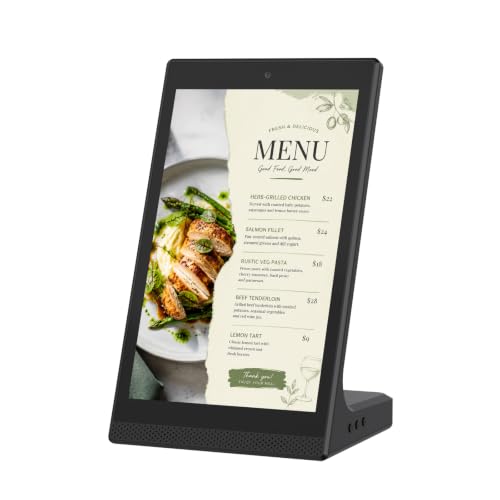
- Small tabletop design for counters and desks
- Touchscreen makes navigation simple
- Good for menus, notices, and product info
Best For: Restaurants, retail counters, and reception desks
Compact 4K Player
BrightSign LS445 4K Signage Player
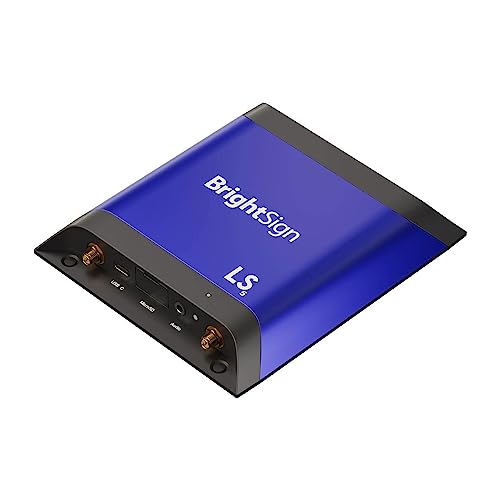
- Supports HD, 4K, and HTML5 content
- BrightSign OS focuses on security and uptime
- Free Control Cloud supports remote management
Best For: Businesses that need a compact player for existing commercial displays
Street-Visible LED Sign

- Bright full-color P6 display for daytime visibility
- Shows scrolling text, images, and animations
- WiFi and USB content updates are quick to manage
Best For: Outdoor storefront advertising and high-visibility promotions
Commercial 4K Signage TV
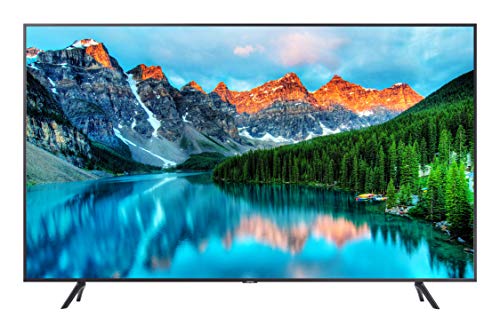
- 4K Crystal UHD image with accurate colors
- Samsung Pro TV app simplifies content creation
- Built for 16/7 business signage use
Best For: Indoor business signage with easy app-based control
Portable Poster Kiosk

- FHD IPS display with 178° viewing angle
- CMS, Wi-Fi, USB, and HDMI for updates
- Foldable design with wheels for easy movement
Best For: Portable promotions, events, and flexible indoor signage
Flagship Large-Format Signage

- 86-inch UHD 4K display for high-impact messaging
- webOS 25 and built-in CMS for easy scheduling
- HDR10/HLG support with 5000:1 contrast
Best For: large business spaces needing premium signage and simple content control
Countertop Menu Board
18.5-inch 700-Nit Signage Display

- 700 nits brightness for clear countertop visibility
- Lifetime free cloud CMS with remote management
- Compact desktop design for portrait or landscape use
Best For: restaurants, cafes, and retail counters that need a bright compact display
Mid-Size 4K Signage Screen
AG Neovo 43-inch Commercial Display

- 43-inch 4K UHD panel with 500 nits brightness
- 24/7 operation with portrait or landscape mounting
- HDMI, LAN, WiFi, and Bluetooth connectivity
Best For: businesses needing a flexible mid-size display for promos and lobby content
Easy CMS Player – Easy 4K CMS Player for Small Teams
If you want digital signage displays for small business without the usual setup headaches, the Amazon Signage Stick is a compact player that turns a compatible screen into a managed signage endpoint. It auto-launches your CMS in kiosk mode, supports free mobile-app setup, and is built for unattended operation.
Best For: Small businesses that want a simple, affordable way to run managed signage across one or multiple screens.
Pros:
- Auto-launches your CMS in kiosk mode for unattended playback
- Free Amazon Signage app helps with setup and multi-device management
- Supports leading CMS platforms and automatic CMS updates
- Wi-Fi 6E, 4K output, and quad-core performance in a compact device
Cons:
- CMS subscription is required
- It is a media player, not a standalone display
- Best value depends on having an existing compatible screen
This is a good fit if you already have displays and mainly need reliable content delivery, easy remote organization, and built-in security features. The 24/7 support option in the app also makes it practical for smaller teams that do not have dedicated IT help.
Commercial Signage Display – Samsung 32-inch 24/7 Commercial Signage Display
The Samsung QMR-A is a practical option for digital signage displays for small business when you need a purpose-built commercial screen rather than a consumer TV. It offers a 32-inch FHD panel, 24/7 operation support, and built-in MagicINFO playback for easier content handling without a PC.
Best For: Businesses that want a slim, professional 32-inch commercial display for signage or customer-facing spaces.
Pros:
- 24/7 commercial-grade signage display with 500 nit brightness
- Built-in MagicINFO player and SSSP simplify playback and maintenance
- Clean cable management and slim symmetrical design suit visible installs
- Wi-Fi, Bluetooth, HDMI, and Samsung Workspace support add flexibility
Cons:
- Requires wall mounting or a proper commercial install
- FHD resolution may be less detailed than 4K options
- More display than some small businesses need for a single countertop sign
For shops, offices, and meeting areas, this display is attractive because it combines commercial reliability with simple content management. The security features and Webex certification also make it useful in spaces that double as signage and collaboration zones.
Countertop Touch Display – Compact 10.1-Inch Android Touch Sign
This compact Android screen is a strong pick for digital signage displays for small business when you need something countertop-friendly and easy to update. Its 10.1-inch size, touchscreen control, and WiFi/USB connectivity make it well suited to menus, notices, and other close-range messaging.
Best For: Restaurants, front desks, and retail counters that need a small interactive sign or menu display.
Pros:
- Compact tabletop design fits counters, desks, and reception areas
- Touchscreen supports simple tap-and-swipe interaction
- WiFi and USB connectivity help with local content updates
- Useful for menus, price lists, notices, and product showcases
Cons:
- 10.1-inch screen is best for close viewing, not larger rooms
- USB Type B connectivity is more limited than network-based signage systems
- Best suited to indoor use and simple content workflows
For businesses that need a small digital sign at the point of service, this model keeps things straightforward. It is less about enterprise fleet management and more about delivering clear, easy-to-read content in a compact footprint.
Compact 4K Player – BrightSign LS445 4K Signage Player
If your small business already has a display and just needs a reliable player, the BrightSign LS445 is a capable choice for digital signage displays for small business setups. It supports 4K and HTML5 content, includes 64 GB of storage, and runs BrightSign OS with remote Control Cloud access.
Best For: Businesses that want a compact, secure media player for commercial displays and remote content management.
Pros:
- Plays HD and 4K video plus HTML5 content and digital audio
- BrightSign OS is designed for security, reliability, and uptime
- Includes free Control Cloud subscription for remote management
- Ultra-thin design fits neatly behind displays
Cons:
- It is a media player, not a display
- Ethernet is standard, while Wi-Fi requires an optional module
- Best fit is for users comfortable with signage hardware and CMS workflows
This model stands out for businesses that care more about dependable playback than flashy hardware. Its compact body and locking power cord also make it easy to install in tight spaces behind a commercial screen.
Street-Visible LED Sign – 40in P6 WiFi Sign
If you need digital signage displays for small business storefronts, this outdoor full-color LED board is built to grab attention from the street. The 40″ x 18″ P6 screen supports scrolling text, images, and animations, so you can rotate daily specials, promotions, hours, and event notices without much setup.
Best For: Storefronts, restaurants, cafes, bars, and retail shops that want a bright outdoor message board.
Pros:
- High-brightness P6 full-color display is designed for daytime visibility.
- Supports text, static messages, pictures, and animation effects.
- WiFi and USB control make updates simple from mobile app or PC software.
- Aluminum housing with IP45 protection helps for outdoor or semi-outdoor use.
Cons:
- PC software is not for Mac.
- Outdoor installation may require more planning than a standard indoor screen.
This is a strong fit when visibility matters more than elegance. For businesses that want a programmable sign with bright, flexible messaging, it offers practical advertising value in a format made for frequent updates.
Commercial 4K Signage TV – Samsung 43in BE43T-H Pro
For digital signage displays for small business owners who want a familiar TV-style setup, this Samsung commercial display gives you 4K resolution and built-in signage tools. The 43-inch screen is aimed at business advertising, with app-based content creation, HDMI and USB inputs, and 16/7 operation for scheduled playback.
Best For: Businesses that want a commercial-grade 4K display with simple app-based content control.
Pros:
- 4K Crystal UHD panel delivers crisp detail and accurate colors.
- Samsung Pro TV app makes it easy to create dynamic content from a phone or tablet.
- 16/7 operating time suits regular business signage use.
- Includes HDMI, USB, Wi-Fi 5, Bluetooth, and stereo speakers.
Cons:
- Consumer apps like Netflix or Amazon Prime Video need an external media player.
- 250 nits brightness is more suited to indoor or controlled-light spaces.
This model works well when you want a polished commercial display rather than a dedicated LED message board. It is a practical choice for shops, lobbies, and counters that need reliable signage and easy content updates.
Portable Poster Kiosk – 32in Android Signage Display
When comparing digital signage displays for small business use, portability can be a big advantage, and this 32-inch LCD kiosk is built around that idea. It combines FHD visuals, HDMI and USB inputs, Wi-Fi connectivity, auto loop playback, and CMS remote publishing so you can update promotions without standing at the screen.
Best For: Businesses, events, and temporary promotions that need a movable signage display with remote updates.
Pros:
- FHD IPS screen with a wide 178° viewing angle.
- USB, HDMI, Wi-Fi, and CMS support offer flexible content management.
- Automatic loop playback reduces the need for manual operation.
- Foldable, movable design with built-in wheels makes repositioning easier.
Cons:
- Smaller 32-inch size may be less impactful than larger storefront displays.
- Portability-focused design may not suit permanent wall-mounted installs.
This kiosk is a smart pick if you need to move signage between spaces or refresh messages often. It is especially useful for businesses that value flexible placement, timed operation, and remote content control.
Flagship Large-Format Signage – LG 86-inch 4K Commercial TV
If you need digital signage displays for small business environments that make a big visual statement, this LG 86-inch commercial screen is built for high-impact spaces like retail floors, hospitality lobbies, conference rooms, and corporate reception areas. It combines UHD 4K detail with webOS signage tools, so you can manage and schedule content without adding extra hardware.
Best For: Large business spaces that want a premium 4K signage screen with built-in content management.
Pros:
- 86-inch UHD 4K panel is ideal for high-visibility commercial messaging.
- webOS 25 and built-in content management simplify scheduling and updates.
- HDR10/HLG support and 5000:1 contrast help content look sharper and richer.
- Designed for 16/7 commercial use with HDMI connectivity for flexible setups.
Cons:
- 300 nits brightness is more moderate than some brighter commercial displays.
- Its very large size may be excessive for small countertops or tight wall spaces.
Overall, this is a strong choice when the goal is to deliver professional signage at scale and keep day-to-day management straightforward. It favors presentation quality and built-in control over compact sizing.
Countertop Menu Board – 18.5-inch 700-Nit Signage Display
For digital signage displays for small business use on counters, reception desks, and checkout areas, this 18.5-inch menu board is a practical fit. It offers 700 nits of brightness, a built-in cloud CMS, and plug-and-play USB support, making it easy to update promotions, menus, and announcements without complicated setup.
Best For: Restaurants, cafes, salons, and retail counters that need a bright, compact signage display.
Pros:
- 700 nits brightness helps content stay visible in busy business settings.
- Built-in lifetime free cloud CMS supports remote updates and scheduling.
- Compact 18.5-inch design works well in portrait or landscape layouts.
- Flexible inputs include HDMI, LAN, USB, TF card, and DC connections.
Cons:
- Resolution is 720P HD rather than full 1080p or 4K.
- Best suited to countertop and desktop use, not large wall-mounted installations.
This model stands out when you want fast content changes and strong brightness in a small footprint. It is especially useful for businesses that rely on menus, promos, or reception messaging throughout the day.
Mid-Size 4K Signage Screen – AG Neovo 43-inch Commercial Display
If you want digital signage displays for small business use with a more versatile mid-size footprint, this AG Neovo 43-inch model offers a solid mix of 4K detail, 500-nit brightness, and 24/7 operation. It supports landscape or portrait mounting and adds content management options like USB signage, wireless screen sharing, and web browsing for commercial messaging.
Best For: Businesses that need a flexible 43-inch signage display for promotions, menus, or lobby content.
Pros:
- 4K UHD resolution and 500 nits brightness support crisp commercial visuals.
- Built for 24/7 operation with portrait and landscape mounting options.
- HDMI, LAN, WiFi, and Bluetooth provide flexible connectivity.
- USB signage and scheduling features make content updates more manageable.
Cons:
- Wireless screen sharing may have limitations in portrait playback.
- At 43 inches, it may still be larger than some small countertop or point-of-sale needs.
Overall, this display is a versatile middle ground for businesses that want a professional screen size without going all the way to an oversized commercial TV. Its flexibility makes it a practical fit for many storefront and lobby applications.
How We Picked the Best Digital Signage Displays for Small Business
We focused on Digital Signage Displays for Small Business that balance ease of setup, screen quality, brightness, runtime, and practical connectivity. We also prioritized models suited to common business uses like menu boards, in-store promotions, lobby messaging, and countertop kiosks.
Because small businesses have different needs, this list includes both complete displays and media players. That mix matters if you already own a screen or need a turnkey solution.
Quick Comparison
If you want a simple indoor setup, look for a commercial display with built-in smart features and 24/7 support. If you need a flexible content engine for an existing screen, a dedicated media player may be the better buy. For windows, bright indoor spaces, or outdoor use, prioritize higher nit counts, weather resistance, and visibility from a distance.
Key Buying Factors for Digital Signage Displays for Small Business
Screen Size and Viewing Distance
Match the screen size to how far customers will stand from it. Countertop kiosks and menu boards often work well in the 10-inch to 24-inch range, while larger retail walls and lobby areas usually benefit from 32-inch, 43-inch, or bigger displays.
Brightness and Environment
Brightness is one of the most important specs. Indoor spaces with controlled lighting can often use standard commercial panels, but bright windows, front doors, and outdoor placements need higher brightness for readability.
Commercial Duty and Runtime
For Digital Signage Displays for Small Business, look for commercial-grade construction and support for extended or 24/7 operation if the screen will run all day. Consumer TVs may seem cheaper, but they are not always built for constant use.
Content Management and Inputs
Check whether the display supports easy updates through USB, Wi-Fi, HDMI, Ethernet, or built-in CMS software. If multiple staff members need to change content, simpler management tools can save time.
Mounting and Placement
Think through whether the unit will be wall-mounted, used on a stand, placed on a counter, or installed outdoors. VESA compatibility, kiosk design, and cable management can all affect how professional the final setup looks.
Who Should Buy Which Digital Signage Displays for Small Business?
Restaurants and cafes: Choose a bright menu board or a compact touchscreen kiosk if you update prices and specials often.
Retail stores: A 32-inch to 43-inch commercial display usually offers the best mix of visibility and footprint.
Offices, lobbies, and reception areas: A larger 4K signage display can make announcements and branding look more polished.
Outdoor or window-facing businesses: Prioritize high brightness and weather-ready hardware so content remains readable all day.
Businesses with existing screens: A dedicated media player can be the most cost-effective way to add signage without replacing the display.
In short, the best choice is the one that fits your space, content workflow, and viewing conditions—not just the one with the biggest screen or longest feature list.