If you work with two screens, the right converter can make a big difference in comfort, posture, and productivity. The best options give you enough width for dual monitors without overwhelming your desk.
Below, we break down ten strong picks for different setups, from compact workstations to wider risers built for heavier monitor loads and more flexible sit-to-stand use.
Best 10 Standing Desk Converters for Dual Monitors Picks for 2026
Quick Sit-to-Stand Riser
VIVO 36" Dual Monitor Workstation

- 91 cm x 56 cm surface fits dual monitors or a laptop setup
- Dual pneumatic springs support smoother height changes
- Keyboard tray moves with the top platform
Best For: Users who want a roomy manual converter for dual screens
Dual Arm Monitor Lift
VIVO 32" Desk Riser with Mount

- Integrated dual monitor mount fits two 13" to 30" screens
- Full-motion arms tilt, swivel, rotate, and adjust on the pole
- Steel frame and desk padding improve stability
Best For: People who want mounted dual monitors on a riser
Electric Lift Desk Riser

- Quiet electric lift adjusts with the push of a button
- 36" x 15.7" surface suits dual monitors plus a laptop
- 50 lb capacity supports heavier work setups
Best For: Users who want push-button convenience for dual monitors
Integrated Dual Monitor Pick
Mount-It! Dual Monitor Desk Converter
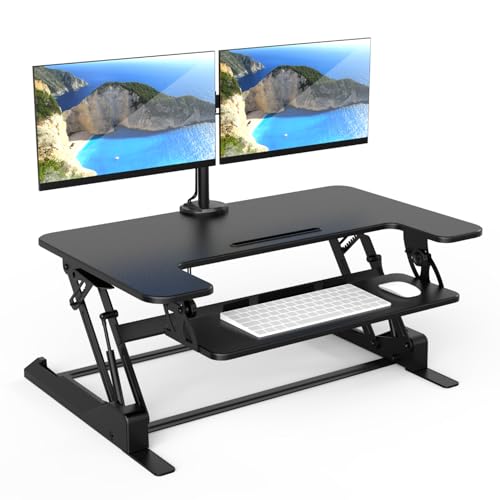
- Built-in mount supports two 32-inch monitors.
- 36-inch surface with keyboard tray keeps essentials organized.
- Gas-spring lift adjusts from 6.5 to 16.3 inches.
Best For: Dual-monitor users who want an all-in-one converter with integrated screen mounts.
Budget-Friendly Wide Surface
TechOrbits 32-Inch Standing Converter

- Pneumatic lift adjusts from 4.3 to 19.7 inches.
- 32-inch surface fits dual monitors and accessories.
- Mostly assembled with included keyboard tray.
Best For: Home-office users who want an adjustable dual-monitor workstation in a compact size.
Compact Steel Option
VIVO 32-Inch Stand Up Desk Riser

- Space-efficient 31.5 x 15.8-inch surface.
- Steel frame supports up to 26 pounds.
- Pneumatic lift adjusts from 4.9 to 19.7 inches.
Best For: Users who want a compact, low-assembly converter for a dual-monitor or laptop-monitor setup.
Space-Saving Dual-Monitor Pick

- 42" top surface supports dual monitors
- Keyboard tray rises with the desktop
- Steel frame supports up to 33 lbs
Best For: Dual-monitor setups needing a wide, easy-to-assemble converter
Corner Desk Solution
VIVO 38 inch Corner Desk Converter

- Corner-friendly 37.5" x 18" top
- Keyboard tray moves in sync with the top
- 33 lb desktop capacity for dual monitors
Best For: Corner-desk setups needing a dual-monitor riser
Quick Sit-to-Stand Riser – VIVO 36" Dual Monitor Workstation
If you want a practical standing desk converter for dual monitors, this VIVO 36-inch riser gives you a roomy two-tier layout with a keyboard tray that rises in sync with the top platform. It’s built for users who want a straightforward way to switch between sitting and standing without a complicated setup.
Best For: People who want a simple, roomy converter for dual monitor or monitor-plus-laptop setups.
Pros:
- 91 cm x 56 cm top surface supports single or dual monitor/laptop setups.
- Keyboard tray raises in sync for a comfortable working position.
- Dual pneumatic springs make the sit-to-stand motion smoother.
- Minimal assembly and a 3-year manufacturer warranty add convenience.
Cons:
- 33 lb maximum weight recommendation may limit heavier setups.
- Manual height locking means it is not motorized.
Overall, this is a strong pick if you value space, simplicity, and a traditional lift-assist converter design. It focuses on ease of use and an office-friendly footprint rather than extra adjustability features.
Dual Arm Monitor Lift – VIVO 32" Desk Riser with Mount
This standing desk converter for dual monitors combines a height-adjustable riser with a full-motion monitor mount, which is useful if you want to free up desktop space and fine-tune your viewing angle. It suits users who prefer screens mounted above the work surface instead of sitting directly on the desktop.
Best For: Users who want a dual-monitor riser with integrated full-motion monitor arms.
Pros:
- Fits two 13″ to 30″ monitors up to 17.6 lbs each.
- Full-motion mount offers tilt, swivel, rotation, and pole height adjustment.
- 31.5″ x 15.7″ top surface and wide keyboard tray provide usable workspace.
- Solid steel frame and desk padding add durability and surface protection.
Cons:
- Requires VESA 75×75 mm or 100×100 mm monitor patterns.
- Assembly includes both the riser and monitor-arm components.
For dual-monitor users who want a more ergonomic screen position, this model stands out for its integrated arm system. It’s a better fit if adjustability and desk organization matter more than keeping the design ultra-simple.
Smooth Gas-Spring Converter – FITUEYES 32" Dual Monitor Riser
If you’re comparing standing desk converters for dual monitors, this FITUEYES model offers a balanced mix of surface space, lift range, and straightforward operation. The 32-inch top and keyboard tray are sized for common home-office layouts, and the dual gas spring design helps the transition feel controlled.
Best For: Buyers who want a sturdy, easy-to-use dual-monitor converter with a clean layout.
Pros:
- 31.5″ x 15.7″ top surface supports dual monitor and laptop setups.
- Dual gas spring force assists smooth sit-to-stand movement.
- Raises to 19.8 inches and lowers to 4.3 inches.
- 33 lb load capacity is enough for many dual-monitor workstations.
Cons:
- Smaller than some 36-inch converters for larger accessories.
- Only two levels are listed in the product details.
This is a sensible choice if you want an uncomplicated converter that can handle a typical dual-monitor setup. It focuses on dependable lifting support and practical workspace dimensions rather than advanced extras.
Electric Lift Desk Riser – VIVO 36" Motorized Converter
For a more convenient take on standing desk converters for dual monitors, this VIVO electric model swaps manual lift assistance for a quiet motor and push-button height changes. The 36-inch surface and synchronized keyboard tray make it a strong fit for users who want an easy transition without much effort.
Best For: People who want a motorized converter for a dual-monitor or mixed workstation.
Pros:
- Electric lift with quiet motor and button control.
- 36″ x 15.7″ desktop accommodates dual monitors and a laptop.
- Keyboard tray raises in sync with the main surface.
- 50 lb desktop capacity supports heavier office setups.
Cons:
- Still requires placement on an existing desk, so it is not a full standing desk.
- Assembly is minimal, but the tray still needs to be attached.
This model is the easiest option here for users who want push-button height changes. If your priority is convenience and a cleaner daily sit-stand routine, the electric lift makes a noticeable difference.
Integrated Dual Monitor Pick – Mount-It! Dual Monitor Desk Converter
If you want standing desk converters for dual monitors with a built-in mounting solution, this Mount-It! model is built around that use case. The 36-inch surface, integrated dual monitor mount, and gas-spring height adjustment make it a practical choice for users who want a cleaner, more ergonomic desktop setup.
Best For: Dual-monitor users who want an all-in-one converter with integrated screen mounts and easy height changes.
Pros:
- Built-in dual monitor mount supports two screens up to 32 inches each.
- 36-inch workspace leaves room for monitors, a laptop, and accessories.
- Manual lift gas spring adjusts from 6.5 inches to 16.3 inches.
- Includes cable management and nonskid pads for a tidier, more stable setup.
Cons:
- Heavier unit at 46.1 pounds, so it is less portable than simpler risers.
- Desktop load capacity is limited to 33 pounds.
Overall, this is a strong fit if you want a dual-monitor converter that does more than just raise your screens. Its integrated mounting, wide top, and organized layout make it especially appealing for productivity-focused workstations.
Budget-Friendly Wide Surface – TechOrbits 32-Inch Standing Converter
For shoppers comparing standing desk converters for dual monitors on a smaller footprint, this TechOrbits option focuses on straightforward adjustability and a simple setup. The 32-inch work area, included dual monitor stand, and pneumatic lift make it a practical pick for home offices and compact workspaces.
Best For: Home-office users who want an adjustable dual-monitor workstation with a simple, mostly assembled design.
Pros:
- Adjusts from 4.3 inches to 19.7 inches with a pneumatic lift and handle.
- 32-inch work area accommodates a laptop or dual-monitor setup plus accessories.
- Mostly assembled out of the box for easier setup.
- Includes a keyboard tray and aluminum frame for a functional workstation layout.
Cons:
- Particle board top may be less premium than metal-topped alternatives.
- Maximum weight recommendation is relatively modest at 14.97 kg.
This model makes sense if you need a flexible converter without a complicated build process. It delivers the basic features most dual-monitor users need, while staying compact enough for smaller office spaces.
Compact Steel Option – VIVO 32-Inch Stand Up Desk Riser
If you need standing desk converters for dual monitors but want a space-efficient design, this VIVO riser keeps the footprint compact without dropping the core features. It uses a steel frame, a synchronized keyboard tray, and a simple lift-assist mechanism for quick sit-to-stand transitions.
Best For: Users who want a compact, low-assembly converter for a dual-monitor or laptop-monitor setup.
Pros:
- 31.5 x 15.8-inch top surface is designed to save space.
- Steel construction supports up to 26 pounds on the desktop.
- Pneumatic spring lift adjusts from 4.9 inches to 19.7 inches.
- Keyboard tray raises in sync with the top surface for smoother transitions.
Cons:
- Desktop load capacity is lower than some larger dual-monitor converters.
- Surface size is more compact, so it is less spacious than 36-inch models.
This is a good pick if desk space is tight and you want a converter that is easy to place and quick to use. Its steel build and minimal assembly help make it a reliable, no-fuss workstation upgrade.
Space-Saving Dual-Monitor Pick – VIVO 42 inch Desk Converter
If you want standing desk converters for dual monitors without giving up much desktop space, this VIVO 42-inch model is built for a straightforward sit-to-stand workflow. Its 42-inch top gives room for two monitors, and the keyboard tray rises in sync so your setup stays aligned as you change positions.
Best For: Dual-monitor users who want a wide, minimal-assembly converter with a simple straight-up lift.
Pros:
- 42″ x 15.7″ top surface fits dual monitors well.
- Keyboard tray lifts with the main platform for a coordinated setup.
- Steel frame and 33 lb desktop capacity add stability for everyday use.
- Minimal assembly: attach the keyboard tray and start using it.
Cons:
- Keyboard tray weight limit is only 4.4 lbs.
- Adjustment range tops out at 20″, which may not suit everyone.
- Best suited to standard straight desks rather than corner layouts.
Overall, this is a practical option if your priority is a compact but capable dual-monitor converter with a simple lift mechanism. It focuses on core functionality and quick setup rather than extra features.
Wide Surface Value Pick – FITUEYES 36 inch Standing Desk Converter
Among standing desk converters for dual monitors, this FITUEYES riser stands out for its broad 36-inch work surface and smooth dual gas spring adjustment. It is designed to handle a dual-monitor or laptop-plus-monitor setup while keeping the transition from sitting to standing simple.
Best For: Buyers who want a wide, easy-adjust converter that can handle dual monitors or a mixed workstation.
Pros:
- 36″ x 24.2″ top surface offers generous room for multiple devices.
- Dual gas springs provide smooth height changes.
- Raises to 19.8″ and lowers to 4.3″ for flexible positioning.
- 33 lb capacity supports two monitors and common office accessories.
Cons:
- The product notes emphasize a single keyboard tray, so desk organization is more compact than some wider models.
- At 13.43 kg, it is not a lightweight option.
- Assembly is simple, but you still need to install the keyboard tray.
For users who want a roomy dual-monitor converter with smooth lifting action, this is a balanced pick. It keeps the feature set focused on workspace size, stability, and easy height adjustment.
Corner Desk Solution – VIVO 38 inch Corner Desk Converter
If you need standing desk converters for dual monitors on a corner workstation, this VIVO K Series model is shaped for that layout. The 37.5-inch top and synchronized keyboard tray give you room for two screens while keeping the lift motion smooth and straightforward.
Best For: Corner-desk users who need a space-efficient dual-monitor converter with a straightforward pneumatic lift.
Pros:
- Corner-friendly 37.5″ x 18″ top surface fits desk angles well.
- Keyboard tray raises in sync with the main surface.
- Pneumatic spring and touch locking mechanism simplify the height change.
- 33 lb desktop capacity is suitable for dual-monitor setups.
Cons:
- The keyboard tray supports only 4.4 lbs.
- Designed specifically for corner desks, so it is less versatile for standard layouts.
- Adjustment range is capped at 20″.
This is a strong fit if your office layout calls for a corner converter rather than a standard rectangular one. It keeps the experience practical with a roomy top, sync-lift tray, and minimal setup.
How We Picked the Best Standing Desk Converters for Dual Monitors
We focused on Standing Desk Converters for Dual Monitors that balance usable platform size, lift range, stability, and workspace layout. We also looked at keyboard tray space, monitor compatibility, and whether each design suits everyday office use rather than just occasional standing.
Quick Comparison
The main differences come down to width, lifting style, and how much gear each converter can support. Smaller models are better for tighter desks or lighter setups, while wider converters are a better fit for two monitors plus a keyboard, mouse, and accessories.
Best for Compact Desks
Choose narrower 32-inch-style converters if you need to conserve surface area and your monitors are not oversized.
Best for More Room and Flexibility
Choose 36-inch to 42-inch options if you want extra workspace, easier monitor spacing, or a more comfortable keyboard layout.
Key Buying Factors for Standing Desk Converters for Dual Monitors
First, check platform width and depth. Dual-monitor setups need enough room not just for the screens, but also for safe spacing and a comfortable typing position. Second, confirm weight capacity and monitor support so the converter can handle your full setup without wobble. Third, look at lift method: manual spring-assisted designs are common, while electric options offer easier height changes at the cost of more complexity.
Also consider keyboard tray design, especially if you type for long stretches. A tray that is too shallow can feel cramped. Finally, think about desk compatibility. A converter that fits your current desk footprint and leaves room for peripheral devices is usually the better long-term buy than the widest model available.
Who Should Buy Which Standing Desk Converters for Dual Monitors?
If you have a small home office, a 32-inch class converter is often the most practical choice. If you run two full-size monitors and want a more comfortable spread, go wider. If you switch positions often during the day, an electric model may be worth it. If you want the simplest, most dependable setup, a manual riser with a sturdy frame is usually the safest bet.
For shoppers comparing Standing Desk Converters for Dual Monitors, the best choice is the one that matches your monitor size, desk space, and daily workflow—not just the biggest or most feature-heavy option.