If you spend hours in spreadsheets, documents, or creative work, the right monitor can make a bigger difference than most upgrades. The best 4K business monitors deliver sharper text, more usable screen space, and better comfort for long workdays.
Below, we focus on practical office features like screen size, connectivity, ergonomics, and panel quality so you can choose a display that fits the way you work.
Best 10 4K Business Monitors Picks for 2026
Editor’s Pick
Dell 27 S2725QC 4K USB-C Monitor

- 27-inch 4K IPS display with 99% sRGB
- 120Hz, FreeSync Premium, 4ms response
- USB-C with up to 65W power delivery
Best For: Business users who want a sharp 27-inch 4K display with USB-C and smoother motion
Large-Screen Value
LG 32UR550K-B 32-Inch 4K Monitor

- 32-inch 4K UHD panel for more workspace
- HDR10 and 90% DCI-P3 color support
- Height, tilt, and pivot adjustments
Best For: Users who want a roomy 32-inch 4K monitor for multitasking and casual media
Compact Creator Pick
LG 27US500-W 27-Inch 4K IPS Monitor

- 27-inch 4K IPS display with wide viewing angles
- HDR10 and up to 90% DCI-P3
- Reader Mode and Flicker Safe for comfort
Best For: Professionals who want a clean 27-inch 4K monitor for detailed work and light creative use
Premium Productivity
Dell 27 S2725QS 4K 120Hz Monitor

- 27-inch 4K IPS panel with 99% sRGB
- 120Hz with FreeSync Premium and 0.03ms response
- USB-C plus full stand adjustability
Best For: Professionals who want a high-quality 27-inch 4K monitor with smooth motion and flexible ergonomics
Immersive 32-inch 4K Pick
LG 32UR500K-B Ultrafine 32-inch 4K UHD Monitor

- 32-inch UHD 4K display with HDR10 and up to 90% DCI-P3
- Dual HDMI, DisplayPort, and built-in stereo speakers
- OnScreen Control plus ergonomic tilt adjustment
Best For: Large 4K workspaces with simple multi-device convenience
Ergonomic Office Choice
ASUS 27” 4K Business Monitor VA27UQSB

- 27-inch IPS 4K UHD panel with 178-degree viewing angles
- Tilt, swivel, pivot, and height adjustment
- Dual HDMI, DisplayPort, and USB hub connectivity
Best For: Office users who want an adjustable compact 4K display
Value 32-inch Work Monitor
DJiEX 32 Inch 4K Computer Monitor
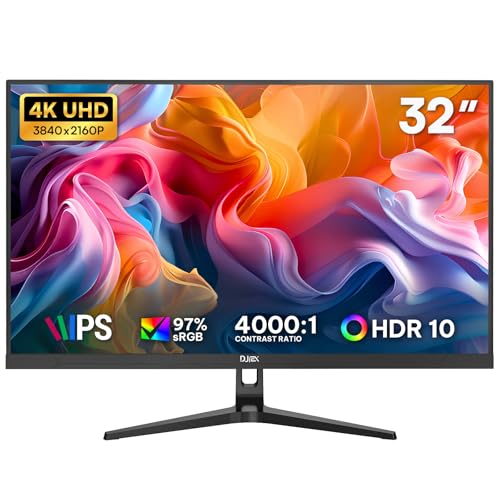
- 32-inch 4K UHD IPS panel with 97% sRGB
- Dual HDMI and dual DisplayPort inputs
- Low Blue Light support with VESA 75x75mm mount
Best For: Large-screen productivity on a simple office-friendly budget
Eye Comfort Choice

- 4K IPS panel with 178° viewing angles and HDR10 support
- Eye Care Plus, blue light filter, and flicker-free design
- Adaptive Sync and 3-year warranty add practical value
Best For: Long work sessions where eye comfort is a priority
Premium Workspace Pick
LG 27" Ultrafine 4K HDR Monitor

- 4K IPS panel with 95% DCI-P3 color for vibrant visuals
- DisplayHDR 400 and Switch app improve versatility
- Height, tilt, and pivot adjustments support ergonomics
Best For: Color-focused office users who want an adjustable stand
Editor’s Pick – Dell 27 S2725QC 4K USB-C Monitor
If you want a versatile 4k business monitor that also feels fast and modern, the Dell S2725QC is an easy fit. Its 27-inch 4K IPS panel, 120Hz refresh rate, USB-C connectivity, and 99% sRGB coverage make it well suited to daily office work, content review, and multitasking with a cleaner desk setup.
Best For: Business users who want a sharp 27-inch 4K display with USB-C, strong color accuracy, and smoother-than-usual motion.
Pros:
- 4K IPS panel with 99% sRGB and 1500:1 contrast for detailed, vibrant visuals.
- 120Hz refresh rate with FreeSync Premium and 4ms response time for smoother scrolling and motion.
- USB-C with up to 65W power delivery helps reduce cable clutter on a business desk.
- ComfortView Plus reduces harmful blue light emissions to 35% while preserving color accuracy.
Cons:
- 27-inch size may feel compact if you prefer a larger workspace.
- Designed around productivity and photo/video editing rather than specialized pro color workflows.
This Dell stands out as a balanced pick for offices that want a polished all-around 4K monitor with better ergonomics and connectivity than many basic business displays.
Large-Screen Value – LG 32UR550K-B 32-Inch 4K Monitor
The LG 32UR550K-B is a practical choice if you want a larger 4k business monitor without moving into a premium price tier. Its 32-inch VA panel gives you extra screen space for spreadsheets, documents, and multitasking, while HDR10 and 90% DCI-P3 add useful color depth for mixed work and media.
Best For: Users who want a roomy 32-inch 4K monitor for office multitasking, general productivity, and casual media use.
Pros:
- 32-inch 4K UHD screen provides lots of room for multitasking and side-by-side windows.
- 90% DCI-P3 and HDR10 support deliver richer color and contrast than basic office monitors.
- Height, tilt, and pivot adjustments make it easier to set up for long work sessions.
- Built-in speakers and HDMI/DisplayPort connectivity add convenience.
Cons:
- 60Hz refresh rate is standard, not ideal if you want a faster-feeling display.
- VA panel is better for contrast than IPS-style wide-angle consistency.
Overall, this LG is a strong pick for buyers who value screen size and everyday versatility more than gaming-speed specs or premium connectivity.
Compact Creator Pick – LG 27US500-W 27-Inch 4K IPS Monitor
The LG 27US500-W is a straightforward 4k business monitor for people who want sharp detail in a compact 27-inch footprint. With an IPS panel, HDR10, up to 90% DCI-P3, and a borderless design, it suits office tasks, creative review, and everyday content work without adding unnecessary complexity.
Best For: Professionals who want a clean 27-inch 4K monitor for detailed work, general productivity, and light creative use.
Pros:
- 4K IPS panel with wide viewing angles and a 1000:1 contrast ratio.
- HDR10 and up to 90% DCI-P3 support give it solid color capability for the class.
- Onscreen Control and the Switch app help with split-screen multitasking and quick adjustments.
- Flicker Safe and Reader Mode are useful for longer work sessions.
Cons:
- 60Hz refresh rate is basic for a modern monitor.
- Stand only offers tilt adjustment, so ergonomics are more limited than some rivals.
This model is a good fit if you want a simple, polished 4K display that emphasizes clarity and color without paying for extra speed or premium stand features.
Premium Productivity – Dell 27 S2725QS 4K 120Hz Monitor
If your shortlist for 4k business monitors includes something a little more polished, the Dell S2725QS is a strong contender. It combines a 27-inch 4K IPS panel, 120Hz refresh, 99% sRGB, and USB-C connectivity with an adjustable stand, making it a good match for busy desks and long workdays.
Best For: Professionals who want a high-quality 27-inch 4K monitor with smooth motion, strong color, and flexible ergonomics.
Pros:
- 4K IPS panel with 99% sRGB and 1500:1 contrast for crisp office work and media.
- 120Hz refresh rate with FreeSync Premium and 0.03ms response time for smoother motion.
- USB-C, HDMI, and DisplayPort give you flexible hookup options.
- Height, swivel, pivot, and tilt adjustments make positioning easier.
Cons:
- 27-inch size is efficient, but not as expansive as larger 32-inch options.
- Its strengths are productivity and general use, not a specialized pro-content display.
For office buyers who want a premium-feeling 4K monitor with better speed and ergonomics than a basic business screen, this Dell is one of the most complete options here.
Immersive 32-inch 4K Pick – LG 32UR500K-B Ultrafine 32-inch 4K UHD Monitor
If you want one of the more flexible 4k business monitors for mixed work and after-hours use, the LG 32UR500K-B gives you a large 32-inch UHD canvas with HDR10 and up to 90% DCI-P3 color coverage. It also includes dual HDMI, DisplayPort, OnScreen Control, and built-in speakers, making it easy to build a practical desk setup without adding extra accessories.
Best For: Users who want a large 4K monitor for business tasks, content viewing, and simple multi-device setups.
Pros:
- 32-inch 4K UHD panel offers plenty of space for spreadsheets, documents, and side-by-side windows.
- HDR10 and up to 90% DCI-P3 support help deliver vivid color and stronger visual depth.
- Dual HDMI, DisplayPort, and built-in stereo speakers add convenience for everyday use.
- OnScreen Control and an ergonomic tilt stand make basic setup and adjustment straightforward.
Cons:
- Built-in speakers are convenient, but the notes do not suggest premium audio performance.
- Its feature set is practical rather than office-focused, so it may be more than some users need.
Overall, this LG model is a strong choice if you want a large, simple 4K display with useful extras for work and general media. It balances screen size, connectivity, and user-friendly controls well for a versatile desk setup.
Ergonomic Office Choice – ASUS 27” 4K Business Monitor VA27UQSB
The ASUS VA27UQSB is a practical option among 4k business monitors if you want a 27-inch UHD screen built around office comfort and connectivity. Its IPS panel, HDR-10 support, dual HDMI, DisplayPort, USB hub, and adjustable stand make it a straightforward fit for a business desk or home office.
Best For: Professionals who want a compact 4K business monitor with flexible ergonomics and broad connectivity.
Pros:
- 27-inch 4K UHD IPS display with 178-degree viewing angles for clear office work.
- Tilt, swivel, pivot, and height adjustment support a more comfortable workstation.
- Dual HDMI, DisplayPort, and USB hub help connect multiple devices.
- ASUS DisplayWidget Center provides an easy way to change monitor settings.
Cons:
- At 27 inches, it offers less screen space than 32-inch alternatives for heavy multitasking.
- 60Hz refresh rate is suited to office use, not fast-paced gaming priorities.
For buyers who value ergonomics and everyday productivity, this ASUS monitor covers the core business essentials well. It is especially appealing if you want a clean, adjustable 4K display that is easy to integrate into a modern office setup.
Value 32-inch Work Monitor – DJiEX 32 Inch 4K Computer Monitor
This DJiEX model is a straightforward pick for shoppers comparing 4k business monitors on value and screen size. It pairs a 32-inch UHD IPS panel with 97% sRGB, HDR10, dual HDMI, dual DisplayPort inputs, and low blue light support, so it fits well into a home office or general productivity setup.
Best For: Business and home office users who want a large 4K monitor for multitasking and everyday work.
Pros:
- 32-inch 4K UHD screen gives you more room for spreadsheets, reports, and browser windows.
- IPS panel with 97% sRGB and 1.07 billion colors supports clear everyday visuals.
- Dual HDMI and dual DisplayPort inputs make it easy to connect multiple devices.
- Low Blue Light and a 75x75mm VESA mount add comfort and setup flexibility.
Cons:
- The 60Hz refresh rate is aimed at daily work rather than high-refresh use cases.
- USB-C is not built in, so some laptops may need an adapter.
Overall, this is a practical 32-inch 4K monitor for buyers who want more desktop space without overcomplicating the setup. It focuses on the features that matter most for office work: size, connectivity, and comfortable long-session viewing.
Value 4K Pick – Sceptre 27" 4K IPS 70Hz Monitor
If you want a practical 4k business monitor with sharp text, wide viewing angles, and a simple no-frills setup, this Sceptre 27-inch IPS model covers the essentials well. Its 3840 x 2160 panel, 100% sRGB coverage, and matte finish make it a solid fit for everyday office work, spreadsheets, and color-sensitive tasks.
Best For: Budget-minded buyers who want a 27-inch 4K IPS monitor for office work, light creative use, and general productivity.
Pros:
- 4K UHD resolution on a 27-inch IPS panel for crisp detail and wide viewing angles
- 100% sRGB color gamut supports more accurate-looking visuals
- Up to 70+Hz via DisplayPort for smoother cursor movement and general responsiveness
- Built-in speakers plus HDMI and DisplayPort keep the setup simple
Cons:
- Only one HDMI port is listed, so expansion is limited
- Built-in speakers are convenient, but not a replacement for dedicated audio
- Basic feature set compared with more premium business monitors
This is a straightforward 4K monitor that focuses on image clarity and value rather than extras. For buyers who want a clean desktop display without paying for advanced office features, it is an easy option to consider.
Eye Comfort Choice – ASUS 27" 4K Eye Care Monitor
This ASUS model is a practical 4k business monitor for users who spend long hours at the screen and want comfort-focused features alongside sharp UHD resolution. The 27-inch IPS panel, HDR10 support, adaptive sync, and Eye Care Plus tools make it a versatile choice for mixed office, web, and media use.
Best For: Professionals who want a 4K monitor with eye-comfort features, flexible connectivity, and broad everyday usefulness.
Pros:
- 27-inch 4K IPS display with 178° wide viewing angles
- Eye Care Plus, blue light filter, and flicker-free support for longer sessions
- HDR10 and Adaptive Sync add visual polish and smoother motion
- 3-year warranty offers extra peace of mind
Cons:
- 60Hz refresh rate is standard rather than high-performance
- 5ms response time is fine for office use, but not aimed at fast gaming
- Its strongest appeal is comfort and utility, not advanced pro display features
Overall, this ASUS monitor stands out for balancing 4K clarity with eye-care features that matter in long work sessions. It is a smart pick if comfort and dependable everyday performance matter more than premium extras.
Premium Workspace Pick – LG 27" Ultrafine 4K HDR Monitor
The LG 27UP650K-W is a strong fit for buyers looking for a refined 4k business monitor with premium color and ergonomic flexibility. Its 27-inch IPS panel, DisplayHDR 400 support, 95% DCI-P3 color gamut, and adjustable stand make it well suited to productivity, content work, and multitasking.
Best For: Users who want a color-rich 4K monitor with an adjustable stand for a comfortable office setup.
Pros:
- 27-inch 4K IPS display with 95% DCI-P3 color coverage
- DisplayHDR 400 support for improved high dynamic range content
- Height, tilt, and pivot adjustments help dial in ergonomics
- Switch app support makes multitasking and screen splitting easier
Cons:
- 60Hz refresh rate is aimed at productivity, not fast-paced motion
- 5ms response time is adequate, but not class-leading
- White finish may not suit every office aesthetic
For buyers who want a polished desktop display with strong color, useful HDR support, and a stand that adapts to the workspace, this LG model makes a compelling case. It leans more premium than basic office monitors while staying practical for everyday business use.
How We Picked the Best 4K Business Monitors
We looked for 4K Business Monitors that balance sharp resolution with everyday usability. Priority went to models with strong text clarity, reliable IPS or VA panels, sensible stand adjustments, eye-comfort features, and the ports most office users actually need. We also considered screen size, refresh rate, and extras like USB-C, built-in speakers, and adaptive sync where they improve value.
Quick Comparison
In this group of 4K Business Monitors, 27-inch models are best for desk setups where sharpness and compact size matter, while 32-inch options suit users who want bigger on-screen workspace without running multiple displays. USB-C makes docking easier, 120Hz panels feel smoother for scrolling and general use, and HDR support is nice to have, though not a top priority for most office buyers.
Key Buying Factors for 4K Business Monitors
Screen Size and Workspace
Choose 27 inches if you want high pixel density and crisp text at a normal viewing distance. Go 32 inches if you prefer larger interface elements and more comfortable multitasking, especially if you work with side-by-side windows.
Connectivity and Docking
For a simple desk setup, look for HDMI and DisplayPort at minimum. USB-C is especially helpful if you want one-cable laptop connectivity for video, data, and sometimes charging. This is one of the biggest quality-of-life upgrades in 4K Business Monitors.
Ergonomics and Eye Comfort
A monitor with height, tilt, swivel, or pivot adjustment is easier to position correctly for long sessions. Features such as flicker-free backlighting, low blue light modes, and anti-glare coatings can also reduce fatigue during extended work.
Color, Refresh Rate, and Panel Type
IPS panels are usually the safest choice for office work because they offer strong viewing angles and consistent color. A 60Hz display is fine for standard productivity, while 120Hz can make scrolling and cursor movement feel noticeably smoother. If your work includes light creative tasks, stronger sRGB coverage is worth prioritizing.
Who Should Buy Which 4K Business Monitors?
Choose a 27-inch 4K monitor if you want the sharpest text and a compact footprint. Pick a 32-inch model if you value bigger scaling and easier multitasking. If you use a laptop as your main work device, USB-C should move to the top of your list. For general office, accounting, admin, and home productivity, focus first on comfort, connectivity, and stand adjustability rather than flashy gaming features.
In short, the best 4K Business Monitors are the ones that fit your desk, your laptop, and your workflow. Start with size and connectivity, then narrow down by ergonomics and image quality to get the best long-term value.