Choosing the right conference camera can make every meeting look and feel more professional. The best 4K conference room webcams deliver sharper image quality, wider coverage, and better framing for hybrid teams.
In this roundup, we focus on models that balance video clarity, ease of setup, audio features, and smart tracking so you can pick the right fit for your room size and workflow.
Best 10 4K Conference Room Webcams Picks for 2026
Premium Meeting Webcam
Logitech Brio Ultra 4K HD Webcam

- 4K at 30 fps with autofocus
- Three FOV presets for easier framing
- Dual mics and RightLight 3 support
Best For: Users who want a premium 4K webcam for polished one-to-one or small meeting room calls
AI Framing Conference Camera
AV Access 4K Conference Room Camera
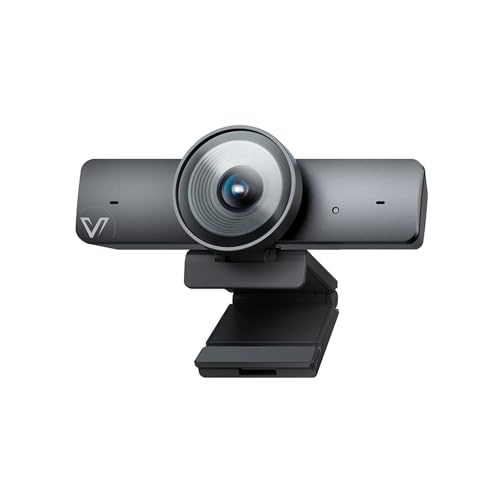
- 1/1.8" CMOS sensor for better detail
- AI framing, tracking, and gallery modes
- 120° view with 5X digital zoom
Best For: Small conference rooms that need automatic participant framing and hands-free control
Creator Collaboration Webcam
Logitech MX Brio Ultra HD 4K Webcam

- 4K at 30 fps with AI image enhancement
- Fine-grained exposure and color controls
- Show Mode for desk sharing and demos
Best For: Hybrid work and presentation setups that need detailed video control plus desk-sharing features
Panoramic Meeting Bar
Jabra PanaCast 50 180° Panoramic-4K Webcam

- Three cameras with real-time stitching
- 90° to 180° adjustable viewing angles
- Eight mics and Teams certification
Best For: Larger rooms that need panoramic group coverage and meeting-room insights
All-in-One Room Bar With Wide-Angle 4K
Yealink UVC34 Conference Camera

- 4K video with a 120° wide field of view
- 8 microphones with 5-meter pickup range
- Built-in speaker plus AI framing and tracking
Best For: Huddle rooms needing a simple all-in-one setup
3-in-1 4K Conference Camera With Speaker

- 4K camera with dual mics and a 3W speaker
- AI auto framing and voice tracking for meetings
- Remote control with 5x zoom and 3 FOV modes
Best For: Small rooms and teams wanting one-cable simplicity
Small-Room AI Framing Pick
WYRESTORM 4K AI Tracking Conference Webcam

- 120° wide-angle coverage for small rooms
- AI auto framing and presenter tracking
- Dual noise-canceling mics with privacy cover
Best For: Small conference rooms and hybrid team meetings
All-in-One Audio Hub Choice
4K Pro Audio and Video Conference Room Camera

- All-in-one camera, speakers, mics, and remote
- AI face detection plus speaker tracking
- 5X zoom with preset views
Best For: Desk-to-monitor conference setups with built-in audio
Best Large-Room Bar
4K Conference Room Camera System with Dual Speakers

- Designed for medium and large rooms
- 120° wide angle with 5X zoom
- 4-mic array and built-in dual speakers
Best For: Large conference rooms and presentation-heavy meetings
Premium Meeting Webcam – Logitech Brio Ultra 4K HD Webcam
If you want a polished option among 4k conference room webcams, the Logitech Brio brings sharp Ultra HD video, flexible framing, and solid audio for meetings. It is built to adapt to changing light, and the adjustable field of view helps it fit everything from a tight head-and-shoulders shot to a broader room view.
Best For: Small teams and professionals who want a premium webcam with strong image quality, flexible framing, and Windows Hello support.
Pros:
- Up to 4K at 30 fps with autofocus and 5x digital zoom
- RightLight 3 helps balance glare and backlighting
- Three field-of-view presets make framing easy
- Dual omnidirectional microphones help reduce background noise
Cons:
- Best suited to webcam-style setups rather than full-room coverage
- Audio pickup is rated from up to 1.2 meters away
Overall, the Brio is a versatile choice if you want a compact meeting camera with premium video controls and broad platform compatibility. It is especially appealing for users who value privacy features and Windows Hello in the same device.
AI Framing Conference Camera – AV Access 4K Conference Room Camera
For teams evaluating 4k conference room webcams, the AV Access BizEye 90 stands out with AI framing features and a wide 120° field of view. Its 1/1.8″ CMOS sensor is designed to capture more light and detail, while the camera’s auto framing, presenter tracking, and individual gallery modes are geared toward active meeting rooms.
Best For: Small meeting rooms and collaborative presentations that benefit from automatic framing and gesture control.
Pros:
- 1/1.8″ CMOS sensor for stronger low-light image quality
- 4K video at 30 fps with backward compatibility to 1080p and 720p
- AI auto framing, presenter tracking, and Individuals Gallery mode
- 120° wide-angle lens with ePTZ and 5X digital zoom
Cons:
- Gesture control may depend on firmware updates for some units
- Fixed-focus design may be less flexible than autofocus models
This is a strong choice if you want automation over manual tuning. The wide view and multi-participant framing tools make it especially practical for rooms where people move around or switch speakers often.
Creator Collaboration Webcam – Logitech MX Brio Ultra HD 4K Webcam
If your shortlist for 4k conference room webcams includes a more creator-focused model, the Logitech MX Brio adds high-resolution video, stronger image controls, and a useful Show Mode feature. It records in 4K at 30 fps, includes AI-enhanced image quality, and offers fine adjustments for lighting and white balance when you want more control.
Best For: Hybrid professionals, presenters, and streamers who want a sharp 4K webcam with detailed image controls.
Pros:
- 4K at 30 fps or 1080p at 60 fps with Logitech’s advanced sensor
- AI-enhanced image quality helps improve face visibility in difficult light
- Fine controls for ISO, shutter speed, tint, and vibrance
- Show Mode lets you tilt down to share notes and sketches
Cons:
- More of a collaboration webcam than a full-room conference camera
- Larger and heavier than some compact webcam options
The MX Brio is best when you want more than basic video calling. It balances professional image quality with useful presentation features, making it a flexible pick for desk-based collaboration.
Panoramic Meeting Bar – Jabra PanaCast 50 180° Panoramic-4K Webcam
Jabra PanaCast 50 180° Panoramic-4K Meeting Room Webcam, 4 Kilopixel Video Resolution, Black
Check Price On AmazonAmong 4k conference room webcams, the Jabra PanaCast 50 is built for larger meeting spaces and wide group coverage. Its three 13 MP cameras stitch video in real time, and the adjustable 90° to 180° field of view gives you room to choose between tighter focus and full-room visibility.
Best For: Larger conference rooms that need panoramic coverage, room insights, and reliable group framing.
Pros:
- Three 13 MP cameras with real-time video stitching
- Adjustable field of view from 90° to 180°
- Eight microphones and automatic zoom adjustment
- Certified for Microsoft Teams and compatible with Zoom
Cons:
- Bulky compared with standard webcams
- Room usage insights may be more than some teams need
This model is a strong fit when the goal is to capture everyone in the room with minimal setup fuss. Its panoramic coverage and meeting-room-focused features make it feel more like a collaboration bar than a traditional webcam.
Dual-Camera AI PTZ 4K for Active Presentations – EMEET PIXY Dual-Camera AI PTZ 4K
If you want one of the more flexible 4k conference room webcams for presentations, teaching, or streams, the EMEET PIXY stands out for its dual-camera design and fast AI-assisted autofocus. It combines a 4K main camera with an auxiliary AI camera to improve framing, exposure, and skin tone handling, while the PTZ system helps keep moving subjects centered.
Best For: Live presenters, instructors, and teams that need smooth tracking in mixed motion scenes.
Pros:
- Dual-camera system pairs 4K imaging with AI-assisted face detection and exposure control.
- PDAF and AI autofocus are designed for quick focusing, including moving subjects.
- 310° pan and 180° tilt support smoother subject tracking across a room.
- 3-mic array offers multiple sound modes for meetings, recordings, and streams.
Cons:
- 4K mode locks the field of view, so framing is less adjustable than in lower resolutions.
- Remote control is sold separately if you want extra convenience.
Overall, PIXY is a strong pick if your meeting space doubles as a presentation or content-creation setup and you want camera movement plus audio in one compact unit.
All-in-One Room Bar With Wide-Angle 4K – Yealink UVC34 Conference Camera
The Yealink UVC34 is built for teams that want a simple, all-in-one option among 4k conference room webcams. Its 120° wide field of view, 8-mic array, and integrated speaker make it a practical choice for small meeting rooms where you want video and audio covered by one device.
Best For: Huddle rooms and conference spaces that need plug-and-play video, mics, and speaker support.
Pros:
- Ultra HD 4K optics with a 120° super-wide field of view.
- Built-in 8-mic array with a 5-meter pickup range.
- Integrated speaker keeps the setup compact and room-friendly.
- AI auto framing and speaker tracking help keep meetings focused.
Cons:
- Designed as an all-in-one unit, so it may be more than you need for a simple one-person desk setup.
- The unit is relatively heavy compared with typical webcam-style cameras.
If your priority is a clean conference-room installation with wide framing and built-in audio, the UVC34 is one of the easiest ways to cover the whole room without adding extra gear.
3-in-1 4K Conference Camera With Speaker – TONGVEO AI Tracking Webcam
The TONGVEO 3-in-1 is a practical option if you want 4k conference room webcams with video, microphones, and speaker output in a single unit. It uses AI auto framing to fit attendees in view, voice tracking to follow the active speaker, and a remote to change zoom and field of view without touching the device.
Best For: Small conference rooms, group calls, and users who want built-in audio plus remote control.
Pros:
- 3-in-1 design combines 4K camera, dual mics, and a 3W speaker.
- AI auto framing centers attendees automatically for group meetings.
- Voice tracking follows the active speaker within a few seconds.
- Remote control supports 5x digital zoom and three FOV modes.
Cons:
- Digital zoom is useful for flexibility, but it is not the same as optical zoom.
- Best suited to USB conference setups rather than highly customized AV installs.
For teams that want a straightforward, self-contained meeting device, TONGVEO offers a lot of convenience without requiring separate speakers or microphones.
Small-Room AI Framing Pick – WYRESTORM 4K AI Tracking Conference Webcam
If you need one of the more focused 4k conference room webcams for a compact meeting space, this WYRESTORM model is built to keep small-room calls looking organized and professional. The 120° wide angle helps capture the whole table, while AI auto framing and presenter tracking reduce the need for constant manual adjustments.
Best For: Small conference rooms, team meetings, and hybrid presentations where automatic framing matters.
Pros:
- AI auto framing keeps all attendees centered during group meetings.
- Presenter tracking follows the active speaker for presentations and training sessions.
- 120° wide-angle view helps cover the full room without repositioning.
- Dual noise-canceling microphones are designed to pick up voices clearly across the table.
Cons:
- Designed specifically for small meeting spaces, so it may be less ideal for larger rooms.
- No included speaker system, so audio output depends on your meeting setup.
Overall, this is a strong fit if you want a straightforward USB conference camera that emphasizes framing automation, clear pickup, and easy setup. The privacy cover is a practical office-friendly touch for shared spaces.
All-in-One Audio Hub Choice – 4K Pro Audio and Video Conference Room Camera
Among 4k conference room webcams, this RayBit all-in-one unit is aimed at buyers who want camera, speakers, microphones, and remote control in a single device. Its 94° wide-angle view, AI face detection, and speaking-following function are meant to keep meetings framed and easy to manage without extra gear.
Best For: Desk-to-monitor setups and conference spaces that benefit from built-in audio and remote control.
Pros:
- Combines a 4K camera, HiFi speakers, noise-canceling microphones, and remote control in one system.
- AI face detection and presenter tracking help keep the focus centered on the meeting.
- Built-in full-duplex audio and dereverberation are designed for clearer conversations.
- 5X digital zoom and preset views can be adjusted from the included remote.
Cons:
- The 94° viewing angle is narrower than some room-focused alternatives.
- As an all-in-one unit, it may not suit setups that already have separate speakers.
This is a practical option if you want to reduce cable clutter and keep setup simple. The integrated audio features make it especially appealing for users who need a single device to handle both meeting capture and playback.
Best Large-Room Bar – 4K Conference Room Camera System with Dual Speakers
If you are shopping for 4k conference room webcams for a medium or large meeting space, this WYRESTORM conference camera system is designed to cover more people and deliver more complete room audio. The 120° wide-angle lens, AI auto framing, and speaker/presenter tracking work together to keep group meetings and presentations easy to follow.
Best For: Medium to large conference rooms, hybrid meetings, and presentation-heavy business use.
Pros:
- Built for medium and large conference rooms with wide room coverage.
- AI auto framing and tracking help keep participants centered and active speakers visible.
- 120° wide angle plus 5X zoom adds flexibility for room coverage and detail shots.
- 4-mic array and built-in dual speakers reduce the need for separate audio gear.
Cons:
- As a larger all-in-one system, it may be more than you need for small rooms.
- USB plug-and-play is simple, but the physical footprint is bigger than a standard webcam.
This model makes sense when one device needs to do more of the room AV work. It is a strong fit for teams that want camera, mics, and speakers in a single, platform-friendly setup.
How We Picked the Best 4K Conference Room Webcams
We prioritized 4K Conference Room Webcams that offer dependable video quality, practical field of view options, strong autofocus or auto-framing, and features that improve real-world meetings rather than just spec sheets. We also looked at audio integration, compatibility with common platforms, and whether each camera suits small huddle rooms, medium meeting spaces, or larger conference areas.
Quick Comparison
For smaller rooms, a compact webcam with a wide lens and clean autofocus is often enough. For team tables and boardroom setups, a model with panoramic coverage, presenter tracking, or PTZ-style control can be a better choice. All-in-one systems with built-in microphones and speakers are ideal when you want fewer devices on the table and simpler deployment.
Key Buying Factors for 4K Conference Room Webcams
Field of View and Room Size
The right field of view matters more than raw resolution. A wide-angle camera can capture everyone at a close table, while panoramic or zoom-capable options work better when you need to cover a deeper room or highlight a speaker.
Auto Framing and Tracking
Auto framing keeps participants centered, while presenter tracking is useful when one person moves around the room. If your meetings involve frequent speaking turns or whiteboard presentations, these features can save time and improve visibility.
Audio Quality
Some 4K Conference Room Webcams include microphones and speakers, which can simplify setup. If your room is larger or acoustically challenging, check whether the system has noise reduction, multiple microphones, or support for external audio gear.
Connectivity and Compatibility
Make sure the camera works smoothly with your main meeting platforms and operating system. USB plug-and-play is the easiest option for most teams, while certified business-focused models may offer better integration for controlled office environments.
Who Should Buy Which 4K Conference Room Webcams?
Buy a compact 4K webcam if you need a simple upgrade for a small meeting room or hybrid desk setup. Choose a panoramic or AI-tracking model if you host group meetings, product demos, or presentations where movement matters. If you want the cleanest all-in-one deployment, pick a conference system with built-in audio and room-focused design. For teams comparing 4K Conference Room Webcams, the best choice usually comes down to room size, how many people need to stay visible, and how much automation you want during calls.