Choosing the right router for a busy office is about more than raw speed. Large teams need dependable coverage, strong security, enough wired capacity, and management features that won’t become a burden as the network grows.
This roundup of the best business Wi-Fi routers for large office environments focuses on practical fit: multi-gig connectivity, Wi-Fi 6 and Wi-Fi 7 performance, PoE support, and business-friendly control options.
Best 10 Business Wifi Routers for Large Office Picks for 2026
Integrated Rackmount Network Core
MikroTik CRS418 Wi‑Fi 6 Router Switch
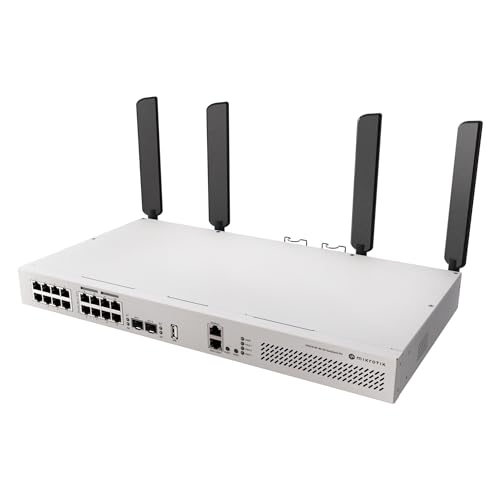
- 16 PoE-out Gigabit ports with 150W budget
- Dual Wi‑Fi 6 APs built into one rackmount unit
- 2x 10G SFP+ uplinks for backbone connectivity
Best For: Large offices needing a combined router, switch, PoE, and Wi‑Fi platform.
Cloud-Managed High-Density AP
Cisco Meraki MR46 Wi‑Fi 6 Access Point

- Wi‑Fi 6 access point for high-density office use
- 2.5 Gbps multigigabit Ethernet uplink
- Cloud management with WIDS/WIPS and auto updates
Best For: Large offices needing centrally managed high-density wireless coverage.
Compact Wi‑Fi 7 Gateway
Ubiquiti Dream Router Wi‑Fi 7 (UDR7)

- Integrated Wi‑Fi 7 tri-band cloud gateway
- 10G SFP+ WAN plus multiple 2.5 GbE ports
- Supports the full UniFi application suite
Best For: Offices wanting a compact UniFi gateway with Wi‑Fi 7 and multi-gig ports.
Enterprise Licensed Access Point
Cisco Meraki MR56 Wi‑Fi 6 Bundle

- Wi‑Fi 6 dual-band enterprise access point
- 3-year Meraki license included
- Cloud-managed with 24/7 tech support
Best For: Large offices needing a licensed, managed Wi‑Fi 6 access point bundle.
Flexible Office Wi-Fi Pick
GL.iNet Flint 2 Business Wi-Fi 6 Router

- Wi-Fi 6 with up to 6 Gbps speeds
- Dual 2.5G ports and four 1G ports
- Supports OpenWrt, OpenVPN, and WireGuard
Best For: Teams that need configurable Wi-Fi and fast wired connectivity
Enterprise AP Choice
Cisco Meraki MR56 Cloud-Managed Wi-Fi 6 AP
- Cloud-managed Wi-Fi 6 access point
- Up to 5.9 Gbps aggregate frame rate
- Includes 5-year enterprise license
Best For: Large offices needing managed, high-density wireless
Next-Gen Office Router
TP-Link Archer BE550 Wi-Fi 7 Router

- Tri-band Wi-Fi 7 with up to 9300 Mbps
- Five 2.5G ports for future-proof networking
- EasyMesh support for broader coverage
Best For: Offices planning for Wi-Fi 7 and multi-gig expansion
Wi‑Fi 7 Performance Pick
GL.iNet Flint 3 Tri-Band Router

- Tri-band Wi‑Fi 7 with up to 9 Gbps wireless speed
- Five 2.5G ports for fast wired office connections
- Supports 100+ devices with WireGuard and OpenVPN up to 680 Mbps
Best For: Offices wanting Wi‑Fi 7 speed and strong VPN support
Value Expansion Choice
TP-Link Archer BE230 Wi‑Fi 7 Router

- Wi‑Fi 7 with MLO, Multi-RUs, and 4K-QAM
- Two 2.5G ports plus three 1G LAN ports
- EasyMesh support for expanded office coverage
Best For: Offices that want Wi‑Fi 7 plus easy mesh growth
High-Capacity Coverage Pick
NETGEAR Nighthawk BE9300 Router

- Tri-band Wi‑Fi 7 up to 9.3 Gbps
- Covers up to 2,500 sq. ft. and 100 devices
- 2.5G internet port with NETGEAR Armor security
Best For: Larger offices needing coverage and device capacity
Integrated Rackmount Network Core – MikroTik CRS418 Wi‑Fi 6 Router Switch
If you’re building business wifi routers for large office networks, this MikroTik all-in-one rackmount unit is aimed at teams that want routing, switching, PoE, and Wi‑Fi 6 in one chassis. It combines Layer 3 switching with dual Wi‑Fi 6 access points, making it a practical choice when you want fewer boxes in the rack and strong wired and wireless integration.
Best For: Large offices that want an integrated router-switch platform with built-in Wi‑Fi 6 and PoE for connected devices.
Pros:
- 16 PoE-out Gigabit ports with a 150W total PoE budget.
- Dual 5axQ Wi‑Fi 6 access points with 4×4 MIMO.
- 2x 10G SFP+ uplinks for high-speed backbone or fiber connections.
- Quad-core 2.2 GHz ARM CPU with L3 hardware offloading.
Cons:
- Rackmount design is better suited to structured network closets than casual desktop use.
- RouterOS and advanced network management may be more complex than simple plug-and-play gear.
This is a strong fit when you need a centralized, high-density networking platform rather than a standalone consumer router. For office deployments that benefit from PoE power, 10G uplinks, and integrated wireless, it offers a lot of infrastructure in one unit.
Cloud-Managed High-Density AP – Cisco Meraki MR46 Wi‑Fi 6 Access Point
For business wifi routers for large office environments, the Meraki MR46 is a wireless access point built for high-density deployments where centralized cloud control matters. It uses Wi‑Fi 6, a multigigabit Ethernet uplink, and built-in security features to support performance-critical wireless LANs across busy floors.
Best For: Large offices that need a cloud-managed Wi‑Fi 6 access point for high-density user coverage.
Pros:
- Wi‑Fi 6 with 4-stream UL/DL MU-MIMO support.
- 1x 2.5 Gbps multigigabit Ethernet port for faster uplink capacity.
- Embedded WIDS/WIPS and Bluetooth included.
- Cloud management with visibility, control, and automatic firmware updates.
Cons:
- Cloud license is required and sold separately.
- It is an access point, not a full router.
The MR46 makes sense when your office already has routing in place and you want stronger wireless capacity plus centralized management. It is especially appealing for organizations that value rapid deployment and ongoing cloud oversight.
Compact Wi‑Fi 7 Gateway – Ubiquiti Dream Router Wi‑Fi 7 (UDR7)
If you’re comparing business wifi routers for large office use, the Ubiquiti Dream Router Wi‑Fi 7 stands out as a compact cloud gateway with integrated wireless, switching, and support for the UniFi application suite. Its Wi‑Fi 7 radio support, 10G SFP+ WAN, and 2.5 GbE ports make it a flexible choice for smaller office hubs or satellite workspaces that still want modern connectivity.
Best For: Offices that want a compact UniFi gateway with Wi‑Fi 7 and multi-gig wired ports.
Pros:
- Integrated Wi‑Fi 7 with tri-band support.
- 1x 10G SFP+ WAN and multiple 2.5 GbE ports.
- Supports the full UniFi application suite.
- Includes PoE on one LAN port and microSD storage.
Cons:
- Desktop form factor may not suit every rack-based deployment.
- Best suited to smaller office edges rather than a very large centralized network core.
This model is best viewed as a compact, feature-rich gateway rather than a full enterprise stack replacement. For office teams that want modern Wi‑Fi 7 performance and UniFi management in one box, it is an efficient option.
Enterprise Licensed Access Point – Cisco Meraki MR56 Wi‑Fi 6 Bundle
In business wifi routers for large office planning, the Cisco Meraki MR56 is a licensed Wi‑Fi 6 access point bundle designed for enterprise wireless deployments with cloud-managed control. It includes the hardware and a 3-year enterprise license, which makes it easier to budget for organizations that want a managed AP with support built in.
Best For: Large offices that want a licensed, cloud-managed Wi‑Fi 6 access point bundle.
Pros:
- Wi‑Fi 6 dual-band access point with 4 antennas.
- Multigigabit Ethernet support up to 10 Gbps LAN bandwidth.
- 3-year enterprise license included in the bundle.
- 24/7 tech support and cloud-managed system.
Cons:
- Requires Meraki management rather than acting as a standalone router.
- Limited to a single Ethernet port.
The MR56 bundle is a good fit when you want enterprise wireless coverage with licensing handled upfront. It is less about being the main router and more about delivering managed office Wi‑Fi with support and control.
Flexible Office Wi-Fi Pick – GL.iNet Flint 2 Business Wi-Fi 6 Router
If you’re comparing business wifi routers for large office use, the GL.iNet Flint 2 stands out for its Wi-Fi 6 capacity, dual 2.5G ports, and support for over a hundred devices. It also includes pre-installed OpenWrt, VPN support, and QoS features, which can be useful when you need flexible network control in a busy office environment.
Best For: Offices that want a configurable Wi-Fi 6 router with multi-gig wired connectivity and strong device handling.
Pros:
- Wi-Fi 6 with up to 6 Gbps combined wireless speeds
- Two 2.5G ports plus four 1G ports for faster wired links
- Pre-installed OpenWrt with OpenVPN, WireGuard, and QoS support
- Designed to handle over a hundred connected devices
Cons:
- Requires firmware update after initial setup for best performance
- Setup is more hands-on than a basic plug-and-play router
- Marketed as a gaming router, so office buyers may need to verify fit for their deployment
For offices that value flexibility and strong wired backhaul options, the Flint 2 is a practical pick. Its strength is in network control and multi-device support rather than enterprise cloud management.
Enterprise AP Choice – Cisco Meraki MR56 Cloud-Managed Wi-Fi 6 AP
For business wifi routers for large office deployments, the Cisco Meraki MR56 is really an enterprise access point built for high-density environments. It combines Wi-Fi 6 performance, multigigabit Ethernet, cloud management, and a 5-year enterprise license, making it a strong fit when centralized control and reliability matter more than consumer-style features.
Best For: Large offices that want cloud-managed Wi-Fi 6 with enterprise security and support.
Pros:
- Cloud-managed Wi-Fi 6 access point with a 5-year enterprise license
- High aggregate throughput up to 5.9 Gbps
- Dedicated radios for security scanning, Bluetooth, and RF optimization
- Built for high-density deployments and performance-intensive use
Cons:
- It is an access point, so it may need to be paired with other network gear
- Enterprise licensing adds a recurring management component
- Less appropriate if you want a simple all-in-one router replacement
The MR56 makes the most sense when your office network needs managed wireless infrastructure rather than a standalone router. Its value comes from enterprise-focused features, support, and scale.
Next-Gen Office Router – TP-Link Archer BE550 Wi-Fi 7 Router
If you want a forward-looking option among business wifi routers for large office setups, the TP-Link Archer BE550 brings Wi-Fi 7 features, full 2.5G ports, and EasyMesh expansion. It is designed to push high wireless speeds and strong wired performance, which can help offices with many users, bandwidth-heavy apps, and plans to expand coverage later.
Best For: Offices that want Wi-Fi 7, multi-gig ports, and easy mesh expansion.
Pros:
- Wi-Fi 7 tri-band design with up to 9300 Mbps combined speeds
- One 2.5G WAN and four 2.5G LAN ports
- EasyMesh support for expanding coverage
- VPN client and server support for flexible remote access
Cons:
- Mesh expansion depends on compatible EasyMesh devices
- Coverage rating is up to 2,000 sq. ft., so very large offices may need multiple units
- More advanced than a basic small-office router
As a high-speed router with strong port options, the BE550 fits offices that want modern wireless performance and room to grow. It is especially appealing when you need speed now and expansion options later.
Wi‑Fi 7 Performance Pick – GL.iNet Flint 3 Tri-Band Router
If you’re comparing business wifi routers for large office use, the GL.iNet Flint 3 stands out for fast tri-band Wi‑Fi 7, strong multi-device support, and practical VPN features. It’s a good fit when you want a flexible router that can handle busy workdays, video calls, and heavy internet use without feeling overbuilt for a smaller deployment.
Best For: Offices that want Wi‑Fi 7 speed, VPN throughput, and support for lots of connected devices.
Pros:
- Wi‑Fi 7 tri-band design with up to 9 Gbps wireless speed and ultra-low latency
- Five 2.5G ports for high-speed wired networking and multi-gig internet setups
- WireGuard and OpenVPN speeds up to 680 Mbps for secure remote access
- Supports over a hundred devices with MLO, OFDMA, and 4K QAM
Cons:
- Coverage is listed at up to 2,000 square feet, which may be modest for very large offices
- Initial setup and firmware updating may take a little extra attention
- Best performance depends on ISP, VPN server, and local network conditions
Overall, this is a strong choice if your office values fast wireless performance, modern Wi‑Fi 7 features, and built-in VPN flexibility. It looks especially appealing for tech-forward teams that need stable connectivity across many devices.
Value Expansion Choice – TP-Link Archer BE230 Wi‑Fi 7 Router
For business wifi routers for large office environments, the TP-Link Archer BE230 is a practical Wi‑Fi 7 option with strong wired flexibility and easy mesh expansion. Its dual-band design makes more sense when you want modern throughput, simple management, and a router that can grow with an office network through EasyMesh.
Best For: Teams that want an affordable Wi‑Fi 7 router with multi-gig ports and easy mesh expansion.
Pros:
- Wi‑Fi 7 with MLO, Multi-RUs, and 4K-QAM for improved efficiency
- Two 2.5G ports plus three 1G LAN ports for flexible wired devices
- Covers up to 2,000 sq. ft. and supports up to 60 devices
- EasyMesh compatibility for building out broader coverage
Cons:
- Dual-band only, so it does not include 6 GHz support
- Coverage and device capacity may be limited for very dense offices
- Performance varies with walls, distance, and network conditions
This router makes sense for offices that want Wi‑Fi 7 features without jumping to a more expensive tri-band model. The combination of multi-gig ports and EasyMesh support gives it useful expansion potential for growing workspaces.
High-Capacity Coverage Pick – NETGEAR Nighthawk BE9300 Router
Among business wifi routers for large office use, the NETGEAR Nighthawk BE9300 is built around wide coverage, high device capacity, and simple app-based management. With tri-band Wi‑Fi 7 and a 2.5G internet port, it’s aimed at teams that need strong wireless reach and enough headroom for many users and devices.
Best For: Larger offices that need broad Wi‑Fi 7 coverage and support for many connected devices.
Pros:
- Tri-band Wi‑Fi 7 speeds up to 9.3 Gbps
- Covers up to 2,500 sq. ft. and supports up to 100 devices
- 2.5 Gig internet port for multi-gig internet plans
- NETGEAR Armor and built-in security measures for added protection
Cons:
- Router only, so a separate modem is required for internet service
- Only four ports, which may be limiting for wired-heavy setups
- Made for use in the U.S. only
For offices prioritizing coverage and capacity, this Nighthawk is the most straightforward choice in the group. It offers a strong mix of Wi‑Fi 7 speed, larger area coverage, and security features that fit busy shared networks.
How We Picked the Best Business Wifi Routers for Large Office
We prioritized hardware and features that matter in real office deployments: multi-user performance, wired backhaul or multi-gig uplinks, robust security options, and centralized or remote management where available. For Business Wifi Routers for Large Office use, stability and scalability matter more than peak headline speeds.
We also looked at whether a device is better suited as a standalone router, a managed access point, or a router-switch hybrid. That distinction is important because large offices often need a mix of routing, switching, and Wi-Fi coverage rather than a single consumer-style box.
Quick Comparison
In general, Wi-Fi 7 models offer the newest wireless platform and more headroom for dense environments, while Wi-Fi 6 options remain strong for offices that value proven reliability and broader compatibility. Multi-gig ports are especially useful if your internet connection, core switch, or uplink can exceed 1Gbps. PoE-capable and cloud-managed gear can be a major advantage for offices with multiple APs or IT teams managing several sites.
Best Fit by Deployment Style
Choose router-switch hybrids when you want fewer boxes and integrated wired expansion. Choose managed access points when you already have a separate firewall or gateway. Choose standalone Wi-Fi 7 routers when you need a fast, flexible edge device for a single large floor or a high-demand branch office.
Key Buying Factors for Business Wi-Fi Routers for Large Office
Coverage and capacity: Large offices need consistent performance across conference rooms, open desks, and walls or partitions. Look for strong radio design, tri-band support where useful, and the ability to add more access points later.
Port speed: Multi-gig WAN and LAN ports prevent wired bottlenecks. If your office has fast fiber or heavy internal traffic, 2.5G or 10G uplinks can make a real difference.
Management: Business networks benefit from cloud dashboards, VLAN support, guest networking, and policy control. These features simplify segmentation for staff, guests, phones, and IoT devices.
Security: Prioritize regular firmware updates, strong VPN support, segmentation tools, and business-grade access controls. Security matters more as more devices and users join the network.
Expansion path: The best choice is often the one that can grow with you. If you expect more users, more APs, or multiple floors, choose hardware that integrates cleanly with switches and mesh or controller-based systems.
Who Should Buy Which Business Wifi Routers for Large Office?
If you want a simple, high-speed edge router for a medium-to-large office, a Wi-Fi 7 standalone model is a practical choice. If your office needs centrally managed wireless across multiple rooms or floors, a business AP platform is usually the better fit. If you want fewer devices and more wired flexibility, a router-switch hybrid with PoE support is often ideal.
For most buyers, the best option is the one that matches your layout, user count, and IT workflow rather than the highest advertised speed. In Business Wifi Routers for Large Office environments, reliability, manageability, and growth potential should lead the decision.