Busy checkout lanes need receipt printers that can keep pace without jamming, slowing down, or creating extra work for staff. The best models for high-volume retail and food service balance speed, durability, and easy connectivity.
Below, we focus on practical options for stores that need dependable performance day after day, from compact USB units to network-ready printers for multi-station setups.
Best 10 Commercial Receipt Printers for Busy Stores Picks for 2026
Fast USB POS Pick
Star Micronics TSP143IIIU USB Thermal Receipt Printer

- 43 receipts per minute printing
- Plug-and-print USB setup
- Compact design with internal power supply
Best For: Busy counters needing a compact USB thermal receipt printer
Square-Ready Workhorse
Epson TM-T20III Monochrome Thermal POS Printer

- Up to 250 mm/sec print speed
- 1.5 million cut auto-cutter life
- USB-only Square Stand/Register support
Best For: Square users needing a fast wired receipt printer
Kitchen Tough Choice
Star Micronics SP742ME Ethernet Impact Receipt Printer
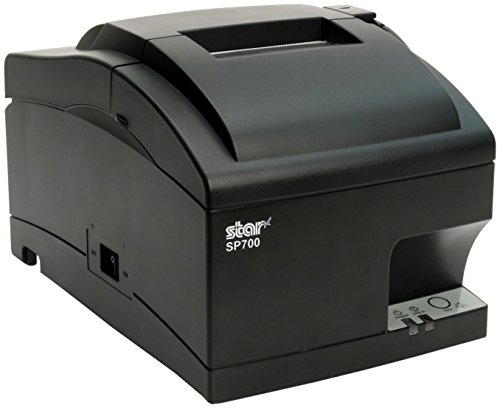
- Built for heat and humidity
- Ethernet network connection
- 13 receipts per minute throughput
Best For: Restaurants and kitchens needing durable impact tickets
Cloud-Ready Countertop Pick
Star Micronics TSP143IVUE USB/Ethernet Thermal Receipt Printer

- 250mm/s thermal printing for faster checkout flow
- USB and Ethernet connectivity for flexible POS integration
- CloudPRNT support for monitoring, graphics, and coupons
Best For: Busy retail and hospitality counters needing network-ready receipt printing
Wall-Mount Value Unit
Volcora 80mm USB/Bluetooth Receipt Printer

- 220mm/s thermal printing with auto cutter for busy use
- USB, Bluetooth, and cash-drawer support
- Wall-mount design helps conserve counter space
Best For: Compact stores and kitchens that need a flexible, space-saving receipt printer
High-Speed Triple-Interface Workhorse
Epson TM-T20IV Thermal Receipt Printer

- 310 mm/s printing for very fast receipt output
- USB, Serial, and Ethernet support for flexible POS setups
- Works with Windows, Android, and iOS via Epson ePOS
Best For: Retail and service counters that need maximum speed and broad compatibility
Value Pick for Wired Checkout Stations
Rongta RP332 80mm POS Receipt Printer

- USB, serial, and Ethernet connections
- 250mm/s speed with auto cutter
- Supports Windows, Mac, and Linux
Best For: Wired checkout counters that need fast printing and wall mounting
Most Cost-Effective for Small Retail
Rongta RP326 80mm Thermal Printer

- 250mm/sec print speed with auto cutter
- USB, serial, and Ethernet connectivity
- Low-cost thermal printing with no ink
Best For: Budget-conscious stores with wired POS stations
Kitchen-Ready Multi-Interface Choice
Rongta RP326 USB Thermal Receipt Printer

- 250mm/s printing with auto cutter
- USB, LAN, and serial ports
- Wall-mount design with cash drawer support
Best For: Busy restaurants and retail counters with wired POS setups
Fast USB POS Pick – Star Micronics TSP143IIIU USB Thermal Receipt Printer
If you need commercial receipt printers for busy stores, this Star Micronics model is a strong USB-first option for quick, reliable counter service. It prints up to 43 receipts per minute, uses a simple plug-and-print setup, and supports iOS, Android, and Windows for straightforward POS use.
Best For: Busy checkout counters that want a compact USB receipt printer with broad POS compatibility.
Pros:
- High-speed output rated at 43 receipts per minute.
- Easy USB setup with plug-and-print convenience.
- Compatible with iOS, Android, and Windows.
- Drop-in clamshell loading and de-curl function help keep receipts neat.
Cons:
- USB-focused design may not suit multi-interface setups.
- Best fit for direct USB communication rather than wireless use.
For stores that value speed and simplicity, this printer keeps the workflow moving without taking much counter space. Its certifications with Square, Clover, Chromebook, and Postmates also make it easier to match with common retail and POS setups.
Square-Ready Workhorse – Epson TM-T20III Monochrome Thermal POS Printer
Among commercial receipt printers for busy stores, the Epson TM-T20III stands out as a dependable USB thermal option built for retail and hospitality receipt and invoice printing. It offers fast speeds up to 250 mm/sec, a long-life auto-cutter, and reduced paper usage features that can help keep lines moving.
Best For: Square Stand or Square Register users who want a fast, reliable USB-only POS printer.
Pros:
- Fast print speeds up to 250 mm/sec.
- Auto-cutter rated for 1.5 million cuts.
- Enhanced print options can reduce paper usage by up to 30%.
- Two-year limited warranty adds reassurance.
Cons:
- USB only, with no Bluetooth or Wi‑Fi.
- Requires Square Stand or Square Register for Square use.
This is a practical choice when you want a simple thermal printer focused on performance and reliability. It is best suited to stores already set up around Square hardware and a wired USB connection.
Kitchen Tough Choice – Star Micronics SP742ME Ethernet Impact Receipt Printer
For commercial receipt printers for busy stores that also handle kitchen tickets, this Star Micronics impact model is built for harsh conditions. The Ethernet connection keeps setup simple, and the impact printing style is intended for environments where heat and humidity can wear down ordinary receipt output.
Best For: Kitchens and restaurant operations that need durable, Ethernet-connected impact printing.
Pros:
- Designed for heat- and humidity-prone kitchen environments.
- Ethernet connection for straightforward network setup.
- Compact footprint with internal power supply.
- Drop-in and print loading for quick paper changes.
Cons:
- Lower throughput than thermal options at 13 receipts per minute.
- Impact printing is less ideal when you want quiet output.
If your priority is durability over raw speed, this printer fits the job well. It is especially useful where kitchen order tickets must remain legible in tough conditions and network connection is preferred.
Multi-Interface Budget Pick – vretti 80mm USB Serial LAN Receipt Printer
If you are shopping commercial receipt printers for busy stores and want flexible wired connectivity, the vretti 80mm model is worth a look. It supports USB, serial, and LAN connections, prints at up to 260 mm/s, and includes a wall-hanging design that can help save space in compact work areas.
Best For: Stores that need a wired thermal printer with USB, serial, and LAN support.
Pros:
- Three wired connection options: USB, serial, and LAN.
- Fast printing speed up to 260 mm/s.
- Wall-hanging design with two hanging holes.
- Supports Windows, Mac, and Linux via ESC/POS commands.
Cons:
- Not compatible with Square and several other POS platforms listed.
- No Bluetooth or Wi‑Fi support.
This is a practical multi-interface printer for retailers that want flexibility without moving to wireless. The included starter kit also makes setup easier for new installations.
Cloud-Ready Countertop Pick – Star Micronics TSP143IVUE USB/Ethernet Thermal Receipt Printer
For commercial receipt printers for busy stores, the Star Micronics TSP143IVUE is built around speed, simple setup, and modern connectivity. Its USB/LAN dual interface, Android Open Accessory support, and CloudPRNT features make it a practical fit for retail and hospitality counters that need reliable receipt output and remote device visibility.
Best For: Busy retail and hospitality counters that want cloud-ready receipt printing with USB or Ethernet connectivity.
Pros:
- Fast 250mm/s thermal printing helps keep lines moving.
- USB and Ethernet support makes it easier to integrate with existing POS setups.
- CloudPRNT adds real-time monitoring and support for custom graphics and coupons.
- Auto-cutter and drop-in paper loading suit high-traffic checkout use.
Cons:
- Designed for print-only use, so it is not a multifunction device.
- Best fit appears to be around Android and PC workflows based on the supplied details.
Overall, this is a strong choice if your store values streamlined operation and network-ready receipt printing. It focuses on the core features busy front counters need most: speed, simple loading, and flexible connectivity.
Wall-Mount Value Unit – Volcora 80mm USB/Bluetooth Receipt Printer
Among commercial receipt printers for busy stores, the Volcora model stands out for its straightforward thermal printing and flexible mounting options. It combines USB and Bluetooth connectivity, an auto cutter, and an 80mm paper path, making it a compact option for shops, kitchens, and other fast-paced service environments where quick ticket handling matters.
Best For: Stores and food-service counters that need a compact receipt printer with USB/Bluetooth connectivity and wall-mount support.
Pros:
- 220mm/s print speed supports quick transaction and ticket output.
- Auto cutter is rated for heavy use and up to 1.5 million cuts.
- USB, Bluetooth, and RJ11 cash-drawer support add useful flexibility.
- Wall-mount option helps save counter space in tight areas.
Cons:
- Compatibility is limited, with stated exclusions for Mac OS and several POS platforms.
- iOS use requires SDK-based development for custom apps.
This printer makes sense when you want a practical, no-frills receipt solution and can confirm software compatibility first. It is especially appealing for businesses that need a compact layout and a printer that can handle frequent daily use.
High-Speed Triple-Interface Workhorse – Epson TM-T20IV Thermal Receipt Printer
If you are comparing commercial receipt printers for busy stores, the Epson TM-T20IV is built for high-throughput checkout environments. It prints up to 310 mm/s and offers USB, Serial, and Ethernet connectivity, plus Epson ePOS support for Windows, Android, and iOS workflows.
Best For: Retailers and service businesses that need very fast receipt printing with multiple connection options.
Pros:
- Up to 310 mm/s printing speed is the fastest option in this group.
- USB, Serial, and Ethernet ports make POS integration more flexible.
- Epson ePOS support works with Windows, Android, and iOS devices.
- Paper-saving mode and ENERGY STAR certification add efficiency benefits.
- Includes starter paper, cables, adapter, and wall-mount bracket for easier setup.
Cons:
- Print-only design means no scanning or multifunction features.
- It is still a thermal receipt printer, so media is limited to supported roll sizes.
For busy checkout lanes, this model is the strongest performance-focused option here. It combines speed, broad connectivity, and installation flexibility in a compact footprint that suits retail and commercial POS use.
Value Pick for Wired Checkout Stations – Rongta RP332 80mm POS Receipt Printer
If you need commercial receipt printers for busy stores that stay focused on wired reliability, the Rongta RP332 is built around USB, serial, and Ethernet connections rather than wireless extras. It supports Windows, Mac, and Linux, prints at up to 250mm/s, and includes auto-cutting plus cash drawer support for a straightforward checkout setup.
Best For: Stores with desktop POS stations that want a fast, wired receipt printer with wall-mount flexibility.
Pros:
- USB, serial, and Ethernet support for flexible wired installation
- 250mm/s print speed with auto cutter for faster checkout flow
- Works with Windows, Mac, and Linux systems
- Supports cash drawer driving and wall hanging
Cons:
- No Wi-Fi or Bluetooth
- Not compatible with phones, tablets, Square, PayPal, or several delivery/POS platforms
- Setup is aimed at laptops and desktop computers rather than mobile devices
Overall, this is a practical option if your store runs on a wired POS and you want a low-friction thermal printer without paying for features you do not need. Its compatibility limits matter, but within supported systems it covers the core checkout basics well.
Most Cost-Effective for Small Retail – Rongta RP326 80mm Thermal Printer
For commercial receipt printers for busy stores, the Rongta RP326 focuses on the essentials: fast thermal printing, auto cutting, and multi-interface wired connectivity. It is positioned for small businesses that want a dependable receipt printer for retail counters, kitchens, and other high-traffic service points.
Best For: Small businesses that want a budget-friendly wired receipt printer for retail, food service, or counter use.
Pros:
- 250mm/sec print speed with auto cutter
- USB, serial, and Ethernet interfaces for wired setups
- Supports ESC/POS commands and cash drawers
- Low operating cost because it uses no ribbon or ink cartridge
Cons:
- No Wi-Fi or Bluetooth
- Not compatible with Doordash, Uber Eats, Square, or GrubHub
- Requires checking app and system compatibility before use
This model makes sense when you want a simple thermal printer that prioritizes speed and operating efficiency over wireless convenience. If your workflow is fully wired and your software is supported, it offers strong value for busy checkout lanes.
Kitchen-Ready Multi-Interface Choice – Rongta RP326 USB Thermal Receipt Printer
Among commercial receipt printers for busy stores, the Rongta RP326 is a practical wired thermal option for retail and kitchen environments that need quick output and simple maintenance. It offers USB, LAN, and serial connections, a 250mm/s print speed, and an auto cutter to keep receipts moving during rush periods.
Best For: Restaurants, retail shops, and other busy counters that need a wall-mountable wired printer with cash drawer support.
Pros:
- Fast 250mm/s printing with auto cutter
- USB, LAN, and serial ports for wired connectivity
- Supports cash drawer driving and ESC/POS commands
- Wall-hanging design helps save counter space
Cons:
- No Wi-Fi or Bluetooth
- Not compatible with Square, Clover, Chromebook, or several delivery apps
- Designed for POS systems rather than mobile devices
If your store relies on a fixed checkout or kitchen station, this printer checks the key boxes without adding unnecessary complexity. The strong wired interface mix and wall-mount option make it especially useful where counter space is tight and volume is steady.
How We Picked the Best Commercial Receipt Printers for Busy Stores
For Commercial Receipt Printers for Busy Stores, we prioritized print speed, auto-cutting, dependable paper handling, and the connection options most stores actually use: USB, Ethernet, serial, and in some cases Bluetooth or mobile/cloud support. We also looked for models with strong POS compatibility, straightforward setup, and power designs that fit busy counters and shared workspaces.
Quick Comparison
If you want the simplest path, USB thermal printers are usually best for a single register. Ethernet models work better for shared lanes or back-office control, while impact printers are the better choice when you need duplicate copies or kitchen-friendly receipts that can tolerate heat and grease. Thermal units are generally faster and quieter, while impact printers trade speed for multipart form support and ruggedness.
Key Buying Factors for Commercial Receipt Printers for Busy Stores
Speed and Throughput
Look for a printer that can keep up during rush periods without slowing staff down. Faster print speeds reduce lines, but only if the printer also feeds paper cleanly and cuts reliably.
Connectivity and Compatibility
Match the interface to your POS setup. USB is easy for one terminal, Ethernet is better for networked environments, and serial can be useful for legacy systems. Check support for Windows, macOS, Linux, Android, or ESC/POS if your software stack depends on it.
Durability and Maintenance
Busy stores need printers that are easy to reload and less prone to downtime. Auto-cutter quality, accessible paper loading, and stable internal power supplies can make a real difference over long shifts.
Environment and Use Case
Retail counters, restaurants, and kitchens do not always need the same type of printer. Thermal printers are usually the best all-around choice, while impact printers are often preferred where heat, moisture, or duplicate copies are a concern.
Who Should Buy Which Commercial Receipt Printers for Busy Stores?
Choose a thermal USB model if you run a single register and want fast, quiet checkout printing. Pick Ethernet or USB/Ethernet options if you manage several terminals, want cleaner cable runs, or need more flexible placement. Go with an impact printer if you need multipart receipts or a tougher print method for kitchen and back-of-house use. For mixed environments, the best Commercial Receipt Printers for Busy Stores are the ones that match your software, lane volume, and long-term service needs rather than the one with the most features on paper.