A powerful PC needs more than premium components. The right case must provide enough room for a large graphics card, high-capacity cooling, cable management, and future upgrades without compromising airflow or usability.
These 10 computer cases for high-end PCs cover full-tower and mid-tower designs, quiet enclosures, showcase builds, and airflow-focused options. Use the guide below to narrow the list by hardware compatibility, cooling needs, expansion plans, and budget.
Best 10 Computer Cases for High End PCs Picks for 2026
Maximum-Capacity Workstation

- E-ATX and SSI-EEB support
- Up to 18 HDDs and 5 SSDs
- 480 mm radiator compatibility
Best For: Large workstations and custom water-cooling builds
Style-Focused Full Tower

- E-ATX support with full-tower space
- 420 mm front radiator support
- Three included 140 mm PWM fans
Best For: Premium gaming PCs with a distinctive appearance
Dual-Chamber RGB Airflow

- Eight pre-installed ARGB PWM fans
- Supports up to 455 mm GPUs
- Dual 420 mm radiator capability
Best For: Showcase gaming builds with extensive cooling
Customizable High-Airflow Mid-Tower

- Modular FRAME customization system
- Three included RS ARGB PWM fans
- Flexible InfiniRail fan mounting
Best For: Airflow-focused ATX builds with upgrade plans
Natural-Style Performance

- Walnut wood finish with ATX mid-tower layout
- Four pre-installed PWM fans and up to 360mm top radiator
- Supports up to five SSDs and 10Gbps USB-C
Best For: ATX builds seeking distinctive styling and included cooling
Panoramic Showcase

- Supports Mini-ITX through EATX motherboards
- Three included ARGB reverse fans and up to 10 fan mounts
- Removable glass panels with up to 360mm radiator support
Best For: Showcase gaming builds with flexible cooling and motherboard support
Extreme Cooling Capacity

- Full-tower design supports E-ATX and up to 12 fans
- Six PWM fans included with multi-directional ventilation
- Supports simultaneous 420mm and 360mm radiators
Best For: Large, thermally demanding E-ATX workstations and gaming PCs
Airflow Workhorse

- Filtered mesh design supports strong airflow.
- Fits up to 285 mm E-ATX boards and large radiators.
- Supports extensive HDD and SSD storage.
Best For: Expandable high-end builds prioritizing airflow and storage
Natural Cooling Specialist
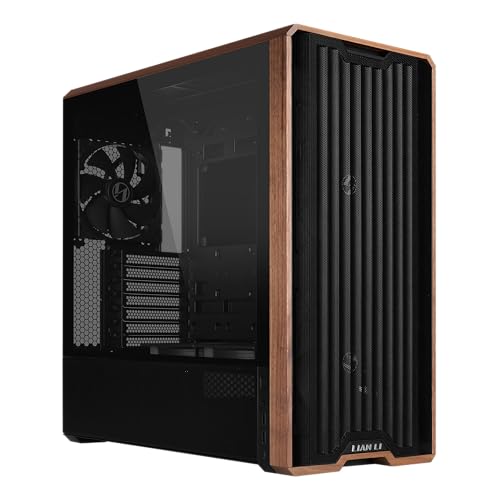
- Includes five pre-installed PWM fans.
- Large front fans support CPU and GPU cooling.
- Adds wood accents and back-connect motherboard support.
Best For: Air-cooled ATX builds with a refined aesthetic
Panoramic RGB Showcase

- Comes with seven PWM ARGB fans.
- Supports GPUs up to 400 mm and 360 mm top radiators.
- Dual glass panels provide a 270-degree interior view.
Best For: RGB gaming builds designed to showcase hardware
Maximum-Capacity Workstation – Define 7 XL
For builders choosing computer cases for high end pcs, the Fractal Design Define 7 XL stands out when expansion room, storage capacity, and custom water cooling matter most. Its full-tower layout supports E-ATX and SSI-EEB boards, GPUs up to 530 mm, and radiators up to 480 mm.
Best For: High-end workstations, extensive storage arrays, and large custom water-cooling loops.
Pros:
- Supports E-ATX and SSI-EEB motherboards with eight expansion slots.
- Holds up to 18 HDDs and five SSDs in the default Storage Layout.
- Open Layout accommodates large reservoirs and radiators up to 480 mm.
- Reversible magnetic front door and modular brackets add flexibility.
Cons:
- Its 18.73 kg weight and full-tower size require substantial desk or floor space.
- The solid front design prioritizes a refined, quieter enclosure style over an open-front appearance.
The Define 7 XL is a specialized choice for demanding builds rather than compact gaming systems. Choose it when oversized components, numerous drives, or a serious custom loop are central to your plan.
Style-Focused Full Tower – North XL
The Fractal Design North XL combines a full-tower platform with wood and alloy accents, making it a compelling option among computer cases for high end pcs. It supports E-ATX boards, long graphics cards, and substantial front or top radiators while retaining a distinctive charcoal tempered-glass presentation.
Best For: High-end gaming builds that need strong component clearance and a polished, design-conscious exterior.
Pros:
- Supports E-ATX, ATX, mATX, and mITX motherboards.
- Fits GPUs up to 413 mm, or up to 380 mm with a 420 mm front radiator.
- Supports front radiators up to 420 mm and top radiators up to 360 mm.
- Includes three 140 mm Aspect PWM fans and an open mesh front panel.
Cons:
- GPU clearance decreases when a 420 mm front radiator is installed.
- The full-tower footprint is larger than a typical mid-tower case.
The North XL is a balanced pick for buyers who want cooling flexibility without giving up visual appeal. Its included fans and spacious compatibility make it a practical foundation for a premium gaming system.
Dual-Chamber RGB Airflow – HYXN H2
The HYXN H2 is a mid-tower alternative for computer cases for high end pcs, pairing a dual-chamber layout with eight pre-installed ARGB PWM fans. It supports E-ATX boards, GPUs up to 455 mm, and large radiator configurations while separating core hardware from the power supply and drives.
Best For: High-performance gaming builds that prioritize visible hardware, included lighting, and extensive cooling support.
Pros:
- Includes eight ARGB PWM fans: six 140 mm reverse fans and two 120 mm fans.
- Supports up to two 420 mm or three 360 mm radiators simultaneously.
- Fits GPUs up to 455 mm and PSUs up to 220 mm.
- Dual chambers and a large rear compartment help organize cabling.
Cons:
- Storage support is limited to two HDDs and three SSDs.
- The fully transparent tempered-glass design may be less suitable for understated setups.
The H2 delivers an unusually complete cooling and lighting package for a mid-tower design. It is especially attractive when you want a showcase build with generous radiator capacity and minimal need to purchase additional fans.
Customizable High-Airflow Mid-Tower – Corsair 4000D RS ARGB
The Corsair 4000D RS ARGB brings modularity to the mid-tower category, making it a flexible choice among computer cases for high end pcs. Its FRAME system, InfiniRail fan mounts, and perforated Y-pattern front panel support airflow-focused builds that may evolve over time.
Best For: Enthusiasts who want a customizable ATX case with included ARGB fans and flexible fan placement.
Pros:
- FRAME system allows future customization of components such as the motherboard tray and front I/O.
- Includes three daisy-chainable RS ARGB PWM fans with Zero RPM mode.
- InfiniRail supports flexible front and roof fan positioning.
- Supports dual 360 mm radiators and GPU anti-sag features.
Cons:
- It supports ATX, mATX, and ITX boards rather than E-ATX.
- The mid-tower format offers less overall expansion and storage capacity than a full tower.
The 4000D RS ARGB is a strong fit for builders who value adaptability more than maximum internal volume. Its airflow panel, modular frame, and configurable fan system make it easy to tailor for a performance-oriented ATX build.
Natural-Style Performance – Okinos Cypress 7
For builders seeking computer cases for high end pcs with a distinctive workspace-friendly design, the Okinos Cypress 7 combines a genuine walnut wood finish with ATX support and practical cooling hardware. Its four pre-installed PWM fans deliver stated airflow of up to 200 CFM, while the case supports a 360mm top radiator.
Best For: ATX gaming or workstation builds that prioritize a wood-accented appearance, included airflow, and multiple SSD options.
Pros:
- Genuine walnut wood finish gives the chassis a distinctive look.
- Includes four pre-installed 120mm PWM fans for strong airflow.
- Supports up to five SSDs and includes a 10Gbps USB-C port.
- Accommodates up to a 360mm top radiator.
Cons:
- Does not support vertical GPU installation.
- Side-mounted storage can limit additional fan installation.
- A 240mm right-side water cooler may interfere with GPUs wider than 280mm.
The Cypress 7 is a capable mid-tower for high-performance ATX systems, but builders should plan GPU orientation and side-cooling clearance before purchasing.
Panoramic Showcase – Corsair 3500X RS ARGB
The Corsair 3500X RS ARGB is a strong option among computer cases for high end pcs when visibility and expansion flexibility matter. Its wraparound tempered-glass design supports Mini-ITX through EATX motherboards, while three included RS120-R ARGB fans and mounting space for up to 10 120mm fans support a highly configurable build.
Best For: Showpiece gaming PCs using large motherboards, extensive fan configurations, or compatible reverse-connection motherboard designs.
Pros:
- Supports motherboard formats from Mini-ITX through EATX.
- Includes three pre-installed RS120-R ARGB reverse fans.
- Provides mounting for up to 10 120mm fans and radiators up to 360mm.
- Removable front and side glass panels simplify building and access.
Cons:
- Only three fans are included; other components shown are not included.
- The glass-focused design may require careful planning for airflow and cable presentation.
Choose this Corsair when a panoramic presentation and broad motherboard compatibility are priorities. Its extensive fan support leaves room to tailor cooling as the system grows.
Extreme Cooling Capacity – Antec Flux Pro
For demanding computer cases for high end pcs, the Antec Flux Pro offers a full-tower platform with E-ATX compatibility, six included PWM fans, and support for up to 12 fans total. Its removable brackets and multi-directional ventilation are designed for substantial air or liquid-cooling configurations, including simultaneous 420mm and 360mm radiators.
Best For: Large E-ATX gaming or workstation systems needing extensive cooling, expansion room, and convenient temperature monitoring.
Pros:
- Includes six PWM fans: three 140mm front, two reverse fans on the PSU shroud, and one 140mm rear.
- Supports up to 12 fans and simultaneous 420mm plus 360mm radiators.
- Accommodates E-ATX, ATX, Micro-ATX, and ITX motherboards.
- Features a 90-degree iShift PSU mount and CPU/GPU temperature display.
Cons:
- Full-tower dimensions and 29-pound weight require substantial space.
- The listed power-supply maximum is 800 watts, which may constrain some extreme builds.
- The product details list two total USB ports.
The Flux Pro is the most cooling-oriented choice here and makes sense for oversized, thermally demanding builds. Verify desk space, PSU requirements, and component clearances before committing to this large chassis.
Airflow Workhorse – Fractal Design Meshify 2
For shoppers comparing computer cases for high end pcs, the Fractal Design Meshify 2 stands out for its filtered mesh airflow, spacious interior, and flexible layout. This ATX mid-tower supports motherboards up to 285 mm E-ATX, multiple radiator sizes, and extensive storage configurations.
Best For: High-end builds that need strong airflow, expansion room, and adaptable storage.
Pros:
- Filtered angular mesh front promotes airflow while maintaining a distinctive look.
- Supports radiators up to 360 mm front, 420 mm top, and 280 mm at the base.
- Can accommodate up to 11 HDDs and includes four SSD mounts with nine brackets.
- Interior opens widely on three sides for easier installation and access.
Cons:
- Its 10.5 kg weight and expansive layout may be more than compact builds require.
- The light-tinted tempered-glass panel may not suit users seeking a fully opaque case.
The Meshify 2 is a practical choice when cooling flexibility and component capacity matter more than a small footprint. Its broad radiator support and storage options make it particularly suitable for demanding, expandable systems.
Natural Cooling Specialist – Lian Li LANCOOL 217
The Lian Li LANCOOL 217 is a compelling option among computer cases for high end pcs, combining five pre-installed PWM fans with a flexible ATX interior and distinctive real-wood accents. Its large front fans are designed to balance CPU and GPU cooling during demanding workloads.
Best For: High-performance ATX systems that need substantial airflow and a polished, furniture-friendly appearance.
Pros:
- Includes five fans: two 170 mm front fans, two 120 mm reversed-blade fans, and one 140 mm rear fan.
- Adjustable front-fan positioning can emphasize CPU cooling or provide balanced system airflow.
- Supports back-connect motherboards for cleaner cable routing.
- Real walnut wood accents and dual PSU mounting options add design and installation flexibility.
Cons:
- Supports ATX motherboards rather than larger E-ATX configurations.
- Its 7-slot expansion layout may be limiting for unusually expansion-heavy builds.
With five included fans and multiple cooling configurations, the LANCOOL 217 is well suited to powerful air-cooled systems. The wood detailing makes it a strong fit for buyers who want performance without a conventional gaming-case appearance.
Panoramic RGB Showcase – MUSETEX K2
For builders wanting computer cases for high end pcs with visible lighting and ready-made cooling, the MUSETEX K2 offers seven pre-installed PWM ARGB fans and a 270-degree dual-tempered-glass design. Its mid-tower layout supports long graphics cards, large top radiators, and several motherboard formats.
Best For: RGB-focused gaming builds that showcase components through panoramic glass.
Pros:
- Seven included ARGB PWM fans can expand to a total of 10 fans.
- Supports graphics cards up to 400 mm and top-mounted liquid coolers up to 360 mm.
- 270-degree dual tempered glass provides a broad view of the interior.
- Includes Type-C connectivity, dust filtering, and support for ATX, Micro-ATX, and Mini-ITX boards.
Cons:
- Power-supply length is more restricted with the hard-drive cage installed.
- The included fans and glass-focused design may be excessive for understated builds.
The K2 emphasizes visual presentation while still providing substantial cooling hardware out of the box. Its component clearances make it a capable choice for gaming systems built around a long GPU and a top-mounted liquid cooler.
How We Picked the Best Computer Cases for High End PCs
We focused on cases that can accommodate demanding modern hardware, including large graphics cards, E-ATX or ATX motherboards, multiple storage drives, substantial power supplies, and 360mm-class radiators. We also considered included fans, front-panel connectivity, dust-filter access, cable-routing space, panel design, and upgrade flexibility.
Because high-end builds vary, the list includes both full towers with maximum capacity and mid-towers that prioritize efficient layouts. Included fans and distinctive materials were considered useful advantages, but not substitutes for sensible thermal design.
Quick Comparison
- Maximum workspace: Fractal Design Define 7 XL and Antec Flux Pro are suited to oversized components, extensive storage, and custom cooling.
- Balanced airflow: Fractal Design Meshify 2, Lian Li LANCOOL 217, and the H2 HYXN ATX case emphasize ventilation and included fan capacity.
- Showcase builds: Fractal Design North XL, CORSAIR 3500X, Okinos Walnut, and MUSETEX models emphasize glass panels and visual presentation.
- Flexible mainstream option: CORSAIR 4000D RS ARGB offers a familiar mid-tower format with room for a strong gaming or workstation build.
Key Buying Factors for Computer Cases for High-End PCs
GPU and Motherboard Clearance
Check the case specifications against your exact graphics card length, thickness, motherboard format, and power-supply dimensions. Cable clearance behind the motherboard tray is also important, particularly with modern GPUs that use bulky power connectors.
Cooling and Airflow
Look for an open front or well-designed intake path, enough fan mounts, and radiator support that matches your cooler. Pre-installed fans can reduce the total build cost, but verify their size, control method, and whether the included layout creates balanced intake and exhaust.
Expansion and Maintenance
Choose a full tower if you need many drives, add-in cards, reservoirs, or unusually large radiators. Prioritize removable dust filters, accessible fan mounts, tool-free panels, and generous cable-routing space for easier maintenance.
Noise, Materials, and Connectivity
Solid panels and sound-damping materials can reduce noise, while mesh panels generally improve ventilation. Also check front USB-C support, fan and RGB controllers, tempered-glass durability, and whether the finish suits your workspace.
Who Should Buy Which Computer Cases for High End PCs?
Choose a full tower if you are building a workstation, multi-drive system, custom-loop PC, or long-term upgrade platform. Choose an airflow-focused mid-tower if cooling performance and manageable size matter most. Choose a panoramic or wood-accented case if the PC will be displayed and component visibility is a priority.
Before buying, confirm the dimensions of every major component rather than relying only on the case category. A slightly larger case with better clearance can simplify installation, improve airflow, and provide more useful upgrade headroom over the life of the system.