High-end PCs generate substantial heat, so the right case or radiator fans can help maintain stable temperatures, lower noise, and sustain performance during demanding workloads.
We selected 10 standout options across premium quiet fans, high-static-pressure models, RGB kits, and multi-packs to help you match cooling performance with your build, budget, and motherboard setup.
Best 10 Computer Cooling Fans for High End PCs Picks for 2026
Premium Quiet Pick
Noctua NF-A12x25 G2 120mm Twin Pack

- Two 1800 RPM PWM fans for radiators and cases
- Speed-offset design helps limit acoustic interaction
- Includes anti-vibration hardware and six-year warranty
Best For: Quiet premium 120mm builds and push-pull cooling
Best Multi-Fan Value
Thermalright TL-C12C-S ARGB 5-Pack

- Five 120mm PWM fans for broad case coverage
- S-FDB bearings and up to 1550 RPM operation
- ARGB lighting with motherboard synchronization
Best For: Large cases and multi-fan ARGB setups
High-Airflow 140mm Pick
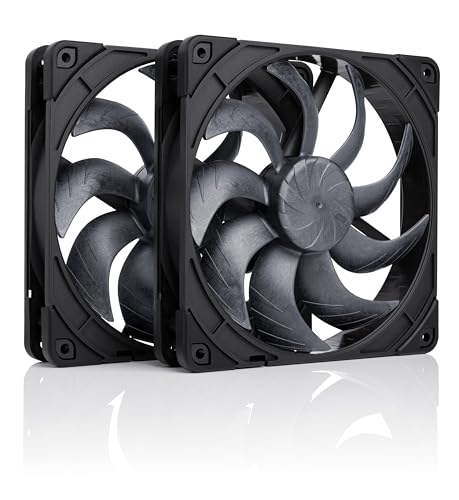
- Two 140mm PWM fans with up to 155.6 m³/h airflow
- Designed for 280mm radiators and case airflow
- Includes gaskets, adapters, cables, and splitter
Best For: Quiet 140mm builds and high-airflow radiator cooling
Wide-Range RGB Performance

- 600–3000 RPM PWM range with 0 RPM mode
- High static pressure for radiators and restrictive panels
- 5V digital RGB and included Y-cable splitter
Best For: Radiator cooling with strong speed control and RGB
Balanced ARGB Value
Cooler Master MF120 Lite 3-Pack

- Three 120mm fans for convenient case or cooler installation
- PWM speed control from 650 to 1,750 RPM
- Frosted ARGB blades with header extender
Best For: RGB-focused builders wanting flexible general-purpose airflow
Quiet Radiator Airflow

- Pressure-optimized design for heatsinks and radiators
- 56.3 CFM airflow and 2.2 mmH₂O static pressure
- Five fans with fluid dynamic bearings
Best For: Radiators, heatsinks, and larger cases needing pressure-focused airflow
Premium Linked RGB Cooling
CORSAIR iCUE LINK RX120 Triple Pack

- 74.2 CFM airflow and 4.38 mm-H₂O static pressure
- PWM control up to 2,100 RPM
- Direct fan linking with vivid eight-LED RGB lighting
Best For: Enthusiast radiator builds using the iCUE LINK ecosystem
Quiet High-Performance Pick
Noctua NF-P12 redux-1700 PWM 3-Pack

- 1700 RPM 4-pin PWM control
- Strong static pressure for coolers and radiators
- Three-pack with six-year warranty
Best For: Quiet, performance-focused CPU, radiator, and case cooling
Best Value Trio
ID-COOLING AS-120-K 120mm PWM 3-Pack

- 300–2,000 RPM PWM range
- Up to 58 CFM and 1.94 mm-H2O pressure
- Daisy-chain connector simplifies wiring
Best For: Flexible multi-fan case, radiator, or CPU-cooler setups
Maximum Airflow Option

- 600–3,000 RPM PWM range
- Up to 77 CFM with high static pressure
- 0 RPM mode and included Y-cable splitter
Best For: High-performance radiators and restrictive case airflow
Premium Quiet Pick – Noctua NF-A12x25 G2 120mm Twin Pack
For builders seeking computer cooling fans for high end pcs, this two-pack combines high airflow, static pressure, and a premium low-noise design. The 120mm PWM fans are suited to radiators, CPU coolers, and case intake or exhaust, with speed-offset tuning intended to reduce unwanted acoustic interaction when used side by side.
Best For: Quiet premium builds, push-pull radiator setups, and high-performance 120mm case cooling.
Pros:
- Two 1800 RPM 4-pin PWM fans with up to 107.3 m³/h airflow.
- Speed-offset pair is designed to reduce acoustic interaction.
- Includes anti-vibration mounts, radiator gaskets, LNA adapters, extension cable, and splitter.
- Premium SSO2 bearing and six-year manufacturer’s warranty.
Cons:
- Two-fan kit may be more than needed for a basic case upgrade.
- Premium feature set may not suit budget-focused builds.
This is a strong choice when refined acoustics and radiator performance matter more than minimizing cost. Its broad accessory bundle also makes installation easier across several cooling layouts.
Best Multi-Fan Value – Thermalright TL-C12C-S ARGB 5-Pack
This five-pack is a practical way to populate a larger case or add airflow around a CPU cooler. These computer cooling fans for high end pcs use 4-pin PWM control, offer up to 1550 RPM, and add motherboard-synchronized ARGB lighting for builders who want coordinated illumination without giving up adjustable fan speed.
Best For: Multi-fan case layouts, ARGB systems, and shoppers needing several 120mm fans in one purchase.
Pros:
- Five 120mm fans provide broad coverage for cases and CPU coolers.
- 4-pin PWM control supports automatic speed adjustment up to 1550 RPM.
- S-FDB bearings are designed to reduce noise and extend service life.
- ARGB lighting supports up to 17 modes and motherboard synchronization.
Cons:
- Maximum airflow is lower than some performance-focused models at 66.17 CFM per fan.
- ARGB requires compatible motherboard control for synchronization.
Choose this kit when quantity, PWM control, and lighting are priorities. It offers a straightforward way to equip multiple mounting points while retaining compatibility with CPU coolers and radiators.
High-Airflow 140mm Pick – Noctua NF-A14x25 G2 Twin Pack
The larger 140mm format makes this twin pack a compelling option for compatible high-end cases and 280mm radiators. These computer cooling fans for high end pcs combine up to 155.6 m³/h airflow with PWM control, speed-offset operation, and Noctua’s premium construction for demanding cooling layouts.
Best For: 140mm case mounts, 280mm radiators, and quiet high-airflow systems.
Pros:
- Two 1500 RPM PWM fans deliver up to 155.6 m³/h airflow.
- Speed-offset pairing is intended to reduce unwanted acoustic interaction.
- Includes 14cm anti-vibration gaskets, L.N.A. adapters, extension cables, and splitter.
- Premium SSO2 bearing has a stated MTTF above 150,000 hours.
Cons:
- Requires cases or radiators that support the larger 140mm size.
- Two-fan pack is less suitable when only one replacement fan is needed.
For compatible mounts, this pack favors efficient airflow and low-noise refinement over compactness. Confirm 140mm clearance before buying, particularly around radiators and adjacent components.
Wide-Range RGB Performance – ARCTIC P12 Pro A-RGB 3-Pack
For users who want aggressive speed control and lighting, this three-pack offers 120mm PWM fans with a wide 600–3000 RPM range. These computer cooling fans for high end pcs are designed for restrictive radiators, mesh panels, and other layouts where high static pressure is important, while the 0 RPM mode can stop the fans below 5% PWM.
Best For: High-static-pressure radiator cooling, responsive fan curves, and 5V digital RGB systems.
Pros:
- Speed range extends up to 3000 RPM for demanding cooling loads.
- Designed to push airflow through radiators and restrictive panels.
- 0 RPM mode below 5% PWM supports low-noise idle operation.
- Fluid dynamic bearing and included Y-cable splitter simplify a three-fan setup.
Cons:
- High maximum speed can produce more noise when operated aggressively.
- Digital RGB requires compatible 5V lighting hardware.
This is the most flexible performance-oriented option in the group for users who want both a quiet stop mode and substantial speed headroom. It is especially well matched to radiator-focused systems with compatible RGB control.
Balanced ARGB Value – Cooler Master MF120 Lite 3-Pack
For builders seeking computer cooling fans for high end pcs, the Cooler Master MF120 Lite offers a practical three-fan setup with adjustable PWM control and ARGB lighting. Its 650–1,750 RPM range lets you balance airflow and noise across a desktop case, CPU air cooler, or liquid cooler.
Best For: RGB-focused builders who want a flexible three-pack for general case or cooler airflow.
Pros:
- Three 120mm fans provide a convenient multi-fan installation.
- PWM control supports adjustable speeds from 650 to 1,750 RPM.
- Frosted blades and an included ARGB header extender support customizable lighting and daisy-chaining.
Cons:
- Its 30 dB noise rating may not suit builders prioritizing the quietest possible system.
- The supplied notes do not include airflow or static-pressure figures.
The MF120 Lite is a well-rounded choice when synchronized lighting, straightforward installation, and a three-fan bundle matter as much as raw cooling specifications.
Quiet Radiator Airflow – ARCTIC P12 5-Pack
The ARCTIC P12 is a strong practical option among computer cooling fans for high end pcs, particularly when fans must push air through heatsinks or radiators. This five-pack combines pressure-optimized blades, 1,800 RPM operation, and a fluid dynamic bearing for long-running desktop cooling.
Best For: High-air-resistance installations such as CPU heatsinks, liquid-cooling radiators, and multi-fan cases.
Pros:
- Static-pressure performance reaches 2.2 mmH₂O for radiator and heatsink use.
- Rated airflow is 56.3 CFM at up to 1,800 RPM.
- Fluid dynamic bearing is designed for quiet operation and extended service life.
- Five-fan pack is useful for larger cases or full-system replacement.
Cons:
- Uses a 3-pin connector rather than PWM speed control.
- No RGB lighting is included.
Choose the P12 when cooling performance through resistance and pack size take priority over lighting and granular motherboard-based speed control. Its six-year warranty is an additional practical advantage for long-term builds.
Premium Linked RGB Cooling – CORSAIR iCUE LINK RX120 Triple Pack
For high-performance builds using dense radiators or heatsinks, the CORSAIR iCUE LINK RX120 is one of the more feature-rich computer cooling fans for high end pcs. It combines PWM control up to 2,100 RPM, 74.2 CFM airflow, high static pressure, and a linked RGB ecosystem.
Best For: Enthusiast systems with high-density radiators that also want streamlined fan cabling and vivid RGB effects.
Pros:
- Delivers up to 74.2 CFM airflow at 2,100 RPM.
- 4.38 mm-H₂O static pressure suits radiators and other airflow obstructions.
- iCUE LINK connectors let fans connect directly into a single-cable fan bank.
- Eight RGB LEDs, side viewing, and AirGuide vanes add lighting and directed airflow.
Cons:
- The 36 dB noise rating may be noticeable at higher speeds.
- Its iCUE LINK approach is more ecosystem-specific than a basic standalone fan setup.
The RX120 is best suited to premium builds where radiator performance, concentrated airflow, and simplified interconnects justify choosing a more integrated RGB system.
Quiet High-Performance Pick – Noctua NF-P12 redux-1700 PWM 3-Pack
For computer cooling fans for high end pcs, the Noctua NF-P12 redux-1700 PWM offers a performance-focused 120mm design with strong static pressure and automatic motherboard speed control. This three-pack suits CPU coolers, radiators, and chassis ventilation where balanced airflow and quiet operation matter.
Best For: High-end builds needing dependable radiator, CPU cooler, or case airflow in a three-fan package.
Pros:
- 1700 RPM PWM control supports powerful airflow when needed and quieter operation at idle.
- Pressure-optimised design works well with CPU air coolers and water-cooling radiators.
- Includes three fans and carries a stated six-year manufacturer warranty.
Cons:
- Maximum airflow and speed are lower than some 3000 RPM alternatives.
- The grey redux styling may not suit every blacked-out build.
This is a strong choice when proven design, PWM control, and restrained noise are more important than extreme peak RPM.
Best Value Trio – ID-COOLING AS-120-K 120mm PWM 3-Pack
The ID-COOLING AS-120-K Trio is a practical option for computer cooling fans for high end pcs when you need three controllable 120mm fans without complicated wiring. Its 300–2,000 RPM range, 58 CFM airflow, and daisy-chain connector support both cooling performance and simpler cable management.
Best For: Multi-fan case, radiator, or CPU-cooler setups that benefit from daisy-chain connectivity and flexible PWM speed control.
Pros:
- Wide 300–2,000 RPM range provides adjustable cooling performance.
- Produces up to 58 CFM airflow with 1.94 mm-H2O static pressure.
- Daisy-chain connectors can reduce cable clutter in multi-fan installations.
Cons:
- Listed maximum noise is 27.2 dBA, higher than the quietest option here.
- Its stated airflow and speed are below the ARCTIC P12 Pro PST’s maximum figures.
This trio is a sensible all-purpose package for builders who want solid specifications, hydraulic bearings, and easier multi-fan cable management.
Maximum Airflow Option – ARCTIC P12 Pro PST 5-Pack
For demanding computer cooling fans for high end pcs, the ARCTIC P12 Pro PST combines a very broad 600–3,000 RPM range with high static pressure and up to 77 CFM airflow. Its PWM stop function and included Y-cable splitter make it suitable for dense radiators, restrictive panels, and larger multi-fan builds.
Best For: High-performance systems that need aggressive radiator or case airflow with wide-range PWM control.
Pros:
- Up to 3,000 RPM and 77 CFM provide the highest listed performance ceiling in this roundup.
- High static pressure helps push air through radiators, mesh, and narrow perforated panels.
- Can stop below 5% PWM and uses a fluid dynamic bearing for smooth, low-noise operation.
Cons:
- High maximum speed may be unnecessary for quieter or less demanding systems.
- The five-pack may exceed the needs of smaller builds.
This is the most performance-oriented package here, especially for users who want substantial headroom and precise control across a large installation.
How We Picked the Best Computer Cooling Fans for High End PCs
We focused on fan designs suited to powerful gaming PCs, workstation builds, and performance-oriented cooling systems. Our selection considers airflow, static pressure, speed control, bearing type, noise potential, included accessories, lighting features, and overall value. Models with PWM control are prioritized because they can automatically adjust speed according to system temperature rather than running at one fixed rate.
We also included both 120mm and 140mm formats, since chassis compatibility matters. Multi-packs can reduce the cost of populating several intake and exhaust positions, while premium fans may be preferable when acoustics, long-term refinement, or radiator performance are more important than the lowest upfront price.
Quick Comparison
| Best For | Recommended Type | What to Look For |
|---|---|---|
| Quiet premium builds | High-end PWM fans | Low motor noise, broad speed range, refined bearings |
| Radiators and dense filters | Pressure-optimized fans | Strong static pressure and PWM control |
| Multiple case positions | Three- or five-pack | Consistent performance and included splitters |
| RGB gaming PCs | Addressable RGB fans | 5V ARGB compatibility and controller or hub support |
| Large cases | 140mm fans | Chassis clearance and matching mounting holes |
Key Buying Factors for Computer Cooling Fans for High-End PCs
Airflow and Static Pressure
Airflow is important for unobstructed case ventilation, while static pressure matters when a fan must push air through a liquid-cooling radiator, heatsink fins, dust filter, or restrictive front panel. Pressure-optimized models are generally the safer choice for radiators and filtered intakes.
Size, Speed, and Noise
Confirm whether your case or cooler supports 120mm or 140mm fans before buying. Higher maximum RPM can improve peak cooling but may increase noise. A wide PWM range, including low-speed or zero-RPM operation, gives you more control over idle acoustics and full-load temperatures.
Controls and Compatibility
Four-pin PWM fans connect to compatible motherboard headers or fan hubs. RGB models require the correct lighting standard: 5V three-pin addressable RGB is not interchangeable with 12V four-pin RGB. Check header limits and use splitters or powered hubs when installing several fans.
Installation and Airflow Direction
Plan a balanced layout with cool-air intake and warm-air exhaust. Check radiator thickness, cable routing, clearance around tall memory or heatsinks, and whether the pack includes screws, splitters, extension leads, or controllers.
Who Should Buy Which Computer Cooling Fans for High End PCs?
Choose a premium quiet model if you are building a high-end workstation or gaming PC where low acoustic output and polished operation matter most. Select a pressure-focused 120mm fan for radiators, tower CPU coolers, or restrictive front panels. A three-pack is a practical middle ground for builds needing front intake and rear or top exhaust coverage, while a five-pack suits larger cases with several mounting positions.
RGB kits are best for builders who want coordinated lighting and already have compatible 5V ARGB or ecosystem hardware. For maximum value, a multi-pack of PWM fans can provide strong ventilation at a lower per-fan cost. Finally, consider 140mm fans when your case supports them: their larger blades can move substantial air at lower rotational speeds, but compatibility should always be verified before purchase.