Workstations generate sustained heat, especially during rendering, simulations, video production, and other demanding workloads. The right fan can improve airflow, reduce thermal throttling, and keep noise under control without requiring a complete cooling-system upgrade.
This roundup compares 10 computer cooling fans for workstations across several installation types, including PWM case fans, 140mm models, USB-powered fans, and AC-powered server-style options. Use the guide below to match fan size, power method, airflow design, and noise expectations to your setup.
Best 10 Computer Cooling Fans for Workstations Picks for 2026
Quiet Airflow Workhorse

- 49.9 CFM airflow with seven optimized blades
- 4-pin PWM control and low minimum RPM
- 80,000-hour rifle-bearing life
Best For: Quiet workstation case ventilation
High-Pressure Daisy-Chain Option

- 72.8 CFM airflow at up to 2,100 RPM
- 4.15mm-H2O static pressure for radiators
- Daisy-chains through one PWM connector
Best For: Radiators and heatsinks in expandable workstation builds
Independent AC-Powered Cooling Bank
Dual Ball 3 x 120mm Fan System

- Three fans rated at 85 CFM each
- AC controller adjusts 3–12V output
- Dual-ball bearings support any orientation
Best For: Racks, cabinets, and DIY workstation ventilation
Large-Frame Quiet Cooling
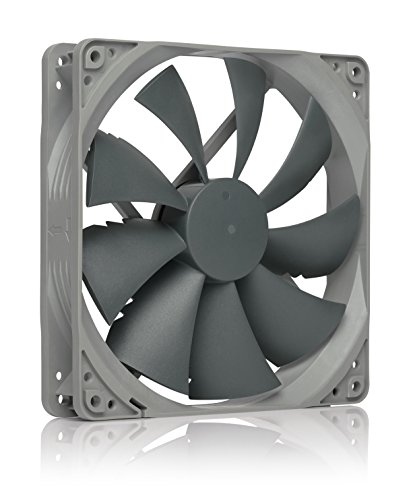
- 140mm fan with 133.7 m³/h airflow
- 25.8 dB(A) maximum noise rating
- PWM control with 150,000-hour MTTF
Best For: Quiet, high-airflow 140mm workstation builds
Flexible AC Cooling

- AC plug with included speed controller
- 700–2800 RPM and up to 95.8 CFM
- Dual-ball bearings rated for 50,000 hours
Best For: Equipment cabinets and workstations needing standalone adjustable cooling
Quiet PWM Performance

- 4-pin PWM motherboard control
- Up to 1700 RPM at 25.1 dB(A)
- Suitable for coolers, radiators, and cases
Best For: Quiet workstation PCs using standard 4-pin fan headers
USB Dual-Fan Cooling
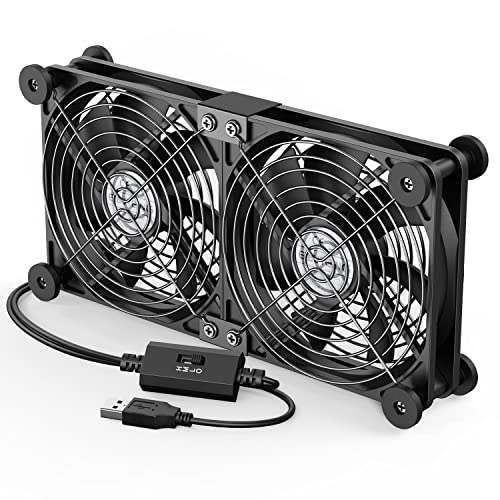
- Two connected 120mm USB-powered fans
- Three speeds from 900 to 1500 RPM
- Protective grilles and rubber shock absorbers
Best For: External workstation equipment and portable USB cooling
High-Performance Pick

- Up to 104.8 CFM airflow
- 3000 RPM PWM operation
- Five-year warranty
Best For: High-performance workstation builds needing strong airflow and static pressure
External Cooling Solution

- Broad 360mm cooling format
- USB-powered with switch
- Rubber anti-resonance feet
Best For: External cooling for workstation accessories and network equipment
Adjustable Office Pick

- Three-speed controller
- USB-powered for flexible placement
- Eight anti-vibration feet
Best For: Office workstations needing adjustable supplemental cooling
Quiet Airflow Workhorse – be quiet! Pure Wings 3 120mm
For computer cooling fans for workstations that balance airflow and low noise, the be quiet! Pure Wings 3 offers a practical 120mm option. Its seven airflow-optimized blades, 4-pin PWM control, and low minimum RPM make it suitable for everyday workstation ventilation and demanding configurations.
Best For: Quiet workstation case ventilation and users who want PWM speed control.
Pros:
- Airflow-optimized frame and seven blades support efficient cooling.
- 4-pin PWM connection enables motherboard speed control.
- Low minimum RPM supports quiet operation.
- Rifle bearing is rated for an 80,000-hour operating lifetime.
Cons:
- Maximum airflow is listed at 49.9 CFM, lower than some higher-speed alternatives.
- Sold as a single fan.
Pure Wings 3 is a sensible choice when quiet operation matters more than maximum airflow. Its standard 120mm format and PWM connector make it easy to integrate into a compatible desktop workstation.
High-Pressure Daisy-Chain Option – CORSAIR RS120 120mm PWM Fan
The CORSAIR RS120 is a strong fit for computer cooling fans for workstations that need concentrated airflow through radiators or heatsinks. It combines 2,100 RPM PWM control, 72.8 CFM airflow, AirGuide vanes, and a high static-pressure rating.
Best For: Radiators, heatsinks, and workstation builds where simplified fan wiring is useful.
Pros:
- Daisy-chain design lets multiple fans share one 4-pin PWM connection.
- Provides up to 72.8 CFM at 2,100 RPM.
- 4.15mm-H2O static pressure suits radiator use.
- Magnetic Dome bearing is designed to reduce friction and noise.
Cons:
- Listed noise level is 36 dB, higher than the quieter alternatives here.
- This listing includes one fan.
With its high static pressure and AirGuide airflow direction, the RS120 is more specialized than a basic case fan. Choose it when radiator performance and streamlined connections are priorities.
Independent AC-Powered Cooling Bank – Dual Ball 3 x 120mm Fan System
For workstation racks, cabinets, or other setups without convenient motherboard fan headers, this three-fan AC-powered unit offers a self-contained approach to computer cooling fans for workstations. It includes an adjustable 3–12V output, speed control, protective metal grilles, and dual-ball bearings.
Best For: Server cabinets, machine racks, mining rigs, and DIY workstation ventilation.
Pros:
- Three 120mm fans provide a combined listed airflow of 255 CFM.
- AC speed controller supports adjustable output and an on/off function.
- Dual-ball bearings allow horizontal or vertical placement.
- Protective metal grilles support flexible intake or exhaust use.
Cons:
- Uses an AC power plug rather than a standard motherboard PWM connector.
- The combined assembly is approximately 14.17 inches wide.
- Maximum speed is listed at 2,500 RPM per fan, which may be louder at full speed.
This is a utility-focused cooling solution rather than a conventional internal case fan. Its independent power and adjustable controller make it particularly useful for open-frame, rack, cabinet, or specialty workstation environments.
Large-Frame Quiet Cooling – Noctua NF-P14s redux-1500 PWM
The Noctua NF-P14s redux-1500 PWM is a 140mm choice for computer cooling fans for workstations where strong airflow and controlled acoustics both matter. Its square frame supports chassis or radiator installation, while 4-pin PWM control allows automatic speed adjustment.
Best For: Larger workstation cases, radiator ventilation, and quiet high-airflow builds.
Pros:
- 140mm frame delivers up to 133.7 cubic meters per hour of airflow.
- 4-pin PWM supports automatic motherboard speed control.
- Rated maximum noise is 25.8 dB(A).
- 150,000-hour MTTF and a six-year manufacturer warranty support long-term use.
Cons:
- 140mm dimensions may not fit cases designed only for 120mm fans.
- Maximum speed is 1,500 RPM, so it is not the highest-speed option listed.
The NF-P14s redux is a good fit for spacious workstations that can accommodate a 140mm fan. It emphasizes a balanced mix of airflow, PWM control, and quiet operation, with strong longevity specifications.
Flexible AC Cooling – Variable-Speed 120mm Fan
For workstations, servers, and equipment cabinets that need adaptable ventilation, this 120mm fan combines AC-plug convenience with adjustable speed control. Its dual-ball bearing design, 95.8 CFM airflow rating, and 700–2800 RPM range make it a practical option among computer cooling fans for workstations, especially where outlet power is more convenient than motherboard wiring.
Best For: Workstations, server cabinets, DVRs, consoles, and other equipment requiring independently powered, adjustable cooling.
Pros:
- AC plug allows direct connection to a wall outlet.
- Included controller adjusts speed from 700 to 2800 RPM.
- Provides up to 95.8 CFM airflow with dual-ball bearings rated for 50,000 hours.
- Can operate from 110V, 120V, or 220V AC input according to the listing.
Cons:
- Its AC-plug design may be less convenient for standard motherboard fan headers.
- Noise is listed at under 41 dB, so it may not be the quietest choice at high speed.
- Only one fan is included.
This model is a strong fit when you need high airflow and simple outlet-powered installation. Choose it over a conventional internal case fan when adjustable, standalone ventilation matters more than motherboard-based PWM control.
Quiet PWM Performance – Noctua NF-P12 redux-1700
The Noctua NF-P12 redux-1700 PWM is designed for buyers who want dependable, motherboard-controlled airflow without excessive noise. Its pressure-optimised blade design suits CPU coolers, radiators, and chassis ventilation, making it a well-rounded choice among computer cooling fans for workstations.
Best For: Quiet workstation builds, CPU air coolers, water-cooling radiators, and standard desktop cases with a 4-pin PWM header.
Pros:
- 4-pin PWM connection supports automatic motherboard speed control.
- Pressure-optimised design provides strong airflow and static pressure.
- Maximum noise is listed at 25.1 dB(A) with speeds up to 1700 RPM.
- Includes a six-year manufacturer’s warranty and a stated MTTF above 150,000 hours.
Cons:
- It requires a compatible 4-pin motherboard fan header for PWM control.
- Maximum speed is lower than some high-speed workstation fans.
- Only one fan is included.
This is the most straightforward pick for a conventional workstation PC where low noise, automatic control, and balanced cooling are priorities. Its 120mm frame also fits many common case and radiator mounting positions.
USB Dual-Fan Cooling – ELUTENG 120mm USB Fan
The ELUTENG dual USB fan offers plug-and-play cooling for workstations and peripheral equipment without requiring internal installation. Its two connected 120mm fans, three-speed controller, protective metal grilles, and horizontal or vertical positioning make it useful among computer cooling fans for workstations that have an available USB port.
Best For: Laptops, external hard-drive enclosures, routers, consoles, receivers, and desk setups needing portable USB-powered airflow.
Pros:
- USB-powered design avoids internal wiring and motherboard installation.
- Two connected fans operate together for broader cooling coverage.
- Three speed settings range from 900 to 1500 RPM, with listed airflow up to 31.98 CFM total.
- Rubber shock absorbers and metal grilles improve stability and protection.
Cons:
- It requires an available USB port and is not a standard internal case-fan replacement.
- Maximum listed airflow is lower than the AC-powered and Noctua options.
- The combined dual-fan unit may need more desk or equipment-cabinet space.
This model makes the most sense for external or temporary cooling where convenience matters. It is easy to reposition and offers quieter low-speed operation, but dedicated internal workstation builds will generally be better served by a motherboard-connected fan.
High-Performance Pick – ASUS ProArt PF120 White
For demanding computer cooling fans for workstations, the ASUS ProArt PF120 emphasizes airflow, static pressure, and high-speed operation. Its 120mm frame reaches up to 3000 RPM and delivers up to 104.8 CFM, making it a strong choice for workstation cases that need substantial cooling capacity.
Best For: High-performance workstation builds and users who need strong airflow and static pressure.
Pros:
- Up to 104.8 CFM airflow and 3000 RPM maximum speed.
- 28mm frame, LCP blades, and a narrow blade-to-frame gap support airflow and static pressure.
- Daisy-chain design and a five-year warranty add installation convenience and long-term value.
Cons:
- Its listed 39 dB noise level may be less suitable for especially quiet workspaces.
- As a 12V PWM chassis fan, it may require compatible motherboard or fan-controller connections.
Choose the PF120 when cooling performance takes priority over minimal noise. The robust motor and bearing design also make it a compelling option for sustained workstation use.
External Cooling Solution – VTRETU 360mm USB Fan
The VTRETU is a practical alternative to internal computer cooling fans for workstations when you need to cool equipment externally. Its 360mm USB-powered design can sit beside routers, cabinets, servers, and other warm electronics, while the switch provides straightforward control.
Best For: External cooling of workstation accessories, network equipment, cabinets, and other USB-equipped devices.
Pros:
- Large 360mm format provides broad airflow coverage.
- USB power and a removable switch simplify placement and operation.
- Rubber shock-absorbing feet help reduce desktop resonance.
- Listed airflow is 56.7 CFM at up to 1500 RPM.
Cons:
- This is an external USB fan rather than a standard internal PC chassis fan.
- Sleeve bearings are rated for 35,000 hours, which may offer less longevity than some premium bearing designs.
- The 55cm cable may limit placement in larger workstation setups.
Consider this model when the heat source is a router, cabinet, server enclosure, or peripheral rather than the inside of a PC case. It offers flexible placement without requiring an internal fan header.
Adjustable Office Pick – Easy Cloud 120mm USB Fan
The Easy Cloud 120mm USB fan suits workstation users who want simple, adjustable cooling without installing a conventional case fan. Its three-speed controller lets you balance airflow and noise, while the USB connection supports use with PCs, servers, cabinets, receivers, and other compatible equipment.
Best For: Office workstations and flexible cooling setups that benefit from adjustable speed and USB power.
Pros:
- Three speed settings provide control over cooling and operating noise.
- Dual-ball bearings support the stated quietness and airflow goals.
- Eight anti-vibration feet allow horizontal or vertical placement.
- Reaches up to 2000 RPM with listed airflow of 51 CFM.
Cons:
- USB power limits it to compatible 5V USB connections rather than standard internal fan headers.
- Its 33 dB listed noise level may still be noticeable in very quiet rooms.
- It is a single 120mm fan, so larger enclosures may need additional cooling.
This is a versatile choice for targeted or supplemental cooling. The speed controller and anti-vibration feet make it especially convenient for desk-side workstation equipment and quiet office environments.
How We Picked These Computer Cooling Fans for Workstations
We selected these models to cover the main cooling situations found in workstation builds and equipment cabinets. The list includes standard 120mm and 140mm case fans, PWM-controlled options for motherboard-based speed adjustment, high-static-pressure designs for restrictive filters or radiators, and standalone USB or AC fans for external equipment.
We also considered practical installation details: power compatibility, speed control, bearing design, daisy-chain support, expected noise, and whether a fan is better suited to a PC chassis, server enclosure, network cabinet, or adjacent equipment. Because workstation cooling needs vary widely, no single fan is ideal for every system.
Quick Comparison
- Best general-purpose upgrades: 120mm PWM fans are typically the easiest replacement or addition for a standard workstation case.
- Best for larger mounting points: A 140mm fan can move substantial air at lower rotational speeds when the chassis supports it.
- Best for radiators and dense filters: High-static-pressure models are designed to push air through resistance.
- Best for external cooling: USB-powered fans suit routers, DVRs, receivers, cabinets, and other low-voltage equipment.
- Best for fixed-location equipment: AC-powered axial fans can work well for server racks, enclosures, and workshop installations, but require careful electrical planning.
Key Buying Factors for Computer Cooling Fans for Workstations
Size and Mounting Compatibility
Confirm the available mounting pattern before buying. A 120mm fan is common, while 140mm models need matching chassis mounts and clearance. Check thickness, screw spacing, cable routing, and nearby components such as memory, radiators, and drive cages.
Airflow Versus Static Pressure
Choose an airflow-focused fan for unobstructed intake or exhaust positions. For radiator fins, mesh filters, heatsinks, and tightly packed workstation cases, prioritize static pressure. A balanced fan is useful when the same model may be installed in several locations.
Control and Power
PWM fans generally use a four-pin motherboard header and allow automatic speed adjustment based on temperature. Three-pin fans may use voltage control, while USB and AC models use separate power standards and may not integrate with motherboard fan curves. Never connect a fan to a power source outside its rated voltage.
Noise and Durability
Look for a suitable bearing type, published noise information, and a speed range that supports quiet idle operation. Higher maximum RPM can improve peak cooling but may produce more noise. For always-on workstations, reliable bearings and controllable speed are often more valuable than maximum airflow alone.
Who Should Buy Which Computer Cooling Fans for Workstations?
Choose a quiet PWM 120mm fan if you want a straightforward case replacement or additional intake and exhaust airflow. Choose a 140mm PWM model when your case supports the larger format and you want strong airflow at moderate speed. Choose a high-RPM, high-static-pressure fan for radiators, restrictive filters, or dense component layouts.
Choose a USB fan for cooling external electronics without opening the workstation or adding motherboard connections. Choose an AC-powered fan for fixed server cabinets, equipment racks, or enclosures where its voltage and wiring requirements are appropriate. If you need synchronized lighting or multiple fans, prioritize models with compatible daisy-chain or control features; otherwise, a dependable non-RGB fan is often the simpler workstation choice.