Overheating can cause noise, throttling, instability, and shortened component life. The right computer cooling fan can improve airflow without adding unnecessary complexity or expense.
This roundup covers internal 120mm fans, laptop cooling pads, USB-powered fans, and adjustable cooling solutions for different setups and heat-management needs.
Best 10 Computer Cooling Fans Picks for 2026
Quiet Performance Pick

- 120mm 4-pin PWM fan with up to 1700 RPM
- Pressure-optimised airflow for coolers, radiators, and cases
- Up to 120.2 m³/h airflow with 25.1 dB(A) maximum noise
Best For: Single-fan desktop cooling with automatic speed control
Portable Laptop Cooling Pick
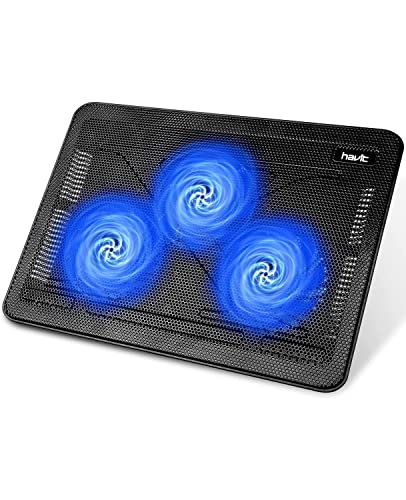
- Three quiet USB-powered fans for 15.6–17-inch laptops
- Two height settings support more comfortable positioning
- Slim design includes an extra USB port and power switch
Best For: Portable cooling and ergonomic support for larger laptops
Electronics Cooling Pick
AC Infinity MULTIFAN S5 Dual USB Fan

- Two 80mm USB fans with 52 CFM combined airflow
- Multi-speed controller for adjustable noise and cooling
- Can stand upright or lie flat around electronics
Best For: External cooling for consoles, AV equipment, and cabinets
Multi-Fan ARGB Value Pick

- Five 120mm 4-pin PWM fans for case or cooler use
- Up to 66.17 CFM airflow at 1550 RPM
- ARGB lighting with up to 17 effects and motherboard sync
Best For: Multi-fan desktop builds needing airflow and coordinated lighting
Best Multi-Fan Laptop Stand

- Five selectable USB-powered fans
- Six adjustable height settings
- Fits 12- to 17-inch laptops
Best For: Large laptops and extended desk use
Best Adjustable Electronics Fan

- Stepless 3V-12V airflow control
- Includes grilles and mounting hardware
- Up to 95 CFM and 3000 RPM
Best For: DIY electronics and equipment cooling
Best Compact Laptop Cooler

- Two fans with metal mesh airflow
- Five adjustable height positions
- Two USB 2.0 ports and phone holder
Best For: Laptops up to 15.6 inches at home or work
Best Multi-Fan Value
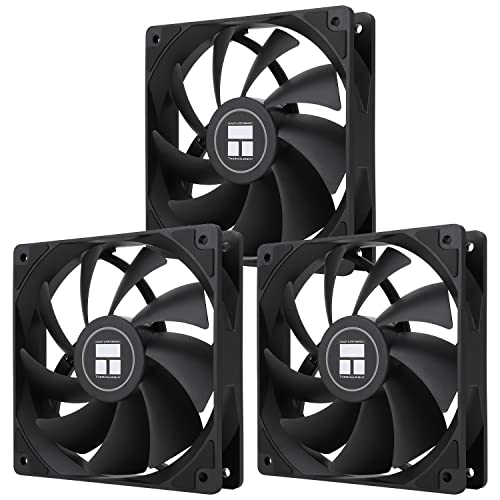
- Three 120mm PWM fans
- 66.17 CFM airflow per fan
- ARGB lighting with motherboard sync
Best For: Desktop builds needing multiple PWM and ARGB fans
Best Single USB Fan

- USB-powered plug-and-play design
- 56.7 CFM airflow at 1500 RPM
- Includes guard and mounting hardware
Best For: External cooling for routers, consoles, and media equipment
Best Adjustable Dual Fan
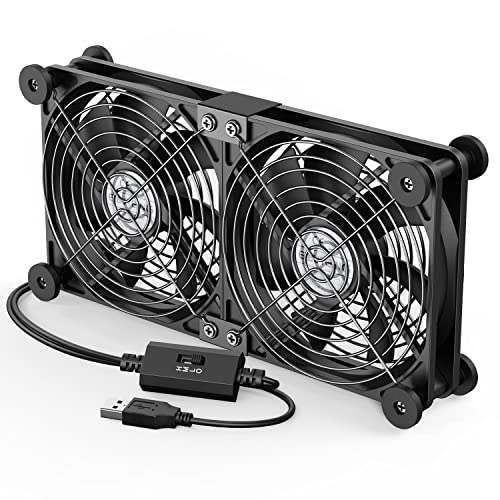
- Dual 120mm fan coverage
- Three adjustable speed settings
- USB power with 1m cable
Best For: Flexible external cooling for PCs and electronics
Quiet Performance Pick – Noctua NF-P12 redux-1700 PWM
For dependable computer cooling fans in a desktop, the Noctua NF-P12 redux-1700 PWM combines pressure-focused airflow with motherboard-controlled speed adjustment. Its 120mm frame and 1700 RPM ceiling make it suitable for CPU coolers, radiators, or case ventilation.
Best For: Builders who want a single, quiet 120mm PWM fan for cooling-intensive areas.
Pros:
- 4-pin PWM control automatically adjusts speed as cooling demand changes.
- Pressure-optimised design suits CPU coolers, radiators, and chassis airflow.
- Rated for up to 120.2 cubic meters per hour of airflow with a maximum noise level of 25.1 dB(A).
- Includes a six-year manufacturer’s warranty.
Cons:
- Only one fan is included.
- It lacks built-in lighting for appearance-focused builds.
The NF-P12 redux-1700 PWM is a well-rounded choice when you want strong, controllable airflow without moving to a louder high-speed fan. Its streamlined package keeps the focus on core cooling performance.
Portable Laptop Cooling Pick – Havit HV-F2056 Cooling Pad
The Havit HV-F2056 is a practical computer cooling fans solution for laptops measuring 15.6 to 17 inches. Its three USB-powered fans circulate air beneath the laptop, while the slim design and adjustable height settings support both portability and more comfortable positioning.
Best For: Laptop users who need portable cooling and an elevated workstation surface.
Pros:
- Three ultra-quiet fans provide airflow beneath the laptop.
- Two adjustable height settings improve viewing and typing comfort.
- Metal mesh creates a stable laptop surface.
- An extra USB port and power switch add convenience.
Cons:
- Designed for laptops from 15.6 to 17 inches, limiting compatibility with smaller systems.
- Power is supplied through USB, and Type-C devices require an adapter.
- It is a cooling pad rather than an internal desktop case fan.
Choose the HV-F2056 when portability matters as much as cooling. It combines three quiet fans with basic ergonomic adjustment, making it a useful accessory for larger laptops at home or on the go.
Electronics Cooling Pick – AC Infinity MULTIFAN S5 Dual USB Fan
The AC Infinity MULTIFAN S5 provides two compact computer cooling fans with USB power and a multi-speed controller. Its flexible orientation, noise-absorption pads, and 52 CFM combined airflow make it useful for electronics cabinets, consoles, receivers, and other components that need extra ventilation.
Best For: Cooling AV equipment, game consoles, cabinets, and compact electronics setups.
Pros:
- Two 80mm fans deliver a combined 52 CFM of airflow.
- Multi-speed control lets you balance airflow and noise.
- Dual-ball bearings support flat or upright placement and a stated 67,000-hour lifespan.
- USB power works with ports on many AV electronics and game consoles.
Cons:
- The 80mm fan size provides less coverage than a typical 120mm case fan.
- Its USB connection may be less suitable for standard motherboard fan headers.
The MULTIFAN S5 stands out for flexible placement rather than conventional PC case installation. It is a convenient low-noise option when an external USB-powered cooling setup is easier than modifying the equipment.
Multi-Fan ARGB Value Pick – Thermalright TL-C12C-S 5-Pack
For outfitting a desktop with several computer cooling fans, the Thermalright TL-C12C-S five-pack supplies 120mm PWM fans with ARGB lighting. Each fan reaches up to 1550 RPM, delivers up to 66.17 CFM, and includes a long cable for PWM series control.
Best For: PC builders adding multiple case or cooler fans with synchronized ARGB lighting.
Pros:
- Five 120mm fans provide broad coverage for cases and cooling setups.
- 4-pin PWM control allows motherboard-based automatic speed adjustment.
- S-FDB bearings are designed to reduce shaking and keep operating noise at or below 25.6 dBA.
- ARGB lighting supports up to 17 effects and motherboard synchronization.
Cons:
- A five-fan pack may be more than needed for smaller builds.
- ARGB synchronization depends on a compatible motherboard connection.
- At 1550 RPM, it has a lower maximum speed than some performance-focused 120mm fans.
This pack is a strong fit for a new build or a full airflow refresh, especially when coordinated lighting is part of the plan. It balances multiple-fan coverage, PWM control, and a stated 66.17 CFM airflow rating per fan.
Best Multi-Fan Laptop Stand – Kootek 5-Fan Cooling Pad
If you need computer cooling fans for a larger laptop, the Kootek cooling pad combines five USB-powered fans with an adjustable stand. Its selectable fan controls, quiet operation, and broad 12- to 17-inch compatibility make it a practical option for gaming, work, or extended viewing sessions.
Best For: Owners of 12- to 17-inch laptops who want adjustable cooling and ergonomic height settings.
Pros:
- Five fans provide broad airflow coverage, with controls for one, four, or all five fans.
- Six adjustable height settings support a more comfortable viewing and typing angle.
- Built-in dual USB ports add connectivity for peripherals.
- Front stoppers help keep compatible laptops secure.
Cons:
- The supplied cable uses USB-to-USB; Type-C devices require an adapter.
- Best performance requires a 5V 1A adapter, which is not described as included.
- Its 1.16 kg weight and larger footprint may be less convenient for frequent travel.
The Kootek is a strong fit when laptop size coverage, stand adjustability, and selectable fan operation matter more than portability. Its blue LEDs and dual USB hub add useful convenience, while the power guidance is worth noting before purchase.
Best Adjustable Electronics Fan – 120mm AC Variable-Speed Fan
This 120mm computer cooling fan is designed for electronics and DIY setups that need adjustable airflow from a wall outlet. It includes a US plug adapter, protective grilles, mounting hardware, and stepless 3V-12V speed control for balancing cooling and noise.
Best For: Routers, NAS devices, amplifiers, game consoles, 3D printers, and other electronics requiring flexible external cooling.
Pros:
- Stepless speed adjustment lets you tune airflow and noise.
- Standard 120mm sizing supports flat, embedded, or external installation.
- The kit includes grilles, rubber feet, screws, and a US plug adapter.
- Dual ball bearings and a 3000 RPM maximum speed support long-term operation.
Cons:
- With a listed noise level of 37 dB, it may be audible at higher speeds.
- Installation may require planning for external placement or device-chassis mounting.
- It is a single fan rather than a multi-fan cooling system.
Choose this model when you need a standalone, plug-in cooling solution rather than a laptop stand. Its included hardware and variable control make it particularly useful for customized electronics cooling projects.
Best Compact Laptop Cooler – KeiBn Two-Fan Cooling Pad
For smaller laptops, this computer cooling fan pad pairs two fans with a metal mesh surface and five adjustable height positions. It also adds two USB 2.0 ports, a hideable phone holder, and front baffles for a practical home or office setup.
Best For: Users with laptops up to 15.6 inches who want lightweight cooling, stand adjustment, and extra USB connectivity.
Pros:
- Two strong fans and a metal mesh surface promote airflow during extended use.
- Five height settings allow the pad to work flat or at an elevated angle.
- Two USB 2.0 ports can connect peripherals such as a keyboard or mouse.
- A hideable phone holder can be used on either side.
Cons:
- Compatibility is limited to laptops up to 15.6 inches.
- It has two fans, so it offers less fan coverage than larger multi-fan pads.
- The blue LED indicator may not suit users seeking an unlit setup.
The KeiBn is a balanced choice for everyday laptop use when portability and desk convenience are priorities. It provides useful adjustability and connectivity without the larger size of a five-fan cooling pad.
Best Multi-Fan Value – Thermalright TL-C12C X3
For builders needing several computer cooling fans, the Thermalright TL-C12C X3 provides three 120mm PWM fans in one package. Its motherboard-controlled speed, 66.17 CFM airflow, and ARGB lighting make it a practical choice for compatible desktop cases and CPU coolers.
Best For: Desktop builders who want a three-fan setup with PWM control and ARGB lighting.
Pros:
- Three 120mm fans provide flexible case or CPU-cooler installation.
- 4-pin PWM control can adjust fan speed based on motherboard temperature.
- S-FDB bearings, 66.17 CFM airflow, and rated noise up to 25.6 dBA balance cooling and quiet operation.
- ARGB blades support up to 17 lighting modes and motherboard synchronization.
Cons:
- Designed for 12V 4-pin PWM connections, so it is less suitable for USB-powered setups.
- ARGB control depends on a compatible motherboard connection.
Choose this pack when you need multiple standard-size fans and your desktop supports PWM and ARGB connections. The included 55cm cabling also helps with series fan control in a case.
Best Single USB Fan – 120mm 5V USB Cooling Case Fan
This 120mm USB computer cooling fan is a straightforward option for electronics without a standard PC fan header. It connects through USB and is suited to routers, TV boxes, receivers, DVRs, consoles, and other enclosed equipment that needs additional airflow.
Best For: USB-powered cooling for routers, media devices, game consoles, and compact electronics.
Pros:
- USB connection enables simple plug-and-play installation.
- 1500 RPM speed delivers up to 56.7 CFM of airflow.
- Compact 120mm by 25mm design fits many tight spaces.
- Includes a protective net, mounting hardware, and foot columns.
Cons:
- Uses a sleeve bearing rather than a more advanced bearing design.
- Supplied as a single fan.
- Its 5V USB format is not a direct replacement for a 12V 4-pin PC case fan.
This is a useful choice when convenience matters more than motherboard integration. Its USB power makes it especially practical for external cooling around home-theater equipment, routers, and small PCs.
Best Adjustable Dual Fan – ELUTENG Dual USB Cooling Fan
The ELUTENG dual USB computer cooling fan combines two 120mm fans with a three-speed controller. Its USB-powered design supports horizontal or vertical placement, making it useful for cooling laptops, routers, hard-drive enclosures, AV equipment, and game consoles.
Best For: Users who want adjustable USB cooling and flexible placement for electronics or compact computer equipment.
Pros:
- Two connected 120mm fans run together for broader cooling coverage.
- Three speed settings adjust airflow from 900 to 1500 RPM.
- USB plug-and-play operation works with devices that provide a USB port.
- Rubber shock absorbers and metal safety grilles support stable, protected use.
Cons:
- Noise rises from 25.6 dB at low speed to 32.5 dB at high speed.
- USB power limits it to compatible 5V setups rather than standard 12V motherboard fan headers.
- It is a connected dual-fan unit rather than two independently controlled fans.
Consider this model when one fan is not enough and you want manual control without internal wiring. The 1m cable and reversible horizontal or vertical placement add flexibility for desks, cabinets, and entertainment systems.
How We Picked the Best Computer Cooling Fans
We selected these Computer Cooling Fans based on the jobs they are designed to handle, including desktop case airflow, CPU and chassis cooling, laptop ventilation, and cooling for receivers, routers, consoles, and other compact electronics. We also considered power options, speed control, installation requirements, noise-conscious designs, size compatibility, and practical portability.
Because a 120mm PWM case fan serves a different purpose than a laptop cooling pad or USB exhaust fan, the list includes several form factors rather than treating one design as universally best. Match the product to your device, available ports, and airflow needs before buying.
Quick Comparison
| Type | Best For | Key Advantage | Watch For |
|---|---|---|---|
| 120mm PWM case fan | Desktop PCs | Efficient internal airflow | Requires case mounting and compatible headers |
| Multi-pack case fans | New builds and upgrades | Consistent airflow across several locations | More installation and cable management |
| Laptop cooling pad | Notebook computers | Elevated platform with active airflow | Fit, USB availability, and fan noise vary |
| USB cooling fan | Routers, consoles, receivers, and accessories | Simple plug-and-play power | Usually offers less airflow than an internal PC fan |
| AC-powered fan | Continuous external cooling | Works without a computer USB port | Needs a nearby outlet and suitable placement |
Key Buying Factors for Computer Cooling Fans
Size and Compatibility
Check the available mounting space before choosing a fan. Desktop cases commonly support 120mm models, but some use 80mm, 140mm, or nonstandard mounts. Laptop pads should match the notebook’s footprint and provide stable support rather than covering intake vents.
Power and Control
PWM fans connect to compatible motherboard headers and can adjust speed automatically. USB models are easier to deploy but may have fewer control options. AC-powered units are useful for fixed installations, while adjustable speed controls help balance cooling performance and noise.
Airflow, Pressure, and Noise
For a PC case, plan the airflow direction: front or bottom fans typically act as intakes, while rear or top fans commonly exhaust warm air. Static pressure matters when air must pass through filters, radiators, or dense vents. Look for stated RPM ranges, airflow ratings, and bearing designs, but remember that published noise figures may not be directly comparable.
Installation and Maintenance
Confirm whether screws, controllers, stands, or cables are included. Clean dust filters and fan blades periodically because buildup reduces airflow and increases noise. Keep cables away from moving blades and avoid blocking the device’s original ventilation openings.
Who Should Buy Which Computer Cooling Fans?
Desktop PC builders: Choose a compatible 120mm PWM fan or multi-pack when you need better case circulation, additional intake capacity, or replacement fans.
Laptop users: A cooling pad is the most convenient option for gaming, sustained workloads, or elevated desk use. Prioritize size, ergonomics, stable support, and fan placement.
Home-theater and networking setups: USB fans work well for receivers, routers, DVRs, TV boxes, and consoles where a small external airflow boost is more practical than internal modification.
Noise-sensitive buyers: Favor models with speed control and lower operating speeds, then position intake and exhaust fans to achieve the needed airflow with fewer fans running at maximum speed.