Choosing the right conference room webcam can make meetings feel more professional, more productive, and less frustrating for everyone on the call.
From compact huddle rooms to larger boardrooms, the best conference room webcams for business balance field of view, audio pickup, and ease of setup.
Best 10 Conference Room Webcams for Business Picks for 2026
All-in-One Meeting Cam
Logitech Conference Cam BCC950
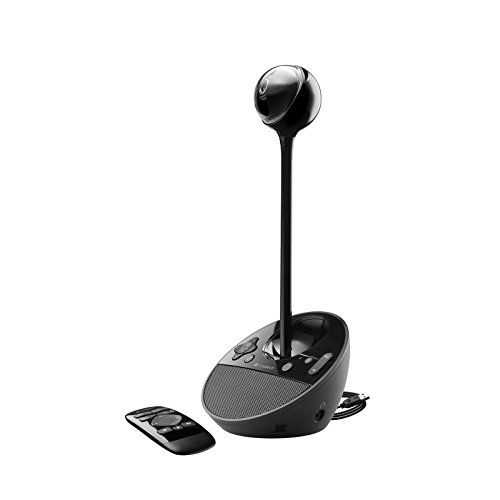
- Plug-and-play on PC and Mac
- Built-in speakerphone and noise-cancelling mic
- Works with most UC and video conferencing apps
Best For: Small teams needing a simple all-in-one meeting cam
Wide-Angle Collaboration Bar

- Three 13 MP cameras with stitched panoramic video
- Selectable 90° to 180° field of view
- Eight mics plus quick USB plug-and-play setup
Best For: Large rooms and hybrid meetings needing panoramic coverage
PTZ Room Camera

- Made for conference rooms and training spaces
- Smooth pan, tilt, and zoom with presets
- 3x optical zoom and wide field of view
Best For: Rooms that need controllable camera movement and zoom
Premium 4K Webcam

- Up to 4K at 30 fps with autofocus
- RightLight 3 helps in glare and backlight
- Three field-of-view presets for flexible framing
Best For: Small rooms or desktop meetings where image quality is the priority
360-Degree Collaboration Choice
j5create 360 Degree Meeting Webcam

- 360-degree video with six display modes
- Built-in omnidirectional microphone
- USB-C plug-and-play with major apps
Best For: Small team rooms and collaborative meetings
All-in-One Huddle Room Pick
Logitech MeetUp Video Conferencing System

- 4K sensor with 120-degree field of view
- Three beamforming mics for small rooms
- Flexible mounting and USB BYOD setup
Best For: Small conference rooms and huddle spaces
AI Tracking Business Upgrade
WYRESTORM 4K AI Tracking Conference Webcam

- AI auto framing and presenter tracking
- 4K video with 120-degree wide angle
- Dual noise-cancelling mics up to 5m
Best For: Small meeting rooms, training sessions, and presentations
All-in-One Desktop Pick
Logitech BCC950 for Small Meeting Rooms

- 1080p HD webcam with 30 fps capture
- Built-in full duplex speakerphone
- Remote control for pan, tilt, zoom, and calls
Best For: Small rooms with 1-4 people
Premium 4K Room Bar
Yealink UVC34 for Teams and Zoom

- 4K camera with 120° wide field of view
- 8-mic array with 5-meter pickup range
- AI auto framing and speaker tracking
Best For: Huddle rooms needing wide-angle video and integrated audio
360-Degree Collaboration Camera
TOUCAN SC360 for Flexible Rooms

- 360° omni-directional video coverage
- 1080p HD with four noise-reduction mics
- Built-in speaker and plug-and-play setup
Best For: Teams that want full-room visibility in one device
All-in-One Meeting Cam – Logitech Conference Cam BCC950
For conference room webcams for business, the Logitech Conference Cam BCC950 is a simple plug-and-play option for small teams that want an all-in-one setup. It works with both PC and Mac, supports most UC and video conference apps, and combines video with a built-in speakerphone for easy meetings.
Best For: Small conference rooms or teams that want quick setup with integrated audio and video.
Pros:
- Plug-and-play on PC and Mac with no software to install
- Built-in full duplex speakerphone and noise-cancelling microphone
- Works with most UC and video conference applications
- Included remote helps control meeting functions
Cons:
- Only listed at 1080p, not 4K
- Designed as an all-in-one unit, so it may be less flexible than separate camera and audio gear
Overall, the BCC950 is a practical fit when you want a straightforward meeting-room camera that handles both sight and sound without extra setup steps.
Wide-Angle Collaboration Bar – Jabra PanaCast 50
Jabra PanaCast 50 180° Panoramic-4K Meeting Room Webcam, 4 Kilopixel Video Resolution, Black
Check Price On AmazonThe Jabra PanaCast 50 is built for conference room webcams for business where you need to show the whole room, not just a single speaker. Its three 13 MP cameras, 8 microphones, and real-time stitching let you choose a wide 90-, 120-, 140-, or 180-degree field of view, and it plugs in quickly over USB.
Best For: Larger meeting rooms and hybrid teams that need a wide panoramic view and advanced audio capture.
Pros:
- Three 13 MP cameras with real-time video stitching
- Selectable 90-, 120-, 140-, and 180-degree field of view
- Eight microphones for broader room audio coverage
- Plug-and-play USB setup with Teams certification and Zoom compatibility
Cons:
- More specialized than a basic webcam
- Safe meeting room insights may be unnecessary for smaller teams
It stands out when your priority is room coverage and flexibility, especially in spaces where people move around or sit spread out across the table.
PTZ Room Camera – Logitech PTZ Pro 2
Logitech PTZ Pro 2 Camera – USB HD 1080P Video Camera for Conference Rooms | Conference Rooms
Check Price On AmazonIf you need conference room webcams for business that can handle larger spaces, the Logitech PTZ Pro 2 is a strong fit. It is designed for conference rooms, training environments, and other professional video use, with smooth pan, tilt, and zoom controls plus a wide field of view.
Best For: Conference rooms, training spaces, and presentations that need controlled camera movement and zoom.
Pros:
- Designed for conference rooms and professional video applications
- Enhanced pan/tilt/zoom motor performance with preset movement
- Wide field of view helps show everyone clearly
- 3x optical zoom and 10x digital zoom for close-up detail
Cons:
- Only 1080p, not 4K
- More camera-focused than all-in-one audio/video bars
For teams that need to zoom in on a presenter, whiteboard, or product demo, this model offers more control than a standard fixed webcam.
Premium 4K Webcam – Logitech Brio Ultra
The Logitech Brio Ultra is a compact choice for conference room webcams for business when image quality matters most. It delivers up to 4K at 30 fps, supports adjustable field of view settings, and uses RightLight 3 to help balance exposure in difficult lighting.
Best For: Professionals who want a sharp 4K webcam for meetings, smaller conference rooms, or desktop setups.
Pros:
- Up to 4K at 30 fps with autofocus and 5x digital zoom
- RightLight 3 helps handle glare and backlighting
- Three field-of-view presets for different framing needs
- Dual microphones with noise-canceling tech
Cons:
- More of a compact webcam than a room-spanning conference system
- Audio pickup is rated from up to 1.2 meters away, so it is best for smaller setups
It is a good pick if you want a polished look, flexible framing, and broad platform support in a smaller meeting space.
360-Degree Collaboration Choice – j5create 360 Degree Meeting Webcam
If you need conference room webcams for business that help everyone stay visible without constant repositioning, this 360-degree j5create camera is built for that kind of group meeting. Its built-in omnidirectional microphone, 1080p video, and six viewing modes make it a flexible fit for collaboration spaces, online classes, and hybrid calls.
Best For: Small team rooms and collaborative meetings where a 360-degree view is more useful than a traditional front-facing webcam.
Pros:
- 360-degree coverage with six display modes for different meeting layouts
- Built-in omnidirectional microphone for capturing voices around the room
- Full HD 1080p video at 30 Hz for clear everyday conferencing
- USB-C plug-and-play setup with support for major meeting apps
Cons:
- May require app permissions to be authorized before use
- Firmware may need updating to optimize functionality and resolution
This is a practical pick when your main goal is to show the whole room and keep setup simple. It is less specialized for speaker tracking, but it offers a flexible, all-around conferencing experience for business teams.
All-in-One Huddle Room Pick – Logitech MeetUp Video Conferencing System
Among conference room webcams for business, the Logitech MeetUp stands out for huddle rooms that need a simple all-in-one solution. It combines an Ultra HD 4K sensor, a wide 120-degree field of view, three beamforming microphones, and flexible mounting options to make small-room video calls easier to manage.
Best For: Small conference rooms and huddle spaces that need strong video, built-in audio, and easy deployment.
Pros:
- Ultra HD 4K sensor with a wide 120-degree field of view
- Three beamforming microphones designed to capture voices up to 4 meters away
- Motorized pan/tilt can expand the view up to 170 degrees
- Multiple mounting options and plug-and-play USB BYOD connectivity
Cons:
- Expansion mic is sold separately if you need more pickup range
- Best suited to small rooms rather than larger conference spaces
If you want a room camera that is easy to deploy and built for business meetings, MeetUp is a strong fit. It balances wide-angle video, room-filling audio, and flexible mounting in a package aimed squarely at small meeting spaces.
AI Tracking Business Upgrade – WYRESTORM 4K AI Tracking Conference Webcam
For conference room webcams for business that need smarter framing, the WYRESTORM FOCUS-210 adds AI auto framing and presenter tracking to a 4K meeting camera. It is designed for small conference rooms, with a 120-degree wide-angle lens, dual noise-cancelling microphones, and plug-and-play USB operation for Zoom, Teams, and Webex.
Best For: Small meeting rooms, training sessions, and presentations where automatic framing and speaker tracking matter.
Pros:
- AI auto framing keeps group meetings centered without manual adjustments
- Presenter tracking follows the active speaker during business presentations
- 4K video with a 120-degree wide-angle view for professional-looking calls
- Dual noise-cancelling microphones with pickup up to 5 meters
Cons:
- Built specifically for small conference rooms, not larger spaces
- Digital zoom is available, but the camera is still centered on room coverage rather than advanced PTZ control
This model is a good choice when you want the camera to do more of the work during meetings. The privacy cover and easy USB setup also make it a solid fit for shared office rooms.
All-in-One Desktop Pick – Logitech BCC950 for Small Meeting Rooms
If you need a straightforward option among conference room webcams for business, the Logitech BCC950 is built for small rooms and up to 1-4 people. It combines 1080p video with a full duplex speakerphone and noise-canceling microphone, so teams can both see and hear clearly without adding separate gear.
Best For: Small conference rooms, huddle spaces, and quick plug-and-play meetings with a few participants.
Pros:
- All-in-one webcam and speakerphone design keeps setup simple.
- 1080p HD video at 30 fps with a Carl Zeiss lens.
- Noise-canceling microphone and echo cancellation help keep audio clear.
- Remote control and base controls make pan, tilt, zoom, and call handling easy.
Cons:
- Designed mainly for small rooms rather than larger conference spaces.
- Requires a desktop-style setup instead of a more permanent room installation.
This is a practical business conferencing choice if you want reliable audio-video basics in one unit. It favors ease of use and clarity over advanced smart framing or wide-room coverage.
Premium 4K Room Bar – Yealink UVC34 for Teams and Zoom
For conference room webcams for business where image quality and room coverage matter, the Yealink UVC34 brings 4K optics, a 120° field of view, and an all-in-one camera, microphone, and speaker design. It is certified for Microsoft Teams and Zoom, and its plug-and-play USB setup makes it easy to deploy in a huddle room or small conference space.
Best For: Huddle rooms and small conference rooms that need wide coverage, strong audio pickup, and smart framing.
Pros:
- 4K video with an 8MP sensor for crisp meeting visuals.
- 120° super-wide field of view helps capture everyone in the room.
- 8-microphone array with a 5-meter pickup range supports clearer group audio.
- AI auto framing, speaker tracking, and face enhancement add smarter meeting behavior.
Cons:
- More advanced than a basic webcam, so it may be more than a tiny setup needs.
- Best value comes when you actually use its framing and room-wide audio features.
The UVC34 stands out as a polished room system for teams that want a cleaner, more professional conference experience. Its combination of 4K video, wide coverage, and integrated audio makes it well suited to modern hybrid meetings.
360-Degree Collaboration Camera – TOUCAN SC360 for Flexible Rooms
If your meetings benefit from seeing everyone in the room, this TOUCAN option is a useful pick among conference room webcams for business. It offers 360° omni-directional coverage, 1080p HD video, four noise-reduction microphones, and a speaker, making it suitable for rooms where people sit around the table or spread across the space.
Best For: Rooms that need full-room visibility and simple plug-and-play conferencing.
Pros:
- 360° viewing angle helps capture participants across the room.
- 1080p HD video supports clear presentations and video calls.
- Four noise-reduction microphones improve voice pickup.
- Plug-and-play setup keeps installation fast and easy.
Cons:
- 1080p resolution is lower than 4K alternatives.
- Best fit is rooms that can benefit from 360° coverage rather than a narrow desk setup.
The SC360 is a flexible solution when you want broad room visibility without complicating setup. Its combination of 360-degree shooting, multiple mics, and built-in speaker makes it a strong practical choice for collaborative meetings.
How We Picked the Best Conference Room Webcams for Business
We focused on Conference Room Webcams for Business that solve real meeting-room problems: wide-angle coverage, clear speech pickup, strong low-light performance, and reliable compatibility with common platforms like Zoom, Microsoft Teams, and Google Meet. We also favored models that are practical to deploy, whether you need a simple USB camera or an all-in-one conferencing system.
Quick Comparison
Think of the lineup in three broad groups: compact desktop units for small spaces, wide-angle and panoramic cameras for standard meeting rooms, and advanced PTZ or AI-tracking options for larger rooms or presenter-led sessions. The right choice depends less on raw resolution alone and more on how many people sit in frame and how much movement happens during calls.
Key Buying Factors for Conference Room Webcams for Business
Field of View
A wider field of view helps capture everyone at the table without constant repositioning. For huddle rooms, 90° to 120° is often enough. For larger rooms, panoramic 180° cameras or systems with speaker tracking can be a better fit.
Audio Quality
Built-in microphones matter more than many buyers expect. If the room is small, a camera with a capable mic array may be enough. For larger or noisier spaces, look for multiple microphones, noise reduction, or a dedicated speakerphone-style design.
Resolution and Framing
4K can help preserve detail and give auto-framing systems more room to crop intelligently, but it is not the only spec that matters. Good optics, reliable exposure, and smart framing often make a bigger difference in day-to-day meetings than resolution alone.
Mounting and Setup
Ease of installation is a major advantage in business settings. USB plug-and-play options are ideal for fast deployment, while PTZ and all-in-one systems can offer more control if you have a dedicated meeting space and IT support.
Who Should Buy Which Conference Room Webcams for Business?
Small teams in huddle rooms should lean toward simple wide-angle cameras with strong mics. Mid-size meeting rooms usually benefit from panoramic or auto-framing models that keep everyone visible. Larger rooms and executive spaces are better served by PTZ or more advanced conferencing systems when presenter tracking, flexibility, and room coverage are priorities.
If you are comparing Conference Room Webcams for Business, prioritize the room layout first, then audio, then resolution. That order will usually lead to a better purchase than chasing the highest spec on the box.