Choosing the right camera for a large conference room is about more than sharp video. You need wide coverage, reliable speaker tracking, and audio that carries across the table.
These picks focus on conference room webcams for large rooms that help remote attendees see faces clearly, follow the conversation, and stay engaged without constant manual adjustments.
Best 10 Conference Room Webcams for Large Rooms Picks for 2026
Panoramic Coverage
Jabra PanaCast 50 180° 4K Meeting Camera

- 180° view with 4 framing options
- Three 13 MP cameras with stitching
- 8 mics and USB plug-and-play setup
Best For: Large meeting rooms that need broad panoramic coverage
PTZ Zoom Control
AVer CAM550 Dual-Lens 4K Camera

- Dual-lens setup with 12X optical zoom
- AI auto framing and Smart Gallery
- USB, HDMI, RS232, and PoE+ support
Best For: Large rooms that need zoom, framing, and AV flexibility
Wide Room Bar
Logitech MeetUp 4K Conferencing System

- 4K sensor with 120° field of view
- Motorized pan/tilt up to 170°
- Beamforming mics and USB plug-and-play
Best For: Huddle and small rooms needing an easy all-in-one system
Enterprise PTZ Kit
AVer VC520 Pro3 Camera and Speakerphone

- 36X total zoom PTZ system
- Bundled speakerphone with noise suppression
- Single USB cable setup
Best For: Enterprise rooms needing an all-in-one camera and audio kit
Enterprise All-in-One
Logitech ConferenceCam CC3000e
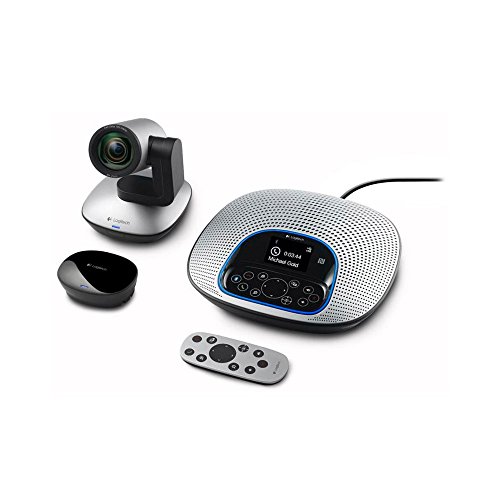
- 1080p HD video at 30 fps
- 90° view with pan, tilt, 10X zoom
- Built-in noise-cancelling speakerphone
Best For: Mid-size conference rooms needing an integrated camera and speakerphone.
AI 4K Room System

- 4K camera with 120° wide-angle lens
- Auto framing and speaker tracking
- 8-mic array with noise cancellation
Best For: Larger meeting spaces that need AI-assisted framing and clear audio.
360-Degree Meeting Cam
TOUCAN 360-Degree Video Conference Camera

- 360° omni-directional shooting
- AI tracking for participants
- 4 noise-reduction mics with speaker
Best For: Large or flexible rooms needing full-room coverage and easy setup.
Editor's Choice
Yealink 4K All-in-One Conference Bar

- 4K camera with 120° field of view
- 8 microphones with 5-meter pickup
- AI framing plus electric privacy shutter
Best For: teams wanting a plug-and-play conference bar
Privacy-Focused Pick
COOLPO 360 AI Conference Camera

- 360° 4K capture for full-room visibility
- AI speaker tracking with 8 microphones
- Local processing supports privacy-focused use
Best For: rooms that need full coverage and local AI processing
Large Room Pick
WyreStorm 4K Conference Bar with Tracking

- Built for medium and large conference rooms
- 120° wide angle with 5X optical zoom
- Dual speakers plus 4-mic array
Best For: medium to large rooms needing tracking and zoom
Panoramic Coverage – Jabra PanaCast 50 180° 4K Meeting Camera
Jabra PanaCast 50 180° Panoramic-4K Meeting Room Webcam, 4 Kilopixel Video Resolution, Black
Check Price On AmazonIf you need conference room webcams for large rooms, the Jabra PanaCast 50 is built around wide-area coverage. Its three 13 MP cameras and real-time stitching can present a 90°, 120°, 140°, or full 180° field of view, making it easier to include more participants without constant repositioning.
Best For: Teams that want a panoramic, plug-and-play camera for larger meeting spaces and mixed conferencing platforms.
Pros:
- 180° panoramic view with adjustable framing options
- Three 13 MP cameras and real-time video stitching
- Eight microphones for meeting-room audio capture
- Plug-and-play USB setup with broad conferencing compatibility
Cons:
- Designed as a room camera, so it may be more than needed for smaller spaces
- Focuses on wide room coverage rather than optical zoom
For large conference rooms, this model stands out when the main priority is seeing everyone clearly in one frame. It also adds room usage insights, which can be useful if your team wants more visibility into meeting-room capacity.
PTZ Zoom Control – AVer CAM550 Dual-Lens 4K Camera
Among conference room webcams for large rooms, the AVer CAM550 is aimed at spaces that need both wide room coverage and the ability to zoom in on details. Its dual-lens design pairs a wide-angle AI lens with a 12X optical PTZ lens, which helps when you need to show the room, a whiteboard, or a presenter up close.
Best For: Medium to large conference rooms, boardrooms, and hybrid meetings that need flexible framing and zoom.
Pros:
- Dual-lens design with wide coverage plus 12X optical zoom
- AI auto framing and Smart Gallery for participant close-ups
- 4K capability for room capture and presentation detail
- USB, HDMI, RS232, and PoE+ support for enterprise setups
Cons:
- More installation-oriented than a simple USB webcam
- Best suited to rooms that can take advantage of PTZ and AV integration
This is a strong pick when a large room needs more than a fixed wide shot. The combination of AI framing and optical zoom makes it especially practical for boardrooms, training spaces, and hybrid meeting environments.
Wide Room Bar – Logitech MeetUp 4K Conferencing System
The Logitech MeetUp is a compact all-in-one option that covers wide room views with a 120° field of view and 5x HD zoom. While it is often used in huddle and small rooms, its motorized pan/tilt can expand the view up to 170°, which helps when you need more flexibility in a larger conference setup.
Best For: Small-to-medium meeting spaces that want an easy plug-and-play room system with wide-angle coverage.
Pros:
- Ultra HD 4K sensor with 120° wide field of view
- Motorized pan/tilt expands coverage up to 170°
- Beamforming microphones for clearer voice pickup
- Plug-and-play USB connectivity and room-solution support
Cons:
- Primarily designed for huddle and small rooms
- Expansion mic is sold separately
If your goal is simplicity, MeetUp offers a very straightforward deployment path. It works best where wide framing and clean audio matter, but it is less specialized for very large conference rooms than the more enterprise-focused options here.
Enterprise PTZ Kit – AVer VC520 Pro3 Camera and Speakerphone
The AVer VC520 Pro3 is a conference room camera system built for clearer communication in larger spaces. With PTZ control, SmartFrame technology, and a bundled tabletop speakerphone, it’s designed to handle both video and audio in a single USB-connected package.
Best For: Enterprise conference rooms and hybrid meetings that need a bundled camera, speakerphone, and remote.
Pros:
- 36X total zoom with PTZ camera control
- SmartFrame and AI-driven composition for participant focus
- Bundled speakerphone with echo cancellation and noise suppression
- Single USB cable connection simplifies setup
Cons:
- Only listed with 1080p video capture, not 4K
- More of a full room system than a basic webcam
This model makes sense when your priority is dependable room coverage and integrated audio rather than a simple camera-only solution. It is especially appealing for teams that want a cleaner, all-in-one install for conferencing platforms like Zoom and Microsoft Teams.
Enterprise All-in-One – Logitech ConferenceCam CC3000e
If you’re comparing conference room webcams for large rooms, the Logitech ConferenceCam CC3000e is built as an all-in-one video and audio system for mid-size meeting spaces. Its 1080p HD camera, 90-degree room view, and 10X zoom make it a practical pick when you need a single device for group calls, presentations, and everyday conferencing.
Best For: Mid-size conference rooms that need integrated video and speakerphone hardware.
Pros:
- 1080p video at 30 fps for clear business meetings
- 90-degree field of view with pan, tilt, and 10X zoom for groups up to 10
- Built-in noise-cancelling speakerphone with full duplex audio
- USB, Bluetooth, and NFC compatibility with common UC and web apps
Cons:
- Best suited to mid-size rooms rather than very large spaces
- Wired setup may be less flexible than fully wireless options
Overall, this is a strong choice when you want a single conferencing system instead of separate camera and audio gear. It focuses on straightforward compatibility and room coverage, which makes it a dependable option for teams that want simple deployment.
AI 4K Room System – Yealink UVC40 E2
For buyers looking at conference room webcams for large rooms, the Yealink UVC40 E2 stands out with a 120-degree wide-angle lens and 4K video. It also adds auto framing and speaker tracking, which can help keep participants centered in rooms where people may sit farther apart.
Best For: Teams that want 4K video, AI framing, and strong audio pickup in a larger meeting space.
Pros:
- Ultra HD 4K camera with a 120-degree field of view
- Auto framing and speaker tracking help follow the meeting naturally
- 8-mic array with noise cancellation and echo reduction
- Electric privacy lens cap and included wall/TV mounts
Cons:
- Designed primarily for huddle rooms, so very large rooms may need careful placement
- Requires wired network management for remote updates
This is a polished room system if you want sharper image quality and smarter camera behavior than a basic webcam. The wide lens and AI features make it especially useful when meeting layouts change often or participants move around the room.
360-Degree Meeting Cam – TOUCAN 360-Degree Video Conference Camera
If you want conference room webcams for large rooms that can capture everyone, the TOUCAN 360-Degree Video Conference Camera is designed around omni-directional coverage. Its 360-degree shooting, AI tracking, and built-in speaker make it a practical option when you need a room camera that supports broad, face-to-face group communication.
Best For: Large or flexible meeting rooms that benefit from full-room coverage and simple plug-and-play use.
Pros:
- 360-degree omni-directional shooting for full-room coverage
- AI tracking helps keep participants in view
- Built-in speaker and 4 noise-reduction mics for clearer meetings
- Plug-and-play setup with broad app compatibility
Cons:
- 1080p HD rather than 4K resolution
- Product notes do not specify advanced zoom or pan controls
This model is a sensible pick when coverage matters more than premium resolution. The 360-degree design makes it easier to include everyone in the room, while the plug-and-play approach keeps setup simple for day-to-day conference use.
Editor's Choice – Yealink 4K All-in-One Conference Bar
If you want conference room webcams for large rooms that are simple to deploy, the Yealink UVC34 is a strong all-in-one option. It combines a 4K camera, 8 microphones, and built-in speaker into one unit, while the 120° field of view and AI framing help keep group meetings looking organized.
Best For: Teams that want a plug-and-play bar with strong video, far-field audio, and automatic privacy protection.
Pros:
- 4K video with a 120° wide field of view for group coverage
- 8-mic array with a 5-meter pickup range for room audio
- AI auto framing, speaker tracking, and face enhancement
- Electric privacy shutter adds hardware-level privacy control
Cons:
- Listed as an all-in-one bar, so it may not suit setups that need modular components
- Best fit for PC-based conferencing rather than broader hardware ecosystems
For large-room meeting setups that value simplicity, the UVC34 covers the essentials well: wide-angle capture, clear pickup, and fast USB deployment. It is a practical choice when you want fewer cables and less setup overhead.
Privacy-Focused Pick – COOLPO 360 AI Conference Camera
For conference room webcams for large rooms where everyone needs to stay visible, the COOLPO AI Huddle Pana takes a different approach with 360° capture. Its 4K camera design, speaker tracking, and 8 microphones are built to make meetings feel more natural in room-scale spaces.
Best For: Meeting rooms that benefit from full-room coverage and local processing for privacy-conscious organizations.
Pros:
- 360° view captures the entire room without stitching
- AI speaker tracking helps follow active participants
- 8 microphones are designed to capture voices within 15 ft
- Standalone AI processes data locally for added privacy
Cons:
- 360° framing may not be ideal if you want a traditional front-facing camera angle
- Best suited to spaces where the whole room should be in view
This model is a good fit when your priority is inclusive room coverage rather than a narrow presenter-focused shot. The local-processing design also makes it appealing for teams that care about keeping meeting data on-device.
Large Room Pick – WyreStorm 4K Conference Bar with Tracking
If you are comparing conference room webcams for large rooms, the WyreStorm HALO-VX10 is built specifically for bigger spaces. It combines 4K video, a 120° wide-angle lens, 5X optical zoom, AI auto framing, and speaker/presenter tracking to keep both groups and presenters covered.
Best For: Medium to large meeting rooms that need wide coverage, zoom flexibility, and built-in audio in one bar.
Pros:
- Designed for medium and large conference rooms
- 120° wide angle plus 5X zoom for room-wide coverage and close-ups
- AI auto framing and speaker/presenter tracking for dynamic meetings
- Built-in dual speakers and 4-mic array simplify the setup
Cons:
- As an all-in-one bar, it may be more than needed for smaller rooms
- Focuses on PC-based platforms rather than standalone operation
For larger conference spaces, this model stands out because it blends wide framing with tracking and optical zoom. That makes it easier to support presentations, hybrid meetings, and active discussion without adding separate audio hardware.
How We Picked the Best Conference Room Webcams for Large Rooms
We prioritized Conference Room Webcams for Large Rooms with broad field of view, strong microphone pickup, effective auto-framing or speaker tracking, and straightforward USB or AV setup. We also considered compatibility with Zoom, Microsoft Teams, and Google Meet, since most buyers need a system that works across platforms.
For larger spaces, we gave extra weight to cameras with PTZ controls, dual-lens or panoramic designs, and external speaker support, because these features help cover more seats without sacrificing clarity.
Quick Comparison
In simple terms, panoramic cameras are best for wide rooms with many seated participants, PTZ models suit rooms where presenters move around, and all-in-one units are a good fit for smaller large rooms that still need built-in audio. If your room has long tables or frequent side conversations, choose a model with stronger mic arrays and better tracking.
Key Buying Factors for Conference Room Webcams for Large Rooms
Field of View and Framing
A wider lens reduces blind spots, but ultra-wide cameras can distort faces at the edges. Look for smart framing, speaker tracking, or multi-zone capture so the image stays natural while covering the whole room.
Audio Pickup
Video quality matters, but audio is often the limiting factor in larger rooms. Multi-mic arrays, beamforming, and noise reduction help remote participants hear clearly from across the table.
Zoom and PTZ Flexibility
PTZ cameras are valuable when you need to focus on presenters, whiteboards, or breakout discussion leaders. Optical zoom is especially useful in deeper rooms where digital zoom can soften the image.
Room Size and Layout
Match the camera to the room. Wide, shallow rooms can work well with panoramic or 120-degree options, while long boardrooms typically benefit from PTZ or higher-end speaker tracking systems.
Who Should Buy Which Conference Room Webcams for Large Rooms?
If you need the broadest coverage for a full team room, choose a panoramic or 360-degree model. If your meetings often include presentations, demos, or a moving speaker, a PTZ system is the better fit. If you want the easiest setup for a modestly sized large room, an all-in-one webcam with integrated microphones and speaker may be enough.
For most buyers, the best Conference Room Webcams for Large Rooms balance coverage, intelligibility, and ease of use. Start with room size and meeting style, then choose the features that solve your biggest pain point first.