Digital menu boards can make restaurant menus easier to update, easier to read, and more consistent across locations. They also help you promote specials, highlight combos, and swap content without reprinting signs.
Below, we focus on the best options for different restaurant setups, from compact countertop displays to bright commercial screens and simple plug-and-play signage players.
Best 10 Digital Menu Boards for Restaurants Picks for 2026
Restaurant Menu Automation
Mandoe Essentials Digital Signage Player for Restaurants

- Plug-and-play HDMI setup
- AI menu and promo creation
- Offline playback support
Best For: Restaurants and cafés needing quick menu updates
Illuminated Chalkboard Menu
VEVOR 32x24 LED Message Writing Board
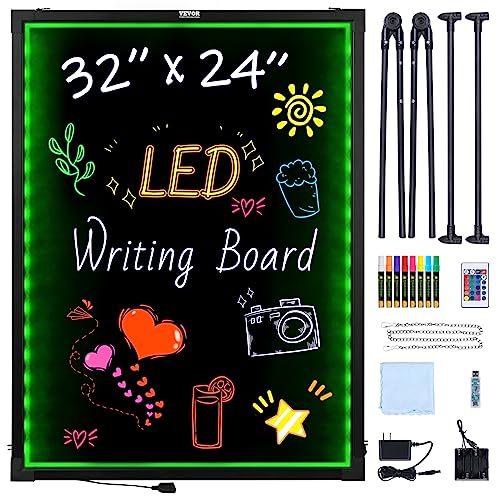
- 16 colors with 4 lighting modes
- Tempered glass and remote control
- Multiple power options for flexibility
Best For: Restaurants needing a reusable glowing message board
Compact 4K Signage Stick
OptiSigns OptiStick Digital Signage Player

- Pre-installed OptiSigns player
- 4K HDR output over HDMI
- Wi-Fi and Ethernet support
Best For: OptiSigns users wanting compact remote-managed signage
Cloud Menu Player
EZ AD TV Digital Signage Player

- Cloud-controlled wireless updates
- Free plan with content tools
- Flexible vertical screen layouts
Best For: Restaurants wanting cloud-managed menu screens
Portable Counter Menu Board
WeADS Android 11 Tabletop Signage

- 23200mAh battery for long runtime
- Android 11 with 4GB RAM and 32GB storage
- USB upload plus cloud/CMS management
Best For: Restaurants, bars, and retail counters needing a portable battery-powered display
Large Wall-Mount Menu Board
29-inch 700-Nit Android Signage
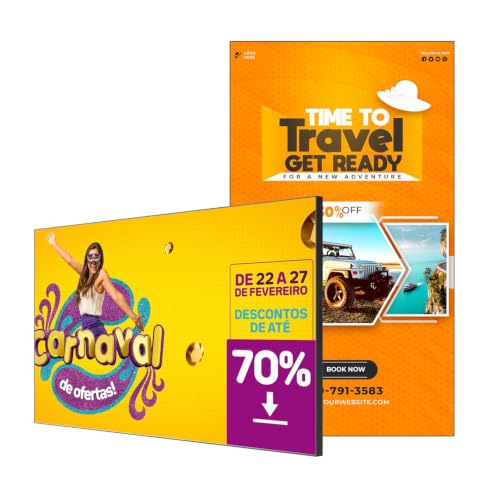
- 29-inch display with 700 nits brightness
- Free CMS for remote scheduling and edits
- Ultra-narrow bezel for cleaner wall installs
Best For: Restaurants needing a larger wall-mounted menu display with remote control
Countertop Menu Display

- 700-nit desktop display for clear visibility
- Free lifetime Cloud CMS for remote updates
- Landscape or portrait tabletop setup
Best For: Cafés, restaurants, and counters needing a compact, bright menu board
Compact Countertop Menu Display
24-Inch Desktop Digital Menu Board

- 24-inch desktop design saves counter space
- Full HD 1080p with wide viewing angle
- Android + CMS supports remote content updates
Best For: Milk tea shops and restaurants with limited counter space
Large Bright Wall Display
43-Inch 1000-Nit 4K Digital Signage

- 1000-nit brightness for better visibility indoors
- 4K UHD with Android 11 and free CMS
- Supports portrait mode and 2 to 6 layout zones
Best For: High-traffic restaurants and wall-mounted menu signage
Mid-Size Counter Display
27-Inch Desktop Digital Menu Board

- 27-inch tabletop format gives extra screen space
- Full HD 1080p with vivid colors and wide viewing angle
- Android + CMS enables remote content management
Best For: Counters that need a bigger menu display without wall mounting
Restaurant Menu Automation – Mandoe Essentials Digital Signage Player for Restaurants
If you want digital menu boards for restaurants that are quick to set up and easy to keep current, this Mandoe Essentials player is built for that workflow. It lets you create menus and promotions in minutes, update pricing from a phone or computer, and keep screens running even when the internet drops.
Best For: Restaurants and cafés that want a plug-and-play way to replace printed menus.
Pros:
- Plug-and-play HDMI setup with no IT help needed
- AI content creation for menus, specials, and promotions
- Remote updates from phone or computer
- Offline playback helps keep displays active during service
Cons:
- Requires a compatible TV or display with HDMI
- Best suited to simple signage workflows rather than advanced customization
Overall, this is a practical choice if your main goal is to swap printed menus for fast-moving digital content without adding operational complexity.
Illuminated Chalkboard Menu – VEVOR 32×24 LED Message Writing Board
For digital menu boards for restaurants that need a handwritten look with extra visibility, this VEVOR LED message board adds a neon-style glow to your messaging. It offers multiple colors, brightness levels, and flash modes, making it useful for attention-grabbing specials or promotions in indoor or outdoor settings.
Best For: Cafés, restaurants, and event spaces that want a reusable illuminated message board.
Pros:
- 16 colors, 4 modes, and 5 brightness levels
- Includes 8 fluorescent markers for quick writing
- Remote control makes it easy to change display effects
- Tempered glass surface is more durable than acrylic
Cons:
- Designed for written messages rather than fully automated digital menus
- Requires power, though multiple charging methods are supported
This is a good fit if you want a reusable illuminated board that can highlight daily specials with more visual punch than a standard chalkboard.
Compact 4K Signage Stick – OptiSigns OptiStick Digital Signage Player
If you need digital menu boards for restaurants with a compact player that focuses on remote management, the OptiSigns OptiStick is a straightforward option. It supports 4K output, works over Wi-Fi or Ethernet, and comes with the OptiSigns player pre-installed for managing screens from anywhere.
Best For: Businesses already using or planning to use the OptiSigns platform.
Pros:
- Pre-installed OptiSigns player for easy setup
- Remote screen management through portal or admin app
- 4K HDR output with HDMI connection
- Wi-Fi and Ethernet support for flexible connectivity
Cons:
- Requires an OptiSigns subscription to use
- One stick powers one screen
This is a strong pick for operators who want a small hardware footprint and are comfortable building their menu system around the OptiSigns ecosystem.
Cloud Menu Player – EZ AD TV Digital Signage Player
For digital menu boards for restaurants that need cloud-based control and flexible layouts, the EZ AD TV player is designed to keep content moving without a complicated workflow. It supports 4K playback, wireless updates from the cloud, and layout options that let you split the screen into multiple slideshows.
Best For: Restaurants and businesses that want cloud-controlled menu and promo screens with simple editing tools.
Pros:
- Free plan available with support for image and video formats
- Mobile app, template builder, and video studio for content creation
- Cloud-based wireless updates for easy changes
- Flexible vertical layouts and multi-slide screen setups
Cons:
- Some advanced features may depend on paid plans
- Requires a compatible HDMI television for display
This is a versatile option if you want a player that combines menu-board scheduling, content creation tools, and remote updates in one package.
Portable Counter Menu Board – WeADS Android 11 Tabletop Signage
If you want digital menu boards for restaurants that can move easily between service areas, this WeADS tabletop display is built for flexible use. Its Android 11 system, Wi-Fi connectivity, and removable high-capacity battery make it practical for counters, pop-ups, bars, and other spots where outlet access may be limited.
Best For: Restaurants, bars, and retail counters that need a portable menu board with battery power and app flexibility.
Pros:
- 23200mAh built-in battery supports long working hours without constant power
- Android 11 with 4GB RAM and 32GB storage for smooth app performance
- Detachable battery design adds portability for different setups
- Supports custom app installation plus USB upload and cloud/CMS management
Cons:
- Tabletop design is better for counters than large wall-mounted menu applications
- Smaller screen size may not suit locations that need distant visibility
This is a strong choice if flexibility matters more than size. It combines portable hardware with multiple content management options, making it a useful fit for businesses that change layouts often or want a simple battery-backed display.
Large Wall-Mount Menu Board – 29-inch 700-Nit Android Signage
For restaurants that want digital menu boards for restaurants with a larger, more visible presentation, this 29-inch Android commercial display is designed for wall-mounted use and remote management. The 700-nit panel, ultra-narrow bezel, and free CMS support make it a practical option for busy spaces that need clear menu updates and scheduled content.
Best For: Restaurants and hospitality spaces that want a bright, wall-mounted digital menu board with remote scheduling.
Pros:
- 700 nits brightness helps menus stay visible in commercial environments
- Free CMS supports remote editing, scheduling, and brightness control
- Ultra-narrow bezels and slim profile suit tiled or gap-free wall installs
- Android system with 2GB RAM and 32GB storage for local media playback
Cons:
- Wall-mounted format is less flexible than a tabletop display
- 2GB RAM is enough for signage, but not aimed at heavy multitasking
This model is best when visibility and presentation matter more than portability. Its larger size, bright panel, and multi-zone layout support make it a good fit for menu boards, promotions, and other high-traffic signage needs.
Countertop Menu Display – Canlarriz 18.5" 700-Nit Board
This 18.5-inch display is aimed at businesses that need digital menu boards for restaurants in a countertop or reception-friendly format. With 700 nits brightness, Android 12, and built-in cloud CMS, it supports quick content changes for menus, promotions, and customer-facing announcements.
Best For: Cafés, restaurants, and retail counters that need a bright desktop menu board with remote content control.
Pros:
- 700 nits brightness helps keep menus readable in commercial settings
- Free lifetime Cloud CMS supports remote updates and scheduling
- Desktop stand with landscape or portrait orientation adds layout flexibility
- Android 12 with 2GB RAM and 32GB storage for stable everyday playback
Cons:
- 18.5-inch screen is best for close-range viewing, not large dining rooms
- HD 720P resolution is less detailed than higher-end commercial panels
For small-format menu deployment, this display gives you the essentials without much setup hassle. It is especially useful where counter space is available and staff want an easy way to update content from a phone, tablet, or PC.
Compact Countertop Menu Display – 24-Inch Desktop Digital Menu Board
If you need one of the more space-efficient digital menu boards for restaurants, this 24-inch desktop unit is built for counters, front desks, and tight service areas. It pairs Full HD 1080p clarity with Android-based content management, so you can update menus, promos, and videos without relying on an on-site computer.
Best For: Milk tea shops, quick-service counters, and restaurants that want a compact tabletop menu display.
Pros:
- 24-inch desktop footprint helps save counter space while keeping menus visible.
- FHD 1920×1080 panel with wide viewing angle and vivid color reproduction.
- Android system plus CMS supports remote updates for menus, promotions, images, and videos.
- Built for 24/7 commercial operation with heat dissipation and multiple update options.
Cons:
- Desktop form factor may not suit wall-mounted signage setups.
- Smaller screen size offers less display area than larger commercial screens.
- Marketing focus is broad, so feature set is practical rather than premium.
Overall, this model makes sense when you want a simple, durable tabletop display that can refresh content quickly. It is a strong fit for busy counters where clarity, easy updates, and efficient ordering matter more than large-format presentation.
Large Bright Wall Display – 43-Inch 1000-Nit 4K Digital Signage
For restaurants that need a high-visibility option among digital menu boards for restaurants, this 43-inch commercial display brings 1000-nit brightness, 4K UHD playback, and flexible split-screen layouts. Its slim bezel, wall-mount design, and remote CMS tools make it well suited to showcasing menus, QR codes, promotions, and daypart changes in a polished format.
Best For: Busy restaurants, retail venues, and businesses that want a bright wall-mounted menu board with remote control.
Pros:
- 1000-nit brightness and IPS panel improve visibility in bright indoor environments.
- 4K UHD support with Android 11 and 4GB+32GB storage for smooth playback.
- Free CMS enables remote publishing, daypart menu switching, and brightness control.
- Supports portrait or landscape use plus 2 to 6 screen zones for flexible layouts.
Cons:
- Wall-mount setup is less flexible than tabletop menu displays.
- Larger size and 41.9-pound weight make installation more involved.
- May be more screen than needed for very small counter spaces.
This is the strongest pick if visibility and presentation matter most. It combines commercial brightness, flexible layout options, and remote management in a format that works well for larger menus and changing promotions.
Mid-Size Counter Display – 27-Inch Desktop Digital Menu Board
This 27-inch option sits in the middle of the digital menu boards for restaurants category, giving you a larger tabletop presence without moving to a full wall display. It delivers Full HD 1080p clarity, Android-based CMS control, and commercial-grade durability for restaurants and retail counters that need a practical, easy-to-update screen.
Best For: Restaurants and milk tea shops that want a larger countertop menu display with remote updating.
Pros:
- 27-inch desktop size offers more screen space while still saving counter area.
- Full HD 1080p panel with vivid color and wide viewing angle.
- Android system plus CMS supports remote menu, promo, image, and video updates.
- Commercial build is designed for 24/7 operation and easier long-term maintenance.
Cons:
- Heavier than the 24-inch desktop model at 9.3 kg.
- Still limited to a countertop format rather than a true large-format wall display.
- Feature set is practical, but it does not include the ultra-high brightness of premium wall screens.
If you want more display area than a compact counter screen provides, this 27-inch model is a sensible step up. It balances size, clarity, and remote content management in a format that suits everyday restaurant use.
How We Picked These Digital Menu Boards for Restaurants
We focused on practical restaurant needs: display clarity, brightness, content management, mounting flexibility, screen size, and how easy each option is to deploy day to day. We also looked for products that fit common menu-board workflows, including cloud updates, CMS support, Android-based systems, and plug-and-play players.
Quick Comparison
In this roundup, the tabletop and desktop models are best for counters, bars, and small service areas. The brighter wall-mounted commercial displays are better for dining rooms with ambient light or windows. The signage players are a fit if you already have compatible screens and want a more affordable upgrade path.
Key Buying Factors for Digital Menu Boards for Restaurants
Screen Size and Viewing Distance
Choose a display size that matches how far guests will stand or sit from the menu. Smaller 18.5-inch and 24-inch boards work well at close range, while 29-inch, 32-inch, 43-inch, or multi-screen setups are better for larger ordering areas.
Brightness and Readability
Brightness matters a lot in busy dining rooms and near windows. Higher-nit commercial screens are easier to read in bright environments, while lower-brightness units may be better suited to indoor counters or controlled lighting.
Content Management
For many buyers, the biggest advantage of Digital Menu Boards for Restaurants is simple remote editing. Look for CMS tools that support scheduled changes, menu dayparts, promotional slides, and multi-location control if you run more than one site.
Installation and Hardware Fit
Some setups need a full display, while others only need a signage player for an existing monitor. Check HDMI support, VESA or desktop placement, power options, and whether the unit is intended for permanent mounting or portable use.
Who Should Buy Which Digital Menu Boards for Restaurants?
Independent cafes and quick-service restaurants often do best with compact all-in-one displays or easy CMS-enabled boards. Multi-location brands should prioritize cloud management and screens that stay legible across different lighting conditions. If you already own compatible displays, a dedicated signage player can be the most cost-effective upgrade.
If you want a setup that can scale with your menu, lighting, and operational needs, the right digital menu board should make updates faster without adding complexity for staff.