Choosing the right display for a lobby is about more than screen size. You need a model that looks polished, stays readable in bright spaces, and makes updates simple for staff.
This roundup of digital signage displays for office lobbies focuses on the features that matter most for reception areas, visitor communication, and branded first impressions.
Best 10 Digital Signage Displays for Office Lobbies Picks for 2026
Freestanding Lobby Kiosk
43-inch Android kiosk for indoor signage

- 43-inch FHD IPS display with wide viewing angles
- Android system supports USB, Wi-Fi, and network updates
- Split-screen layout helps combine promos and information
Best For: Indoor lobby messaging, wayfinding, and promotions
Premium Standing Poster Display
ViewSonic 55-inch 4K free-standing kiosk

- 55-inch 4K display with wide-angle viewing
- Free-standing kiosk design suits high-traffic lobbies
- Anti-glare, 7H scratch-resistant glass faceplate
Best For: Upscale lobby signage with strong visual impact
Wall-Mounted Office Display
Promethean 55-inch 4K non-touch signage screen

- 55-inch 4K UHD display with 500-nit brightness
- Wall mount included for quick lobby installation
- Remote device management and 3-year onsite support
Best For: Clean, wall-mounted lobby announcements and directories
Portable Lobby Signage
32-Inch Portable Android Kiosk

- FHD IPS display with 178° viewing angle
- USB/HDMI input and auto loop playback
- Foldable design with built-in wheels
Best For: Offices needing a portable lobby display with remote updates
Thin-Bezel Wall Display
29-Inch 700-Nit Android Signage
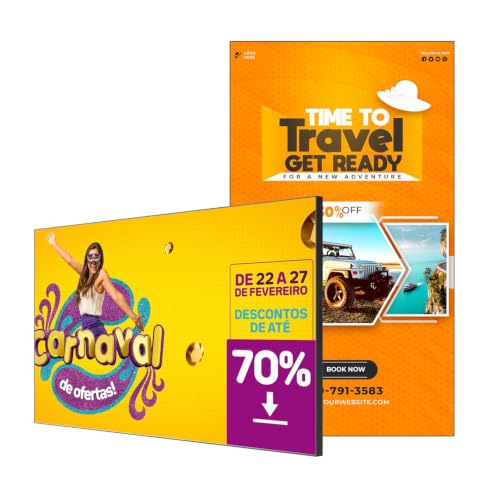
- 700-nit panel for bright lobby visibility
- Ultra-slim bezel and wall-friendly profile
- Free CMS for remote scheduling and edits
Best For: Slim office lobbies needing a bright wall-mounted signage screen
Interactive Lobby Kiosk

- Responsive touchscreen for visitor interaction
- Built-in media player with USB playback
- Timer function for scheduled power control
Best For: Corporate reception areas needing touch-based wayfinding or engagement
Ultra-Wide Lobby Signage Pick
29" Stretched Bar Monitor for Offices

- Slim stretched format for narrow lobby spaces
- 1000-nit brightness for commercial visibility
- Cloud, app, and USB content management
Best For: Office lobbies and reception areas with limited wall space
All-in-One 4K Lobby Display
Promethean ActivPanel D-Series 55"

- 4K commercial display for lobbies and reception
- No media player required for simpler setup
- Includes Radix VISO license and onsite support
Best For: Offices wanting a streamlined, centrally managed lobby screen
Compact Reception Display
18.5" Countertop Signage for Offices

- Compact desktop design for reception areas
- 700-nit brightness with built-in cloud CMS
- USB and HDMI support for easy updates
Best For: Small office lobbies and reception desks
Freestanding Lobby Kiosk – 43-inch Android kiosk for indoor signage
If you need digital signage displays for office lobbies that can handle announcements, wayfinding, and brand messaging, this 43-inch floor-standing kiosk is built for that kind of indoor use. Its slim vertical design, built-in Android system, and auto media playback make it practical for a front desk, reception area, or other shared space where you want content to keep running with minimal setup.
Best For: Office lobbies that need a freestanding screen for promotions, directions, and general information sharing.
Pros:
- 43-inch FHD IPS screen with 178° viewing angle for broad visibility
- Built-in Android OS with USB playback, Wi-Fi, and network connectivity
- Split-screen layout support for showing multiple content types at once
- Slim floor-standing design with 3-year warranty for quality defects
Cons:
- Designed as an indoor kiosk, so it is not meant for outdoor use
- Best suited to content teams that will manage scheduled or remote updates
This model makes sense when you want a single freestanding display that can present ads, brand stories, schedules, or navigation in a polished vertical format. The combination of built-in playback tools and split-screen flexibility gives it useful range for lobby communication.
Simple Commercial Signage Panel – LG 43-inch FHD digital signage display
For office lobbies that need a straightforward commercial screen rather than a kiosk, this LG 43-inch digital signage display is a practical option. It offers a 1080p FHD panel, 178-degree viewing angle, and HDMI connectivity, making it suitable for basic lobby announcements, visitor information, and scheduled messaging where a clean wall- or desk-mounted display is preferred.
Best For: Offices that want a simple 43-inch signage screen for everyday lobby communication.
Pros:
- 43-inch Full HD 1080p resolution for clear signage content
- 178-degree viewing angle supports visibility in shared spaces
- HDMI, USB, and RS232 connectivity for common installations
- Commercial-specific use with a simple, no-frills display approach
Cons:
- No built-in kiosk stand or free-standing enclosure included
- Fewer built-in signage features than more specialized digital poster systems
This is a good fit when you already have a mounting plan and just need a dependable signage panel for the lobby. It keeps the feature set focused on display quality and basic connectivity rather than all-in-one kiosk functions.
Premium Standing Poster Display – ViewSonic 55-inch 4K free-standing kiosk
This free-standing ViewSonic model is a strong pick for digital signage displays for office lobbies when you want a premium poster-style presentation. The 55-inch 4K screen, slim kiosk form factor, and anti-glare scratch-resistant glass are aimed at high-traffic indoor spaces where visual impact and durability both matter.
Best For: Larger office lobbies that need a polished, high-resolution standing display for dynamic messaging.
Pros:
- 55-inch 4K Ultra HD panel for sharp, vivid content
- Free-standing design creates a clean poster-style lobby presence
- Anti-glare, 7H scratch-resistant glass faceplate improves durability
- Embedded signage platform reduces the need for external playback hardware
Cons:
- Heavier than smaller signage options at 164.7 pounds
- Optional CMS software may be needed for broader content management workflows
For organizations that want a more upscale lobby statement piece, this kiosk delivers strong resolution and a professional form factor. It is especially appealing when you want signage that can stand on its own in bright, busy entry areas.
Wall-Mounted Office Display – Promethean 55-inch 4K non-touch signage screen
If your goal is to deploy digital signage displays for office lobbies with a clean wall-mounted look, this Promethean 55-inch commercial screen is built for announcements, directories, and schedule updates. It combines 4K UHD resolution, a frameless design, and included wall mount hardware, making it a practical choice for reception areas and other professional communication spaces.
Best For: Offices, schools, and retail spaces that need a wall-mounted signage display for routine messaging.
Pros:
- 55-inch 4K UHD panel with 500 nits brightness for clear signage
- Wall mount included for streamlined installation
- Pre-installed device management platform supports remote control and monitoring
- 3-year onsite support adds confidence for daily business use
Cons:
- Non-touch design means it is not intended for interactive use
- Wall-mounted format may not suit teams looking for a freestanding kiosk
This display is best when your lobby signage needs to feel integrated and professional rather than kiosk-like. The included support and management tools make it especially useful for organizations that want easier long-term deployment.
Portable Lobby Signage – 32-Inch Portable Android Kiosk
If you want digital signage displays for office lobbies that can be moved around easily, this 32-inch kiosk is built for flexible placement and simple content updates. Its FHD IPS panel, 178° viewing angle, and auto loop playback make it a practical fit for reception areas, entrances, and temporary promotions where visibility matters.
Best For: Offices that need a portable lobby display with remote content control and plug-and-play operation.
Pros:
- 32-inch FHD IPS display with a wide 178° viewing angle
- USB/HDMI support plus automatic loop playback for easy setup
- CMS allows real-time remote publishing and management
- Foldable, wheeled design makes it easier to move between spaces
Cons:
- Bulkier than wall-mounted office lobby screens
- Designed for portability rather than a permanent fixed install
- Best suited to content playback, not interactive touch use
This is a strong choice if your lobby signage needs to travel between locations or be updated often without a lot of manual effort. The combination of timed power settings, continuous playback, and remote CMS control gives it good day-to-day flexibility for office use.
Thin-Bezel Wall Display – 29-Inch 700-Nit Android Signage
For digital signage displays for office lobbies that need a cleaner wall-mounted look, this 29-inch Android model focuses on brightness, slim design, and remote management. The 700-nit panel, ultra-narrow bezel, and 24/7 loop playback help it work well in bright reception spaces where polished presentation is important.
Best For: Office lobbies that want a slim, bright display for menus, announcements, and scheduled content.
Pros:
- 700-nit brightness supports visibility in busy, well-lit areas
- Ultra-narrow bezel and slim profile suit wall mounting
- Free CMS supports remote scheduling and bulk editing
- Android platform includes Google Play Store and plug-and-play HDMI
Cons:
- No touchscreen for interactive lobby use
- 29-inch size may be small for larger reception areas
- 2GB RAM and 32GB storage are fine for signage, but not heavy multitasking
If your priority is a sleek office lobby display that looks tidy on the wall and is easy to manage remotely, this model is well aligned. It combines commercial brightness with simple scheduling tools, which makes it a practical fit for everyday announcements and wayfinding.
Interactive Lobby Kiosk – 43-Inch Touch Screen Signage
When office lobbies need more than passive playback, this 43-inch touch screen kiosk turns digital signage displays for office lobbies into an interactive information point. With a responsive touchscreen, built-in media player, and timer-based power control, it is set up for engagement, navigation, and straightforward content playback in public-facing spaces.
Best For: Corporate lobbies and reception areas that need interactive wayfinding or guest engagement.
Pros:
- Responsive touchscreen supports interactive use in busy areas
- Built-in media player plays JPG, MP4, and other files from USB
- 2K display is designed for clear visuals in bright environments
- Timer function helps automate power on/off schedules
Cons:
- Larger footprint than standard non-touch lobby displays
- Native resolution listed as 2560×1080, so it is not a true 4K panel
- More interaction-focused than a simple set-and-forget signage screen
This model makes the most sense if your lobby signage needs to answer questions, guide visitors, or support product-style presentations. The touch interface adds flexibility, while the media player keeps setup simple for teams that want direct USB playback.
Ultra-Wide Lobby Signage Pick – 29" Stretched Bar Monitor for Offices
If you need digital signage displays for office lobbies that fit a narrow wall space or reception counter, this 29-inch stretched bar monitor is built for exactly that kind of layout. Its ultra-wide 16:9 design, 1000-nit brightness, and remote CMS support make it a practical choice for welcome messages, announcements, and rotating promotions in busy commercial areas.
Best For: Office lobbies, reception areas, and other spaces where a slim, wall-friendly signage format works better than a standard monitor.
Pros:
- Ultra-wide, slim-profile design fits tight lobby and counter installations.
- 1000-nit brightness helps content stand out in commercial environments.
- Cloud, app, or USB updates make remote content management straightforward.
- Split-screen playback can show announcements and promotions at the same time.
Cons:
- Bar-style format is less suitable if you want a traditional large-format display.
- Native resolution is 1920 x 1080, not 4K.
- Best fit depends on having a space where the stretched shape makes sense.
This is a strong lobby signage option when the goal is to maximize visibility without taking up much physical room. The commercial build, auto-play startup, and included VESA-compatible mounting add to its appeal for unattended front-desk use.
All-in-One 4K Lobby Display – Promethean ActivPanel D-Series 55"
For digital signage displays for office lobbies that need a straightforward, commercial-grade setup, this Promethean ActivPanel D-Series focuses on simplicity and central management. It is designed for lobbies, reception areas, and conference rooms, with 4K resolution, a 1-year Radix VISO license, and no media player required.
Best For: Offices that want an all-in-one 4K signage display with remote management and fewer separate components.
Pros:
- 4K UHD panel offers sharp visuals for announcements, directories, and schedules.
- No media stick required, which simplifies setup and reduces extra parts.
- Included Radix VISO license supports remote device management and scheduling.
- 3-year onsite support adds confidence for commercial deployment.
Cons:
- At 55 inches, it needs a larger lobby wall or reception area.
- Single HDMI port may limit certain source setups.
- It is a non-touch commercial display, so it is not built for interactive use.
This display makes sense if you want a polished signage solution that is easier to deploy than a separate display-plus-player stack. The combination of 4K clarity, remote management, and onsite support is a strong match for professional front-of-house messaging.
Compact Reception Display – 18.5" Countertop Signage for Offices
If your office lobby needs a compact screen rather than a large wall display, this 18.5-inch option fits well on a reception desk, check-in counter, or waiting-room table. It is designed for commercial use with 700-nit brightness, built-in cloud CMS, and plug-and-play USB or HDMI support for easy content updates.
Best For: Reception desks, check-in counters, and smaller office lobbies that need a desktop signage solution.
Pros:
- Desktop stand and portrait/landscape support make placement flexible.
- 700-nit brightness is suited to commercial indoor viewing.
- Built-in lifetime free CMS allows remote scheduling and playlist management.
- USB and HDMI connectivity support quick local content changes.
Cons:
- 18.5-inch screen size is better for close viewing than large lobby visibility.
- 720P HD visuals are less detailed than higher-resolution signage options.
- Desk-mount format may not suit wall-mounted lobby installations.
This is a practical choice when you want signage that feels integrated into a front desk rather than dominating the room. It is especially useful for welcome messages, small promos, and ongoing reception updates in tighter office spaces.
How We Picked the Best Digital Signage Displays for Office Lobbies
We looked for commercial-grade options that fit real lobby use: strong brightness, dependable playback, easy content management, and formats that suit entrance areas. We also favored displays with practical connectivity, durable construction, and sizes that work well for wayfinding, announcements, and branded welcome messages.
Quick Comparison
For most office lobbies, the best choice depends on the space. Larger vertical kiosks create a premium welcome presence, while smaller panels can work well near reception desks or in narrow entryways. Interactive models make sense when visitors need directions or self-service, while non-touch displays are better for simple, always-on messaging.
Key Buying Factors for Digital Signage Displays for Office Lobbies
Visibility and Brightness
Lobby lighting can be challenging, especially near glass doors or bright overhead fixtures. Choose a display with enough brightness to remain readable without looking washed out. For most front-of-house setups, higher-nit models are easier to see from multiple angles and in changing light.
Screen Orientation and Size
Portrait kiosks are popular for Digital Signage Displays for Office Lobbies because they look like modern welcome signs and work well for announcements, directories, and event messaging. Landscape formats are useful for wide reception areas or content that includes more text, branding, or video.
Content Management
Look for built-in Android systems, cloud CMS support, or USB/HDMI playback if you want simple updates. If multiple team members will manage the screen, remote scheduling can save time and keep messaging consistent across locations.
Touch Vs. Non-Touch
Interactive screens are best when visitors need to search directories, check-in, or browse information. If your goal is just to greet guests and share notices, a non-touch panel is usually more reliable and easier to maintain.
Placement and Hardware
Check whether the display is freestanding, wall-mountable, or designed as a kiosk. The right form factor should match your lobby footprint and traffic flow so the screen is visible without blocking entry paths.
Who Should Buy Which Digital Signage Displays for Office Lobbies?
Choose a large freestanding kiosk if you want a high-end entrance statement and frequent content changes. Pick a mid-size commercial display if you need a flexible, budget-conscious solution for announcements or branding. Go with an interactive model if visitors need guidance or self-service tools. For smaller lobbies, compact high-brightness screens can deliver a clean, professional look without taking up much space.
In short, the best Digital Signage Displays for Office Lobbies balance visibility, ease of use, and a professional presentation that supports your brand from the moment guests arrive.