Choosing the right display can make Zoom Rooms feel more natural, more interactive, and easier to manage. The best digital whiteboards for Zoom Rooms help teams annotate, present, and collaborate without slowing the meeting down.
Below, we focus on practical buying factors like screen size, touch performance, casting, software support, and whether a board fits a small huddle room or a larger conference space.
Best 10 Digital Whiteboards for Zoom Rooms Picks for 2026
Classroom-Ready Collaboration Hub

- 65-inch 4K UHD touchscreen
- Zoom, Meet, Teams, and Webex support
- Wireless sharing plus QR file transfer
Best For: Teams and classrooms needing an all-in-one interactive board
Secure Hybrid Meeting Display
- Google EDLA-certified with Play Store access
- Android 14 and 128GB storage
- Anti-glare 4K screen with wireless sharing
Best For: Hybrid offices and schools needing secure Google-based workflows
Large-Room Video Conferencing Board

- 86-inch true 4K UHD touchscreen
- Built-in video conferencing hub
- Front, rear, and bottom connectivity
Best For: Large conference rooms and training spaces
Meeting-Ready Interactive Display
HORION 65" 4K Digital Whiteboard
- 40-point 4K anti-glare touchscreen
- Zoom and Teams compatible with touchback
- Android 13, Google Play, and Wi-Fi 5
Best For: Offices and classrooms running hybrid meetings
Most Complete All-in-One
65" 4K Smart Board with Touch and Camera

- 4K display with 20-point multi-touch
- 13MP camera, 8-array mic, dual 20W speakers
- Android 14 with wireless and wired sharing
Best For: Hybrid rooms that need an integrated Zoom board
Best for Simple BYOM Setups
55" Anti-Glare Smart Whiteboard for Zoom Rooms
- 40-point 4K anti-glare touchscreen
- Wireless screen sharing with touchback control
- Zoom and Teams compatible, with external gear support
Best For: Rooms that want a clean display with BYOM conferencing
Best Premium Google Option
55" EDLA Smart Board Pro with AI Camera
- Google EDLA-certified with Workspace and Drive support
- 48MP AI camera plus 100W soundbar
- Zoom, Meet, Teams, and Webex compatible
Best For: Google-based teams wanting a premium Zoom-room board
Premium Large-Screen Collaboration Pick
75 Inch 4K Google EDLA Smart Board

- 75-inch 4K display with wide viewing angles
- Google EDLA access for Google apps and Workspace
- 50-point touch with wireless casting for up to 16 devices
Best For: Large zoom rooms and hybrid team spaces
Meeting-Focused All-in-One Choice
65" Smart Board Pro with Camera
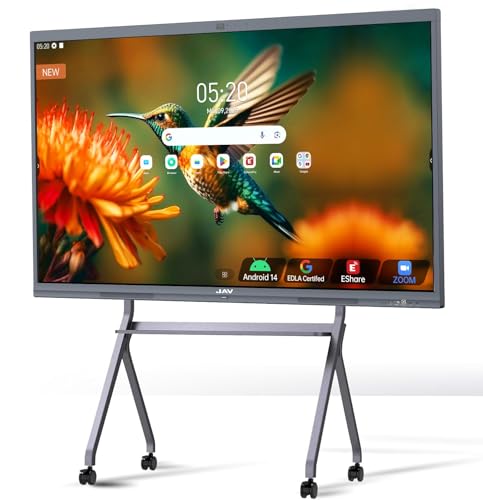
- 48MP AI camera and 100W soundbar built in
- Eight microphones with noise reduction and echo cancellation
- Supports Zoom, Google Meet, and Microsoft Teams
Best For: Conference rooms that want an all-in-one video meeting board
Balanced Mid-Size Pick
65 Inch 4K Google EDLA Smart Board

- 65-inch 4K screen suits many meeting rooms
- Google EDLA access with Android 14
- 50-point touch and wireless casting for 16 devices
Best For: Standard zoom rooms and mixed-use office spaces
Classroom-Ready Collaboration Hub – COOLHOOD 65" 4K Smart Board
If you’re comparing digital whiteboards for zoom rooms, this 65-inch COOLHOOD model is built for interactive meetings, teaching, and live annotation. It pairs 4K UHD resolution with 20-point touch, wireless screen sharing, and built-in support for Zoom, Google Meet, Microsoft Teams, and Webex, so it fits well in rooms where presentations and discussion happen in the same session.
Best For: Teams and classrooms that want an all-in-one interactive board with strong video meeting support.
Pros:
- 65-inch 4K UHD touchscreen with 20-point multi-touch
- Supports Zoom plus other major conferencing platforms
- Wireless screen sharing, QR file sharing, and built-in collaboration tools
- Android 13 with 128GB storage and open app ecosystem
Cons:
- Wall mount is included, but the stand is sold separately
- Only 1 HDMI port is listed in the specs
Overall, this is a versatile smart board for organizations that want a large interactive display with conferencing and annotation features in one unit. The feature set is especially useful when the board is expected to handle both presentation and meeting-room duties.
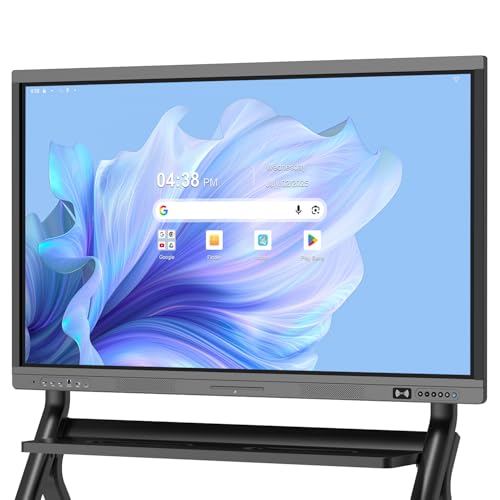
Secure Hybrid Meeting Display – Dornium 55" EDLA Smart Board
For buyers looking at digital whiteboards for zoom rooms, this 55-inch Dornium board emphasizes security, app access, and flexible sharing. Its Google EDLA certification, Android 14 system, and support for wireless sharing plus HDMI input make it a practical fit for hybrid workspaces, classrooms, and offices that want a dependable meeting display.
Best For: Hybrid offices and schools that want Google ecosystem support and secure user management.
Pros:
- Google EDLA-certified with Play Store and Google Drive access
- Android 14, 8GB RAM, and 128GB storage
- 4K anti-glare tempered glass with 20-point multi-touch
- Wireless sharing, HDMI input, and QR code page sharing
Cons:
- Standing bracket is sold separately
- 55-inch size may be smaller than some conference-room setups
This model stands out if your team values secure access, app flexibility, and straightforward content sharing. It is a solid middle-ground choice for meeting rooms that need both collaboration tools and Google-friendly workflow support.
Large-Room Video Conferencing Board – 86" Android 14 Smart Board
If you need digital whiteboards for zoom rooms in a larger space, this 86-inch smart board is designed for visibility, collaboration, and conferencing. It combines a true 4K UHD touchscreen with Android 14, 8GB RAM, and 128GB storage, while also adding built-in video conferencing support and a wide port selection for mixed equipment setups.
Best For: Large conference rooms, training spaces, and classrooms that need a big display and broad connectivity.
Pros:
- Large 86-inch true 4K UHD display
- Android 14 with 8GB RAM and 128GB storage
- Built-in video conferencing hub for meetings and annotation
- Wide range of front, rear, and bottom ports
Cons:
- Large size may be more than smaller rooms need
- Many connection options can make setup more involved
This board is best when room size and connection flexibility matter more than compactness. It gives you a lot of screen area and interface options, making it well suited to busy shared spaces that handle meetings, teaching, and multimedia content.
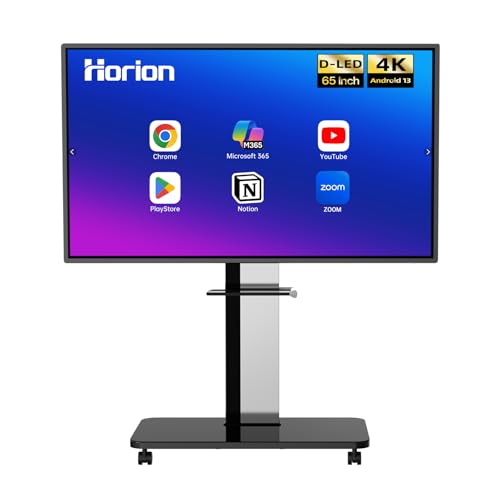
Meeting-Ready Interactive Display – HORION 65" 4K Digital Whiteboard
This HORION model is a practical pick for digital whiteboards for zoom rooms when you want a balance of meeting features and everyday usability. It includes 4K anti-glare touch, Android 13 with Google Play, wireless screen sharing, and Zoom and Teams compatibility, plus a design that supports both touchback control and external cameras or microphones.
Best For: Offices and classrooms that want a polished interactive board for hybrid meetings.
Pros:
- 65-inch 4K anti-glare touchscreen with 40-point touch
- Zoom and Teams compatible with touchback support
- Wireless screen sharing from major device types
- Android 13 with Google Play and dual-band Wi-Fi 5
Cons:
- External camera and microphone are sold separately
- May be less feature-dense than boards with larger storage or newer Android versions
For teams that want a stable meeting display with strong collaboration basics, this is an easy board to justify. The combination of screen sharing, touchback, and built-in speakers makes it well suited to day-to-day hybrid work.
Most Complete All-in-One – 65" 4K Smart Board with Touch and Camera
If you want digital whiteboards for zoom rooms that can handle meetings, teaching, and quick content sharing in one device, this 65-inch smart board is built for that kind of all-in-one setup. It combines a 4K display, integrated computing, and conferencing hardware so you can run hybrid sessions without stacking extra gear around the room.
Best For: Teams, classrooms, and hybrid meeting rooms that want a fully integrated Zoom-ready board with minimal setup.
Pros:
- Built-in 8GB RAM, 128GB storage, and Android 14 reduce the need for a separate PC.
- 20-point touch support makes it easy for multiple people to write, draw, and zoom at once.
- Includes a 13MP auto-focus camera, 8-array microphone, and dual 20W speakers for video calls.
- Supports wireless casting plus HDMI/USB-C wired sharing, with split-screen for up to 4 sources.
Cons:
- The size and all-in-one design are better suited to dedicated rooms than small desks.
- Its full feature set may be more than casual users need for simple annotation only.
Overall, this is a strong choice if you want a single board to anchor collaboration and conferencing. The combination of touch, camera, audio, and app access makes it especially practical for rooms that host frequent Zoom meetings.
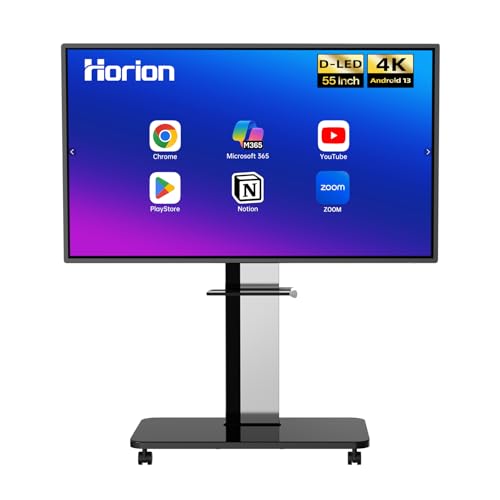
Best for Simple BYOM Setups – 55" Anti-Glare Smart Whiteboard for Zoom Rooms
For digital whiteboards for zoom rooms where you want the display to stay simple, reliable, and compatible with your existing meeting gear, this 55-inch HORION board is a practical fit. It focuses on smooth touch input, wireless sharing, and Zoom/Teams support while leaving cameras and external mics up to your room setup.
Best For: Offices, classrooms, and privacy-conscious meeting rooms that already have separate conferencing hardware.
Pros:
- 4K anti-glare 40-point touchscreen supports responsive multi-user writing and drawing.
- Wireless sharing works with iPhone, Mac, Windows, and Android devices.
- Direct touchback control lets you operate your laptop from the display.
- Includes wall mount, remote, stylus pens, and an 18-month warranty.
Cons:
- External camera and microphone are sold separately.
- It is more focused on display and collaboration than on built-in conferencing hardware.
This model makes sense when you already have a preferred camera and audio setup and mainly need a dependable interactive screen. Its anti-glare panel, split-screen sharing, and touchback features make day-to-day meetings easier without adding unnecessary complexity.
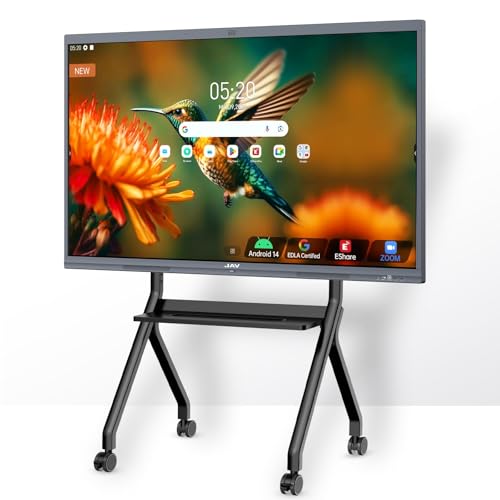
Best Premium Google Option – 55" EDLA Smart Board Pro with AI Camera
If you need digital whiteboards for zoom rooms with strong collaboration tools and a more premium presentation feel, this JAV Smart Board Pro is designed to stand out. It pairs 4K UHD touch, Google EDLA certification, and built-in conferencing features so teams can collaborate, annotate, and launch meetings from one platform.
Best For: Organizations that want a Google-integrated smart board for meetings, teaching, and content sharing.
Pros:
- Google EDLA certification supports Google Workspace, Drive, Meet, and Google Play access.
- 48MP AI camera, 8-array mic, and 100W soundbar are built for stronger meeting presence.
- Supports Zoom, Meet, Teams, and Webex with noise suppression and intelligent framing.
- Includes annotation tools, OCR, split-screen, QR export, and wireless casting options.
Cons:
- The feature set is broad, so it may be more board than some smaller rooms need.
- Its advanced collaboration tools may take longer to learn than a basic display.
For teams that rely on Google tools and want richer meeting hardware, this board offers one of the strongest feature sets in the group. The combination of AI camera, strong audio, and cross-platform sharing makes it well suited to active Zoom rooms.
Premium Large-Screen Collaboration Pick – 75 Inch 4K Google EDLA Smart Board
If you want digital whiteboards for zoom rooms that feel closer to a true meeting hub than a basic display, this 75-inch NEWORK board is built for that role. It combines a 4K 75-inch panel, Android 14, Google EDLA access, and wireless casting for up to 16 devices, making it a strong fit for collaborative hybrid sessions.
Best For: Large zoom rooms, classrooms, and hybrid workspaces that need a big interactive canvas with Google app access.
Pros:
- Google EDLA certification gives access to Google Play, Workspace, and Education Suite.
- 50-point touch supports up to 10 simultaneous writers for collaborative sessions.
- 4K 75-inch display offers wide viewing angles and clear readability in shared spaces.
- Wireless casting supports up to 16 devices for quick hybrid sharing.
Cons:
- Large 75-inch size may be more than smaller rooms need.
- Wall mount is included, but installation and room planning still matter.
This is the most room-dominant option in the group, and it stands out when visibility and group interaction matter more than compactness. If your zoom room is large enough to justify the footprint, it has the specs to serve as a central collaboration screen.
Meeting-Focused All-in-One Choice – 65" Smart Board Pro with Camera
For teams shopping digital whiteboards for zoom rooms, this JAV Smart Board Pro is the most meeting-centered option here. It pairs a 65-inch 4K EDLA-certified display with Android 14, a 48MP AI camera, 100W soundbar, and microphone array features designed to support video calls and hybrid presentations.
Best For: Zoom rooms that need built-in camera, audio, and whiteboarding in one system.
Pros:
- Built-in 48MP AI camera and 100W soundbar support video meetings without extra hardware.
- Eight array microphones with noise reduction, echo cancellation, and voice gain help remote participants hear clearly.
- Works with Zoom, Google Meet, and Microsoft Teams for hybrid meeting workflows.
- Includes smart tools like text recognition, handwritten annotations, PDF import, voting, screenshots, and a timer.
Cons:
- Touch support is 20-point, which is lower than the 50-point options in this roundup.
- Feature set is broad, so buyers wanting a simpler board may not use everything.
This model makes the strongest case for conference-room use because it builds the camera and audio into the board itself. If your zoom room needs fewer add-ons and more all-in-one convenience, it is the most complete meeting package here.
Balanced Mid-Size Pick – 65 Inch 4K Google EDLA Smart Board
This 65-inch NEWORK board is a practical middle-ground option among digital whiteboards for zoom rooms. It keeps the same Google EDLA access, Android 14 platform, 50-point touch, and wireless casting features as the larger model, but in a size that is often easier to fit into standard meeting spaces.
Best For: Standard zoom rooms, offices, and classrooms that want a capable interactive board without going oversized.
Pros:
- Google EDLA certification provides access to Google Play, Workspace, and Education Suite.
- 65-inch 4K panel is a more flexible fit for many meeting rooms.
- 50-point touch supports collaborative writing for up to 10 users.
- Wireless casting supports up to 16 devices for easy hybrid sharing.
Cons:
- No built-in camera or microphone system is listed for video conferencing.
- Still a large-format display, so smaller rooms may need careful planning.
If you want the core board features without jumping to a very large screen, this is the most straightforward pick. It should fit comfortably into many room layouts while still covering the essentials for interactive meetings and presentations.
How We Picked the Best Digital Whiteboards for Zoom Rooms
We looked for displays that support smooth touch interaction, reliable wireless sharing, and a practical fit for modern meeting rooms. For Digital Whiteboards for Zoom Rooms, the most important features are clear 4K visuals, responsive multitouch, easy device casting, and an operating system that feels stable for daily use.
We also favored models with Google EDLA certification or strong Android support, since those can simplify app access and admin control. Screen size, brightness, and anti-glare treatment mattered too, especially for rooms with mixed lighting or multiple viewers.
Quick Comparison
In simple terms, 55-inch models are better for smaller rooms or tight wall spaces, 65-inch displays are the most flexible all-around choice, and 75-inch or 86-inch boards work best in larger conference rooms where visibility matters more than compactness. If your team collaborates heavily on-screen, prioritize higher touch-point counts and fast wireless sharing.
Key Buying Factors for Digital Whiteboards for Zoom Rooms
Room Size and Viewing Distance
Match the display to the room. A board that is too small can make content hard to read, while one that is too large may overwhelm a huddle room. Consider how far attendees sit from the screen and whether the board will double as a presentation surface.
Touch Response and Writing Feel
For whiteboarding, touch accuracy matters as much as resolution. Look for low-latency writing, good palm rejection, and enough touch points for multiple people to annotate at once.
Zoom Room Compatibility
Even when a display is not a dedicated Zoom appliance, it should still integrate cleanly with your meeting-room setup. Check whether it supports the peripherals, casting workflows, and room control tools your IT team prefers.
Software and Ecosystem
Android-based boards with Google EDLA support can be easier to manage in organizations already using Google services. If your team relies on a broader app ecosystem, confirm how apps are installed, updated, and secured.
Wireless Sharing and Connectivity
Fast casting reduces friction in meetings. Look for dependable wireless screen sharing, multiple input options, and enough ports for cameras, microphones, and room PCs.
Who Should Buy Which Digital Whiteboards for Zoom Rooms?
If you need a compact collaboration screen for a small team, choose a 55-inch board. For most hybrid meeting spaces, a 65-inch model is the safest default because it balances visibility, usability, and installation flexibility. Larger teams, training rooms, and executive conference spaces usually benefit from 75-inch or 86-inch displays.
If your priority is simple day-to-day collaboration, focus on touch quality and casting. If your room is managed by IT, prioritize certification, admin controls, and a familiar software ecosystem. The best Digital Whiteboards for Zoom Rooms are the ones that fit your space, workflow, and support model—not just the biggest screen on the list.