Choosing the right document camera for a conference room can make demos, training, and hybrid meetings much easier to follow. The best models deliver sharp detail, flexible positioning, and simple connectivity for fast setup.
Below, we focus on practical options that work well in real meeting spaces, from compact USB cameras to advanced 4K presenters with zoom, tracking, and multi-input support.
Best 10 Document Cameras for Conference Rooms Picks for 2026
Ultra-Portable Classroom Pick
IPEVO V4K 8MP USB Document Camera

- 8MP sensor with up to 3264 x 2448 capture
- Up to 30 fps at Full HD for smooth streaming
- Works with Mac, Windows, and Chromebook
Best For: portable conferencing and everyday document sharing
Zoom-Heavy Presenter Pick
AVer Vision 8MP 60fps Doc Camera

- 20x digital zoom for tighter framing
- HDMI and USB connectivity for room use
- Built-in LED and mic for added convenience
Best For: presenters who need flexible zoom and simple connectivity
Interactive Smart Pointer Pick
OKIOCAM S2 Pro 13MP 4K Doc Camera

- 13MP sensor with true 4K capture
- OKIOPoint smart pointer for interactive demos
- LED light and wide software compatibility
Best For: interactive meetings and software-driven presentations
Professional Optical Zoom Pick
AVer F50+ 4K Versatile Document Camera

- 4K capture with 10x optical zoom
- Multiple shooting modes for specialized use
- HDMI and USB connectivity for room setups
Best For: formal presentations and setups that need optical zoom
AI-Tracking Room Cam
WYRESTORM 4K Conference Webcam

- 4K video with auto framing
- Presenter tracking for speakers
- 120° wide angle plus privacy cover
Best For: Small conference rooms and hybrid meetings
Portable Visual Presenter

- 4K Ultra HD at 30fps
- One-push autofocus for quick setup
- Foldable 1.2 lb portable design
Best For: Portable presentations with sharp document and object detail
Zoom Demo Camera
BenQ ideaCam S1 Pro Document Camera

- 15x zoom glass lens for detail
- Handheld mode for flexible demos
- Ring light plus AI noise-canceling mic
Best For: Close-up demos, sample inspection, and hybrid presentations
Elite Large-Format Imaging
ELMO PX-30E 4K Document Camera
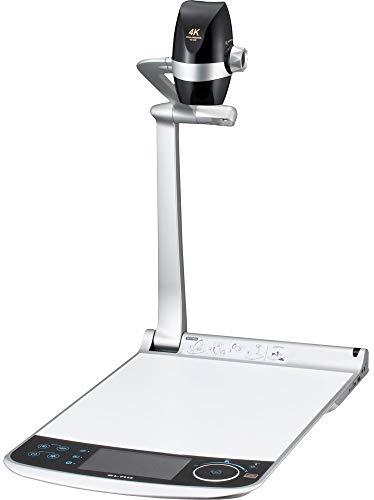
- Ultra 4K image capture with 4K/30fps recording
- 5-inch LCD preview monitor for easier setup
- HDMI, VGA, USB, and HDBaseT-compatible output support
Best For: conference rooms that need premium imaging and flexible connectivity
Smart Meeting Framing
AV Access 4K Conference Room Camera
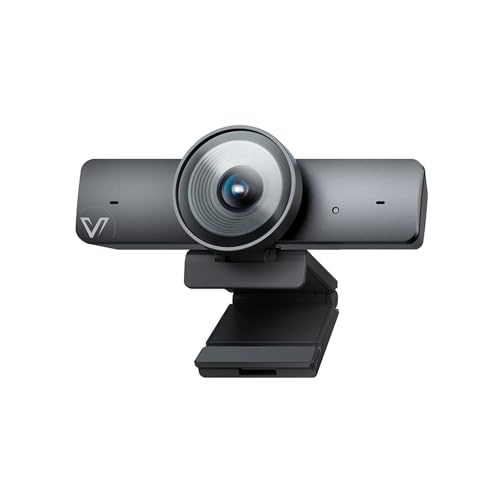
- 1/1.8-inch CMOS sensor with 4K/30fps video
- AI auto framing, presenter tracking, and Individuals Gallery
- 120° wide view with 5X digital zoom and USB plug-and-play
Best For: conference rooms that need smart wide-angle framing and tracking
Interactive Teaching Capture
ELMO TT-12G 4K Document Camera
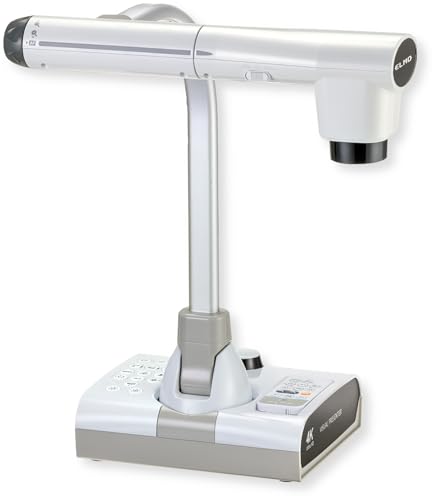
- 4K Ultra HD imaging with a 12MP sensor
- 192x total zoom for detailed presentations
- Flexible arm and large 18.5 x 10.2-inch capture area
Best For: conference rooms that need flexible high-zoom presentation capture
Ultra-Portable Classroom Pick – IPEVO V4K 8MP USB Document Camera
If you need document cameras for conference rooms that can also handle remote demos and hybrid meetings, the IPEVO V4K is a practical USB option. Its 8MP sensor captures up to 3264 x 2448 images, while the high frame rate helps keep live sharing smooth during presentations.
Best For: Teams that want a compact, easy-to-use camera for web conferencing, training, and document sharing across Mac, Windows, and Chromebook setups.
Pros:
- 8MP capture with Ultra HD resolution for detailed documents and objects
- Up to 30 fps at Full HD for lag-free live streaming
- Fast autofocus helps when switching between materials often
- Compatible with Mac, PC, and Chromebook
Cons:
- No optical zoom
- Best performance depends on meeting the recommended system specs
- Smaller shooting area than some larger conference-room models
The V4K is a solid fit if you want a dependable, straightforward document camera without extra complexity. It leans more toward portability and everyday conferencing than advanced room-install features.
Zoom-Heavy Presenter Pick – AVer Vision 8MP 60fps Doc Camera
For document cameras for conference rooms where framing flexibility matters, the AVer Vision model stands out with 20x digital zoom and a compact build. It is designed for distance learning and quick connectivity, making it a versatile choice for live presentations and shared materials.
Best For: Presenters who want zoom flexibility and simple HDMI/USB connectivity in a compact document camera.
Pros:
- 20x digital zoom for closer views of documents and objects
- 8MP sensor for detailed still capture
- HDMI and USB connectivity support flexible room setups
- Built-in LED and microphone add convenience in meetings
Cons:
- Listed video resolution is 480p in the supplied details
- Heavier than ultra-compact USB-only models
- Digital zoom is less ideal than optical zoom for some users
This model makes sense when you want straightforward room connectivity and the ability to zoom in without moving the camera. It is a practical pick for users who value adaptability over a purely minimalist design.
Interactive Smart Pointer Pick – OKIOCAM S2 Pro 13MP 4K Doc Camera
If your conference room presentations need more interaction, the OKIOCAM S2 Pro is built to make document cameras for conference rooms feel more dynamic. Its 13MP 4K sensor, integrated LED light, and OKIOPoint smart pointer are aimed at sharper sharing and more engaging live sessions.
Best For: Teams that want 4K clarity, software tools, and smart pointer features for interactive demos and meetings.
Pros:
- 13MP sensor with true 4K capture up to 3840 x 2160
- OKIOPoint smart pointer adds interactive tracking in live presentations
- Integrated LED light helps in dimly lit spaces
- Compatible with Windows, Mac, Chromebook, Zoom, Teams, and Google Meet
Cons:
- Best features depend on using OKIOCAM Live software
- Digital zoom only, not optical
- May be more feature-rich than some users need for simple sharing
The S2 Pro is a strong fit if you want a modern presentation tool with software-backed interactivity. It is especially appealing for teams that value visual clarity and live annotation tools in the same package.
Professional Optical Zoom Pick – AVer F50+ 4K Versatile Document Camera
For document cameras for conference rooms that need a more polished, presentation-friendly feature set, the AVer F50+ offers 4K video and 10x optical zoom. It supports a range of shooting modes and both HDMI and USB connectivity, which gives it more flexibility for different room workflows.
Best For: Teams that need optical zoom, 4K output, and a versatile camera for training, demos, and formal presentations.
Pros:
- 4K video capture for sharp conference-room presentations
- 10x optical zoom plus digital zoom for flexible framing
- Multiple shooting modes including microscope, macro, and infinity
- HDMI and USB connectivity for easier integration
Cons:
- Heavier than smaller USB document cameras
- More complex than basic plug-and-play models
- Requires more desk or setup space than compact options
The F50+ is the most feature-forward option here, especially if optical zoom is a priority. It is a strong match for users who want a document camera that can handle both polished meetings and more specialized presentation needs.
AI-Tracking Room Cam – WYRESTORM 4K Conference Webcam
If you’re shopping for document cameras for conference rooms, this WYRESTORM model is a strong fit for small meeting spaces where you want everyone in frame without extra setup. It combines 4K video, auto framing, and presenter tracking, so it works well for hybrid meetings, training sessions, and boardroom-style discussions.
Best For: Small conference rooms that need automatic framing and speaker tracking for meetings.
Pros:
- AI auto framing helps keep all attendees visible during group meetings.
- Presenter tracking follows the active speaker for presentations and training.
- 120° wide-angle view covers the whole room without repositioning.
- Dual noise-cancelling microphones capture voices clearly across the table.
Cons:
- Designed specifically for small conference rooms, so it may not suit larger spaces as well.
- Uses a USB plug-and-play setup rather than a more advanced AV installation.
Overall, this is a practical conference-room webcam for teams that want reliable framing, clear audio, and a simple setup. The privacy cover is also a useful touch for shared office environments.
Portable Visual Presenter – Elmo MX-P3 4K Document Camera
For buyers comparing document cameras for conference rooms, the Elmo MX-P3 stands out as a portable visual presenter built for detailed document and object display. Its 4K Ultra HD output, one-push autofocus, and multiple connection options make it a flexible choice for presentations that need sharp close-up clarity.
Best For: Presenters who need a portable 4K document camera for showing documents, objects, or demos.
Pros:
- 4K Ultra HD resolution at 30fps delivers clear, detailed images.
- One-push autofocus makes setup fast during live presentations.
- Large 14.7 x 11.1-inch imaging area fits documents and objects well.
- USB-C, HDMI, and RGB connectivity support broad compatibility.
Cons:
- Weighs 1.2 lbs, so it is portable but not an ultra-light tabletop unit.
- Focused on visual presentation, so it is less like a full meeting-room webcam.
In practice, this is a strong pick when you need a document camera that can move between rooms and still deliver polished, high-resolution content. The foldable design is especially helpful for teams that travel or share equipment.
Zoom Demo Camera – BenQ ideaCam S1 Pro Document Camera
If your priority is close-up detail, this BenQ option is a compelling choice among document cameras for conference rooms and remote demos. The 15x glass lens, 8MP Sony sensor, and handheld flexibility make it useful for showing samples, sketches, prototypes, and other small items with more control.
Best For: Product demos, sample inspection, and hybrid presentations that need close-up detail.
Pros:
- 15x zoom glass lens helps reveal fine details in materials and working samples.
- Handheld mode adds flexibility for capturing angles and objects.
- Auto-rotation and one-second webcam/document camera switching streamline demos.
- Includes AI noise-canceling microphone, ring light, and auto focus.
Cons:
- BenQ notes it is not ideal for low-light environments.
- Some features rely on the BenQ EnSpire app and firmware updates.
Compared with a basic meeting-room camera, this model is more specialized for live demos and visual inspection. If your conference-room use case includes showing products or hands-on examples, it offers more depth than a standard webcam.
Elite Large-Format Imaging – ELMO PX-30E 4K Document Camera
If you need document cameras for conference rooms that can handle both detailed close-ups and larger visuals, the ELMO PX-30E is built for polished presentations. It combines 4K capture, a 5-inch LCD preview screen, and multiple output options to fit a wide range of room setups.
Best For: conference rooms that need a premium document camera with high-resolution imaging and flexible connectivity.
Pros:
- Captures Ultra 4K images and records 4K video at 30fps, with Full HD at 60fps
- 5-inch touchscreen LCD preview monitor helps with quick framing and setup
- Offers HDMI, VGA, USB, and HDBaseT-compatible output options
- Supports 4:3 and 16:9 shooting modes and capture sizes up to A3 landscape
Cons:
- Large, premium unit may be more than needed for smaller meeting spaces
- No built-in wireless sharing is listed in the provided details
- Water resistance is not included
The PX-30E stands out when image quality and connection flexibility matter more than simplicity. For teams that want a conference-room document camera with strong presentation-grade visuals, it offers a lot of capability in one unit.
Smart Meeting Framing – AV Access 4K Conference Room Camera
For document cameras for conference rooms that also need strong people-framing features, this AV Access camera leans more toward modern meeting capture than traditional document-only use. Its 4K sensor, wide 120° field of view, and AI framing tools make it useful in spaces where presenters and small groups need to stay in view.
Best For: conference rooms that need a smart, wide-angle camera with auto framing and presenter tracking.
Pros:
- 1/1.8-inch CMOS sensor is designed for sharper image quality and better low-light performance
- 4K video at 30fps with backward compatibility to 1080p and 720p
- AI auto framing, presenter tracking, and Individuals Gallery for up to 4 people
- 120° wide-angle lens, 5X digital zoom, and built-in noise-reducing microphone
Cons:
- Fixed focus limits manual optical control
- Individuals Gallery is limited to up to 4 people before switching to group framing
- Gesture control may require a firmware update if not present out of the box
This model is a strong fit when the priority is intelligent meeting-room framing rather than document-only capture. It brings together video quality, wide coverage, and automation that can simplify everyday conference calls.
Interactive Teaching Capture – ELMO TT-12G 4K Document Camera
If you want document cameras for conference rooms that can handle documents, objects, and live demos with room to spare, the ELMO TT-12G is a versatile pick. It offers 4K imaging, a flexible multi-angle arm, and a very large capture area, making it well suited to presentations that need more than a basic overhead view.
Best For: conference rooms that need a flexible, high-zoom document camera for detailed presentations and live demonstrations.
Pros:
- 4K Ultra HD imaging with a 12MP sensor for sharp presentation visuals
- 192x total zoom helps reveal fine details during demos
- Flexible multi-angle arm and wide 18.5 x 10.2-inch capture area
- HDMI, USB, and VGA outputs cover modern and legacy room systems
Cons:
- Heavier, larger design may take more desk space than compact models
- Built-in wireless sharing depends on Miracast-compatible displays
- More feature-rich than needed for simple one-document setups
The TT-12G is best when your meeting space needs high zoom, broad capture, and flexible positioning. For conference rooms that support detailed walkthroughs or shared materials, it brings a lot of presentation control.
How We Picked These Document Cameras for Conference Rooms
We prioritized image clarity, zoom range, low-latency performance, compatibility with common meeting platforms, and ease of use in shared spaces. For Document Cameras for Conference Rooms, reliable connectivity and simple switching between live sharing and presentation modes matter just as much as raw resolution.
We also looked for models that suit different room sizes and workflows, including portable units for quick demos, feature-rich cameras for larger spaces, and presenters with built-in lights or microphones for cleaner communication.
Quick Comparison: What Matters Most
- Best for everyday sharing: USB document cameras with straightforward plug-and-play setup.
- Best for larger rooms: 4K models with stronger zoom, better framing, and wider coverage.
- Best for hybrid meetings: Cameras with auto framing, presenter tracking, and noise-cancelling audio.
- Best for teaching and demos: Flexible-arm or handheld designs that make repositioning easy.
Key Buying Factors for Document Cameras for Conference Rooms
Resolution and Detail
Higher resolution helps participants read text, view small objects, and inspect printed materials without strain. For conference rooms, 4K can be a strong advantage, but a well-tuned 1080p or 8MP camera may still be enough for many teams.
Zoom and Framing
Optical zoom is generally more useful than digital zoom when you need crisp close-ups. Also consider how well the camera handles framing at different table distances and whether it can cover a whiteboard, handouts, or product samples.
Connectivity and Compatibility
USB is the easiest path for most teams, while HDMI and VGA can help in legacy rooms or dedicated AV setups. Check support for Windows, macOS, and Chromebook if multiple departments share the system.
Lighting, Audio, and Automation
Built-in lights help in darker rooms, while microphones can reduce the number of accessories needed for quick presentations. Auto framing, presenter tracking, and gesture controls are especially helpful when the room must stay polished with minimal operator effort.
Who Should Buy Which Document Cameras for Conference Rooms?
If you want simple deployment and frequent portability, choose a compact USB model. If your meetings involve live demos, teaching materials, or detailed product walk-throughs, look for stronger zoom and a flexible arm. For executive rooms and polished hybrid presentations, prioritize 4K output, tracking features, and broader AV compatibility. In short, the best Document Cameras for Conference Rooms are the ones that match your room size, content type, and setup time—not just the highest spec sheet number.