Choosing the right time clock can save small teams hours of admin work each week. The best systems make it easier to track attendance, reduce punch errors, and keep payroll accurate.
Below, we focus on practical options for different workplaces, from basic card-based systems to app-connected biometric clocks.
Best 10 Employee Time Clocks for Small Business Picks for 2026
2-in-1 Time & Document
uPunch CR1000 Digital Time Clock and Date Stamp

- Tracks punches and stamps documents
- Includes 50 cards, ribbon, and keys
- Good for arrival, lunch, and departure tracking
Best For: Businesses needing time tracking plus document date stamping
Cloud Remote Access
NGTeco Cloud Time Clock with Fingerprint and WiFi

- Manage attendance from app or web portal
- Dual-band Wi-Fi and fingerprint login
- Battery backup helps during power cuts
Best For: Managers who need remote attendance control and quick fingerprint punches
Starter Punch Bundle
uPunch HN1500 Starter Time Clock Bundle

- Includes clock, 100 cards, rack, ribbon, and keys
- AutoAlign helps improve punch accuracy
- Plug-and-play setup with two-year warranty
Best For: Teams wanting a complete traditional punch-clock starter kit
App Payroll Control
Fingerprint and Face Time Clock with App Control
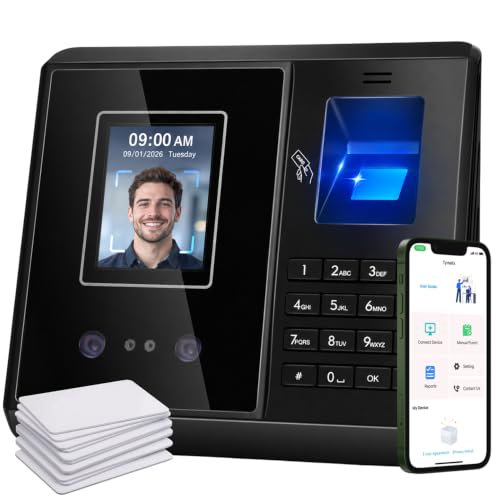
- Manage attendance and reports from the phone app
- Supports face, fingerprint, IC card, and PIN
- Edit missed punches and custom overtime rules
Best For: Payroll-focused teams that need flexible app-managed timekeeping
Reliable Card-Style Tracking
Pyramid 2500 Auto-Aligning Bundle

- Quick setup with auto-aligning punches
- Includes cards, ribbons, rack, and keys
- Handles 12/24-hour formats and DST changes
Best For: Small businesses wanting a ready-to-use punch clock bundle
Standalone Biometric Choice

- No WiFi, software, or monthly fees
- USB export with Excel-ready reports
- Stores up to 500 users and 50,000 punches
Best For: Businesses that want paperless biometric tracking without subscriptions
Auto-Feed Two-Color Punch Clock
TooCust Auto-Align Time Clock Kit

- Auto card feed with auto-aligning punches
- Two-color printing highlights late punches
- Includes cards, keys, ribbon, and instructions
Best For: Teams wanting an easy starter punch clock with clear attendance markings
Fast Fingerprint Payroll Pick
NGTeco Time Clock with App Control

- Fingerprint clock-in in about 0.5 seconds
- Exports timesheets by email or USB
- Supports flexible and overnight shift management
Best For: Businesses that need quick clock-ins and simple payroll exports
2-in-1 Time & Document – uPunch CR1000 Digital Time Clock and Date Stamp
If you want employee time clocks for small business that also handle document stamping, the uPunch CR1000 is a simple dual-purpose option. It tracks punches with digital timing while also adding a built-in date stamp for forms, receipts, and office paperwork.
Best For: Small businesses that need both employee time tracking and document date stamping in one unit.
Pros:
- 2-in-1 design combines a digital time clock and date stamp
- Includes 50 time cards, one ribbon, and 2 keys to get started
- Supports monitoring arrival, break, lunch, and departure times
- Cover window makes loading cards and documents easier
Cons:
- Uses a traditional time-card workflow rather than cloud-based management
- Requires ribbon-based printing
For businesses that still prefer a physical punch system, this model focuses on straightforward timekeeping and paperwork organization. It is a practical fit when you want dependable tracking without adding app or Wi-Fi complexity.
Cloud Remote Access – NGTeco Cloud Time Clock with Fingerprint and WiFi
Among employee time clocks for small business, this NGTeco model stands out for remote access and cloud-based attendance tools. It lets managers review clock-ins, reports, and employee activity from the app or web portal, while still supporting fast fingerprint punch-ins at the device.
Best For: Owners who want remote attendance access, Wi-Fi connectivity, and fingerprint check-in.
Pros:
- App and web portal access for managing attendance remotely
- Dual-band 2.4GHz/5GHz Wi-Fi for more stable connectivity
- Fingerprint recognition for quick punch in/out
- 2000mAh battery helps keep the unit running during outages
Cons:
- Full app features require a separate TimeEntrix subscription
- Cloud features may be more than some very small teams need
This is a strong choice if you want modern attendance tracking with remote oversight and flexible shift handling. The free management app covers the basics, while the broader feature set can scale if your team needs more advanced tools later.
Starter Punch Bundle – uPunch HN1500 Starter Time Clock Bundle
If you prefer a traditional punch system for employee time clocks for small business, the uPunch HN1500 starter bundle gives you a ready-to-use setup. It includes the clock, cards, rack, ribbon, and keys, making it easy to start tracking hours without piecing together extra accessories.
Best For: Small businesses that want a simple starter kit with physical cards and straightforward punch tracking.
Pros:
- Complete bundle includes time clock, 100 cards, rack, ribbon, and keys
- AutoAlign technology helps improve punch accuracy
- Plug-and-play setup is designed for quick installation
- Two-year warranty with unlimited customer support
Cons:
- Uses a conventional card-based system instead of app-based tracking
- Best suited to teams comfortable with physical time cards
This bundle makes sense when you want a dependable, low-friction way to track employee hours from day one. The included accessories and simple setup reduce the hassle of building a system from scratch.
App Payroll Control – Fingerprint and Face Time Clock with App Control
For businesses comparing employee time clocks for small business, this model is built around app control and flexible payroll rules. It connects quickly to the phone app, supports multiple punch methods, and lets you edit records before payroll so attendance data is easier to clean up.
Best For: Small businesses that want app-based attendance control, flexible rules, and multiple clock-in methods.
Pros:
- App control lets you manage records, employees, and reports from your phone
- Supports face recognition, fingerprint, IC card, and PIN clock-ins
- Custom overtime, lunch, and break rules help match your payroll setup
- Can fix missed punches and incorrect records directly in the app
Cons:
- Supports up to 50 employees, so it is not aimed at larger teams
- Connection model is different from Wi-Fi/cloud systems, which may not suit every workflow
This is a practical pick if your biggest priority is cleaner payroll data and flexible attendance rules. The ability to manage records in the app can save time when employees miss punches or schedules vary by department.
Reliable Card-Style Tracking – Pyramid 2500 Auto-Aligning Bundle
If you want employee time clocks for small business that are simple to set up and easy to read, this Pyramid bundle is a practical fit. It auto-aligns punches, prints clearly, and includes the core supplies needed to start tracking time right away.
Best For: Small businesses that want a straightforward punch clock bundle with bundled cards and ribbon supplies.
Pros:
- Quick setup, usually in under two minutes, with auto-aligning punches for readable time entries.
- Automatic Daylight Saving Time and short-month adjustments help reduce manual corrections.
- Tracks arrival, break, lunch, and departure times in 12-hour or 24-hour formats.
- Includes 100 time cards, 2 ribbon cartridges, a 10-slot rack, and 2 security keys.
Cons:
- Uses time cards and ink ribbons, so it is not a paperless system.
- Designed for up to three daily punches, which may not suit every scheduling need.
This is a solid low-friction choice for offices, retail shops, warehouses, and other small workplaces that want a dependable, all-in-one time clock starter bundle.
Standalone Biometric Choice – NGTeco Fingerprint Time Clock
For employee time clocks for small business that avoid monthly fees and software hassles, this NGTeco model keeps things compact and self-contained. It uses fingerprint or PIN check-ins, stores attendance locally, and exports records by USB for payroll use.
Best For: Small businesses that want a digital biometric time clock with no WiFi, no software, and no recurring fees.
Pros:
- True standalone operation with no WiFi or complex software required.
- USB export provides ready-to-use Excel reports for payroll integration.
- Supports up to 500 user profiles and 50,000 punch records as teams grow.
- Internal backup system helps preserve punches during power loss.
Cons:
- Needs corded electric power, so it is not a battery-based option.
- USB-based workflow may be less convenient for teams wanting automatic cloud syncing.
This is a strong fit if you want a paperless, low-maintenance attendance system that can handle growing headcount while staying easy to run day to day.
Auto-Feed Two-Color Punch Clock – TooCust Auto-Align Time Clock Kit
This TooCust option is built for small businesses that want employee time clocks for small business with automatic card feeding and clear punch markings. It tracks clock-ins, breaks, lunches, and clock-outs, while the two-color print feature helps make attendance exceptions easy to spot.
Best For: Small businesses that want a basic auto-aligning punch clock with included starter supplies.
Pros:
- Auto-align and auto card feed features simplify daily use.
- Two-color printing shows on-time punches in black and late or early punches in red.
- Tracks clock in/out, break, and lunch times weekly, biweekly, or monthly.
- Includes 50 time cards, 2 keys, one ink ribbon, and instructions.
Cons:
- Requires matching 7.1″ x 2.4″ time cards for proper use.
- Uses printed cards and a ribbon, so it is not a paperless system.
Overall, this is a practical starter clock for teams that want straightforward punch tracking and easy-to-read attendance records without adding software complexity.
Cloud-Connected 4-in-1 Pick – NGTeco Cloud Time Clock for Small Business
If you want employee time clocks for small business that can be managed from anywhere, this NGTeco cloud model is built around remote access and automatic reporting. It combines face, fingerprint, RFID, and PIN check-ins with free core cloud service, making it a practical fit for teams that need flexible attendance tracking without a monthly fee.
Best For: Small businesses that want cloud access, multiple clock-in methods, and no recurring subscription for basic attendance tracking.
Pros:
- Free cloud service with real-time punch data, hour calculations, and auto reports through a web browser
- 4-in-1 verification modes: face, fingerprint, RFID, and PIN
- Supports customizable shifts, including fixed, rotating, split, and flexible schedules
- Stores up to 200 users and 30,000 logs with offline punch capture and automatic sync later
Cons:
- Full employee app features require a separate TimeEntrix subscription
- Some advanced management tools are not included in the free core service
- Designed for indoor use and powered by a corded connection
Overall, this is a strong pick if your priority is simple cloud access, flexible scheduling, and a no-monthly-fee entry point for attendance management. The added language support and US-based help make it especially appealing for teams with varied workflows.
Fast Fingerprint Payroll Pick – NGTeco Time Clock with App Control
NGTeco Time Clock for Small Business, APP Control | 2.4GHz WiFi, No Monthly Fees
Check Price On AmazonThis NGTeco option is a straightforward choice among employee time clocks for small business if you mainly want quick punch-in, simple app control, and cleaner payroll prep. It focuses on fingerprint and PIN clock-ins, auto-calculated hours, and easy export options for teams that want less manual work.
Best For: Small businesses that want a fast fingerprint clock with easy shift management and payroll-friendly exports.
Pros:
- Fingerprint recognition works in about 0.5 seconds for quick, secure clock-ins
- Supports flexible scheduling, including overnight shifts
- Exports timesheets by email or USB for payroll processing
- Mobile app allows attendance edits with real-time sync on the same local network
Cons:
- App control requires the same local network
- Only fingerprint and PIN clock-in modes are listed
- No monthly fees, but it is still a corded indoor device
For businesses that want speed and simplicity more than extra verification modes, this clock keeps attendance tracking and reporting practical. The built-in backup for power outages is another useful detail for day-to-day reliability.
Plug-and-Play 4-in-1 Choice – NGTeco APP Time Clock for Small Business
For businesses comparing employee time clocks for small business, this NGTeco model stands out for its four verification methods and easy setup. It is designed to reduce buddy punching, keep records digital, and handle flexible shift management without recurring fees.
Best For: Small businesses that want a no-monthly-fee attendance system with multiple clock-in options and simple setup.
Pros:
- 4-in-1 clock-in modes: facial recognition, fingerprint, RFID, and PIN
- Plug-and-play setup with no technical knowledge required
- Offline recording captures punches when the network is weak or intermittent
- Supports up to 200 employees and includes 10 RFID cards
Cons:
- App management requires the same local network
- No monthly fee, but advanced remote features are not described in the core setup
- Indoor, corded device only
This is a good fit if you want a broader set of clock-in options than fingerprint-only systems and prefer a simple deployment. Its digital storage and auto-sync behavior make it a solid upgrade from paper time cards.
How We Picked These Employee Time Clocks for Small Business
We looked for models that fit real small-business needs: simple setup, dependable punch accuracy, clear record keeping, and features that help reduce time theft or manual spreadsheet work. We also favored options with useful extras like exportable reports, flexible clock-in methods, and bundled supplies that lower the upfront hassle.
Quick Comparison
Think of the lineup in three groups. Basic card clocks are the simplest and often the easiest to adopt. Biometric and PIN-based systems add tighter accountability. Cloud or app-connected models are best for teams that need remote access, automated reporting, or easier payroll integration. The right choice depends on whether you want speed, control, or convenience.
Key Buying Factors for Employee Time Clocks for Small Business
Clock-In Method
Card, fingerprint, facial recognition, PIN, RFID, and app-based options each solve different problems. Cards are familiar and affordable, while biometrics and PINs help prevent buddy punching. App control is useful if you manage multiple locations or want remote oversight.
Reports and Payroll Workflow
Look for systems that can generate clean reports without extra manual edits. Features like overtime rules, lunch and break tracking, and export tools can make payroll faster and less error-prone.
Ease of Setup and Day-To-Day Use
For many small businesses, the best clock is the one employees actually use correctly. Clear displays, auto-alignment, straightforward menus, and included starter supplies can make a big difference during rollout.
Growth and Flexibility
If your staff count may change, choose a system that can scale without forcing a full replacement. Flexible shift management and multiple attendance modes are especially helpful for growing teams, retail shops, and service businesses with variable schedules.
Who Should Buy Which Employee Time Clocks for Small Business?
If you want the simplest path, a basic punch-card clock is a strong fit for small teams with on-site staff and uncomplicated schedules. If accuracy and accountability matter most, choose a fingerprint, face, or PIN system. If you need remote access, automated reporting, or more advanced scheduling control, go with a cloud or app-connected model. For the broadest use, Employee Time Clocks for Small Business with multiple check-in modes offer the most flexibility as your needs change.
In short, prioritize the system that matches how your team works today, while leaving room for growth tomorrow. The best pick is the one that keeps attendance accurate, payroll efficient, and daily use simple for both managers and employees.