Interactive digital whiteboards can transform meetings from passive presentations into fast, collaborative working sessions. The right board makes it easier to share ideas, annotate in real time, and keep hybrid teams aligned.
In this roundup, we focus on business-friendly features like screen size, touch performance, wireless casting, software compatibility, and installation flexibility.
Best 10 Interactive Digital Whiteboards for Business Picks for 2026
Premium 65-Inch Collaboration Hub

- 65-inch 4K UHD display with 20-point touch
- Wireless sharing across major devices and platforms
- Built-in meeting tools, QR sharing, and cloud support
Best For: large meeting rooms and hybrid collaboration
Google-Certified Team Board

- Google EDLA-certified with security and OTA updates
- Unlimited canvas plus cloud saving and QR sharing
- Split-screen and up to 16 wireless connections
Best For: businesses that rely on Google apps and secure collaboration
Feature-Rich Meeting Display
55-Inch Android 14 Smart Board

- Android 14 with 8GB RAM and 128GB storage
- 4K UHD display with over 400 nits brightness
- 20-point touch plus extensive front, rear, and bottom ports
Best For: teams that need strong connectivity and flexible meeting-room use
Large-Format Conference Board
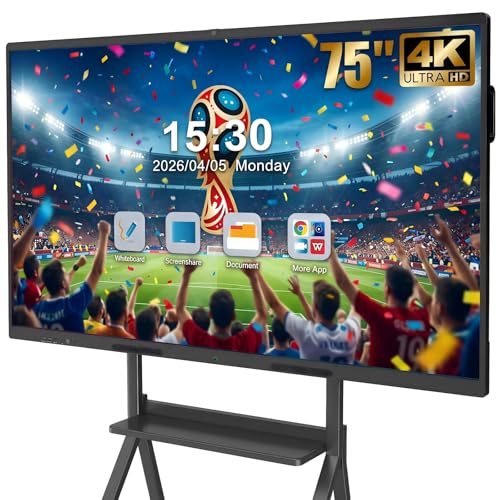
- 75-inch 4K UHD display with 20-point touch
- Built-in camera, mics, and dual speakers for meetings
- Wireless/wired sharing with split-screen for 4 sources
Best For: large boardrooms and hybrid conference spaces
Large Meeting Room Pick
75'' 4K Smart Board for Business

- 75-inch 4K UHD touchscreen with high brightness
- Android 14, 8GB RAM, and 128GB storage
- 20-point touch plus built-in conferencing support
Best For: Large conference rooms and hybrid training spaces
IT-Friendly Wall Mount Choice
55'' 4K Smart Whiteboard with Wall Mount

- 55-inch 4K UHD display with wall mount included
- Android 14 platform with 8GB RAM and app ecosystem
- Security and fleet management tools for IT teams
Best For: Office teams that want a mounted collaboration board
Best for Video-Ready Meetings
55" 4K Smart Board with Camera

- Native 4K UHD panel with wide viewing angles
- Android 14, 8GB RAM, and 256GB storage
- 48MP camera, microphone, and AI assistant built in
Best For: Meeting rooms that need video and collaboration in one display
Google EDLA Smart Board for Teams
75-Inch 4K Collaboration Display

- Google EDLA with Play and Workspace access
- Android 14 with 8 GB RAM and 64 GB storage
- 50-point touch and wireless casting for teams
Best For: Large collaborative meetings and Google-centric offices
All-in-One Meeting Board

- 4K UHD panel with 20-point infrared touch
- Android 13 with 8 GB RAM and 128 GB storage
- Built-in HD camera and microphone for calls
Best For: Smaller meeting rooms and hybrid collaboration
Room-Ready Collaboration Board

- 65-inch 4K UHD display for room visibility
- 20-point infrared touch for writing and zooming
- Built-in camera and microphone for hybrid meetings
Best For: Mid-sized conference rooms and hybrid teams
Premium 65-Inch Collaboration Hub – COOLHOOD 65 Smart Board
If you’re comparing interactive digital whiteboards for business, this 65-inch COOLHOOD model stands out as a large-format option built for presentations, annotation, and team collaboration. It combines 4K UHD clarity, 20-point touch, and Android 13 with 128GB of storage, so it can handle everyday meeting workflows without relying on extra hardware.
Best For: Teams that want a wall-mounted 65-inch board for meetings, brainstorming, and hybrid collaboration.
Pros:
- 65-inch 4K UHD display with 20-point multi-touch for collaborative use
- Wireless screen sharing works across Mac, Windows, iOS, and Android
- Built-in tools like smart voting, screenshots, timer, and QR file sharing
- Supports Zoom, Google Meet, Microsoft Teams, and Webex
Cons:
- Wall mount is included, but the stand is sold separately
- Only one HDMI port and limited USB connections
- Large size may be more than smaller rooms need
For businesses that want a polished all-in-one board with strong collaboration features, this COOLHOOD unit offers a practical mix of display quality, sharing tools, and app flexibility. Its open ecosystem and cloud support also make it easier to keep work moving between sessions.
Google-Certified Team Board – 55-Inch EDLA Smart Board
This 55-inch option is a strong fit for buyers looking at interactive digital whiteboards for business with a Google-certified software experience. It offers zero-latency writing, unlimited canvas space, split-screen multitasking, and wireless casting, making it useful for teams that switch between note-taking, content review, and presentations.
Best For: Offices and classrooms that want Google Play access, secure management, and easy wireless collaboration.
Pros:
- Google EDLA certification adds enterprise-grade security and OTA updates
- Unlimited canvas with one-click cloud saving and QR sharing
- Split-screen mode helps compare materials while taking notes
- Supports up to 16 wireless connections for group collaboration
Cons:
- 55-inch size may be limiting for larger conference rooms
- Wall mount is included, but mobility depends on the cart setup
- Best feature set depends on Google ecosystem use
Overall, this board is best for teams that want a modern collaboration display with Google Play access and secure device management. The optional OPS expansion also gives it room to grow if your office later needs Windows support.
Feature-Rich Meeting Display – 55-Inch Android 14 Smart Board
For buyers shopping interactive digital whiteboards for business, this 55-inch smart board focuses on performance and connectivity. Android 14, 8GB of RAM, and 128GB of storage give it the headroom for apps, presentations, and meeting workflows, while the 4K UHD panel and 20-point touch make it practical for daily collaboration.
Best For: Meeting rooms and training spaces that need a responsive 55-inch board with broad port options.
Pros:
- Android 14 with 8GB RAM and 128GB storage for smooth operation
- True 4K UHD screen with over 400 nits brightness and eye-care features
- 20-point infrared touch with 6ms response and ±1mm precision
- Front, rear, and bottom ports cover a wide range of connection needs
Cons:
- Has many ports, which may feel more complex than simpler boards
- Lower brightness details aside, it still needs a suitable room setup
- 55-inch format may not suit very large boardrooms
This is a versatile choice if your business values performance, port flexibility, and built-in conferencing support. It looks especially useful where teams regularly connect different devices and want quick access from the front panel.
Large-Format Conference Board – 75-Inch Business Smart Board
If your priority is a large, all-in-one display among interactive digital whiteboards for business, this 75-inch QIXZOCV board is built for demanding collaboration. It combines 4K UHD resolution, 20-point touch, Android 14, a built-in camera and microphone system, and screen sharing so teams can manage meetings, presentations, and remote sessions from one device.
Best For: Larger boardrooms and hybrid meeting spaces that need a 75-inch collaborative display.
Pros:
- 75-inch 4K UHD panel with 20-point infrared touch
- Built-in 13MP camera, 8-array microphone, and dual 20W speakers
- Wireless and wired screen sharing with split-screen support up to 4 sources
- Android 14 with 8GB RAM and 128GB storage for app-based workflows
Cons:
- Large size makes it better suited to bigger rooms
- Feature depth may be more than smaller teams need
- Wall mount is included, but installation planning matters at this scale
This model is a strong pick for organizations that want a single display to handle collaboration, conferencing, and content sharing. The combination of a large screen and integrated meeting hardware makes it a practical centerpiece for higher-traffic rooms.
Large Meeting Room Pick – 75'' 4K Smart Board for Business
If you need one of the larger interactive digital whiteboards for business, this 75-inch model is built for room-scale presentations, training, and hybrid collaboration. Its 4K UHD touchscreen, Android 14 system, and broad port selection make it a flexible all-in-one display for teams that want to present, annotate, and connect devices without extra hardware.
Best For: Large conference rooms, training spaces, and hybrid meeting setups that need a big, highly connected interactive display.
Pros:
- 75-inch 4K UHD display with over 400 nits brightness for clear visibility.
- Android 14 with 8GB RAM and 128GB storage for smooth multitasking.
- 20-point infrared touch with ±1mm precision and 6ms response time.
- Built-in video conferencing support plus front and rear connectivity options.
Cons:
- Large size may be more than smaller offices or huddle rooms need.
- Feature depth can be overkill if you only want a basic whiteboard display.
This is a strong fit if your priority is scale, responsiveness, and flexible connectivity in a business setting. It combines presentation, annotation, and conferencing tools in one board, which can simplify meeting-room setups.
IT-Friendly Wall Mount Choice – 55'' 4K Smart Whiteboard with Wall Mount
This 55-inch option fits well in offices that want interactive digital whiteboards for business without moving to an oversized display. It runs on Android 14 with 8GB RAM, supports screencasting from major device types, and includes wall-mount hardware, making it a practical choice for meeting rooms, classrooms, and home offices.
Best For: Teams that want a wall-mounted business whiteboard with secure management features and simple day-to-day use.
Pros:
- 55-inch 4K UHD display sized for meeting rooms and offices.
- Android-based system with 8GB RAM and smooth performance.
- Supports screencasting from Mac, Windows, iOS, Android, or HDMI.
- Enterprise-friendly security and fleet management tools for IT admins.
Cons:
- Smaller screen may be limiting for large group sessions.
- Notes emphasize software and management more than advanced hardware extras.
If your priority is dependable collaboration and easier IT oversight, this board offers a solid balance of size, features, and manageability. It is especially appealing for organizations that want a mounted all-in-one display for recurring meetings.
Best for Video-Ready Meetings – 55" 4K Smart Board with Camera
For businesses that want interactive digital whiteboards for business plus stronger meeting-room presentation tools, this 55-inch smart board stands out. It combines native 4K UHD resolution, Android 14, 8GB RAM, and a built-in AI assistant with a 48MP camera and microphone, making it well suited for collaborative sessions and instruction.
Best For: Offices and presentation spaces that want a 55-inch smart board with integrated camera and microphone support.
Pros:
- Native 4K UHD display with wide viewing angles and strong color support.
- Android 14 with 8GB RAM and 256GB storage for heavier multitasking.
- Built-in 48MP camera, microphone, and AI assistant for collaboration.
- 60-point IR touch support plus broad compatibility with major OS platforms.
Cons:
- 55-inch format may be less suited to very large rooms than bigger boards.
- OPS module is optional, so extra computing expansion requires a separate purchase.
This model is a smart pick if you want a business-ready display that goes beyond writing and annotation. The integrated camera, mic, and Android platform help streamline video-enabled meetings without relying on multiple add-on devices.
Google EDLA Smart Board for Teams – 75-Inch 4K Collaboration Display
If you want one of the more capable interactive digital whiteboards for business, this 75-inch NewBoard leans into polished meeting-room use with Google EDLA certification, Android 14, and a sharp 4K panel. It’s built for shared brainstorming, screen casting, and presentations where multiple people need to write, annotate, and jump between apps without friction.
Best For: Teams that want a large, Google-ready board for hybrid meetings, workshops, and collaborative presentations.
Pros:
- Google EDLA certification gives access to Google Play, Google Workspace, and Google Education Suite.
- Android 14 with 8 GB RAM and 64 GB storage is suited to multitasking in business environments.
- 50-point touch support lets up to 10 users write at the same time for group collaboration.
- Wireless casting supports up to 16 devices, which is useful in hybrid workspaces.
Cons:
- The 75-inch size may be more board than smaller meeting rooms need.
- Glossy screen finish may not suit every lighting setup.
- Requires wall mount or mobile cart planning because of its large footprint.
This model stands out when your priority is a big, app-friendly board that supports live collaboration and easy content sharing. It feels especially well matched to teams that already rely on Google tools.
All-in-One Meeting Board – 55-Inch 4K Touchscreen
This 55-inch option fits neatly into the interactive digital whiteboards for business category if you want a compact all-in-one setup for everyday meetings. It combines 4K UHD touch, Android 13, and built-in conferencing hardware, so teams can write, present, and video call from the same device.
Best For: Smaller offices, conference rooms, and hybrid teams that want an integrated board with camera and microphone.
Pros:
- 4K UHD display and 20-point infrared touch support smooth writing and navigation.
- Android 13 with 8 GB RAM and 128 GB storage offers strong app and file capacity.
- Built-in HD camera and microphone reduce the need for extra conferencing gear.
- Wireless screen sharing works with Windows, Mac, iOS, and Android devices.
Cons:
- 55-inch size may feel limited for larger conference spaces.
- No mounting or mobility details are highlighted in the supplied notes.
- Heavier all-in-one build may be less convenient than a simpler display-only unit.
For teams that want fewer separate devices on the table, this board is a practical meeting-room solution. Its value comes from combining presentation, collaboration, and conferencing in one unit.
Room-Ready Collaboration Board – 65-Inch 4K Touchscreen
Among interactive digital whiteboards for business, this 65-inch model is a balanced pick for teams that need more screen real estate than a 55-inch unit without jumping to a very large board. It offers the same all-in-one writing, sharing, and video-conferencing features as the smaller version, but in a size that better suits many conference rooms.
Best For: Mid-sized offices and conference rooms that want a room-filling board with built-in conferencing tools.
Pros:
- 65-inch 4K UHD display gives more room for presentations and collaborative notes.
- 20-point infrared touch supports smooth writing, dragging, and zooming.
- Android 13 with 8 GB RAM and 128 GB storage is built for app use and local file storage.
- Built-in camera and microphone make it ready for remote meetings and hybrid work.
Cons:
- At 112.8 pounds, it is heavier than the 55-inch version.
- It still may be too large for tight offices or small huddle spaces.
- Supplied notes do not mention advanced certification or ecosystem integrations.
This is a sensible middle-ground choice if your team wants a bigger collaborative canvas but still values an integrated, easy-to-use meeting board. It should fit well in rooms where the display needs to stay readable across a broader seating area.
How We Picked the Best Interactive Digital Whiteboards for Business
We looked for boards that make workplace collaboration simpler, not harder. That means reliable touch response, clear 4K display quality, enough screen size for conference rooms or huddle spaces, and connectivity that supports laptops, phones, and meeting-room setups. We also favored models with business-ready features such as screen sharing, split-screen tools, Google EDLA support, strong storage and RAM, and built-in camera or audio options where relevant.
Quick Comparison
For smaller meeting rooms and flexible offices, 55-inch models are usually easier to place and more affordable. For medium to large conference spaces, 65-inch and 75-inch boards offer better visibility and room for annotation during group discussions. If your team depends on Google services, EDLA-certified options can be a major advantage. If you want a more self-contained setup, Android 14 boards with higher RAM and storage are worth a closer look.
Key Buying Factors for Interactive Digital Whiteboards for Business
Screen Size and Room Fit
Choose the display size based on viewing distance and group size. A 55-inch board works well for compact meeting rooms, while 65-inch is a balanced pick for most offices. Go 75-inch if you regularly host larger presentations or need the screen visible from across the room.
Touch Accuracy and Multi-User Support
Interactive whiteboards should feel responsive for note-taking, sketching, and live markup. Higher touch-point counts are useful when several people collaborate at once.
Connectivity and Casting
Wireless casting, HDMI, Wi-Fi, and Bluetooth reduce setup friction. For busy teams, easy laptop and mobile sharing is often more valuable than extra software features.
Software and Ecosystem Compatibility
If your organization uses Google Workspace, EDLA-certified models can streamline access and admin control. Android-based boards may offer a more flexible all-in-one experience, especially when paired with meeting apps and file sharing tools.
Storage, Performance, and Extras
More RAM and storage can improve responsiveness and keep apps running smoothly. Built-in cameras, microphones, and speakers are helpful for hybrid meetings, while AI assistants and split-screen tools can improve multitasking.
Who Should Buy Which Interactive Digital Whiteboards for Business?
Small teams and offices should lean toward 55-inch models for value and space savings. Mid-size companies often get the best balance from 65-inch boards. Larger rooms, training spaces, and executive conference rooms usually benefit from 75-inch displays with stronger visibility and more collaboration room. If your workflow is heavily cloud-based, prioritize Google-certified options; if you want a self-contained meeting hub, choose a higher-spec Android smart board.
For most buyers, the best choice is the board that fits the room first and the software environment second. Once those two needs are covered, the remaining differences come down to touch quality, display size, and the extras that help your team work faster.