A laptop stand with docking station can turn a compact computer into a more comfortable, connected desktop setup. By combining screen elevation with USB-C expansion, these products help reduce cable clutter while adding ports for monitors, storage, peripherals, and memory cards.
Our 2026 roundup compares ten options across display support, charging, connectivity, adjustability, and desk-friendly design so you can choose the right fit for work, travel, or a dual-monitor workstation.
Best 10 Laptop Stand with Docking Station Picks for 2026
Flexible 7-in-1 Workstation

- Adjusts from 68mm to 178mm
- 4K@60Hz HDMI and SD/microSD readers
- Up to 10Gbps data and 85W pass-through charging
Best For: Adjustable desk setups needing versatile USB-C connectivity
All-in-One Desk Organizer

- 12-in-1 dock with HDMI and Ethernet
- 100W upstream laptop charging
- Wireless charging and under-monitor storage
Best For: Permanent monitor-based workstations and organized home offices
Collaborative Adjustable Stand

- 360-degree swivel for screen sharing
- Foldable, height- and angle-adjustable stand
- 4K@30Hz HDMI plus USB and audio ports
Best For: Collaborative desks and portable USB-C workstation setups
Dual-Display Connectivity

- Two HDMI ports for dual-display setups
- Up to 85W USB-C pass-through charging
- Ethernet, card readers, and USB-A ports
Best For: Existing laptop stands needing compact dual-monitor connectivity
Best All-in-One Value

- Adjusts from 68mm to 178mm
- 4K60 HDMI and Gigabit Ethernet
- 10Gbps USB-A and USB-C ports
Best For: Office users needing fast connectivity and wired networking
Best for Portable Expansion

- Eight-in-one hub with SD and TF slots
- Nine-level height adjustment
- Folds to a lightweight travel size
Best For: Mobile workers and creators needing card readers
Best for Flexible Positioning
Adjustable 9-in-1 Laptop Riser

- Raises laptops up to 5.5 inches
- 360-degree swivel with locking rotation
- Nine-port hub with 4K60 HDMI
Best For: Large-laptop desk setups needing flexible positioning
Best Dual-Monitor Stand
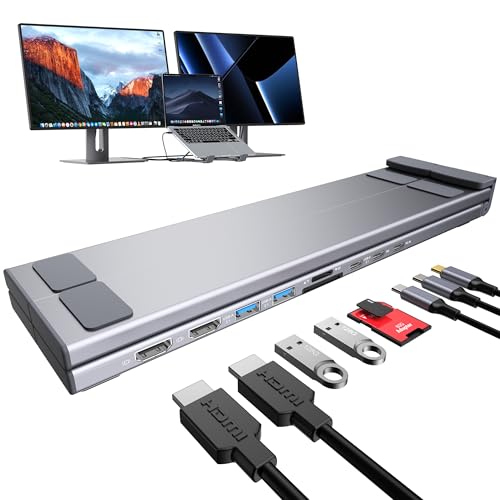
- Dual 4K@60Hz HDMI for compatible Windows laptops
- Nine ports with USB, USB-C, SD, and TF connectivity
- Foldable, adjustable design with travel bag
Best For: Windows users building a portable dual-monitor workstation
Best Adjustable Workstation Stand

- 11-port hub with HDMI, Ethernet, USB, and 100W PD
- Dual hinges raise the laptop up to 5.5 inches
- Supports laptops up to 15.6 inches and 18 pounds
Best For: Stable, flexible desk setups with extensive connectivity
Flexible 7-in-1 Workstation – Adjustable USB-C Laptop Stand
For shoppers seeking a laptop stand with docking station, the BENFEI combines an adjustable aluminum stand with HDMI, card readers, USB ports, and USB-C power delivery. Its height adjusts from 68mm to 178mm, making it useful for improving desk posture while keeping common peripherals connected.
Best For: MacBook, Windows laptop, tablet, and hybrid workstations needing adjustable height and broad connectivity.
Pros:
- Adjustable height and angle with a sturdy aluminum-alloy construction.
- Includes 4K@60Hz HDMI, SD and microSD readers, and three USB 3.2 ports.
- Supports up to 85W USB-C pass-through charging and up to 10Gbps data transfer.
- Anti-skid silicone helps keep the laptop in place.
Cons:
- Video output and charging depend on the laptop, cable, and connected accessories.
- The stand weighs about 1.22kg, so it is less suited to ultralight travel.
This is a strong all-around choice when you want a height-adjustable stand without giving up useful desktop ports. Confirm your laptop’s USB-C video and power-delivery support before buying.
All-in-One Desk Organizer – 12-in-1 Monitor Stand Dock
The Anker 675 is a laptop stand with docking station designed around a monitor-centered workspace. It raises a monitor, creates storage space underneath for peripherals, and adds HDMI, Ethernet, card readers, USB ports, wireless charging, and laptop charging from one desktop unit.
Best For: Fixed home-office or business desks that need monitor elevation, cable consolidation, and phone charging.
Pros:
- 12-in-1 layout includes HDMI, Ethernet, SD/microSD slots, five USB ports, and wireless charging.
- 100W maximum USB-C upstream connection can charge a compatible laptop.
- Raises the monitor to encourage a more upright working posture.
- Open space underneath stores a keyboard, mouse, and other accessories.
Cons:
- Display output is available through HDMI only; USB-C ports do not support display.
- Its monitor-stand form factor is less portable than a folding laptop stand.
- The listed 100W input does not mean every laptop receives 100W charging.
Choose this model if organization and one-cable desk connectivity matter more than portability. Its HDMI-only display design is important to verify before pairing it with a multi-monitor setup.
Collaborative Adjustable Stand – 360-Degree Swivel USB-C Dock
This laptop stand with docking station adds a 360-degree swivel base, adjustable height and angle, and a foldable aluminum design. Its 9-in-1 hub provides HDMI, USB-A and USB-C data ports, audio output, and other connections for compatible laptops and tablets.
Best For: People who share screens, adjust viewing angles often, or want a foldable stand for a USB-C laptop or iPad Pro.
Pros:
- 360-degree swivel makes screen sharing and collaboration easier.
- Adjustable, foldable design supports height and angle changes without tools.
- HDMI output supports up to 4K UHD at 30Hz when the laptop supports video over USB-C.
- Includes three USB 3.0 data ports and a 3.5mm audio jack.
Cons:
- 4K HDMI output is limited to 30Hz.
- Requires a full-featured USB-C 3.0-or-higher port with video-out support.
- It may provide fewer high-speed ports than docks offering USB 3.2 or 10Gbps connectivity.
The swivel mechanism is the standout feature for shared desks and presentations. It is a practical choice for flexible positioning, provided your laptop’s USB-C port supports DisplayPort Alt Mode or equivalent video output.
Dual-Display Connectivity – Anker 8-in-1 USB-C Hub
Unlike a conventional elevated stand, this Anker unit is a compact USB-C docking station for laptop setups. It offers two HDMI ports, Ethernet, SD and microSD readers, USB-A data ports, and up to 85W pass-through charging, making it useful alongside a separate laptop stand.
Best For: Windows, ChromeOS, and compatible USB-C laptops that need dual-display connectivity and wired networking.
Pros:
- Two HDMI ports can connect two displays at up to 4K@30Hz, or one display at 4K@60Hz.
- Includes Ethernet, SD/microSD card readers, two USB-A data ports, and USB-C PD input.
- Supports up to 85W pass-through charging with a compatible charger and cable.
- Compact 3.2-ounce design is easy to add to an existing laptop stand.
Cons:
- It is a hub rather than an integrated elevated laptop stand.
- Charger and USB-C cable are required but not included.
- Not compatible with Linux, and macOS mirrors the same image on both external monitors.
This is the best fit for buyers who already have a stand and want a compact docking upgrade. Check operating-system and display requirements carefully, especially if you need extended displays on macOS.
Best All-in-One Value – BENFEI 6-in-1 Laptop Stand
If you want a laptop stand with docking station that combines ergonomic adjustment with essential desktop connectivity, the BENFEI is a practical choice. Its aluminum design adjusts from 68mm to 178mm and includes HDMI, Ethernet, USB, and USB-C power features.
Best For: Home or office users who want a stable adjustable stand with fast USB transfers and wired networking.
Pros:
- Adjustable height and angle with a sturdy aluminum-alloy frame.
- HDMI supports 4K at 60Hz, while Ethernet supports up to 1Gbps.
- USB-A and USB-C 3.2 ports support data speeds up to 10Gbps.
- Supports up to 100W input power delivery and up to 85W USB-C pass-through charging.
Cons:
- Its six-port layout is less expansive than some larger docking stands.
- Full HDMI functionality requires a compatible USB-C video-output connection.
The BENFEI stands out for balancing adjustability, stability, 4K display support, and high-speed connectivity in a relatively straightforward setup. It is especially appealing if Gigabit Ethernet and 10Gbps USB performance matter more than card-reader expansion.
Best for Portable Expansion – Mukiya 8-in-1 Docking Stand
The Mukiya is a laptop stand with docking station designed for users who need more connectivity in a portable format. Along with 4K HDMI, it adds USB ports, SD and TF card slots, adjustable height, and a foldable aluminum frame.
Best For: Students, mobile workers, and creators who regularly move between home, office, and travel setups.
Pros:
- Eight-in-one design includes HDMI, USB, USB-C, SD, and TF connectivity.
- Nine height levels help support a more comfortable viewing angle.
- Foldable 0.7-pound design includes a storage bag for portability.
- Supports laptops up to 40 pounds and up to 90W laptop charging.
Cons:
- HDMI output reaches 4K at 30Hz rather than 60Hz.
- SD and TF transfer speeds are listed at up to 25MB/s.
- Video output requires a USB-C port with DisplayPort Alt Mode.
The Mukiya offers the broadest media and card-storage expansion of these options while remaining easy to fold and carry. It is a strong fit for travelers and creative users, although those seeking smoother 4K display refresh should consider a 4K60 model.
Best for Flexible Positioning – Adjustable 9-in-1 Laptop Riser
This laptop stand with docking station is built for users who want extensive adjustment and dual-display capability. Its reinforced aluminum platform supports laptops up to 15.6 inches and 18 pounds, while the integrated hub offers nine ports and 4K60 HDMI.
Best For: Desk users with larger laptops who want height adjustment, 360-degree rotation, and a highly configurable workstation.
Pros:
- Dual hinges adjust up to 180 degrees, with up to 5.5 inches of height.
- 360-degree swivel base is designed to rotate smoothly and lock in position.
- Supports laptops up to 15.6 inches and 18 pounds on an 11-by-8.9-inch platform.
- Nine-port hub includes 4K60 HDMI, three USB 3.0 ports, and 100W PD charging.
Cons:
- Requires a full-featured USB-C port for the dock to operate.
- High-torque hinges may require noticeable force to adjust.
- Direct typing on the elevated laptop is not recommended.
The defining advantage here is positioning flexibility: the stand can raise, tilt, and rotate a heavier laptop while providing a broad selection of ports. It is best paired with an external keyboard and mouse for a stable, ergonomic desk setup.
Best Dual-Monitor Stand – Mukiya 9-in-1 Dual HDMI Stand
If you need a laptop stand with docking station capabilities for a Windows dual-monitor setup, the Mukiya combines an adjustable aluminum stand with nine useful ports. It supports two HDMI displays at up to 4K@60Hz, along with USB, USB-C, SD, and TF connectivity. Your laptop must support USB-C Power Delivery, DisplayPort Alt Mode, and data transfer.
Best For: Windows users who want a portable, adjustable stand with dual external-monitor support.
Pros:
- Two HDMI ports support dual 4K@60Hz displays on compatible Windows laptops.
- Nine integrated ports include USB 3.0, USB-C, PD, SD, and TF connections.
- Folds compactly, weighs 0.7 pounds, and includes a storage bag for travel.
- Nine height levels, silicone pads, and an open design support ergonomic positioning and airflow.
Cons:
- macOS supports mirror mode only rather than extended dual-monitor mode.
- Video output requires a full-featured USB-C or Thunderbolt port with DisplayPort Alt Mode.
The Mukiya is a strong fit when dual-display productivity and portability matter most. Its macOS display limitation and USB-C requirements are important to confirm before purchase, but the combination of stand adjustment and broad connectivity is practical for compatible Windows workstations.
Best Adjustable Workstation Stand – 11-in-1 Swivel Laptop Dock
This laptop stand with docking station is designed for users who want extensive connectivity and flexible positioning. Its 11-port USB-C hub, 360-degree swivel base, dual hinges, Gigabit Ethernet, HDMI output, and 100W PD support make it suited to a more permanent desk setup, provided your laptop has a full-featured USB-C port.
Best For: Desk users who want a sturdy, highly adjustable stand with a built-in 11-port hub.
Pros:
- Supports macOS, iPadOS, Windows, and Android with plug-and-play operation on compatible devices.
- Dual hinges allow tool-free height and angle adjustment, raising the keyboard up to 5.5 inches.
- Reinforced aluminum construction supports laptops up to 15.6 inches and 18 pounds.
- Includes 360-degree swiveling, dual-display 4K@60Hz HDMI capability, Gigabit Ethernet, and 100W PD.
Cons:
- Adjustment requires firm manual force because of the high-torque hinges.
- Typing directly on the elevated laptop is not recommended; a separate keyboard and mouse are preferable.
- Compatibility depends on having a full-featured USB-C port.
Choose this model if stability, height range, and desk flexibility are more important than a lightweight travel design. Its robust construction and broad port selection make it a capable workstation stand, though the hinge force and USB-C requirements should be part of your setup planning.
Best Portable USB-C Stand – M91 Dual 4K Laptop Dock
The M91 is a laptop stand with docking station functionality for users who need dual HDMI outputs, fast USB connections, card readers, and charging support in a foldable design. It fits 10- to 17-inch USB-C laptops and offers six height levels, making it useful for both travel and everyday desk work.
Best For: MacBook and USB-C laptop users who want portable dual-display connectivity and card-reader access.
Pros:
- Two HDMI outputs support dual 4K@60Hz displays on compatible systems.
- Includes dual USB 3.0 ports, a 5Gbps USB-C port, SD and TF card slots, and up to 85W charging through the PD port.
- Six-level adjustment, triangular support, and silicone pads help with positioning and stability.
- Folds to 10.5 by 2.2 by 0.9 inches, weighs 0.9 pounds, and includes a storage bag.
Cons:
- HDMI video requires a laptop USB-C port with DisplayPort Alt Mode.
- Power delivery is described as up to 85W through the PD port, despite the listed 100W specification.
The M91 offers a well-balanced mix of portability, display expansion, and media-card connectivity. It is particularly appealing for photographers, content creators, and mobile professionals, as long as the host laptop supports the required USB-C video functionality.
How We Picked the Best Laptop Stand with Docking Station
We evaluated these laptop stands with docking stations by focusing on the features that matter most in daily use: available ports, video outputs, power delivery, build quality, adjustability, and ease of setup. We also considered whether each model is better suited to a fixed home-office arrangement or a portable workstation.
Port counts can be misleading, so we looked beyond the headline number. A useful dock should provide the connections you actually need without making unrealistic promises about simultaneous displays or charging performance. Compatibility with your laptop, operating system, charger, and monitors remains essential.
Quick Comparison
| What to Compare | Best For | Why It Matters |
|---|---|---|
| Video outputs | External-monitor users | Determines resolution, refresh rate, and display count. |
| USB ports | Peripherals and storage | Higher-speed USB ports help with drives and large file transfers. |
| Power delivery | Single-cable desks | Lets one USB-C connection carry charging and accessories. |
| Stand design | Ergonomic setups | Elevation, stability, and swivel adjustment affect comfort. |
Key Buying Factors for a Laptop Stand with Docking Station
Port Selection and Speed
Count the ports you need before choosing a model. USB-A remains useful for keyboards, mice, and older accessories, while USB-C is valuable for newer drives and phones. If you regularly copy large files, look for 10Gbps USB connections rather than basic USB 2.0. SD and microSD slots are especially convenient for photographers and content creators.
Display Compatibility
Check the dock’s HDMI specifications against your monitor. Some options support 4K at 60Hz, but actual performance may depend on the laptop’s USB-C capabilities and whether the computer supports DisplayPort Alt Mode. Dual-monitor support can also vary by operating system and computer hardware, so verify the manufacturer’s compatibility notes.
Charging and Cable Requirements
Power Delivery ratings such as 100W describe the dock’s pass-through capacity, not necessarily the power your laptop receives after internal overhead. Use a suitably rated USB-C charger and cable, and confirm that your laptop accepts charging through the selected port.
Stability, Fit, and Ergonomics
A stand should support your laptop securely without blocking vents or placing excessive strain on the hinge. Adjustable or swiveling designs offer more flexibility, while fixed aluminum risers may be steadier and simpler. Check the supported laptop size and weight, particularly for larger 16-inch models.
Who Should Buy Which Laptop Stand with Docking Station?
Choose a feature-rich 9-in-1 or 11-in-1 model if you want multiple displays, several USB accessories, and a more permanent desktop setup. These are useful for productivity-heavy home offices.
Choose a compact 6-in-1 or 7-in-1 stand if you mainly need one monitor, charging, storage-card access, and a few everyday peripherals. These models can offer a cleaner balance between portability and connectivity.
Choose a dual-monitor option if your workflow depends on two external screens, but confirm operating-system and laptop support first. For charging-focused desks, models that add wireless charging or broad power-delivery support may reduce the number of accessories on your workspace.