A monitor arm with a laptop tray can free valuable desk space while putting your screen and notebook at more comfortable viewing heights. The right model can also improve posture, simplify cable management, and make a compact workstation easier to adjust.
We selected 10 versatile options ranging from single-screen mounts to dual-monitor systems, with support for different screen sizes, laptop weights, and desk configurations.
Best 10 Monitor Arm with Laptop Tray Picks for 2026
Best Overall
HUANUO 2-in-1 Monitor Arm with Laptop Tray
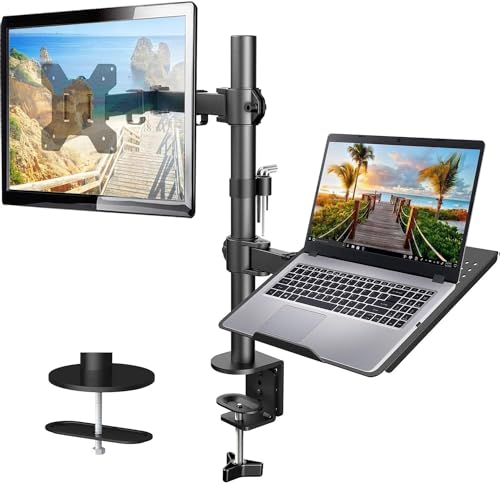
- Supports 13-32-inch monitors up to 22 pounds
- Ventilated 14-by-12-inch laptop tray
- Includes C-clamp and grommet mounting options
Best For: Flexible single-monitor and laptop workstations
Best for Larger Laptops
VIVO Monitor Arm with 17-Inch Laptop Tray

- Vented tray fits laptops up to 17 inches
- Supports 13-32-inch monitors with VESA mounting
- Includes cable clips and a 3-year warranty
Best For: Larger notebook and monitor workstations
Best for Adjustability
HUANUO Full-Motion Laptop and Monitor Arm

- Supports laptops up to 17 inches or monitors up to 34 inches
- Offers broad full-motion adjustment and 18.1-inch arm reach
- Tray adds ventilation, anti-slip pads, and Velcro straps
Best For: Switchable laptop and monitor setups
Best Compact Option
UPGRAVITY Monitor and Laptop Mount

- Fits 13-27-inch monitors up to 17.6 pounds
- Vented tray supports laptops up to 17 inches
- Includes clamp, grommet, cable management, and 3-year warranty
Best For: Compact dual-screen desk setups
Best Compact 2-in-1 Pick
Suptek Monitor and Laptop Mount

- Supports 13-27-inch monitors and laptops up to 15.6 inches
- Detachable ventilated tray with cable management
- Includes C-clamp and grommet mounting options
Best For: Compact single-monitor and laptop workstations
Best for Multi-Display Setups
HUANUO Dual Monitor and Laptop Mount

- Holds two 32-inch monitors and a 17-inch laptop
- Wide range of tilt, swivel, rotation, and height adjustment
- Uses clamp or grommet mounting to save desk space
Best For: Dual-monitor productivity workstations
Best for Extended Height
Suptek Dual Monitor Laptop Mount

- Fits 17-35-inch monitors and 13-18-inch notebooks
- Adjusts up to 18.7 inches high with 22.24-inch maximum extension
- Ventilated tray and built-in cable management
Best For: Sitting and standing desk setups
Silver Space Saver
Adjustable 2-in-1 Monitor and Laptop Mount

- Supports 17- to 32-inch monitors up to 19.8 pounds
- Fits laptops from 12 to 17 inches
- Offers 360-degree swivel and cable management
Best For: A clean silver setup with one monitor and one laptop
Flexible Workstation Pick
Full-Motion Monitor Arm with Laptop Tray

- Supports 13- to 32-inch monitors up to 22 pounds
- Includes a vented steel tray for laptops up to 16 inches
- Offers C-clamp and grommet installation
Best For: Flexible home-office and gaming desk configurations
Triple-Device Setup
Dual Monitor and Laptop Desk Mount
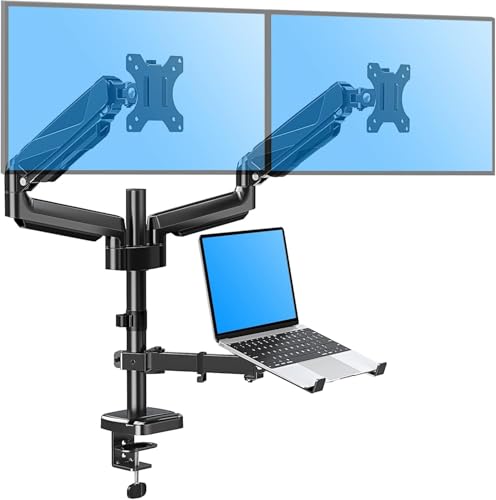
- Supports two monitors plus a 10- to 17-inch laptop
- Holds up to 17.6 pounds per monitor arm
- Provides adjustable positioning and cable organization
Best For: Multi-screen productivity and compact three-device workstations
Best Overall – HUANUO 2-in-1 Monitor Arm with Laptop Tray
If you want a flexible monitor arm with laptop tray for a single-screen workstation, this HUANUO model combines a ventilated 14-by-12-inch laptop platform with support for 13- to 32-inch VESA monitors. Its articulating arm and dual mounting options make it a practical choice for reclaiming desk space.
Best For: Users who want one adjustable arm for either a laptop and monitor setup.
Pros:
- Supports 13- to 32-inch monitors weighing up to 22 pounds.
- Ventilated tray includes a protruding bottom lip to help hold the laptop securely.
- Offers tilt, swivel, rotation, height adjustment, and integrated cable management.
- Includes both C-clamp and grommet mounting hardware.
Cons:
- Compatibility is limited to VESA 75x75mm or 100x100mm monitors.
- The included mounting hardware is intended for wooden desks.
With its relatively high 22-pound monitor capacity and broad adjustment range, this is a well-rounded monitor arm with laptop tray for everyday office or home-office use. Confirm your monitor’s VESA pattern, weight, and desk material before buying.
Best for Larger Laptops – VIVO Monitor Arm with 17-Inch Laptop Tray
This VIVO monitor arm with laptop tray is designed for setups that need room for a laptop up to 17 inches alongside a monitor. It supports screens from 13 to 32 inches and uses a sturdy desk-mounted design with detachable VESA plates for installation.
Best For: Users with larger laptops who want a straightforward monitor-and-notebook workstation.
Pros:
- Vented tray accommodates laptops up to 17 inches.
- Supports monitors up to 32 inches and 22 pounds each according to the product title.
- Provides tilt, swivel, rotation, height adjustment, and portrait or landscape positioning.
- Includes cable clips, mounting hardware, and a 3-year warranty.
Cons:
- The listed monitor compatibility is limited to VESA 75x75mm or 100x100mm patterns.
- Its tilt range is more limited than some competing models, at plus or minus 15 degrees.
The large laptop tray and broad monitor compatibility make this a useful option for multitasking without placing the laptop directly on the desk. Its tilt range is modest, but the arm still provides useful positioning flexibility and cable organization.
Best for Adjustability – HUANUO Full-Motion Laptop and Monitor Arm
For shoppers prioritizing reach and repositioning, this HUANUO monitor arm with laptop tray offers a full-motion design that can hold a laptop up to 17 inches or support a 13- to 34-inch monitor when the tray is removed. Its arm extends up to 18.1 inches for added placement flexibility.
Best For: Users who frequently adjust their screen position or switch between laptop and monitor modes.
Pros:
- Works with laptops up to 17 inches or monitors up to 34 inches.
- Provides plus or minus 45-degree tilt, plus or minus 90-degree swivel, and 360-degree rotation.
- Long arm reach and height adjustment help position the screen at eye level.
- Ventilated tray includes anti-slip pads, a widened guard, and Velcro straps.
Cons:
- The monitor weight capacity varies by size from 4.85 to 19.8 pounds.
- The counterbalanced arm may rise when the laptop is removed.
- Its warranty is two years, shorter than some options in this roundup.
This is the most adaptable choice here for users who want to alternate between a laptop tray and a monitor mount. Pay close attention to the monitor’s weight and handle the arm carefully when removing the laptop.
Best Compact Option – UPGRAVITY Monitor and Laptop Mount
This UPGRAVITY monitor arm with laptop tray targets smaller monitor setups, supporting screens from 13 to 27 inches and laptops up to 17 inches. Its vented tray, full-motion positioning, and included clamp and grommet hardware help create a more organized dual-screen workspace.
Best For: Users with 13- to 27-inch monitors who want a space-saving laptop-and-monitor mount.
Pros:
- Supports monitors up to 27 inches and 17.6 pounds.
- Vented 11.8-by-10.4-inch tray fits laptops up to 17 inches.
- Offers height adjustment, 90-degree tilt, 180-degree swivel, and 360-degree rotation.
- Includes detachable cable clips, C-clamp hardware, grommet hardware, and a 3-year warranty.
Cons:
- Its 27-inch monitor limit is lower than the larger HUANUO and VIVO options.
- The monitor weight capacity is limited to 17.6 pounds.
Choose this model when your monitor falls within the 13- to 27-inch range and you want a capable full-motion mount without using desk space for a laptop stand. Verify your monitor’s VESA pattern and weight before installation.
Best Compact 2-in-1 Pick – Suptek Monitor and Laptop Mount
If you need a monitor arm with laptop tray for a compact workstation, this Suptek model combines one monitor arm with a detachable notebook tray. It supports 13- to 27-inch monitors and laptops up to 15.6 inches, with adjustable positioning and both clamp and grommet mounting options.
Best For: Users who want a flexible single-monitor and laptop setup with a removable tray.
Pros:
- Supports monitors from 13 to 27 inches and up to 22 pounds total per supplied specifications.
- Detachable, ventilated 400 x 300 mm laptop tray helps accommodate notebooks up to 15.6 inches.
- Offers 180-degree arm swiveling, 360-degree monitor rotation, 90-degree tilt, and 400 mm of height adjustment.
- Includes both C-clamp and grommet mounting hardware for desks 10-80 mm thick.
Cons:
- The laptop tray is not designed for notebooks larger than 15.6 inches.
- Monitor compatibility is limited to displays with 75 x 75 mm or 100 x 100 mm VESA patterns.
Its detachable tray and dual mounting options make this a practical choice when you want to change between a laptop-and-monitor arrangement and a more traditional monitor setup.
Best for Multi-Display Setups – HUANUO Dual Monitor and Laptop Mount
This monitor arm with laptop tray is built for a larger workstation, supporting two monitors up to 32 inches along with a laptop up to 17 inches. Its independently adjustable arms and multiple positioning options can help organize a multi-screen setup while freeing desk space.
Best For: Productivity-focused users who need two monitors and a laptop on one desk mount.
Pros:
- Supports two monitors up to 32 inches and a laptop up to 17 inches at the same time.
- Monitor arms rotate 360 degrees, swivel plus or minus 90 degrees, and tilt from plus 85 to minus 90 degrees.
- Laptop tray swivels plus or minus 90 degrees, tilts plus 90 to minus 45 degrees, and adjusts vertically.
- Includes C-clamp and grommet mounting options for different desk setups.
Cons:
- The grommet mount is specified for wooden and plastic desks only.
- Each monitor is limited to 17.6 pounds according to the supplied product notes.
Choose this HUANUO mount when your priority is maximizing screen count and keeping a laptop within reach without using separate desk stands.
Best for Extended Height – Suptek Dual Monitor Laptop Mount
For a monitor arm with laptop tray that can adapt to sitting or standing use, this Suptek mount offers up to 18.7 inches of height adjustment and a maximum extension length of 22.24 inches. It supports a 17- to 35-inch monitor alongside a 13- to 18-inch notebook.
Best For: Users who want substantial height and reach adjustment for a monitor-and-laptop workstation.
Pros:
- Designed for 17- to 35-inch monitors and 13- to 18-inch notebooks.
- Provides 360-degree rotation, 180-degree swivel, 180-degree tilt, and up to 18.7 inches of height adjustment.
- Ventilated laptop tray accommodates laptops, tablets, or paper materials.
- Includes internal cable management plus C-clamp and optional grommet installation.
Cons:
- The supplied notes specify a total load capacity of up to 24.25 pounds.
- The laptop tray dimensions and monitor range may not suit especially large notebooks or smaller displays.
Its extended height range and 22.24-inch maximum reach make this a strong fit for desks where screen elevation and positioning flexibility matter more than a minimal footprint.
Silver Space Saver – Adjustable 2-in-1 Monitor and Laptop Mount
If you want a monitor arm with laptop tray that combines a clean look with broad adjustment range, the Viozon 2-in-1 mount is a practical option. Its aluminum arms support a 17- to 32-inch monitor and a 12- to 17-inch laptop, while cable management helps keep the desk organized.
Best For: Users who want a silver, space-saving setup for one monitor and one laptop.
Pros:
- Supports 17- to 32-inch VESA monitors up to 19.8 pounds.
- Includes a tray for 12- to 17-inch laptops.
- Offers 360-degree swivel, monitor tilt, and extended reach up to 20.5 inches.
- Aluminum construction and cable management provide a tidy, stable setup.
Cons:
- Monitor support requires a compatible 75x75mm or 100x100mm VESA interface.
- The laptop tray is limited to laptops up to 17 inches.
The Viozon stands out for its aluminum finish and generous positioning range. It is a strong fit when appearance, laptop compatibility, and ergonomic adjustability matter more than supporting multiple monitors.
Flexible Workstation Pick – Full-Motion Monitor Arm with Laptop Tray
The Redbat is a versatile monitor arm with laptop tray for desks that need flexible positioning and straightforward installation. It supports 13- to 32-inch monitors up to 22 pounds, includes a vented steel tray for laptops up to 16 inches, and offers both clamp and grommet mounting.
Best For: Remote workers, gamers, and professionals who want broad monitor compatibility and two mounting choices.
Pros:
- Supports most 13- to 32-inch VESA monitors up to 22 pounds.
- Vented steel tray fits laptops and notebooks up to 16 inches.
- Provides 90-degree tilt, 180-degree swivel, and 360-degree rotation.
- Includes C-clamp and grommet mounting options plus cable clips.
Cons:
- The laptop tray accommodates up to 16-inch devices, less than some competing trays.
- Its alloy-steel construction weighs 4.5 kg, which may be substantial for some setups.
Choose the Redbat when installation flexibility is a priority. Its wide screen-size range, higher stated monitor capacity, and included organization accessories make it a well-rounded choice for varied desk arrangements.
Triple-Device Setup – Dual Monitor and Laptop Desk Mount
For a multi-screen workstation, this MOUNTUP monitor arm with laptop tray supports two monitors plus a laptop. It accommodates two 13- to 27-inch displays and a 10- to 17-inch notebook, helping free desk space while allowing each device to be repositioned for a more comfortable view.
Best For: Productivity-focused users who need two monitors and a laptop in one organized setup.
Pros:
- Supports two 13- to 27-inch monitors and a 10- to 17-inch laptop.
- Holds up to 17.6 pounds per arm and supports 75x75mm and 100x100mm VESA patterns.
- Provides tilt, swivel, rotation, and extension for flexible positioning.
- Includes C-clamp mounting, with a grommet option for compatible desks.
Cons:
- Monitor support is limited to screens up to 27 inches.
- A reinforcement plate is required for glass-table installation and is not included.
- Desk thickness and grommet-hole dimensions must fall within the listed ranges.
The MOUNTUP is the most capable choice here for a three-device workspace. Its dual-monitor design can significantly expand screen space, but confirm desk compatibility and mounting surface requirements before buying.
How We Picked the Best Monitor Arm with Laptop Tray
We focused on the specifications that matter most in daily use: monitor-size and weight limits, laptop-tray dimensions, adjustment range, VESA compatibility, desk-mount style, and support for single- or dual-screen layouts. We also considered whether each design offers useful tilt, swivel, rotation, or height adjustment.
Because product listings can vary by configuration, confirm the exact capacity and included hardware for the version you plan to buy. A mount rated for a large monitor may not support the same weight in every arm position.
Quick Comparison
| Best For | Look For | Typical Configuration |
|---|---|---|
| Single-screen workstation | One monitor arm and a stable laptop tray | 13–34-inch monitor plus laptop |
| Dual-screen setup | Two independent arms and adequate desk depth | Two monitors, or one monitor plus laptop tray |
| Small desks | Compact clamp and a shallow tray | One monitor with elevated laptop |
| Heavy equipment | Higher weight capacity and reinforced mounting | Large monitor or multiple displays |
Key Buying Factors for a Monitor Arm with Laptop Tray
Monitor and Laptop Compatibility
Check the monitor’s VESA pattern, commonly 75 x 75 mm or 100 x 100 mm, along with its actual weight without the factory stand. Then compare the tray’s stated laptop size and weight limits. A 17-inch notebook may fit within the dimensions but still exceed the tray’s capacity.
Desk Mount and Stability
Most models use a C-clamp, while some can also pass through a desk grommet. Measure the desk thickness and leave room behind it for the clamp. A sturdy base and properly tightened hardware help prevent wobble, especially with extended arms or heavier screens.
Adjustment Range
Height adjustment, tilt, swivel, and screen rotation determine how easily you can create an ergonomic setup. Gas-spring arms generally offer smoother repositioning, while fixed or mechanically adjusted arms may be preferable for a workstation that rarely changes.
Single or Dual Arms
A dual-arm design provides more flexibility for two monitors, but it usually needs more desk space and careful weight balancing. If you mainly use one display and a laptop, a single-arm model is often simpler and less bulky.
Cable Management and Tray Design
Integrated cable channels keep power and display leads organized. For the laptop tray, look for ventilation openings, raised edges, and a surface wide enough for the notebook plus room to connect charging or peripheral cables.
Who Should Buy Which Monitor Arm with Laptop Tray?
Choose a single-arm mount if you want a cleaner desk, an elevated laptop, and one adjustable monitor without adding unnecessary hardware. A dual-monitor model is better for multitasking, spreadsheets, coding, or creative work across several displays. If your laptop is large or heavy, prioritize tray dimensions and load capacity over the lowest price. For frequent repositioning, choose a full-motion or gas-spring arm; for a fixed home office, a simpler mount can deliver better value.