The right monitor arm can free up desk space, improve screen positioning, and make long work or gaming sessions more comfortable. This roundup compares 10 monitor arms for standard displays, ultrawide screens, and dual-monitor workstations.
Use the buying guide below to match each mount’s capacity, adjustment range, installation style, and screen compatibility to your desk and monitors.
Best 10 Monitor Arms Picks for 2026
Best Dual-Arm Stability
HUANUO FlowLift Dual Monitor Stand

- Holds two 13–32-inch monitors
- Dual C-clamp or grommet mounting
- Full-motion adjustment with cable management
Best For: Stable dual-monitor workstations
Best for Ultrawide Displays
VIVO Aluminum Ultrawide Monitor Tension Arm
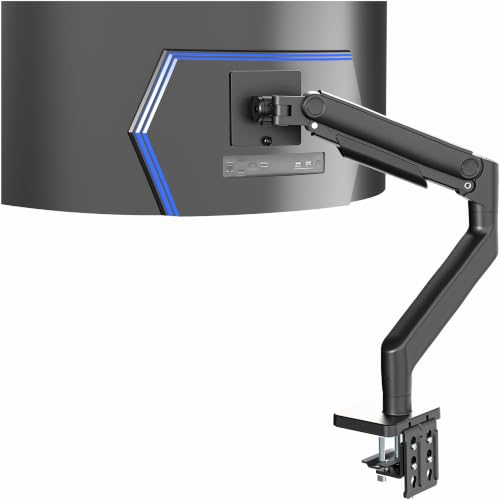
- Supports ultrawides up to 49 inches
- Handles monitors up to 44 pounds
- Spring-assist height adjustment
Best For: Heavy ultrawide gaming monitors
Best Easy-Adjust Single Arm
HUANUO FlowLift Single Monitor Mount

- Fits compatible 13–32-inch monitors
- One-piece design for simpler setup
- Clamp and grommet mounting options
Best For: Single-monitor home office setups
Best Versatile Single-Monitor Value
VIVO Single Monitor Desk Mount

- Supports screens up to 38 inches
- 22-pound monitor capacity
- Portrait and landscape positioning
Best For: Flexible single-monitor desk setups
Stable Dual-Screen Flexibility

- Supports two 17–33-inch monitors up to 22 pounds each
- Offers extensive tilt, swivel, height, and rotation adjustment
- Includes C-clamp and grommet mounting options
Best For: Dual-monitor workstations needing flexible positioning
Single-Screen Ergonomics

- Fits flat or curved screens up to 34 inches
- Provides extensive extension, height, tilt, swivel, and rotation
- Includes cable management and two mounting options
Best For: Single-monitor desks prioritizing reach and ergonomic adjustment
Proven Dual-Monitor Value
VIVO STAND-V002 Dual Monitor Mount

- Holds two 13–30-inch monitors up to 22 pounds each
- Provides tilt, swivel, rotation, and height adjustment
- Includes C-clamp, grommet option, cable clips, and VESA plates
Best For: Traditional dual-screen setups seeking sturdy, practical mounting
Best Single-Arm Pick
ErGear Fully Adjustable Monitor Arm

- Supports 13–34-inch screens up to 19.8 pounds
- Tool-free VESA mounting and cable management
- Height, reach, tilt, swivel, and rotation adjustments
Best For: Flexible single-monitor workspaces
Best Dual-Arm Value
HUANUO Advanced Dual Monitor Mount

- Holds two monitors up to 32 inches
- Supports up to 22 pounds per arm
- Includes broad positioning and mounting adjustments
Best For: Two-screen productivity setups
Best Heavy-Duty Dual Setup

- Up to 26.4 pounds per arm
- Extended 21.1-inch height and 25.59-inch reach
- USB ports, cable management, and clamp/grommet mounting
Best For: Heavy dual-monitor workstations needing extra reach
Best Dual-Arm Stability – HUANUO FlowLift Dual Monitor Stand
For users comparing monitor arms for a two-screen workstation, the HUANUO FlowLift combines full-motion adjustment with a dual C-clamp base designed to keep both displays steady. It supports two 13–32-inch monitors weighing 4.4–19.8 pounds each, provided they use 75×75 or 100×100 VESA mounting holes.
Best For: Dual-monitor work, gaming, and productivity setups that need adjustable positioning and a secure desk mount.
Pros:
- Supports two monitors with full tilt, swivel, rotation, and height adjustment.
- Dual C-clamp design and optional grommet mounting promote a stable installation.
- Built-in cable management helps keep the desktop organized.
- Includes a five-year manufacturer warranty.
Cons:
- Compatibility depends on each monitor meeting the size, weight, and VESA requirements.
- Designed for wooden desks; plastic or glass desks are not recommended.
- Desk undersides must be free of cross beams or panels that could interfere with installation.
This is a practical choice when two screens are central to your setup and stability matters. Check both monitor specifications and desk construction before purchasing.
Best for Ultrawide Displays – VIVO Aluminum Ultrawide Monitor Tension Arm
Among monitor arms for oversized displays, this VIVO tension arm is built for a single ultrawide screen up to 49 inches and 44 pounds. Its spring-assist design helps counterbalance heavier monitors while providing smooth height and angle adjustments.
Best For: Large ultrawide gaming monitors, including high-weight displays such as Samsung Odyssey G9 models.
Pros:
- Supports monitors up to 49 inches and 44 pounds with 75×75 or 100×100 VESA patterns.
- Spring-assist tension arm enables touch-adjustable repositioning.
- Offers tilt, swivel, rotation, and 11 inches of height adjustment.
- Includes a detachable VESA plate and integrated cable management covers.
Cons:
- Its compatibility is limited to monitors with the required VESA patterns and weight rating.
- The C-clamp supports desks up to 3.2 inches thick, while the optional grommet supports up to 1.4 inches.
- It is intended for one monitor rather than a multi-screen setup.
Choose this arm when a conventional mount is not enough for a large, heavy ultrawide. Confirm the monitor’s VESA layout and your desk thickness before installation.
Best Easy-Adjust Single Arm – HUANUO FlowLift Single Monitor Mount
For a single-screen setup, this HUANUO FlowLift is one of the more approachable monitor arms to consider. It supports compatible 13–32-inch monitors weighing 4.4–19.8 pounds and uses a one-piece design intended to simplify installation and adjustment.
Best For: Home offices and single-monitor users who want broad movement, quick setup, and either clamp or grommet mounting.
Pros:
- Provides tilt, swivel, rotation, and up to 39.6 cm of height adjustment.
- Supports 75×75 and 100×100 VESA patterns and monitors up to 19.8 pounds.
- Offers C-clamp and grommet installation options.
- Includes a five-year manufacturer warranty and tested motion durability.
Cons:
- Monitor and desk must meet specific size, weight, VESA, thickness, and construction requirements.
- Wood tabletops are recommended, and underside beams or panels may obstruct installation.
- It is designed for one monitor and may not suit larger or heavier displays.
This model makes sense for a standard single-monitor desk where easy positioning is a priority. Its stated compatibility limits should be checked carefully before ordering.
Best Versatile Single-Monitor Value – VIVO Single Monitor Desk Mount
This VIVO desk mount is a flexible option among monitor arms for standard screens and moderate-size ultrawides. It supports up to 22 pounds, offers extensive movement including portrait or landscape orientation, and includes both clamp and grommet mounting hardware.
Best For: Single-monitor users who want broad adjustment range and compatibility with screens up to 38 inches.
Pros:
- Supports most compatible 13–32-inch monitors and ultrawides up to 38 inches.
- Offers up to 16 inches of height adjustment, plus tilt, swivel, and rotation.
- Supports portrait and landscape screen positioning.
- Includes a detachable VESA plate, cable clips, and both mounting options.
Cons:
- Maximum supported monitor weight is 22 pounds.
- Monitor must use a 75×75 or 100×100 VESA pattern.
- Desk clamp installation supports surfaces up to 3.25 inches thick, so desk dimensions should be verified.
Consider this mount if you want a straightforward single-screen arm with generous positioning range and ultrawide support. Confirm the monitor’s VESA pattern, weight, and desk thickness first.
Stable Dual-Screen Flexibility – ErGear Dual Monitor Stand
If you need monitor arms for a two-screen workstation, the ErGear Dual Monitor Stand combines sturdy steel construction with broad positioning options. It supports two 17- to 33-inch monitors weighing 4.4 to 22 pounds each, provided they use 75x75mm or 100x100mm VESA mounting holes.
Best For: Users building a dual-monitor home office or workstation who want height, tilt, swivel, and portrait-orientation adjustments.
Pros:
- Supports two monitors up to 33 inches and 22 pounds each.
- Offers tilt, swivel, rotation, height, and extension adjustments.
- Includes both C-clamp and grommet installation options.
- Tested for 20,000 adjustment cycles.
Cons:
- Compatibility requires the correct screen size, weight, and VESA pattern.
- The manufacturer recommends installation on a wooden desk without underside obstructions.
The ErGear is a practical choice when you want one mount for two moderately sized displays. Check your desk thickness and underside clearance before choosing between the C-clamp and grommet bases.
Single-Screen Ergonomics – WALI Adjustable Monitor Arm
Among monitor arms for a single display, the WALI Adjustable Single Monitor Arm stands out for its wide motion range and substantial load capacity. It fits many flat or curved screens up to 34 inches, while integrated cable guides help keep the desk organized.
Best For: Home offices, gaming setups, and compact desks that need a single full-motion arm with strong screen support.
Pros:
- Supports flat screens up to 34 inches and 26.4 pounds, with separate curved-screen limits.
- Extends up to 19.3 inches and raises the monitor up to 17.3 inches.
- Provides 360-degree rotation, broad swivel, and tilt adjustment.
- Includes C-clamp and grommet bases plus cable management guides.
Cons:
- VESA pattern, screen size, and weight must be verified before purchase.
- The manufacturer recommends a wooden desk with no crossbeam blocking installation.
With its generous reach and 10-year warranty, the WALI is a strong fit for users who frequently reposition one display. Confirm your monitor’s weight limit, especially if using a curved screen.
Proven Dual-Monitor Value – VIVO STAND-V002 Dual Monitor Mount
The VIVO STAND-V002 is a straightforward option among monitor arms for two displays. Its steel construction supports two 13- to 30-inch monitors weighing up to 22 pounds each, with 75x75mm or 100x100mm VESA compatibility and adjustable positioning for portrait or landscape use.
Best For: Dual-monitor users who want a sturdy, widely compatible desk mount with simple installation and essential adjustability.
Pros:
- Supports two screens up to 30 inches and 22 pounds each.
- Offers tilt, swivel, rotation, and height adjustment.
- Works with C-clamp desks up to 3.25 inches thick and includes an optional grommet mount.
- Includes cable clips, detachable VESA plates, and a three-year warranty.
Cons:
- Its maximum supported screen size is 30 inches.
- VESA mounting holes must be 75x75mm or 100x100mm.
The VIVO is a sensible pick for a conventional two-monitor setup, especially if you value a heavy-duty clamp and easy assembly. Its screen-size range is narrower than some newer dual-arm alternatives, so check your displays first.
Best Single-Arm Pick – ErGear Fully Adjustable Monitor Arm
For a clean, ergonomic desk setup, this ErGear monitor arm supports one 13–34-inch flat or curved screen while offering broad height, reach, tilt, swivel, and rotation adjustments. Its tool-free VESA plate, cable clips, and choice of clamp or grommet mounting make installation straightforward.
Best For: Users who want a flexible single-monitor setup with ultrawide compatibility and easy positioning.
Pros:
- Supports screens from 13 to 34 inches weighing 4.84–19.8 pounds.
- Provides up to 17.5 inches of height adjustment and 18.1 inches of reach.
- Includes tool-free VESA mounting, cable management, and two desk-mounting options.
- Offers tilt, swivel, and 360-degree rotation for precise positioning.
Cons:
- Designed for one monitor rather than a dual-screen setup.
- Monitor compatibility depends on the screen’s weight and 75x75mm or 100x100mm VESA pattern.
This is a practical choice when you want to free desk space and improve viewing height without adding unnecessary complexity. Verify your monitor’s dimensions, weight, and VESA pattern before buying.
Best Dual-Arm Value – HUANUO Advanced Dual Monitor Mount
This HUANUO monitor arm system is built for two screens up to 32 inches, with each arm supporting up to 22 pounds. It combines adjustable height, reach, tilt, swivel, and rotation with clamp or grommet mounting for a versatile dual-monitor workstation.
Best For: People building a two-screen desk setup who need strong per-arm support and flexible viewing angles.
Pros:
- Supports two 17–32-inch flat or curved monitors, up to 22 pounds per arm.
- Allows up to 17.5 inches of arm extension and height adjustment.
- Offers ±90-degree swivel, +90/-35-degree tilt, and 360-degree rotation.
- Includes C-clamp and grommet mounting options with the required tools and instructions.
Cons:
- Supports screens up to 32 inches, so it is not intended for larger displays.
- Requires two compatible 75x75mm or 100x100mm VESA mounting patterns.
For typical dual-screen productivity setups, this mount balances substantial capacity with useful adjustment range. Its mounting flexibility is helpful, but confirm both monitors meet the stated size, weight, and VESA requirements.
Best Heavy-Duty Dual Setup – HUANUO HNDS7 Monitor Stand
For larger and heavier dual-screen arrangements, the HUANUO HNDS7 monitor arm uses aluminum arms, a larger base, and a dual C-clamp design. It provides extended height and reach, full-motion positioning, integrated cable management, and two USB charging ports.
Best For: Users who need high-capacity dual monitor arms with extra reach and convenient USB charging.
Pros:
- Supports two 13–40-inch screens weighing up to 26.4 pounds per arm.
- Raises monitors up to 21.1 inches and extends them up to 25.59 inches.
- Provides swivel, tilt, and 360-degree rotation adjustments.
- Includes clamp or grommet mounting, cable management, and two built-in USB ports.
Cons:
- The supplied details list maximum supported screen size as 32 inches, despite the product notes stating support for screens up to 40 inches; verify compatibility before purchase.
- Its dual-arm design may be more than needed for a single-monitor desk.
This is the most feature-rich option of the three for a demanding dual-monitor workspace, particularly where extra height, reach, and per-arm capacity matter. Because the supplied size specifications conflict, check the manufacturer’s current compatibility information before ordering a 40-inch display setup.
How We Picked These Monitor Arms
We focused on compatibility, load capacity, adjustability, installation flexibility, and overall suitability for common desk setups. The selection includes single and dual mounts, options for standard monitors and ultrawides, and models supporting screens from compact 13-inch displays to large 49-inch panels.
We also considered practical features such as VESA compatibility, C-clamp and grommet mounting, height adjustment, tilt and swivel range, cable management, and whether the arm is designed for quick installation or heavier displays.
Quick Comparison
| Best For | What to Look For |
|---|---|
| Single standard monitor | 13- to 32-inch support, 75 x 75 or 100 x 100 VESA compatibility |
| Ultrawide monitor | Higher weight capacity and support for displays up to 38 or 49 inches |
| Dual-monitor setup | Two independent arms, sufficient capacity per arm, and broad adjustment range |
| Small or crowded desk | A compact clamp, integrated cable routing, and a wide height range |
Key Buying Factors for Monitor Arms
Monitor Size and Weight
Check your monitor’s weight without its original stand and compare it with the arm’s per-screen capacity. Large ultrawides often require more support than their diagonal measurement alone suggests. Dual mounts should be rated for each monitor individually, not just for the combined load.
VESA Compatibility
Most compatible monitors use 75 x 75mm or 100 x 100mm VESA mounting patterns. Confirm both the pattern and the location of the mounting holes before buying. Some displays require an adapter, especially unusual or very large models.
Desk Mounting and Stability
C-clamp mounts attach to the rear edge of a desk, while grommet bases pass through a hole in the desktop. Measure the desk thickness and check that there is enough clearance behind it. A heavier monitor or extended arm benefits from a broad, rigid base and a sturdy steel frame.
Adjustment Range
Look for smooth height, tilt, swivel, and rotation adjustments if you frequently switch between sitting and standing or use portrait mode. Dual-monitor users should also consider independent arm movement and the ability to align screens at different depths.
Who Should Buy Which Monitor Arms?
Choose a single-monitor arm if you want more desk space or better ergonomic positioning without the complexity of a multi-screen mount. For a large ultrawide, prioritize a model with a high weight rating and a long, stable arm.
Dual-Monitor Arms suit productivity users, streamers, and gamers who need two screens in one setup. Select a heavy-duty option for larger displays, while a more compact dual mount is better for two lightweight monitors and a shallow desk.
If installation speed matters, choose a mount with tool-free VESA attachment or straightforward clamp hardware. For a flexible long-term setup, prioritize broad adjustment, reliable tension control, and built-in cable management over the lowest price.