A reliable Ethernet switch can turn one router connection into several stable wired connections for computers, printers, access points, cameras, and other office equipment.
We compared 10 strong options for home offices, including plug-and-play gigabit switches, smart-managed models, a 2.5Gbps switch, PoE hardware, and a 24-port expansion option.
Best 10 Network Switches for Home Office Picks for 2026
Best Value
TP-Link TL-SG105 5-Port Gigabit Switch
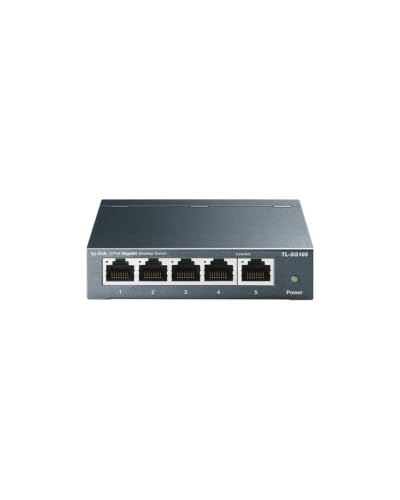
- Five auto-sensing Gigabit ports
- Fanless metal design
- Plug-and-play setup with QoS and IGMP Snooping
Best For: Quiet, simple Gigabit expansion in a home office
Best Smart Features
NETGEAR GS305E 5-Port Managed Switch

- Five Gigabit Ethernet ports
- VLAN, QoS, monitoring, and security controls
- Silent, energy-efficient metal design
Best For: Small offices needing basic managed-network features
Best for Multi-Gig
TP-Link TL-SG105S-M2 2.5G Switch

- Five 2.5Gbps ports
- Supports 100Mbps, 1Gbps, and 2.5Gbps devices
- Silent unmanaged metal design
Best For: Multi-Gig workstations, NAS devices, and Wi-Fi access points
Best Port Capacity
TP-Link TL-SG108E 8-Port Smart Switch
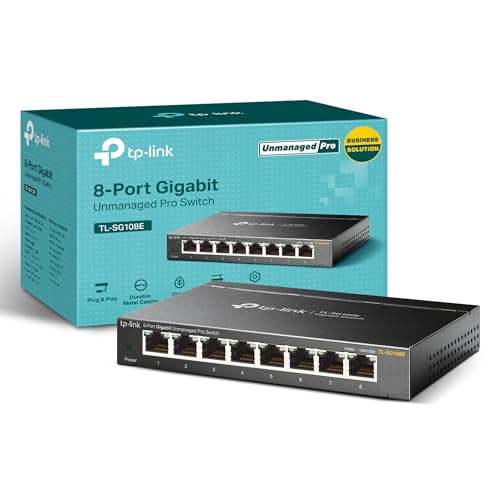
- Eight Gigabit Ethernet ports
- VLAN, QoS, IGMP Snooping, and monitoring tools
- Desktop or wall-mountable metal design
Best For: Growing home offices needing more ports and smart management
Compact Quiet Pick

- Five Gigabit Ethernet ports
- Silent fanless metal design
- Plug-and-play desktop or wall mounting
Best For: Simple, quiet home-office network expansion
Best for Everyday Use

- Eight Gigabit Ethernet ports
- Quiet fanless metal construction
- Automatic energy-efficient operation
Best For: Connecting multiple wired home-office devices
Best for Traffic Control

- Eight Gigabit Ethernet ports
- Web-managed VLAN and QoS features
- Silent fanless metal housing
Best For: Organizing and prioritizing home-office traffic
Power-Packed PoE Choice

- Eight Gigabit PoE ports with up to 120W total power
- Two Gigabit uplinks for routers, PCs, or NVRs
- Fanless metal design with VLAN and CCTV modes
Best For: Home offices with compatible PoE cameras or access points
Simple Everyday Pick

- Eight auto-negotiating 1Gbps Ethernet ports
- Plug-and-play setup with no software required
- Silent fanless design supports desktop or wall mounting
Best For: Small home offices needing simple wired expansion
High-Capacity Expansion
NETGEAR 24-Port Gigabit Switch

- Twenty-four Gigabit Ethernet ports for extensive wired connectivity
- Plug-and-play unmanaged operation
- Fanless design with desktop, wall, and rack mounting
Best For: Large home offices with many wired devices
Best Value – TP-Link TL-SG105 5-Port Gigabit Switch
For a straightforward network switches for home office setup, the TP-Link TL-SG105 adds five Gigabit Ethernet ports without requiring software, configuration, or an operating system. Its compact metal enclosure, fanless operation, and desktop or wall-mounting options make it easy to place near a router, workstation, or entertainment setup.
Best For: Home offices that need quiet, plug-and-play Gigabit expansion for computers, printers, access points, or other wired devices.
Pros:
- Five 10/100/1000Mbps ports with auto-negotiation and Auto MDI/MDIX
- Fanless design provides quiet operation
- Metal case supports desktop or wall mounting
- Includes QoS and IGMP Snooping for traffic prioritization and multicast efficiency
Cons:
- Unmanaged design does not provide VLAN or advanced network configuration
- Only five ports are available
The TL-SG105 is a practical choice when you want reliable Gigabit connectivity with minimal setup. It is especially appealing for a quiet workspace, though users needing network segmentation or monitoring should consider a managed model.
Best Smart Features – NETGEAR GS305E 5-Port Managed Switch
The NETGEAR GS305E is a strong option among network switches for home office users who want more control than a basic plug-and-play switch provides. Its five Gigabit ports support Easy Smart management features such as VLAN configuration, QoS traffic prioritization, port monitoring, and network security controls.
Best For: Small home offices that need VLANs, traffic prioritization, port monitoring, or other basic managed-switch capabilities.
Pros:
- Five 1Gbps Ethernet ports with auto-negotiation
- Supports VLANs, QoS, port monitoring, and network security management
- Fanless, energy-efficient operation
- Compact metal housing supports desktop or wall mounting
Cons:
- Managed features require more setup than an unmanaged switch
- Regional compatibility is listed as U.S. and Canada only
- Limited to five ports
Choose the GS305E if your home office would benefit from traffic control or network segmentation. It keeps the compact, silent form factor of a basic switch while adding configuration options for more structured networks.
Best for Multi-Gig – TP-Link TL-SG105S-M2 2.5G Switch
The TP-Link TL-SG105S-M2 is designed for home offices moving beyond standard Gigabit networking. All five ports support up to 2.5Gbps, with auto-negotiation for 100Mbps, 1Gbps, and 2.5Gbps devices, making it suitable for multi-Gig Wi-Fi access points, NAS storage, workstations, and high-speed local transfers.
Best For: Multi-Gig home offices, NAS users, workstation transfers, gaming setups, and networks with 2.5Gbps-capable devices.
Pros:
- Five 2.5Gbps ports provide up to 25Gbps of switching capacity
- Auto-negotiates among 100Mbps, 1Gbps, and 2.5Gbps links
- Fanless design enables silent operation
- Metal casing supports desktop or wall mounting
Cons:
- Unmanaged design lacks VLANs and other configuration features
- Benefits depend on having multi-Gig devices and network service
- Larger footprint than the basic five-port models listed here
The TL-SG105S-M2 is the forward-looking pick for users who already have, or plan to add, 2.5Gbps equipment. It avoids the configuration overhead of a managed switch while providing a substantial speed step up from conventional Gigabit hardware.
Best Port Capacity – TP-Link TL-SG108E 8-Port Smart Switch
For a growing home office, the TP-Link TL-SG108E combines eight Gigabit Ethernet ports with Easy Smart management. It provides room for more wired devices while adding VLAN support, QoS, IGMP Snooping, port mirroring, loop prevention, cable diagnostics, and Link Aggregation.
Best For: Home offices with several wired devices that need extra ports plus VLANs, monitoring, traffic optimization, or other Layer 2 controls.
Pros:
- Eight Gigabit Ethernet ports expand wired capacity
- Supports VLANs with up to 32 VLANs simultaneously from 4K VLAN IDs
- Includes QoS, IGMP Snooping, port mirroring, loop prevention, and cable diagnostics
- Sturdy metal housing with shielded ports supports desktop or wall mounting
Cons:
- Management features require configuration through a web interface or software
- Provides Gigabit rather than multi-Gigabit ports
The TL-SG108E is the most expandable and feature-rich choice in this group. It makes sense when five ports are not enough and you want practical management tools, though a smaller unmanaged switch may be simpler for basic connectivity.
Compact Quiet Pick – NETGEAR GS305
For a straightforward setup among network switches for home office use, the NETGEAR GS305 provides five Gigabit Ethernet ports in a compact, fanless design. Its unmanaged plug-and-play operation requires no software or configuration, while desktop or wall mounting makes placement flexible.
Best For: Home offices needing a quiet, simple wired network expansion.
Pros:
- Five 1Gbps auto-negotiating Ethernet ports support high-speed connections.
- Plug-and-play setup works with existing Cat5e or Cat6 cables.
- Fanless metal design operates silently and supports desktop or wall mounting.
Cons:
- Five ports provide less expansion room than larger eight-port models.
- Unmanaged operation does not provide traffic controls or VLAN features.
- Specified for use in the U.S. and Canada only.
The GS305 is a practical choice when you want reliable Gigabit connectivity without network-management complexity. Its compact, silent design fits especially well in a desk-based home office.
Best for Everyday Use – TP-Link TL-SG108
The TP-Link TL-SG108 is a strong option among network switches for home office setups that need several wired connections. It offers eight Gigabit ports, a sturdy metal housing, fanless operation, and automatic power adjustment without requiring configuration.
Best For: Home offices connecting computers, printers, gaming consoles, and other Ethernet devices.
Pros:
- Eight 10/100/1000 Mbps ports provide room for multiple wired devices.
- Fanless design delivers silent operation in noise-sensitive rooms.
- Metal housing and shielded ports support durability, heat dissipation, and interference protection.
- Energy-efficient operation adjusts consumption based on link status and cable length.
Cons:
- As an unmanaged switch, it does not offer configurable VLAN or traffic-priority controls.
- Its larger housing takes more desk or mounting space than a five-port option.
With eight ports and a durable metal enclosure, the TL-SG108 offers useful capacity for a growing home office. It is best suited to buyers who want simple expansion rather than advanced network administration.
Best for Traffic Control – NETGEAR GS308E
The NETGEAR GS308E adds management features to the usual plug-and-play experience, making it a flexible choice among network switches for home office networks. Its eight Gigabit ports are paired with a web-based interface, VLAN support, QoS, traffic monitoring tools, and built-in protections.
Best For: Home offices that need to organize, prioritize, and troubleshoot network traffic.
Pros:
- Eight auto-negotiating 1Gbps ports support full-Gigabit wired connectivity.
- Web GUI works on Windows, Mac, or Linux without requiring an app or Windows-only utility.
- Supports up to 64 VLANs, QoS, IGMP snooping, and port mirroring.
- Fanless metal housing operates silently and includes loop detection, storm control, and cable testing.
Cons:
- Management features require more setup and learning than an unmanaged switch.
- Advanced controls may be unnecessary for a basic network with only a few devices.
The GS308E is the more capable choice when a home office needs segmentation, traffic prioritization, or troubleshooting tools. Its silent housing and desktop or wall-mount flexibility keep it practical for everyday use.
Power-Packed PoE Choice – 8-Port Gigabit PoE Switch
For home office networks that also support cameras or access points, this 8-port switch combines Gigabit connectivity with built-in PoE power. It offers eight PoE ports, two Gigabit uplinks, and a fanless metal design, making it a practical option among network switches for home office surveillance setups.
Best For: Home offices needing to power compatible PoE cameras, wireless access points, or other devices without separate injectors.
Pros:
- Eight Gigabit PoE ports provide up to 30W per port, with a 120W total PoE budget.
- Two additional Gigabit uplink ports can connect routers, PCs, or an NVR.
- Fanless operation, VLAN mode, CCTV mode, and a compact metal enclosure support flexible installations.
Cons:
- It is an unmanaged switch, so advanced configuration options are limited.
- PoE compatibility is limited to standard devices; passive PoE and 24V wireless access points require additional equipment.
- The extended transmission distance applies when CCTV mode is enabled and may depend on the installation.
This is the most specialized option in the group. Its built-in power supply and PoE features are useful for surveillance-focused home offices, while buyers with only standard wired devices may not need the added PoE hardware.
Simple Everyday Pick – NETGEAR 8-Port Gigabit Switch
The NETGEAR GS308 is a straightforward way to add wired connections to a home office. Its eight Gigabit ports, plug-and-play setup, and compact fanless metal design make it a strong general-purpose choice among network switches for home office computers and peripherals.
Best For: Users who want to connect several wired devices without configuration software or PoE features.
Pros:
- Eight auto-negotiating 1Gbps ports work with existing Cat5e or Cat6 cables.
- Plug-and-play operation requires no software installation or configuration.
- Fanless, energy-efficient design supports quiet desktop or wall-mounted use.
Cons:
- It has no PoE ports for powering cameras or access points.
- Eight ports may be limiting for larger home offices or expanding device collections.
- The supplied notes specify U.S. and Canada compatibility.
For a typical desk or small office, the GS308 keeps networking simple and unobtrusive. It is best suited to standard Ethernet expansion rather than installations requiring managed controls, PoE, or a high port count.
High-Capacity Expansion – NETGEAR 24-Port Gigabit Switch
When a home office has many computers, printers, entertainment devices, or networked peripherals, the NETGEAR GS324 provides substantial wired capacity. With 24 Gigabit ports and quiet unmanaged operation, it is a practical large-office option among network switches for home office installations.
Best For: Larger home offices, workspaces, or households that need many wired Ethernet connections in one enclosure.
Pros:
- Twenty-four 1Gbps ports provide room for numerous wired devices.
- Plug-and-play operation avoids software installation and manual configuration.
- Fanless, energy-efficient construction supports quiet operation and desktop, wall, or rack mounting.
Cons:
- Its larger enclosure takes more space than an 8-port desktop switch.
- As an unmanaged Layer 1 switch, it does not provide advanced network management features.
- It does not provide PoE power for compatible devices.
The GS324 makes sense when port capacity matters more than compact size. Its mounting flexibility helps with permanent installations, while the unmanaged design keeps setup easy for users who simply need more Gigabit Ethernet connections.
How We Picked the Best Network Switches for Home Office Use
We focused on the features that matter most in a home office: port count, Ethernet speed, setup complexity, management options, physical design, and room for future expansion. The lineup includes compact five-port switches for basic desks, eight-port models for growing setups, a 24-port option for larger installations, and specialized choices for multi-gigabit or Power over Ethernet equipment.
Unmanaged switches were favored for simple plug-and-play networking, while smart-managed models were included for users who need VLANs, Quality of Service, traffic controls, or more visibility into their network. We also considered fanless designs, shielded metal housings, wall-mount flexibility, and built-in PoE power where relevant.
Quick Comparison
| Best For | Recommended Type | Why It Fits |
|---|---|---|
| Small desk setup | 5-port unmanaged gigabit | Simple, quiet, and affordable expansion |
| Traffic controls | 5- or 8-port smart-managed | Supports VLAN, QoS, and configuration options |
| Fast local transfers | 2.5Gbps multi-gigabit | Higher throughput for compatible devices |
| Security cameras or access points | PoE switch | Carries data and power over one Ethernet cable |
| Large wired installation | 24-port unmanaged | Provides substantial room for expansion |
Key Buying Factors for Network Switches for Home Office
Port Count
Count the devices you will connect now, then add a few spare ports. A five-port switch works well for a desktop with several wired devices, while eight ports are more practical for a home office with printers, access points, storage, and entertainment equipment. Choose 24 ports only when you expect a larger wired installation or want significant expansion capacity.
Speed and Compatibility
Gigabit Ethernet is sufficient for most internet plans and everyday office work. A 2.5Gbps switch is worth considering for fast NAS transfers, workstation backups, or newer computers with multi-gigabit Ethernet. The connected devices and cabling must also support the faster speed to benefit from it.
Managed Versus Unmanaged
Unmanaged switches require virtually no configuration and are usually the best choice for straightforward connectivity. Smart-managed switches cost more but can help separate guest, work, smart-home, or security traffic with VLANs and prioritize important traffic with QoS.
PoE, Noise, and Placement
Choose PoE when cameras, wireless access points, or compatible phones need power through Ethernet. For a desk or quiet office, a fanless metal switch is generally preferable. Check whether the housing supports desktop or wall mounting and leave room for cable access and ventilation.
Who Should Buy Which Network Switches for Home Office?
Choose a five-port unmanaged model for the simplest small-office upgrade. Move to an eight-port unmanaged switch if you need more connections without configuration. Select an easy-smart managed model when you need VLANs or traffic prioritization. Choose the 2.5Gbps option for compatible high-speed devices, and pick the PoE model for powered cameras or access points. The 24-port switch is best for a dedicated office network, structured wiring cabinet, or setup expected to grow substantially.