Choosing the right brochure folder can save hours, improve consistency, and give every handout a cleaner, more professional finish.
From compact desktop units to higher-capacity automatic models, the best paper folding machines for brochures depend on your volume, paper type, and fold styles.
Best 10 Paper Folding Machines for Brochures Picks for 2026
Auto-Feed Office Folder
Martin Yale P7500 Paper Folding Machine

- Up to 4,000 sheets per hour
- Letter, half, Z-fold, and double parallel
- 50-sheet feed tray with stacking tray
Best For: Small offices and mailrooms needing simple automatic folding
Manual Scoring Tool
13.78" Paper Creaser for Brochures

- Sharp creases for cardstock and brochures
- Extended positioning block and clear scale
- Foldable panel for compact storage
Best For: Small-volume brochure work needing precise manual scoring
High-Speed Digital Folder
Banfluxion Automatic Paper Folder
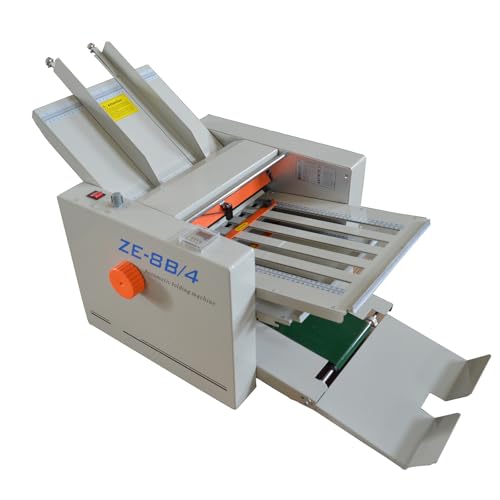
- Folds multiple sizes from 2"x3" to 12"x27"
- Auto-feed with variable speed and counter
- Supports Z-fold, C-fold, and letter-fold
Best For: High-volume brochure and document folding in offices or print shops
Preset Office Folder
Martin Yale 1711 Paper Folding Machine
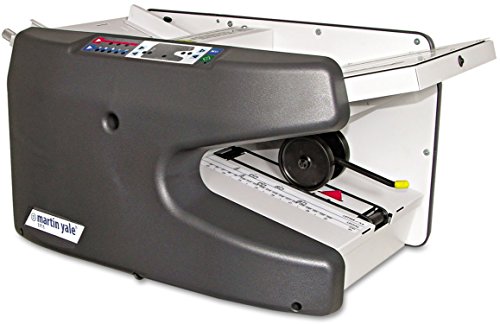
- Up to 9,000 sheets per hour
- 150-sheet feed tray and six presets
- Supports custom folds and skew adjustment
Best For: Medium to large office folding jobs with preset convenience
Precision Manual Creasing

- 18-inch manual creasing length for brochure-sized projects
- Imperial scale and metal block support accurate alignment
- Works with paper from 70-450 GSM
Best For: Small shops and studios needing precise brochure creasing
High-Speed Auto Folder

- Folds up to 156 sheets per minute
- Supports letter and legal sizes with multiple fold types
- 200-sheet hopper and LCD controls simplify use
Best For: Busy offices, schools, and churches
Portable Manual Creaser
Oztwel 13.78-Inch Paper Folder

- Portable manual creaser for brochures, cards, and covers
- Extended positioning block and alloy blades improve alignment
- Single-sheet operation with a 13.18-inch maximum crease width
Best For: Small studios needing a compact brochure creaser
High-Volume Multi-Size Folder
Automatic Paper Folding Machine for Brochures
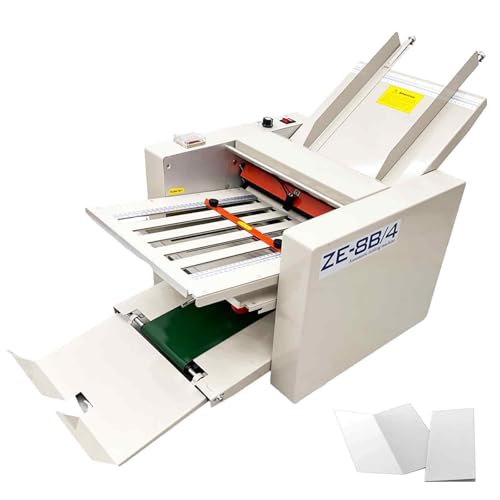
- Folds paper from 2x3 inches to 12x27 inches
- Adjustable speed up to 262 ft/min
- Supports 40gsm to 125gsm stock
Best For: Busy offices and print shops producing brochures and mixed-size documents
Compact Desktop Folder
Martin Yale P6500 Letter Folding Machine

- Manual feed with automatic tri-fold and half-fold operation
- Handles up to 1,800 sheets per hour
- Compact desktop design for small workspaces
Best For: Small offices and mailrooms folding standard letter-size brochures
Budget Letter Folder
My Office Products P6500 Desktop Machine

- Folds letter or half-fold formats
- Accepts 1-3 sheet hand-fed sets, including stapled sets
- Rated up to 1,800 sheets per hour
Best For: Budget-minded offices folding standard 8.5 x 11 brochures
Auto-Feed Office Folder – Martin Yale P7500 Paper Folding Machine
If you need paper folding machines for brochures or other office handouts, the Martin Yale P7500 is built for fast, straightforward production. It automatically feeds from a tabletop setup, folds letter- and legal-size sheets, and is designed for simple operation in small offices, mailrooms, churches, and similar spaces.
Best For: Small offices and mailrooms that need an easy automatic folder for routine brochure and document jobs.
Pros:
- Produces up to 4,000 folded sheets per hour for faster batch work.
- Handles multiple fold types including letter, half, Z-fold, and double parallel.
- Feed tray holds up to 50 sheets, and the stacking tray collects finished output.
- Simple enough for general office use without complicated setup.
Cons:
- Designed for 8.5″ x 11″ and 8.5″ x 14″ 20lb bond paper, so material range is narrower than heavier-duty machines.
- Best suited to office environments rather than high-volume print-shop workflows.
Overall, this is a practical automatic folder when you want speed and convenience more than advanced controls. It fits well for regular brochure inserts, letters, and mailings in compact workspaces.
Manual Scoring Tool – 13.78" Paper Creaser for Brochures
For brochure projects that need sharp fold lines before finishing, this manual option stands out among paper folding machines for brochures because it focuses on clean creasing rather than automatic feeding. It is designed for cardstock, invitations, book covers, and brochure work, with a grooved platform, clear scale, and compact foldable build.
Best For: Home offices, DIY studios, and small print shops that need precise manual creasing for brochure and cardstock projects.
Pros:
- Extended positioning block and clear scale help align edges accurately.
- Upgraded alloy blade is made for sharp, clean crease lines with minimal deviation.
- Ergonomic auto-rebound handle helps reduce hand fatigue during repeated work.
- Foldable panel makes storage easier in tighter workspaces.
Cons:
- Manual operation means it is slower than automatic folding machines.
- Best for scoring and creasing rather than high-speed batch folding.
This is a solid choice if the priority is professional-looking folds on brochures and other thick paper stock. It trades speed for control, which can be exactly what smaller production runs need.
High-Speed Digital Folder – Banfluxion Automatic Paper Folder
If you are comparing paper folding machines for brochures and broader document production, this digital folder is built for fast automated output. It supports multiple paper sizes, offers Z-fold, C-fold, and letter-fold options, and adds an electronic counter and variable speed control for more consistent runs.
Best For: Offices, banks, and print shops that need a heavy, automated desktop folder for brochures and document batches.
Pros:
- Processes paper from 2″x3″ to 12″x27″ and 40-125g thickness.
- Auto-feed and separation support continuous operation with less manual handling.
- Variable speed regulator and digital counter improve control over batch work.
- High-grip rubber rollers and an emergency stop switch support steadier operation.
Cons:
- At 112.4 pounds, it is much heavier than a typical tabletop folder.
- Its large footprint may be more than some small offices need.
For higher-demand environments, this folder offers more size flexibility and automation than basic office units. It is best viewed as a production-oriented machine for repetitive brochure and document folding tasks.
Preset Office Folder – Martin Yale 1711 Paper Folding Machine
The Martin Yale 1711 is a strong option if you want paper folding machines for brochures that handle recurring office jobs with less setup. It automatically feeds and folds stacks of documents, supports multiple preset folds, and is aimed at medium to large folding jobs in offices and associations.
Best For: Offices and associations that need a reliable electronic folder for recurring brochure and document runs.
Pros:
- Folds up to 9,000 sheets per hour for faster throughput.
- Feed tray capacity holds up to 150 sheets for larger batches.
- Includes six preset fold types with electronic controls.
- Supports custom folds and precision skew adjustment.
Cons:
- Designed for medium to large jobs, so it may be more machine than a very small office needs.
- Maximum document size is limited to 8 1/2 x 14.
This model balances speed, presets, and control in a way that suits repeated office folding tasks. It is a practical upgrade when brochure mailings or document stacks have become regular work.
Precision Manual Creasing – 18-Inch Mxmoonant Creaser
If you need paper folding machines for brochures that prioritize control over speed, this manual creasing machine is built for accurate scoring on brochures, covers, business cards, and invitations. Its 18-inch creasing length, imperial scale, and stable metal positioning block make it a practical choice for small shops, studios, and home offices that want cleaner folds and more consistent results.
Best For: Small printing shops, studios, and home offices that need precise manual brochure creasing.
Pros:
- 18-inch creasing length handles brochures and other larger paper projects.
- Imperial scale helps eliminate conversions during setup.
- Metal positioning block is designed for stable, accurate placement.
- Comfortable handle and non-slip feet support steady manual use.
Cons:
- Manual operation means slower output than automatic folders.
- Best suited to single-sheet creasing rather than bulk folding runs.
- Requires the user to handle positioning and feeding carefully.
For brochure work where crease quality matters more than volume, this model offers a straightforward, dependable setup. It focuses on clean, full creases and stable positioning rather than automation, which makes it a solid fit for smaller production needs.
High-Speed Auto Folder – United Office Products F100
Among paper folding machines for brochures and other office mailings, this automatic folder stands out for speed and convenience. It processes up to 156 sheets per minute, accepts letter and legal sizes, and supports common fold styles, making it a useful fit for busy environments that need neat, consistent folding without a lot of manual setup.
Best For: Offices, schools, and churches that need fast, high-volume folding.
Pros:
- Automatic folding saves time on repetitive jobs.
- Handles letter and legal paper sizes.
- Supports C, Z, Half, and Double Parallel folds.
- 200-sheet hopper helps reduce reloads during larger jobs.
Cons:
- Designed for office folding, not thick brochure stock or creasing-heavy media.
- Bulkier and heavier than manual tabletop options.
- Better suited to document folding than specialty craft work.
If your priority is throughput, this folder is the most productivity-focused option here. The clear controls, stacked output, and multiple fold patterns make it a practical workhorse for recurring folding tasks in institutional settings.
Portable Manual Creaser – Oztwel 13.78-Inch Paper Folder
If you’re comparing paper folding machines for brochures and want a compact manual option, this portable creaser is designed for clean indents on brochures, cards, invitations, menus, and book covers. It uses an extended positioning block, precision-ground alloy blades, and a simple press action to help produce sharp creases on single-sheet jobs.
Best For: Small printing shops and studios that need a portable manual creaser for brochure work.
Pros:
- Extended positioning block helps keep paper aligned edge to edge.
- Alloy blades are heat-treated and precision-ground for accuracy.
- Wider rebound handle is designed for easier operation.
- Compact, portable build suits small workspaces.
Cons:
- Only one sheet can be creased at a time.
- Maximum crease width is 13.18 inches, which is smaller than some alternatives.
- Best for solid paper under 300g/m³, not heavier stock.
This model is a good fit when you want portability and simple setup over output volume. It emphasizes accurate positioning and crisp creases, which makes it useful for small brochure runs and other light production tasks.
High-Volume Multi-Size Folder – Automatic Paper Folding Machine for Brochures
BEILOCKERY Automatic Paper Folding Machine, Electric Paper Folder with 4 Trays
Check Price On AmazonIf you need paper folding machines for brochures that can also handle everyday office jobs, this automatic electric folder is built for range and throughput. It supports paper from 2×3 inches up to 12×27 inches, with adjustable speed up to 262 feet per minute, making it a practical pick for busy offices, schools, churches, and print shops.
Best For: High-volume brochure, letter, and manual folding where size flexibility matters.
Pros:
- Handles a wide paper-size range from 2×3 inches to 12×27 inches.
- Supports 40gsm to 125gsm paper for broader material compatibility.
- Adjustable speed and preset quantity help streamline repeat folding jobs.
- Digital display, simple controls, and adjustable guides support easier operation.
Cons:
- Large footprint and 113-pound weight make it less portable.
- Best results depend on careful loading to reduce jams.
Overall, this is the strongest match if your brochure workflow includes mixed paper sizes and higher daily output. It looks better suited to a dedicated work area than a small desktop, but the flexibility and speed are clear advantages.
Compact Desktop Folder – Martin Yale P6500 Letter Folding Machine
For paper folding machines for brochures in a smaller office setup, the Martin Yale P6500 focuses on simple letter-size work. It manually feeds and automatically folds 8.5 x 11 paper into tri-fold or half-fold formats, while keeping the machine compact enough for a desktop or mailroom counter.
Best For: Small offices that need a straightforward letter-size folder for brochures and mail prep.
Pros:
- Automatic folding with manual feed keeps operation simple.
- Supports tri-fold and half-fold layouts for brochure-style jobs.
- Handles up to 1,800 sheets per hour for routine workloads.
- Compact desktop size fits limited workspaces.
Cons:
- Limited to letter-size paper handling.
- Designed for hand-fed use rather than fully automated feeding.
This model makes sense when you want dependable brochure folding without a large machine or complex setup. It is a practical choice for everyday document handling, especially if your work is centered on standard 8.5 x 11 paper.
Budget Letter Folder – My Office Products P6500 Desktop Machine
If you want paper folding machines for brochures that keep things basic and affordable, this desktop P6500-style folder focuses on letter or half-fold output. It accepts hand-fed sets of 1 to 3 sheets, works with 8.5 x 11 paper, and is rated for up to 1,800 sheets per hour for straightforward office folding.
Best For: Simple brochure and letter folding with standard letter-size paper in a small office.
Pros:
- Folds letter or half-fold formats for common brochure tasks.
- Accepts 1-3 sheet sets and can handle stapled sets.
- Rated for up to 1,800 sheets per hour.
- Works with 18lb to 24lb bond paper and 68gsm to 90gsm stock.
Cons:
- Limited to 8.5 x 11 inch paper.
- Best suited to light-to-medium bond paper rather than heavier stocks.
Compared with larger folders, this one stays focused on the essentials and should fit routine brochure prep in a compact workspace. It is a sensible option when your priority is simple operation on standard paper sizes rather than broad versatility.
How We Picked These Paper Folding Machines for Brochures
We focused on brochure folders that balance folding quality, speed, ease of setup, and real-world suitability for offices, schools, churches, and print environments. Priority went to machines that handle common brochure sizes cleanly, offer useful fold options, and match different workload levels from occasional use to frequent batch folding.
Quick Comparison
The lineup includes manual creasing tools for heavier stock, desktop automatic folders for smaller teams, and faster-feed electric models for higher-volume brochure jobs. That mix matters because Paper Folding Machines for Brochures are not one-size-fits-all: the best choice depends on whether you need crisp score lines for cardstock, fast letter folds for mailers, or a versatile desktop unit for everyday office work.
Key Buying Factors for Paper Folding Machines for Brochures
Fold Types
Check that the machine supports the fold style you use most, such as letter, half, Z-fold, or double parallel. Brochures often need consistent folds, and limited fold options can slow production or force extra handling.
Paper Weight and Material
Light office paper is easier to fold automatically, while heavier brochure stock or coated paper may need a creaser or a machine specifically designed to handle thicker GSM ranges. If you print on cardstock, confirm the folding machine can score without cracking the paper.
Capacity and Speed
Higher sheet capacity reduces reloading, while faster throughput helps when you batch larger brochure runs. For low-volume use, a compact desktop model may be enough. For larger campaigns, look for automatic feed and stronger output speed.
Setup and Accuracy
Look for clear tray adjustments, counters, and simple controls. Accurate setup reduces skewed folds, wasted sheets, and repeated test runs. If you produce different brochure formats, easy adjustment is a major time saver.
Who Should Buy Which Paper Folding Machines for Brochures?
Small offices and teams that need occasional brochure folding should lean toward compact automatic desktop models. Print shops, marketing departments, and administrative teams with steady output should consider faster electric machines with stronger feed capacity. If you regularly fold thicker brochure stock, invitations, or covers, a manual creasing machine is often the better fit because it creates cleaner fold lines on heavy materials.
In short, the best Paper Folding Machines for Brochures are the ones that match your paper weight, output volume, and fold style without adding unnecessary complexity.