The best podcast recorders for lectures make it easier to capture clear, reliable audio without managing a complicated setup. This roundup compares compact voice recorders, dedicated field recorders, and newer AI-enabled devices designed for notes, interviews, classes, and presentations.
Consider recording quality, microphone pickup, storage, battery life, file transfer, and transcription features before choosing. The right model depends on whether you prioritize straightforward recording, portability, or searchable AI-generated notes.
Best 10 Podcast Recorders for Lectures Picks for 2026
Best Compact Lecture Recorder
EVISTR L357 Digital Voice Recorder

- 64GB storage with long recording capacity
- Seven-level gain and PCM noise reduction
- Voice activation plus WAV/MP3 support
Best For: Students and teachers seeking simple, long-duration classroom recording
Best Versatile Stereo Recorder

- 32-bit float recording for clip-free audio
- X/Y stereo microphones for natural sound
- USB microphone mode for calls and podcasts
Best For: Users who record lectures alongside podcasts, interviews, and content
Best High-Capacity Voice Recorder

- 128GB storage rated for 9,296 hours
- Six-level voice activation and PCM recording
- Folders, bookmarks, and password protection
Best For: Frequent lecture recording with extensive file-storage needs
Best AI Transcription Recorder
Plaud Note Pro AI Voice Recorder

- AI transcription, summaries, and recording chat
- Directional audio with four MEMS microphones
- Up to 30 hours in Enhance Mode
Best For: Users who want searchable lecture notes and automated follow-up
Simple Lecture Capture

- One-button recording and playback
- Voice activation with noise reduction
- Up to 30 hours of recording
Best For: Students seeking simple, portable lecture recording
Long-Run Lecture Recording
136GB AI Noise Reduction Recorder

- 136GB storage with 18,800-hour capacity
- Up to 48 hours of continuous recording
- OTG transfer and voice activation
Best For: Frequent lecture and business recording with minimal file management
Smart Lecture Notes
AI Transcription Voice Recorder

- Transcription in 118 languages
- AI summaries, templates, and mind maps
- 64GB storage with app-based exports
Best For: Users who want lecture recordings converted into organized notes
Best High-Capacity Pick
Tonfarb 136GB Digital Voice Recorder

- Up to 68 hours of continuous recording
- 136GB advertised total storage
- PCM audio, noise reduction, and one-touch recording
Best For: Long lectures, classes, meetings, and interviews
Best Simple Learning Recorder

- Simple three-button recording operation
- Voice activation and stereo recording
- A-B repeat and variable playback speed
Best For: Classroom notes and reviewing recorded lessons
Best Smartphone Transfer Pick
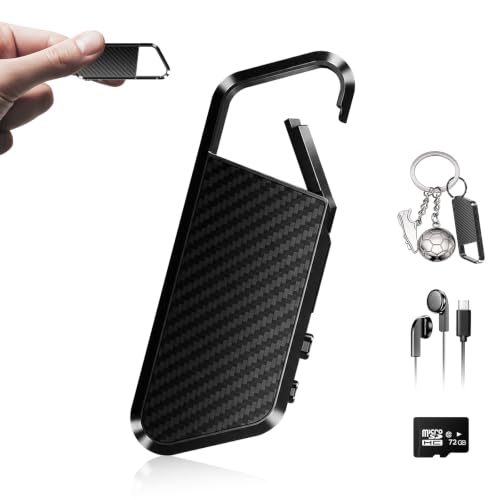
- OTG transfer to compatible phones and tablets
- 72GB built-in storage
- DSP 6.0 noise reduction and voice activation
Best For: Mobile file transfers and long-term lecture storage
Best Compact Lecture Recorder – EVISTR L357 Digital Voice Recorder
For shoppers comparing podcast recorders for lectures, the EVISTR L357 is a compact option focused on straightforward voice capture. Its adjustable gain, noise-reduction features, voice activation, and long recording battery life make it practical for classroom use and extended note-taking sessions.
Best For: Students, teachers, and anyone who wants a simple recorder with voice activation and substantial storage.
Pros:
- 64GB storage can hold up to 4,660 hours at 32Kbps.
- Adjustable seven-level recording gain and PCM noise reduction help capture distant or quieter speech.
- Voice activation can reduce silent sections and conserve storage.
- Supports WAV and MP3 recording, playback controls, and Type-C file transfers.
Cons:
- The built-in microphone is less versatile than a recorder with dedicated external microphone inputs.
- Voice activation may omit pauses or very quiet portions of a lecture.
The L357 is a sensible fit when ease of use, storage, and battery endurance matter more than advanced podcast-production connectivity. Its date-and-time file naming also helps organize recordings after class.
Best Versatile Stereo Recorder – Zoom H1essential Recorder
The Zoom H1essential is a versatile choice among podcast recorders for lectures, especially when you also want to record interviews, lessons, performances, or other content. Its X/Y stereo microphones, 32-bit float recording, and USB microphone mode give it broader use than a basic dictaphone.
Best For: Creators, students, and educators who want one recorder for lectures, podcasts, interviews, and multimedia work.
Pros:
- 32-bit float recording helps provide clip-free audio capture.
- X/Y stereo microphones record natural stereo sound for lectures and conversations.
- Can function as a USB microphone for calls, livestreams, podcasts, and voiceovers.
- Compact 92-gram design and approximately 10-hour battery life support portable use.
Cons:
- Its feature set may be more than needed for shoppers seeking a basic one-button lecture recorder.
- It uses two AAA batteries rather than a built-in rechargeable battery.
- Supplied details list WAV format, without MP3 recording support.
Choose the H1essential if lecture recording is only part of your workflow. It stands out for flexible stereo capture and direct computer or mobile use, though a simpler voice recorder may be easier for basic classroom archiving.
Best High-Capacity Voice Recorder – EVIDA V618 Lecture Recorder
The EVIDA V618 is built for shoppers who prioritize storage and voice-activated recording in podcast recorders for lectures. Its 128GB capacity, multiple recording formats, folder organization, and password protection make it suited to keeping a large archive of classes, meetings, and interviews.
Best For: Students, professionals, and frequent recorders who need extensive onboard storage and organized file management.
Pros:
- 128GB capacity is rated for up to 9,296 hours of recording.
- Supports MP3 recording at multiple bitrates and WAV at 1536Kbps.
- Six-level voice activation can reduce blank or quiet sections.
- Password protection, bookmarks, four folders, and USB transfer support organized storage.
Cons:
- The built-in mono microphone is less suited to stereo ambience or broader content capture.
- There is no headphone jack for direct monitoring or playback according to the supplied details.
- The listed battery life is up to 54 hours, shorter than the device’s maximum storage capacity may encourage users to fill.
The V618 is a practical archival recorder rather than a full podcast-production tool. Its strongest advantages are capacity, voice activation, and organization, making it useful when you record many lectures and want to keep them on the device.
Best AI Transcription Recorder – Plaud Note Pro AI Voice Recorder
The Plaud Note Pro takes a more automated approach to podcast recorders for lectures by combining directional audio capture with transcription and AI-assisted summaries. It is designed for users who want to turn recorded discussions into searchable notes, key points, questions, and follow-up actions.
Best For: Professionals, students, and teams who value transcription, summaries, cross-device access, and structured follow-up from recordings.
Pros:
- AI tools can transcribe, summarize, answer questions, extract key points, and suggest next steps.
- Four MEMS microphones and a VPU microphone support speech capture up to 16.4 feet in Enhance Mode.
- Enhance Mode offers up to 30 hours of recording, while Endurance Mode offers up to 50 hours.
- Supports audio, typed notes, images, highlights, and desktop, web, and mobile access.
Cons:
- Transcription capacity depends on the included Starter Plan or a paid plan upgrade.
- No headphone jack is listed.
- Its cloud and AI workflow is more complex than a basic recorder that simply saves audio files.
The Note Pro is the strongest choice here for turning lectures into usable written material, not merely storing audio. Before recording, notify participants and follow applicable privacy laws, particularly when using cloud-connected transcription features.
Simple Lecture Capture – Compact 16GB Voice Recorder
For shoppers comparing podcast recorders for lectures, this compact Sunlan recorder focuses on straightforward recording, playback, and file transfer. Its built-in microphone, noise-reduction technology, voice activation, and 16GB of storage suit everyday classroom or meeting use.
Best For: Students and users who want simple one-button recording with local playback and USB file storage.
Pros:
- One-button recording and easy playback with an internal speaker.
- Voice-activated recording can reduce silent gaps and conserve power.
- 16GB storage and up to 30 hours of recording time.
- Lightweight 35-gram design with a 3.5mm headphone jack.
Cons:
- Records in mono WAV format rather than offering multi-microphone recording.
- Playback time is listed at up to 7 hours, shorter than the recording capacity.
- USB connectivity may be less convenient than newer USB-C designs.
This is a practical, budget-oriented choice when ease of operation matters more than advanced transcription or app features. Its small size and long recording capacity make it convenient for carrying between lectures.
Long-Run Lecture Recording – 136GB AI Noise Reduction Recorder
This Pexqil model is built for buyers who need podcast recorders for lectures with substantial storage and extended battery life. It combines 136GB of capacity, voice activation, DSP 5.0 AI noise reduction, OTG transfer, and one-button operation in a lightweight design.
Best For: Students and professionals recording frequent lectures, interviews, or business sessions without regularly clearing files.
Pros:
- 136GB built-in storage is rated for up to 18,800 hours of audio capacity.
- Voice activation pauses during silence to reduce empty recordings.
- DSP 5.0 AI noise reduction is designed to filter ambient noise.
- Up to 48 hours of continuous recording and USB-C OTG transfer.
Cons:
- The supplied notes do not specify a recording file format or microphone pickup pattern.
- Voice-activated recording may not suit users who want uninterrupted room ambience.
- OTG compatibility can depend on the connected phone or computer.
Its standout advantage is endurance: the large storage and 48-hour battery rating reduce maintenance during multi-day use. Choose it if capacity and portability are higher priorities than transcription or app-based organization.
Smart Lecture Notes – AI Transcription Voice Recorder
For shoppers seeking podcast recorders for lectures that can also organize notes, this upgraded AI recorder adds transcription, summaries, and app control to traditional audio capture. It supports 118 languages, multiple templates, 64GB of storage, and dual-mode recording for lectures, meetings, and calls.
Best For: Students and professionals who want searchable transcripts, AI-generated summaries, and flexible recording management.
Pros:
- AI transcription supports 118 languages with stated accuracy of up to 98%.
- AI summaries and mind maps use professional and scenario-based templates.
- Condenser and bone-conduction microphones support lecture and talk modes.
- App tools can edit, merge, and export recordings or transcripts in several formats.
Cons:
- Only 300 transcription minutes per month are included with the Starter Plan.
- Unlimited transcription requires an optional paid plan listed at $29.99 per year.
- Many organization and transcription features depend on the Doway app and service.
This is the most feature-rich option for turning lectures into usable study materials, rather than simply storing audio. Consider the transcription allowance and app requirements before choosing it for heavy, ongoing lecture use.
Best High-Capacity Pick – Tonfarb 136GB Digital Voice Recorder
For shoppers comparing podcast recorders for lectures, the Tonfarb stands out for its combination of long battery life, large storage, and one-touch operation. Its dual microphones, PCM recording, and automatic noise reduction are suited to capturing extended classroom sessions, meetings, and interviews.
Best For: Students and users who need long recording sessions, extensive storage, and simple controls.
Pros:
- Up to 68 hours of continuous recording on one charge.
- 136GB total storage with the included 128GB TF card and built-in memory.
- 1536 kbps PCM recording, dual microphones, noise reduction, and voice activation.
- One-click recording, USB-C transfers, A-B repeat, and password protection.
Cons:
- The product listing describes the included storage as 8GB built-in plus a 128GB card, so advertised capacity may require the card.
- Its many features may be more than needed for basic voice notes.
This is a strong choice when lecture recording length and storage matter most. The portable metal design and large screen add convenience, while the recording controls make it practical for quick starts during class.
Best Simple Learning Recorder – HoTiyan 8GB Voice Recorder
If you want podcast recorders for lectures with straightforward controls, this HoTiyan model offers a compact, budget-friendly setup. It combines voice activation, stereo recording, playback tools, and several recording-quality options for classroom notes and review.
Best For: Students who want an uncomplicated recorder with playback features and adjustable recording modes.
Pros:
- Three-button operation supports quick recording, saving, and playback.
- Voice activation can reduce silent sections and whisper clips.
- Supports MP3 and WAV recording, with up to 560 hours listed at the lowest quality setting.
- A-B repeat, variable playback speed, timestamps, and password protection help with study and file organization.
Cons:
- The 20-hour continuous recording battery life is shorter than some larger-capacity alternatives.
- Built-in storage is limited to 8GB.
- File capacity and recording time vary substantially by selected quality setting.
This recorder is best suited to everyday lecture capture rather than maximum endurance. Its playback and repeat functions are particularly useful for revisiting key explanations after class.
Best Smartphone Transfer Pick – NekSide 72GB Voice Recorder
For users seeking podcast recorders for lectures that can move files directly to a mobile device, the NekSide offers built-in OTG transfer alongside substantial storage. DSP 6.0 noise reduction and voice activation are designed to help capture speech in lectures, meetings, and interviews.
Best For: Mobile-focused users who want high storage capacity and direct smartphone or tablet transfers.
Pros:
- OTG supports direct transfers to compatible smartphones and tablets.
- 72GB of built-in memory is advertised for up to 10,860 hours of audio.
- DSP 6.0 noise reduction is designed to filter background noise.
- Portable design, playback, and voice activation support on-the-go recording.
Cons:
- The default recording format is WAV; MP3 requires conversion through a computer.
- The listing specifies mono microphone operation.
- Compatibility and transfer convenience depend on a compatible mobile device and OTG connection.
The NekSide is a practical fit when mobile file access is a priority. Its large built-in capacity reduces file management, though users who need ready-to-share MP3 files should plan for an extra conversion step.
How We Picked the Best Podcast Recorders for Lectures
We selected these models based on the features that matter most in classrooms, lecture halls, meetings, and spoken-word recording. Our comparison considers microphone performance, voice-activation options, storage capacity, battery claims, playback controls, portability, file-transfer methods, and any included transcription or summarization tools.
Because product specifications can vary by recording quality and usage conditions, treat advertised recording hours as maximum estimates rather than guaranteed real-world results. A recorder with dependable controls and clear files is generally more useful than one that only offers the largest storage number.
Quick Comparison
- Best for simple everyday recording: Traditional digital voice recorders with playback and USB charging are easy to operate and typically offer good value.
- Best for higher-quality audio: A dedicated field recorder such as the Zoom H1 Essential is better suited to music, podcasts, and demanding spoken-word work.
- Best for searchable notes: AI-enabled recorders can transcribe and summarize recordings, but check app requirements, language support, privacy policies, and subscription costs.
- Best for long sessions: High-capacity models with voice activation can reduce wasted storage when recording lectures or meetings.
Key Buying Factors for Podcast Recorders for Lectures
Microphone Pickup and Recording Quality
For lectures, prioritize intelligible speech over headline storage capacity. Noise reduction, microphone sensitivity, and the ability to position the recorder near the speaker all affect results. Stereo microphones can provide a more natural room recording, while a focused voice recorder may be easier to carry and operate.
Storage, Battery Life, and File Handling
Large internal storage helps with lengthy classes, but battery endurance is equally important. Look for rechargeable operation, a clear battery indicator, and common audio formats such as WAV or MP3. USB-C or direct USB transfer can simplify moving files to a computer, tablet, or phone.
Controls, Playback, and Transcription
Physical record, pause, stop, and playback buttons are valuable when you need to start recording quickly. Voice activation may conserve space, though it can miss quiet speech if sensitivity is poorly configured. AI transcription is convenient for reviewing lectures, but confirm whether processing occurs on the device or in an app and whether additional fees apply.
Privacy and Portability
Choose a compact design that can sit on a desk without blocking microphones. Password protection may be useful for sensitive recordings. Always follow local laws, school policies, and consent requirements before recording other people.
Who Should Buy Which Podcast Recorders for Lectures?
Students and casual note-takers should favor a simple, compact recorder with reliable playback, voice activation, and enough storage for several classes. Journalists, podcasters, and musicians may prefer a dedicated field recorder with better microphone control and higher-quality files. Professionals who need searchable notes should consider an AI model, provided its transcription accuracy, supported languages, privacy terms, and ongoing costs fit their workflow. Users recording long seminars or conferences should prioritize battery capacity, high storage, and easy file transfer over unnecessary extras.