When the power drops, the right backup unit can keep your workday moving. The best portable power stations for office backup are quiet, easy to use, and sized for the devices that matter most.
This roundup focuses on practical options for laptops, Wi-Fi gear, monitors, and small peripherals, with a mix of compact emergency units and higher-capacity models for longer outages.
Best 10 Portable Power Stations for Office Backup Picks for 2026
Office-Ready High Power Pick
OUPES Mega 1 2000W Fast-Charge UPS

- 2000W continuous output with 4500W surge
- <20ms UPS transfer for critical devices
- Expandable from 1024Wh to 5120Wh
Best For: Small offices and workstations needing stronger backup
Compact UPS Pick
BLUETTI Elite 30 V2 288Wh 600W

- 600W output with 1500W lifting power
- 10ms UPS switching for fast backup
- 0-80% recharge in 45 minutes
Best For: Compact home offices and essential electronics
Lightest Basic Backup
EnginStar 150W 155Wh Portable Power Station

- About 4 lbs and easy to carry
- Six outputs for small devices
- 150W limit for low-power essentials
Best For: Emergency charging and very light office backup
Office Backup Workhorse
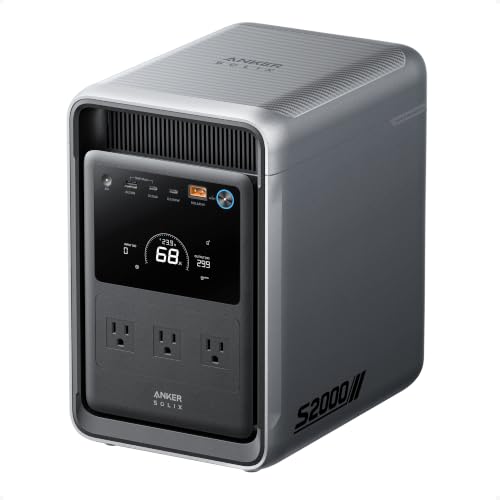
- <10 ms UPS switchover for office gear
- 2,010Wh capacity with 1,500W output
- Up to 6 recharge methods, including solar
Best For: Home offices needing high-capacity, fast-switch backup
Light Backup Pick
Jackery Explorer 300 Portable Power Station

- 292Wh capacity with 300W output
- Only 7.5 lbs for easy carry
- LiFePO4 battery rated for 4,000+ cycles
Best For: Short office outages and lightweight laptop backup
Budget Mini Backup
Powkey 88.8Wh AC Power Station

- Only 1.4 lbs and highly portable
- 120V AC outlet plus USB/DC ports
- 88.8Wh capacity for emergency top-ups
Best For: Minimal backup for phones, tablets, and small laptops
Office-Ready UPS Backup
LIBRIDS C600 640Wh LiFePO4 Power Station

- 10ms UPS for seamless outage switching
- 640Wh LiFePO4 battery with 4000+ cycles
- 600W output, 4 AC outlets, 8 total ports
Best For: Office essentials, routers, laptops, and short outages
Office-Ready High Power Pick – OUPES Mega 1 2000W Fast-Charge UPS
If you want portable power stations for office backup that can handle more than just a phone and a router, the OUPES Mega 1 is built for heavier-duty protection. Its 2000W output, <20ms UPS transfer time, and LiFePO4 battery make it a strong fit for keeping sensitive work equipment running through short outages while charging back up quickly afterward.
Best For: Small offices, workstations, and users who want UPS backup with room to expand capacity later.
Pros:
- 2000W continuous output with 4500W surge for demanding office gear
- <20ms UPS transfer helps protect against data loss during outages
- 0-80% recharge in 36 minutes via AC, or 26 minutes with AC + solar
- Expandable from 1024Wh up to 5120Wh with extra batteries
Cons:
- More than many offices need if you only want to keep a laptop and modem online
- Expansion requires buying additional batteries separately
Overall, this is the most capable office-backup option in the group when you need fast recovery, clean power, and real UPS behavior. It is especially appealing if your backup plan may grow over time.
Ultra-Compact Budget Backup – powkey 200W 146Wh AC Power Bank
For portable power stations for office backup on a tight budget, the powkey 200W is a very compact emergency option. It is best suited to light office essentials such as phones, laptops, and small accessories, with pure sine wave AC power and a small footprint that makes storage easy.
Best For: Keeping low-wattage office devices and personal electronics running during short outages.
Pros:
- Pure sine wave AC outlet helps reduce noise and compatibility issues
- Very small and lightweight at about 3 lbs for easy storage and transport
- Multiple outputs, including 2 AC sockets, 4 USB ports, and 1 DC port
- Fast DC recharge time of about 5-6 hours
Cons:
- 200W total output limits what it can power
- Heating products must stay under 100W
- Not designed for larger office equipment or high-draw appliances
This is a practical compact backup if your office needs are modest and portability matters more than runtime. It makes sense for keeping a few critical devices alive, not for powering a full desk setup.
Compact UPS Pick – BLUETTI Elite 30 V2 288Wh 600W
The BLUETTI Elite 30 V2 is a compact choice among portable power stations for office backup when you want useful output without a bulky unit. With 600W continuous power, 10ms UPS switching, and fast charging, it is well suited to keeping core devices like laptops, routers, and CPAP units covered during brief interruptions.
Best For: Home offices and light office setups that need compact UPS-style backup.
Pros:
- 600W continuous output with 1500W surge lifting mode
- 10ms UPS switch helps prevent interruptions during blackouts
- 0-80% charge in 45 minutes with 380W wall charging
- Lightweight at 9.4 lbs for easy moving and storage
Cons:
- 288Wh capacity is modest for longer outages
- Not intended for larger appliances or full-office backup loads
This model stands out when you want a small but capable backup for essential electronics. It balances portability, quick recharge, and UPS functionality better than many entry-level units.
Lightest Basic Backup – EnginStar 150W 155Wh Portable Power Station
If you need a simple entry-level option in portable power stations for office backup, the EnginStar 150W is built for basic devices rather than heavy equipment. Its small size, low weight, and multiple output types make it useful for phones, tablets, laptops, lights, and other low-power essentials during short outages.
Best For: Very light office backup, personal electronics, and emergency charging.
Pros:
- Very compact and lightweight at about 4 lbs
- Six outputs let several small devices run at once
- Pure power with AC, DC, USB, and USB-C options
- Built-in LED light adds emergency usefulness
Cons:
- 150W output is too limited for most office gear
- Not suitable for larger appliances like refrigerators or microwaves
- Runtime is short compared with larger power stations
This is best seen as a lightweight emergency battery, not a full backup system. It makes sense for keeping small essentials powered when size and simplicity matter most.
Office Backup Workhorse – Anker SOLIX S2000 2,010Wh UPS
For portable power stations for office backup, the Anker SOLIX S2000 is built for keeping critical gear running through outages without a messy setup. Its <10 ms UPS switchover, 1,500W continuous output, and front-and-rear outlet layout make it a strong fit for desks, routers, monitors, and other essentials that need dependable backup power.
Best For: Home offices and small workspaces that need fast UPS-style switchover and high-capacity backup.
Pros:
- 10 ms UPS switchover helps protect connected office equipment from brief outages.
- 2,010Wh capacity and 1,500W output support a wide range of home essentials.
- Compact for its class at 30% smaller and 25% lighter than the industry average.
- Long-life LiFePO4 battery is rated for up to 10,000 cycles.
Cons:
- At 35.7 lbs, it is still a substantial unit to move around.
- No 12V DC port is included.
- Higher-capacity system may be more power than simple phone-and-laptop backup needs.
This is the most office-ready option in the group if you want real backup capability instead of just portable charging. It stands out for runtime, UPS behavior, and flexible recharging, especially where a cleaner multi-outlet setup matters.
Light Backup Pick – Jackery Explorer 300 Portable Power Station
If you want portable power stations for office backup in a lightweight form, the Jackery Explorer 300 is an easy grab-and-go option. With 292Wh of capacity, a 300W output, and multiple ports for laptops and small devices, it works best for keeping a basic workstation alive during short outages or for moving between rooms.
Best For: Light office backup for laptops, phones, and small accessories during short power cuts.
Pros:
- Very light at 7.5 lbs, making it simple to carry and store.
- Provides 2 AC outlets, USB-C PD, 2 USB-A ports, and a car port.
- LiFePO4 battery is rated for over 4,000 charge cycles to 70% capacity.
- Can reach 80% in about 2.8 hours with a 100W solar panel.
Cons:
- 292Wh capacity is modest for longer office outages.
- 300W rated output limits it to smaller electronics and accessories.
- Not intended for heavy-duty backup loads.
For a compact backup unit, this Jackery focuses on portability and basic utility rather than high output. It makes sense when you mainly need to keep a laptop and a few low-power devices going.
Budget Mini Backup – Powkey 88.8Wh AC Power Station
For very basic portable power stations for office backup, the Powkey 88.8Wh unit is a compact emergency option for small electronics. Its 120V AC outlet, USB ports, and small size make it useful for charging a laptop, phone, or tablet when you need a minimal backup supply rather than full workstation support.
Best For: Budget-minded users who only need emergency power for small office devices.
Pros:
- Extremely compact and lightweight at 1.4 lbs.
- Includes a 120V AC outlet plus USB and DC outputs for multiple device types.
- Can be recharged by wall outlet, car adapter, or compatible solar panel.
- Charges in under 4 hours with the included 30W input.
Cons:
- 88.8Wh capacity is very limited for office backup use.
- 65W AC output is only suitable for low-power devices.
- Best suited to short emergency charging, not extended runtime.
This is the smallest option here, so expectations should stay modest. It is a practical fallback for keeping essential gadgets topped up, but not a substitute for a larger backup station.
Office-Ready UPS Backup – LIBRIDS C600 640Wh LiFePO4 Power Station
For portable power stations for office backup, the LIBRIDS C600 stands out if you want fast switchover protection and enough capacity for everyday essentials. Its 10ms UPS mode is designed to keep devices like WiFi routers, laptops, and CPAP machines running through short outages, while the 600W output covers common office electronics and small gear.
Best For: Keeping critical office devices powered through brief outages and downtime.
Pros:
- 10ms UPS automatically switches to battery during outages.
- 640Wh LiFePO4 battery with 4000+ cycles for long-term use.
- 600W output with 1200W surge and pure sine wave power.
- 1.5-hour AC fast charging helps it recharge quickly between outages.
Cons:
- 600W output is not meant for high-wattage office appliances.
- Indoor-use safety guidance means you should avoid wet or humid conditions.
Overall, this is a strong pick if your backup priority is clean, stable power for sensitive electronics and a fast return to readiness after an outage. The 8 ports and clear LCD add convenience for shared workspace use.
Compact Emergency Backup – MARBERO 88Wh Portable Power Station
If you want a budget-friendly option among portable power stations for office backup, the MARBERO M82 is best suited to very light-duty needs. Its compact design, multiple output ports, and built-in LED light make it useful for keeping small devices going, but the 88Wh capacity is much smaller than larger backup stations.
Best For: Small office devices, phone charging, and very short emergency use.
Pros:
- Very compact at 3.2 lbs, making it easy to move or store.
- 8 output ports support several small devices at once.
- Can charge phones, tablets, and laptops through USB and USB-C ports.
- Includes bright LED lighting with SOS mode for outage situations.
Cons:
- 88Wh capacity is limited for extended office backup.
- 80W rated output is not suited for many larger office devices.
In practical terms, this is more of a compact backup power bank than a full office power station. It makes sense when portability matters more than runtime and you only need to cover essential small electronics during brief interruptions.
Balanced Desktop Backup – Core 300W 192Wh LiFePO4 Power Station
For portable power stations for office backup, this 300W model hits a practical middle ground between compact size and useful runtime. It includes a 10ms UPS function for seamless switching during outages, plus pure sine wave output to safely support sensitive devices like routers, laptops, and CPAP machines.
Best For: Keeping a few critical office devices online during short power cuts.
Pros:
- 10ms UPS helps prevent interruptions when the power drops.
- 300W rated output with 600W surge for small office electronics.
- LiFePO4 battery with 4000+ cycles for long service life.
- Fast AC recharge from 0% to 80% in about 1 hour.
Cons:
- 192Wh capacity is modest for extended backup runtime.
- Not suitable for high-wattage appliances like coffee makers or hair dryers.
This model makes sense if you want a compact backup unit that can bridge short outages without taking up much space. The included LCD, multiple output types, and solar-ready design add flexibility for both desk use and emergency planning.
How We Picked the Best Portable Power Stations for Office Backup
For Portable Power Stations for Office Backup, we prioritized usable AC output, battery chemistry, UPS support, recharge speed, and overall capacity. We also looked for models that make sense in real office scenarios, from keeping a laptop and modem alive for an hour to supporting multiple devices through a longer outage.
Because office backup needs vary, this list includes compact units for light loads and larger stations for heavier, multi-device use.
Quick Comparison
Smaller units are best for laptops, phones, tablets, and networking gear. Mid-size options can handle a monitor, router, and laptop together. Higher-capacity stations are better if you want longer runtime, higher wattage, or a broader safety margin during extended outages.
Key Buying Factors for Portable Power Stations for Office Backup
Capacity and Runtime
Check watt-hours first. Higher Wh generally means longer backup time, but actual runtime depends on the total wattage of your devices. For office use, estimate your combined load and choose a cushion above it.
Output and Inverter Quality
Make sure the unit can handle the peak draw of your equipment. A pure sine wave AC output is the safer choice for sensitive electronics, while higher continuous wattage matters if you plan to run more than just a laptop.
UPS and Switchover Speed
If you need uninterrupted work, look for UPS or fast switchover support. This is especially useful for desktops, network gear, and any setup where a brief outage would interrupt meetings or risk data loss.
Charging Speed and Battery Type
Fast recharging helps if you expect repeated outages. LiFePO4 batteries are a strong fit for office backup because they tend to offer longer cycle life and better long-term value.
Ports and Expandability
Think about how many AC outlets, USB ports, and DC outputs you actually need. If you may add more devices later, expandable capacity can be a smart investment.
Who Should Buy Which Portable Power Stations for Office Backup?
If you only need to keep a laptop, phone, and router running, a compact lower-capacity unit is usually enough. For a home office with a monitor, modem, and multiple accessories, a mid-range station is the most balanced choice. If you want longer backup time, higher output, or room to power several devices at once, choose one of the larger capacity models.
In short, the best choice depends on your load, outage length, and how much convenience you want when the lights go out.