Choosing the right rackmount switch can make a small office network faster, cleaner, and easier to manage. The best options balance port count, speed, reliability, and the features you actually need.
Below, we focus on practical picks for small businesses that want dependable rackmount network switches without overpaying for enterprise extras.
Best 10 Rackmount Network Switches for Small Business Picks for 2026
Simple, Silent 24-Port Choice
NETGEAR GS324 24-Port Unmanaged Gigabit Switch

- 24 Gigabit ports for wired expansion
- Fanless, silent operation
- Desktop, wall, or rack mounting
Best For: Small offices needing quiet, plug-and-play rack-mount flexibility
Smart Controls Without Complexity
TP-Link TL-SG1024DE Easy Smart Switch

- 24 Gigabit ports with plug-and-play setup
- VLAN, QoS, and cable diagnostics
- Desktop or rackmount metal design
Best For: Small businesses that want basic smart management in a simple switch
Reliable No-Frills Rack Unit
NETGEAR JGS524 24-Port Unmanaged Switch

- 24 Gigabit ports for easy expansion
- Silent, energy-efficient unmanaged design
- Desktop or rackmount with hardware included
Best For: Small businesses wanting a simple, quiet 24-port rack switch
Compact 16-Port Rack Option
TRENDnet TEG-S17D 16-Port Gigabit Switch

- 16 Gigabit ports in a metal housing
- Fanless and quiet for office use
- Rackmount brackets included
Best For: Smaller offices needing a quiet 16-port switch with rack support
High-Port Capacity Pick
TP-Link TL-SG1024 24-Port Gigabit Unmanaged Switch

- 24 Gigabit RJ45 ports
- Fanless 19-inch metal rackmount design
- Plug-and-play with Auto MDI/MDIX
Best For: Small offices wanting a quiet, easy 24-port rackmount switch
Managed Flexibility Pick
NETGEAR GS724T Smart Switch with 2 SFP Ports
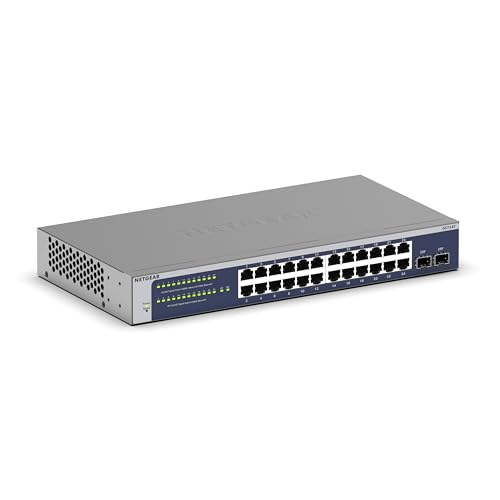
- 24 Gigabit ports plus 2 SFP uplinks
- Smart managed control with SNMP support
- Fanless desktop or rackmount design
Best For: Small businesses needing managed control and fiber-ready expansion
Compact Value Pick
D-Link DGS-1016D 16-Port Gigabit Unmanaged Switch

- 16 Gigabit ports in a compact footprint
- Fanless metal build with rackmount support
- QoS, Port Isolation, and Storm Control
Best For: Small offices wanting a quiet 16-port switch with basic traffic tools
Rackmount Office Expansion
UGREEN 24-Port Gigabit Rackmount Switch

- 24 gigabit ports for wired office expansion
- Rack, wall, or desktop placement options
- Fanless metal build with 4 working modes
Best For: Small offices needing a quiet, flexible unmanaged 24-port switch
Smart Traffic Control
D-Link 16-Port Smart Managed Switch

- 16 gigabit ports with VLAN and QoS support
- Fanless metal build for quiet operation
- Web-based management for easier administration
Best For: Small businesses that need manageable traffic control and VLANs
Simple 24-Port Expansion
TP-Link 24-Port Gigabit Unmanaged Switch

- 24 gigabit ports with auto negotiation
- Fanless metal case for quiet use
- Plug-and-play setup with no configuration
Best For: Small businesses needing a simple 24-port rackmount switch
Simple, Silent 24-Port Choice – NETGEAR GS324 24-Port Unmanaged Gigabit Switch
If you need rackmount network switches for small business without the setup overhead, the NETGEAR GS324 is a straightforward 24-port Gigabit option. It’s built for plug-and-play use, works with existing Cat5e or Cat6 cabling, and can be mounted on a desktop, wall, or rack depending on your space.
Best For: Small offices that want a silent, unmanaged 24-port switch with flexible mounting.
Pros:
- 24 x 1.0Gbps ports for high-speed wired connections
- Unmanaged design keeps installation simple with no software or configuration
- Fanless operation stays silent in shared work areas
- Energy Efficient Ethernet helps reduce power use
Cons:
- Unmanaged, so it lacks VLAN, QoS, and other control features
- Regional compatibility is limited to the U.S. and Canada
For small businesses that mainly want reliable port expansion, this switch focuses on simplicity and quiet operation rather than advanced network management. Its metal chassis and rack-mount support make it a practical fit for a tidy office setup.
Smart Controls Without Complexity – TP-Link TL-SG1024DE Easy Smart Switch
Among rackmount network switches for small business, the TP-Link TL-SG1024DE stands out if you want more control than a basic unmanaged model. It combines plug-and-play simplicity with useful management features like VLAN, QoS, port mirroring, loop prevention, and cable diagnostics.
Best For: Small businesses that want easy smart features for traffic control and basic network monitoring.
Pros:
- 24 Gigabit ports for fast file transfers
- Easy Smart features include VLAN, QoS, IGMP Snooping, and port mirroring
- 9K jumbo frame support helps large data transfers
- Metal build with desktop or rackmount placement
Cons:
- Not a full managed switch, so advanced admin needs may be limited
- Designed for plug-and-play use, which may not suit complex deployments
This is a strong middle-ground choice for offices that need basic traffic segmentation and troubleshooting tools without a steep learning curve. The included warranty and support add extra confidence for business use.
Reliable No-Frills Rack Unit – NETGEAR JGS524 24-Port Unmanaged Switch
NETGEAR 24-Port Gigabit Ethernet Unmanaged Switch (JGS524) - Desktop or Rackmount
Check Price On AmazonIf your priority is dependable port expansion, this NETGEAR model is a classic pick among rackmount network switches for small business. It offers 24 Gigabit Ethernet ports, silent operation, and a simple plug-and-play setup, making it easy to drop into an existing office network.
Best For: Small businesses that want a basic 24-port rackmount switch with quiet operation.
Pros:
- 24 Gigabit Ethernet ports for straightforward network growth
- Plug-and-play unmanaged operation requires no configuration
- Includes the mounting hardware needed for desktop or rackmount use
- Silent, energy-efficient design fits noise-sensitive spaces
Cons:
- No advanced switching features since it is unmanaged
- Larger and heavier than some compact alternatives
For offices that just need stable connectivity and a clean rack installation, this switch keeps things simple. The limited lifetime hardware warranty adds another layer of value for long-term use.
Compact 16-Port Rack Option – TRENDnet TEG-S17D 16-Port Gigabit Switch
For small business setups that do not need 24 ports, the TRENDnet TEG-S17D is a compact option in the rackmount network switches for small business category. It provides 16 Gigabit ports, a metal housing, fanless operation, and included rackmount brackets for a quick 1U installation.
Best For: Smaller offices that want a quiet 16-port switch with rackmount hardware included.
Pros:
- 16 Gigabit RJ-45 ports for general office networking
- Fanless design eliminates operating noise
- Rackmount brackets included for 1U rack installation
- NDAA and TAA compliant for customers with compliance requirements
Cons:
- Fewer ports than 24-port alternatives
- Desktop-focused design may be less ideal for larger wiring closets
This switch makes sense when you need a solid, quiet 16-port unit rather than a full 24-port chassis. Its low power draw and lifetime protection also make it an easy fit for practical office deployments.
High-Port Capacity Pick – TP-Link TL-SG1024 24-Port Gigabit Unmanaged Switch
If you need rackmount network switches for small business that are simple to deploy and built for steady everyday traffic, the TP-Link TL-SG1024 is a straightforward option. It gives you 24 Gigabit RJ45 ports in a standard 19-inch steel chassis, so it fits neatly into a closet rack and keeps wiring organized without requiring any configuration.
Best For: Small businesses that want a plug-and-play 24-port rackmount switch with quiet operation and basic Gigabit expansion.
Pros:
- 24 Gigabit RJ45 ports for broad wired device support
- Fanless metal rackmount design for quiet operation
- Auto MDI/MDIX and MAC address self-learning simplify setup
- IEEE 802.3X flow control helps support stable full-duplex transfers
Cons:
- Unmanaged design offers no advanced network controls
- No SFP fiber ports for uplinks or expansion
For small offices that mainly need dependable port count and easy installation, this TP-Link switch covers the essentials well. It is a practical choice when you want a rackmount unit that works out of the box and keeps maintenance minimal.
Managed Flexibility Pick – NETGEAR GS724T Smart Switch with 2 SFP Ports
For buyers comparing rackmount network switches for small business, the NETGEAR GS724T adds more control than a basic unmanaged model. It pairs 24 Gigabit Ethernet ports with 2 SFP ports, and its smart managed interface is geared toward secure setup, access control, and SNMP-based management.
Best For: Small businesses that want managed features, fiber connectivity, and flexible desktop-or-rack installation.
Pros:
- 24 Gigabit Ethernet ports for wired office devices
- 2 x 1G SFP ports add fiber connectivity options
- Smart managed features support secure setup and SNMP management
- Fanless, energy-efficient design helps keep operation quiet
Cons:
- More complex than a plug-and-play unmanaged switch
- Insight cloud management is optional and limited to 1 year
This model makes sense if your small business needs more than simple port expansion. The combination of managed controls, SFP support, and silent operation gives it a stronger fit for networks that may grow or need more administrative oversight.
Compact Value Pick – D-Link DGS-1016D 16-Port Gigabit Unmanaged Switch
If you want rackmount network switches for small business without overbuying on port count, the D-Link DGS-1016D is a compact 16-port Gigabit option. It uses a fanless metal case, supports desktop or rackmount placement, and focuses on simple plug-and-play expansion for small offices.
Best For: Small businesses that need a smaller, quiet Gigabit switch with basic traffic-handling features.
Pros:
- 16 Gigabit ports for everyday office connectivity
- Fanless metal design keeps noise down
- Port Isolation, Storm Control, and QoS help improve network efficiency
- Plug-and-play setup requires no software or configuration
Cons:
- Only 16 ports, so it may fill up faster than larger models
- Unmanaged design limits administrative control
- No SFP ports for fiber connections
This D-Link model is a sensible pick when you need reliable Gigabit connectivity in a smaller footprint. It offers a useful balance of quiet operation, simple setup, and traffic-management features without adding complexity.
Rackmount Office Expansion – UGREEN 24-Port Gigabit Rackmount Switch
If you want rackmount network switches for small business that are simple to deploy and built for steady wired expansion, this UGREEN 24-port model is a practical fit. It gives you 24 gigabit ports for PCs, NAS, printers, and other office devices, plus flexible placement options for a rack, wall, or desk.
Best For: Small offices and network closets that need a silent, unmanaged 24-port switch with flexible mounting.
Pros:
- 24 gigabit ports support straightforward wired expansion for business devices
- Includes rack ears, screws, rubber feet, and wall-mount support for versatile installation
- Fanless metal design with ventilation, heatsinks, and thermal pads for quiet operation
- 4 working modes include standard, port isolation, link aggregation, and flow control
Cons:
- Unmanaged design means it is not a full smart-managed switch
- No software setup or advanced configuration interface
- Best suited to basic switching rather than complex network administration
Overall, this UGREEN switch is a strong value pick for businesses that want a rugged, quiet 24-port rackmount option with a few useful traffic modes. It is especially appealing when you need plug-and-play expansion without adding management complexity.
Smart Traffic Control – D-Link 16-Port Smart Managed Switch
Among rackmount network switches for small business, this D-Link model stands out for teams that want more control than a basic plug-and-play switch. It combines 16 gigabit ports with VLANs, QoS, bandwidth control, and IGMP Snooping, making it a useful fit for voice, video, and segmented office traffic.
Best For: Small businesses that need smart-managed features in a fanless desktop or rackmount switch.
Pros:
- 16 gigabit ports provide solid capacity for small business networks
- VLAN, QoS, bandwidth control, and IGMP Snooping help organize traffic
- Fanless metal design supports silent operation and lower power use
- Web-based management makes setup and administration more approachable
Cons:
- Only 16 ports, so larger wired setups may outgrow it sooner
- Requires more configuration than an unmanaged switch
- Not aimed at users who want pure plug-and-play simplicity
This is the most feature-rich option in the group for businesses that want control without moving to a full enterprise stack. It makes sense when traffic shaping, VLAN separation, and remote management matter more than keeping things completely basic.
Simple 24-Port Expansion – TP-Link 24-Port Gigabit Unmanaged Switch
If you need rackmount network switches for small business and prefer a straightforward 24-port unit, this TP-Link model is an easy choice. It offers gigabit connectivity, a sturdy metal case, and fanless operation, making it a practical way to expand wired devices without adding configuration work.
Best For: Businesses that want a simple, quiet 24-port unmanaged switch for rack or desktop use.
Pros:
- 24 auto-negotiating gigabit ports support broad device expansion
- Fanless design keeps operation quiet for offices and work areas
- Metal casing improves durability, heat dissipation, and EMI protection
- Plug-and-play setup requires no software installation or configuration
Cons:
- Unmanaged design offers no VLAN or advanced traffic controls
- Shielded ports and traffic optimization are basic rather than smart features
- Best for simple expansion, not network segmentation or policy control
This TP-Link switch is a dependable no-frills option for small business environments that mainly need more wired ports. It is a good fit when reliability, quiet operation, and a standard 1U rackmount footprint matter more than management features.
How We Picked the Best Rackmount Network Switches for Small Business
We prioritized switches that fit real small-office needs: 16- and 24-port capacities, Gigabit speeds, rackmount-ready builds, and dependable metal housings. We also looked for quiet or fanless designs, since many offices place networking gear near workspaces. For managed models, we favored straightforward VLAN, QoS, and monitoring features that add value without making setup unnecessarily complex.
Quick Comparison: Which Type Fits Your Setup?
Unmanaged switches are the easiest choice if you need simple expansion and no ongoing configuration. Smart managed models are better when you want traffic control, segmentation, or more visibility into the network. If you are comparing Rackmount Network Switches for Small Business, the main tradeoff is simplicity versus control.
Key Buying Factors for Rackmount Network Switches for Small Business
Port Count and Growth
Choose 16 ports only if your device count is modest and unlikely to expand soon. A 24-port switch is usually the safer buy for offices with workstations, printers, access points, VoIP phones, and shared storage.
Managed Vs. Unmanaged
Unmanaged switches are plug-and-play and ideal for basic connectivity. Managed and smart managed switches are worth considering if you need VLANs for separating guest, staff, and voice traffic, or QoS for prioritizing important applications.
Rackmount Design and Noise
Check whether rack ears are included and whether the switch is fanless or uses active cooling. Quiet operation matters in open offices, reception areas, and small server closets.
Build Quality and Port Features
Metal enclosures, shielded ports, and support for storm control or port isolation can improve durability and stability. For businesses handling mixed traffic, SFP uplinks and traffic optimization features can also be useful.
Who Should Buy Which Rackmount Network Switches for Small Business?
If you want the simplest setup, choose an unmanaged 24-port model. If you expect to segment traffic or manage performance, a smart managed switch is the better fit. Smaller offices with fewer devices can save money with a 16-port rackmount switch, while growing teams should lean toward 24 ports to avoid an early upgrade. For most Rackmount Network Switches for Small Business, the best choice is the one that matches your device count today and leaves room to expand tomorrow.