When the power goes out, the best backup solution is one that keeps your office productive without noise, fumes, or fuel storage. Solar generators can bridge short outages, protect sensitive electronics, and keep essential work running.
Below, we focus on practical solar generators for office backup, with an emphasis on usable capacity, AC output, charging speed, and UPS-style performance for business-critical gear.
Best 10 Solar Generators for Office Backup Picks for 2026
Premium Whole-Home Backup
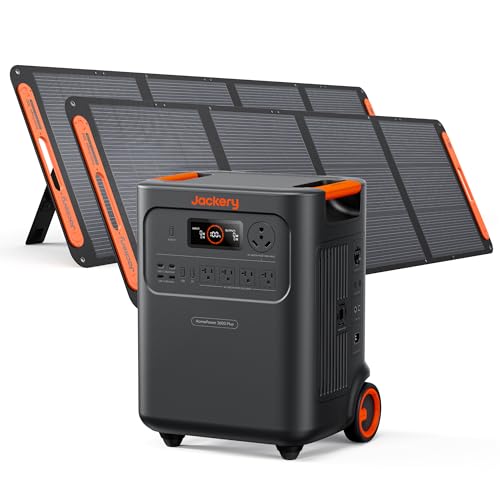
Jackery HomePower 3000 Solar Generator

- 3600W AC output, 7200W surge
- ≤20ms UPS for critical devices
- 3072Wh LFP battery, 4,000 cycles
Best For: larger offices or home workspaces needing dependable essential-device backup
Compact Fast-Charge Pick
Jackery Solar Generator 1000 v2

- 1500W AC output, 3000W surge
- 1070Wh battery with 100W USB-C
- 23.8 lb design with fast charging
Best For: small offices and remote work setups needing portable short-outage backup
High-Capacity Rolling Backup
- 3600W output, 7200W parallel
- 3584Wh expandable to 21kWh
- Wheels and telescopic handle
Best For: larger office backup setups that may need expandable energy storage
Ultra-Fast Portable UPS
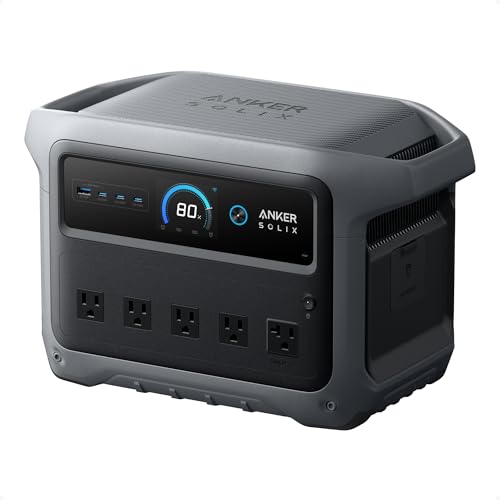
- 2000W output, 3000W peak
- Under 10ms UPS switchover
- 49-minute recharge with HyperFlash
Best For: compact office backup and sensitive electronics that need fast UPS protection
Office-Ready Backup Power
OUPES Mega 1 Portable Power Station 2000W

- 2000W output with 4500W surge
- <20ms UPS transfer time
- Expandable up to 5120Wh
Best For: Small offices and workstations needing fast backup and UPS protection
Lightweight Desk Backup Pick
Jackery Explorer 300 Portable Power Station

- Only 7.5 lbs for easy portability
- 292Wh LiFePO4 battery
- 300W output with multiple device ports
Best For: Individuals needing a small, portable backup for laptops and essentials
Budget Mini Backup Kit
100W Solar Generator with 40W Panels

- Panels included for easier setup
- 146Wh battery in a 3.3 lb unit
- Seven outputs for basic devices
Best For: Very light emergency charging for phones and small office gear
Compact Office UPS Backup
LIBRIDS C600 640Wh Portable Power Station

- 10ms UPS for seamless outage switching
- 640Wh LiFePO4 battery with 600W output
- Charges fully in about 1.5 hours
Best For: Small offices needing quick backup for routers and laptops
Long-Run Office Backup
Anker SOLIX S2000 2010Wh Power Station
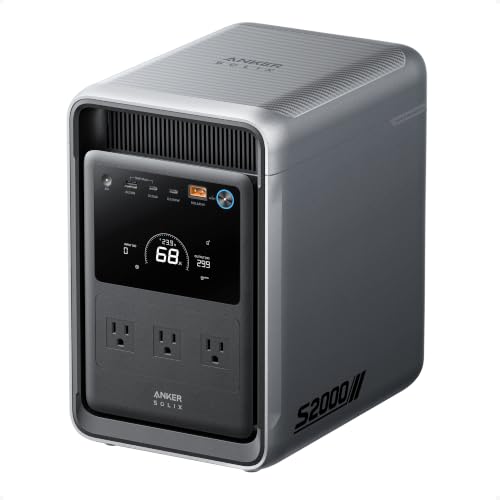
- 2,010Wh LiFePO4 battery for extended backup
- 1,500W continuous output with <10 ms UPS
- Supports up to 400W solar input
Best For: Offices needing longer runtime and stronger whole-room backup
Fast-Charge Office Backup
Anker SOLIX C1000 1056Wh Power Station

- Full charge in under an hour
- 1,800W output with 2,400W SurgePad
- Up to 600W fast solar recharging
Best For: Busy offices that need quick recharge and flexible device support
Premium Whole-Home Backup – Jackery HomePower 3000 Solar Generator
If you want solar generators for office backup that can keep a serious workspace running through outages, the Jackery HomePower 3000 is built for that kind of load. Its 3600W AC output, 3072Wh capacity, and under-20ms UPS switching make it a strong fit for protecting routers, lights, computers, cameras, and other essential office gear without interruption.
Best For: Offices or home workspaces that need higher-capacity backup for essential electronics and short outages.
Pros:
- 3600W output with 7200W surge supports demanding backup needs.
- UL-certified UPS switches within ≤20ms for sensitive devices like WiFi routers and Zoom calls.
- Fast recharge options, including hybrid AC+DC in 1.7 hours.
- LiFePO4 battery rated for 4,000 cycles with 70% capacity retention.
Cons:
- Large-capacity system is overkill if you only need to keep a laptop and router alive.
- Solar charging with the included 2x200W panels is slower than AC top-ups.
This is a strong pick when office continuity matters more than portability. It stands out for UPS-backed reliability and enough output to handle multiple essential devices at once, making it more of a serious backup unit than a casual portable power bank.
Compact Fast-Charge Pick – Jackery Solar Generator 1000 v2
For buyers comparing solar generators for office backup, the Jackery Solar Generator 1000 v2 offers a balanced mix of portability and useful output. With 1500W AC power, a 1070Wh battery, and a 100W USB-C port, it can cover a compact desk setup, networking gear, and other light essentials when the power goes out.
Best For: Small offices, remote workers, and backup needs that prioritize portability and fast recharge.
Pros:
- 1500W output with 3000W surge can handle multiple small appliances.
- Lightweight at 23.8 lbs with a foldable handle for easy moving.
- 1-hour emergency charging option through the app, with a normal 1.7-hour full charge mode.
- 100W USB-C plus multiple AC, USB-A, and DC ports for flexible device charging.
Cons:
- 1070Wh capacity is better for short-term backup than extended whole-office runtime.
- 1-hour charging requires emergency mode to be enabled in the app.
This model makes sense if your backup goal is keeping core office devices online long enough to ride out a brief outage. It is especially appealing when you want a solar generator that is easier to store, faster to recharge, and simpler to move between rooms or workspaces.
High-Capacity Rolling Backup – Jackery HomePower 3600 Plus
If your priority is solar generators for office backup with long runtime and room to grow, the Jackery HomePower 3600 Plus is designed for heavier-duty use. Its 3600W output, 3584Wh capacity, and expandable architecture make it suitable for keeping more demanding work essentials running, while the plug-and-play design keeps setup straightforward during an outage.
Best For: Larger offices, shared workspaces, or backup plans that may need expanded capacity over time.
Pros:
- 3600W output with 7200W in parallel for substantial backup power.
- 3584Wh capacity is expandable up to 21kWh per unit.
- Plug-and-play design makes it easy to deploy without complex installation.
- Luggage-style wheels and telescopic handle improve mobility for a unit this size.
Cons:
- Higher-capacity design is less convenient if you only need basic desk backup.
- Best charging speeds rely on specific recharge methods, including hybrid AC+DC.
This is a strong option when office continuity demands more than just keeping a router alive. The combination of expandable storage, dual voltage support, and straightforward operation makes it well suited to users who want a backup system that can scale with their needs.
Ultra-Fast Portable UPS – Anker SOLIX C1000 Gen 2
For shoppers looking at solar generators for office backup, the Anker SOLIX C1000 Gen 2 focuses on speed, portability, and useful UPS protection. Its 2000W output, 1024Wh capacity, and under-10ms backup switchover make it a practical choice for keeping laptops and other essential office devices powered through brief interruptions.
Best For: Small offices, remote workers, and UPS-style backup for sensitive electronics.
Pros:
- 2000W output with 3000W peak supports multiple devices.
- Under 10ms UPS switchover helps protect sensitive equipment.
- 49-minute full recharge is useful when outages happen unexpectedly.
- Compact, 14% smaller and 11% lighter than similar models.
Cons:
- 1024Wh capacity is more suited to short backup sessions than long office outages.
- Solar recharge at 600W still takes 1.8 hours, so it is not the fastest off-grid refill option.
This model is appealing if you want office backup that behaves more like a high-end UPS with solar support. It is easy to carry, fast to recharge, and built to keep critical electronics online without much fuss.
Office-Ready Backup Power – OUPES Mega 1 Portable Power Station 2000W
When comparing solar generators for office backup, the OUPES Mega 1 stands out for fast recovery and serious output. Its 2000W continuous power, <20ms UPS transfer time, and expandable battery design make it a practical choice for keeping workstations, networking gear, and other sensitive electronics running during outages.
Best For: Home offices or small workspaces that need fast-swapping backup power for computers, servers, and essential equipment.
Pros:
- 2000W continuous output with 4500W surge for demanding office devices
- <20ms UPS transfer time helps protect critical equipment from interruption
- 0-80% recharge in 36 minutes via AC, or 26 minutes with AC plus solar
- Expandable from 1024Wh to 5120Wh with extra batteries
Cons:
- More power than many basic desk-backup setups need
- Expansion requires separate extra batteries
- Larger capacity may be unnecessary for light-use office backup
This is the strongest option here for users who want office backup with UPS-style protection and room to scale. If your priority is keeping productivity gear online, its speed, output, and app-based monitoring make it easy to justify.
Lightweight Desk Backup Pick – Jackery Explorer 300 Portable Power Station
For solar generators for office backup, the Jackery Explorer 300 is best viewed as a compact support unit rather than a whole-office solution. Its 292Wh LiFePO4 battery, 300W output, and lightweight 7.5 lb build make it useful for keeping laptops, phones, and small accessories powered during short outages or moving between work locations.
Best For: Individual users who want a light, portable backup for laptops and small office devices.
Pros:
- Very light at 7.5 lbs, making it easy to move between rooms or sites
- 292Wh LiFePO4 battery with over 4,000 charge cycles
- 300W rated output plus multiple ports for common office gear
- Can recharge from solar with a 100W panel in about 2.8 hours to 80%
Cons:
- 300W output is limited for larger office equipment
- 292Wh capacity is modest for longer outages
- Solar panels are optional, not included
This is a sensible pick if your backup plan centers on portability and short-duration essentials. It is not built for heavy loads, but it is easy to store, easy to carry, and well suited to a single desk or mobile workstation.
Budget Mini Backup Kit – 100W Solar Generator with 40W Panels
If you want a compact entry point into solar generators for office backup, this Apowking setup focuses on the basics. With a 146Wh battery, 100W inverter output, and included 40W solar panels, it is best suited to charging small electronics and covering very light emergency needs at a desk or in a home office.
Best For: Very light backup use for phones, tablets, small lights, and compact office accessories.
Pros:
- Solar panels are included, which simplifies the first setup
- Very portable at 3.3 lb for easy storage and transport
- Seven outputs support AC, USB-A, USB-C, and DC charging
- BMS protection and cooling vents add basic safety support
Cons:
- 146Wh capacity is small for office backup needs
- 100W output limits it to low-power devices
- Not suited for running standard office equipment for long
This is the most compact option in the group, but its size also defines its limits. It makes sense as a low-cost emergency charger, yet users with laptops, monitors, or networking gear will likely want something larger.
Compact Office UPS Backup – LIBRIDS C600 640Wh Portable Power Station
If you want solar generators for office backup that can keep essential devices running during brief outages, the LIBRIDS C600 is built around fast switching and simple everyday power. Its 10ms UPS mode is designed to support equipment like WiFi routers, laptops, and CPAP machines, while the 640Wh LiFePO4 battery gives you a practical amount of backup for small office needs.
Best For: Small offices or home workspaces that need quick UPS-style backup for routers, laptops, and a few critical devices.
Pros:
- 10ms UPS automatically switches to battery power during outages.
- 640Wh capacity with 600W output and 1200W surge support.
- Charges fully in about 1.5 hours for fast turnaround.
- 8 total output ports, including 4 AC outlets, for multiple devices.
Cons:
- 600W running output is best for lighter office loads.
- Indoor-use-only warning means you need dry, well-ventilated conditions.
The C600 makes sense if your priority is clean, quiet backup power rather than long runtime. Its pure sine wave output, LiFePO4 battery, and 5-year warranty add confidence for keeping essential office gear online.
Long-Run Office Backup – Anker SOLIX S2000 2010Wh Power Station
For solar generators for office backup where runtime matters, the Anker SOLIX S2000 is positioned as a larger-capacity option with strong efficiency and UPS support. Its 2,010Wh LiFePO4 battery, <10 ms switchover, and 1,500W continuous output make it a better fit for keeping more demanding office essentials powered through longer outages.
Best For: Offices that want extended backup time for essential appliances, networking gear, and a cleaner UPS setup.
Pros:
- 2,010Wh capacity with up to 35-hour fridge backup claim.
- 1,500W continuous output and 3,000W peak output.
- <10 ms UPS switchover for home office use.
- Supports up to 400W solar input plus multiple recharge options.
Cons:
- 35.7 lb weight makes it less convenient to move around often.
- No 12V DC port, so setup is focused on AC-powered devices.
This is the most capacity-forward pick in the group, and the combination of long cycle life, efficient operation, and dual-sided outlets makes it appealing for office backup planning. If you need longer runtime instead of a compact footprint, it is the strongest fit here.
Fast-Charge Office Backup – Anker SOLIX C1000 1056Wh Power Station
If you want solar generators for office backup that recharge quickly and can handle a wide range of devices, the Anker SOLIX C1000 stands out for speed and versatility. It offers 1,056Wh of LiFePO4 storage, up to 1,800W output, and a full charge in under an hour with UltraFast AC charging.
Best For: Busy offices that need rapid recharge times and flexible backup power for everyday electronics.
Pros:
- Full charge in under 1 hour, with 80% in 43 minutes.
- 1,800W output and 2,400W SurgePad support for demanding appliances.
- Up to 600W fast solar recharging for off-grid top-ups.
- 11 ports provide broad device compatibility.
Cons:
- Smaller capacity than the 2kWh class options.
- UltraFast AC charging requires app control and a smartphone.
This model is a smart middle ground if your office backup plan values quick turnaround more than maximum battery size. With strong output, fast solar input, and a compact design, it is well suited to keeping essential work devices ready between outages.
How We Picked the Best Solar Generators for Office Backup
For office backup, we prioritized units that can realistically support laptops, routers, monitors, phones, and small networking equipment. We looked at battery chemistry, inverter output, recharge speed, expandability, portability, and UPS or pass-through support where it matters most.
Quick Comparison
Smaller units are best for desks and lightweight backup, while midrange models are the sweet spot for a home office or small team. Larger-capacity systems make more sense when you need longer runtime for networking gear, multiple workstations, or extended outage coverage.
Key Buying Factors for Solar Generators for Office Backup
Capacity and Runtime
Battery size determines how long the unit can keep devices running. A compact model may be enough for charging laptops and phones, but offices that rely on routers, printers, or several monitors should consider higher-capacity systems.
Output and Device Compatibility
Check continuous AC output, not just surge rating. For Solar Generators for Office Backup, stable output is important for computers and networking gear. Also confirm you have enough AC and USB ports for the devices you actually use.
UPS and Switch-Over Speed
If you need uninterrupted connectivity, look for UPS functionality or very fast transfer times. That helps prevent dropped calls, rebooted routers, and lost work during short outages.
Charging Speed and Solar Input
Fast AC charging is valuable if outages are infrequent and you want quick turnaround. Solar input adds resilience during longer blackouts, but panel size and weather conditions will affect real-world recovery time.
Expandability and Portability
Expandable systems offer a better path if your office needs may grow. If you plan to move the unit between rooms or sites, weight and handle design matter just as much as watt-hours.
Who Should Buy Which Solar Generators for Office Backup?
Solo professionals and light home-office users should focus on smaller, more affordable models that can handle a laptop, phone, and router. Small offices and hybrid workers benefit most from mid-sized units with strong inverter output and UPS support. Teams that need longer runtime, more ports, or room to scale should consider larger expandable systems.
In short, the right choice depends on how much of your office you want to keep online and for how long. Match the generator to your essential loads first, then choose the model that adds the fastest recharge and most practical backup features for your workflow.