Accurate color depends on more than visual judgment. The right spectrophotometer color calibration tool can help match, measure, and reproduce color more consistently across screens, printers, materials, and production workflows.
This roundup compares 10 options ranging from display-focused calibrators to portable instruments for paint matching, print control, packaging, and industrial analysis, so you can choose equipment suited to your process and budget.
Best 10 Spectrophotometer Color Calibration Tools Picks for 2026
Full-Workflow Color Control

- Profiles cameras, displays, printers, scanners, and projectors
- Includes ColorChecker Classic Mini for RAW camera profiling
- Measures ambient light for improved print-to-screen matching
Best For: Photographers managing capture-to-print color
Print Quality Measurement

- Built for print control strips and quality control
- Includes a 2mm targeting jig for precise positioning
- Optional Print Pro integration can support production workflows
Best For: Print professionals measuring production color
Portable Precision
Spectro 3 Mobile Spectrophotometer
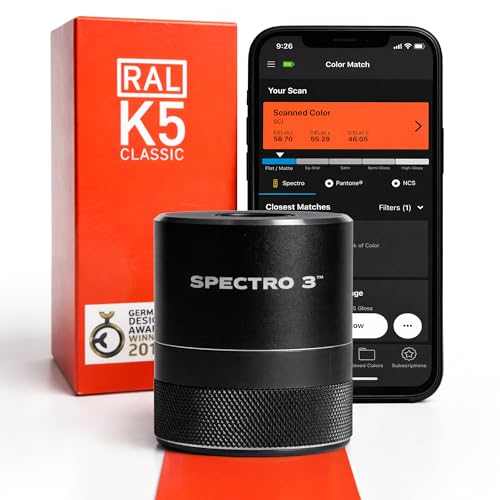
- Measures color and 60° gloss in one portable device
- Supports 45/0° and d/8° optical geometries
- Offers app connectivity and 1,000+ measurements per charge
Best For: Field color matching, manufacturing QC, and varied material testing
Industrial Measurement

- Supports nearly 40 evaluation light sources
- Provides over 30 color measurement indicators
- Uses a stable low-center design with an observation window
Best For: Industrial QC, coatings research, and detailed color analysis
Standards-Focused Control
Multi-Aperture Spectrocolorimeter

- Combines D/8, SCI/SCE, UV, and camera positioning
- Supports many color spaces and illuminant sources
- Includes automatic whiteboard calibration and cloud storage
Best For: Standards-based color management and cross-industry QC
Portable Paint Matching

- Portable 8-ounce paint color reader
- Wireless iOS and Android app connection
- Supports major paint-brand fan deck libraries
Best For: Mobile paint matching for designers, painters, and contractors
Automatic Calibration

- Automatic SCI/SCE calibration support
- More than 30 measurement parameters
- 26 illuminants and USB data storage
Best For: Portable measurement workflows requiring varied color tests
High-Precision Analysis
Three Caliber Spectrophotometer

- Selectable 3mm, 6mm, and 11mm apertures
- Repeatability specified at dE*ab≤0.02
- Bluetooth or USB ColorExpert software connection
Best For: Technical color analysis across varied sample sizes
Full-Workflow Color Control – ColorChecker Studio
For photographers who need spectrophotometer color calibration tools beyond the monitor, the Calibrite ColorChecker Studio profiles cameras, displays, projectors, printers, paper, and scanners. Its included ColorChecker Classic Mini also supports custom camera profiling for RAW workflows.
Best For: Photographers and studios seeking one device for capture-to-print color management.
Pros:
- Supports monitor, projector, printer, paper, camera, and scanner profiling.
- Adaptive iterative profiling is designed to optimize results for each display.
- Ambient-light measurement helps match screen brightness to print viewing conditions.
- Includes ColorChecker Classic Mini, USB cable, and monitor holder pouch.
Cons:
- Its broad feature set may be more than needed for monitor-only calibration.
- At 14.5 ounces, it is heavier than the display-focused options here.
Choose this model when your workflow spans camera capture, editing, proofing, and physical output. It is the most comprehensive option in this group for end-to-end color control.
Fast Display Calibration – Spyder Monitor Calibrator
The datacolor Spyder is a straightforward choice among spectrophotometer color calibration tools for photographers and creators who mainly need a calibrated laptop or desktop display. Its software is designed to establish an accurate starting point in about 90 seconds.
Best For: Users who want quick, approachable monitor calibration with support for modern display types.
Pros:
- Supports OLED, mini-LED, and Apple Liquid Retina XDR displays.
- Fast calibration process takes about 90 seconds.
- Preset and customizable calibration options suit beginners and experienced users.
- Ambient-light sensing can recommend or automate adjustments as room light changes.
Cons:
- Its supplied features focus on display calibration rather than printer or camera profiling.
- Requires a nonstandard battery.
This is a practical pick for display-centered workflows. Select it for convenience and broad laptop and monitor compatibility rather than full device-to-print profiling.
Print Quality Measurement – Nix Spectro 2
The Nix Spectro 2 is a specialized option among spectrophotometer color calibration tools, built for print-industry color measurement and quality control. Its 2mm targeting jig positions the device over a control strip, while optional Nix Print Pro software can connect measurements to a production workflow.
Best For: Print professionals checking control strips and monitoring production color consistency.
Pros:
- Designed specifically for print-industry color measurement and quality control.
- 2mm targeting jig helps position the device over print control strips.
- Includes a case, ceramic tile, USB-C cable, pouch, and lanyard.
- Works with the free Nix Toolkit app and supports expanded library compatibility through subscription access.
Cons:
- The device will not function without the targeting jig.
- It is recommended only for color professionals in the print industry.
- Nix Print Pro software is sold separately.
Choose the Nix Spectro 2 when print control strips and production measurements are the priority. It is less suitable for general monitor calibration or camera profiling.
HDR Display Precision – Display Pro HL
The Calibrite Display Pro HL is a display-focused choice among spectrophotometer color calibration tools, using a high-luminance sensor for LCD, mini-LED, OLED, and Apple XDR screens. It measures up to 3000 nits and includes PROFILER software with validation and uniformity checks.
Best For: Photo, video, and design users calibrating bright or HDR-capable displays.
Pros:
- Measures displays up to 3000 nits, including modern high-brightness panels.
- Supports LCD, mini-LED, OLED, Apple XDR displays, and compatible projectors.
- PROFILER offers Basic and Advanced controls for white point, luminance, contrast, and gamma.
- Includes profile validation, uniformity checks, Quick Check, and flare correction.
Cons:
- It is focused on display and projector calibration rather than printer or camera profiling.
- Advanced options may be unnecessary for users with a basic, standard-brightness monitor.
This model is a strong fit for creators working with bright modern panels and HDR workflows. Its validation tools also help studios verify consistency across multiple displays.
Portable Precision – Spectro 3 Mobile Spectrophotometer
The Spectro 3 is a practical choice among spectrophotometer color calibration tools when you need lab-grade color and gloss measurements in the field or on a production floor. Its portable design, app connectivity, and support for multiple materials make it suited to hands-on color matching and quality control.
Best For: Manufacturing, QC teams, and field professionals measuring paint, plastic, fabric, leather, or printed materials.
Pros:
- Combines color scanning with a 60° gloss meter in one device.
- Uses 45/0° and d/8° optical geometries for measurements on varied surfaces.
- Provides 1,000+ measurements per charge and includes UV illumination for fluorescence detection.
- Connects to the Spectro by Variable mobile app, with an optional QC Module for tracking color drift.
Cons:
- Advanced QC workflows require the optional QC Module.
- App connectivity is part of the workflow, so users should be comfortable capturing and comparing data digitally.
The Spectro 3 stands out as a compact, versatile color analysis kit for teams that need both color and gloss data without carrying a larger laboratory instrument.
Industrial Measurement – Portable Color Spectrometer
This portable color spectrometer is designed for industrial color analysis and quality-control work. It is a candidate among spectrophotometer color calibration tools for users who need numerous evaluation light sources, broad measurement indicators, and a stable design for repeatable positioning.
Best For: Manufacturing QC, materials and coatings research, and industrial color-difference measurement.
Pros:
- Claims a ΔE value of ≤0.02 for consistent and precise measurements.
- Offers nearly 40 selectable evaluation light sources.
- Reports more than 30 indicators, including CIE-Lab, reflectance, opacity, whiteness, and yellowness.
- Low-center horizontal construction and an integrated observation window support stable positioning.
Cons:
- At 3.89 pounds, it is less lightweight than smaller handheld color readers.
- The broad selection of light sources and indicators may require additional setup or training.
Choose this model when measurement flexibility and stable operation matter more than minimum size. Its industrial feature set is better suited to controlled analysis than casual, on-the-go color checks.
Standards-Focused Control – Multi-Aperture Spectrocolorimeter
This multi-aperture spectrocolorimeter is a feature-rich option among spectrophotometer color calibration tools, combining D/8 geometry, SCI/SCE modes, automatic whiteboard calibration, and camera-assisted positioning. Its extensive color spaces and illuminant choices support formal color management across several industries.
Best For: Color matching and quality control in coatings, textiles, plastics, food, building materials, and cosmetics.
Pros:
- Uses D/8 optical geometry with SCI/SCE technology and repeatability of ΔE*ab≤0.02.
- Supports multiple apertures, color spaces, and illuminants, including CIE LAB and D65.
- Provides automatic whiteboard calibration through an intelligent calibration base.
- Includes UV illumination, camera positioning, cloud color databases, and a traceable calibration certificate.
Cons:
- The extensive measurement options may be more than needed for simple color comparisons.
- Cloud database features depend on using the associated apps or applets.
- The supplied notes do not specify battery life or package weight.
This model is a strong fit for structured color-management programs that need standards-oriented measurements, repeatable calibration, and shared color data rather than a bare-bones handheld reader.
Portable Paint Matching – Spectro 1 Pro
For designers, painters, and contractors seeking spectrophotometer color calibration tools for paint work, the Spectro 1 Pro offers a compact, wireless approach to capturing color data. Its portable design, included protective pouch, and compatibility with iOS and Android make it practical for on-site use.
Best For: Designers, painters, contractors, and DIY users who need portable paint color matching.
Pros:
- Portable 8-ounce design with a protective carrying pouch.
- Designed for consistent paint color readings across surfaces and lighting conditions.
- Connects wirelessly to the Spectro App on iOS and Android.
- Supports fan deck libraries from major paint brands.
Cons:
- Focused primarily on paint color matching rather than broader laboratory color analysis.
- App use requires a compatible iOS or Android device.
The Spectro 1 Pro is the most convenient choice here for mobile paint matching. It prioritizes portability and a streamlined app-based workflow over the larger measurement and reporting features found in benchtop-style instruments.
Automatic Calibration – Portable Spectrocolorimeter
This portable spectrocolorimeter is a practical option among spectrophotometer color calibration tools when repeatable measurements and multiple evaluation modes matter. It includes auto calibration, SCI/SCE testing, a 4mm aperture, touchscreen controls, and USB data storage.
Best For: Users who need portable color measurement with automated calibration and varied testing parameters.
Pros:
- Supports automatic SCI and SCE calibration and testing.
- Offers more than 30 measurement parameters, including opacity, whiteness, and yellowness indexes.
- Provides 26 illuminants for different evaluation requirements.
- Lists repeatability of Delta E*ab 0.08 for stable measurement.
Cons:
- At 3.31 pounds, it is less lightweight than compact handheld color readers.
- The supplied notes do not specify included software or wireless connectivity.
Choose this model if automated calibration and a broad set of measurement parameters are more important than minimal size. Its touchscreen and USB storage function also support a more instrument-focused workflow.
High-Precision Analysis – Three Caliber Spectrophotometer
For demanding spectrophotometer color calibration tools applications, this three-aperture spectrophotometer emphasizes repeatability and measurement flexibility. Its 3mm, 6mm, and 11mm apertures, horizontal positioning window, and ColorExpert software support samples of different sizes and detailed color-management workflows.
Best For: Technical users who need high repeatability, selectable apertures, and extensive color evaluation options.
Pros:
- Offers three measuring apertures: 3mm, 6mm, and 11mm.
- Specifies high repeatability accuracy of dE*ab≤0.02.
- Includes more than 30 measurement parameters and nearly 40 evaluation light sources.
- Connects to ColorExpert software through Bluetooth or USB.
Cons:
- At 3.31 pounds, it is better suited to a workstation than highly mobile field use.
- Its broader controls and software may be more than casual users need.
This is the strongest fit for users who need precise, repeatable readings across varied sample sizes. The adjustable apertures and ColorExpert system make it more versatile for technical color management than a paint-focused handheld reader.
How We Picked These Spectrophotometer Color Calibration Tools
We grouped the selected products by their intended use rather than treating every instrument as interchangeable. Display colorimeters are designed for monitor calibration, while spectrophotometers and spectrocolorimeters measure reflected color from physical samples. We considered measurement purpose, aperture size, calibration features, portability, software or app support, display compatibility, targeting aids, stated repeatability, and workflow fit.
Specifications can vary by model and software version, so verify current manufacturer details before purchase—especially supported materials, measurement geometry, operating-system compatibility, and whether the required accessories are included.
Quick Comparison
| Best For | Look For | Relevant Options |
|---|---|---|
| Monitor calibration | Display support, luminance range, profiling software | Calibrite Display Pro HL, Datacolor Spyder |
| Complete color-management workflows | Display, projector, printer, and scanner profiling | Calibrite ColorChecker Studio |
| Paint and design matching | Portable body, app support, sample targeting | Spectro 1 Pro, Spectro 3 |
| Print and packaging quality control | Small aperture, repeatability, densitometry features | Nix Spectro 2 |
| Industrial or general sample measurement | Calibration routine, aperture choice, data export | Portable spectrophotometers and spectrocolorimeters |
Key Buying Factors for Spectrophotometer Color Calibration Tools
Choose the Correct Measurement Type
A monitor calibrator measures emitted light from a display; a reflected-light spectrophotometer measures physical samples. Select based on the surface or device you need to control. A display colorimeter is not a substitute for a paint, textile, plastic, or printed-sample instrument.
Check Aperture and Targeting
A smaller aperture helps isolate tiny color areas, while a larger aperture can average uneven or textured samples. Targeting jigs, positioning holes, cameras, and preview displays can make repeated measurements easier and more consistent.
Evaluate Repeatability and Calibration
Look for clear repeatability claims, automatic white-reference calibration, and a documented measurement procedure. Low stated Delta E repeatability may be valuable in production environments, but practical results also depend on sample preparation, lighting conditions, and operator technique.
Confirm Software, Connectivity, and Compatibility
Review supported operating systems, mobile requirements, USB or wireless connectivity, export formats, and whether the software is included or subscription-based. For display work, confirm support for LCD, OLED, mini-LED, projectors, HDR, and high-brightness screens where relevant.
Who Should Buy Which Spectrophotometer Color Calibration Tools?
Photographers, designers, and video professionals should prioritize a display calibrator with reliable profiling software and support for their panel type. Print shops and packaging teams need reflected-color measurement, repeatability, and useful targeting or densitometry features. Paint professionals and designers may benefit most from a portable tool with straightforward sample matching and mobile workflow support. Industrial buyers and laboratories should focus on measurement geometry, aperture options, calibration controls, data handling, and documented accuracy rather than portability alone.
Before ordering, define the samples you will measure, the acceptable color tolerance, the required measurement speed, and where results must be stored or shared. Those answers will narrow the field more effectively than price or feature count by itself.